

Screenshot API for any website.
Capture any URL as a PNG, JPEG, or WebP image. Full page or a single element, desktop or mobile, without ads and cookie banners.



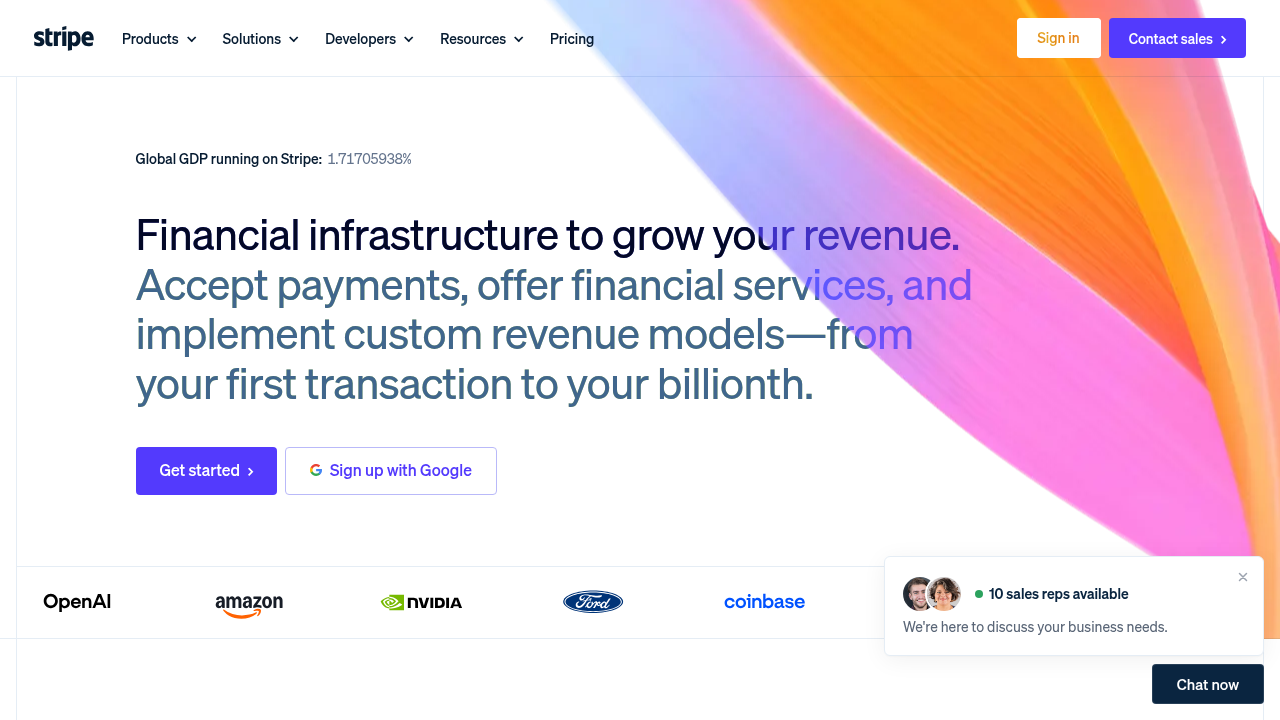
- 500 free credits every month
- No card to start
- Failed requests cost nothing
POST /screenshot
{
  "url": "stripe.com"
}










Screenshots that look like the real page.
No browser fleet to run and no cleanup scripts. Every request renders in a real browser and returns a clean image.
Full page or one element
Capture the entire page from top to bottom, just the viewport, or target a specific element with a CSS selector.
fullPage: trueClean captures
Block ads, hide cookie banners by default, and skip CAPTCHAs where possible so you get a clutter-free result every time.
hideCookie: trueAny device or viewport
Emulate desktop or mobile devices, set viewports from 320 to 3,840 pixels, and boost scale factors for sharp, high-DPI images.
device: mobileDark mode and timing
Render in light or dark theme, wait up to 10 seconds for delayed content to load, and turn off animations for consistent output.
theme: darkPNG, JPEG or WebP
Control format and compression quality. Get a hosted image URL back, or stream inline Base64 directly to AI agents.
type: webpGlobal proxies
Route requests through proxies in specific countries to capture localized pricing, regional layouts, and localized content.
proxyCountry: gbWhat a DIY screenshot service actually takes.
Headless Chrome gets you a first screenshot in an afternoon. Making every capture look right, on every site, is the part that keeps costing you.
| Problem | In-house |  With Geekflare With Geekflare |
|---|---|---|
| Rendering | Run and scale a headless browser fleet, and watch memory and cold starts. | Real browser, per request |
| Cookie banners and ads | Maintain selectors to close consent popups and block ad networks, site by site. | Removed by default |
| Full-page captures | Scroll, wait for late content, and deal with sticky headers breaking the image. | fullPage: true |
| Devices and viewports | Keep device profiles, viewport sizes and pixel ratios up to date. | device: "mobile" |
| Blocked sites | Buy proxies for sites that block bot traffic, in every country you need. | proxyCountry: "de" |
| Storing images | Upload to storage, generate links and clean up old files. | Hosted URL |
See the page each country sees.
Prices, languages, promotions, and cookie notices vary by location. Pass a country code to route your request through a local proxy and capture exactly what native visitors see.
proxyCountrycaptures through any of 194 countries- Check regional pricing, ads and compliance banners
- Adds 4 credits only on requests that use a proxy
- 0
- Countries
- Country
- Level of geo-targeting
- Opt-in
- Only when you need
The API parameters you'll use most.
See what each screenshot parameter does, what it costs, and when to use it.
| Parameter | Type | What it does | Credits |
|---|---|---|---|
| url | string | The page to capture. Any public URL. | — |
| fullPage | boolean | Capture the whole page instead of just the viewport. Defaults to false. | included |
| selector | string | Capture only the element that matches a CSS selector, such as ".hero". | included |
| device | string | desktop or mobile. Defaults to desktop. | included |
| viewportWidth | number | Viewport width from 320 to 3840 pixels. viewportHeight sets the height. | included |
| type | string | png, jpeg or webp. Defaults to png. Set quality for jpeg and webp. | included |
| theme | string | light, dark or auto. Defaults to auto. | included |
| delay | number | Seconds to wait before capturing, up to 10. | included |
| inline | boolean | Also return the image as Base64 and a data URI in the response. | included |
| proxyCountry | string | Capture through a proxy in this country, e.g. "de". | +4 |
What you can build with the Screenshot API.
A dated record of any page
Capture full-page screenshots with timestamp for compliance records, legal evidence, or audit logs.
- Full page, top to bottom
- Timestamp watermark on the image
- Schedule captures to track changes
POST /screenshot
{
  "url": "https://stripe.com/pricing",
  "fullPage": true,
  "addTimestamp": true
}Your first screenshot, in a few lines.
# pip install geekflare-api
from geekflare_api.client import GeekflareClient
from geekflare_api.models import ScreenshotDto

with GeekflareClient(api_key="<api-key>") as client:
    result = client.screenshot(
        ScreenshotDto(
            url="https://example.com"
        )
    )
print(result)One API. Every stack.
The same key works from an agent, a workflow builder, an SDK or your own service. Pick the lane you already live in.
MCP server
One remote endpoint exposes Geekflare's tools to any MCP client. Your agent discovers them itself: no glue code, no per-tool wiring.
 Claude
 Cursor
 Codexany MCP client
LLM & agent pipelines
LLM-ready Markdown straight into a retrieval pipeline, with the boilerplate stripped so you spend context on content, not navigation.
Workflow builders
Run any endpoint as a step in a visual scenario. Useful when the person who needs the data does not write code.
SDKs & REST
First-party typed SDKs for Python and Node. Everything else talks plain REST, from any language.
 PythonNode.jsPostman
5 credits a screenshot. Here is what that buys.
Credits are shared with every other Geekflare API. Failed requests cost nothing.
Growth covers up to ~20,000 screenshots a month (100K credits), about $3.45 per 1,000 screenshots. Or $58/mo billed yearly.
- 500 credits / month
- 1 team member
- 7 days log retention
- 1 request per second
- 10K credits / month
- 3 team members
- 30 days log retention
- 5 requests per second
- 100K credits / month
- 5 team members
- 30 days log retention
- 10 requests per second
- 1M credits / month
- 25 team members
- 90 days log retention
- 25 requests per second
Teams that stopped maintaining Puppeteer.
“Finally found a screenshot API that handles full-page captures correctly. Most others mess up the rendering of dynamic elements. Geekflare API captures the whole thing.”
“Geekflare screenshot API has been solid so far. I like how consistently it handles dynamic content and modern websites. Team feature is a plus, I can get my team members to get API key and request logs.”
“Great API and even better customer support. They went above and beyond to help me fix a rendering issue. Fast response times and effective solutions. 5 stars!”
Before you integrate screenshots.
Everything else is in the endpoint docs, and our support team replies to every email.
Open the endpoint docsfullPage: true to capture the whole page from top to bottom instead of just the viewport.type, and quality from 10 to 100 for JPEG and WebP. Add inline: true to also get the image as Base64 in the response.selector to capture a single element, or set viewportWidth and viewportHeight for an exact size. fallbackToFullPage returns the full page if the selector isn't found.blockAds blocks ads, hideCookie hides cookie popups and skipCaptcha tries to get past CAPTCHAs.inline: true if you'd rather store the image yourself.proxyCountry routes the capture through a proxy in that country, which often gets past these blocks.100 screenshots a month, free.
The free tier renews every month and needs no card. Capture your first page in a single call.