
Remote work is the key to ideal work-life balance. It started gaining popularity in last decade. Since then many organizations are now pushing for a return to office (RTO).
However, not all are shifting fully to work-from-office (WFO). Recognizing the benefits of remote work, some are adopting a flexible hybrid model, requiring employees to come to the office only a few days per week.
According to Statista, remote work is here to stay as it increased from 20% in 2020 to 28% in 2023. Rather than completely moving away from remote working, organizations are opting for a hybrid approach as it will ensure business continuity.
To facilitate remote/hybrid working, organization needs a tool that can help them achieve it.
In this article, I’ll look into Bitrix24, an all-in-one business workplace that supports remote and hybrid working.
Bitrix24 offers access to CRM, collaboration, and management tools. It solves key challenges of remote and hybrid work settings, giving companies more confidence in adapting to fast-changing work environments.
Challenges of remote and Hybrid work
Remote work is preferable as it brings benefits such as increased flexibility, autonomy, improved work-life balance, and reduced commute times. In many cases, employees feel more productive and satisfied and eager to take risks beyond his/her capabilities.
However, not all work can be done in remote settings. Some require a hybrid approach (going to the office a few days per week), which in turn can bring new challenges.
Even with clear benefits, there are many challenges of remote and hybrid work. These include:
- Communication gaps: In remote and hybrid settings, it is easy to get messages lost or misunderstood. This happens due to misreading the message or the lack of context. This is further amplified in global teams due to different time zones, making alignment harder and challenging. Organizations can overcome most of these challenges by having proper communication channels for each activity, including casual conversations and project-based collaboration.
- Project visibility: Shifting to remote or hybrid work can make teams lose project visibility, which includes tasks and timelines. It results in wasted effort and slowed delivery. Furthermore, with no clear sight of how team members work, management can make poor decisions, leading to an inability to change in real-time. To solve it, teams need a real-time dashboard that offers dynamic buffers and unified timelines. Managers should also actively want to learn about each team member’s contribution by regularly holding virtual 1:1 meetings.
- Employee engagement: Employee engagement is always a challenge, even in full work-from-office (WFO) scenarios. In a remote/hybrid setup, the challenges amplify as leaders and HR need to step up to ensure complete employee engagement. Employees can feel lonely due to limited interactions or burn out due to over-communication. To fix, proper communication tools need to be used. HR/leaders should keep employees engaged with weekly non-work meetings and carry out virtual or in-person team-building activities. Furthermore, it is vital to boost employee morale by rewarding performance.
- Collaboration difficulty: Collaboration in a remote/hybrid setting can be challenging due to fewer face-to-face interactions. It can be resolved by using the right tools, clear documentation, and proper one-on-one meetings with managers on a regular basis.
- Cybersecurity issues: 65% of employees bypass cybsesecurity policies, according to a research by Cyberark Labs. Therefore, one of the biggest challenges for security teams is ensuring a proper trust network. To resolve, teams must implement Zero Trust (ZF) frameworks while strengthening endpoint visibility and control. Additionally, employees also need to be trained about best practices both in a remote and a hybrid environment.
Bitrix24 as a remote work hub
Organizations can tackle remote and hybrid challenges by using Bitrix24 as a remote work hub. Bitrix24 offers hybrid workplace tools and is perfect for remote teams to use as a collaboration platform.
Let’s look at the following key features that make Bitrix24 a great remote work hub for both fully remote and hybrid setups.
Team chat & video conferencing
Bitrix24 offers an excellent team chat and video conferencing feature. It supports 100+ participants where you can discuss and brainstorm ideas without worrying about miscommunication.
I like how Bitrix24 offers different channels/spaces for communication.
- Collab – for external teams and customers
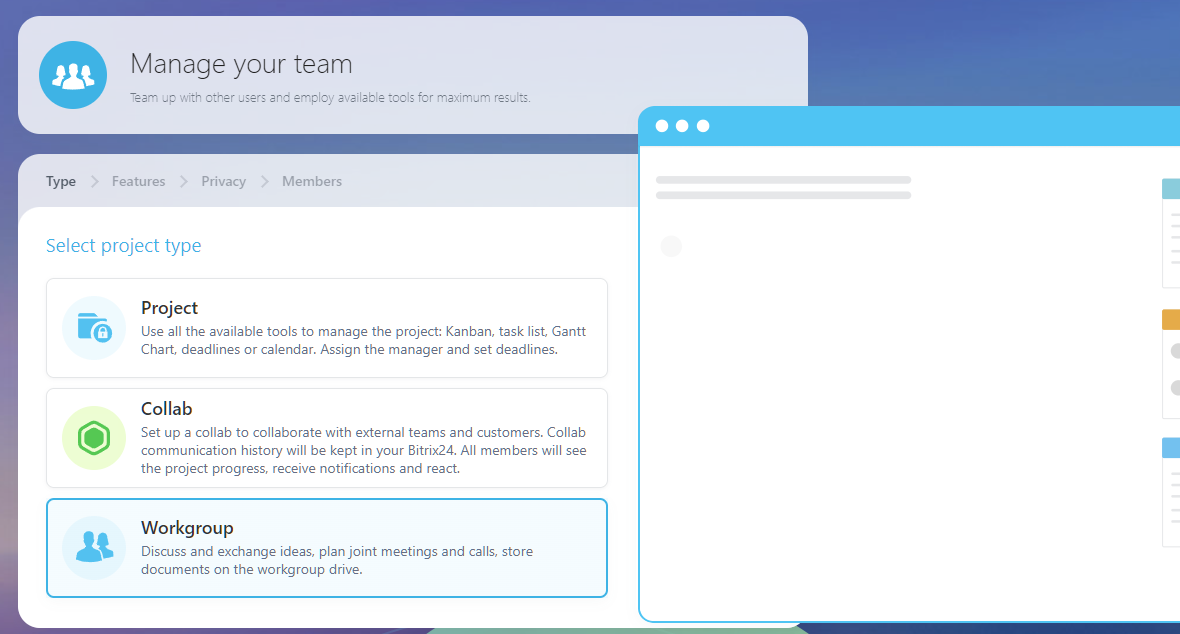
- Workgroup – enables teams to discuss and exchange ideas, plan joint meetings and calls, and even store documents on the workgroup drive.
Collab is great for working with external guests, customers, or even freelancers. It opens up a trustworthy collaborative channel where you can carry out chat, calls, files, tasks, and a calendar.
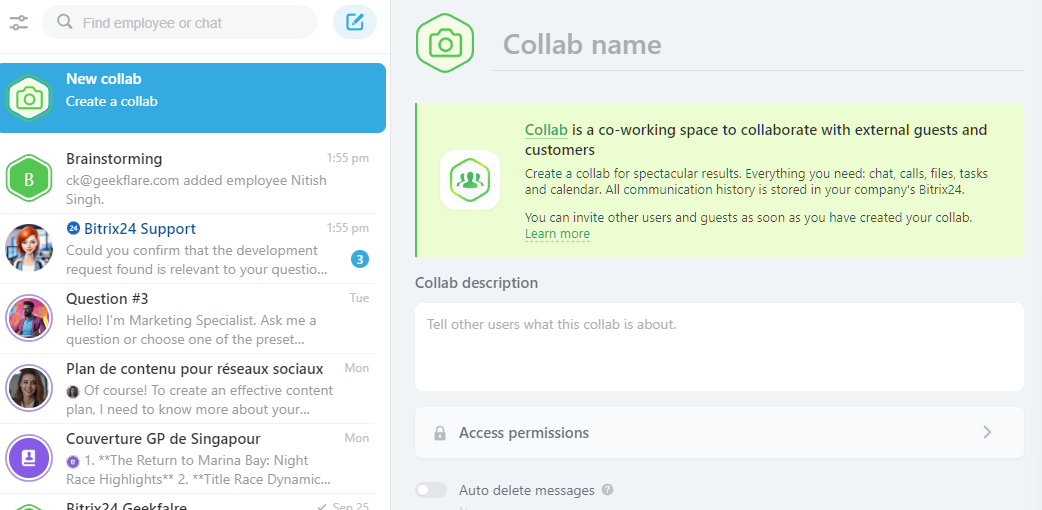
You can create an access collab tab and create a new collab from the side menu. Additionally, you can also go to Workgroups → Collab to access it.
Inside collabs, you can do the following:
- Create tasks
- Add files
- Access calendar
- Do a video call, a voice call, or a Zoom meeting.
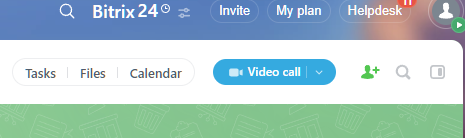
For internal communication, you can create a Workgroup. It is accessible from the dashboard → Workgroups → Create.
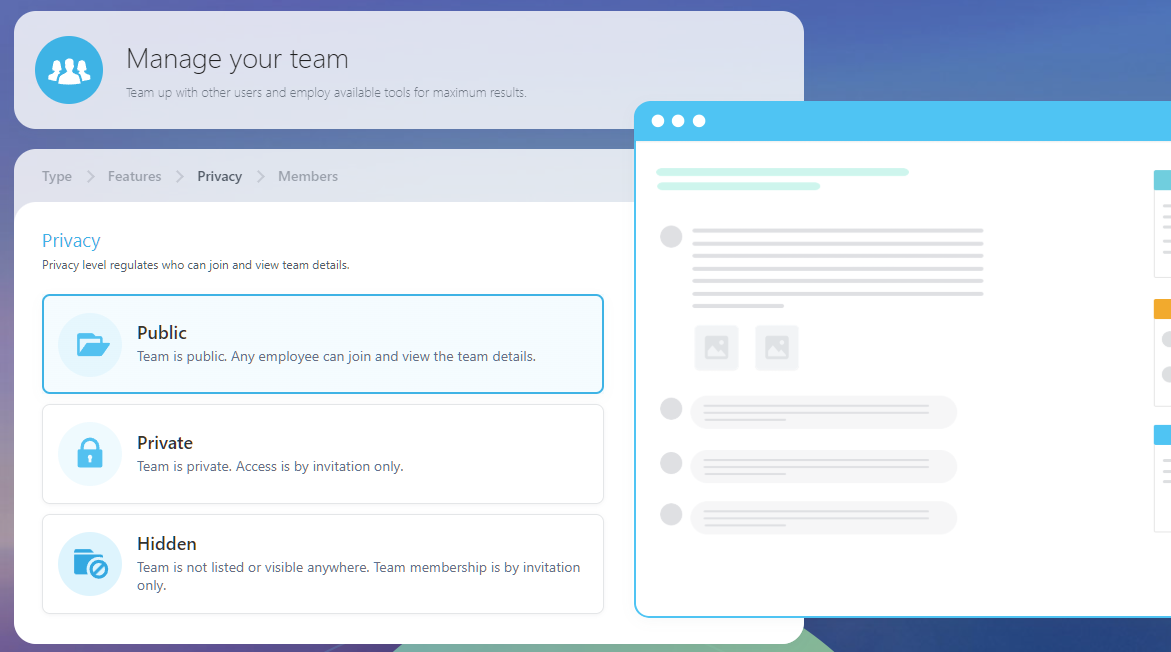
Workgroups are great for internal team exchange, where you can do everything you could do in Collab. Here, you get some extra privacy options, including Public, Private, and Hidden.
Workspace has a friendly user interface with a dedicated feed. Here, you can send a message to all the group members.
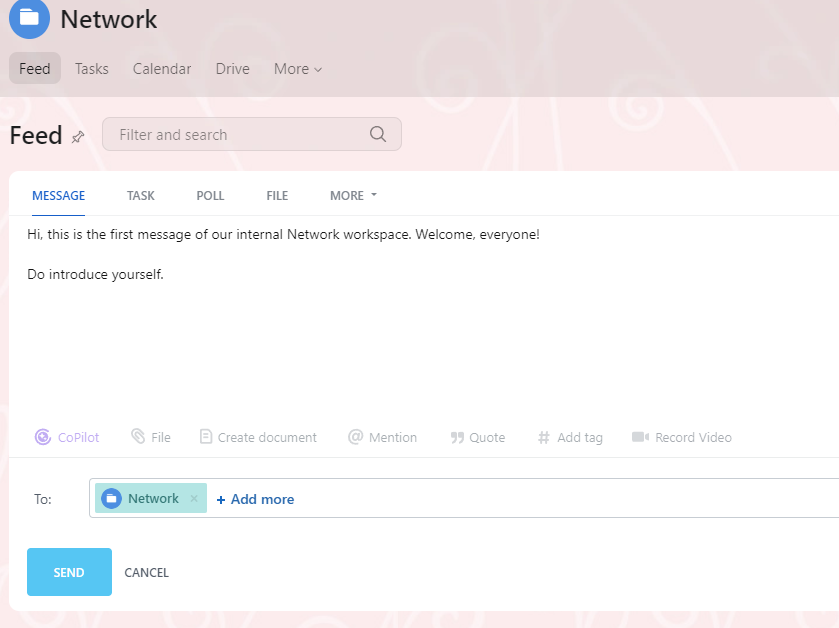
Additionally, I found CoPilot integration, which improves the team’s productivity.
In the workspace, you can do the following:
- Add tasks, polls, or upload files directly from the feed.
- Do an announcement on major updates.
- Appreciate team members for their work (helps in keeping morale high in remote and hybrid settings)
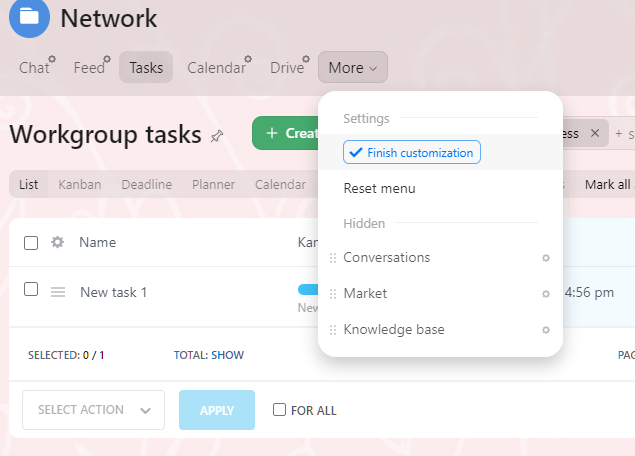
From the workspace top menu, you also get access to Calendar, Drive, Conversations, Market, and Knowledge Base.
The best part is that you can shifting the menu elements as per your needs.
Additionally, I found the video conference interface and usability to be top-notch. It has all the key features that a video collaboration tool should have. The CoPilot integration improves it further and removes the need to use a third-party tool for automation purposes (summary, analysis, recommendations, transcript, etc).
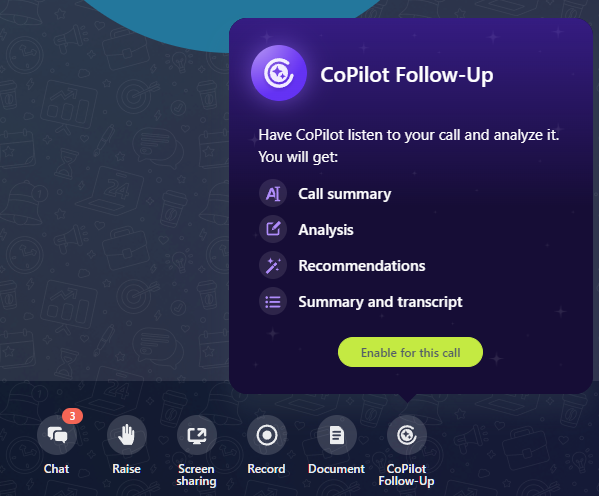
However, I did find that CoPilot doesn’t get enabled in the first instance, and may require multiple re-tries.
Other excellent features that improve communication include:
- Background blurs
- Screen sharing
- Meeting brief
- Call audio/video recording
- HD video and audio quality
In short, Bitrix24’s team chat and video conference address the communication challenge that remote and hybrid workspaces go through.
Task & Project management
I found Bitrix24 to offer top-notch task and project management features. Under the hood, Bitrix24 is a CRM solution, so it is no surprise that you can manage projects with access to main project management features, including Kanban board, Gantt chart, project calendar, chat, meeting, and most importantly, workgroups.
I already discussed how you can create workgroups — a collaborative environment to work on the project with all communication tools built in. It also allows working with external people using Collab. Additionally, admins can have full control over these groups with custom access permissions.
The project calendar is super helpful as it helps organize tasks and keep an eye on project progress.
The Planner (personal Kanban board) helps you to take care of your own tasks in a proper way. It offers full control over different project stages.
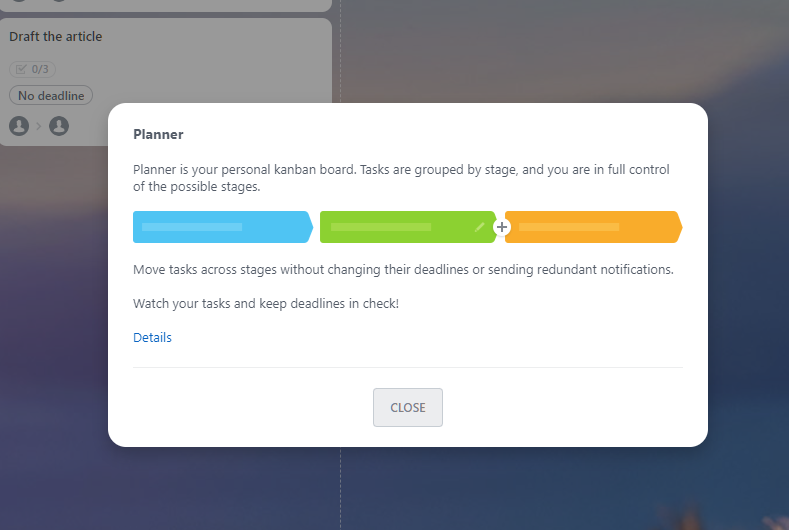
All these Bitrix24 task and project management tools help solve two key challenges in remote and hybrid work settings: project visibility, and collaboration.
Cloud Document
A remote and hybrid workplace requires constant access to resources all the time from anywhere. That’s where I found Bitrix24’s online documents and cloud file storage feature useful.
Each account gets a pre-defined cloud storage (depending on the plan), where teams can add, delete, and store files, accessible to team members and external users.
Bitrix24 also comes with an advanced online document management system with support for documents, spreadsheets, and presentations. This means you don’t have to leave the platform to manage documents.
However, I found the built-in document management system slow. I created and copied-pasted this article. It took almost a minute for it to load. That’s a drawback that teams might have to manage if they want a unified project management solution.
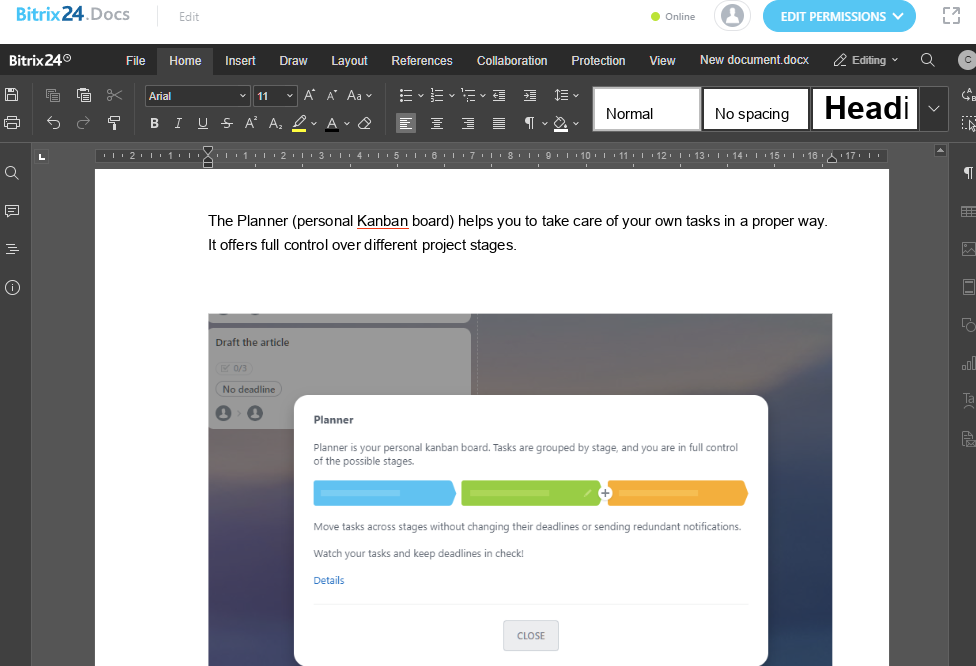
The good thing is that you can use Microsoft 365 and Google Docs to edit the documents, which are much faster than Bitrix24’s offering. As for other cloud storage support, Bitrix24 offers Dropbox, Google Drive, and OneDrive support.
Apart from that, all documents support real-time collaboration. You can share files with others and set permissions on how they can interact with them.
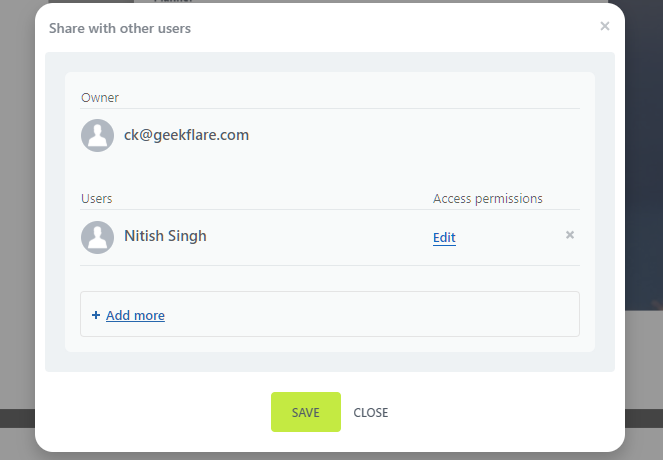
I found the Drive interface clean and useful. You can find all the folders and files listed with proper naming. The UI shows the dedicated folders for different collab and workspace groups.
Overall, the cloud document improves remote working with a dedicated space to store, edit, and share files among teammates. Team members can collaborate via the document management system. All files are updated in real-time, ensuring that everyone has access to the latest changes and updates.
Features to make hybrid work easier
Hybrid work has its own set of challenges compared to complete remote settings. Here, employees need to sync in both remote and in-office settings. That’s why Bitrix24 offers key hybrid features, including Calendar & Scheduling, Time Tracking, and Mobile Access.
Calendar & Scheduling
Having everyone on the same page is vital in hybrid settings. To ensure proper sync with top-notch visibility, Bitrix24 offers a built-in calendar. It lets you organize every interaction (meetings and events), be it with team members or external users. Once an event or meeting is set up, confirmation is done via email, SMS, or messenger.
You can quickly set up a meeting or use its full editor to create a more detailed event, as shown below:

The calendar also lists the tasks. If you’re a manager, you can use it to schedule tasks for team members via Team Calendars.
Bitrix24 offers support for iCalendar, which is useful as it helps synchronize with other calendars. So, if you like to use another calendar solution, such as Google Calendar, you can import your calendar via the .ics format.
I like how Bitrix24 makes scheduling easier. It offers a collaborative calendar with flexible access rights and shared notifications and reminders.
All these features help combat the hybrid working challenges. Bitrix24 calendar is easy to use and intuitive, enabling anyone to create meetings, sync updates, and pick up from where they left off.
Time Tracking
When working remotely, it is crucial to know the time an employee worked. It helps evaluate performance and improve team productivity.
Managers can use Bitrix24 time tracking to see efficiency and allocate work accordingly, helping them with work planning.
Time tracking is built directly into tasks. However, to use it, managers need to enable time tracking via a detailed form during the task creation process (available under the More tab).
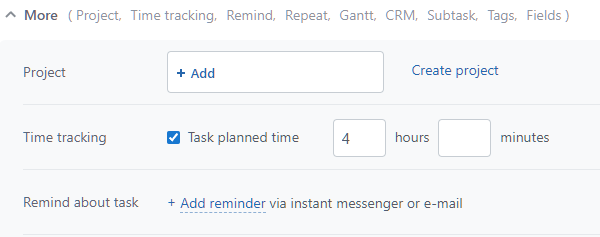
Note: if the option is not enabled, then the time tracking option won’t be available on the task itself. However, team members can add custom time, if needed.
To start the time, click on the “Start Time Tracker” button.
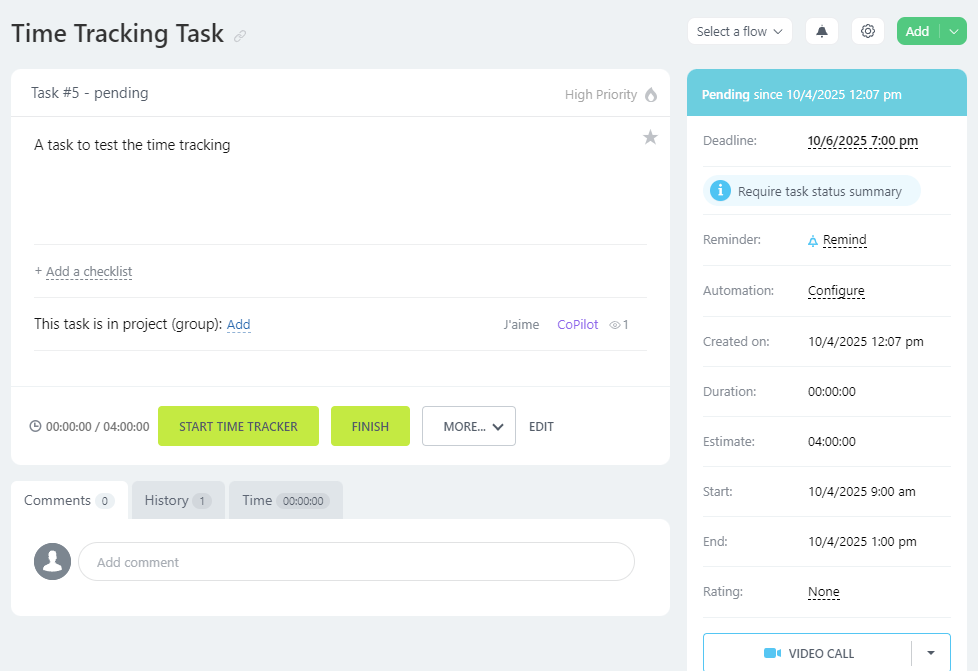
In case you didn’t enable time tracking, it’ll showcase as below.
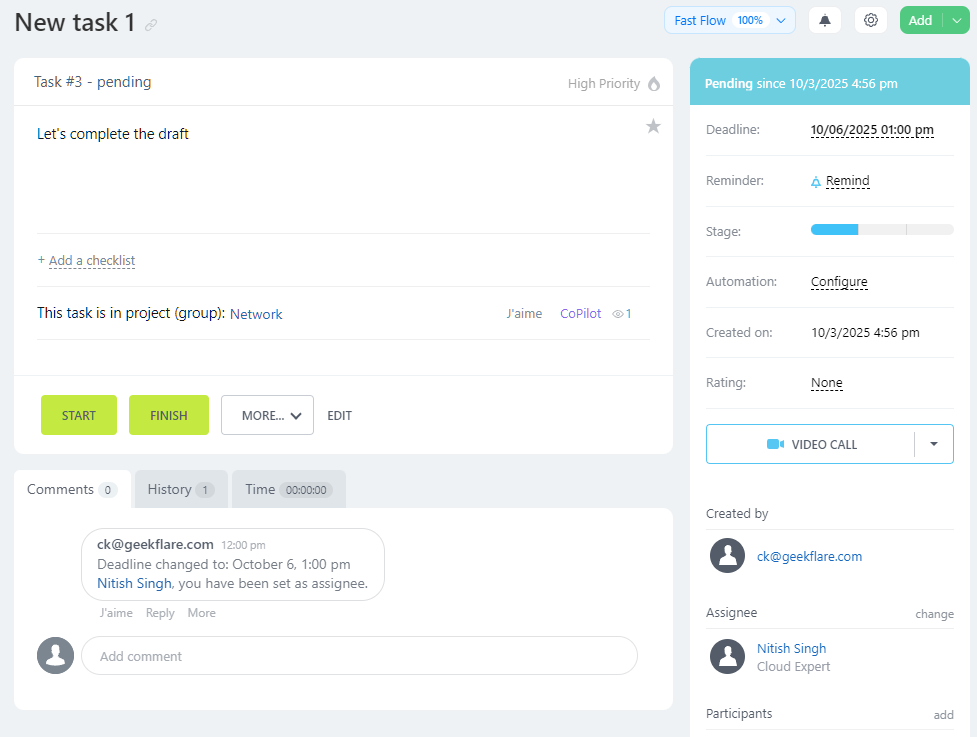
All these features help managers track employee performance KPI. They have deadline control and full-fledged work reports.
Bitrix24 offers standard and custom reports. The standard reports can be set to daily, weekly, or monthly. It helps managers to evaluate employee performance. Custom reports, on the other hand, are customizable and help provide better insight into departments and certain individuals. Furthermore, reporting supports automation as well.
Overall, time tracking helps remote/hybrid workspaces to do proper workload management by task time tracking, work schedules, work prioritization, and work time management.
Mobile Access
Bitrix24 is available both on the web and mobile. With a mobile app, remote or hybrid teams can work on the go. They can get tasks done, track progress, and take full advantage of Bitrix24’s built-in communication tools like chat and video calls.
The mobile app is well-designed with ease of use in mind. I tested the app by downloading its Android version (It is also available for iOS).
Here is what the mobile app interface looks like:
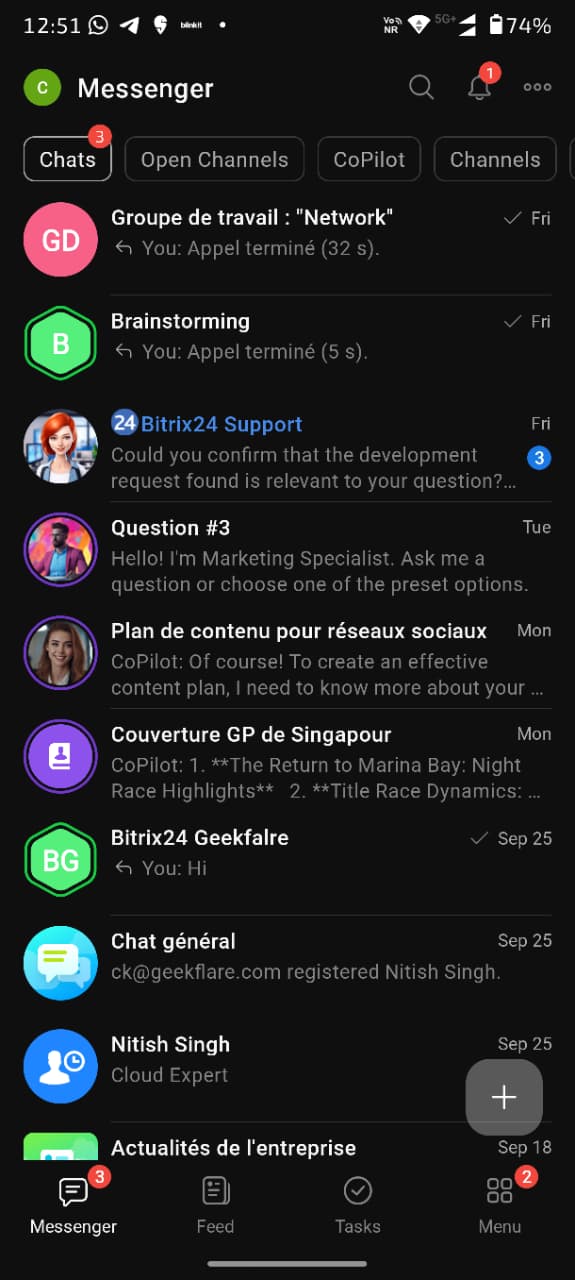
Bitrix24 has 4 main tabs at the bottom, each offering access to features.
- Messenger: All chats, channels, and CoPilot access
- Feed: Get all feeds related to your work and project
- Tasks: All tasks listed here
- More: Access to more features and settings
I found Bitrix24 super useful for teams on the go. However, not all features are accessible via the mobile app. For example, during my testing, I found that email and Scrum were not available.
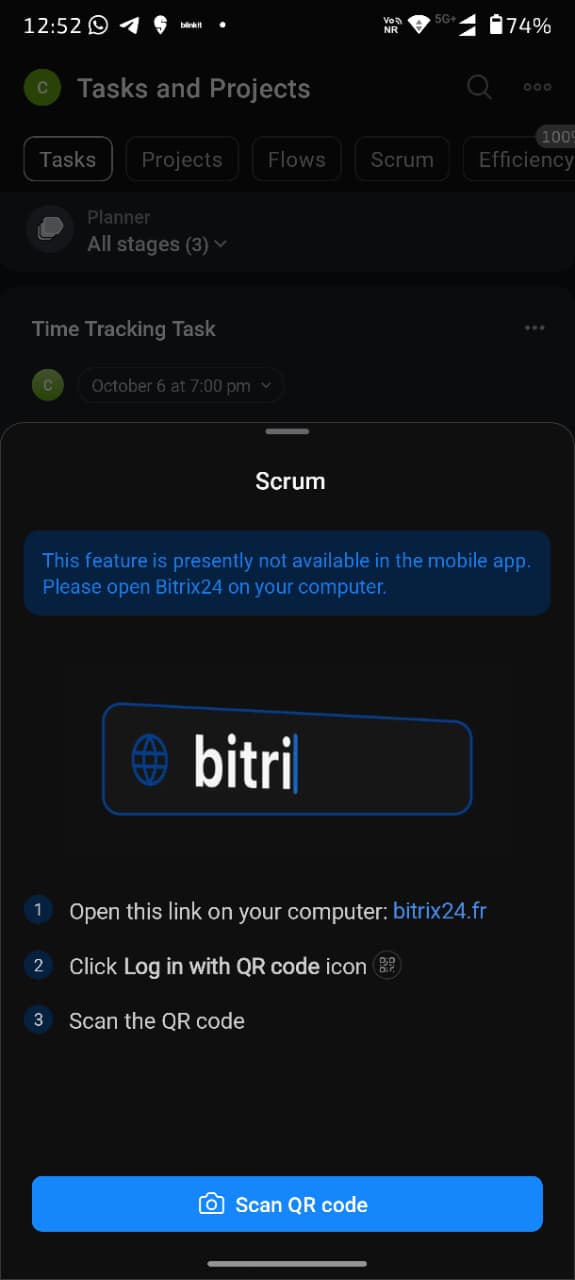
The mobile app is a perfect hybrid workplace tools that an organization need. It acts as a perfect collaboration irrespective of their location.
Bitrix24 vs other remote work tools
Bitrix24 offers a unified collaboration platform, ideal for both remote and hybrid teams. But, how does it stack against other remote work tools such as Slack, Teams, and Asana? Let’s explore.
There is no doubt that Slack, Teams, and Asana are excellent tools for collaboration. However, they offer limited or no project management functionality. This means you can use these communication tools in conjunction with other project management solutions, such as Jira, ClickUp, and monday.com, and use their integration capabilities to create a more unified approach.
Bitrix24 doesn’t have to do that. Everything that a remote work software must have is built in with minimal need for integration with third-party tools.
Real-life use cases
Bitrix24 changes how remote and hybrid teams work. They can use Bitrix24 in the following use cases:
- Use Bitrix24 as a remote hub
- Communicate with teams via chat and video conference
- Take full advantage of Bitrix24’s CoPilot integration to improve productivity
- Manage tasks with full visibility and time tracking
- Gauge team members’ efficiency and improve productivity
- Do complete end-to-end project management with complete visibility, better communication, and a higher success rate
- Use a calendar and scheduling to keep everyone on the same page
- Work and communicate on the move via the Bitrix24 mobile app
Who Should use Bitrix24 for hybrid workplace
Bitrix24 is best suited for small businesses and global startups that have a remote and hybrid workforce. With 24/7 availability, teams can work across different time zones and collaborate effortlessly.
Bitrix24 tackles hybrid workplace challenges by implementing key features like chat & video conference, proper task management, task tracking, full-fledged calendar and scheduling, mobile app, and CoPilot integration.
FAQs
Yes, Bitrix24 is an excellent choice for remote work. It has proper project and task management with key remote work features, including chat, video conferencing, time tracking, unified document management via shared drive, and an easy-to-use mobile app.
Yes. Bitrix24 can completely replace Microsoft Teams (primarily a communication tool). Bitrix24’s built-in chat and video conference work great out of the box. CoPilot capabilities make it even better as it gives teams a productive way to summarize meetings.
Bitrix24 is completely safe to use for remote collaboration. It offers GDPR compliance and SSL certification to secure communication and data privacy and safety. Managers can take full advantage of customizable access permissions, making it as secure as possible.