
You’ve got the traffic. Your product pages look good.
But actual sales? Abysmal.
It’s every business’s story. An ideal customer journey — from interest to purchase—can take days, weeks, or even months.
It’s TOO easy for your leads to lose interest or slip away to your competition.
That’s where sales funnel software comes in—it helps you create an automated step-by-step customer journey.
Once a potential customer gets into your sales funnel, they are guided and nurtured through the journey using personalized nudges, lead magnets, and offers.
In this article, I’ll share my experience of using the top 13 sales funnel software.
Sales Funnel Software Comparison Table
Below is a quick comparison table of the main features of the sales funnel software, whether they offer a landing page builder, full funnel templates, A/B testing, and email marketing with pricing and Geekflare’s rating for each of them.
 |  |  |  |  |  |  |  |  |  | |
 |  | | | | | | | | | |
 |
| | | | | | | | | | |
| | | | | | | | | | |
| | | | | | | | | | |
$81 | $17 | $19 | $49 | $97 | $9 | $79 | $15 | $90 | $249 | |
Geekflare’s editorial team determines ratings based on factors such as key features, ease of use, pricing, and customer support to help you choose the right business software. | ||||||||||
1. ClickFunnels
Leading All-in-One Sales Funnel Builder

As the name says, ClickFunnels helps you build clickable sales funnels that convert.
Co-founded by Russell Brunson, a prominent marketing expert, ClickFunnels is the 12th most popular tool in the conversion optimization category. Best for marketing agencies, small businesses, and enterprises.
Some Redditors have found success using ClickFunnels for specific campaigns, such as real estate listings or exclusive property lists. But you can also use it to sell or promote your products and services.
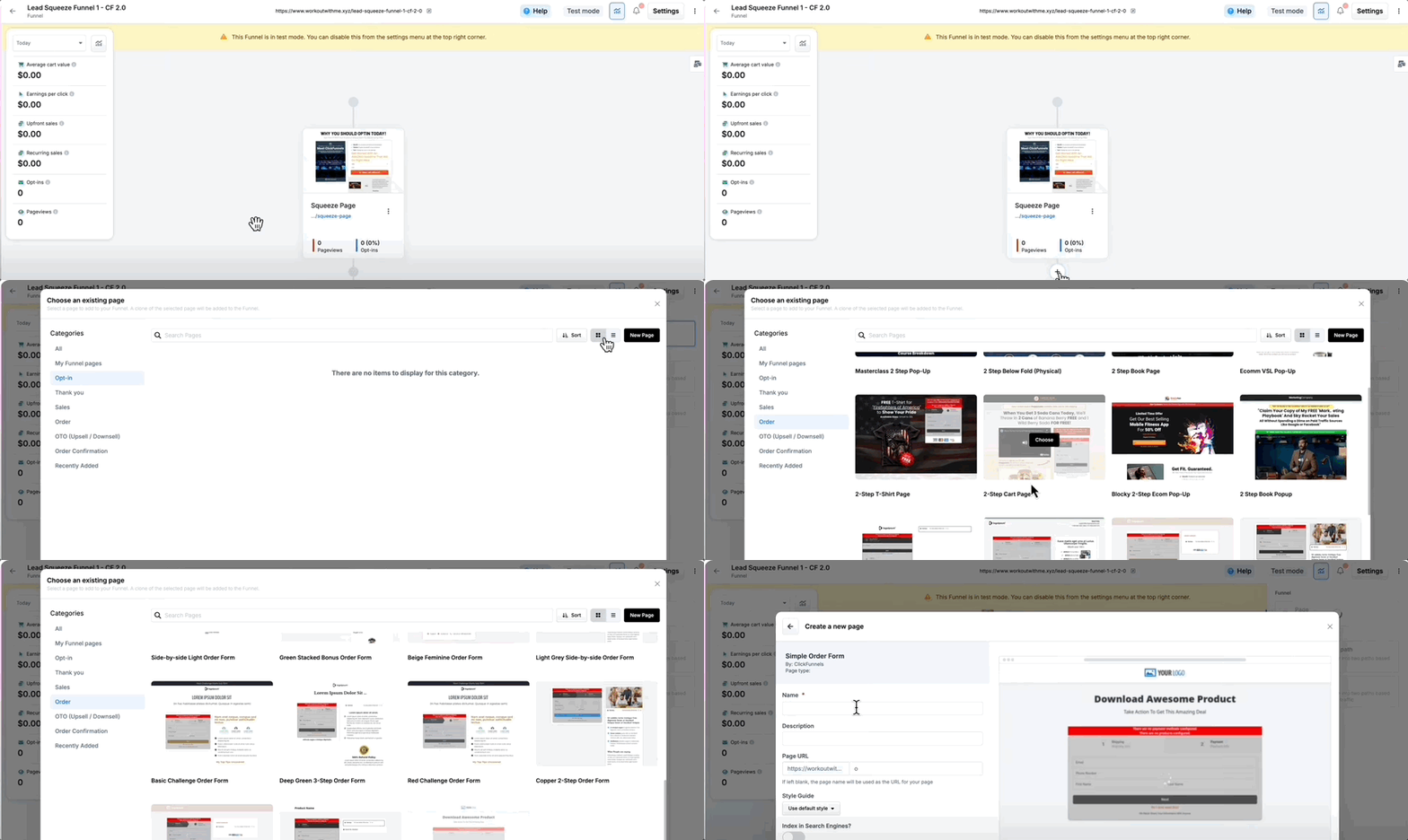
Their sales funnel builder has a click-and-done interface, easy to use. You can add different types of pages, conditional triggers, and elements like countdown timers, discounts, and coupons to keep leads engaged throughout the funnel.
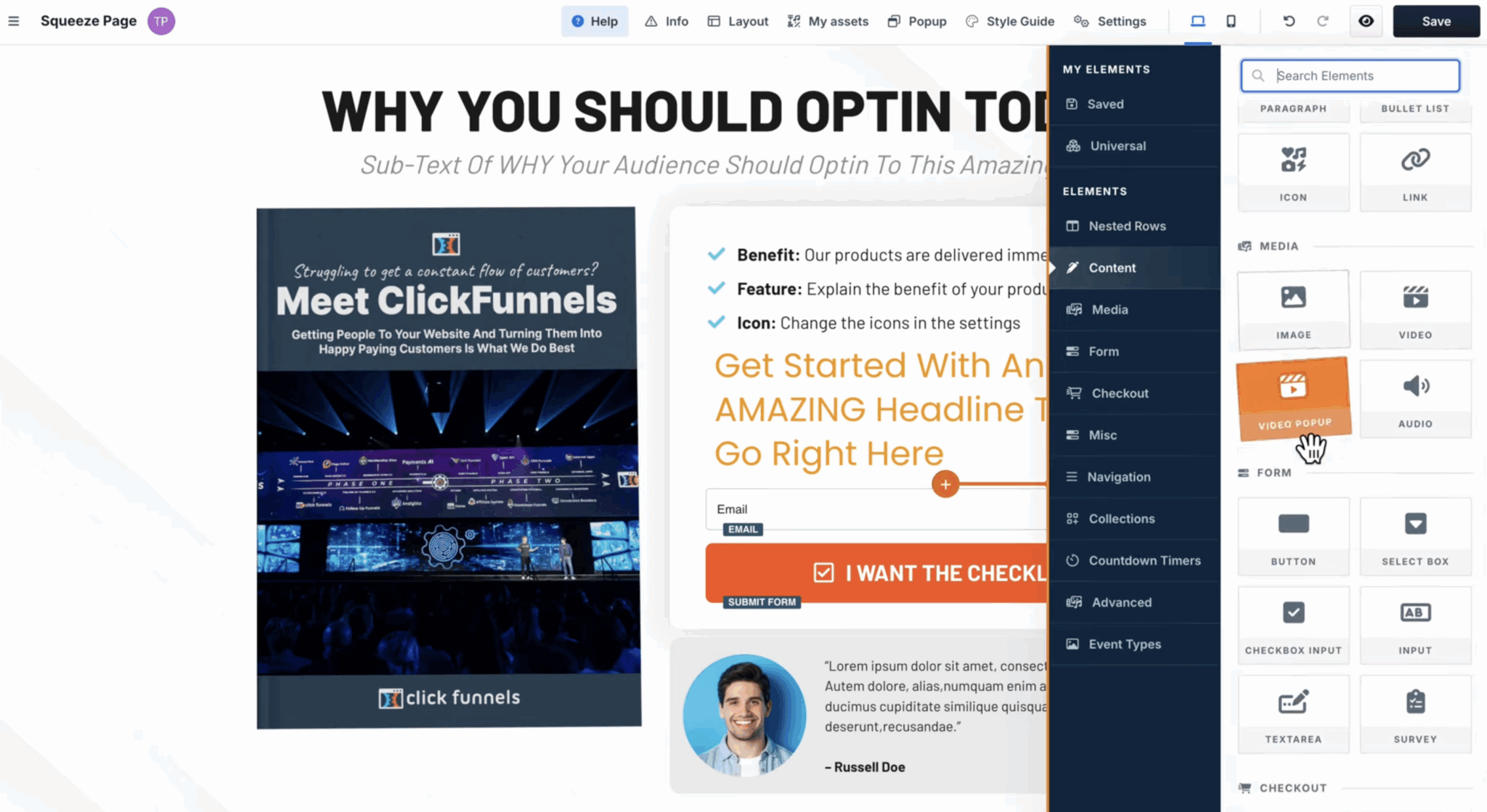
ClickFunnels’ landing page editor offers tools to edit page content, design, layouts, and more.
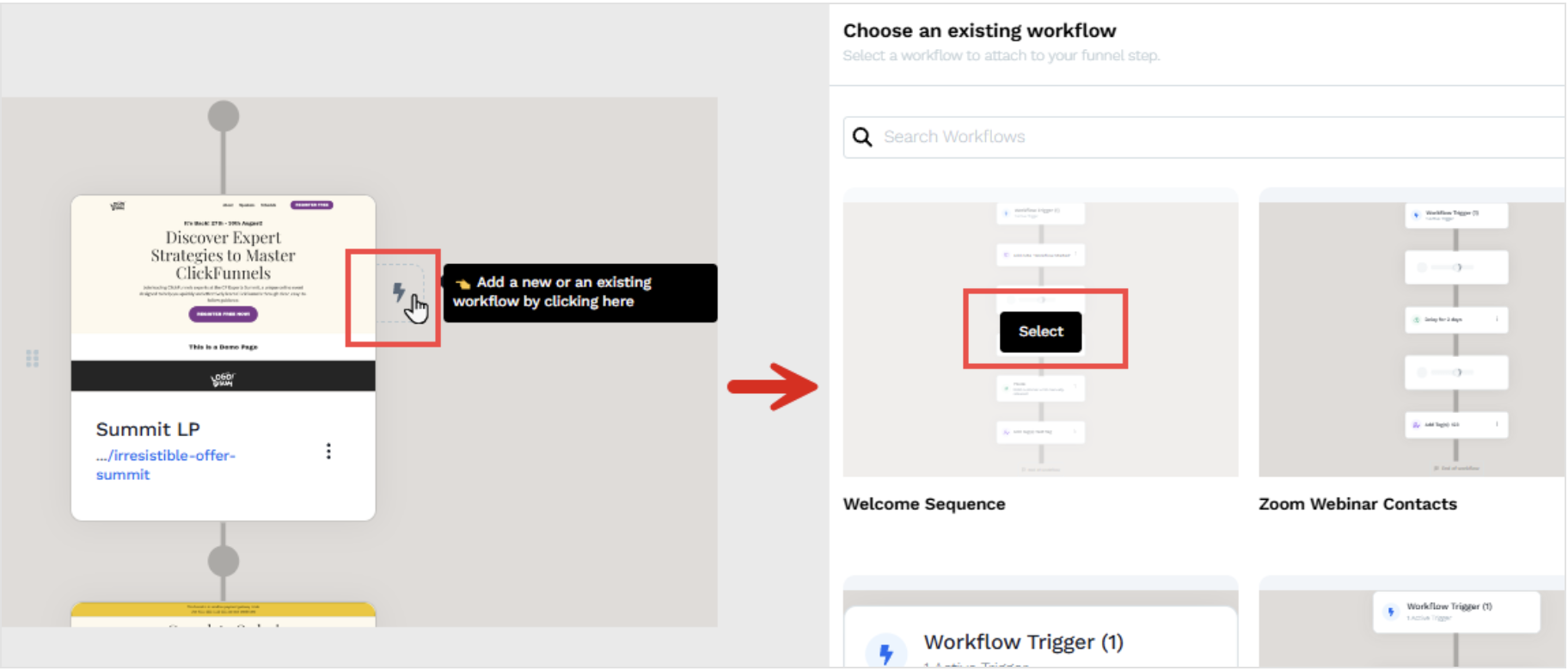
Automating funnels is also easy. ClickFunnels’ automation builder allows you to automatically nurture and move leads through the funnel based on behavioral signals and custom triggers.
Its Payments AI is an AI-powered payment gateway that reduces failed transactions and ensures that things don’t get stuck when it’s time for your funnel to generate revenue.
ClickFunnels Features
- Has a drag-and-drop editor for building surveys, landing pages, and funnels
- Run split tests on pages or emails, automatically distributing traffic and reporting results
- Shareable links allow you to place funnels anywhere— social media, email, ads, etc.
- Automate recurring actions or complex multistep workflows
- Get real-time insights into funnel performance, including conversion rates, visitor behavior, and drop-off points
- Integrate natively with ActiveCampaign, HubSpot, Klaviyo, Slack, Zapier, and more
Pros

Huge library of ready-made funnel templates
Ease of use, even for those without technical know-how
Robust marketing automation

Cons
Limited customization options
Maybe overpriced for small businesses (cheaper alternatives are available)

ClickFunnels Pricing
ClickFunnels offers a 14-day free trial. After which, you can continue with its paid plans, as follows:
- Startup: $81/month
- Pro: $248/month
2. Systeme.io
Affordable All-in-One Marketing Platform
Systeme is an affordable and all-in-one marketing platform ideal for entrepreneurs, small businesses, and online marketers.
I tried it and found that its conversion funnels offer a lot of functionality. You get tools for A/B testing, automation, lead management, and sales enablement, right at the top of the funnel.
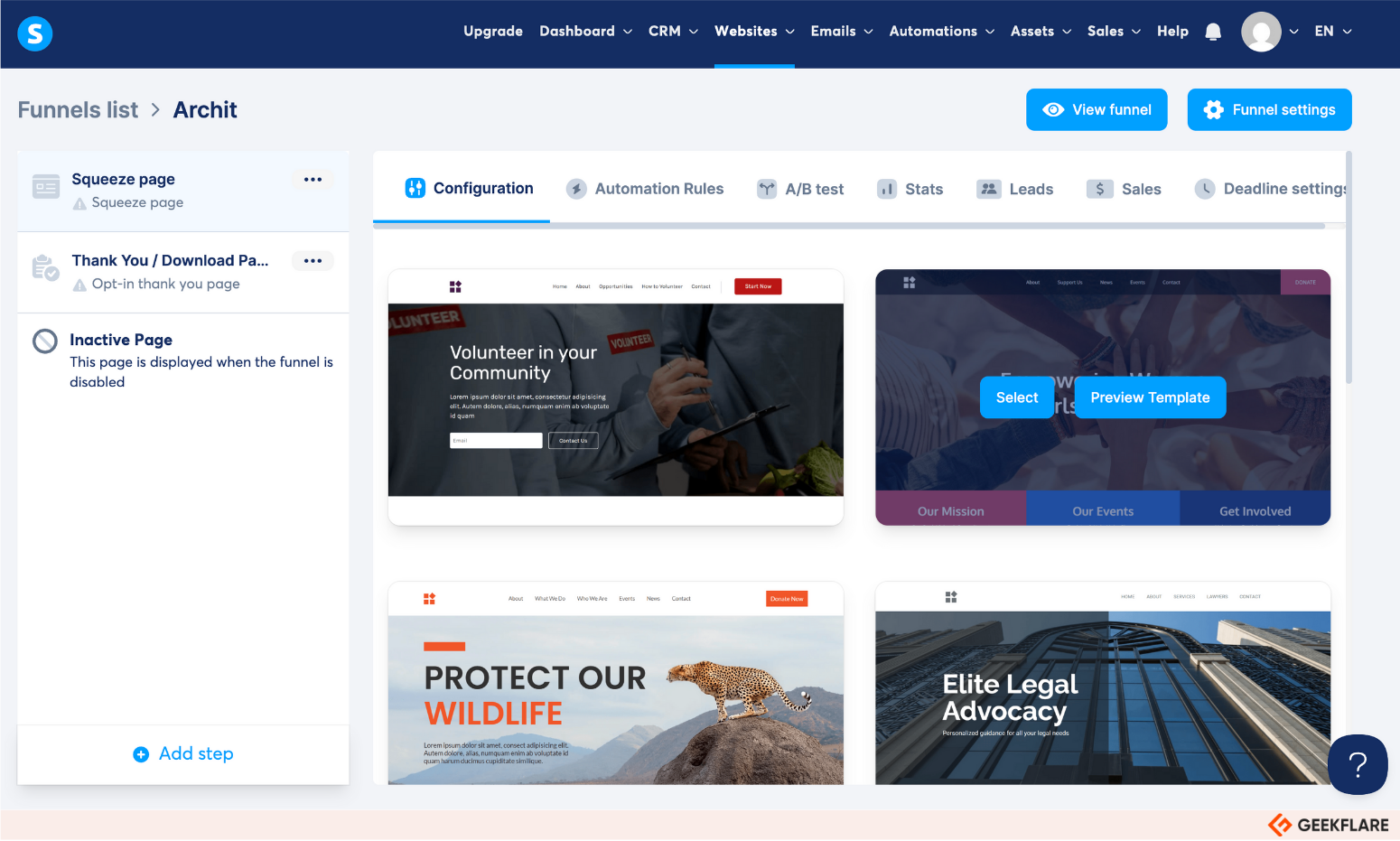
Systeme is also noted for its ease of use. It features 60+ pre-designed funnel templates, lead magnets, and landing pages, customizable using a drag-and-drop editor.
👉 A funnel template is a template that consists of the landing page, the sequence of webpages that follow the landing page – like a lead capture page, a thank-you page etc, plus email automations along the path. A landing page template is just what it says – it only creates the first page in the funnel sequence. The rest of the sequence needs to be manually handled.
The editor also helps you organize funnel steps in any sequence you like—Sales page, Upsell, Downsell, Order page, and Thank you form.
If you’re building a sales funnel, I’d say using Systeme’s freemium plan is more economical than paying for individual tools.
The plan allows up to 2,000 contacts, unlimited emails, and has all essential features, including sales funnels, email marketing, course hosting, affiliate management, and more.
Systeme Features
- Has a drag-and-drop funnel builder to add landing pages, courses, e-books, and more into your funnel
- Integrate your email list with sales funnels and send emails based on your customer’s position in the funnel (unlimited emails on all plans)
- Sell physical and digital products, integrate with payment gateways like Stripe and PayPal, and manage orders
- Supports one-click upsells, order bumps, pop-ups, and coupon codes
- Run A/B tests on landing pages to only roll out the high-converting ones
- Use workflow automation to link actions, triggers, and conditions across funnels, emails, and membership sites
Pros
Get unlimited file storage space even on the free plan
No transaction fees, whether you accept payment via Stripe or PayPal
Cons
Limited design and customization options
No live chat or phone support
Systeme Pricing
Systeme offers a generous free plan with unlimited email seats and up to 3 sales funnels. Other than that, it has three paid plans:
- Startup: $17/month
- Webinar: $47/month
- Unlimited: $97/month
3. GetResponse
Email Marketing with Sales Funnel Capabilities

At its core, GetResponse is an email marketing platform. But it also combines automation, funnel building, landing pages, webinars, and e-commerce tools.
GetResponse’s conversion funnel (also called Autofunnel) is quick and easy to set up. It’s called Autofunnel because you can autogenerate 90% of the funnel using AI. Or choose from over 60 ready-made funnel templates for building lists, selling products, or promoting webinars.
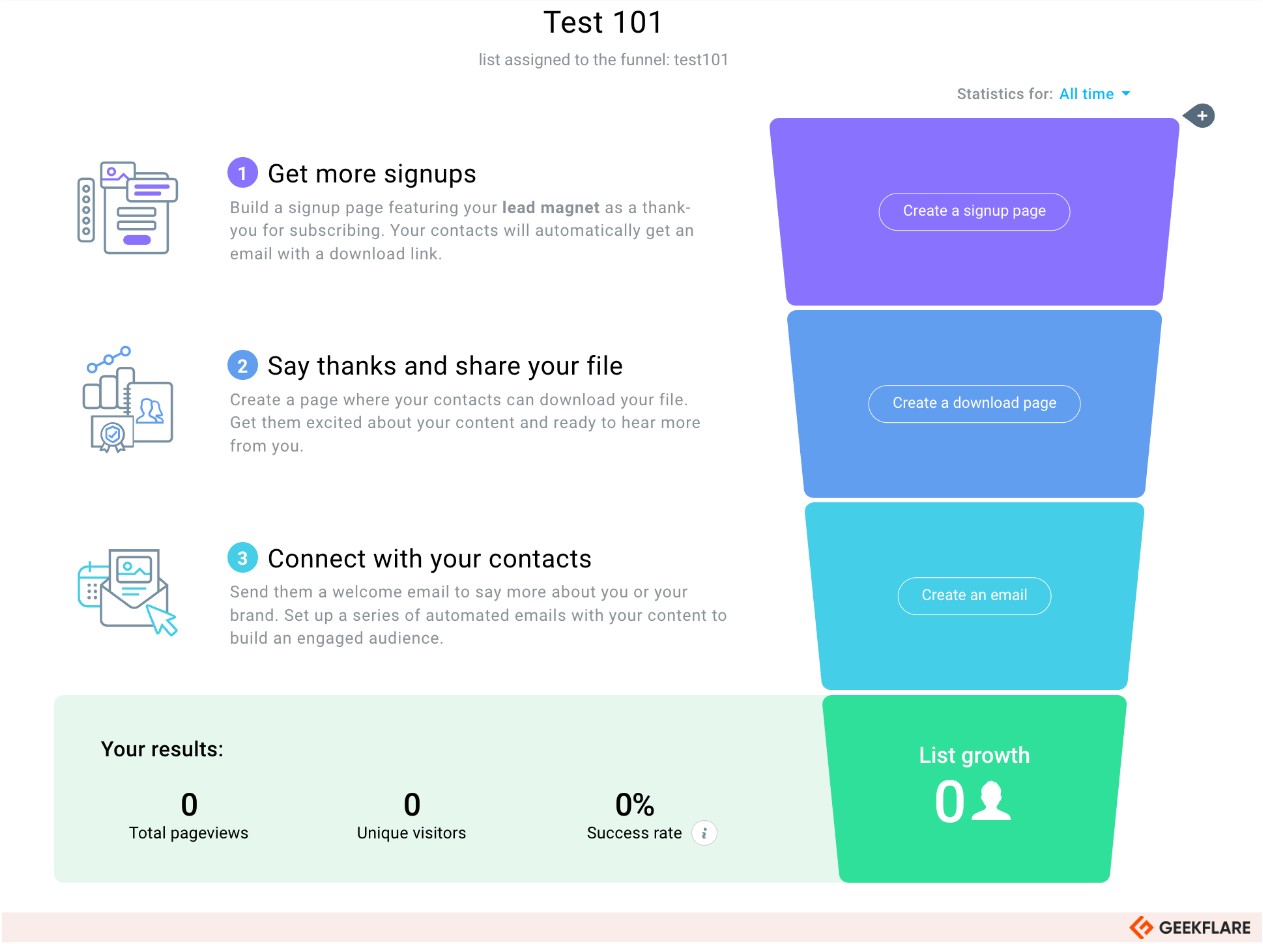
I especially like the visual funnel-building experience on GetResponse. It’s exactly how I imagined funnel building.
For example, when building a lead generation funnel, I can visualize and create funnel stages with real-time results, as shown in the image below. 👇
However, the Starter Plan does not offer funnel-building features. It’s typically available in the more advanced plans, like the Marketer plan and higher.
GetResponse Features
- Has a highly visual funnel building process
- Use AI to autogenerate funnels from landing pages or ideas
- Offers 60+ pre-built funnel templates for quick setup
- Built-in chat widget for landing pages and emails to boost engagement and conversions
- Powerful segmentation and list-building features
Pros
An easy-to-use, highly visual funnel builder
Dedicated mobile app
Integrations to GA4, e-commerce platforms, social apps, and Zapier
Cons
Funnel building is not available with the Starter plan
Split testing is limited (mainly to subject lines and content)
GetResponse Pricing
GetResponse offers a 30-day free trial and four paid plans:
- Starter: $19/month
- Marketer: $59/month
- Creator: $69/month
- Enterprise: Custom pricing
4. Leadpages
High-Converting Landing Pages
Leadpages helps you build high-converting landing pages and lead generation assets. While it’s not a full-scale sales funnel software, it’s still good for top-of-funnel stages—lead generation and management.
It’s often recommended for simpler landing page setups and A/B testing variations.
For that, it has a drag-and-drop landing page builder with preset conversion tools, including pop-ups, alert bars, timers, and widgets. You can add and test different widgets to your landing or web pages to see which brings in more leads.
Built-in lead management helps you sort, edit, and manage incoming leads directly from within the platform. But I also think there are limited tools for lead qualification and nurturing.
For the bottom of the funnel, its Checkout feature is attractive to e-commerce businesses looking to close sales and sell more. You can embed the checkout widget anywhere on your landing page, pop-up, or third-party site.
Leadpages Features
- Over 250+ mobile-responsive templates for landing pages and websites
- Has a visual editor with 100+ ready-made sections from hero banners to testimonials, ready to drag and drop
- Leverage conversion tools like pop-ups, overlays, and more for better engagement
- Automate the delivery of digital downloads or gated content to new leads
- Add online checkouts to your landing pages or pop-ups via Stripe, PayPal, Credit Cards, and more payment options
- Integrates with 90+ tools, including ERPs, CRMs, automation tools, and payment gateways
Pros
Great for building landing pages
Easy-to-use editor
Good customer support and onboarding
Cons
A/B testing, traffic splitting, and advanced integrations are only available with the Pro plan onwards
Maybe costly for small businesses (costs $15/month per new user)
Email marketing is only available as an integration with other tools
No full funnel template, only landing page templates are available
Leadpages Pricing
Leadpages offers a 14-day free trial, accompanied by three paid plans:
- Standard: $49/month
- Pro: $99/month
- Custom: Custom pricing
5. HighLevel
Popular Platform for Agencies
HighLevel is a full-scale marketing and sales platform. It’s best suited for agencies managing “god knows” how many sales funnels for various clients.
I’d say it’s a complete toolkit for lead and contact management, sales enablement, funnel building, visual pipelines, automations, and more into one platform.
Speaking of sales funnels, you can either create sales funnels from scratch, use AI, or choose from 1000+ ready-made funnel templates.
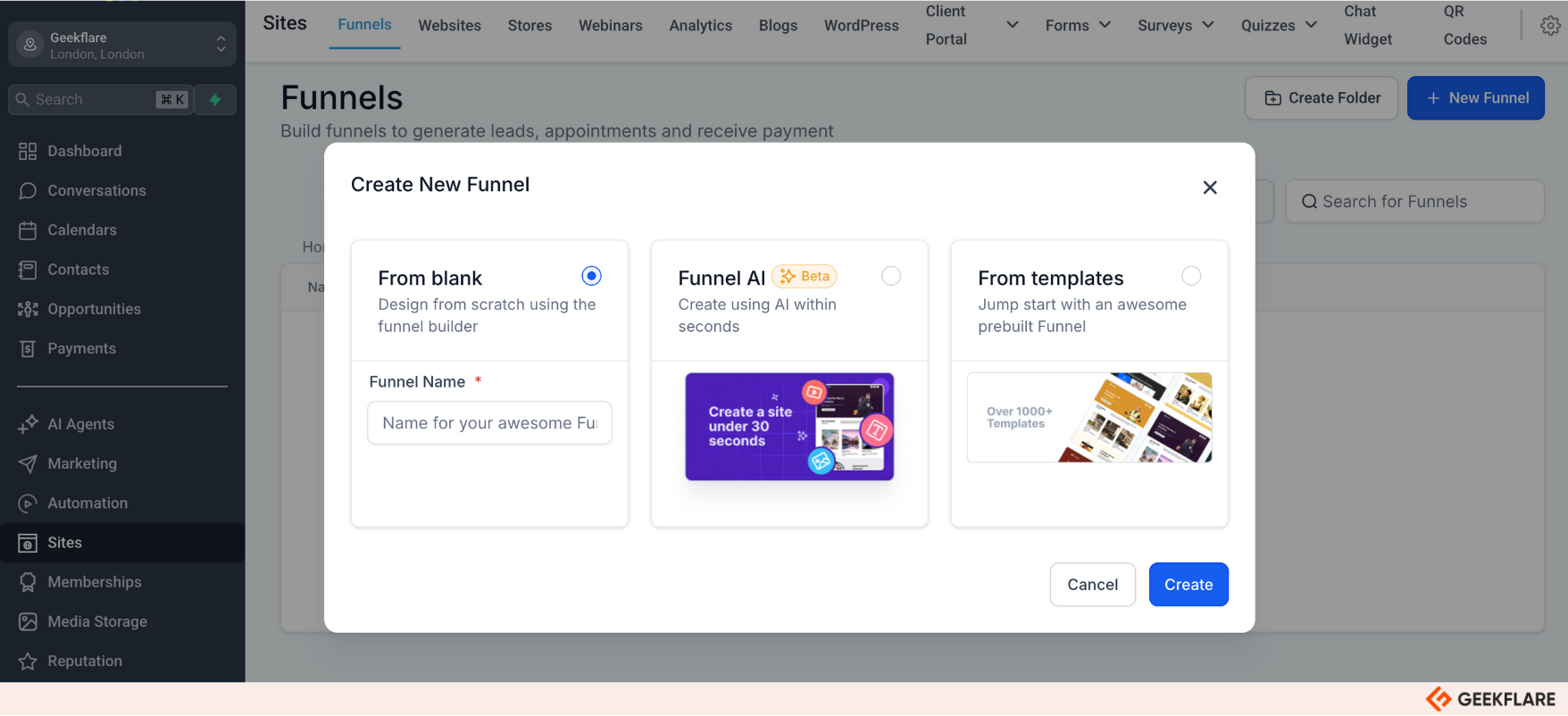
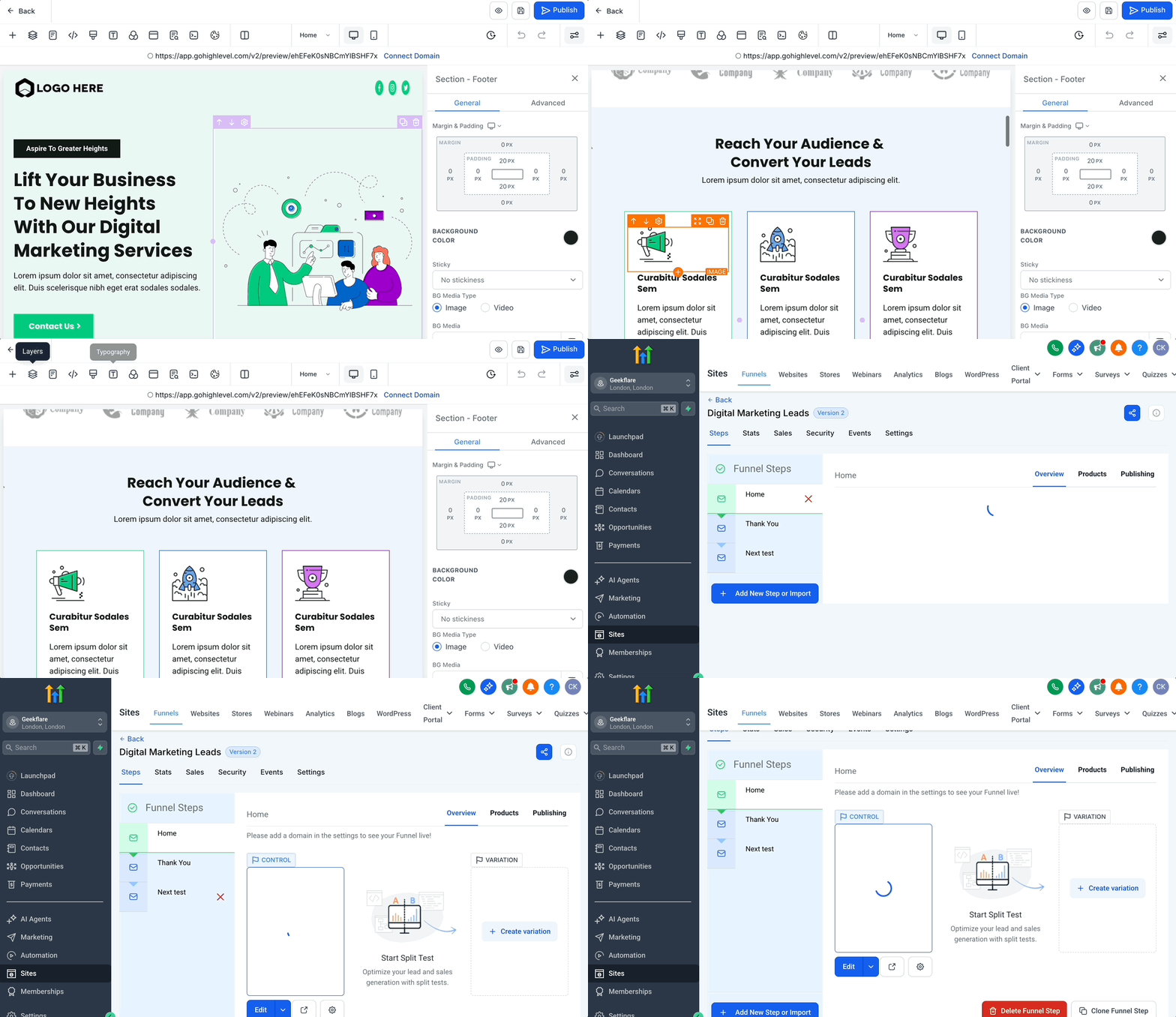
The funnel builder is nice and easy to use. It has everything to customize the funnel brick-by-brick. You can test different variations of every step in your funnel—compelled to say, it can give any individual funnel builder available in the market a run for its money.
Read my detailed HighLevel Review
HighLevel Features
- Drag-and-drop builder for unlimited sales funnels and landing pages
- Robust CRM to track leads, automate follow-ups, and visualize the sales pipeline
- Integrated scheduling and calendar features for service-based businesses
- Has a unified inbox for managing email, SMS, voicemail drops, and Facebook Messenger
- White-labeling and SaaS resale options for agencies
Pros
Affordable compared to buying separate tools
Support omnichannel communication
White-labeling and SaaS resale options for agencies
Cons
Sending emails is charged over the subscription price
No free plan available
HighLevel Pricing
HighLevel offers a 14-day free trial alongside two paid plans:
- Starter: $97/month
- Unlimited: $297/month
6. Freshsales
CRM with AI-Powered Lead Management
Freshsales, at its core, is an AI-powered sales CRM. Although not your ideal sales funnel builder tool, Freshsales is a complete sales suite in itself. It has tools for lead capturing, management, and automating sales sequences. (funnels).
You can create custom forms and deploy live chatbots to capture leads. Choose from 07+ views to visualize leads as they move through funnel stages. Carry out all communication (internal or client-facing) from the platform.
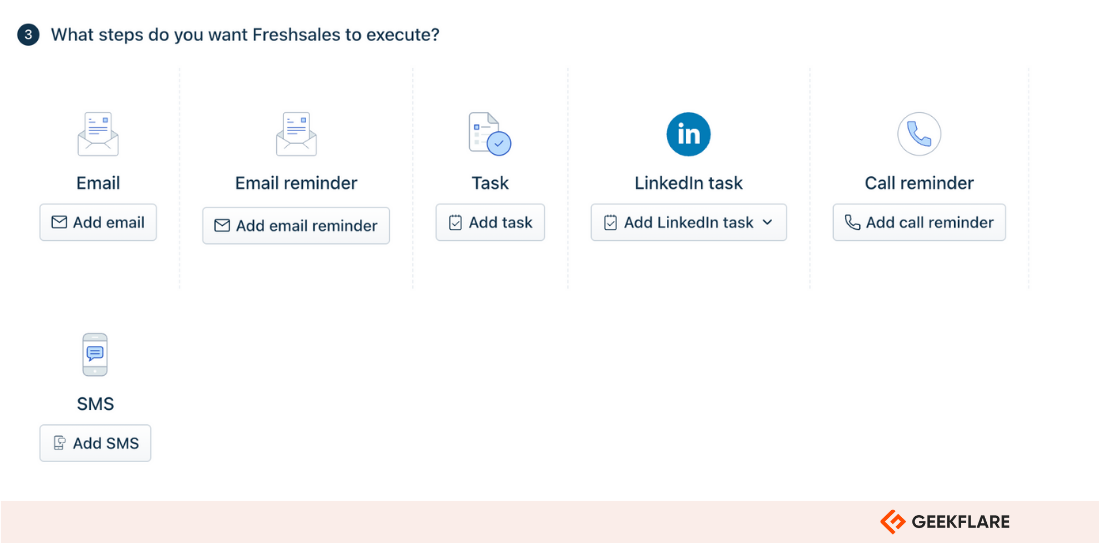
I like its sales sequences. It allows you to nurture potential customers using a series of steps. A step can be an email, task, call reminder, or SMS. Basically, you can trigger automated sales campaigns across channels based on specific events or days.
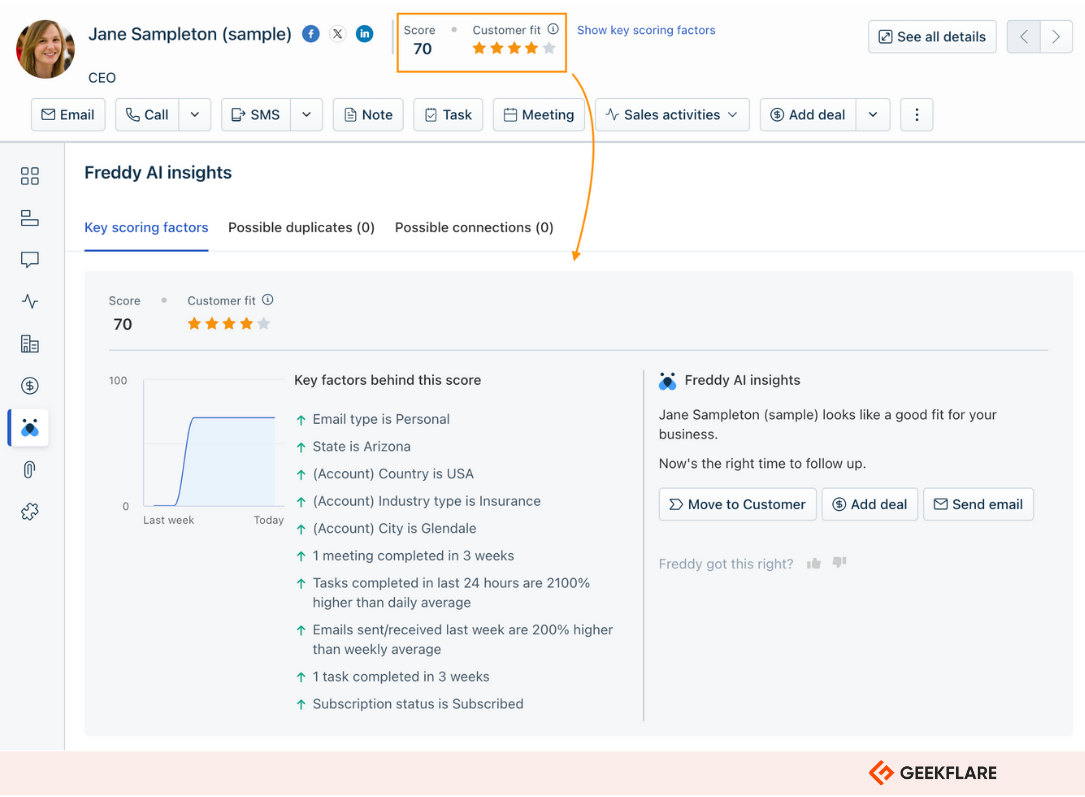
A nice-to-have feature is AI-powered lead scoring. It allows you to score leads based on custom criteria. First, it helps you identify leads that align with your Ideal Customer Profile (ICP). And next, you can move the highest-scoring leads into the funnel.
Read my Freshsales Review to know more.
Freshsales Features
- Easily create and embed forms to capture leads directly into the CRM for immediate nurturing
- Drag-and-drop interface to track deals through customizable sales stages
- Built-in email, phone, SMS, chat, and integration with WhatsApp and Facebook Messenger
- Uses Freddy AI to score leads based on engagement and demographics automatically
- Tailor the CRM to your business with custom fields, sales activities, and modules
- In-depth reporting and AI-powered insights for forecasting, performance tracking
Pros
Dedicated app marketplace with 1000+ apps
Built-in telephony, live chat, and communication tools
Offers relatively affordable pricing, especially for smaller businesses
Cons
Lacks advanced reporting and customization options
The mobile app isn’t as feature-rich as the desktop version
Freshsales Pricing
Freshsales offers a free plan for up to 3 users. Other than that, it has three paid plans:
- Growth: $9/user/month
- Pro: $39/user/month
- Enterprise: $59/user/month
7. Kartra
Comprehensive Marketing & Funnel Solution
Kartra is an all-in-one marketing and sales platform. It’s particularly favored for backend operations, such as creating funnels and automating campaigns.
I’d recommend Kartra to entrepreneurs, startups, and online marketers. However, it may be a little expensive. The starter plan costs $119/month; it is limited to 2,500 contacts. So, if you’ve more contacts to manage, you must upgrade to the Growth plan for $229/month. Phew!
Alas, if you have that budget, Kartra is a great sales funnel software. It has landing page builders, email marketing tools, membership site management, real-time analytics, and advanced automation features.
Karta’s visual funnel mapping helps you build your funnel strategy on a whiteboard. Then use a drag-and-drop builder to connect every step of the funnel with opt-in forms, landing pages, email automation, and checkout pages in a few clicks.
Kartra has over 50+ high-converting opt-in form templates. So your funnel always has fresh incoming leads. Additionally, you get 90+ campaign templates that are already written, designed, and worked out for you.
Kartra Features
- Use Funnel mapping and Stimulator to plan your funnel strategy visually and simulate traffic flow to forecast ROI
- Access pre-built, professionally designed templates for forms, landing pages, or even the entire sales funnel
- Use Kartra AI to generate high-quality pages, emails, and SMS campaigns
- Real-time analytics and reporting across all funnel steps, campaigns
- Leverage email marketing and automation tools to build advanced, behavior-based email sequences and automate follow-ups
Pros
Offers a one-on-one personalized onboarding call
Powerful automations and advanced segmentation
Cons
No free plan available, and paid plans may be costly for small businesses
Lacks white labeling option for agencies
Kartra Pricing
Kartra offers a 14-day free trial. After which, you can continue with any of the four premium plans:
- Starter: $79/month
- Growth: $229/month
- Professional: $549/month
- Enterprise: $999/month
8. ActiveCampaign
Marketing Automation for Sales Funnels
ActiveCampaign is an email-first marketing automation and customer experience platform. It integrates email marketing with automation, advanced segmentation, CRM, landing pages, and forms. Overall, it allows you to build good-enough sales funnels.
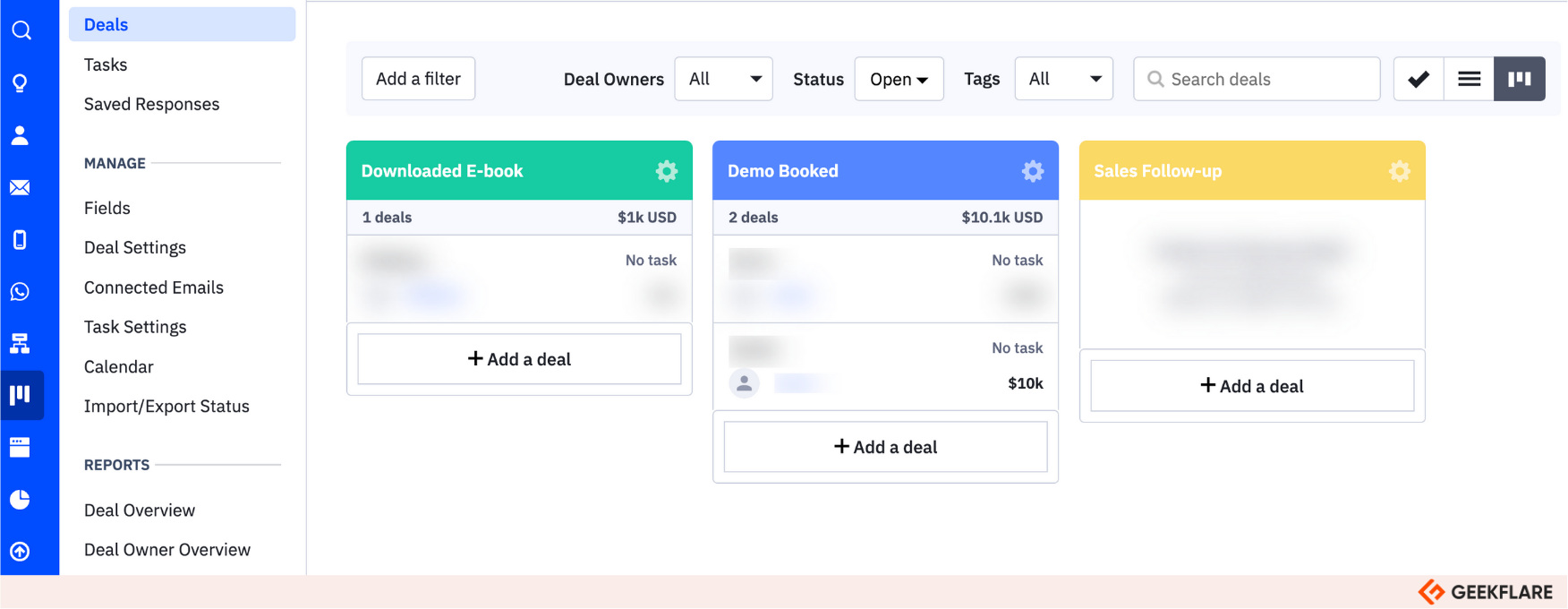
You can choose from different views to visualize leads as they progress through different funnel stages.
ActiveCampaign is highly regarded for its powerful automation builder. You can use it to automate most of your sales funnel.
For example, deliver relevant messages based on the customer’s interests or use tracking data to send an “abandoned cart reminder” email.
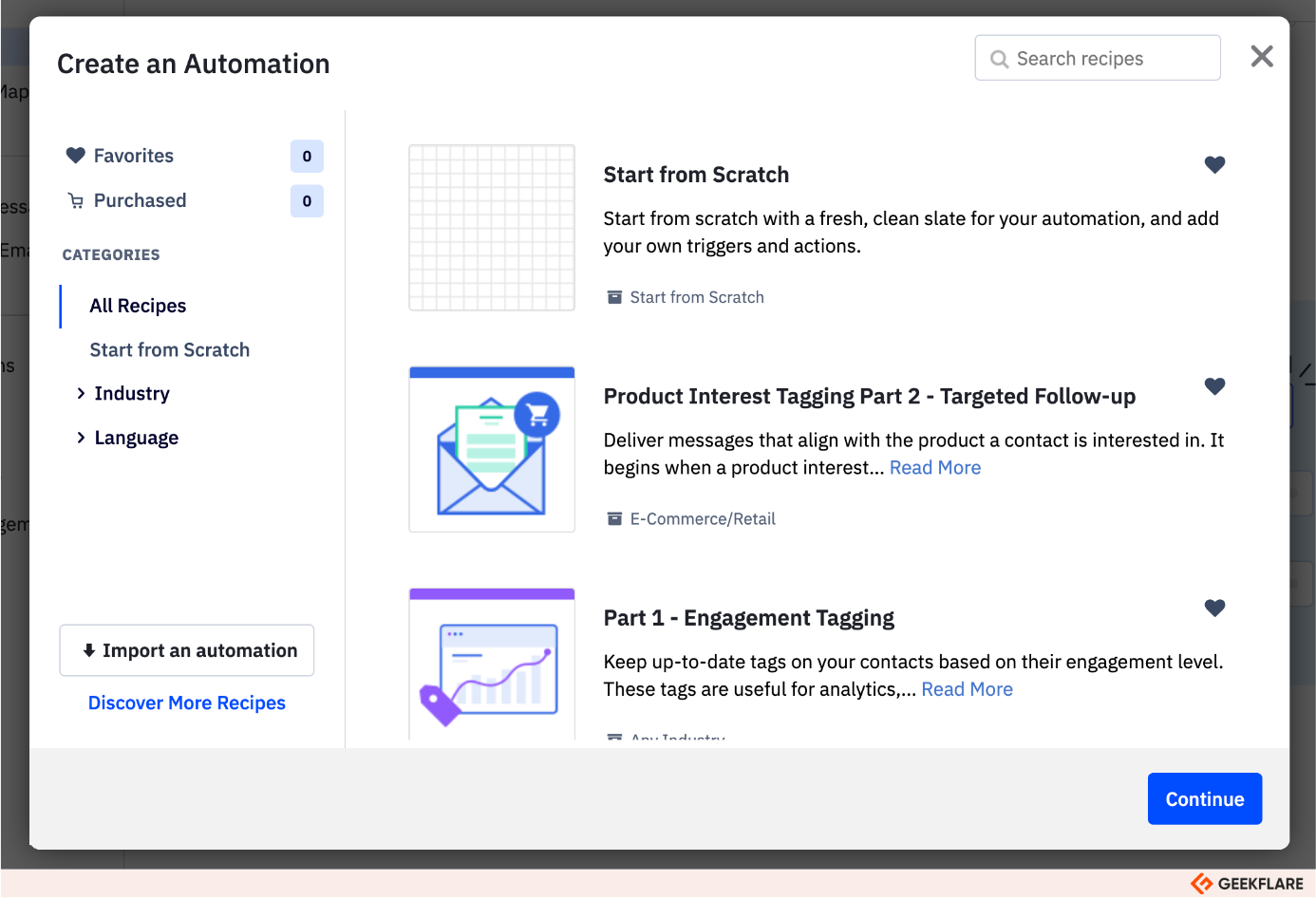
Moreover, ActiveCampaign offers hundreds of ready-made automation recipes, so it’s easy to get started.
ActiveCampaign Features
- Visual sales pipelines to track deals and move leads through customizable stages
- Automate email campaigns and delivery based on behavior, tags, triggers, and pre-built automation workflows
- AI-driven lead scoring to prioritize leads and advanced segmentation for personalized communication
- Supports A/B testing for emails and automations
- Automate appointment scheduling and follow-up emails
- Engage leads via email, SMS, Facebook Messenger, and live chat
- Real-time analytics track campaign performance, sales pipeline progress, and revenue attribution
- Integrates with 900+ third-party tools, including e-commerce platforms, webinar software, and more
Pros
Powerful automation builder
Best in industry email deliverability
Over 900+ ntegrations
Cons
Does not allow creating landing pages with the Starter plan
Premium CRM integrations are available with the Enterprise plan
ActiveCampaign Pricing
ActiveCampaign offers a 14-day free trial and four paid plans:
- Starter: $15/month
- Plus: $49/month
- Pro: $79/month
- Enterprise: $145/month
9. HubSpot Sales Hub
Robust CRM with Sales Funnel Tools
HubSpot Sales Hub is primarily a sales CRM designed to automate sales processes for businesses of all sizes. Built natively atop HubSpot CRM, the Sales Hub has tools for sales enablement, lead management, automation, AI-driven insights, and integration with marketing and service tools.
Teams can visually manage deals using drag-and-drop pipelines, customizing stages to fit their unique sales process. The automation builder is easy to use and allows automating repetitive tasks such as sending follow-up emails, scheduling meetings, and assigning tasks.
AI tools assist with lead validation, predictive lead scoring, and recommending the best actions or timing for outreach. Sales automation “Sequences” allow reps to set up personalized, multistep outreach cadences, so prospects are nurtured consistently without manual effort.
HubSpot Sales Hub Features
- Has a centralized hub for managing leads’ history, interactions, and current status
- Customizable visual sales pipelines allow tracking leads and deals as they move across the funnel stages
- Use automated sequences to set up personalized, multistep outreach cadences
- AI-powered lead scoring and segmentation to prioritize and target the most promising leads
- Built-in reports and dashboards to track key sales metrics, such as conversion rates, deal stage progression, and revenue forecasts
Pros
Over 1500+ integrations to third-party apps
Robust automation capabilities
Advanced reporting and analytics
Cons
Steep learning curve for new users
HubSpot Sales Hub Pricing
HubSpot Sales Hub offers a 14-day free trial and two premium plans:
- Sales hub professional: $90/user/month
- Sales hub enterprise: $150/user/month
10. Keap
CRM and Sales & Marketing Automation for Small Business
Keap is a small business CRM and automation software including tools for lead generation and management, email marketing, and sales pipeline management.
It’s ideal for startups, marketing agencies, and service-driven businesses. And is a popular choice for users seeking an alternative to HubSpot.
Keap allows you to automate a lot of processes, for example, sales pipelines. It helps you efficiently gather leads and turn them into customers using automated follow-up, appointment setting, payment processing, and more.
Alongside, it’s a complete CRM. So if you’re looking for a more vibrant tool that adds more to funnel building, Keap might be it.
However, the pricing may upset cost-conscious businesses. Although Keap is considered a good value for small businesses, it may not be the cheapest option available
Keap Features
- Built-in workflow automation builder to automate follow-ups, email campaigns, lead nurturing, and task reminders
- Visual drag-and-drop pipeline builder to track deals through customizable stages
- Centralized contact management system to store customer data, track interactions, and manage communication
- Tools for lead capturing, segmentation, email marketing, and appointment scheduling
Pros
Responsive and helpful customer support
Easier to learn and less sophisticated than HubSpot
Connect to 5000+ apps using Zapier
Cons
Users share mixed opinions on Keap’s email deliverability tools
Keap Pricing
Keap offers a 14-day free trial. Its paid plans start at $249/month (billed annually) for 2 users and 1500 contacts.
Honorable Mentions
In addition to the above the below sales funnel tools deserve honorable mentions for their popularity.
- Pipedrive: Best for Visual Sales Pipeline Management
- Zendesk for Sales: Best Sales CRM for SMBs
- Involve.me: Interactive Funnel and Lead Capture Tool
What Is Sales Funnel Software?
A sales funnel software helps you create high-converting sales funnels that guide customers through their journey from the initial stage, awareness, to the final stage, point of sale.
All this, while providing tools to create landing pages, emails, and lead magnets to keep customers engaged throughout the journey.
Let’s take an example.
Imagine a small business that sells eco-friendly home cleaning kits online. Here’s how they might use sales funnel software:
- Runs Instagram ads linking to a landing page (created using the software) for a free “Green Home Guide”
- Visitors enter their email to download the guide; software adds them to the contact list and tags them as ‘interested’
- With built-in email marketing tools, the software automates an email sequence: the first email includes the guide, the second email features testimonials, and the third email offers a 15% discount on purchasing the home cleaning kit.
- A recipient clicks the discount link and is taken to a product page. The software tracks this action and, if the purchase is completed, triggers a thank-you email with order details.
Everything happens in the background, while the sales funnel software provides real-time analytics on how many leads are captured, which emails are opened, and where conversions occur.
While in this example I mentioned the most basic features, here’s a detailed list of features you should look for in sales funnel software
Common Features to Look Into Sales Funnel Software
A good sales funnel software must have the below 4 features.
1. Drag-and-drop Funnel Builder
A drag-and-drop funnel builder lets you visually create, organize, and customize every step of the sales funnel without any coding or technical know-how.
If you ask me, I find the drag-and-drop interface pretty helpful for beginners because it’s easy to learn, quick to build, adjust, and launch funnels. Most of the time, sales funnel software with a drag-and-drop builder also includes templates, pre-set elements, widgets, and content blocks.
2. Lead Tracking and Segmentation
Effective lead tracking and segmentation allow you to establish a strong foundation for your sales funnel. It allows you to monitor each prospect’s journey, score leads, and segment them into meaningful groups based on behavior or demographics.
It’s only in a later stage of your funnel that you realize these features help you so much with personalized sales offers that convert.
3. Integrations With CRM and Email Marketing Tools
Look for sales funnel software that integrate with your existing tech stack. Mostly, your CRM and email marketing tools. Because most of your lead’s data and interactions happens through these systems, and a solid integration would help you sync data with your sales funnel for better lead management and personalization.
4. A/B Testing and Analytics
Analytics tools track user drop-off rates at each funnel stage, while A/B testing isolates problematic elements by giving a clear picture of which landing page is resulting in better conversions. The duo can help you with continuos performance benchmarking and optimization.