
AI-powered solutions are plenty. But only a few solutions offer impactful AI features that directly impact team productivity.
Meet Bitrix24, an AI-powered remote online workplace. It enables businesses to do effective online collaboration and communication.
More than 70% of the business leaders report a significant productivity boost with AI. This also reflects on McKinsey reports as they claim that AI will add $4.4 trillion in added productivity growth potential in the long term.
It is important to choose an AI-powered platform that implements AI with a positive impact on the team’s or end-users’ productivity.
In this article, I’ll showcase how Bitrix24 leverages AI for improving teams’ productivity. I’ll go through the Bitrix24 AI tool’s key AI features, real-world examples, and compare it with other competitor AI solutions.
Why AI Is reshaping team collaboration
True collaboration is not about dividing work between machines and people but about bringing the strengths of both together to solve problems and achieve more than either could alone.
Garry Kasparov, Chess Grandmaster, Writer, and Political Activist.
Garry Kasparov is right.
AI is like a modern architect. It improves people’s ability to solve problems and collaborate better.
But how is AI reshaping team collaboration? Don’t we already have established project management software, document sharing, and even team communication apps?
Well, artificial intelligence improves each team’s collaboration solution.
It does so by identifying bottlenecks and offering solutions via automation.
AI acts as an intelligent digital aid that improves existing systems rather than completely changing them.
For instance, AI can help in managing team collaboration tasks such as:
- Scheduling meetings.
- Managing emails
- Taking real-time data-driven decisions
A more refined example would be scheduling a call. AI can suggest a more appropriate time for a meeting by properly evaluating availability based on calendar data.
Another example would be AI-powered grammar tools. These help in writing error-free content such as emails, blog posts, and newsletters.
AI can also improve team members’ efficiency by helping them brainstorm ideas and lay out detailed plans.
But what about complex tasks?
Well, AI can also help in that too. One such example is the GitHub app for Teams and the Teams AI library, which helps in better collaboration by:
- Generating contextual code
- Ability to build intelligent agents to handle different tasks
Overall, it is clear that AI is reshaping team collaboration, whether for simple or complex tasks.
AI features in Bitrix24
I found Bitrix24 AI tools to offer many AI-focused features, enabling businesses to improve collaboration via automation.
Bitrix24 uses CoPilot’s impressive capabilities to help teams take care of different daily and creative tasks, including decision-making.
CoPilot seamlessly integrates with following Bitrix24 features:
- AI-powered video conferencing that offers unbiased AI-powered analysis, full meeting transcription, meeting summary, and highlights & recommendations.
- AI in CRM offering AI-generated ideas, instant call transcription, automated deal and lead field completion, and high-quality email and landing page copy.
- Internal communications where team members can use CoPilot to write, edit, and summarize, use AI to provide constructive feedback, and get access to grammar checks and automatic translation.
- Task management where teams can create task descriptions, provide AI summaries, and more.
- Website creation by using AI to generate marketing content & images, and generate content that matches the brand tone.
In this section, I’ll go through the AI chatbot’s features that directly impact the team’s productivity.
AI-Powered Assistant CoPilot Chatbot
The easiest way to access CoPilot via its Bitrix24 messenger. They get benefits like:
- Generate endless ideas
- 24/7 availability
- Generate ready-to-use copy
- Brainstorm ideas
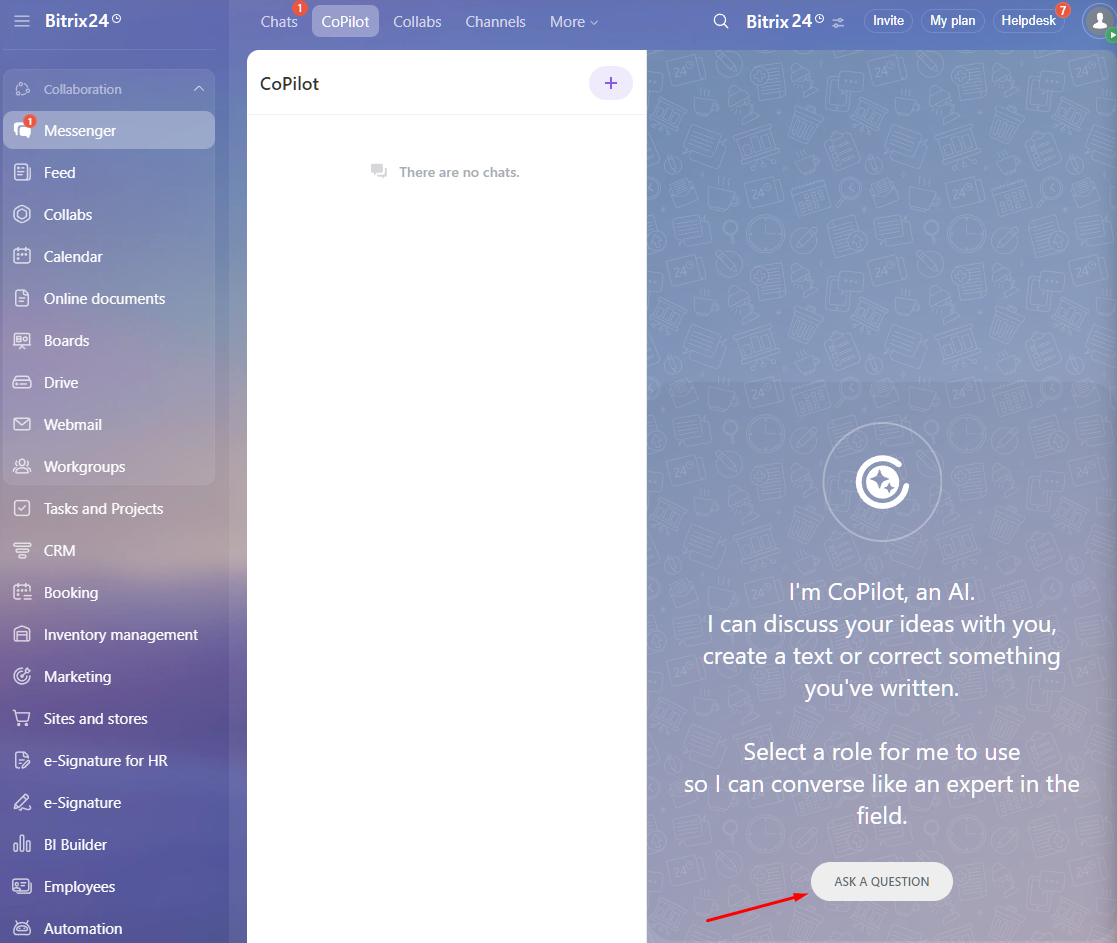
You can start by clicking on “Ask a Question.” It’ll then ask you to set the CoPilot role. If you want a specific question, you can set it to an expert role or let it use its default “Generic” CoPilot role.
The best part is that you can choose from pre-defined roles, including:
- SSM Manager → helps you to promote your business online via social media platforms.
- SEO Copywriter → create converting text for your website.
- Marketing specialist → helps in product placement, customer segmentation, and other marketing tasks.
- Prompt Guru → Help generate prompts for performing tasks more efficiently
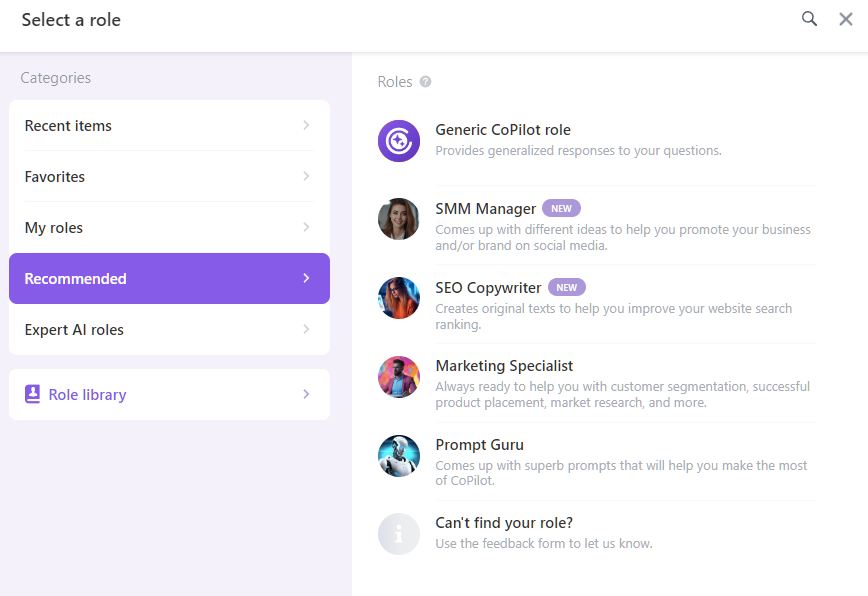
All these four roles are accessible via the Recommended tab. You can also check out all the available roles listed under the “Expert AI roles” tab, consisting of more than 30 roles, including Native Speaker, Business Analyst, Technical Writer, Product Analyst, and so on.
I like how you can add them to favorites for easy accessibility via the Favorites tab.
Check out the favorite roles that I chose!
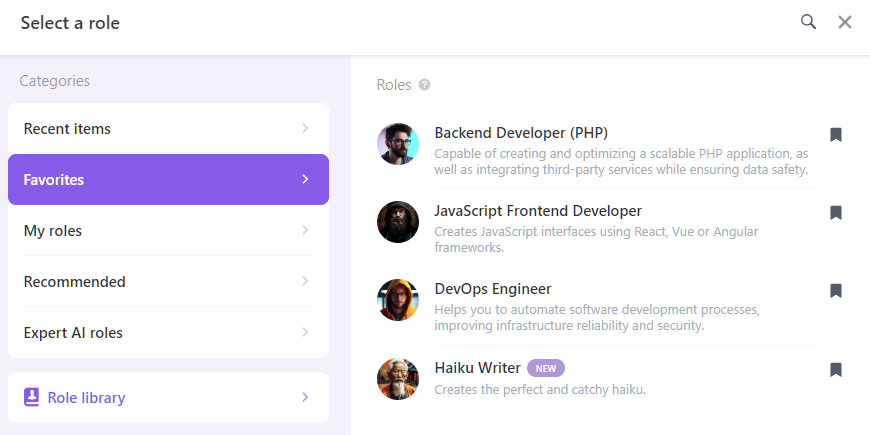
And lastly, you can go to Role Library, where you can add new roles based on your requirements.
To put it to the test, I went ahead and created a “Formula 1 Journalist” role. For it to be effective, you need to be as detailed as possible.
In my case, I used the following prompt.
“Act as a professional Formula 1 journalist with deep expertise in the sport and its global context. Your role is to deliver accurate, unbiased, and insightful coverage of Formula 1 by getting information from official sources and trusted outlets. Go beyond basic news reporting by offering context, analysis, statistics, and fresh story ideas that appeal to both long-time fans and newcomers. Write with clarity, authority, and balance, ensuring your reporting adds value and perspective rather than repeating headlines.”
Next, choose the Name, Icon, and provide a description. You can also set the roles’ availability across the organization’s roles.
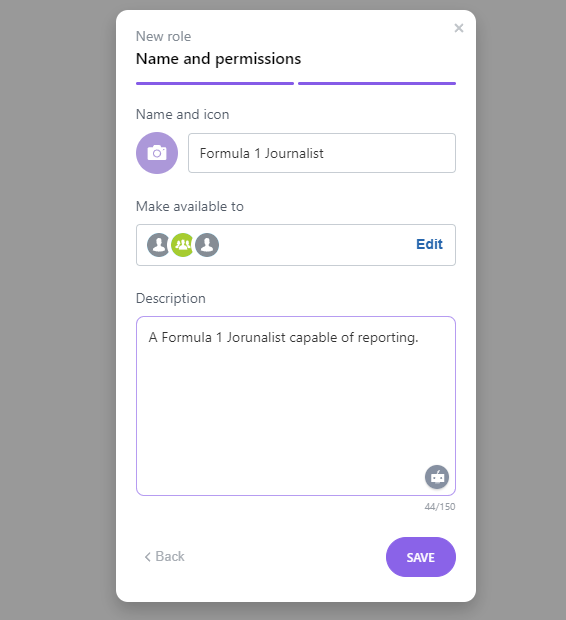
I went ahead and tested the new role and got decent results. CoPilot was successful in recommending new news ideas to cover.

For comparison, I went ahead and tested one of their pre-defined role. I chose SMM Manager and asked it to develop a content plan for the month.
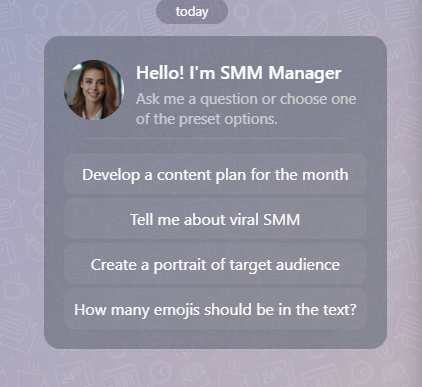
It’s well-defined and asks for additional information when needed. For example, when I asked her about the content plan, she asked me to enter business/product information, target audience, social media platforms to target, goals, tone & style, current activities, and competitors. Impressive, indeed!
In conclusion, after testing the custom and pre-defined CoPilot roles, I can confidently conclude the following things:
- Bitrix24 did a great job at embedding the CoPilot capabilities
- The custom UI to create and deploy roles is easy.
- The already-existing roles are well-defined and surely improve the team’s productivity in business settings.
Smart Task Automation
Bitrix24 offers smart task automation, which helps save time and effort for routine processes. It also eliminates human errors, replacing them with rules and triggers.
Below is how the sales automation looks as below:
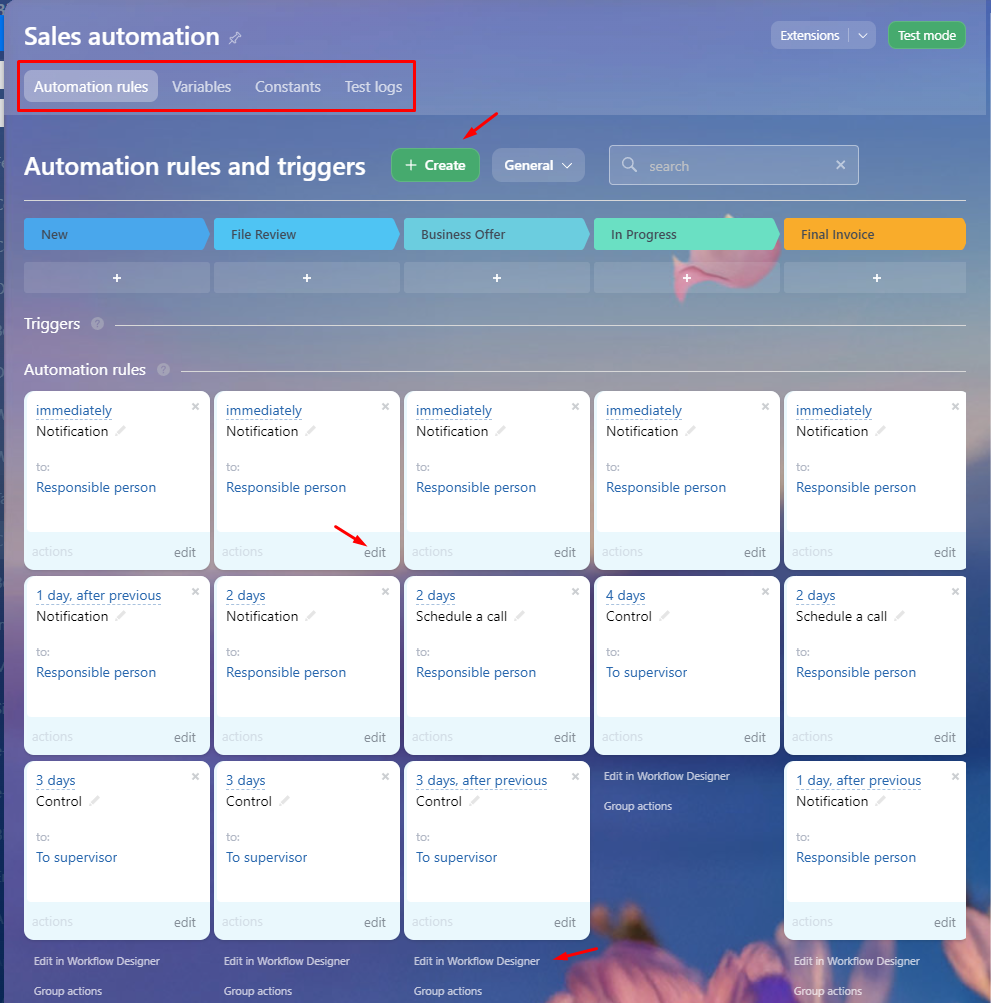
You can notice that you can create triggers and automation rules. The above image doesn’t have any triggers, but does have a bunch of automation rules. Each of them can be edited, where you can change existing conditions such as execution and time, or add a new condition.
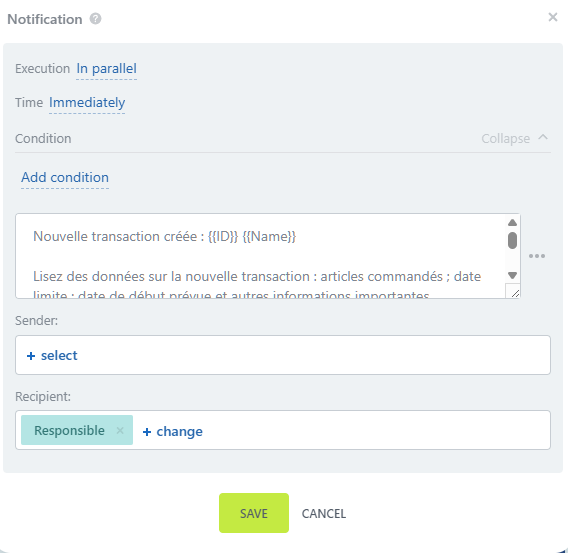
For further editing and refinement, you can use the built-in no-code Workflow Designer, which gives a wider choice.
That’s how the workflow designer looks.

You can edit the template by changing the parameters, global variables, or flow control. It also lets you add CRM activities such as book a resource, add a product item, and so on.
Organizations can use automation rules to automate simpler tasks such as sending emails or making calls. However, if used to its full potential, automation rules can help streamline the client management process and lead processing.
Triggers, on the other hand, help tag customer-side activity and activate related automation.
With automation, teams can have better productivity and can run automations as per their needs, be it daily, weekly, monthly, or even a custom period.
However, the best part about Bitrix24 AI-powered automation is RPA support. You can automate standard business processes via RPA and save time up to 80%.
Additionally, I also found Bitrix24 Flows (accessible via Task & Projects > Flows) to be very effective as it lets you visualize processes within your department.
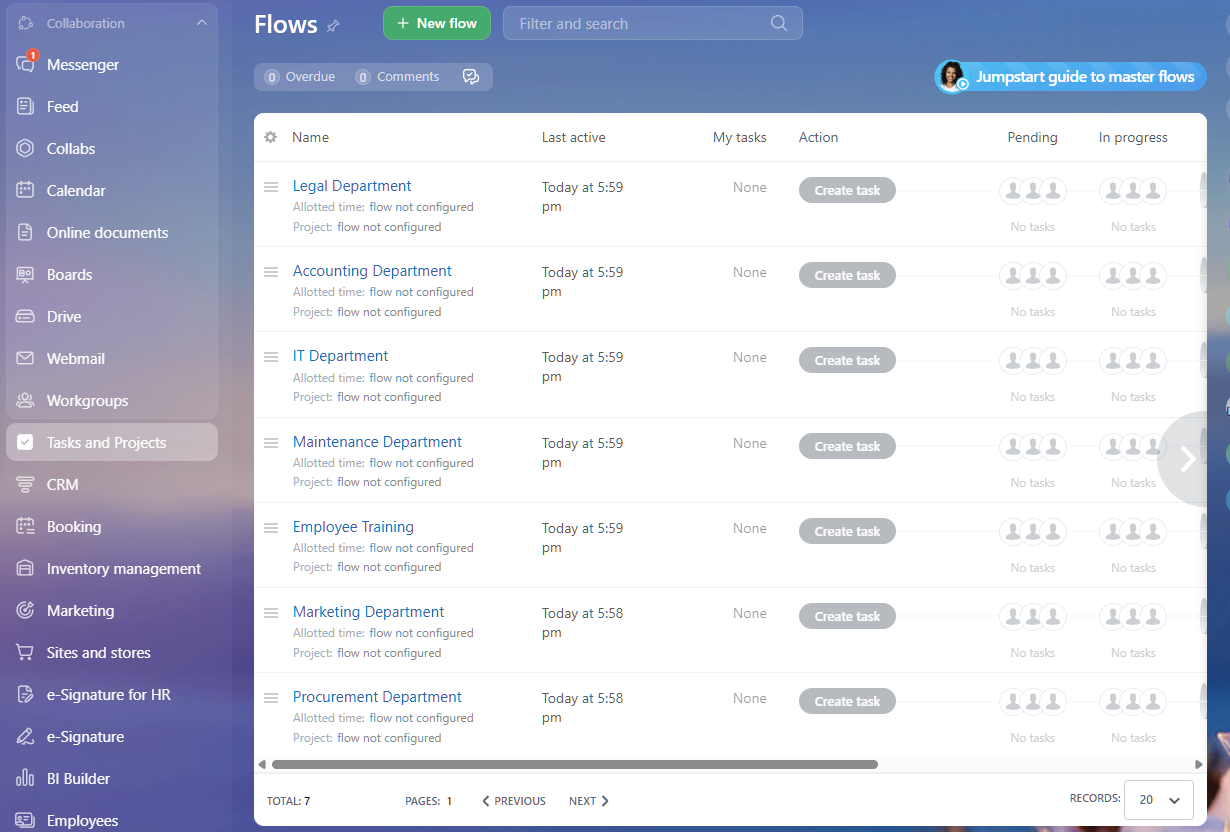
In short, AI-based analysis helps you find bottlenecks and increase work efficiency whenever possible. Managers also get to do real-time workload management and help distribute workload to ensure fast task turnaround time.
Predictive Sales Insights
The future of sales is to serve, not sell. Generative AI gives us guidance that’s so personal and precise, we’re always presenting the most relevant solutions — no pushing required.
Marcus Chan, Founder, Venli Consulting Group.
Indeed! Bitrix’s CoPilot helps you boost your sales in various ways, including:
- Brandstorming new ideas for sales and marketing
- Capture phone transcription to an easy-to-read text format
- Automatically fill the fields in CRM so that you can focus on the bigger picture
In the “CoPilot section,” I showed how you can use CoPilot roles to your advantage. Similarly, you can use the Marketing Specialist AI role to your advantage.
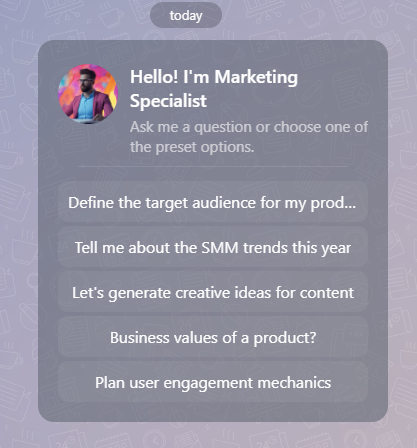
However, AI can do more than just that.
Bitrix’s AI analytics in CRM can help analyze customer data and spot patterns, offering real-time prediction. It is completely different from static reports. For it to work, you need proper data collection and data processing, aiming for accuracy and consistency. If done right, predictive insights can help in sales trends (using lead scores) while providing actionable recommendations.
AI-powered communication
Bitrix24 uses CoPilot to enhance the team’s communication.
As communication is all about clear messaging, AI can help you do that.
Before communication, you can even proofread or ask AI to refine the message, resulting in effective communication.
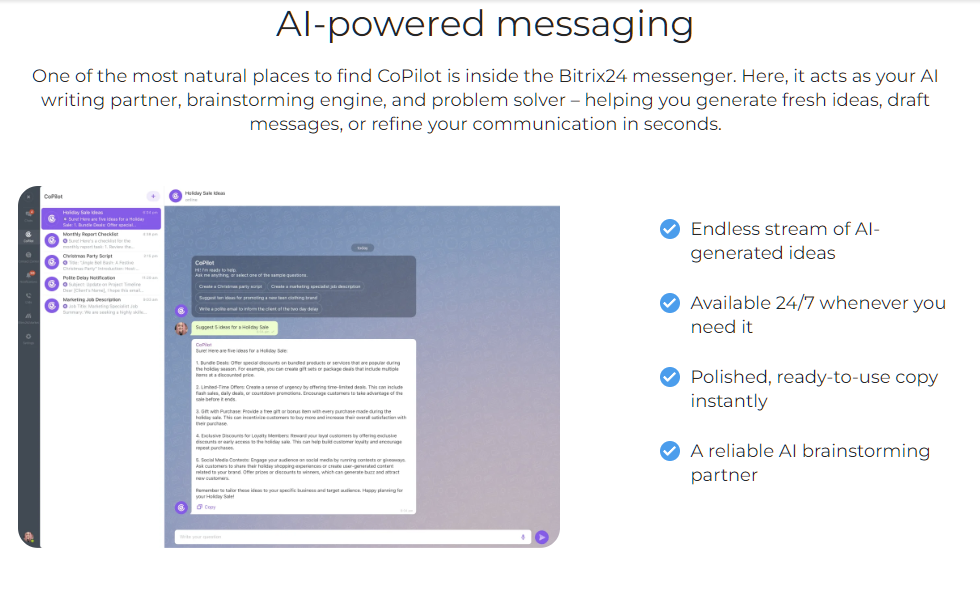
Furthermore, if you’re running out of ideas, you can use Bitrix24’s CoPilot to get new ideas. It is also fully capable of creating original ideas for campaigns.
Not only that, CoPilot is capable of acting as your AI-powered transcription tool (no need to rely on third-party tool integration). It can do a word-for-word call transcript and provide a detailed summary. For busy teams, it can provide unbiased AI-powered call analysis, helping call attendees save time and effort.

During meetings, the CoPilot Follow-Up tool automatically pops up and starts recording. I also like how CoPilot Follow-Up provides recommendations on how you can improve the team’s productivity and call efficiency.
Additionally, Bitrix24 CoPilot AI also improves internal communication. It does so by providing a CoPilot menu for posts and comments.
All you need to do is press “Space” on your keyboard or use the CoPilot icon to pop up the CoPilot for assistance.
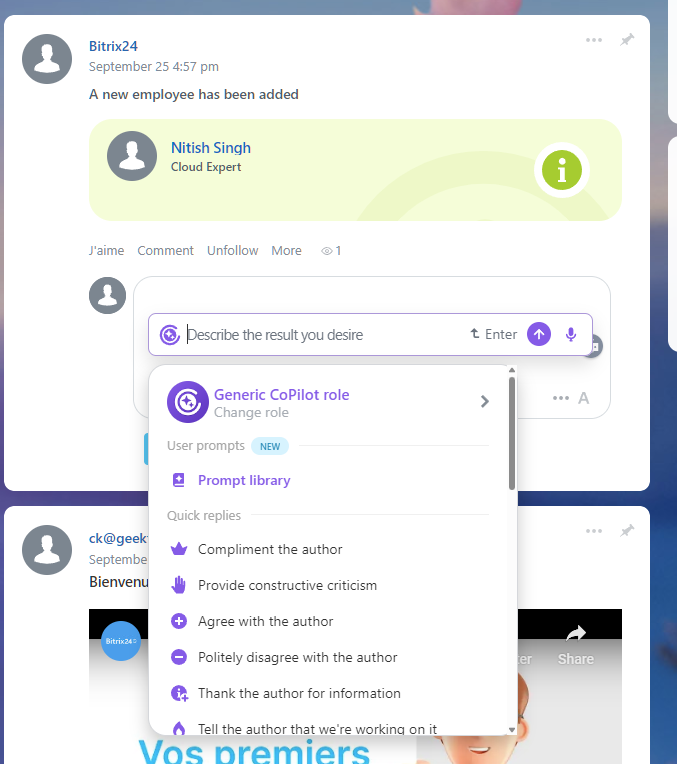
Here too, you have access to the full prompt library or the ability to change to another CoPilot role. The best part is that it understands the context and offers quick replies.
You can also type your query and get the desired output. For this, I went ahead and welcomed the cloud expert.
Here is the prompt. 😉
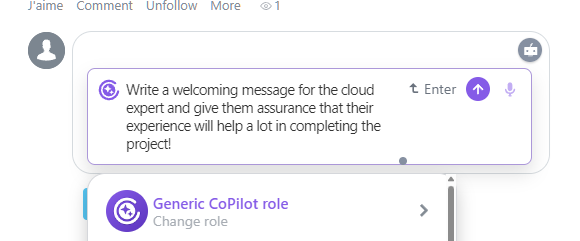
And, here is the output.
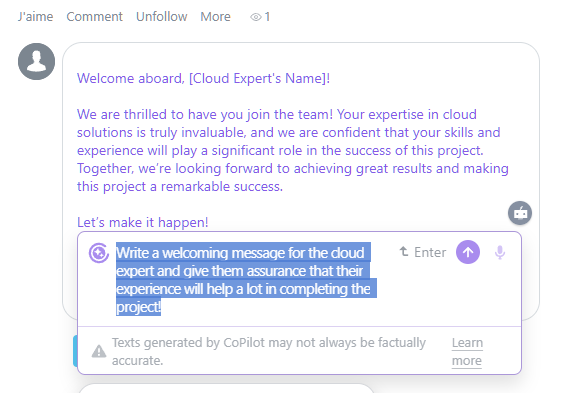
All you need to do is edit the message accordingly. Neat, indeed!
CoPilot is accessible across different Bitrix24 features, allowing you to write, edit, and even summarize. It also offers automatic translation and provides grammar checks.
Real examples of AI in action
Until now, we saw Bitrix24 AI features. Let’s look at more real examples of AI in action.
Automating repetitive tasks
Bitrix24 excels at automating repetitive tasks. I found it to be effective with useful real cases, including:
- Ability to create checklists and task descriptions from outlines
- Ability to autofill fields in CRM from transcribed calls
- Generate quick summaries from tasks, posts, calls, and even meeting transcripts.
- Provides one-click checklists for lengthy tasks.
Reducing response times
Along with internal team communication, Bitrix24 CoPilot is equally capable of handling routine customer inquiries. This results in reduced response time and higher customer satisfaction.
Furthermore, internally, teams can use AI to optimize meeting times by finding an optimal time that doesn’t conflict with employee schedules.
Improving decision-making with AI analytics
Bitrix24 AI analytics helps in decision-making, reducing guesswork. The AI Analytics provides real-time insights which is far better than looking at fixed historical data.
The three ways in which Bitrix24 AI analytics improve decision-making include:
- Predictive sales insights: Uses AI to analyze historical data to meet future demand.
- Automated performance tracking: Help optimize key performance indicators (KPIs).
- AI-enhanced reporting: Create detailed reports on different aspects of the business, including sales and marketing.
Benefits for different teams
Bitrix24 leverages AI to benefit different teams. These include the sales team, marketing teams, project managers, support team, and human resources team.
Sales teams
The sales team benefits the most by using Bitrix24 AI capabilities. They can not only predict sales, but also use AI capabilities to optimize customer journey or lead generation.
Furthermore, the sales team can automate different aspects of the customer journey and discovery, including transcribing and summarizing customer calls, providing recommendations to sales agents, or improving lead management and follow-up by generating a converting sales script or copy.
Marketing teams
Marketing teams can utilize AI capabilities to implement campaigns with fresh ideas.
On a more granular level, marketing teams can use Bitrix24 AI to optimize posts or email content. AI is also a great proofreader, which makes it easy for marketing teams to send error-free emails.
As for strategy, teams can do deep market research or create real-time reports to make better decisions.
Teams can also create content for different marketing channels, including newsletters and social media.
Project Managers
Project managers can take advantage of Bitrix24 CoPilot’s ability to provide smart task management.
They can create detailed task descriptions and a smart checklist. Furthermore, the ability to generate summaries helps in understanding project progress and identifying points for improvement.
Bitrix24 CoPilot’s transcribing capabilities also come in handy as it reduce manual tasks by providing summaries, highlighting important notes, and producing real-time reports.
Support team
Support teams can use Bitrix24 AI to transcribe and summarize lengthy conversations. It speeds up the process and helps understand the context and ensure a timely reply to the customer.
Furthermore, CoPilot can also suggest contextual actions or answers based on historical data, making resolutions more likely to get accepted.
Human resources team
Bitrix24 Copilot is capable of automating routine HR tasks, especially repetitive tasks, saving valuable resources and time.
AI, along with automation, helps HR teams in the following:
- Leave management
- Scheduling interviews
- Updating payroll information
And much more.
Bitrix24 AI vs. Competitors
CoPilot is deeply integrated in Bitrix24, be it chat, CRM, feed, tasks, website/online and shops. It brings multiple benefits including improved team productivity, better automation, but how does it stack against competitor AI such as HubSpot, Zoho, and ClickUp? Let’s explore.
Bitrix24 AI vs. HubSpot AI
The core difference between Bitrix24 AI and HubSpot AI is the implementation. While Bitrix24 AI relies on established CoPilot, HubSpot created Breeze AI, a sophisticated new layer of AI that impacts every part of HubSpot’s customer platform.
That’s how the HubSpot AI tech stack looks:
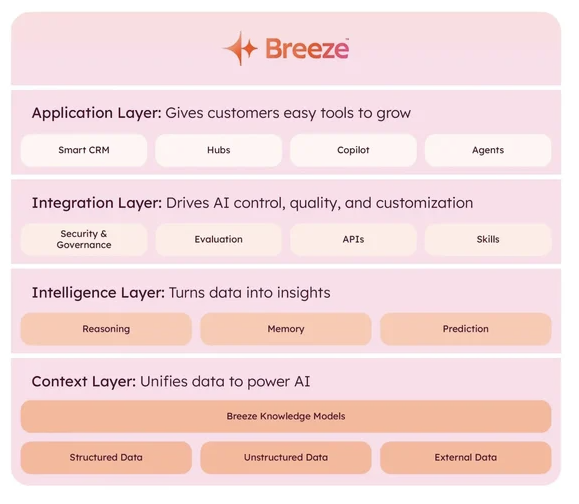
HubSpot Breeze AI combines models from major providers, including OpenAI, Google, Anthropic, and others. It also adds its own custom AI models on top of it.
Overall, debating which one is better is completely subjective. AI models vary heavily depending on the purpose. With both Bitrix24 CoPilot and HubSpot Breeze AI aiming to improve businesses’ end-to-end operations, there is no clear winner.
Bitrix24 AI vs. Zoho AI
Zoho AI has its own Gen AI named ZIA, powered by ChatGPT. It is a capable AI that helps work with different Zoho products, including CRM, Desk, Notebook, Social, Mail, SalesIQ, Analytics, and more.
Additionally, Zoho supports Bring Your Own Key, which enables businesses to use capable OpenAI capabilities directly in the Zoho ecosystem. To natively use ZIA in the Zoho ecosystem, you need to join their waitlist. Once approved, ZIA should be accessible natively within Zoho.
While Zoho AI is powered by Microsoft Copilot, Bitrix24 has its own AI assistant CoPilot. The response quality from Bitrix24 CoPilot is much better as it is heavily trained and tuned for business use cases.
Bitrix24 vs. ClickUp AI
ClickUp AI is known as ClickUp Brain. It offers 25+ prebuilt AI agents that are highly customizable based on your requirements. You can select:
- Agent: such as a project manager, campaign manager, etc.
- AI tools you need: such as a meeting notetaker, image generation, meeting scheduler, etc.
- Workflows: such as marketing, software, design, operations, etc.
- Data: such as ClickUp, Slack, Dropbox, Hubspot, etc.
Each option offers one or more choices, making your own AI as simple as a content creator for your campaign to a social media manager that handles an end-to-end campaign with data from multiple platforms.
The best part about ClickUp Brain is that it is deeply integrated into the ClickUp platform, enabling users to take full advantage of it.
This makes ClickUp AI more customizable than Bitrix24 CoPilot, with the ability to choose AI models.
The future of AI-powered work with Bitrix24
AI’s integration in platforms such as Bitrix24 is game-changing. It transforms an online collaboration and business management platform into a genuine AI productivity software.
Bitrix24’s project and business management solution ensure team productivity with AI. That’s because AI improves every aspect of project and business management, providing key Bitrix24 AI tools.
I found Bitrix24’s choice of CoPilot is impressive, as it is an all-around model with the ability to adapt to business requirements. The integration is impressive, with almost every aspect of business management benefiting from faster turnaround time, higher efficiency, and better communication.
FAQs
Yes, Bitrix24 has AI built in. Its name is CoPilot. It is integrated seamlessly in the Bitrix24 ecosystem, including CRM, messaging, video conferencing, internal communication, task management, and website creation.
AI can improve team efficiency by aiding in repetitive tasks and brainstorming. It can help automate repetitive tasks such as transcribing meetings, summarizing tasks, creating checklists, etc. Creatively, teams can use AI to brainstorm new ideas, do sales forecasting, and even set up end-to-end marketing/sales campaigns. It can also help improve teams’ communication by allowing teams to grammar and context check before they send it out.
Yes, AI in Bitrix24 can help small businesses to fast-track their project progress without relying on spending more on human resources. It leads to fewer errors and better team communication