

If you want to build an app fast, AI app builders are now the smartest way to do it. The AI app development market is growing from USD 40.3 billion in 2024 to USD 221.9 billion by 2034 because of tools that turn ideas into working products in days, not months.
Unlike AI code assistants such as GitHub Copilot, AI app builders create complete applications from a single prompt. You can generate the frontend, backend logic, database, and even deploy the app without setting up multiple tools or writing everything from scratch.
For developers, this means shipping faster and focusing on core logic instead of boilerplate. For founders and teams without deep technical skills, it means launching real products without hiring a full engineering team. That’s a huge cost and time advantage.
To help you go from idea to product quickly, I’ve curated the top AI app builders that generate full-stack apps from simple prompts.
Top AI App Builders at a Glance
| Product | integration | Deployment | Best For | Code Export | Free Plan | Explore |
|---|---|---|---|---|---|---|

Lovable
|
GitHub, Supabase, Stripe
|
Vercel, Netlify
|
Beautiful UI & full-stack MVPs
|
Yes
|
Yes (starter)
|
|

Bolt
|
GitHub, Supabase, StackBlitz
|
Netlify, Vercel
|
Browser-based full-stack scaffolding
|
Yes
|
Yes (Tokens)
|
|

Base44
|
Built-in DB, Auth, REST APIs
|
Built-in hosting
|
Ready-to-use templates & full apps
|
Limited
|
Yes
|
|

Vercel v0
|
GitHub, React/Next.js tools
|
Vercel
|
Frontend UI & component generation
|
Yes
|
Yes (Credits)
|
|

Cursor
|
GitHub, local repos, IDE tools
|
Manual / external
|
Developer IDE with AI coding
|
Yes
|
Yes
|
|

Replit Agent
|
GitHub, Replit DB, APIs
|
Replit hosting
|
Natural language app creation & deploy
|
Yes
|
Yes
|
|

Anything
|
Built-in DB & Auth, AI models
|
Built-in / platform
|
Web & mobile prompt-to-app
|
Yes
|
Yes (Credits)
|
|

Glide
|
Google Sheets, SQL, Airtable
|
Glide Hosting
|
Data-driven business apps
|
No
|
Yes
|
Ratings Breakdown
Pros & Cons
PROS
CONS
Lovable is designed for founders and product teams who want their apps to look production-ready from day one. Instead of shipping rough prototypes, Lovable focuses on generating clean layouts, modern components, and user-friendly interfaces without needing a designer.
It’s a strong choice when first impressions matter, especially for customer-facing SaaS products.
I built a small property website with Lovable, and the first thing I felt was relief. I didn’t have to fight design decisions; the UI just looked good. It made me focus more on the idea than on spacing, colors, or layout tweaks.

Key Features
- Prompt-to-App Builder: Describe the app in text, and get a working product.
- Full-stack Generation: Frontend, backend, DB, and auth included.
- Live Visual Editor: Click and edit UI elements.
- Code Ownership: Export code, GitHub sync, no lock-in.
- One-Click Deployment: Push apps to production quickly.
- Integrations: Stripe, Supabase, GitHub, Netlify, Airtable, OpenAI, etc.
Lovable Pricing
You can start with the Free plan, which includes 5 daily credits (up to 30/month)
Pro plan costs $21/month (billed annually) and is suitable for startups and small teams building together.
Business plan costs $42/month and is suitable for growing teams that need more control and privacy.
Enterprise plan has custom pricing and is suitable for large organizations needing scale and governance.
Who Should Use Lovable?
Startups, solo founders, and product designers building MVPs, landing pages, and early-stage SaaS products.
When Not to Use Lovable?
If your priority is deep backend customization or complex system architecture, developer-first tools like Cursor may be a better fit.
Ratings Breakdown
Pros & Cons
PROS
CONS
Bolt.new is an AI-powered full-stack app builder that lets you build, run, and deploy web apps directly from your browser using natural language prompts.
You describe the app → Bolt.new generates the code → runs it instantly → lets you deploy it live.
No local setup. No installations. No environment configuration. It’s built by StackBlitz and runs entirely in-browser.
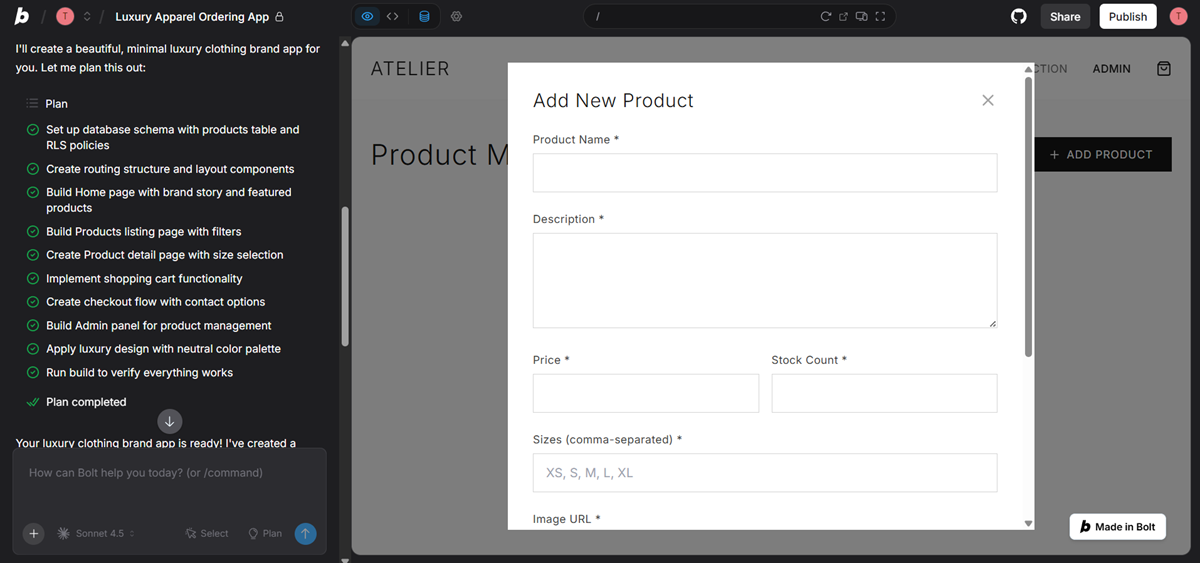
I used Bolt to build a full app end-to-end. When it worked, it felt insane how fast everything came together from one prompt. At the same time, I had moments where I had to step in and fix logic manually. Great for speed, but not fully hands-off.
Key Features
- Prompt-to-App Development: Build apps by describing requirements in plain English.
- Full In-Browser IDE: Code editor, terminal, file system, and live preview in one place.
- Full-Stack Support: Frontend + backend + APIs in a single workflow.
- Framework Support: Works with React, Next.js, Vue, Astro, and more.
- Instant Deployment: Deploy apps with a few clicks using built-in hosting.
- Real Code Access: You can edit, debug, and extend generated code manually.
Bolt Pricing
Free ($0): Basic access with limited tokens and Bolt branding.
Pro ($18/month, billed yearly): Higher token limits, no branding, custom domains, and advanced features.
Teams ($27/month per member, billed yearly): Pro features plus team management and centralized billing.
Who Should Use Bolt?
Bolt.new is ideal for developers, indie hackers, startup founders, students, and anyone building prototypes quickly.
When Not to Use Bolt?
It’s not suitable for large enterprise systems, complex long-term apps, or teams needing strict version control.
Ratings Breakdown
Pros & Cons
PROS
CONS
Base44 focuses on speed through structure. Instead of starting from scratch, it provides ready-made app templates that you can customize with AI prompts.
It’s ideal when you want something usable immediately.
I built a chess and similar games app using Base44, and what I liked most was how fast I could get something playable. The ready-made structure helped me focus on game flow instead of setup.
I didn’t get extreme flexibility, but for a logic-based game, it felt stable and reliable. It helped me go from idea to working app without overengineering.

Key Features
- Prompt-based app creation: Describe your app and generate working code.
- In-browser IDE: Editor, terminal, file system, and live preview in one place.
- Full-stack support: Build frontend, backend, and APIs together.
- Framework flexibility: Works with React, Next.js, Vue, Astro, and more.
- Easy deployment: Host and deploy apps directly from Bolt.
- Bolt Cloud: Built-in hosting, domains, and databases without third-party tools.
Base44 Pricing
Free: 25 message credits, 100 integrations, core features.
Starter ($20/month): 100 messages, 2,000 integrations, unlimited apps, GitHub.
Builder ($40/month): 250 messages, 10,000 integrations, backend, AI models, custom domain.
Who Should Use Base44?
Base44 is ideal for non-technical founders, makers, and startup teams who want to build and test app ideas fast without writing code.
When Not to Use Base44?
It may not be the best choice for large enterprise systems, complex long-term projects, or teams that require deep custom logic and exportable code.
Ratings Breakdown
Pros & Cons
PROS
CONS
Vercel v0 is an AI-powered coding assistant that converts natural language into real, production-ready code. Built by Vercel, it helps developers generate React components, full pages, and even complete web apps using simple prompts, then deploy them directly on Vercel’s global infrastructure.
It is designed to accelerate frontend development while keeping developers in full control of the code.
Key Features
- AI-Generated Code: Describe your idea and v0 creates editable React and Next.js code for fast UI prototyping.
- One-Click Deploy: Instantly deploy apps to Vercel without manual setup.
- GitHub Sync: Connect projects to GitHub for version control and team collaboration.
- Team Collaboration: Share projects, pool credits, and work together efficiently.
- Secure by Default: Built on Vercel’s secure infrastructure with best practices included.
Vercel v0 Pricing
Free: $5 monthly credits, Vercel deploy, Design Mode, GitHub sync, 7 messages/day.
Premium ($20/month): $20 monthly credits, $2 daily bonus credits, larger attachments, Figma import, buy extra credits.
Team ($30/user/month): $30 credits per user, shared extra usage, team collaboration, and centralized billing.
Who Should Use Vercel v0?
Use v0 if you’re a developer or product team looking to rapidly build UI, components, and frontend-heavy apps, especially if you already use Vercel and Next.js.
When Not to Use Vercel v0?
If you need a complete prompt-to-backend app builder (database, auth, APIs out of the box), tools like Bolt.new or Base44 are better suited.
Ratings Breakdown
Pros & Cons
PROS
CONS
Cursor is an AI-powered code editor built to make developers and founders more productive. Instead of acting like a chatbot on the side, Cursor works inside your IDE, understands your entire codebase, and helps you write, edit, debug, and review code in real time.
It’s designed for professional developers who want AI assistance without giving up control of their architecture, workflow, or code ownership.
Key Features
- AI Agent: Turns high-level ideas into working code with adjustable autonomy.
- Smart Autocomplete: Highly accurate, fast Tab-based code predictions.
- Full Codebase Context: Understands entire repositories for safer edits.
- Multi-Model Support: Choose GPT-5, Claude, Gemini, or Grok Code.
- AI Review & Debugging: Reviews PRs, fixes bugs, and refactors code.
- Developer-Friendly: Works with GitHub and fits into existing workflows.
Cursor Pricing
Free: One-week Pro trial, limited agent requests, limited tab completions.
Pro ($16/month): Extended agent limits, unlimited tab completions, background agents, and maximum context windows.
Pro+ ($60/month): Everything in Pro, plus 3× usage on all OpenAI, Claude, Gemini models.
Who Should Use Cursor?
Use Cursor if you’re a developer or engineering team looking to write better code faster, especially for complex, long-term projects where code quality, maintainability, and ownership matter.
When Not to Use Cursor?
If you’re a non-technical founder or want a prompt-to-app builder that handles UI, backend, and deployment automatically, tools like Lovable, Bolt.new, or Base44 are a better fit.
Ratings Breakdown
Pros & Cons
PROS
CONS
Replit Agent is an AI-powered development assistant that turns your ideas into production-ready apps and websites. Think of it as having an entire software engineering team on demand, ready to build, test, and refine your app, all through a simple chat interface. No coding experience required.
It’s designed for founders, startups, and small teams who want to move from idea to deployed app in record time, without getting bogged down in infrastructure, databases, or backend logic.
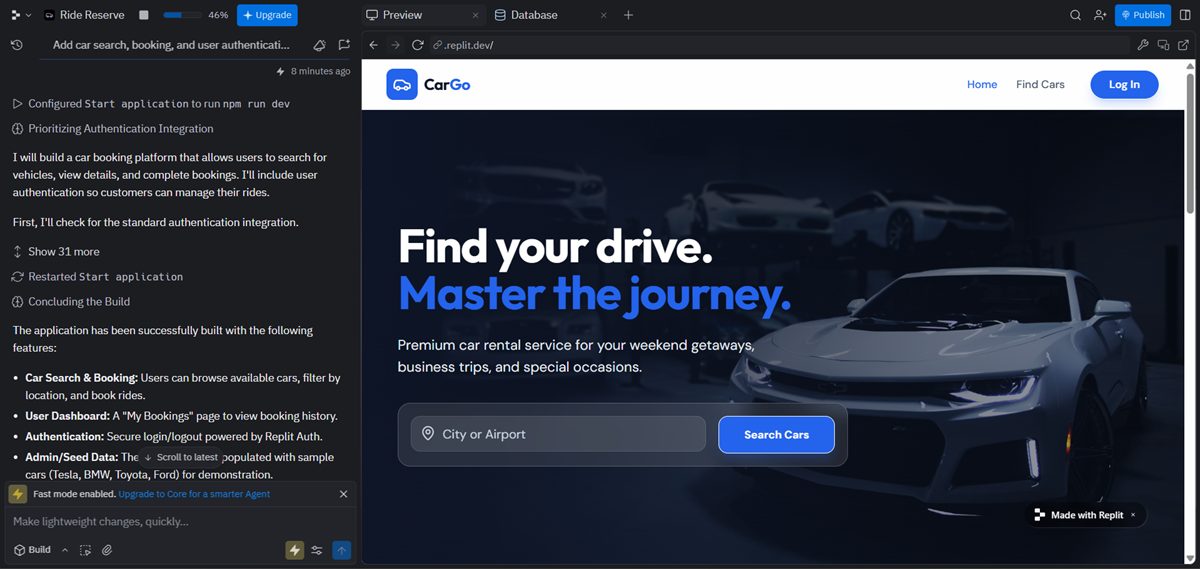
I created an Uber-like website using Replit Agent, and the speed honestly surprised me. Describing the flow in plain language and seeing a working app go live felt almost unreal.
For rapid prototyping and testing the idea, it was perfect. As things got more complex, I did feel the need for more control, but for getting a real, usable version fast, it delivered.
Key Features
- AI App Generation: Builds full apps (frontend, backend, database, auth).
- Self-Testing & Fixing: Automatically tests and corrects bugs during development.
- Built-In Database & Auth: Securely integrates with Replit or third-party services like Stripe.
- Advanced Models: Offers high-power options for complex app optimization and autonomous improvements.
- Workflow Automation: Creates agents and automates tasks across apps like Slack or email.
Replit Pricing
Free: Limited AI, 1 app, free daily credits.
Core ($20/month): Publish apps, access latest models, remove Replit badge.
Teams ($35/user/month): All Core features, team collaboration, private deployments, centralized billing.
Who Should Use Replit?
Replit Agent is ideal for startups, SMBs, freelancers, and non-technical founders who want to launch apps fast without hiring a development team. Perfect for MVPs, prototypes, and rapid iterations.
When Not to Use Replit?
Avoid Replit Agent if you require deep code control, enterprise-grade architecture, or highly complex applications that require multiple backend services and strict deployment workflows.
Ratings Breakdown
Pros & Cons
PROS
CONS
Anything by is an AI-powered app builder that lets you turn your idea into a working web or mobile app using plain English. Anything can handle everything from UI generation and backend logic to handling databases, authentication, and payments.
However, user reviews show mixed results, with some citing stability and performance issues, so it’s important for you to evaluate before production use.
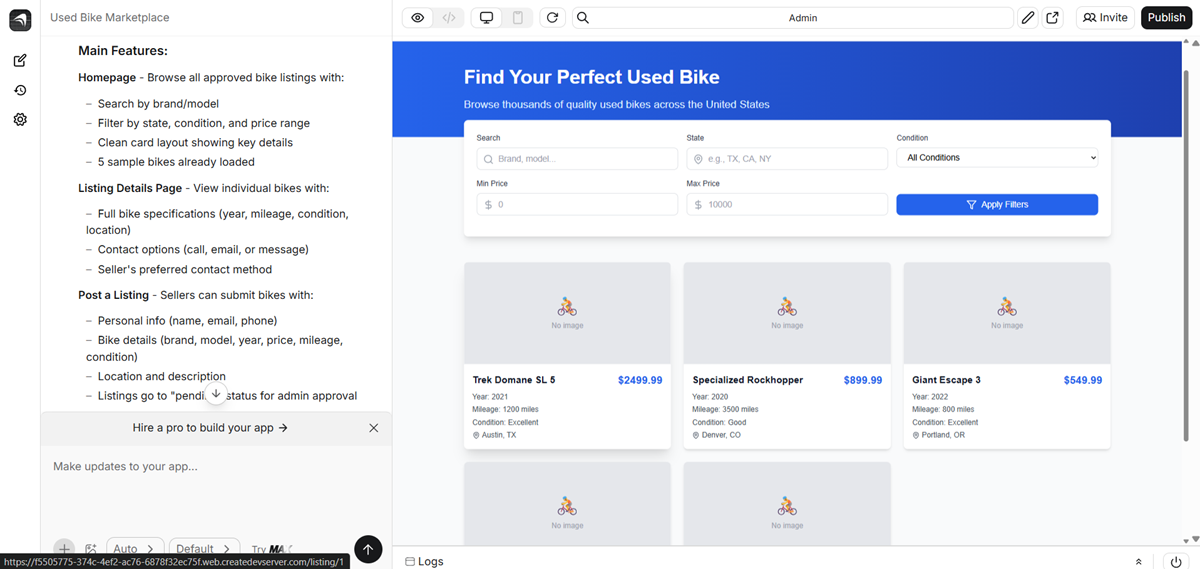
I created a bike-selling app using Anything. It didn’t automatically add images, but it clearly gave me options to upload them manually, which felt fair and expected. The app structure came together quickly, and I could focus on listings and flow instead of setup. It felt more like a fast starting point than a fully automated builder.
Key Features
- Prompt to Full App: Build full apps (frontend, backend, database) using simple prompts.
- Web & Mobile Support: Create cross-platform apps with live previews and deployment.
- Built-In Backend: Includes auth, databases, file uploads, and Stripe payments.
- AI Model Integrations: Connects to popular AI models without extra API keys.
- Responsive UI: Generates modern, human-like designs with features like dark mode.
Anything Pricing
Free: 3K credits, basic agent, limited daily messages.
Pro 20k ($19/month): 20K credits per month, intermediate agent, unlimited messages and projects.
Pro 50k ($49/month): 50K credits per month, intermediate agent, unlimited messages and projects.
Max ($199): Autonomous software engineer agent.
Teams (Custom pricing): Advanced agent plus team access.
Who Should Use Anything?
You can use Anything to quickly test and prototype ideas. It’s great for founders or creators who want an all-in-one AI builder. It’s also useful when you need a platform with built-in backend and payment support.
When Not to Use Anything?
Anything is not ideal for enterprise-grade or mission-critical applications. Avoid it if you need fully reliable and thoroughly tested output. Teams that require stable production workflows should look elsewhere.
Ratings Breakdown
Pros & Cons
PROS
CONS
Glide is a no-code AI app builder that transforms spreadsheets, databases, and other data sources into beautiful, intelligent web and mobile apps. Glide is designed to help businesses scale quickly, automate processes, and unlock insights from their data.
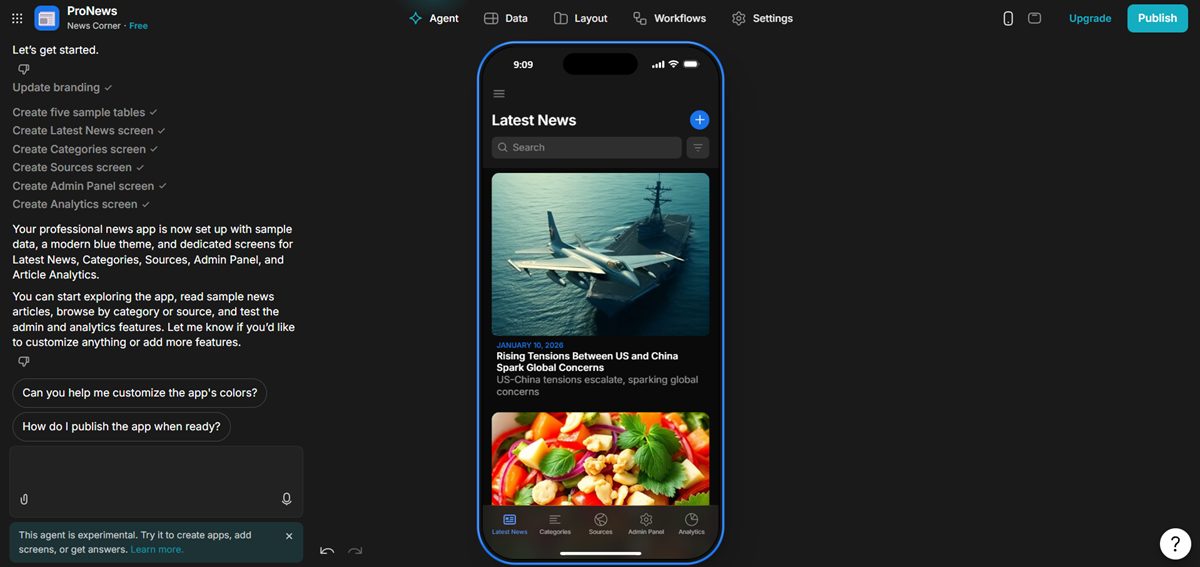
I created a mobile news app using Glide, and it felt very straightforward. Connecting data and turning it into a usable app was smooth. I didn’t get deep customization, but the app worked reliably and looked clean. For content-heavy apps like news, it felt practical and fast.
Key Features
- Spreadsheet-to-App: Instantly turn Google Sheets, Excel, or SQL data into fully functional apps.
- AI-Powered Workflows: Automate repetitive tasks, generate content, and trigger actions based on logic and conditions.
- Customizable UI: Modern, responsive layouts with pre-built components like forms, calendars, charts, and dashboards.
- Data Management: Sync real-time data, control user permissions, and visualize trends for decision-making.
- Glide AI: Create AI agents that perform tasks, analyze data, or automate workflows.
Glide Pricing
Free: Build apps with 1 editor, unlimited drafts, up to 25k rows, Glide Tables, and community support.
Explorer ($19/month): 1 app, 100 personal users, 250 updates, workflows, integrations, AI support.
Maker ($49/month): 3 apps, unlimited personal users, 500 updates, custom branding, custom domains, Glide support.
Who Should Use Glide?
Small to mid-sized businesses can use Glide to replace spreadsheets with apps. Enterprises can use it to streamline operations and automate workflows. Non-technical teams can build apps without any coding. Operations, logistics, and field teams will benefit from mobile-ready solutions.
When Not to Use Anything?
Glide is not suitable if your app needs fully custom backend logic. It’s not ideal for complex enterprise-grade apps beyond its workflow capabilities. Avoid Glide if you need full control over code or app store deployment.
Other AI App Builders
Below are some additional tools I explored during my evaluation:

FlutterFlow

Builder.io

Bubble

Figma

Softr

Retool
What to Look for in an AI App Builder
When choosing the right AI app builder for your project, I always focus on a few core capabilities that determine how flexible, scalable, and future-proof the tools are:
Full-Stack Capabilities: Can it handle backend logic or just UI?
Some builders (like Bolt.new and Replit Agent) generate both frontend and backend code, auth, database access, APIs, so you get a true full-stack app. Others (like Vercel v0) excel at UI generation but require separate backend work.
👉 Ask yourself: Do I need server logic, database schemas, and workflows, or just user interfaces?
Code Ownership: Can you export the code to GitHub, or are you locked in?
Exportability matters, especially if you plan to scale, customize, or bring the app in-house later. Tools like Bolt.new and Lovable let you export your code so you retain full ownership, whereas some no-code builders may not.
👉 Ask yourself: Will I need full control over the codebase down the line?
Self-Correction (Agentic Workflow): Does the AI fix its own bugs?
Next-gen builders like Replit Agent and Cursor have reflection loops or agentic workflows where the AI tests and improves the app automatically. This feature dramatically reduces manual debugging and speeds up iterations.
👉 Ask yourself: Do I want the AI to act like a coding partner or just a code generator?
Deployment: Is it one-click to Netlify/Vercel or fully automated?
Deployment should be frictionless. Some tools (e.g., Vercel v0, Bolt.new) support one-click deployment to providers like Vercel or Netlify. Others rely on exporting code and manual deployment.
👉 Ask yourself: Do I want to handle deployment manually, or should the tool manage it for me?
Conclusion
After testing and comparing the top AI app builders available today, here’s how I’d recommend them based on ease of use, power, and overall flexibility:
Top 3 Picks for Beginners
- Lovable: Best for designers and founders who want beautiful UI and full-stack generation without great technical skills.
- Bolt.new: A strong all-around performer that turns plain text into complete full-stack apps.
- Base44: Ideal if you like ready-made templates you can customize with prompts.
Top 2 Picks for Developers
- Cursor: Perfect for engineers who want AI deeply integrated into their coding workflow, with contextual editing, autocomplete, and agentic capabilities.
- Vercel v0: A solid choice for rapid frontend/React UI generation with first-class deployment support.
👉 These picks balance ease of use, output quality, flexibility, and long-term value, whether you’re a non-technical founder or a seasoned developer.
Frequently Asked Questions
Yes, but with context. You can build apps that are ready for real users, especially with AI app builders that let you export and refine code (like Bolt.new, Lovable, and Cursor). For mission-critical applications, you’ll still want developer oversight and proper testing.
In most cases, yes. Tools like Bolt.new and Lovable allow you to export the full codebase to GitHub or your local environment, giving you ownership and control over future development.
Most of the AI app builders mentioned offer free plans or trials, but advanced features (higher usage limits, team collaboration, exports, and AI credits) typically require a paid subscription. Free plans are great to experiment with, but serious app building usually needs a paid tier.