Presentations can make or break a deal – I’ve seen pitches win million-dollar contracts and others fall flat because of poor slide design. The shift from traditional PowerPoint to modern, AI-powered slides has changed everything.
AI presentation makers now handle intelligent design, real-time data integration, and visual storytelling in minutes, not hours. AI isn’t just generating text anymore; it’s creating beautiful presentations that actually look professional.
I tested 30+ AI presentation tools, including platforms such as Decktopus, Prezi, Gamma, and Canva, to identify the best options for businesses, startups, marketers, and educators in 2026.
Why Trust Our Guide
Best AI Presentation Makers Review
Now, I am going to share all the nuanced details that I discovered about the AI slide generators on this list and help you choose the perfect tool for your automated slide design requirements.
Prezi
Best for engaging, memorable presentations
I tested Prezi to see if its signature zooming canvas still holds up in the AI era, and I found it delivers something competitors can’t match – visual storytelling that audiences remember.
In a Prezi vs PowerPoint study, it was discovered that Prezi presentations were better (to be specific, 12.5% more organized, 16.4% more engaging, 21.9% more persuasive, and 25.3% more effective) than PowerPoint presentations.
What Makes Prezi Different
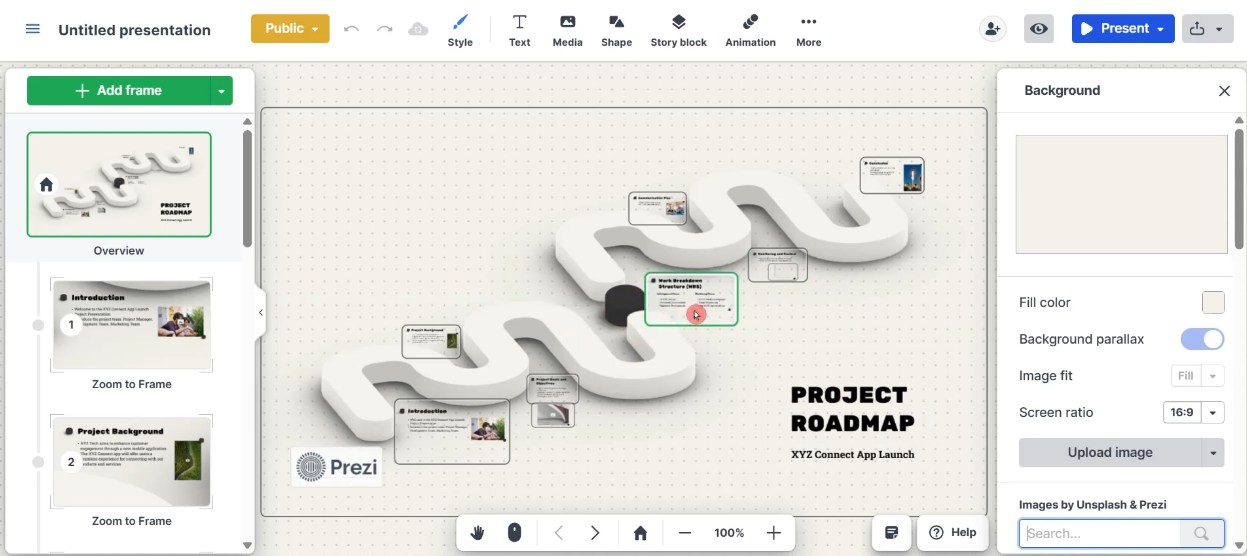
Instead of clicking through linear slides, Prezi uses a single infinite canvas where you zoom in and out to reveal ideas. I created an app launch presentation using AI presentation tools like Prezi, and the zooming effect genuinely captured attention in a way PowerPoint never does. This works brilliantly for creative projects like storytelling, workflows, and concept visualizations, where everything connects.
Prezi’s AI generates presentations in under 30 seconds from prompts. I typed “Create a project roadmap presentation for an app launch,” and Prezi AI built a structured deck with 8 frames instantly. You can also upload files – PPT, PDF, or Word documents – and Prezi transforms them into dynamic presentations.
Key Features
- Fast AI generation: Delivers structured presentations in 30 seconds from simple prompts.
- Mobile apps: iOS and Android apps (Prezi Viewer) for viewing and presenting on the go.
- File transformation: Convert existing PowerPoint, PDF, or Word documents into Prezi presentations.
Pros & Cons
PROS
CONS
Prezi Pricing
Prezi has plans for 4 different sets of audiences. They follow a monthly subscription model.
Basic: A basic free plan with 500 credits and a Plus plan starts at $19/mo.
Individual: A Standard plan at $7/mo, a Plus plan at $19/mo, and a Premium plan at $29/mo
Students & Educators: A EDU Plus at $4/mo, a EDU Pro at $8/mo, and a EDU Teams at $19/mo/user
Business: A Plus plan at $19/mo, a Premium plan at $29/mo, and a Teams plan at $39/mo/user
Verdict
Prezi excels when you want to wow audiences with visual storytelling and non-linear presentations. The zooming effect genuinely stands out. But if you need fast, fully automated AI content generation or PowerPoint compatibility, other tools handle those better.
Decktopus
Best for Business & Sales
Decktopus is popular for business presentations, so I tested it for that exact use case, and it delivers exactly what sales teams and entrepreneurs need: professional pitch decks in under 5 minutes.
If you’re preparing strategy-driven presentations for investors, sales proposals, or quarterly reports, Decktopus optimizes for business use cases better than any competitor I tried.
Why Decktopus Stands Out for Business
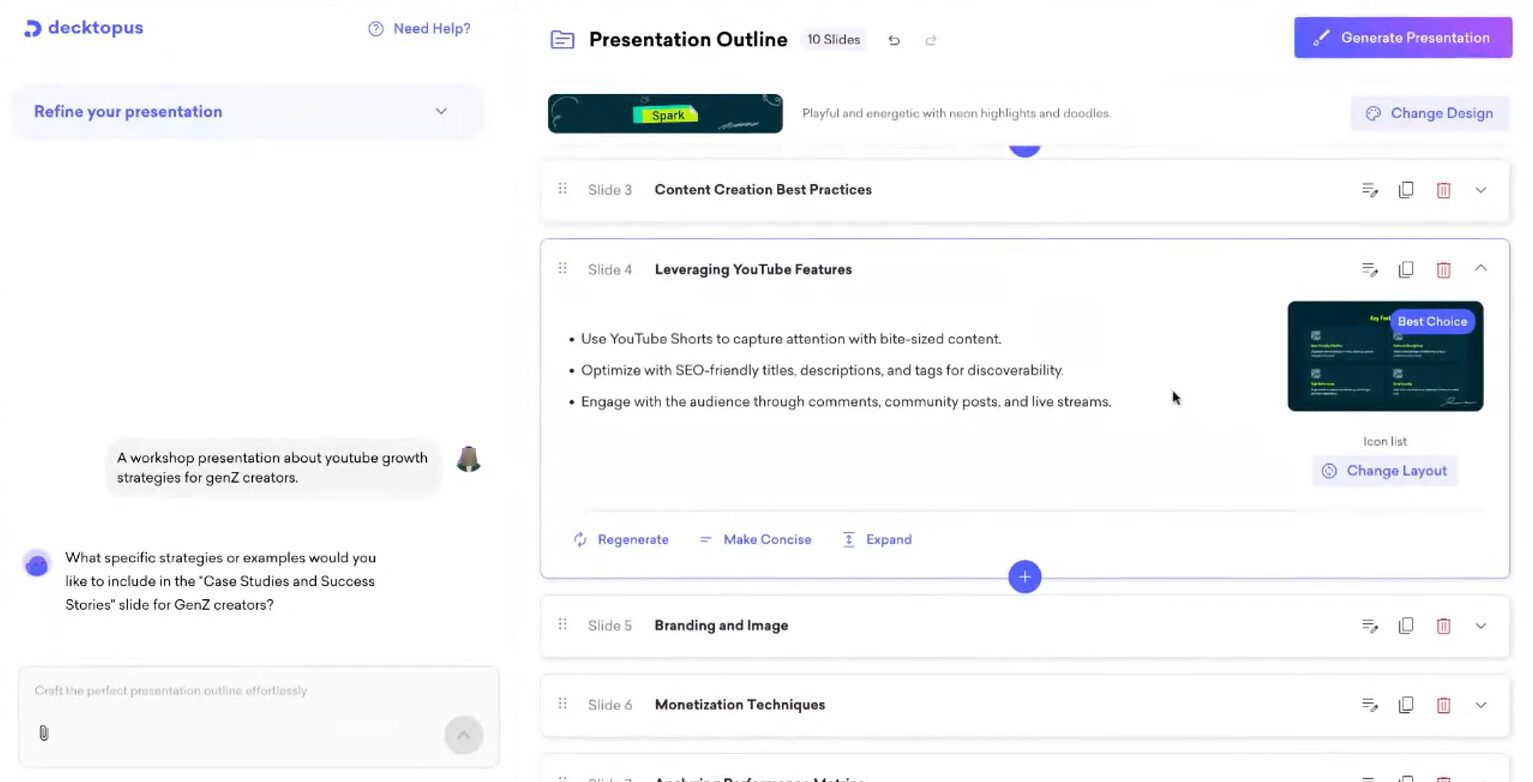
Decktopus uses AI trained specifically on business presentation structures. I entered “Create a workshop presentation about YouTube growth strategies for Gen-Z creators,” and within 3 minutes, it generated a complete 10-slide presentation with branding and image suggestions, monetization techniques, case studies, and a call-to-action slide.
With a few tweaks, the structure felt ready for actual business meetings – not generic AI output.
The platform includes business-specific features: presentation analytics (who viewed your deck, how long they stayed on each slide), webhook integrations for CRM systems like Salesforce, HubSpot, and Pipedrive, and form embedding to capture leads directly inside presentations.
Key Features
- Credit system: 1,000 AI credits per user/per month (Business plan), with each presentation using approximately 30 credits.
- Presentation analytics: Track viewer engagement, time spent per slide, and form submissions.
- Business-optimized AI: Understands sales deck structure, pitch flow, and persuasive elements better than general tools.
Pros & Cons
PROS
CONS
Decktopus Pricing
Decktopus follows a monthly subscription model. Here are the monthly prices of their annual plans.
Pro: $14.99/per month
Business: $34.99/ user/per month
Enterprise: Custom pricing
Decktopus also offers a free plan, but you get only 20 one-time credits.
Verdict
Decktopus excels when you need business presentations fast and want analytics to track engagement. The AI understands sales deck structure better than competitors. But expect to manually refine AI-generated content for high-stakes pitches, and be aware that template designs can feel generic after repeated use.
Also, the Business plan at $34.99/user/month adds up quickly for larger sales teams.
Adobe Express
Best for Enhancing Existing PowerPoint Files
I expected Adobe Express to be another AI presentation generator, but discovered it’s something different – a PowerPoint enhancement tool that excels at importing, editing, and beautifying existing presentations.
If you already have PPTX files that need visual polish or want access to Adobe’s premium asset library, this is the tool for you. You can create images, videos, text effects, and more, with Adobe’s AI capabilities.
What Makes Adobe Express Different
Unlike AI presentation platforms like Decktopus, Gamma, and Prezi that generate presentations from scratch, Adobe Express focuses on document transformation and enhancement.
I noted that Adobe Express is an excellent PowerPoint alternative for creative presentations. I imported an existing PowerPoint file (a plain 10-slide marketing deck), and Adobe Express preserved every element (text, images, layouts) perfectly, making them perfectly editable as individual layers. Tools like Canva often break formatting during import, but Adobe Express maintained complete fidelity.
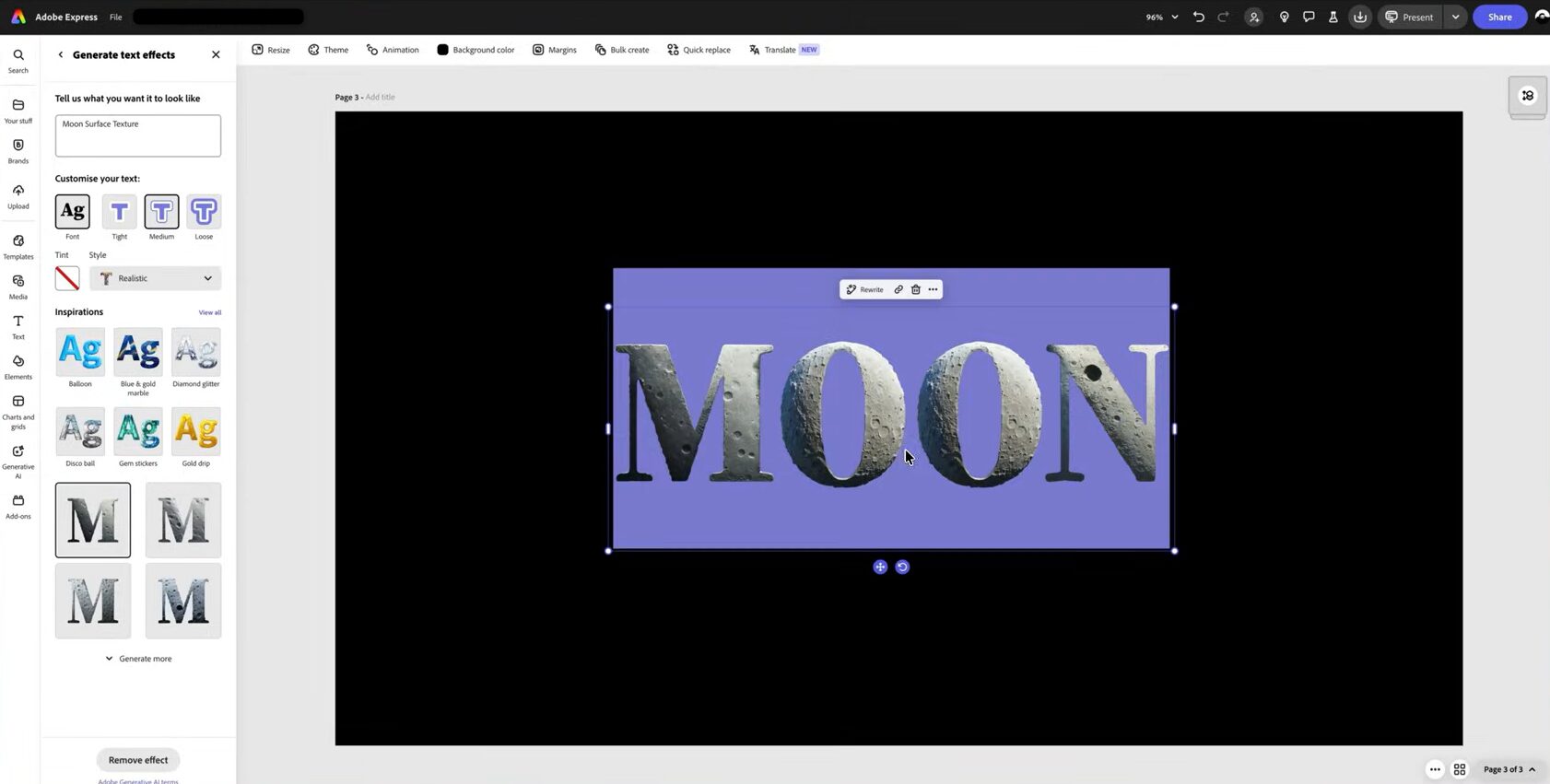
The platform provides access to 280 million Adobe Stock assets – photos, videos, graphics, and over 25,000 Adobe Fonts. I created a fun presentation about the moon landing and had an excellent time generating dozens of high-quality, royalty-free images that looked professional and not like generic stock photos.
Key Features
- 280+ million Adobe Stock assets: Access premium photos, videos, graphics, icons, and 25,000+ professional fonts (Premium plan).
- 250 generative AI credits per month (Premium plan): Create custom images, text effects, and design elements.
- AI image editing: Remove or insert objects in photos using generative fill.
Pros & Cons
PROS
CONS
Adobe Express Pricing
Adobe Express offers multiple monthly subscription plans for its target audiences. Here are the monthly prices of their annual plans:
Individuals: Adobe Express Free ($0/mo), Adobe Express Premium ($9.99/mo), and Adobe Firefly Pro ($19.99/mo)
Business: Adobe Express Teams ($4.99/mo/user), Adobe Express Enterprise (Contact Sales)
Students: Adobe Express Free ($0/mo), Adobe Express Premium ($9.99/mo)
Educators: Adobe Express K-12 Education ($0/mo), Adobe Express Higher Education (Contact Sales)
Verdict
Adobe Express’s PowerPoint import/export fidelity is unmatched. However, if you want fast AI-generated presentations from prompts, tools like Decktopus and Gamma deliver better automated content creation. Adobe Express is more of an enhancement tool than an AI generator.
Gamma
Best for Docs-to-Slides
I uploaded a chaotic Google Doc full of notes, bullet points, and scattered ideas to Gamma – and watched it transform into a polished presentation in under 2 minutes.
If you have existing content in messy documents that needs visual structure, Gamma is unmatched. It’s designed specifically to import files from platforms like Google Docs, Notion, PowerPoint, PDFs, and Word and turn them into modern, card-based presentations.
Why Gamma Excels at Document Transformation
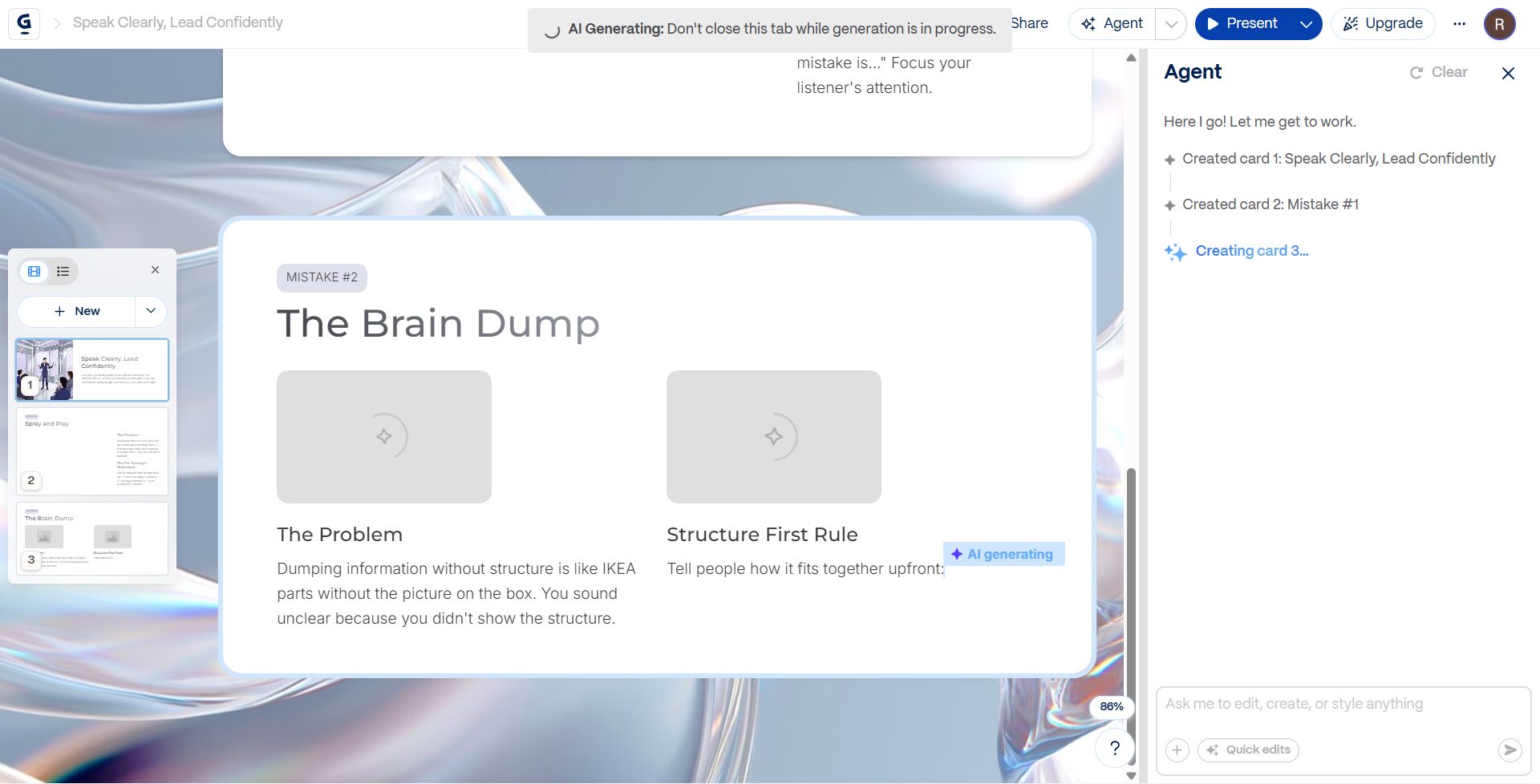
Gamma’s core strength is intelligent content restructuring. I pasted a 2,000-word research document with 7 headings into Gamma’s import feature, and it automatically created 7 cards – one per section – with text, layouts, and visual hierarchy already applied. Competing tools like Decktopus and Prezi require you to start fresh or provide structured prompts; Gamma works with whatever messy content you already have.
The platform uses a card-based design system instead of traditional slides. Cards scroll vertically like a webpage, automatically adjusting height to fit content without overflow. This eliminates the constant resizing issues you face in PowerPoint.
Gamma uses 20+ AI models (including GPT-4, Claude, and others) to ensure high-quality output. During generation, I noticed the AI understood context better than single-model tools: it grouped related points, suggested relevant images, and even generated charts from the data I pasted.
Key Features
- Multi-source import: Upload files from Google Drive, Notion, PowerPoint (PPTX), Word (DOCX), PDFs, or paste webpage URLs directly.
- Card-based design system: Dynamic cards adjust height automatically to fit content without overflow or cutting off text.
- Website and document modes: Create scrollable web pages or traditional slide decks from the same content.
Pros & Cons
PROS
CONS
Gamma Pricing
Gamma offers two sets of plans for two sets of audiences:
Individual: Free (€0), Plus (€10/seat/mo), Pro (€18/seat/mo), and Ultra (€77.33/seat/mo)
Team: Team (€18/seat/mo) and Business (€35/seat/mo)
Verdict
Gamma is the best tool for transforming existing documents, notes, and messy content into structured presentations. The import feature saves hours compared to manually rebuilding slides.
The card-based design eliminates overflow headaches. However, the vertical scrolling format may not suit traditional live presentations where slide transitions matter.
Canva
Best for Social Media, Students, and Freelancers
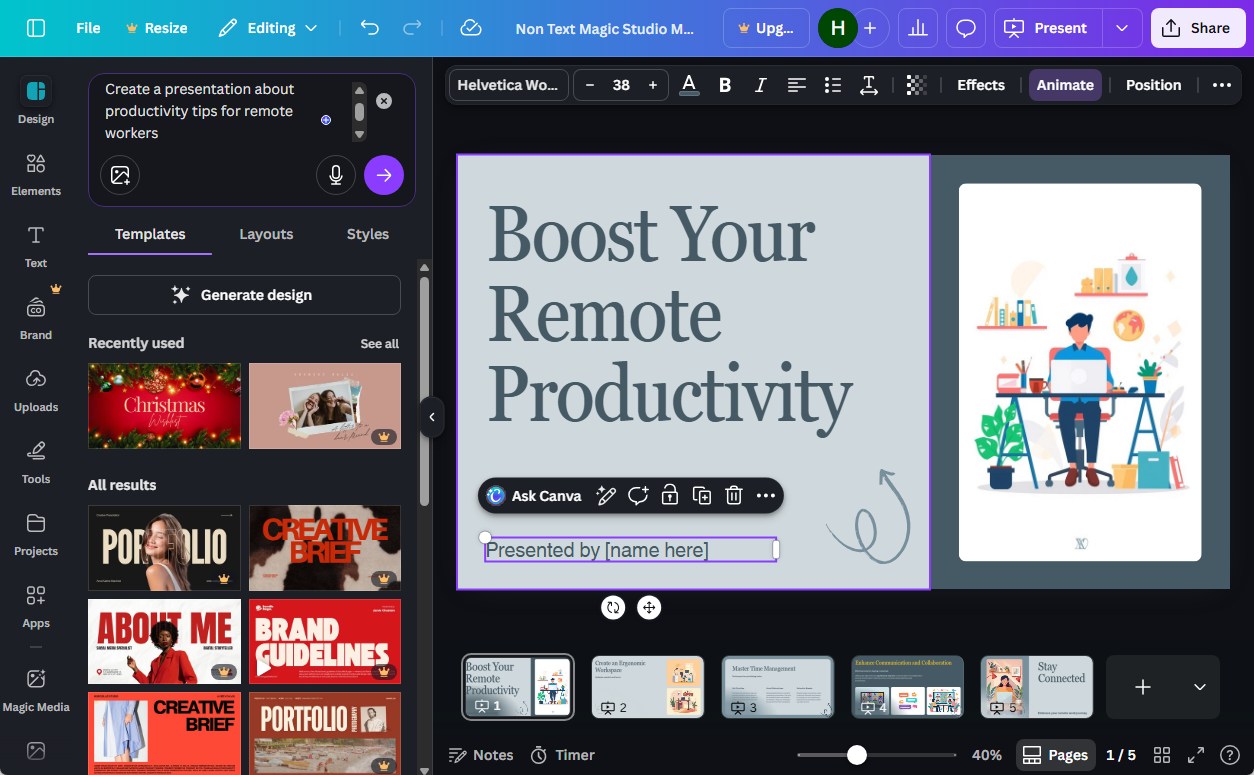
I have used Canva’s Magic Design before, but only for social media graphics. Today, I used it to create a presentation for the first time, and I must say it’s perfect for specific audiences: students needing quick school projects, freelancers designing client decks, and social media managers creating visual content.
The generous free plan and all-in-one ecosystem make it accessible for users who can’t afford premium tools like Beautiful.ai or Decktopus.
Why Canva Works for Students and Freelancers
Canva’s biggest advantage is its familiar interface and cross-platform accessibility. I created a presentation on my desktop, edited it on my iPhone during my commute, and presented from my iPad – all changes synced instantly.
For students juggling classes or freelancers working on-the-go, this flexibility is invaluable. Design tools like Adobe Express, Prezi, and Beautiful.ai require desktop browsers; Canva’s full-featured mobile apps (iOS and Android) let you design anywhere.
The free plan offers 10 AI-generated presentations per month using Magic Design. I tested this limit – each month, your quota resets, so students can create weekly school projects without paying. Competitors like Gamma offer one-time credits that expire; Canva’s monthly refresh is more sustainable for regular users.
Key Features
- Renewable free plan: 10 free AI presentations per month (renews monthly); unlimited on Pro plan.
- Whiteboard mode: Convert presentations into collaborative whiteboard canvases for brainstorming sessions.
- Animation and transitions: Add slide animations, element transitions, and timed effects to make presentations dynamic.
Pros & Cons
PROS
CONS
Canva Pricing
Canva offers monthly subscription plans that include its Magic Design capabilities:
Individual and Business: Free ($0/mo), Pro ($144/year), Business ($250/year), and Enterprise (custom pricing)
Education: Free plans for K-12 educators, schools, and districts. For campuses, custom plans are available.
Verdict
Canva excels when you need visually appealing presentations quickly and want to repurpose content across social media, documents, and other formats. The 10 free AI presentations per month, mobile apps with full editing capabilities, make it sustainable for students and freelancers.
However, AI-generated content lacks depth and requires significant manual editing, PowerPoint export is restricted on the free plan, and the editor struggles with large presentations.
Presenti.ai
I tested Presenti.ai to see if it lives up to its promise of turning documents into presentations within seconds, and found it delivers fast transformation speeds for users who need quick slide decks from existing materials.
If you have Word documents, PDFs, Markdown files, or even XMind mind maps that need to be converted to PowerPoint, Presenti.ai handles multiple input formats better than most competitors.
What Makes Presenti.ai Stand Out for Business
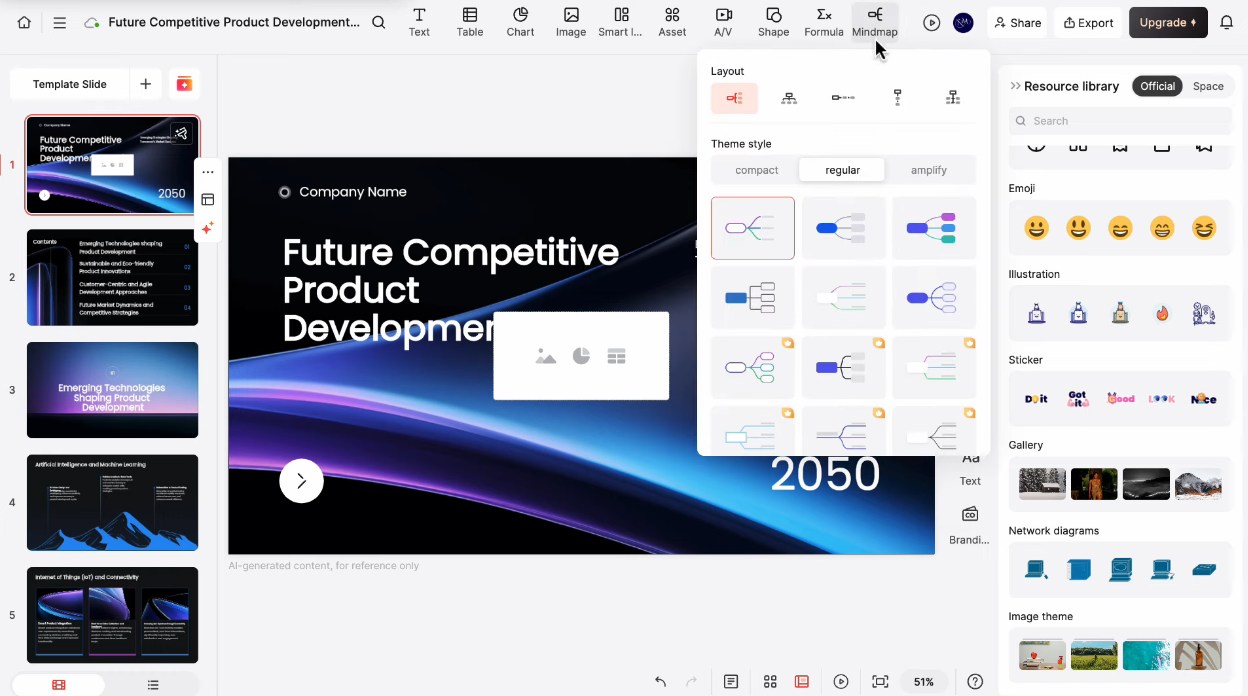
I signed up for Presenti.ai and tried to create a pitch deck with a broad topic (suggested by Presenti): “Future Competitive Product Development.” The platform built an editable outline first – I could tweak sections, rename slides, or switch to mind map view before wasting credits. After selecting a theme, Presenti.ai generated a complete 15-slide deck in 45 seconds. The editing interface felt surprisingly smooth – more like desktop PowerPoint than clunky web tools.
I tested document conversion by uploading a WordPress training outline. It produced cleaner, better-structured slides than my prompt-based test. The Material Library organized brand assets like Dropbox, and the AI Beautify feature modernized an old presentation instantly by applying new layouts and colors.
The custom brand template feature impressed me most. I uploaded my company’s branded PowerPoint, mapped content placement, and saved it as a template. Every future presentation automatically followed brand guidelines – no manual formatting needed. For agencies and corporations, this saves hours.
Key Features
- Five creation paths: Generate from scratch with AI prompts, transform existing files (Word/PDF/PowerPoint/Markdown), start from templates, or use AI Beautify on old presentations
- Material library: Built-in asset management system (like Dropbox) stores logos, images, and graph.ics with tagging for organization.
- Desktop-like editing: Comfortable interface for resizing text, moving elements, changing fonts, uploading logos, and adding images – feels more like PowerPoint than browser tools.
Pros & Cons
PROS
CONS
Presenti AI Pricing
Presenti AI offers four different plans. Here are the monthly prices for their annual plans:
Free: $0
Plus: $6/mo
Pro: $8/mo
Ultra: $16/mo
Verdict
Presenti.ai works best for businesses and agencies needing brand-consistent presentations. The custom template system automatically keeps every deck on-brand, and document conversion produces cleaner results than AI prompts.
However, occasional spacing tweaks are needed; templates frequently use stock images, and the free plan is too limited. At $6/month with all features included, it’s an excellent value for regular users.
Beautiful.ai
Best for Corporate Teams and Marketing Departments
Corporate presentations have a branding problem. Sales reps use outdated logos. Marketing creates decks in off-brand colors. Every department builds presentations differently.
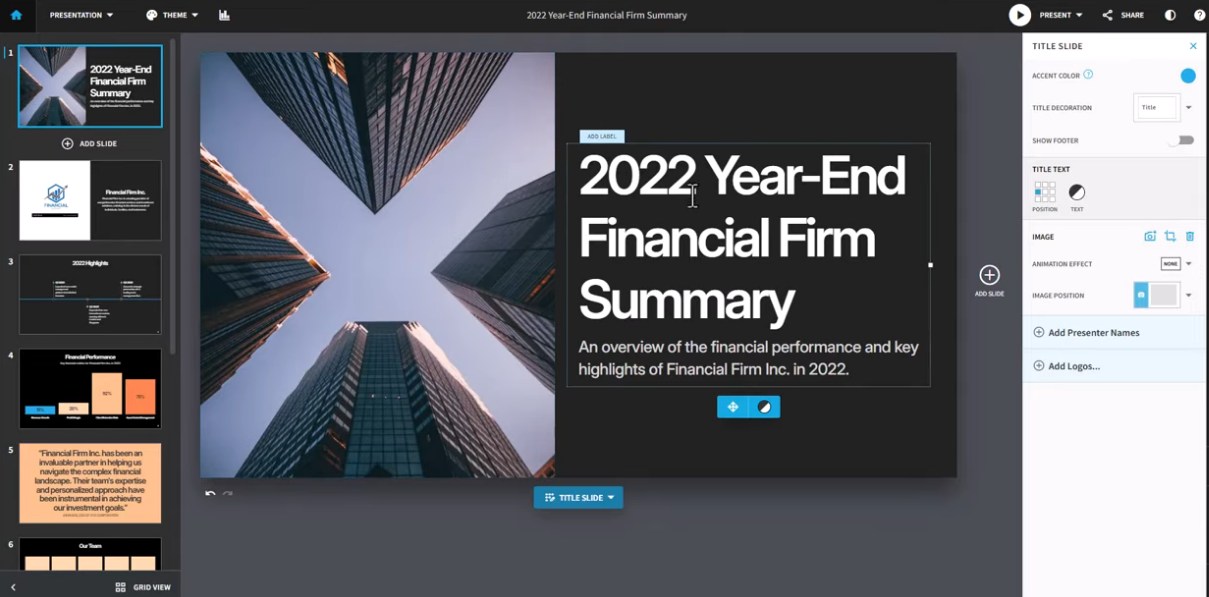
Beautiful.ai solves this chaos with Smart Slides technology – layouts that adapt automatically while enforcing brand consistency across entire organizations. I tried creating a business presentation with text, images, and charts, and it performed better than I expected.
What Makes Beautiful AI Different?
Brand governance separates Beautiful.ai from design tools like Canva, Prezi, and Adobe Express. Upload your logo, colors, and fonts once and save them. Every presentation your team creates automatically follows brand guidelines.
If you change your logo or any other brand asset, admins can instantly propagate updates to all existing decks. No manual edits. No email reminders. Just consistent branding enforced at the platform level.
Sales and marketing teams benefit most. Presentation analytics track viewer engagement – which prospects opened your deck, how long they stayed, which slides held attention. Real-time collaboration with approval workflows eliminates version chaos. Shared libraries give teams instant access to approved templates.
Key Features
- Brand governance: Admins lock organization themes, propagate logo updates to all existing presentations automatically.
- Real-time collaboration: Multiple editors work simultaneously with comment threads, approvals, and role-based permissions.
- Presentation analytics: Track who viewed decks, time per slide, engagement metrics for sales follow-ups.
Pros & Cons
PROS
CONS
Beautiful AI Pricing
Beautiful AI offers three plans. Here are the monthly prices for their annual plans:
Pro: $12/mo
Teams: $40/mo/user
Enterprise: Custom pricing
Verdict
Beautiful.ai works best for corporate teams needing brand-consistent presentations at scale. Smart Slides eliminate formatting busywork. Brand governance automatically keeps every deck on-brand. Collaboration features prevent version chaos.
Presentations.ai
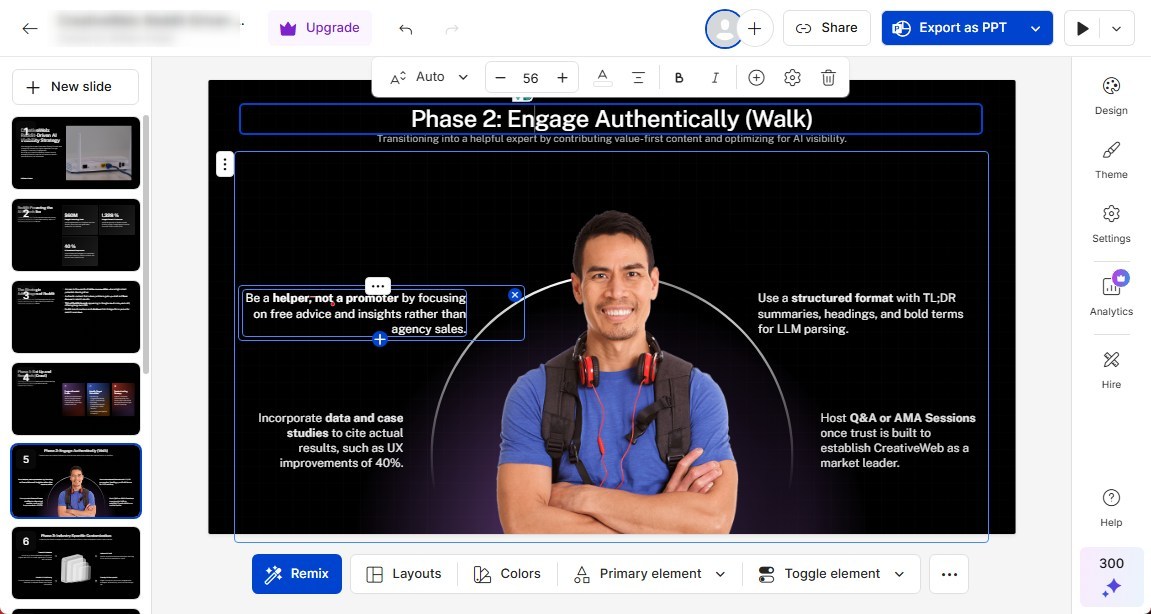
Presentations AI claims to be one of the fastest AI presentation makers in the market, and when I used it, it did not disappoint. I uploaded a pdf of my Reddit-focused marketing strategies and chose a template, and Presentations AI created these (in the screenshot) AI slides within 30 seconds. I was impressed.
You can upload your own files to generate AI slides, or import from Google Drive or Notion, and you can even give it a prompt to generate a pitch deck from scratch.
What Makes Presentations AI Different?
Presentations AI positions itself as “ChatGPT for Presentations”, and that comparison is accurate. Like ChatGPT, it understands prompts well and generates content quickly. Also like ChatGPT, the output requires significant human refinement. The AI created a logical structure and professional visual design immediately, but the actual text content felt generic and surface-level.
The AI slide generator automatically generates 9-11 slides in 40-60 seconds. Slide layouts range from typical business formats to more innovative designs. The editing interface follows familiar patterns: thumbnails on the left side, like in PowerPoint and Google Slides, with editing toolbars below and to the right of the selected slide.
Key Features
- Really fast generation: Fastest AI presentation creation tested. My complete deck was ready in under 30 seconds after I uploaded my PDF.
- Multiple input sources: Generate from text prompts, upload PDFs for conversion, import from URLs, YouTube videos, or blog posts.
- Cloud synchronization: Access and edit presentations across all devices – desktop, tablet, mobile.
Pros & Cons
PROS
CONS
Presentations AI Pricing
Presentations AI offers annual subscription plans for starters, pros, and enterprises.
Starter: $0 (early bird pricing)
Pro: $198/year
Enterprise: custom pricing
Verdict
Presentations.ai works best for rapid prototyping and internal drafts where speed matters most. At 40 seconds per deck, it beats every competitor tested, and the mobile app enables on-the-go editing. However, AI-generated content is generic and requires 50-70% rewriting for professional use.
The free plan can’t export files, and PowerPoint exports have formatting issues. Great for brainstorming, but expect significant refinement work for client-facing presentations.
Other AI Presentation Makers
The below AI presentation makers deserve an honorable mention on our list.

Manus

Genspark AI

Simplified

Copilot in Powerpoint

Plus AI

SlidesAI

Sendsteps
Prezi vs. Decktopus vs. Others
| Tool | Starting Price | Free Plan | Best Features | Export Options | Mobile App | AI Credits/month |
|---|---|---|---|---|---|---|
| Prezi | $7/month | No (a 14-day free trial is available) | Non-linear zooming canvas, 25% more memorable than slides, AI-powered generation | PDF, PPTX, EXE/ZIP, and MP4 | iOS & Android (view only) | 500 to unlimited |
| Decktopus | $14.99/month | Yes (limited) | Business-optimized AI, presentation analytics, lead capture forms | PPT, PDF | Mobile browser (responsive) | 750-1,000 (depending on plan) |
| Adobe Express | $9.99/month | Yes | 280M Adobe Stock assets, seamless PowerPoint import/export, cross-device editing | PPT, PDF | iOS & Android (full editing) | 250-4000 (paid plans) |
| Gamma | €10/seat/month | Yes (400 one-time credits) | Docs-to-slides transformation, card-based design, 20+ AI models | PPT, PDF, and PNG | Browser only (no app) | 400-20,000 (depending on plan) |
| Canva | $144/year | Yes | 10 free AI decks/month, Magic Resize for social media, 250K+ templates | PDF, PNG, JPG (PPT on Pro) | iOS & Android (full editing) | Unlimited AI decks (Pro) |
| Presenti.ai | $6/month | Yes (no export) | Custom brand templates, Material Library, AI Beautify old decks | PPTX, PDF (paid only) | No | 15-75 slides per file (no AI credits system) |
| Beautiful.ai | $12/month | No (14-day trial) | Smart Slides auto-formatting, brand governance, and real-time data linking | PPT, PDF | Browser only | Unlimited AI content |
| Presentations.ai | $198/year | Yes (limited features) | 40-second generation, purpose statement prompts, AI assistant | PDF (PPT +$99) | Android only | Limited free, unlimited Pro |
How to Choose the Right AI Presentation Tool for Your Needs
If you need a sales deck fast: Go with Decktopus.
Decktopus generates business-ready sales decks in under 5 minutes with built-in analytics to track prospect engagement and lead capture forms to convert viewers into contacts.
If you want to wow an audience visually: Go with Prezi.
Prezi’s zooming canvas creates memorable presentations that audiences remember 40% better than traditional slides, with non-linear navigation that lets you jump between sections dynamically during live presentations.
If you have a messy text document: Go with Gamma.
Gamma transforms chaotic Google Docs, Notion pages, or Word files into structured presentations in under 3 minutes, with card-based designs that automatically adjust height so content never gets cut off.
If you want all-in-one: Go with Canva.
Canva lets you create presentations and instantly convert slides into Instagram posts, LinkedIn carousels, and PDF handouts using Magic Resize, with 10 free AI decks monthly and full mobile editing capabilities.
Tips for Getting the Best Results from AI Presentation Generators
Below are some tips to ensure that AI presentation generators give you the best results.
- Write good prompts with context (e.g., “Act as a marketing manager presenting to C-suite executives…”).
- Always review the content for hallucinations and factual errors.
- Check if the AI emphasized the right data points.
- Specify your target audience in the prompt (investors, students, clients, employees).
- Include the desired number of slides to avoid overly long or short presentations.
- Add your own images instead of relying solely on AI-generated stock photos.
- Upload existing brand guidelines (logos, colors, fonts) before generating presentations.
- Test the presentation on the device you’ll use for delivery (desktop, tablet, mobile).
- Export early to check formatting in PowerPoint or PDF before finalizing content.
- Use bullet points sparingly – aim for 3-5 bullets maximum per slide to avoid overcrowding.
- Add real data, statistics, and case studies to replace generic AI-generated examples.
- Review exported files for font substitutions, image scaling issues, and layout shifts.
- Regenerate slides multiple times if the first output doesn’t match your needs.
- Combine AI-generated structure with manual content refinement for the best results.
- Save presentations in multiple formats (PPT, PDF, cloud link) for backup and compatibility.