Convenient AI apps are everywhere. They offer a clean interface and a fixed per-user price, but this convenience can lead to issues in the long term.
For example, they can lead to unexpectedly high monthly bills and raise data privacy concerns, such as unclear data ownership policies, inadequate logging controls, or uncertainty about how user data is handled or used for model training.
With per-user billing, it is common to find bills crossing thousands of dollars. Big organizations pay a lot more than they should, leading to the phenomenon known as per-seat SaaS inflation.
SaaS spending could reach $9,100 per employee in 2026, up from $7,900 in 2023, as per research by Vertice.
Many AI apps provide limited team-level access controls. This can lead to prompts/logs/history being visible to other team members.
For most users, default managed subscriptions are great, but they come with a trade-off. You trade control for convenience. This can lead to vendor lock-in and a lack of compliance with industry standards.
So, is there a better AI subscription alternative?
Yes, it’s BYOK.
Bring Your Own Key (BYOK) lets you take direct control over your AI usage, including the cost and the AI model you want to use. It works by generating AI keys directly from the model provider and integrating them into internal tools or BYOK-enabled apps.
BYOK brings flexibility and personalization that traditional AI apps lack. For enterprises, it means infrastructure ownership and a separate interface from the underlying AI provider.
In this article, I’ll guide you on how you can use BYOK as your preferred business strategy to take control over your AI use, spending, and scalability.
Why the One Model Is Broken
Many businesses default to a single-model AI strategy. They start by choosing one model, buying per-seat subscriptions, only to find it unsustainable.
For small teams, per-seat pricing can be enticing. The appeal lies in its convenience and predictable budgeting. It feels straightforward, especially when managing a budget. However, it can lead to “seat tax,” where businesses waste resources when users do not fully utilize the tool.
For instance, businesses pay a “fixed” amount per employee, irrespective of:
- Usage volume
- Task complexity
- ROI generated
- Model selection
Many AI providers push bulk deals, which leads to a waste of resources. During my research on “SaaS” wastage, 44% of businesses waste or underutilize SaaS licenses, resulting in over $17M wasted every year, as per Zylo’s SaaS management index report.
In addition, using only one AI model has its own set of disadvantages:
- Inefficiency: Each AI model has its own strengths and weaknesses. Sticking to just one can lead to inefficient or incorrect results, which is not ideal for any business setting.
- Hallucinations: A single model increases the chance of hallucinations, as you cannot cross-verify it with other models’ output.
- Broken workflow: New AI model updates can break workflow, including prompt reliability and accuracy. For example, model updates change output style or can lead to API pricing shifts or some prompts to stop working.
- Technical debt: Relying on a single model can lead to technical debt and operational risks. For instance, businesses can suffer due to tight API coupling and custom prompt architecture.
- Multi-capability: Might lack the ability to offer speed and accuracy (deep reasoning) together.
- Cost: Can become costly if dependency becomes long-term.
However, the biggest disadvantage is vendor lock-in. This is where a BYOK strategy changes the equation. Let’s discuss how BYOK can help you and also compare it to the “managed subscriptions” model.
BYOK vs. Managed Subscriptions
To understand which approach fits your organization, let’s compare the two billing models.
- Managed subscription model
- BYOK model
Managed Subscription Model
Managed subscriptions are the most common way businesses access AI SaaS platforms.
It involves a flat monthly/quarterly/yearly fee where you get full access to the service, including model access, margins, and data routing.
It’s neat and useful as it leads to simple onboarding and predictable costs. After all, you’re paying for a bundled interface, preselected model access, and abstraction from infrastructure complexity. Furthermore, there is no need to enter API keys or configure dashboards. It benefits teams that want faster adoption.
However, this model can lead to higher long-term costs while providing limited model choice. The subscription provider’s margin for managing the API keys adds up and gets reflected in the final expenditure. In fact, global AI SaaS spending is projected to cross $300B in 2026, showing dangerous trends when it comes to business spending.
Isn’t AI all about making it cheaper and easier to access? At its core, AI is doing it, but organizations must check where they can save costs and increase efficiency.
BYOK Model
The BYOK model is a more flexible approach where you provide your own API keys and access models via a BYOK-enabled app.
Here, you can include API keys from different vendors, including the likes of OpenAI, Google, and Anthropic, giving you the option to choose a model as per your needs.
I like the approach as it gives organizations freedom. I have worked on multiple enterprise projects where requirements change more often than expected, especially when working on cutting-edge technologies such as AI.
Depending on the change, one model might feel outdated, while others shine. Also, there can be instances where newer models are way more efficient and accurate compared to older ones.
Enterprises need flexibility, and that can be done via the BYOK approach.
In terms of pros, the BYOK model offers:
- Cheaper wholesale rates due to a pay-per-use AI approach
- Direct AI data protection agreements with providers
- Freedom for multi-provider BYOK
Out of these, the biggest impact is cost. BYOK lets you save up to 65% of the cost you might have had to pay if you choose a managed subscription. That’s huge, considering the cost variable is the hardest part of the equation to solve for growing businesses with varying project demands and requirements.
Let’s look at how you can save up to 65% by taking a real-world use case scenario.
For a team size of 5 people, a traditional subscription model will cost $100 if the per-person cost is $20 per month. However, if you use the BYOK model with Geekflare Connect, the cost reduces to $35.25. Let’s look at how it’s done.
- Team Size: 5
- Token Usage: Leverages 2 million “lite” LLM tokens (e.g., cost-effective models like Gemini 3 Flash Lite, Grok 4 Fast, etc.) + 2 million “pro” LLM tokens (e.g., GPT-5, Gemini 3.1 Pro for high-quality outputs).
- Estimated Token Costs (based on standard API rates):
– Lite tokens: ~$0.50 per 1M tokens → 5M tokens = $2.5
– Pro tokens: ~$11 per 1M tokens → 1.5M tokens = $16.50
Total API cost: $18.75/month - Platform Cost: $16.50/month for up to 5 people
Total Monthly Cost: API tokens ($18.75) + Platform ($16.50) = $35.25
So, you save ($64.75 / $100) × 100 = 64.75% compared to traditional models.
You simply don’t waste resources and scale when your project demands.
As for cons, I only find its initial setup and key management are limited. However, this can be resolved by having a dedicated manager to handle setup and management.
The Strategic Advantages of BYOK
BYOK not only provides operational efficiency, but it also gives you access to a multi-model approach. In this section, we dive deep into the strategic advantages that BYOK brings to your enterprise ecosystem.
BYOK transforms AI from a SaaS expense into an infrastructure utility.
Here, you pay as per the published API rates and only for the consumed tokens.
AI Cost Savings
AI can be costly if operational expenses are not structured correctly. However, there are ways to decrease overall expenditure, such as by using the BYOK-AI platform.
BYOK eliminates the middleman’s markup. It is also cheaper, as you don’t have to sign up for their overall package, including the user interface, customer support, and other bundled options. Here, you pay only for the tokens you consume.
This is a great approach, considering that AI is only going to get costlier from here. We’re still in the early phase of AI adoption, where AI companies are willing to provide services at a lower price. Once the adoption rates reach a plateau, the BYOK option would be viable, especially for businesses and enterprises.
The Multi AI Provider Advantage
Multi-AI access is the biggest advantage of using BYOK. With this approach, businesses are not stuck to a single model. They can use different models, such as OpenAI or Anthropic, for different purposes, be it reasoning, creativity, coding, cost efficiency, or multimodal tasks.
With BYOK, organizations can optimize via model arbitrage and performance optimization.
For example, teams can opt to use a high-tier ChatGPT for deep reasoning, while using Claude long-context models for understanding long documents with 100K+ token requirements. This creative approach brings the best results while maintaining cost-efficiency (switch to cheaper alternatives easily).
Furthermore, utilizing multiple models via the BYOK-AI platform, such as Geekflare Connect, opens up easy access via one interface. The model-agnostic approach gives the option to rapidly scale and adapt to changing requirements.
With BYOK, AI use becomes modular rather than monolithic.
In short, using multiple AI providers, the team also benefits from:
- Proper risk diversification, as they can change providers in case of price change or underperformance.
- No need to pay a premium, such as bundled subscription premiums.
- Proper cost optimization with critical reasoning done via premium models and simple queries via low-cost models.
- Competitive edge as you can adapt to breakthrough models.
- Reducing AI hallucinations by comparing multiple outputs, ideal for more sensitive fields such as legal research.
How to Implement BYOK
While BYOK may sound complex, implementation is typically straightforward. In this section, we’ll look into the steps you need to add your keys and start using the Multi-model AI access. For demonstration purposes, we’re going to use Geekflare Connect.
Step 1: Adding Your Keys
The very first step for a successful BYOK setup is to get your keys.
Since API keys are tied to usage-based billing, you’ll need to create and fund them through your chosen AI provider.
Once bought, you can add them to the BYOK AI app, such as Geekflare Connect, during account setup or via settings.
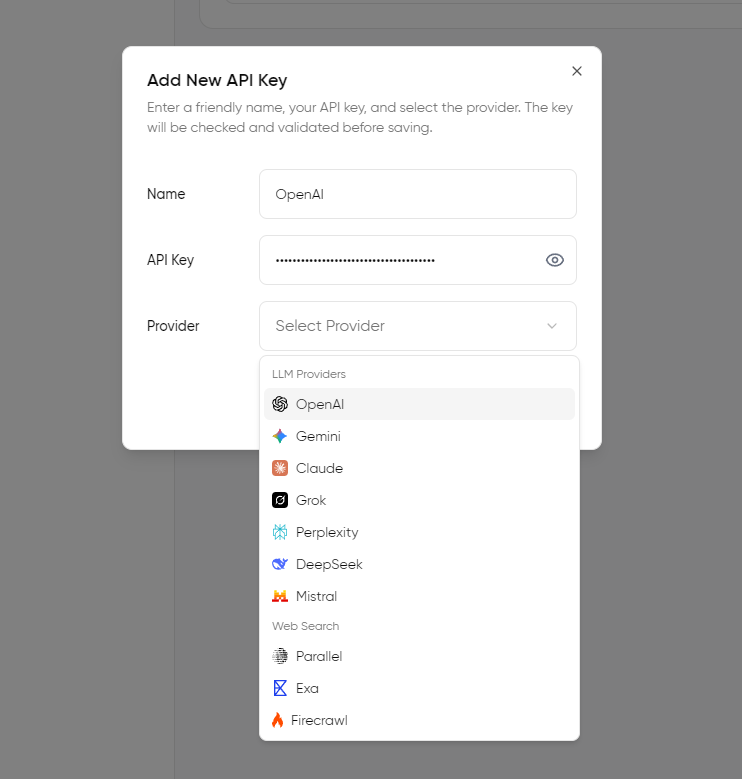
To find your API key, you need to go to the provider’s respective account. For example, OpenAI has its keys available at https://platform.openai.com/api-keys.
Step 2: Choosing Your BYOK Platform
For AI models, you have plenty of options, be it OpenAI, Anthropic, and Google. You can add multiple models to one BYOK platform.
With multiple providers available, selecting the right BYOK platform becomes critical.
For the best experience, I suggest looking for key features such as:
- Unified dashboard: allows you to monitor usage across all providers and get a model-level breakdown. Admins also get access to team-level usage and token consumption.
- Cost analytics: Learn how much each model is costing with a per-user, daily/monthly breakdown.
- Team controls: proper role-based access control with model/token access restrictions.
- Prompt/library portability: Ability to access your prompt library and export it without getting locked out.
Apart from these technical features to look for, I strongly suggest choosing BYOK AI apps that offer:
- Ease of use
- Intuitive way to add/remove API keys
- Detailed knowledge base
- Strong support
I prefer Geekflare AI, as it offers all the things mentioned above. For example, I can add keys by going to settings ⚙️and then quickly adding them. It also offers easy API key addition during the initial setup, which is handy.
Step 3: Manage Models and Security
Models and security management are vital for organizations to fully take advantage of the BYOK model.
It helps admins to assign models to teams or team members. Also, if a model is no longer useful, admins can turn it off, saving precious costs.
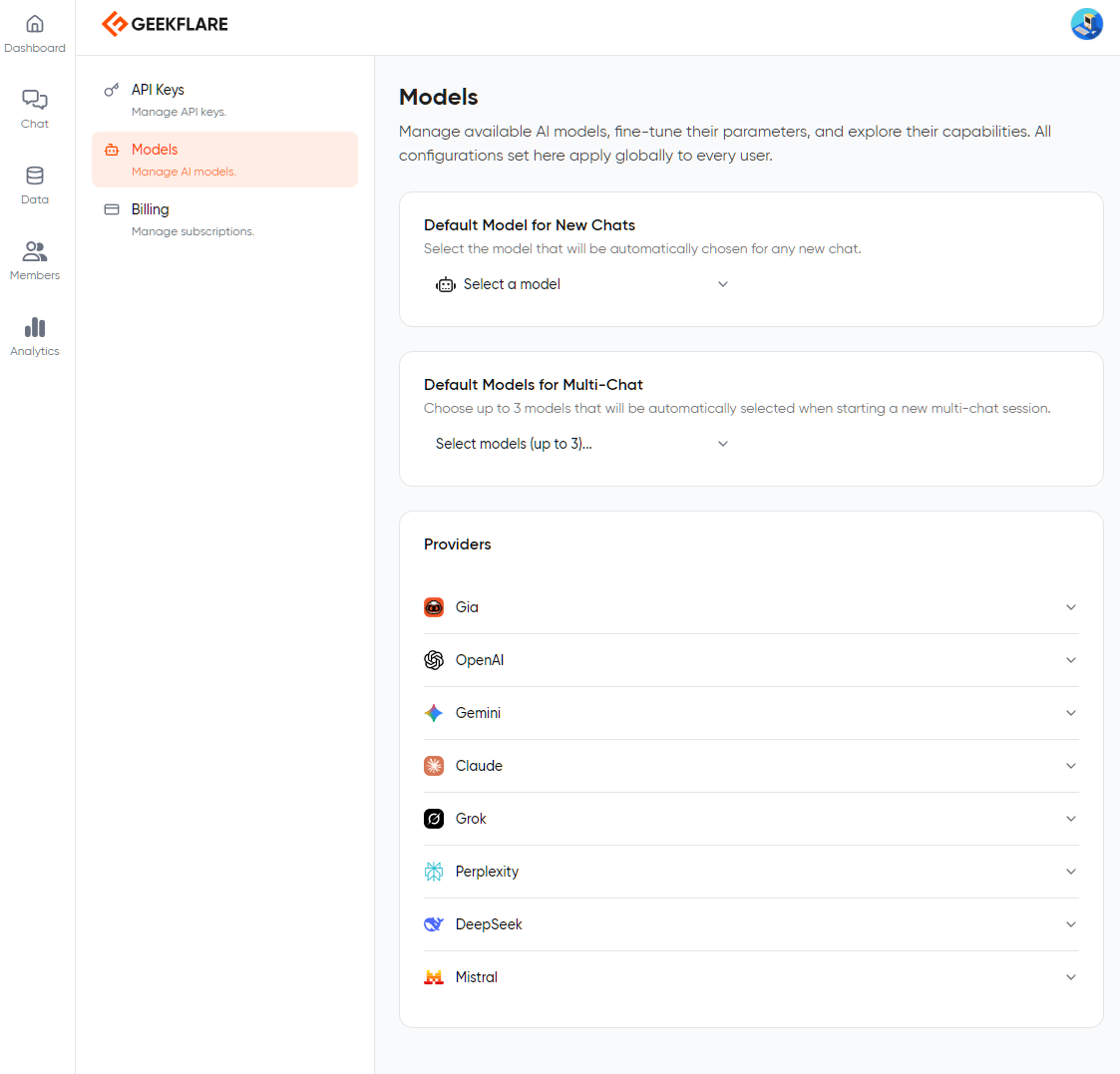
Additionally, access management is crucial to ensure the right distribution of resources among the team. Not every team member uses AI equally; some are heavy users, while others rely less on it. By ensuring proper allocations, organizations can improve cost efficiency while providing the best to each member based on their needs and capabilities.
Common Objections to BYOK and Why They’re Myths
In this section, we’ll list common BYOK myths and see why they’re wrong.
Myth 1: BYOK is Too Technically Complex
A common misconception is that BYOK is technically complex. BYOK does require additional steps to set up, but it’s not that technical as perceived by most users. It actually abstracts the complexity into a simple managed interface.
However, organizations need to carefully pick a BYOK AI platform that offers ease of use with good support and an in-depth knowledge base to make onboarding and managing the platform as seamless as possible.
Myth 2: I Lose the Convenience of a Single Bill
Single platform, single bill. In practice, SaaS billing structures often include add-ons, overage charges, and usage-based components.
When moving to BYOK, organizations think that this issue might get compounded. However, it’s not as most modern BYOK apps, such as Geekflare Connect, offer a single dashboard for usage and cost analytics across all providers. With an eagle-eye view, administrators can equip themselves with insights and help them make better decisions when it comes to resource allocation and billing.
Myth 3: It’s Only for Large Enterprises
BYOK is beneficial for different types of businesses, irrespective of how small or big they are.
Undoubtedly, the BYOK approach helps improve cost-effectiveness for enterprises; however, it’s more impactful for startups and SMBs that need the most AI cost savings and flexibility.
For instance, SMBs can refine expenditure or take on new models as soon as they are released to get a competitive advantage. The fine control and access to multiple models are cheaper in the long term compared to using a single AI model.
Geekflare Connect: The BYOK Platform for Modern Teams
Geekflare Connect is one of the leading BYOK platforms for small-to-medium-scale businesses. It is a true BYOK platform that offers all the key features that an organization needs to succeed. These include:
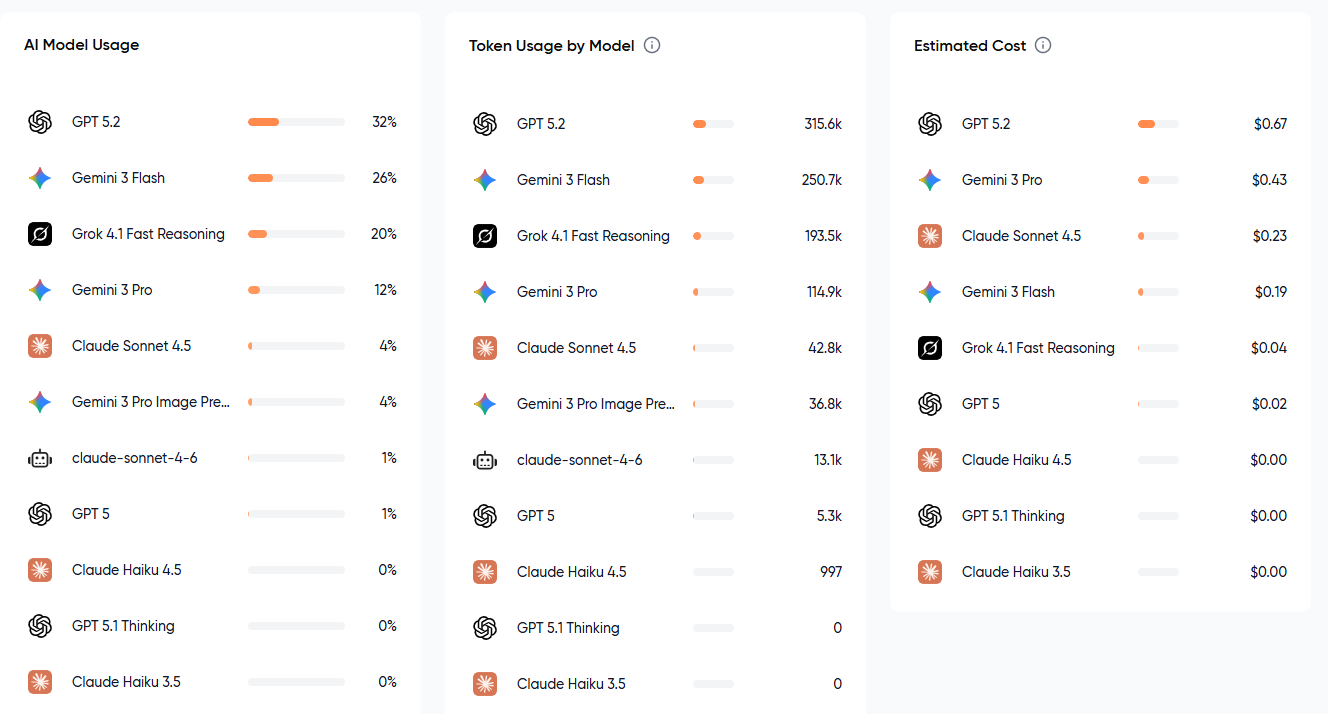
Unified billing dashboards: Offers one dashboard for your AI infrastructure that shows cost per model, usage, and more.
Side-by-side model comparison: Compare outputs from two models to get the best answer free from hallucinations. For example, you can run GPT against Gemini to get the best result.
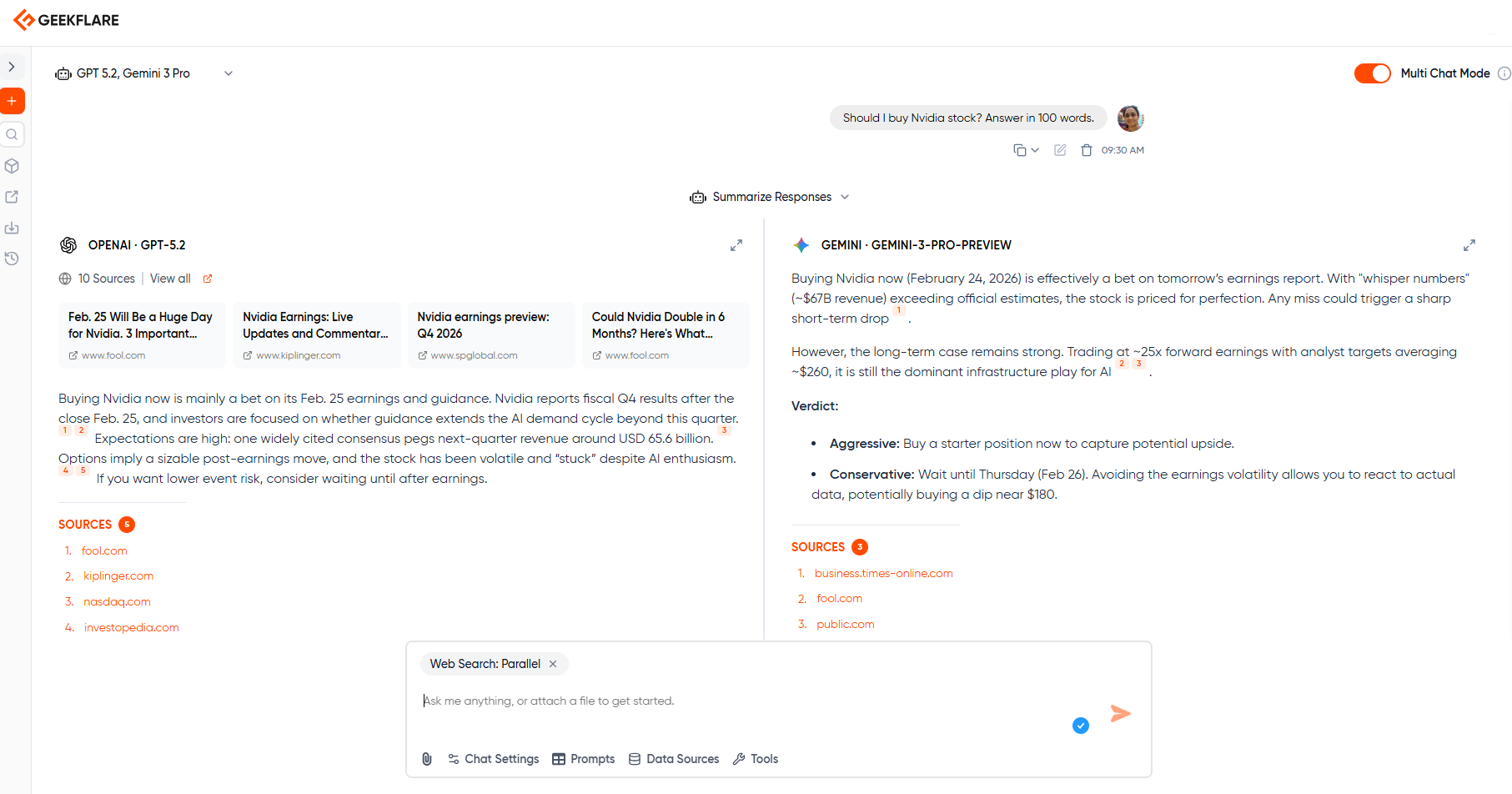
The side-by-side model comparison is also an excellent feature, as it lets you spot and reduce hallucinations.
- Shared prompts: A proper way to share prompts among team members and improve team efficiency and collaboration.
- Shared projects: Organize work in projects with a centralized approach to help reach project goals.
- Live web access: Get real-time and factual answers based on the latest data via web access.
Starting from where you sign up, you get proper onboarding where you can add your API keys to get started as soon as possible.
BYOK provides AI cost savings even after paying model providers. The core reason behind this is that the published API rates are lower compared to full-fledged subscriptions, as they have no markups and lack bundled inflation. API costs also rely on how much you’re using, which makes the rates wholesale with complete transparency. If done right, API usage can lead to up to 65% savings in cost.
BYOK can be used for a team, which allows shared model access. For that, you need to use the Geekflare business plan that lets you add and manage team members’ access and allocation. Furthermore, you also get features such as role-based access, model management controls, and shared dashboards.
Yes, you can use the Geekflare Connect BYOK AI client for free. It is for individuals who allow them to add their own API keys.