AI hallucinates, but it shouldn’t stop you from using AI’s capabilities to grow your business.
Like every technology, AI has its limitations, and they can be mitigated.
In this strategic information guide, I’ll help you understand the risks behind AI hallucinations and how you can put guardrails in place to minimize AI hallucinations in your work processes.
AI hallucinations have a huge impact on growing businesses. When AI generates fabricated content, it can directly impact decision-making and can cause reputational and financial damage.
Some instances of big AI hallucination-induced mishaps include:
- A recent case where a lawyer used AI-generated fake legal citations resulted in $6000 in sanctions. This not only resulted in monetary loss but also reputational damage to the lawyer and the client. There are similar reported instances where lawyers are getting caught.
- Major consulting firms have also faced scrutiny over AI-generated inaccuracies in published research. Deloitte, for example, used AI for a $290,000 report, leading to reputational damage.
As a business, you must know how to reduce AI hallucinations.
On average, AI hallucinations range anywhere between 3% to 27%, depending on the domain and task severity.
However, AI hallucinations are decreasing with every release, but due to how probabilistic models function, some level of hallucination risk will always remain.
What are AI Hallucinations?
AI hallucinations are outputs that are inaccurate or not grounded in reality. They involve generating output that is not factual and is completely made up. However, the biggest issue is how confidently it presents the information, making users trust the output, especially if not questioned. This leads to unchecked misinformation to enter into real-world reports and presentations.
AI hallucinations are not random.
Any AI model, be it Gemini, OpenAI, or Claude, has a statistical probability of giving outputs that may sound right, but are not accurate. For example, the Google Gemini-2.0-Flash-001 model has a hallucination rate at just 0.7%, but if you take another Google model, the Google Gemma-2-9B-it, it is 10.1%.
How does AI hallucinate?
As a user, you need to understand that hallucinations are:
- Not a syntax or typo error
- Not a rare edge case
- Not intentional deception
- Not outdated knowledge (but can lead to it)
AI hallucinations are due to how probabilistic language models work. Models present responses with high confidence, and users’ trust in the output can let some hallucinations slip through.
As LLMs are good at predicting the next word/output, you can think of the AI model as a super-fast auto-complete tool. When there is a gap in knowledge of information, it tries to fill it up with the most plausible information. In return, it leads to wrong information.
However, these errors can be avoided or minimized by using safeguards.
Key technical drivers
AI hallucinations can occur due to:
- Data gaps
- Overgeneralization
- Prompt ambiguity
Data gaps are one of the key reasons for fabricated outputs. It happens because the model lacks information about the topic or niche (such as law, medicine, or proprietary knowledge). In that case, it fills the missing information with fabricated information, even making claims by citing fabricated citations. This happens most frequently in domains that are evolving fast.
Next is overgeneralization, which happens due to how models generalize a pattern and try to replicate it as they find it similar. That’s fine; however in a few cases this generalization becomes overly aggressive, leading to AI hallucinations.
The final straw that makes AI hallucinate is prompt ambiguity. AI models are powerful. However, they still require proper prompts to get the most useful information out of it. A clear prompt that covers everything, including audience, scope, and source expectations is vital for accuracy and efficiency. It also includes clear boundaries so that the model doesn’t deviate (I have explained this in the “How to prevent Hallucinations.” section).
Understanding AI hallucination is one step forward in stopping them from happening. Like any pattern, hallucinations are also predictable and can be mitigated, which leads us to our next section on how to spot AI Hallucinations.
How to Spot AI Hallucinations
As a frequent LLM user, I find it intuitive to spot AI hallucinations. However, this only works for small research tasks and work. When used in a larger project, a proper approach needs to be taken when it comes to spotting, preventing and fixing AI hallucinations.
Let’s look at the red flags to spot AI hallucinations.
The red flags
AI hallucinates in different ways, but there are a few common red flags that you must note:
- Unsupported claims
- Logical flaws
- Outdated info
Unsupported claims generally come up when you search for statistics or work with a project that is data-backed. For example, I was working on a hosting topic and asked Perplexity Pro about getting some data. However, I found the model to generate hallucinations with no citations.
To identify unsupported claims, you can look for these key signals:
- No source
- Generic attribution
- Studies that cannot be independently located
AI-generated content is mostly logical, but it misses the mark a few times. That’s because LLMs generate responses through next-token prediction. This can lead to logical flaws without the model even trying to do so.
To catch these logical flaws, look out for:
- Conclusions that contradict earlier data
- Inconsistent statements across sections
- Reasoning that appears solid but skips key steps
You can also use the Retrieval-Augmented Generation (RAG) model to get consistent logical outputs. In this process, you prevent the model from relying solely on its internal training data and instead provide it with a set of resources (PDFs, web pages, notes, or transcripts) to pull the information from, ensuring proper citation and context. We’ll discuss more about it in the next sections.
The last issue is outdated info. When ChatGPT was first launched, it was powerful in its own way, but it only had access to information up until 2021. That resulted in outdated information. However, that issue has been resolved as ChatGPT can now access the latest information by browsing the internet. While that’s amazing, it can still be hit-or-miss when it comes to finding new information.
Verification techniques
The best way to deal with AI hallucinations for business is to use verification techniques. As AI models are conversational, you can ask follow-up questions on the source, clarify assumptions or expose gaps in reasoning.
For example, I use any of the following variants of the prompt to re-check outputs:
- “Can you provide the primary source for…?”
- “What evidence supports this statement?”
You’re free to ask similar questions as per your need, as long as it helps you verify the source and support the statement.
You must verify the provided citations to see if they are correct. There are many instances where AI models provide false and non-existent citations to support their fabricated claims. Independent cross-referencing by checking the source documents is also advisable. For critical decisions, verify claims against official records, printed materials, or authoritative databases.
All these methods come in handy for verifying output. But, checking everything yourself can easily become time-consuming, making the use of AI counterintuitive (as it lets you save time).
To fast-track and become more productive, I recommend using multi-model comparison, discussed in the next section.
Using multi-model comparison
Businesses aim to obtain accurate results quickly, especially when using AI. To accelerate verification and reduce hallucinations, one approach is to use a multi-model AI platform such as Geekflare Connect. It is a BYOK AI platform that lets you connect multiple AI models, including OpenAI, Google, and Anthropic, while reducing spending up to 65%.
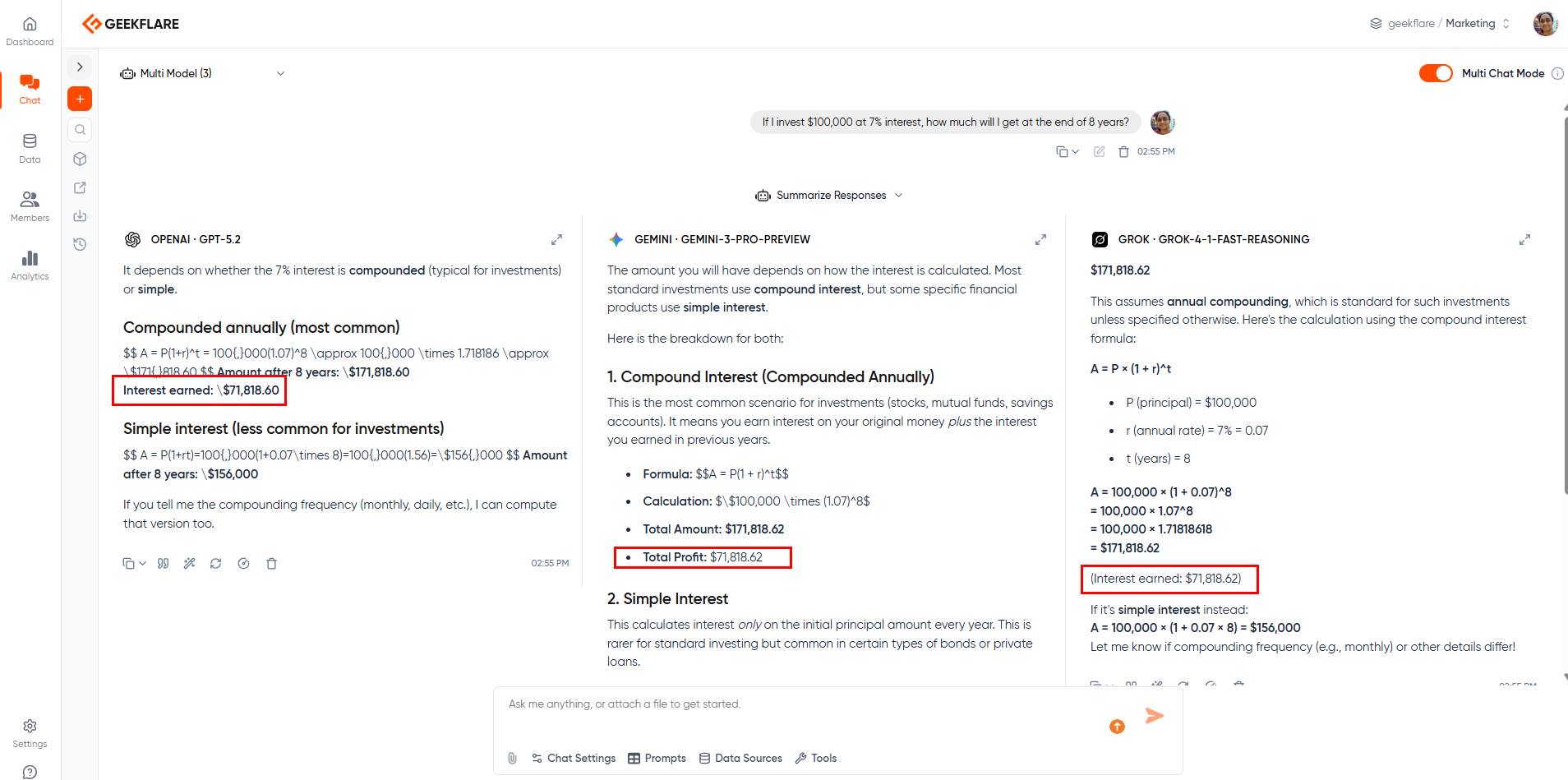
By using different AI models, you get the benefit of comparing, especially when various models are trained on different datasets. If one model produces questionable output, comparing it with another model can help surface inconsistencies and prompt further verification. This means, if two models disagree, there is a high chance of AI hallucination.
By using Geekflare AI Connect, you get to:
- Compare answers
- Spot inconsistencies
- Identify overconfident and inconsistent answers
It allows you to do better research, analysis, and trust your own work with outputs from multiple models.
How to Prevent Hallucinations
Preventing hallucinations is essential in any AI-assisted workflow. As discussed earlier, AI hallucinations can hamper trust and have a long-term impact on clients.
The following techniques can significantly reduce hallucination risks.
Mastering the AI prompt to avoid hallucinations
AI prompts are the medium through which you connect with an AI model.It also serves as the first line of defense against hallucinations. Yes, it’s like communicating, but with a computer that lacks the nuances to understand context.
Prompts, when written with clarity, reduce any ambiguity. It conveys exactly what you need and leaves less or no space for AI to hallucinate.
For example, I recently worked on the Meta CUA project, where I had to create annotations for training data for AI models. There, I needed to record a video that follows the prompt. So, rather than using a single line prompt as below,
Generic prompt
“Help me perform annotations for the Meta CUA project.”
I opted for a more precise and specific prompt to help me perform the task.
A well-defined prompt
“Please act as a helper who would help me perform annotation for Meta CUA. I am an annotator who needs to do the task as efficiently as possible. All I want from your side is to guide me through the steps. Also, check if the task is performable or not. Act as a guide and nothing more or less.”
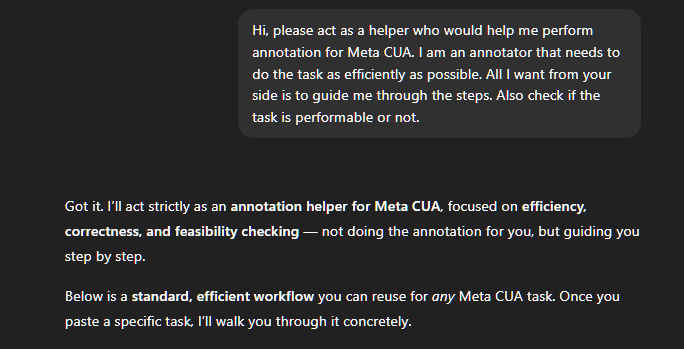
This approach guided me to perform 150 annotations with less than 1% of outputs containing errors or hallucinations (anecdotal).
Key techniques
Apart from writing clear prompts, there are other techniques that one should use to reduce AI hallucinations. These include:
- Grounding
- Specificity
- Chain-of-thought prompting
Grounding is a powerful technique which adds context-specific data into AI prompts. It limits the model’s freedom to invent, while providing outputs rooted in real-world information.
Rather than typing, “What risks will our business have in the market,” it’s better to write a more grounded prompt that reduces hallucinations. The grounded version would be as follows.
Grounded prompt
“Using the information provided below, can you summarize all the associated risks with the market if we try to release the XYZ product to the target audience of YYY. Make sure to use the information below and ask for more information if needed.”
By removing any option to fill gaps, you reduce AI’s capabilities to fabricate data to sound confident (even when it makes up new information).
Specificity can also help reduce AI hallucinations. The above prompt example narrows the scope as it mentions the product name, the target audience, and explicitly asks to follow certain information. This approach cuts down on the AI model’s overgeneralization and assumptions. Being specific is always better than being verbose, as it gives AI models less freedom to become creative.
Finally, I recommend using chain-of-thought prompting. Chain-of-thought prompting aims to guide the LLM to explain reasoning step-by-step rather than jumping to an answer.
It is very useful as it guides the LLMs to use structured reasoning. It can improve reasoning transparency and make flawed assumptions easier to detect.
One such example that instructs LLMs to follow the chain-of-thought is as follows.
Chain-of-thought prompt
“Explain your reasoning step by step. Clearly label any assumptions. If an assumption cannot be verified, flag it as uncertain.”
Practical prompt templates you can use today
We already provided multiple examples above. However, if you’re looking for more, check below. You can add these prompts to the end of your main prompt.
Template 1: Allow the model to express uncertainty
Prompt: “Answer the question with high confidence. If you’re unsure, explicitly state that you don’t know rather than generating a speculative answer”
Use-case: Any
Template 2: Business-focused and source-first prompt.
Prompt: “Provide answers that are verifiable and backed with citations. List sources and if there are none, state it clearly.”
Use-case: Legal, finance, policy, healthcare
Template 3: Grounded prompt
Prompt: “Summarize content based on the provided text. Don’t research from the internet or external sources and try to use another form of interpretation.”
Use-case: Internal documentation/reports, summarization, meeting notes,
Template 4: Strategy and planning
Prompt: “Avoid assumptions. Answer only based on facts and statements that can be backed properly.”
Use-case: strategy, forecasting, business planning
Building Guardrails
For SMBs, it’s best to build guardrails to ensure reliable and safe AI deployment.
There are three ways SMBs can build guardrails for minimal AI hallucination, including:
- Implementing retrieval-augmented generation (RAG)
- Using fine-tuning and knowledge graphs
- Setting up programmatic output filters and guardrails
Implementing Retrieval-Augmented Generation (RAG)
I find RAG very useful in today’s work ecosystem. It ensures that the language model generates responses with evidence rather than from memory. It ensures accuracy with reduced AI hallucinations.
RAG works by retrieving only from relevant documents. The response is grounded and within context. It improves the overall functioning of the large language model by providing relevant up-to-date information. This helps in overcoming LLM’s limitations, including:
- Access to up-to-date information
- Improves domain specificity without retraining
- Often more cost-effective than full model retraining
For example, an SMB can connect internal SOPs, policies, and product documentation to a RAG system. Instead of generating responses based on generic internet-scale data, the model retrieves and cites internal documents. This is particularly effective for areas like customer support and internal decision-making.
Using fine-tuning and knowledge graphs
Fine-tuning and knowledge graphs can be used to enhance LLMs’ performance, behaviour, and relevance. It helps to align tone, terminology, and response style as per business requirements.
In Fine-tuning, businesses can use a more specific dataset to train a model at particular task or domain. It opens up LLMs to new capabilities and adapt to existing knowledge.
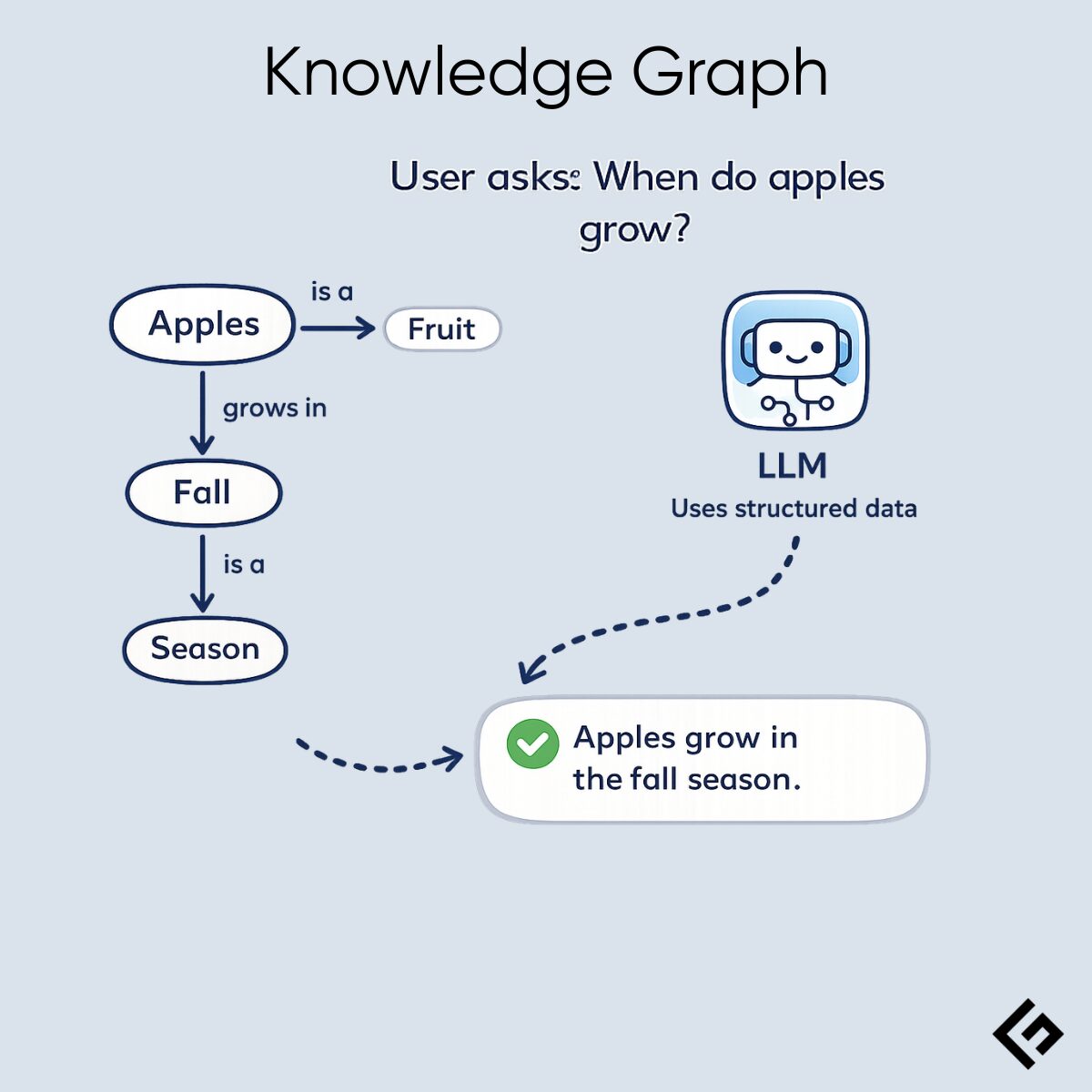
Knowledge graphs further improve LLM performance but use more advanced techniques, such as KG-SGT (Knowledge Graph-Driven Supervised Fine-tuning), to improve explanations. They anchor responses to structured data when integrated with LLMs, improving factual consistency and reasoning.
Both approaches reduce logical hallucinations, especially related to domain knowledge. I recommend reading Fine-Tuning LLM article to get a much deeper understanding of how knowledge graphs help improve LLMs.
Setting up programmatic output filters and guardrails
Programmatic filters are a process by which output is inspected before it reaches the end-user.
SMBs must implement programmatic output filters and guardrails to constrain or validate LLMs’ outputs. These help catch risky behavior. Furthermore, these approaches can often be implemented without full-scale AI infrastructure.
If properly set, SMBs benefit from:
- Reducing manual review workload
- Scale better when working with large datasets or projects
For example, businesses can put claim detection filters. They can flag outputs which have numerical claims or percentages for additional review. By using it, you can ensure that percentages, growth rates, market sizes, and performance numbers are flagged if presented without evidence. Furthermore, it works well in legal settings and medical advice as well.
Apart from that, SMBs can also implement:
- Confidence and uncertainty rules: Help LLMs to be certain with their reasoning by ensuring proper guardrails.
- Domain allowlists: Filter AI to only answer within its domain. For example, an LLM can be set to answer questions related to a company’s internal policies and product information, while blocking legal advice, financial guarantees, and medical guidance.
Implementing filters and guardrails doesn’t require modifying the underlying model. However, it requires the use of multiple layers of approach, which can be visualized as follows.
User → Guardrails → LLM → Guardrails → User
Here, an input classifier decides which user inputs are sent to the LLM. If the outcome is uncertain or risky, it enforces stricter rules, with the ability to disallow conversation altogether in a few cases.
In Guardrails, it’s common to use the RAG model and other approaches. Finally, an output filter (check for validity, confidence, and certainty) is also set to reduce the likelihood of hallucinations.
Lastly, we always recommend having a human review the final input before it is used in business requirements.
Additionally, it is always best to log every flagged output and use it to further improve the LLM’s output via guardrails and filters.
Orchestrating for Reliability
Enterprises, due to their scale of operations, need a more enterprise-focused approach to reduce AI hallucinations. In this section, we’ll go through the options that enterprises take to improve LLM outputs and usability while minimizing hallucinations. These include:
- Leveraging model-agnostic platforms to compare outputs
- Centralizing knowledge for consistent grounding
- Implementing audit trails and analytics
Leveraging model-agnostic platforms to compare outputs
A model-agnostic approach helps enterprises to operate at more scale without the need to worry about vendor-locking. For example, enterprises can use OpenAI for content generation and Google for analytics.
In this approach, a control layer needs to be placed above all model that communicates directly with different AI model APIs, such as OpenAI, Anthropic and Google. This unified interface helps quickly swap models easily, compare models and test new models.
Model-agnostic platforms work because it opens one model’s output to get verified by a different one. For example, if an AI model hallucinates and provides citation that is not available, the other one can refuse it. It works well for high-risk queries, especially related to legal and finance. This can resolve most issues via automation, but is also capable of flagging issues to humans for further review.
With this approach, enterprises can reduce vendor dependency and do proper cost-performance optimization to improve ROI.
Centralizing knowledge for consistent grounding
Enterprises face issues with properly managing documents, be it legal, sales, support or compliance. As AI tries to use multiple sources, it can lead to conflicting answers, outdated info or hallucinations.
To resolve, enterprises must do “centralized grounding.” In this approach, a unified enterprise retrieval layer that offers role-based access control with version-tracked document ingestion. It allows for structured knowledge with high grounding. Additionally, it offers easy rule changes.
Overall, centralizing knowledge reduces hallucinations as it makes content grounded reducing data gaps, inconsistencies and overgeneralization.
Implementing audit trails and analytics
Another way enterprises can improve overall AI efficiency and performance is to implement proper audit trails and analytics.
The audit trail must log every aspect of the operation including input layer, system layer and output layer. By doing so, hallucinations can be prevented in real time by identifying prompts that result in the most hallucinations or identify which domain or model versions increase error rates.
Analytics, on the other hand, gives deep insight on how the LLM works. Here, enterprises can measure key aspects including hallucination rate, disagreement rate, guardrail trigger frequency and so on.
Future-Proof Your AI
AI is a powerful tool. However, if not properly set up, hallucinations can occur, causing damage to individuals or the company’s reputation. That’s why organizations must do the following:
- Adopting a “trust but verify” mindset
- Implementing human-in-the-loop processes
- Continuously evaluating and updating AI strategy
Adopting a “trust but verify” mindset
Always adopt a “trust but verify” mindset. It allows you to take advantage of AI capabilities, but iron out issues before using the information.
Businesses can use this mindset to scale responsibly while maintaining accuracy and accountability.
Implementing human-in-the-loop processes
AI can be autonomous, but only to a certain degree. Having a human oversee the process adds an additional layer of oversight. However, it should be only for high-risk categories, as manually reviewing everything is not practical.
Continuously evaluating and updating your AI strategy
For long-term benefit, businesses must evaluate and update their AI strategy constantly. This includes:
- Regularly benchmarking models and understanding their limits and capabilities
- Doing prompt & retrieval audits
- Doing stress testing to find rare edge cases
Additionally, teams must also regularly do compliance alignment to ensure no compliance issues occur.
A simple example would be asking for statistics from LLMs. For instance, “what’s the percentage of SMBs that succeed in their first year?” can cause LLMs to output hallucinated answers. LLMs, depending on their training data and other constraints, can answer incorrectly with no evidence to back it up.
Yes. It depends on the domain, and especially with niches with limited data. For example, an LLM can fail to properly provide information on local regulations or internal company policies. AI models also tend to hallucinate when it comes to specialized or technical topics that require precision. Lastly, any topic (such as regulations and AI tools) that keeps evolving also reduces an LLM’s ability to provide accurate answers.
Any prompt that is grounded, specifies exactly what is needed, and gives LLMs the ability to respond negatively is a safe approach. For example, adding the following instruction to your existing prompt can significantly reduce hallucinations.
“Make sure to only respond if you’re confident about your answer and can back it up with evidence. If you need to fabricate information to meet the prompt requirements, stop, and respond with “I don’t know.” Also, cite verifiable sources whenever possible.”
No. It’s not. That’s because of how LLMs operate. LLMs are probabilistic systems which means that AI hallucinations are part of the deal. However, the frequency of AI hallucinations depends on multiple factors including prompt quality, the data with which the LLMs are trained and how well the business has taken steps to reduce AI hallucinations with RAG, fine-tuning, guardrails, and multi-model comparison.