Finding the right cloud cost management tool can be daunting. You have to dive deep into organizational needs, navigate complex feature sets, and compare a wide variety of vendors.
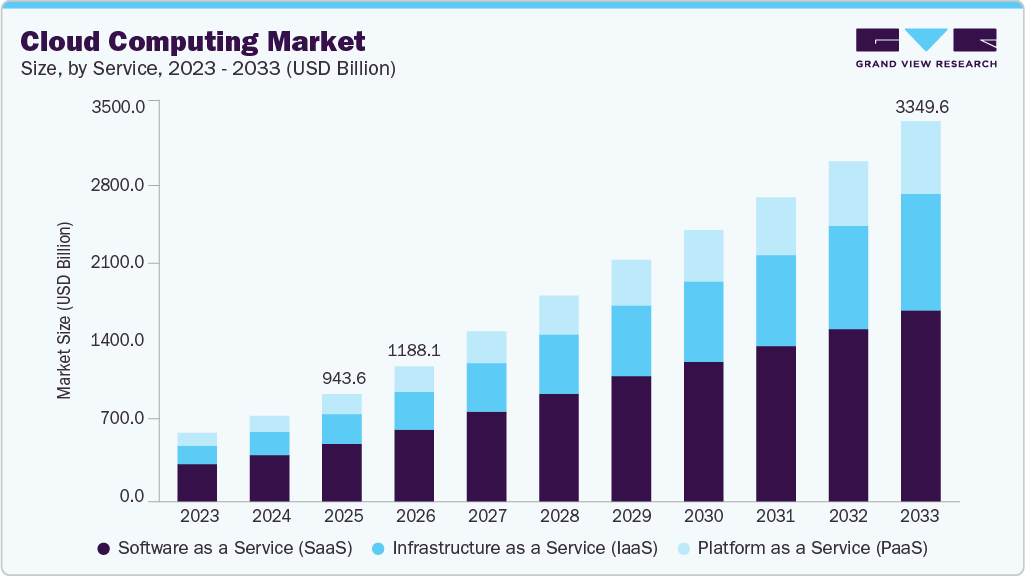
Public cloud spending shows no signs of slowing down. In fact, it is forecasted to cross $3 trillion by 2033. Consider your organization’s contribution to that figure and the significant savings potential if managed correctly.
To help you make an informed decision, I’ve analyzed 25+ options to select the top cloud cost management platforms below. I reviewed product documentation, attended demos, and cross-referenced third-party reviews to verify every vendor claim.
Why Trust Geekflare Guide
Top Cloud Cost Management Tools Comparison
For quick reference, check it out below👇🏼
| Tool | Free Trial | Highlights | starting price | Explore |
|---|---|---|---|---|

Vantage
|
|
Virtual tagging, Anomaly Detection
|
$30/mo
|
|

Turbo360
|
|
Best for Azure
|
Varies
|
|

ProsperOps
|
|
FinOps automation
|
Quote-based
|
|

CloudSpend
|
|
Forecasting, Cost reports
|
1% of cloud bill
|
|

Harness
|
|
Data driven automation
|
Varies
|
|

Zesty
|
|
Kubernetes specialist
|
Varies
|
|

Apptio
|
|
Enterprise-ready
|
Varies
|
|

CloudZero
|
|
Cost allocation, Unit economics
|
Varies
|
|

nOps
|
|
Cost visiblity and optimization
|
Varies
|
Top Cloud Cost Management Tools Review
Below, I review each tool in detail to make you informed decision.
1. Vantage
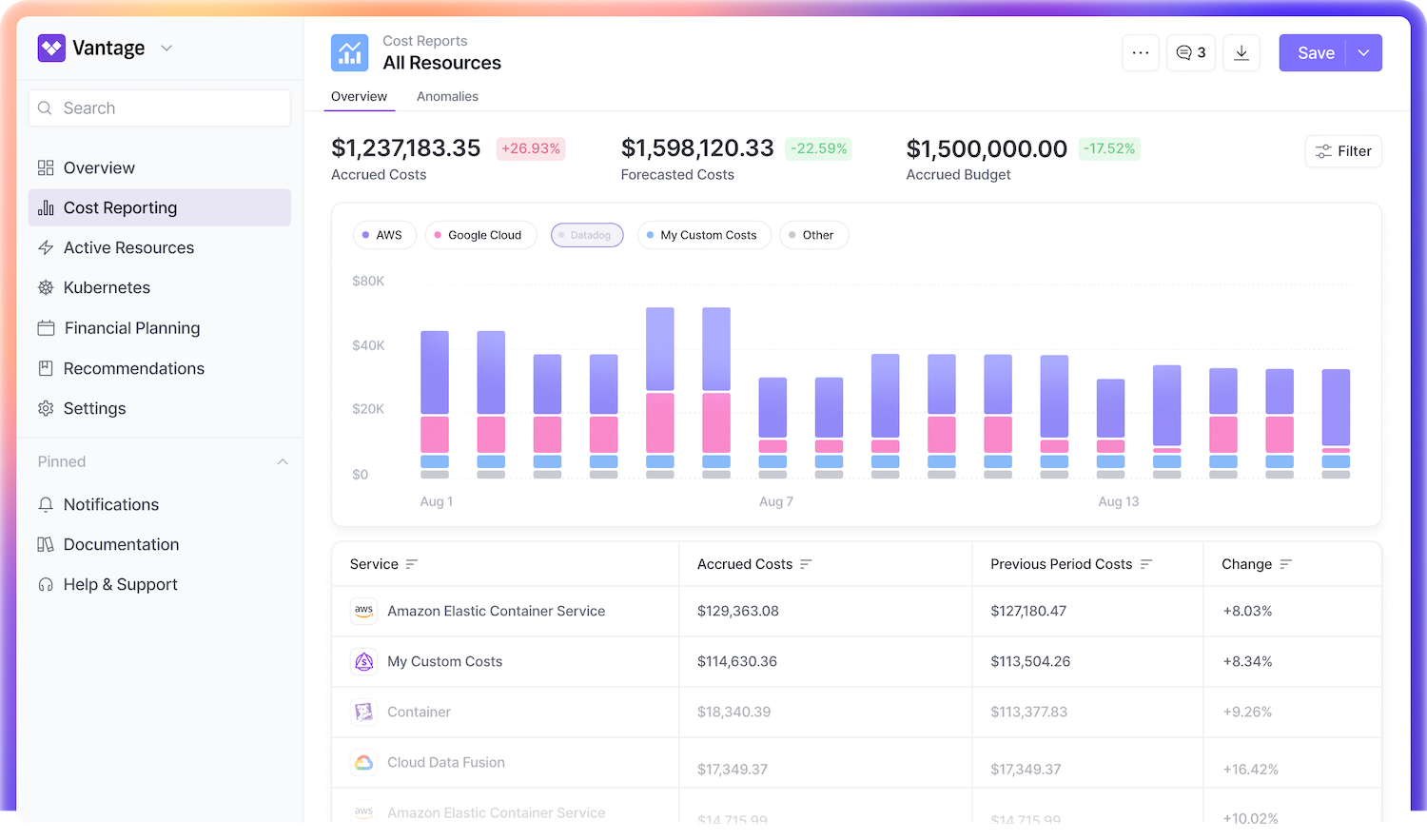
Vantage makes cloud cost management simple and effective. It offers detailed cost reports to track spending and identify trends easily. The resource reports show which services drive costs, which helps you manage cloud expenses better.
You can create custom cost allocation tags to organize spending across different providers. Cost allocation segments let you enforce cost governance and track expenses within your organization.
Vantage provides usage-based reporting, giving clear insights into how your cloud resources are being used. Its savings planner helps you model and forecast future savings. So, you can plan better. With unit costs, you can see spending at a granular level — per customer, per query, or per endpoint.
I liked its automated anomaly detection feature, which alerts you to unusual costs before they become problems. You can track issues and assign them to team members, keeping communication organized.
Vantage also integrates with Jira to track issues easily and collaborate with teams.
Who uses Vantage?
Block, NBA, FanDuel, Rippling, HelloFresh, Vercel, CircleCI and many other leading brands use Vantage to keep their cloud spending under control.
Vantage Features
- Automates buying of AWS Savings Plans and provides savings recommendations for RDS, ElastiCache, Redshift, and OpenSearch.
- Identifies the main drivers of network costs for better visibility and control.
- Tracks key FinOps metrics like effective savings rate, coverage, and total discounts.
- Pinpoints individual resource costs to eliminate guesswork.
- Enables FinOps as Code for automated cloud cost management using Terraform.
Vantage Pricing
Starter (free) for up to $2,500 in costs
Pro ($30/month) for up to $7,500
Business ($200/month) for up to $20,000
2. nOps
nOps is an Amazon Web Services (AWS) cost optimization platform that offers various useful features, such as commitment management, cost allocation, reports and budgets, ideal resource optimization, and more.
Its AI and ML-based cost optimization process helps you control spending and optimize resources without any manual effort. As a result, you can automatically identify cost-saving opportunities. nOps allows you to filter spending by customer, product, cost center, or any category you choose.
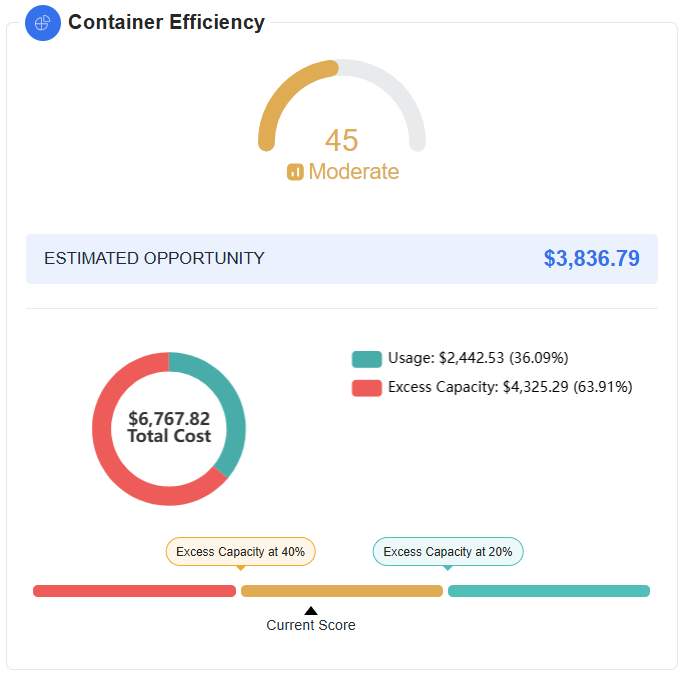
It optimizes your environment for Spot Instances, Reserve Instances (RI), and Saving Plans to help you lower Elastic Kubernetes Service (EKS) and Auto Scaling Group (ASG) costs.
nOps Features
- Business contexts offer visibility into all your AWS costs.
- Essentials automates cost optimization tasks.
- Compute Copilot automatically manages, scales, and optimizes your AWS compute to reduce costs.
- Commitment management automatically optimizes Reserved Instances and Saving Plans.
I like nOps because its AI constantly learns your usage patterns and automatically identifies idle resources. It turns off these unused resources to reduce your AWS bill without any manual effort on your end. This helps you avoid waste, improve efficiency, and save money consistently.
3. CloudZero
CloudZero is a leading cloud cost optimization platform that identifies waste and improves unit economics by automating the collection, allocation, and analysis of infrastructure spend.
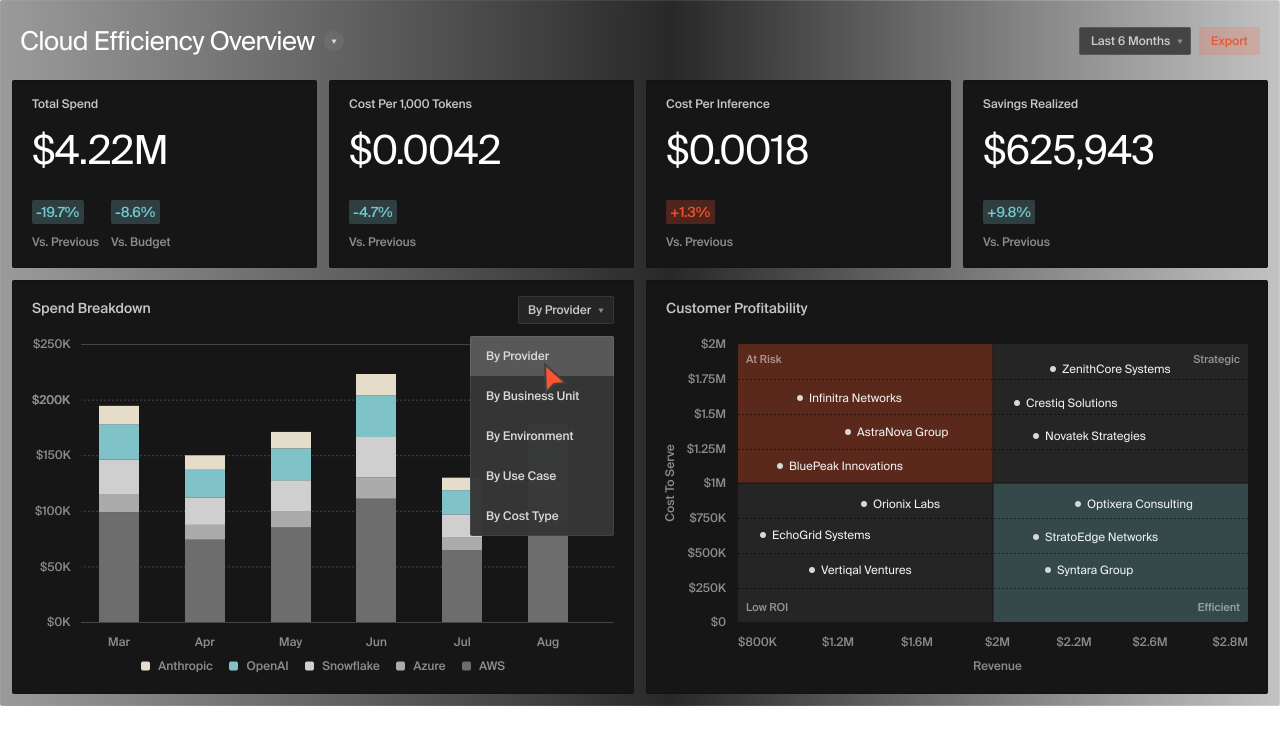
CloudZero CostFormation® helps you keep track of every dollar you spend on the cloud. It shows you how your engineering work affects costs, so you can understand where your money goes. This makes it easier to make better decisions and plan your budget more accurately.
If something looks off in your spending, CloudZero’s AI will quickly alert your engineers. They can then fix the issue before it costs you more money, which helps you avoid wasting money and stay on budget.
I’m impressed with CloudZero’s ability to help you find the right balance between performance and cost. It shows you where you can improve efficiency without increasing expenses. As a result, you can grow your business without sacrificing quality.
CloudZero Features
- Identifying abnormal spend events using hourly data to prevent overspending with AI-powered anomaly detection.
- Tracking and reporting past spending while predicting future costs to stay on budget.
- Providing 100% visibility into spend with detailed drill-down capabilities through the dashboard.
- Identifying and prioritizing cloud efficiency opportunities from engineers, FinOps managers, and CloudZero insights.
- Combining business fundamentals with automated intelligence for better cloud efficiency through analytics.
- Categorizing cloud spending by customers, products, features, and teams with CloudZero Dimensions.
4. IBM Cloudability
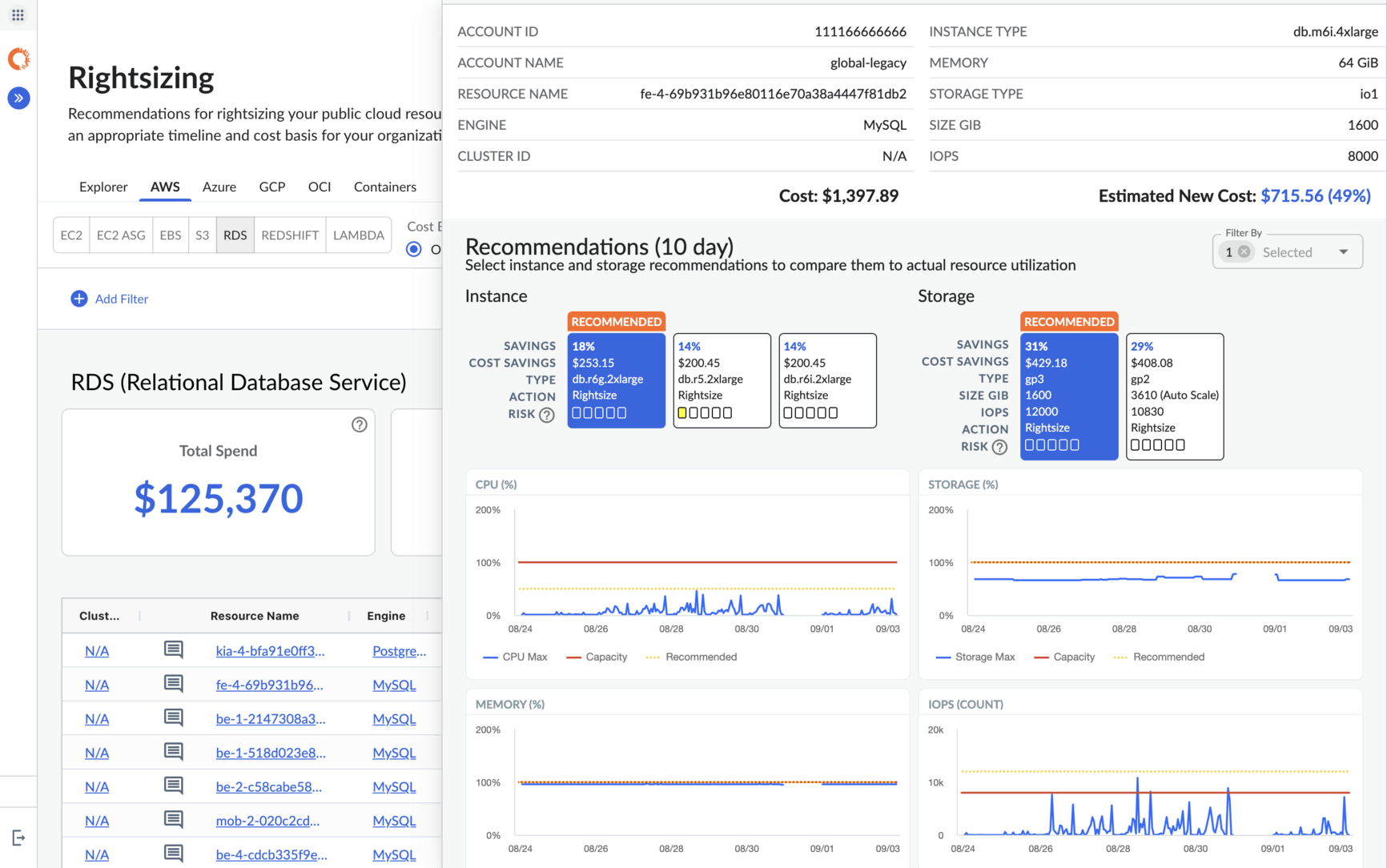
IBM Cloudability is a leading FinOps solution that helps you track, analyze, and optimize cloud spending across all major providers.
It offers multi-cloud visibility, which allows your team to manage costs from a single platform. With its Anomaly detection features, you can easily identify unusual spending patterns to reduce waste.
Automated commitment program coverage ensures maximum savings on reserved instances and savings plans.
I particularly like IBM Cloudability because of its business mapping, which connects cloud costs to business goals. This helps teams make better decisions and increase profitability. I also appreciate how rightsizing adjusts resources to match demand, reducing unnecessary expenses.
It also supports container cost allocation, forecasting, and budgeting. As a result, your team can plan more accurately.
IBM Cloudability works with tools like Jira and Datadog, helping IT, Finance, and DevOps teams improve cloud efficiency together.
IBM Cloudability Features
- Provides multi-cloud visibility to track and manage costs across all major cloud providers in one place.
- Detects unusual spending patterns to identify and reduce cost spikes or waste.
- Automates savings plan and reserved instance coverage to maximize discounts and minimize costs.
- Links cloud spend to business goals, which helps you measure profitability and improve decision-making.
- Adjusts cloud resources to match actual demand, reducing waste and improving efficiency.
5. Zesty
Zesty is a cloud optimization platform that helps businesses reduce costs and improve efficiency with AI-driven automation.
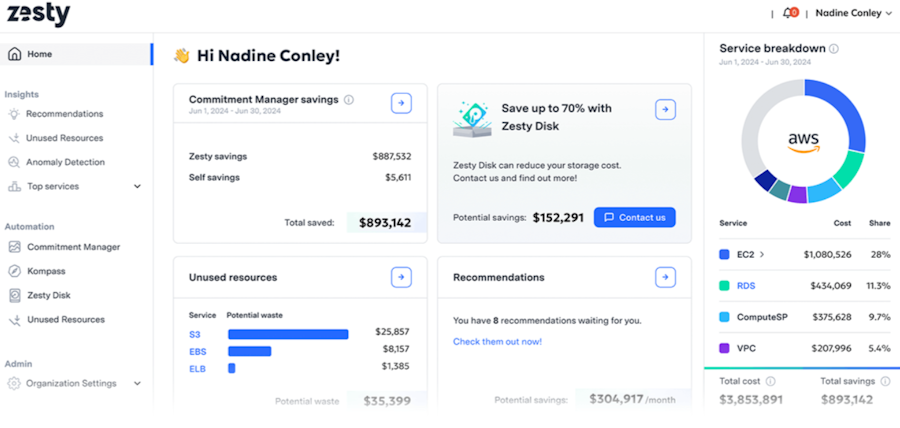
It offers three cost-saving solutions: Kompass for optimizing Kubernetes, Zesty Disk for managing and scaling EBS storage, and Insights for tracking cloud costs and finding savings.
It provides real-time insights and recommendations to optimize computing, storage, and container resources. Zesty automatically scales cloud resources up or down based on actual demand, reducing waste and ensuring performance.
Commitment management adjusts AWS discount commitments automatically, which helps reduce Elastic Compute Cloud (EC2) costs without financial risk.
Its anomaly detection alerts teams to cost spikes before they escalate. HiberScale technology reduces node headroom and automates spot instance usage for Kubernetes.
I’m impressed with Zesty for its ability to optimize storage. Zesty Disk automatically adjusts storage volumes based on real-time needs, which can help you save up to 70% on storage costs. I also liked its prescriptive insights that give clear recommendations for high-impact actions. Consequently, it makes decision-making easier and more effective.
Zesty also minimizes engineering effort by automating resource management. This helps your teams to focus on strategic work.
Zesty Features
- Uses machine learning to unlock savings that manual processes can’t achieve.
- Automatically manages AWS discount commitments to reduce EC2 costs.
- Automatically scales cloud resources up or down based on real-time business needs.
- Identifies and alerts teams to cost spikes in real time.
- Provides prescriptive insights with actionable recommendations to optimize cloud costs.
Zesty Pricing
Zesty uses a pay-as-you-save model, charging based on the savings it generates. Kompass costs $500/month plus $5 per managed vCPU.
Zesty Disk pricing starts at $0.025/unit and decreases with higher usage.
Insights provides cost breakdowns and savings recommendations for a flat monthly fee (free for Kompass customers).
You can request a demo to explore the platform.
6. Harness
Harness is an AI-native software delivery platform that helps your engineering team modernize DevOps, measure & improve developer experience, securely deliver software, and optimize your cloud spend.
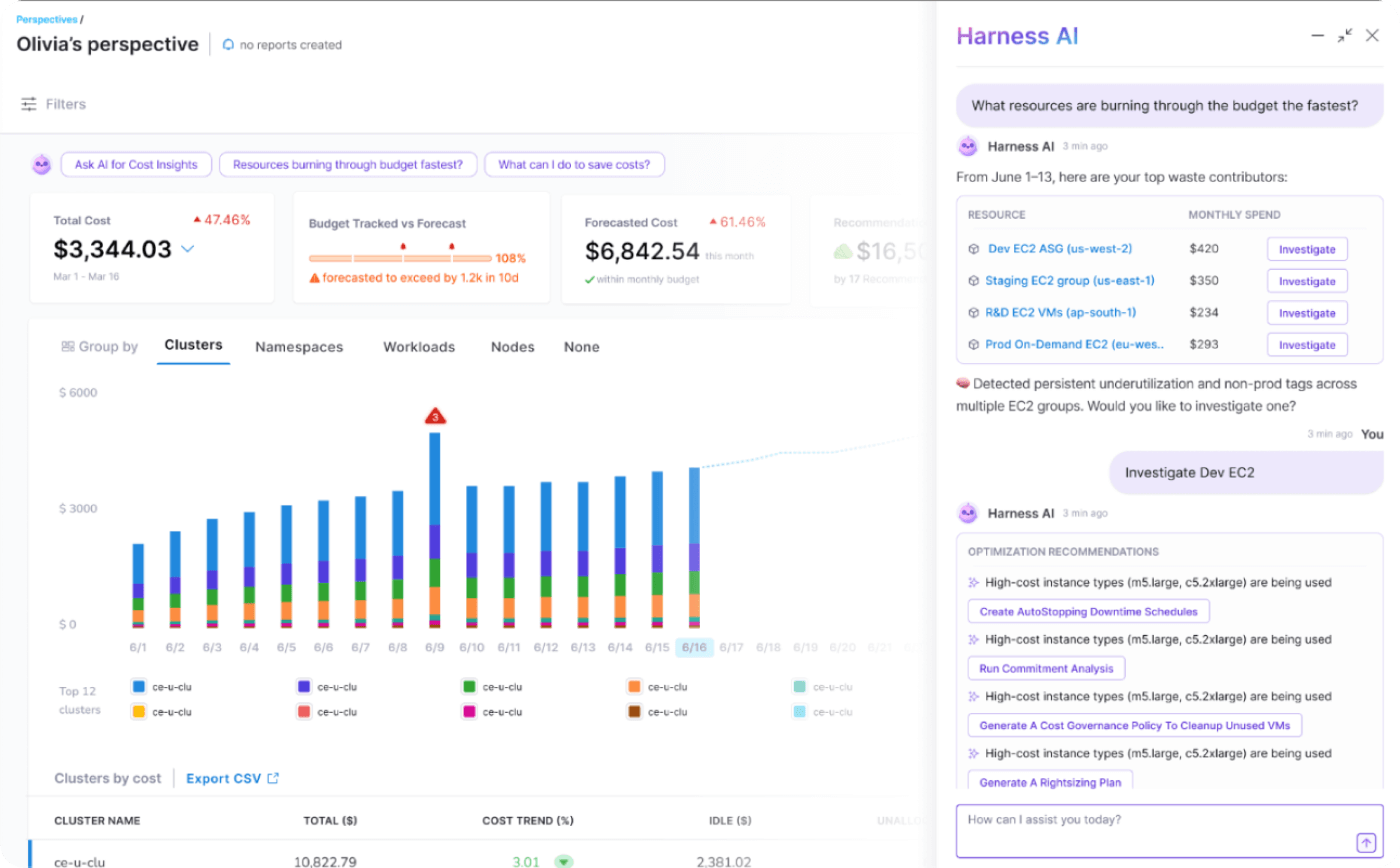
Harness Cloud Cost Management manages costs across AWS, Azure, GCP, and Kubernetes from a single platform. The Commitment Orchestrator automates long-term commitment management, which helps you maximize AWS EC2 savings.
The Cluster Orchestrator intelligently scales EKS nodes and manages Spot Instances to reduce costs and maintain performance.
The platform provides detailed cost attribution with Cost Perspectives, letting your team track and allocate expenses by teams, workloads, and applications.
I liked its Cloud AutoStopping feature that detects and shuts down idle resources. As a result, you can cut non-production costs by up to 70%.
Harness also includes Governance-as-Code with AI-powered YAML templates, enabling automated compliance and policy enforcement.
Harness Features
- Automates compliance and remediation using Governance-as-Code (GaC).
- Maximizes AWS Elastic Compute Cloud (EC2) commitment savings by automating long-term commitment management.
- Provides intelligent autoscaling for Elastic Kubernetes Service (EKS) nodes and manages Spot Instances.
- Detects and shuts down idle resources, saving up to 70% on cloud costs.
- Identifies and alerts on cost spikes to prevent unexpected expenses.
Harness Pricing
Harness offers three pricing tiers. Free for small teams, Essentials for growing businesses with support, and Enterprise for large-scale organizations with advanced features. You can contact the sales team to explore the platform.
7. ManageEngine CloudSpend
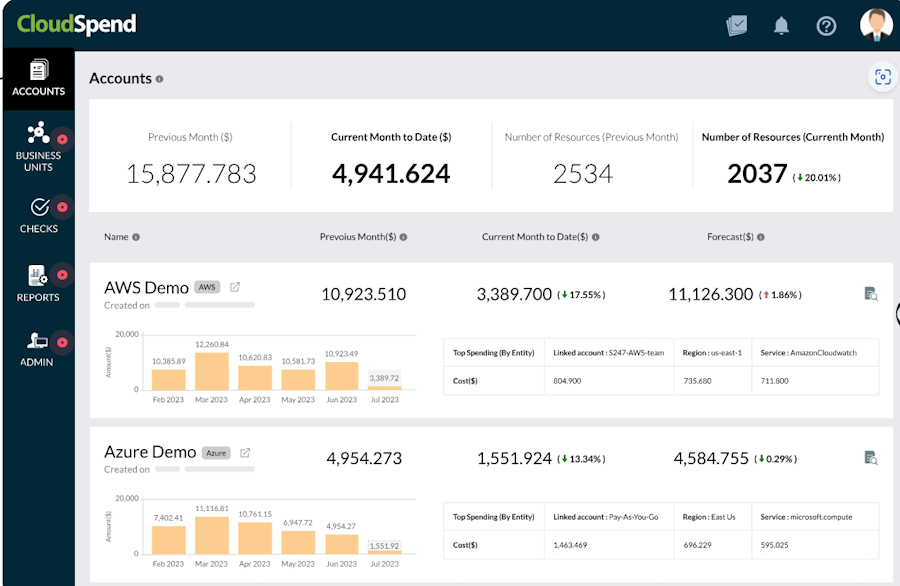
ManageEngine CloudSpend provides clear insights into cloud costs, helping you make smarter decisions and save money. It gives full visibility into your resource inventory, allowing you to audit and manage cost-impacting elements effectively.
The platform simplifies cloud financial data with easy-to-use cost reporting, so you can easily understand spending patterns.
I like CloudSpend because the detailed usage reports help you understand your infrastructure better and identify cost-saving opportunities. The actionable insights make it easy to spot areas for improvement. Automated recommendations simplify controlling spending and reducing waste without manual effort.
CloudSpend also allows you to organize costs into cost centers, providing real-time insights and automated optimizations. You can integrate it with Site24x7 to monitor cloud costs alongside other key metrics.
CloudSpend Features
- Streamlining Kubernetes costs by cutting over-provisioning and paying only for what you use.
- AI-driven monitoring automatically identifies unexpected cost spikes and sends real-time alerts.
- Detecting idle resources in non-production environments and triggering automated actions to reduce waste.
- Virtual tagging solution enhances visibility and control over cloud resources across the organization.
- Tracking cloud discounts, monitoring changes in coverage, and discovering savings opportunities.
CloudSpend Pricing
ManageEngine CloudSpend offers a free service for cloud bills up to $3,000/month. Bills above $3,000 cost 1% monthly. A 30-day free trial is available.
8. ProsperOps
ProsperOps automates cloud cost optimization across AWS, Azure, and Google Cloud, helping businesses reduce spending with minimal effort.
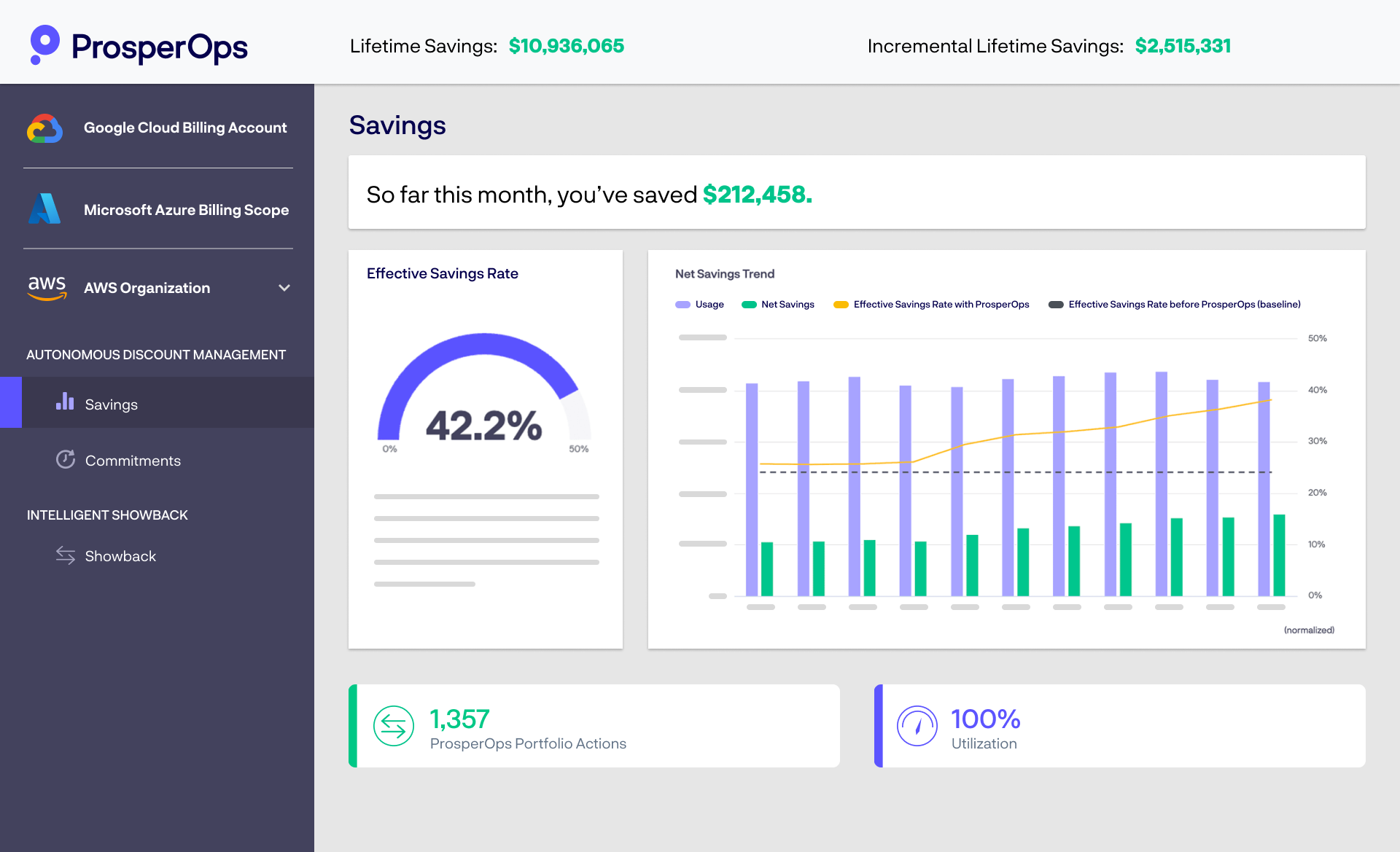
It continuously adjusts commitments based on usage changes, which increases the Effective Savings Rate (ESR) and maximizes savings.
ProsperOps automates thousands of monthly actions to improve commitment utilization and generate consistent savings.
ProsperOps offloads commitment management, allowing FinOps teams to focus on strategic priorities. Moreover, it automates repetitive rate optimization tasks, saving your teams tons of time.
I like ProsperOps because it lets organizations visualize savings potential clearly, so they can see how much they’re saving and where they can improve. The ability to benchmark performance vs. peers helps companies understand how their savings rate compares to others in the industry.
Who uses ProsperOps?
Collibra, Coinbase, Tipalti, Nubank, Chargify, Hiya and other global companies uses ProsperOps to reduce their AWS, Google Cloud and Azure bills.
ProsperOps Features
- Continuous cloud cost optimization across AWS, Azure, and Google Cloud with zero effort.
- Intelligent Showback for automated reallocation of commitment costs and savings.
- Automated commitment management to maximize flexibility and reduce waste.
- Insight-driven reporting with core KPIs and team-level allocation details.
- Net Savings Trend graph to track savings outcomes and ESR over time.
ProsperOps Pricing
Evaluation – free
Rate optimization – small percentage of realized savings
Workload optimization – flat free per reosurce
9. Turbo 360
Turbo 360 is a cloud management platform for Microsoft Azure. It optimizes costs, monitors cloud resources, and creates technical documentation from a single platform.
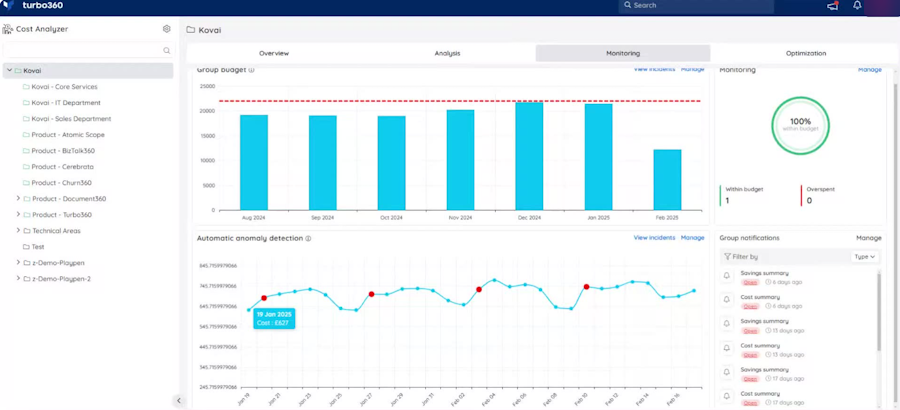
You can gain detailed cost visibility by organizing expenses in a structured way across different business dimensions. This means tracking costs by departments and cost center owners, making it easier to see who is spending what.
You can also identify and handle unusual spending quickly. The system detects cost anomalies — unexpected or out-of-pattern expenses — and directs you to the exact infrastructure resource causing the issue. Consequently, you can fix problems faster and prevent waste or budget overruns.
I chose Turbo 360 because it helps quickly create detailed technical documents about Azure usage, cost, security, and compliance. You can save time with autogenerated editable diagrams that clearly show how your Azure resources are organized based on your application architecture, which makes auditing and managing Azure much easier and faster.
Turbo 360 Features
- Allocates 100% of Azure resource costs across departments and business units.
- Identifies and resolves unexpected Azure cost spikes to stay on budget.
- Uses historical data to make informed decisions on Azure Reservations for discounts.
- Continuously optimizes costs with rightsizing recommendations for over-provisioned or unused resources.
- Provides consistent cost data to align stakeholders on business-relevant metrics and budget decisions.
Other Cloud Cost Management Tools
The following platforms are also noteworthy. I suggest checking them out if the top tools listed above don’t satisfy your infrastructure requirements, or if you simply want to explore more options.

Finout

CloudOptimo

Cast AI

Densify

Flexera
Why Is Cloud Cost Management (CCM) Essential?
In recent years, many companies have been shifting their businesses and operations to cloud infrastructure for benefits like cost savings, scalability, higher performance, centralization, business continuity, and security. So it is no surprise that the global cloud computing market is expected to surpass 3 trillion by 2033.
However, cloud computing benefits come with challenges, especially the rising cloud costs.
Cloud spending is increasing, and failing to manage costs can lead to financial strain. Poor cost management may result in unexpected expenses, overpaying for underused resources, or even performance issues.
According to CloudZero research, 49% of organizations say their cloud costs are higher than expected, and only 3 out of 10 organizations know exactly where their cloud spend is going.
Cloud cost management (CCM) is a strategy businesses need to optimize cloud infrastructure and control costs. It involves maximizing cloud usage and increasing efficiency to reduce overall infrastructure expenses.
A clear cost management strategy can improve forecasting, boost profits, and increase accountability across the organization by providing better visibility into cloud expenses and usage.
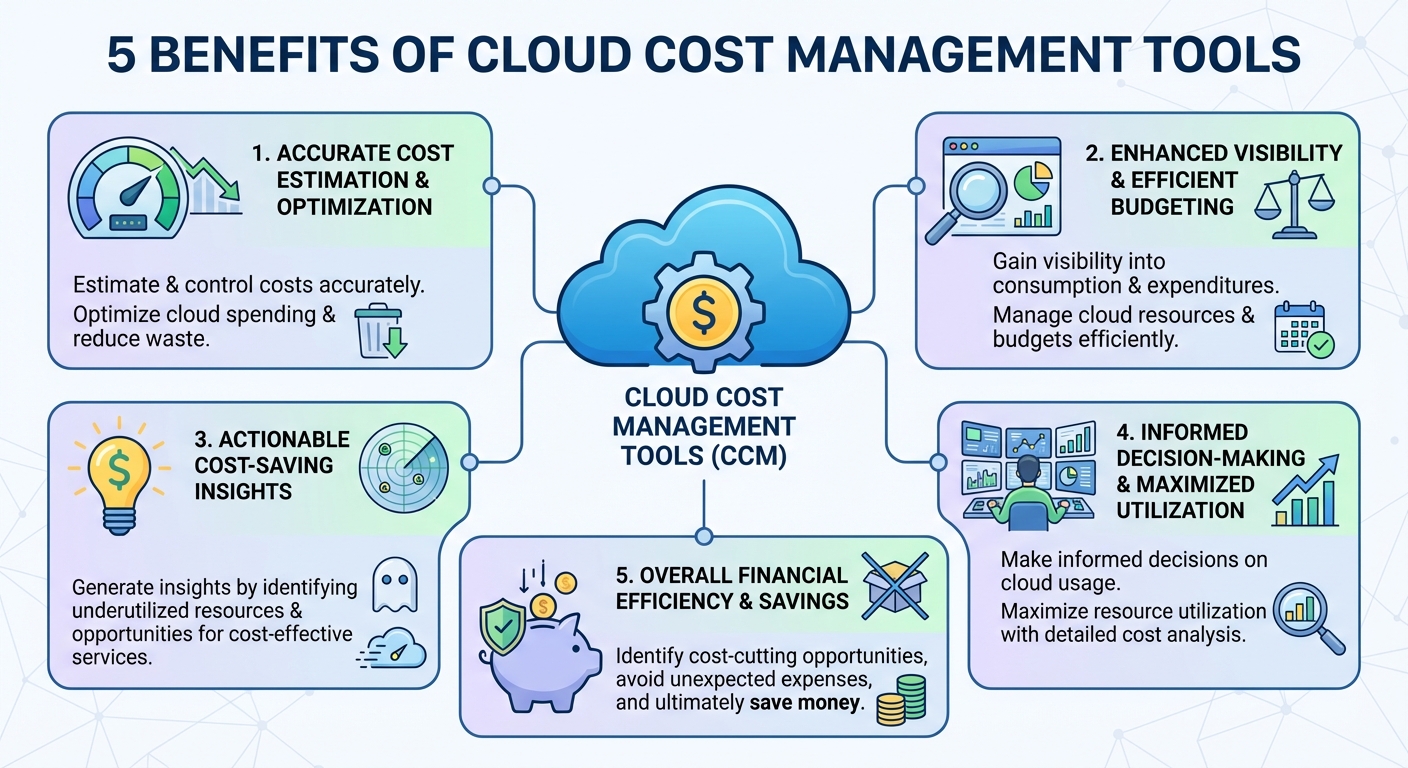
Cloud Cost Management Tools Benefits
How To Choose the Cloud Cost Management Tool
To simplify your search, look for a solution that allows you to:
- Automate workflows with an AI-driven platform
- Identify idle and underutilized cloud resources
- Predict cloud usage at granular levels
- Right-size services to match performance needs
- Generate comprehensive reports
- Gain visibility and in-depth spending analysis
- Leverage Reserved Instances (RIs) and Spot Instances
- Monitor cost anomalies in real-time
- Optimize storage options (tiers and archives)
- Analyze costs at each stage of the SDLC
- Minimize software license costs
- Receive notifications for breaching cost thresholds
- Create and manage multiple cost budgets
- Set alerts for exceeding resource utilization
The features mentioned above will help you choose the right cost management tool for your cloud environment.
Conclusion
You now have a clear idea of the leading cloud cost management platforms, their key features, and how to select the best one.
I recommend taking advantage of free trials and scheduling product demos for the tools on this list. Testing them firsthand is the best way to find the solution that perfectly aligns with your cloud infrastructure requirements.