



If you’re a Minecraft player like me, you know the real fun lies in experimenting. The whole Minecraft experience can be summed up as starting vanilla and then moving to modded versions.
However, running modded servers requires more powerful hardware, especially since Minecraft is CPU-hungry.
Additionally, you are met with Realms’ restrictive approach to plugins, resources, and player limits. With Realms, you also don’t get access to the server console. It’s good for new players but limits further Minecraft ecosystem exploration.
But what about self-hosting? Is that an option? It is, but only if you are playing privately with a small group. It is not ideal for serving large communities or playing with tons of mods/plugins.
The real solution? A dedicated Minecraft host that provides 24/7 uptime, automated backups (no fear of losing progress), and the required hardware to ensure a lag-free experience.
In this article, we’ll cover the best Minecraft server providers. The list suits both players and sysadmins. To give a fair comparison, all entries are tested for CPU performance, chunk-loading speeds with Elytras, and modpack installations.
Let’s get started.
Quick Comparision
| Provider | Starting Price | Best For | Data Center location |
|---|---|---|---|
| Scalacube | $2 per month | Budget tinkers running multiple small servers | 14 global (4 US) |
| Dathost | $7.89 per month | Mid-to-large communities | 9 locations |
| Pinehosting | $4.20 per month (annual) | Transparent and pay-for-what-you use | 6 locations |
| Hostinger | $6.99 per month | Full root/VPS control for self-managed admins | 9 locations |
| Host Havoc | $3.75 per month (1 GB) | Plan flexibility + fast 24/7 ticket support | 12 global (6 US) |
| Apex Hosting | $11.24 per month (first month, then $14.99 per month) | Beginners & assisted migration | 13 locations |
| G-Portal | $1.39 (3-day rental) | Short-term testing & weekend events | 12 locations |
| BisectHosting | $5.99/GB per month | Reliable hosting with deep mod support | 21 locations |
| PebbleHost | $3.00 per quarter (1 GB RAM) | Lowest real budget; first timers | NA, EU, Australia, Singapore, India |
| Shockbyte | $3.99 per month | Safe long-term value pick | US, EU, Asia, Australia |
| Nodecraft | $4.17 per month (Lite) | Best control panel; multi-game swapping (62 games) | 28+ global |
| Sparkedhost | $1.20 per month | First-time buyers wanting fast support | 11 locations |
| GTXGaming | £1.90/mo (~$2.40) | Tinkerers; widest server-type support (17+) | 11 global |
| Godlike | Free tier; $2/mo paid | Free entry & trying before paying | USA East/West, India, Singapore + more |
Reviews of the Best Minecraft Server Hosts
ScalaCube
ScalaCube is my first recommendation when it comes to Minecraft server hosts because it offers a reliable and user-focused environment via features such as a one-click install option, but it can take up to 10 minutes to configure and run.
ScalaCube supports 3,298+ unique modpacks out of the box, including CurseForge and others.
If you visit the ScalaCube Minecraft main page, you will find it offers no free plan. However, it is available on a different page, where they offer a free forever plan. It gives you access to 6 GB of RAM — with no need to plug in your credit card details. However, the free plan only supports the basic and snapshot versions. It has a 2-player cap and renews every 2 days, so it’s only good for testing.
Signing up for a free server was a breeze with a quick six-step flow.
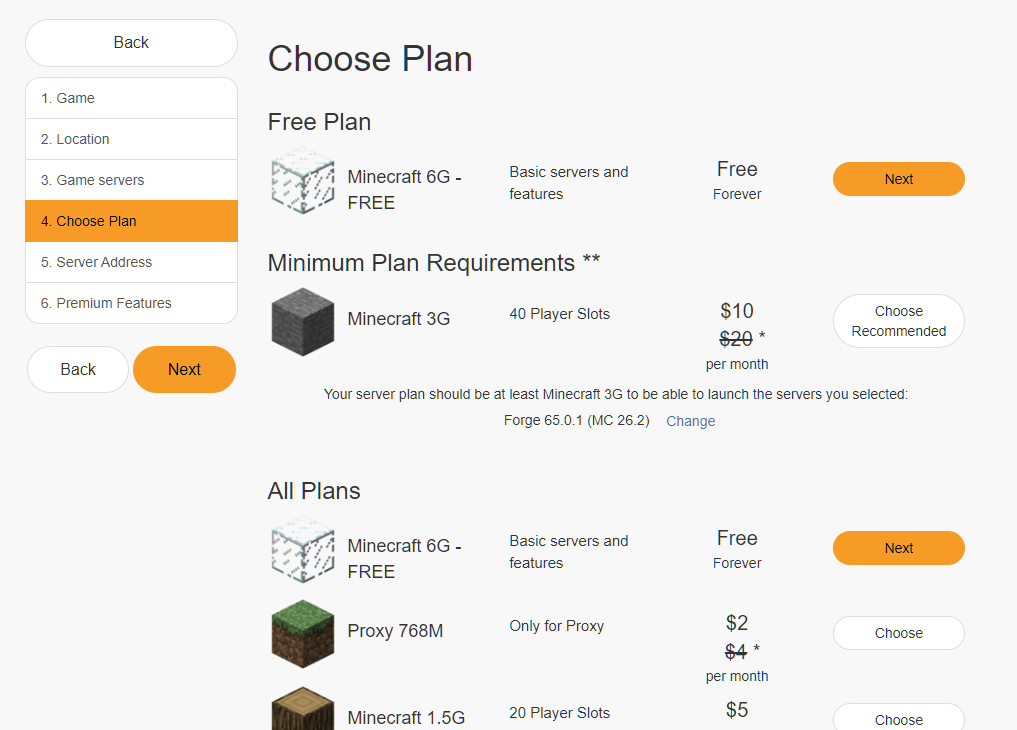
Note: My free server got deactivated after 2 hours with no activity.
Coming to hardware, all ScalaCube servers, free and paid, run high-speed CPUs (no public numbers) with SSD storage (yup, no NVMe).
Reliability-wise, it offers a 99% uptime SLA, which is decent, but there is still room for improvement.
Feature-wise, ScalaCube comes loaded, which includes:
- Unlimited slots
- Full FTP access
- Full mod & plugin support
- Server management tools
- DDoS protection
Pros & Cons
PROS
CONS
Pricing
ScalaCube pricing starts at $2 per month with 768 MB RAM. ($4 per month after the 1st month).
Ideal for: Small groups looking to experiment and tinker while on a budget.
DatHost
DatHost fits perfectly in the top Minecraft server hosting providers. That’s because it offers reasonable pricing with a focus on quality and lag-free gaming experience. For Minecraft hosting, it follows the same standards, offering powerful CPUs, 16 GB DDR5 RAM, and NVMe SSDs.
Even though DatHost doesn’t offer any free plan, it has a 14-day money-back guarantee on all its billing cycle (monthly, 6-month, and yearly).
I found DatHost to be good for small and big clans, as it offers unlimited slots and unrestricted game swapping. Additionally, the 230+ Tbps network capacity and server spread across major continents, including Europe, North America, Asia-Pacific, Latin America, and the Middle East & Africa, mean optimal experience, despite where clan members/friends stay.
DatHost offers easy game and version management with one-click mods/plugin installation from CurseForge.
I recommend DatHost due to its good infrastructure and access to:
- Automatic backups
- DDoS protection
- Supports fresh starts and failsafes
- Versatile server support with a fast time to set up and play
Pros & Cons
PROS
CONS
Pricing
DatHost pricing starts at $7.89 per month (yearly plan). All billing cycles offer a 14-day money-back guarantee.
Pine Hosting
Pine Hosting is a UK-based hosting provider that offers Minecraft server hosting. They offer robust hosting options, with servers in Germany, Finland, the US, the UK, Australia, and Canada (verified by live chat).
As CPU choice dictates Minecraft server performance, I decided to search for it on their page, with no success. This led me to their customer support via live chat.
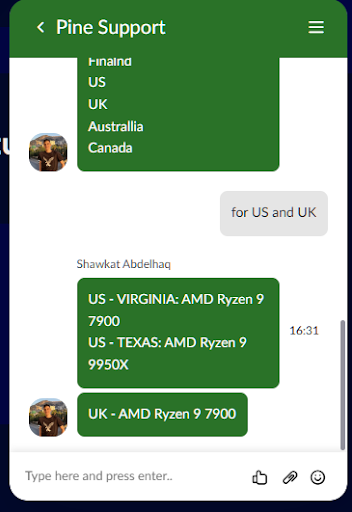
According to customer support, each location has different CPUs allocated. For example, US-Virginia and the UK offer Ryzen 7950X, while US-Texas uses Ryzen 9 9950X. Both are top-tier CPUs, but it’s best to contact them before renting a server.
For sysadmins, it offers good features, including a powerful console, a version switcher, task scheduling, and access to a file manager. Admins can also install modpacks via the modpack installer.
Pine Hosting offers custom Pine Panel, a control center with a focus on easy management. Sysadmins can also take advantage of its AI-powered log analysis to help manage the server better.
Pros & Cons
PROS
CONS
Pricing
Pine Hosting pricing starts at $4.20 per month (annual plan) with only a 48-hour guarantee. They also offer custom plans which makes it ideal for different player bases and clans.
Hostinger
Hostinger’s Minecraft hosting is well known for its strong VPS hosting. For sysadmins, it opens up more control while still giving access to the pre-installed Game Panel.
Here, you get full root access and dedicated resources. However, before you pick this up, you must know that it is unmanaged, and you need to handle everything yourself, be it installation, or troubleshooting.
On CPU, it does well, with higher plans offering more multi-core vCPUs (uses AMD EPYC processors). However, as we know, Minecraft benefits more from single CPU performance; even lower plans are good enough to host and manage Minecraft servers (1-vCPU/4GB entry plan is good for 5-10 players on vanilla with light mods).
Hostinger offers one-click installation, mod support, and access to worldwide data centers with servers in the USA, Brazil, Germany, France, UK, Lithuania, Indonesia, Malaysia, and India.
Apart from that, it also features:
- 2000+ modpack installer on the current panel
- 50 GB+ NVMe disk space (goes up to 400 GB)
- Kodee AI assistant for easy server management and troubleshooting
Pros & Cons
PROS
CONS
Pricing
Hostinger Minecraft hosting pricing starts at $6.99 per month (24-month plan).
Ideal for: Sysadmins who need full control.
Host Havoc
If you’re searching for the most flexibility in choosing your plan, then Host Havoc has you covered. They have 10 plans to choose from, with RAM capacity going from 1 GB to 32 GB, supporting solo players to big clans with 250+ players.
However, before you go ahead, beware: just like PineHosting, Host Havoc also doesn’t have a similar CPU configuration across locations or data centers. They have a mixed pool of AMD Ryzen 9s (7900X, 7950X, up to 9900X/9950X). Moreover, there is a disparity in the allocated RAM generation (DDR4/DDR5), as only their New York data center offers DDR5. So, before you commit, make sure to talk to customer support about your options.
Despite this, I recommend Host Havoc due to its lag-free performance and dedicated 24/7 expert support team via ticketing.
Like other providers, Host Havoc also offers:
- DDoS protection for peace-of-mind gaming sessions
- Text/Editor/File manager for remotely managing the server
- Console & power actions
- Automattic modpack installers
- Full FTP access
Host Havoc’s Multicraft panel also makes an impact. It is a well-tested old standard that focuses on providing flexibility. But it does lack AI log analysis. I also found the one-click installer useful.
Pros & Cons
PROS
CONS
Pricing
Host Havoc Minecraft hosting prices start at $3.75 per month, which comes with 1 GB of RAM.
Apex Hosting
Apex Minecraft Hosting is a US-based Minecraft hosting provider that is best suited for beginners and modpack variety. It gives beginners an easy way to spin up a server and install modpacks via a 1-click installer.
Apex Hosting’s Minecraft documentation further makes it easier for beginners. It offers a video guide and written documentation to follow. If you’re migrating from another server, then their team will assist you. Furthermore, you can connect with their 24/7 live chat if you still feel stuck.
As for hardware, you get access to EX-Series (extreme performance) hardware composed of a fleet of Ryzen 9 5900X and Ryzen 7 5800X CPUs. They offer good single-core performance but are still an older generation of CPUs. These CPUs are available via premium tier, while the standard plans have undisclosed CPUs.
Other key features include:
- Free subdomain
- Unlimited slots
- Automated backups
Pros & Cons
PROS
CONS
Pricing
Starts at $11.24 for the first month and then $14.99 monthly.
Ideal for: Busy sysadmins who want to set up their server and forget it. It is also a great option for those looking to migrate, as they offer assisted migration.
G-Portal
G-Portal is one of the best Minecraft server hosting services for testing, thanks to its 3-day server rentals, starting at just $1.39. It is also great for hosting small events among friends or the community.
With 12 locations to choose from (India, Australia, USA, and others), you can choose the right server with the lowest ping. They show live ping from their order page, giving you key information before you pick the closest server to your community.
However, before you pick G-Portal, you must know that they have up to 6 GB, which is more than enough for most use cases, but can limit servers with tons of mods and plugins. They don’t publish CPU models, which is not ideal, especially if you want to know what you’re getting.
Apart from this, G-Portal comes with 250+ preinstalled modpacks, DDoS protection, and instant server deployment (under 3 minutes).
Pros & Cons
PROS
CONS
Ideal for: Casual users, as they don’t mind a lack of CPU specific information. It is also a great pick for weekend sessions or just trying out your Minecraft server before hosting on a better hosting provider.
BisectHosting
BisectHosting is one of the most popular Minecraft hosting providers, powered by the latest Ryzen hardware with up to 5.7 GHz clock speed.
Each server is optimized for performance with real-time provisioning.
However, the biggest selling point of BisectHosting is its BisectOne model with support for 100+ games, including Minecraft. It’s a one-plan model where you get everything, including DDoS protection, unlimited disk space, 2300+ modpacks, instance manager, and much more. They have servers across 21 worldwide locations, including the US, Germany, Mumbai, Hong Kong, and so on.
As for the panel, you get the Starbase panel. It is a feature-rich offering with a live console, full FTP, a pro file manager, a config editor, live performance metrics, and much more.
Pros & Cons
PROS
CONS
Ideal for: Those who want reliable hosting with solid mod support.
Pebblehost
Pebblehost is a budget Minecraft server hosting provider, starting at just $1 per GB, while not compromising on CPU choice. Its budget offering has Ryzen 7 5700X at 3.4/4.6 GHz, good enough to handle single-core demands.
If your requirement is higher, then Pebblehost offers premium plans with Ryzen 9 9900X. However, the budget option lacks free daily backups.
Pebblehost is a UK-based company but has servers across North America, Europe, Australia, Singapore, and India.
As for other features, Pebblehost offers:
- Unmetered storage
- Scheduled tasks
- Full FTP access
- Resource analytics
To monitor and manage the server, you get a custom-built panel. You can check it out here: demo.pebblehost.com. The panel offers a live console, plugin installer, API, and instant provisioning.
Overall, Pebblehost is a great pick if you’re fine with decent performance on the lowest budget.
Pros & Cons
PROS
CONS
Ideal for: First-timers or a small private/friend group who want a low-cost hosting option.
Shockbyte
Shockbyte is one of the longest-running Minecraft hosts, making it a reliable option for hosting a Minecraft server.
Despite being the longest hosting provider, they are using the AMD EPYC 4465 processor running at 5.40 GHz, optimized for high single-thread performance. They also use NVMe SSDs and DDR5 RAM, making them a good pick for sysadmins looking to host Minecraft.
To match other offerings, they replaced their old Multicraft panel with a new custom panel. The new panel offers real-time updates, a one-click modpack installer, and backups.
Feature-wise, it is solid with support for one-click installs, DDoS protection, and 24/7 support. It has 99.9% uptime, backed by an SLA.
Pros & Cons
PROS
CONS
Pricing
Shockbyte is cheaper and more affordable, with plans starting at just $3.99 per month (with 4GB RAM costing $7.99 per month).
Ideal for: Users who want a safe pick and are looking for a long-term commitment while getting value for money.
Nodecraft
Nodecraft is a top-tier Minecraft host and is best suited for those who want maximum swap options, supporting over 62 games. It’s affordable and offers a custom control panel, NodePanel.
NodePanel is one of the best in-house control panels. It offers a real-time console, a web file manager, live stats, and no-code automation. This makes it an ideal companion for admins, as they can automate and don’t have to babysit to manage updates.
Launching a server with Nodecraft is easy with one-click installers. It also supports Minecraft modpacks and plugins..
Hardware-wise, Nodecraft’s 28+ worldwide locations (Seattle, Chicago, São Paulo, etc.) use Ryzen 9 or AMD EPYC CPUs, ideal for lag-free Minecraft gaming sessions.
Pros & Cons
PROS
CONS
Pricing
Nodecraft plans start at just $4.17 per month, offering access to DDoS protection. However, task automation is only available on the Pro plan (starting at $6.99 per months).
Sparked Host
Sparked Host is one of the best Minecraft server hosting providers. It houses faster infrastructure with the option to choose from AMD Ryzen 9 7900 or Ryzen 9 9900X processors. They also offer DDR5 RAM and NVMe storage.
On the software side, they offer Apollo Panel, a modern control panel. It is intuitive and easy to use, while offering access to Modern File Manager and One Click Plugin.
Price-wise, I found Sparked Host to be affordable, starting at just $1.20 per month. But I recommend getting the 4 GB RAM plan at least, which starts at $9.56 per month if you’re playing with at least 4 players. However, it does lack free backups. All plans come with 99.9% uptime (claimed) and 24/7 support. Sparked Host offers 11 locations, including London, Paris, and Dallas. These servers are secure and come with DDoS protection.
Ideal for: Simple hosting and a great pick for first-time Minecraft hosting buyers
GTX Gaming
GTX Gaming offers a shared Minecraft server at an affordable rate. They’re UK-based and support both Java and Bedrock versions.
It supports 17+ server types with 5000+ modpacks supported. They are easy to install and switch with 1-click options.
GTX Gaming pricing starts at £1.90/mo, but I recommend getting their 4 GB plan, starting at £7.80/mo. All plans are upgradable, so you can start with any.
Under the hood, they use Intel Core i9, Ryzen 9, and Intel Xeon processors. All fast processors, which work well with their NVMe SSD and DDR5 RAM. They have servers across 11 locations, including Dallas, New York, and Toronto,
Apart from raw performance, they offer GTXcontrol, a custom TCAdmin panel. For mods, you can use their dedicated modpack panel, gamepanel2. If you intend to use the Minecraft Java version, then you can use Multicraft. These options are great but can easily confuse new users. For sysadmins, it means toggling between tools to manage servers.
Ideal for: Anyone who loves to tinker.
Godlike
Godlike is a well-known modded Minecraft server hosting. It is Romanian-based and offers support for both Java and Bedrock versions.
Godlike stands out with its free 2 GB server (requires renewal every 3 hours). Their plans start at just $2 per month and are hence affordable.
Performance-wise, they offer fast CPUs and use the Ryzen 9950X3D processor, available across different locations, including USA East, USA West, India, Singapore, and others. They offer 24/7 expert support as well (20 minute average response time). Additionally, they offer 3 free daily backups.
Ideal for: Users on a budget and want to try before paying monthly fees.
Single-Threaded Performance
Minecraft was first created in 2009 as a one-person hobby project. It was initially written in Java using a single-threaded game loop.
Here, anything happening in the game world, including player action, mob AI movements, etc., is run sequentially.
So, if a server runs at 20 ticks per second, then each tick has a 50 ms window to complete. If the server fails to do so, then every player can feel lag!
In short, Minecraft performance (especially the Java version) relies heavily on a single CPU core. The load changes depending on how busy or heavy your world is, and the player base, and hence you need a server that offers high single-thread performance.
This also means that buying 16 GB of RAM on a slow CPU is vastly inferior to 4 GB of RAM on a top-tier CPU. Choose wisely!
Pick servers that offer high clock speed, especially in a 5.0 GHz and above range. The latest range of Ryzen 7000/9000 series or Intel Core i9s are great at single-thread performance.
If you are still running into problems, run /tps and /mspt.
- TPS < 20 and MSPT > 40-50 ms = CPU problem
- Solid 20 TPS but player lagging = network latency
How to Calculate Your RAM Requirements
To pick the right RAM requirement, use the formula mentioned below.
Total RAM = 2 GB (Base Game) + (Active Players x 200 MB) + Modpack Overhead
For Vanilla Minecraft with 5–10 friends:
2 GB (Base) + 2 GB (Active players) + 0 GB (no Modpack) = 4 GB is more than enough for a smooth vanilla experience.
Heavy Modpacks (200+ mods with 5–10 friends):
2 GB (Base) + 2 GB (active players) + 8 GB = 12 GB.
If you are planning to run heavy modpacks, you should look for plans offering at least 10 GB to 12 GB of RAM to ensure a lag-free experience.
FAQs
Is there any free Minecraft hosting?
Yes, there are! Aternos and Minehut are two great free Minecraft hosting services that you can use to play your games. To learn more, check out our free Minecraft server hosting guide.
How do I install plugins like WorldEdit or EssentialsX on my server?
To install these plugins, you need to do the following:
Have access to plugin-capable server types, including Paper, Spigot, and others.
Download the plugins.jar from a trusted source.
Upload to servers /plugins via file manager or FTP/SPT.
You can also install via the host panel if the host supports it. For example, the Host Havoc panel lets you install EssentialsX and WorldEdit.
Note: Check the plugin version to ensure that it is compatible with the server version.
Can I host a Minecraft server on my own PC instead of paying?
Yes, you can. To host, you need a machine with at least a 4 GHz+ CPU, 6 GB RAM, and a fast-enough SSD. It is good for hosting a small vanilla server.
However, it can add to the electricity cost, which may be more than getting it from a provider. Also, there are challenges to protecting your server against DDoS. Random power cuts can also lead to downtime.
What does a dedicated IP mean for a Minecraft server?
A dedicated IP gives your Minecraft server a clean address that players can connect to.
Generally, shared hosting has an IP address. All different servers hosted on the machine have a unique port (123.45.67.89:25612). So, if players have to connect, they need to type the port as well.
A dedicated IP helps bypass that but carries an additional cost. Other benefits of a dedicated IP are that you won’t be affected by a shared IP getting DDoSed. There are no performance benefits of choosing a dedicated IP.






