




Generating and manipulating PDFs programmatically sounds simple until you try to build it yourself. If you’ve tried tools like Puppeteer, you may have encountered challenges such as broken page layouts, inconsistent CSS rendering, memory spikes, and server maintenance headaches. Unfortunately, even something as simple as converting a webpage to a PDF can become complicated when dealing with page breaks or large documents.
To overcome these challenges, many developers now rely on PDF APIs instead of maintaining their own infrastructure. A dedicated PDF API lets you convert HTML or URLs to PDF, merge files, edit documents, and even extract text with OCR using simple REST requests. Instead of managing headless browsers and scaling servers, you can focus on building features while the API handles rendering, processing, and document storage.
Our team at Geekflare tested different tools to prepare this guide. I’ll walk through the best PDF APIs for HTML-to-PDF conversion, editing, merging, and OCR. I’ll compare their features, developer experience, pricing, and ideal use cases so you can choose the right API for your stack.
Why Use a Dedicated PDF API?
Many developers initially try to generate PDFs using tools like headless Chrome, Puppeteer, or command-line utilities such as wkhtmltopdf. I tried this approach in a few projects, and while it works for simple tasks, it becomes complicated as you scale.
Basically, running your own HTML-to-PDF setup means managing a full browser rendering environment on your server. Tools like Puppeteer launch a headless Chrome instance to render webpages before converting them to PDFs. While powerful, this approach introduces several hidden challenges.
- Server resource usage can spike quickly. Rendering complex pages with JavaScript, fonts, and images often consumes significant CPU and memory. When multiple PDF jobs run simultaneously, it can slow down your application or even crash the server.
- Maintaining rendering accuracy is difficult. CSS issues, page break problems, and inconsistent font loading can produce PDFs that look different from the original webpage. Debugging these issues takes time, especially when you’re dealing with dynamic frameworks like React or Vue.
- Operational overhead. You have to maintain browser dependencies, monitor failures, update libraries, and scale infrastructure to handle demand when at peak. What starts as a simple feature can turn into a maintenance burden.
Dedicated PDF APIs eliminate most of these problems. First, instead of running browsers on your own servers, you simply send an API request with the webpage URL, HTML, or document file.
Also, most modern HTML-to-PDF APIs go beyond basic conversion. For example, most support PDF merging, splitting, watermarking, encryption, OCR text extraction, and form processing. These capabilities are built into the API, so you don’t need to implement complex workflows yourself.
Another advantage is scalability. These Puppeteer alternatives run on cloud infrastructure that processes large volumes of documents. Most HTML-to-PDF APIs also use global edge networks, which help reduce latency when generating PDFs from webpages hosted worldwide.
Top APIs for Webpage to PDF Conversion
Webpage-to-PDF APIs help developers convert HTML pages or URLs into downloadable PDF documents. These tools preserve styling, layouts, and dynamic content to ensure the final PDF looks like the original webpage. Read on to get the best API to generate PDFs.
Geekflare API
Geekflare PDF Generator API renders pages in a headless browser, ensuring that PDFs from dynamic content appear just as they do on the webpage. This tool gives you full control over layout and formatting, as you can set page orientation, select a device (mobile or desktop), or choose a paper format. This ensures that you get a PDF that suits your needs.
Geekflare PDF Generator API has anti-bot capabilities as it features rotating proxies. You can select a country from the dropdown for websites that display different content for different regions. This tool also has a global edge network where all requests are routed through to ensure low latency. Add a timestamp to your PDFs or even set custom margins or adjust scaling to fit your PDF export needs.
I tested the Geekflare API and got this as my response code:
curl --location --request POST 'https://api.geekflare.com/url2pdf' \

  -H "x-api-key: YOUR_API_KEY_HERE" \

  -H "Content-Type: application/json" \

  --data-raw '{"device":"mobile","format":"a4","orientation":"portrait","url":"https://www.bbc.com/sport/football","hideCookie":true,"skipCaptcha":true,"addTimestamp":true}'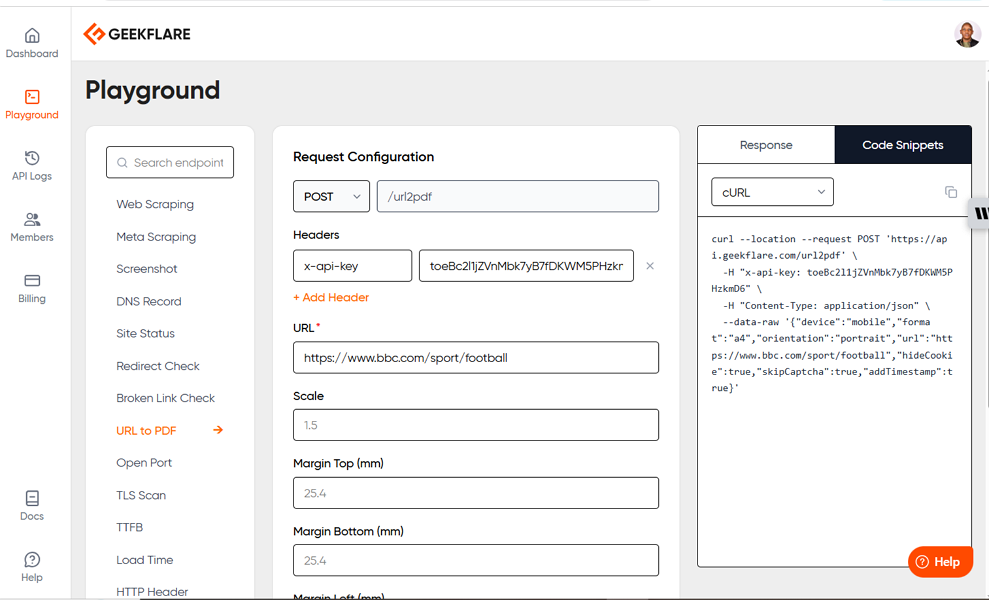
Pros & Cons
PROS
CONS
Pricing
Geekflare PDF Generator API has a free plan offering 500 monthly credits. Paid plans that offer rotating proxies and longer log retention start from $9/month.
DocRaptor
DocRaptor is an HTML-to-PDF converter based on the PrinceXML engine. This API automatically converts raw HTML into accessible PDF forms for normal users and screen readers. The tool applies CSS-based and automatic tagging techniques that allow users to generate PDF files that meet ISO-14289, Section 508, and WCAG 2.0 accessibility standards.
DocRaptor is a flexible tool that lets you customize your inputs and mix different headers, footers, styles, and sizes all within the same PDF. The tool integrates footers and headers by default, meaning that you can use CSS and HTML to define non-repeating or repeating headers and footers within an HTML file.
DocRaptor pays attention to privacy and security standards as it is SOC2, HIPAA & GDPR compliant. This means you don’t have to worry about how your data is processed, and you can use this API from anywhere irrespective of your geographic location or industry.
Pros & Cons
PROS
CONS
Pricing
DocRaptor offers a free plan that allows users to generate 5 PDF documents per month. Paid plans start at $15/month for 125 documents per month. However, every plan includes unlimited watermarked test documents that don’t charge any fees.
Api2PDF
Api2PDF is a REST API for generating PDFs, converting and merging documents, taking screenshots, and creating barcodes, all without users needing to run infrastructure. This tool runs on Google Cloud Run and uses wkhtmltopdf and Headless Chrome engines to turn raw HTML into PDFs. Api2PDF is a flexible API that supports multiple scripting languages, such as Java, Python, C#, PHP, and Node.js.
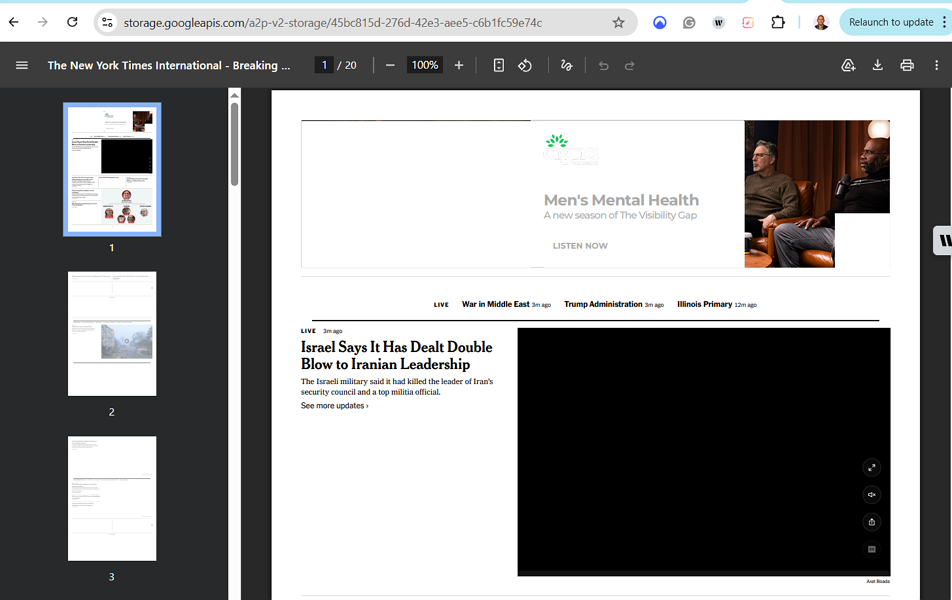
You can run HTML-to-PDF, URL-to-PDF, or Office-to-PDF conversions without switching tools. I used this simple code to generate a PDF from a URL from The New York Times:
curl -X POST 'https://v2.api2pdf.com/chrome/pdf/url' \

  -H 'Authorization: YOUR_API_KEY_HERE' \

  -H 'Content-Type: application/json' \

  -d '{"url":"https://www.nytimes.com/international/"}'
Once the PDF was generated, I got the URL with the generated PDF. This is the final PDF after opening the URL on my browser:
Api2PDF also supports advanced settings on both wkhtmltopdf and Headless Chrome. It lets users specify margins and page layouts.
Pros & Cons
PROS
CONS
Pricing
Api2PDF follows a pay-per-usage model with a base fee of $1.00. New users get $1.00 in credit to test the platform before purchasing extra credits.
Template-Based PDF Generation
Template-based PDF generation allows users to generate PDFs from predefined layouts. These are some of the best APIs in this category:
PDFMonkey
PDFMonkey is an API for creating reusable templates and generating PDF files from HTML and URLs. You can use this REST API to create invoices, receipts, and dynamic reports. After signing up, visit your dashboard to create and manage templates, even if you aren’t a developer. You can always preview your templates on your dashboard before saving them for future use.
PDFMonkey allows users to insert beautiful charts into their PDFs. You can use any chart library or service of your choice to insert such charts. This is especially useful when generating dynamic reports or other documents that require data-driven visuals.
You can generate custom PDFs using PDFMonkey with external CSS libraries such as Tachyons and Tailwind CSS. You can also pair PDFMonkey with Google Fonts if you need specific fonts on your platform or even use it with QR code generators to create PDFs with QR codes.
Pros & Cons
PROS
CONS
Pricing
PDFMonkey has a free-forever tier that allows users to generate 20 documents per month. Paid plans, starting from €4.5/month, billed annually, unlock integration with chart libraries and more documents every month.
CraftMyPDF
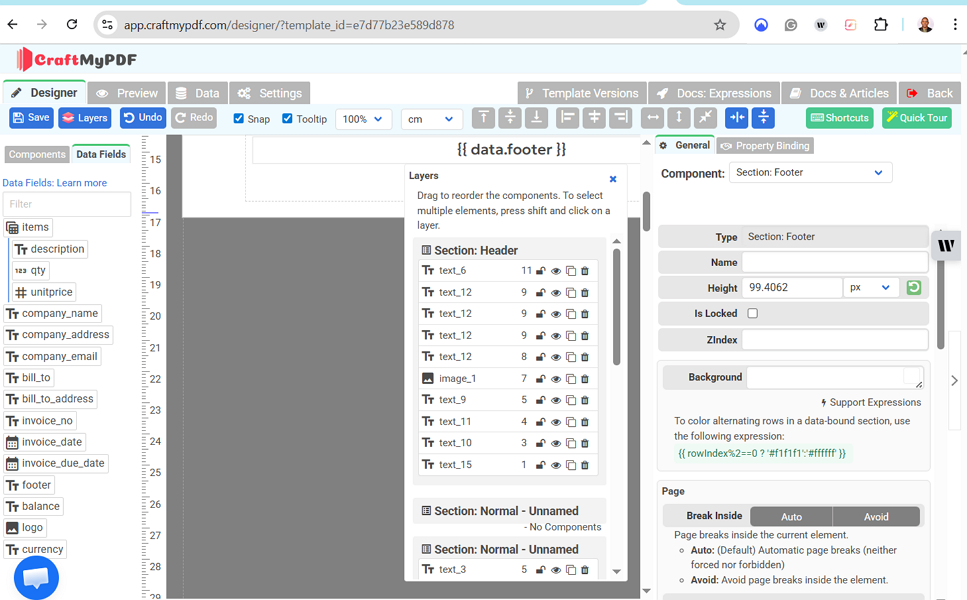
CraftMyPDF is an easy-to-use API for creating PDF templates with a drag-and-drop editor. You can generate personalized documents either through the API or via automation platforms. CraftMyPDF allows users to add text, QR codes, images, charts, and tables to the saved templates to produce the desired PDFs. You can also reuse existing PDFs by importing them and editing them on CraftMyPDF’s dashboard.
CraftMyPDF is known for its powerful expressions and formatting support. Simply use the built-in expressions to format text, dates, currencies, and numbers. Moreover, you can extend the logic of your templates through custom JavaScript functions. You can overlay text, dynamic data, and QR codes on your PDFs while preserving the original layout.
You can embed the CraftMyPDF template editor in your internal tool, meaning you can generate PDFs without leaving the tools you already use. Also, you can automate PDF generation by using CraftMyPDF with automation tools like Coda, Bubble, Make, or Zapier.
Pros & Cons
PROS
CONS
Pricing
CraftMyPDF has a free plan that allows users to generate 50 documents and create 3 templates per month. Paid plans with higher limits start from $29/month.
PDF Generator API
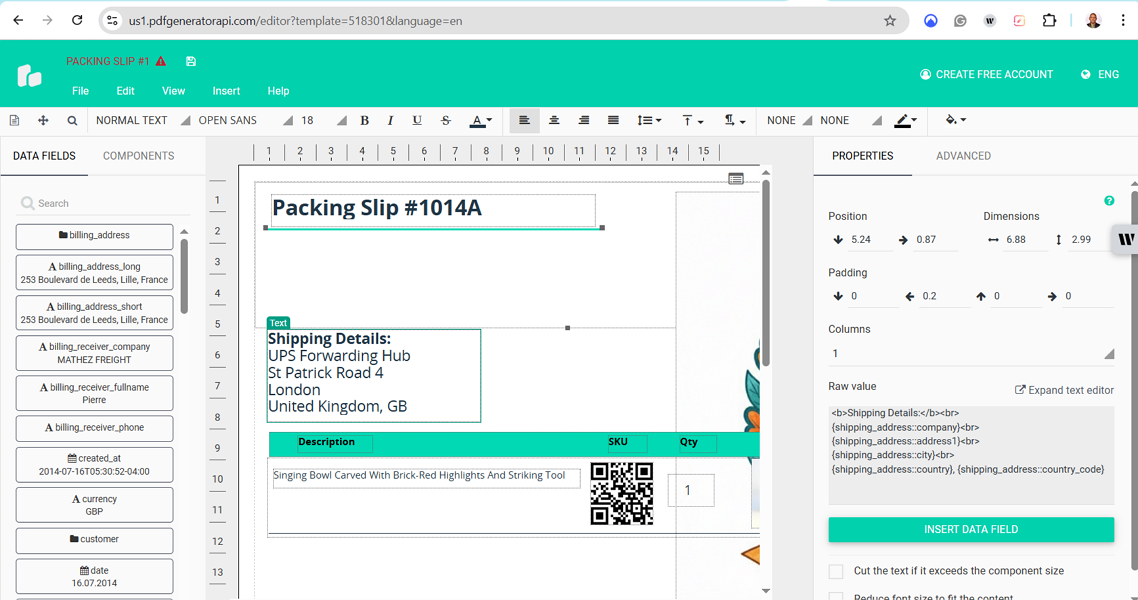
PDF Generator API helps users create dynamic document templates without writing a single line of code. It comes with a WYSIWYG editor that lets you create a range of PDFs, from invoices and labels to contract documents and packaging slips. Simply create a template, populate it with data, or even allow users to modify these templates to suit their needs.
PDF Generator API allows users to save repeatable data. Simply use content blocks or even tables to display dynamic data. Make your data easy to track or even searchable by embedding scannable QR and barcodes within your PDFs. Create your templates once and reuse them forever for consistent branding and efficiency. This API comes with ready templates that you can edit:
You can integrate the PDF Generator API with any application or service that supports HTTP requests. Use this tool with low-code platforms such as Zapier, n8n, Make, Airtable, and more. You can also use the PDF Generator API with various scripting languages like Python, Ruby, JavaScript, PHP, and Java.
Pros & Cons
PROS
CONS
Pricing
PDF Generator API doesn’t offer a free plan but has a 14-days trial with 1000 credits. Paid plans start at €80/year.
PDF Manipulation & Extraction API
PDF manipulation and extraction APIs allow users to modify existing PDF files and extract specific data. You can use these tools to merge, split, edit data or extract images and data for further processing. Here are some of the best PDF manipulation and extraction APIs.:
Adobe PDF Services API
Adobe PDF Services API is a tool you can use to create, transform, OCR, and edit PDFs. You can programmatically alter a document in various ways, like rotating, inserting, or reordering pages with a few clicks. With the help of AI, Adobe PDF Services API accurately identifies text objects and understands the natural reading order of various elements such as headings, paragraphs, and lists.
Adobe PDF Services API extracts font styles by identifying metadata, such as italic and bold text, and their positions within a PDF file. This API saves the extracted content as a structured JSON file, images as PNGs, and tables as XLSX or CSV. This tool uses Adobe Sensei to understand the content structure in a PDF file.
This is how to extract content from a PDF:
curl --location --request POST 'https://pdf-services.adobe.io/operation/extractpdf' \
--header 'x-api-key: YOUR_API_KEY_HERE' \
--header 'Content-Type: application/json' \
--header 'Authorization: Bearer {{Placeholder for token}}' \
--data-raw '{
    "assetID": "urn:aaid:AS:UE1:23c30ee0-2e4d-46d6-87f2-087832fca718",
    "elementsToExtract": [
        "text"
    ]
}'
Adobe PDF Services API has various use cases. For instance, you can use it for report creation and editing, both for internal consumption and external sharing. It is also handy in creating white papers or marketing materials that feature analytics and security controls. You can also use Adobe PDF Services API to automate job posting and attach support documents, such as PDF brochures.
Pros & Cons
PROS
CONS
Pricing
The Adobe PDF Services API offers a free tier that supports up to 500 document transactions per month. However, pricing information on paid plans isn’t displayed publicly and is only available through contacting the sales team.
PDF.co
PDF.co is a low-code REST for automating PDF conversion, extraction, and editing. Its Document Classifier automatically sorts and organizes scans and documents. Create custom classification rules within CSV files and even add “OR” and “AND” logic within these classifications. You can still sort documents by vendor to streamline data extraction.
PDF.co allows you to add signatures, text, and images to your existing PDFs. You can also create forms from scratch or fill out existing ones. Make it easy to share information and improve navigation by adding hyperlinks and annotations to your documents. Use PDF.co with various programming languages like Visual Basic, Java, JavaScript, Python, and more.
You can search and replace text within your PDF files using PDF.co. Simply use regular expressions to search for patterns and locate and manage data within PDF files. Target entire documents or specific pages to replace text with other text or images. This is sample code you can use to search and replace text in a document.
curl --request POST "https://api.pdf.co/v1/pdf/edit/replace-text" --header "Content-Type: application/json" --header "x-api-key: YOUR_API_KEY_HERE" --data "{\"url\":\"https://pdfco-test-files.s3.us-west-2.amazonaws.com/pdf-search-and-replace/sample-agreement-template-signature-page-1.pdf\",\"searchstring\":\"[CLIENT-NAME]\",\"replacestring\":\"John Doe\",\"casesensitive\":true,\"replacementlimit\":1}"Pros & Cons
PROS
CONS
Pricing
PDF.co doesn’t offer a free plan, but it has a 30-day free trial with 10,000 credits. Paid plans start at $8.99/month for 16,500 credits/month.
ConvertAPI
ConvertAPI is a powerful file conversion, compression, and PDF processing API that enables developers to automate document workflows with minimal setup. You can convert files between a wide range of formats, such as PDF, Word, Excel, PowerPoint, and images. This makes it suitable for applications that handle diverse document types.
I tested one file compression, and it reduced my document size by over 80%.
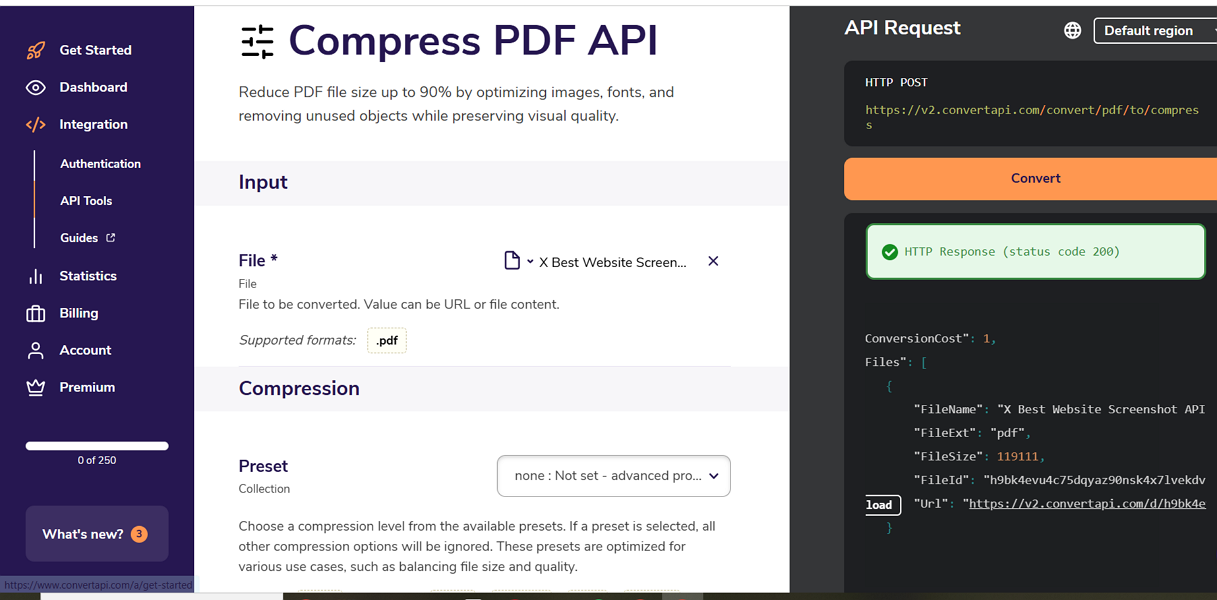
With ConvertAPI, you can programmatically convert PDF, PPTX, DOCX, or XLSX files. Use this tool to convert scanned or textual documents to plain text, Excel, PowerPoint, or Word documents. This API also comes in handy when you want to extract tables from scanned or regular PDF documents. You can also import from MS Office spreadsheets or comma-separated values using this tool.
A key feature of ConvertAPI is its support for PDF/A, the international ISO standard for preserving electronic documents. This is useful when you want to convert documents to a format suitable for long-term preservation and improve accessibility or even be compliant. This tool can convert PDFs into PDF/UA formats, suitable for assistive technology accessibility.
Pros & Cons
PROS
CONS
Pricing
ConvertAPI doesn’t have a free plan, but it offers a 30-day free trial that includes 250 conversions. Paid plans start at $35/month for 1000 conversions.
Anvil
Anvil is a tool you can use to convert existing PDFs into API-fillable templates. Its Document AI feature allows users to upload a fixed document, such as a DOCX or PDF, and instantly convert it into a fillable template. Users can also create dynamic, editable templates with composable clauses and variable fields using Anvil.
Anvil allows users to generate well-formatted PDFs. You can generate itineraries, contracts, invoices, and proposals using custom HTML and CSS to perfect your PDFs. Use frontend technologies such as Vue and React with Anvil to generate PDF files. You can even use Markdown syntax, especially when dealing with tables, images, and headings.
You can use this sample code to generate a PDF:
[
  {
    "label": "Name",
    "content": "Sally Smith",
    "fontSize": 18
  },
  {
    "label": "Use markdown",
    "content": "Lorem **ipsum** [dolor sit _amet_](https://useanvil.com)...",
    "textColor": "#CC0000"
  },
  {
    "table": {
      "rows": [
        [
          "Description",
          "Quantity",
          "Price"
        ],
        [
          "4x Large Wigets",
          "4",
          "$40.00"
        ],
        [
          "10x Medium Sized Widgets in dark blue",
          "10",
          "$100.00"
        ],
        [
          "6x Small Widgets in white",
          "6",
          "$60.00"
        ]
      ],
      "columnOptions": [
        {
          "align": "left",
          "width": "60%"
        },
        {
          "align": "center",
          "width": "100px"
        },
        {
          "align": "right"
        }
      ],
      "firstRowHeaders": true,
      "rowGridlines": true,
      "columnGridlines": true,
      "verticalAlign": "center"
    }
  }
]
Anvil supports various open-source libraries. This means you can use it with various programming languages like Node.js, React Components, Python, and C#.NET Client.
Pros & Cons
PROS
CONS
Pricing
Anvil has a free plan supporting 2 users and unlimited e-signatures. Paid plans with API access, Etch E-sign and custom CSS used metered usage pricing, starting from $0.10.
PDF Vector
PDF Vector is an AI-powered document processing API for extracting structured data and text from PDFs and other document formats. You can transform unstructured files into clean, machine-readable output. This makes it ideal for developers building data-driven applications or automating document analysis workflows.
PDF Vector doesn’t just extract text but also enables AI-powered querying of documents. You can parse a PDF, extract specific fields, and even ask questions about the content. This is very useful when handling contracts, reports, or research papers at scale.
The API also supports multiple file types, such as PDFs, Word documents, spreadsheets, and images, offering flexibility beyond traditional PDF tools. It offers API integration and support for structured outputs such as Markdown or JSON. It’s useful for automation pipelines, analytics tools, or AI-powered document search systems.
Pros & Cons
PROS
CONS
Pricing
PDF Vector has a free plan with access to all APIs and 100 credits. Paid plans start from $23/month for 3000 credits.
Other PDF APIs
Here are other PDF generation and modification APIs you can consider:

APITemplate.io

Bannerbear

PDF-API.io

Cloudmersive PDF APIs

Browserless.io PDF API

ILoveAPI

DocSpring PDF Generation API
What to Look for in a PDF API
Not all PDF APIs are created the same. These are some of the features to look for in the ideal PDF API:
- Modern CSS/JS Support: The ideal PDF API should render React/Vue/Angular pages or Tailwind CSS. This is important because most webpages rely on JavaScript for dynamic content, and poor rendering can break layouts in generated PDFs.
- Manipulation Capabilities: A good API should support merging (PDF A + PDF B), splitting, and rotating. This is so important when extracting specific pages or combining reports.
- Security & Compliance: Check for SOC 2, GDPR, and HIPAA compliance, and for auto-deletion of files after processing. This assures users that their files are processed in accordance with agreed-upon standards.
- Webhooks & Async Processing: The ideal PDF processing tool should support webhooks and async processing. This helps handle massive files without timing out the server.
PDF API Quick Comparison
Below is a quick comparison table of the PDF APIs discussed.
| API | Best for | Starting Price | SDKs available | Free Tier |
|---|---|---|---|---|
| Geekflare API | Fast Webpage/URL to PDF conversion | $9/month | REST API with multi-language support | Yes |
| DocRaptor | For accessible PDFs | $15/month | REST API with multi-language support | Yes |
| API2PDF | Cost-effective quick PDF generation | Pay as you go | Yes. Java, Python, C#, PHP and Node | No |
| PDFMonkey | Invoices, receipts, and dynamic reports | €4.5/month | REST API | Yes |
| CraftMyPDF | Personalized documents | $29/month | REST API | Yes |
| PDF Generator API | Creating dynamic document templates | €80/year | Yes. Python, Ruby, JavaScript, PHP, and Java | No. Has a 14-day trial |
| Adobe PDF Services API | Large enterprises | Not publicly available | Yes. Multiple languages | Yes |
| PDF.co | Extracting data from a scanned PDF or merge documents | $8.99/month | Visual Basic, Java, JavaScript, Python | No. But has a 30-day free trial |
| ConvertAPI | Multi-format conversions, and merging | $35/month | Yes. Multiple languages | No. But has a 30-day free trial |
| Anvil | Web-to-PDF forms and e-signatures | Metered-usage pricing, starting at $0.10 | Yes. Node.js, React Components, Python and C#/.NET Client | Yes, for 2 users |
| PDFVector | Extract PDF data | $23/month | Yes. TypeScript, cURL, and Python | Yes |
How to Choose the Right PDF API for Your Stack
Choosing the right PDF API ultimately depends on your needs. From my experience, there’s no perfect solution as some APIs are optimized for fast HTML-to-PDF conversion, while others do best in document automation, data extraction, or large-scale processing.
- If your primary goal is to convert webpages or URLs into PDFs quickly, a lightweight API like Geekflare API is a practical choice.
- For more structured use cases such as invoices, reports, or templates, tools like PDFMonkey or CraftMyPDF offer better flexibility.
- If you’re dealing with advanced workflows like OCR, merging, or extracting data from scanned files, APIs like PDF.co or Adobe PDF Services API provide more powerful capabilities.
Before making a final decision, I recommend testing a few APIs using their free tier or trial. Pay close attention to rendering accuracy, API response time, and how easy it is to integrate into your existing stack. The right choice should not only meet your current requirements but also scale with your application as it grows.
FAQs
Yes. Most PDF APIs, like Geekflare PDF API, offer a free tier with 500 credits
Puppeteer will be a good fit if you’re technical and want to handle infrastructure maintenance. PDF APIs are ideal if you’re just focused on getting results. It depends on your needs and experience level.



