Proxies are no longer just about changing IPs; they’re critical for avoiding ad fraud, accessing geo-restricted content, and scraping websites that aggressively block automated traffic. That said, it is well known that low-quality IPs are flagged almost instantly, and NodeMaven is among the most sought-after proxy providers. In this NodeMaven Review, I’m taking a close look at how well this proxy service performs when dealing with modern anti-bot systems.
I’ve tested NodeMaven to see whether it actually delivers on its promise of high-quality residential and mobile IPs. I particularly tested it on tough use cases like e-commerce scraping, social media automation, and SERP tracking. Instead of relying on marketing claims, I focused on real-world performance such as connection speed, success rates across popular targets, and session stability.

Throughout this review, I’ll break down NodeMaven’s features, explain what makes its IP Quality Filter different, and share benchmark results from my hands-on tests. If you’re looking for a proxy provider that can handle strict detection systems without burning through IPs, this review should help you decide whether NodeMaven is worth your money.
What is NodeMaven?
NodeMaven is a proxy service provider focused on delivering high-quality residential and mobile IPs for users who regularly hit strict anti-bot systems. Instead of competing on raw IP volume, NodeMaven positions itself around IP quality and control, which is what actually determines success when scraping protected sites or managing multiple accounts.
What stood out to me while testing NodeMaven is its approach to filtering traffic before it reaches the user. The service’s IP Quality Filter checks and excludes unreliable or flagged IPs. This means you’re much more likely to get usable addresses from the start instead of rotating through bad ones.
Another differentiator is NodeMaven’s shared balance system. It lets you use both residential and mobile proxies from the same account balance, without needing separate plans for each type.
Overall, NodeMaven is clearly built for users who prioritize consistency and is a strong choice for automation, scraping, and multi-account workflows.
NodeMaven Features
NodeMaven’s feature is around quality, flexibility and control rather than the number of IPs. Below are some of the core capabilities that I found most impactful in real-world use cases:
- Hybrid Proxy Network: NodeMaven provides a hybrid network of both residential and mobile proxies under one account. This means you can access residential IPs for broad web tasks and mobile IPs for tougher anti-bot targets without subscribing to separate plans.
- IP Quality Filter: NodeMaven has IP Quality Filter, which screens IPs in real time and filters out low-quality or high-risk addresses before they’re assigned to your session. This means 95% of your requests go through clean, usable IPs rather than spending time rotating through bad ones.
- Geo-Targeting: NodeMaven supports detailed geo-targeting when generating proxy credentials. You can select proxies filtered by: Country, City, Region or ASN (Autonomous System Number). This allows you to tailor IP selection to specific geographic markets or carrier networks. This is crucial in localized scraping results or accessing region-locked content.
- Protocols: NodeMaven supports both HTTP(S) and SOCKS5 protocols. This ensures users have a wide variety of IPs to select from.
- Session Control: NodeMaven gives you control over session behavior. You can either have sticky sessions that keep the same IP for a longer period (useful for login flows, social automation) or rotating sessions where you get a new IP per request or session, which is ideal for high-volume scraping where you want to spread requests across many IPs.
Performance Benchmarks
I ran NodeMaven through rigorous tests to determine its speed, success rate and stability. This is how I did it
Test Setup
To benchmark NodeMaven, I ran controlled tests using its gateway endpoint gate.nodemaven.com:8080 with the IP Quality Filter set to medium and country targeting set to any.
I used multiple proxy usernames that included a unique session ID (sid), which allowed me to test both performance and sticky session stability (one SID per session). For each target, I sent a fixed number of requests using the same headers and timeout settings, then recorded response time, HTTP status codes, and failures.
To simulate rotation, I repeated the same test across multiple session IDs and compared results across sessions.
I used this script:
#!/usr/bin/env python3

import argparse
import csv
import statistics
import time
from concurrent.futures import ThreadPoolExecutor, as_completed
from dataclasses import dataclass
from datetime import datetime
import requests

@dataclass
class ResultRow:
    idx: int
    ts_utc: str
    url: str
    status_code: int
    ok: bool
    elapsed_ms: int
    error: str
    bytes: int
    note: str

def build_proxy(host, port, user, password):
    proxy_url = f"http://{user}:{password}@{host}:{port}"
    return {"http": proxy_url, "https": proxy_url}

def one_request(idx, url, proxies, timeout, headers):
    ts = datetime.utcnow().isoformat(timespec="seconds") + "Z"
    start = time.perf_counter()
    try:
        r = requests.get(url, proxies=proxies, headers=headers, timeout=timeout)
        elapsed = int((time.perf_counter() - start) * 1000)
        ok = 200 <= r.status_code < 400
        return ResultRow(idx, ts, url, r.status_code, ok, elapsed, "", len(r.content), "")
    except Exception as e:
        elapsed = int((time.perf_counter() - start) * 1000)
        return ResultRow(idx, ts, url, 0, False, elapsed, type(e).__name__, 0, "")

def main():

    p = argparse.ArgumentParser()
    p.add_argument("--label", required=True)
    p.add_argument("--url", required=True)
    p.add_argument("--requests", type=int, default=300)
    p.add_argument("--concurrency", type=int, default=10)
    p.add_argument("--proxy-host", required=True)
    p.add_argument("--proxy-port", type=int, required=True)
    p.add_argument("--proxy-user", required=True)
    p.add_argument("--proxy-pass", required=True)
    args = p.parse_args()
    proxies = build_proxy(
        args.proxy_host,
        args.proxy_port,
        args.proxy_user,
        args.proxy_pass

    )

    headers = {
        "User-Agent": "Mozilla/5.0 Chrome/145",
        "Accept": "text/html",
        "Accept-Language": "en-US,en;q=0.9"
    }

    print(f"\n=== Proxy Speed Test: {args.label} ===")
    print(f"Target: {args.url}")
    print(f"Requests: {args.requests} | Concurrency: {args.concurrency}")
    print("Running...\n")
    rows = []
    start_all = time.perf_counter()
    with ThreadPoolExecutor(max_workers=args.concurrency) as ex:
        futures = [
            ex.submit(one_request, i+1, args.url, proxies, 20, headers)
            for i in range(args.requests)
        ]
        for f in as_completed(futures):
            rows.append(f.result())
    total_time = round(time.perf_counter() - start_all, 2)
    latencies = [r.elapsed_ms for r in rows if r.ok]
    success = len([r for r in rows if r.ok])
    print("=== Results Summary ===")
    print(f"Total time: {total_time}s")
    print(f"Success rate: {round(success / args.requests * 100, 2)}%")
    print(f"Average latency: {round(statistics.mean(latencies), 2)} ms")
    print(f"Median latency (P50): {round(statistics.median(latencies), 2)} ms")
    print(f"Min / Max latency: {min(latencies)} / {max(latencies)} ms")
if __name__ == "__main__":

    main()
Speed Test
To measure NodeMaven’s proxy speed, I sent 300 requests to Google using a single sticky residential session, with a concurrency level of 10 parallel connections.
This is the script I ran to test speed:
python -W ignore proxy_test.py ^
--label nodemaven_speed_google ^
--url https://www.google.com ^
--requests 300 ^
--concurrency 10 ^
--proxy-host gate.nodemaven.com ^
--proxy-port 8080 ^
--proxy-user hello_geekflare_com-country-any-sid-0105e78ae3074-filter-medium ^
--proxy-pass .......
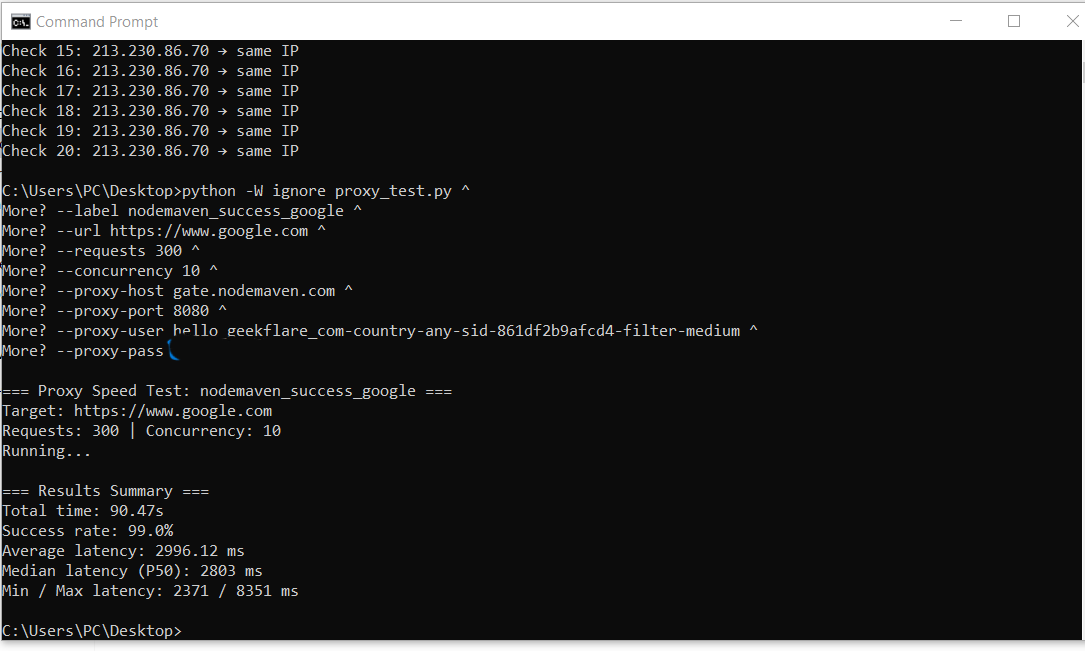
During the test, NodeMaven delivered an average response time of 3,191 ms, with a median (P50) latency of 3,110 ms. Latency remained relatively consistent throughout the run, with response times ranging from 2,625 ms to 4,800 ms under sustained load. The overall success rate reached 99.33%.
These were the results:
Success Rate Test
To evaluate reliability on real-world, high-friction targets, I tested NodeMaven proxies across e-commerce, social media, and search engines. I sent 300 requests per target using sticky residential sessions and a concurrency level of 10.
Target 1: E-commerce
Amazon is known for aggressive bot detection and frequent IP blocking. I sent 300 requests using a sticky residential session with moderate concurrency to simulate a realistic scraping workload.
This is the script I ran for the Amazon success rate test:
python -W ignore proxy_test.py ^

--label nodemaven_success_amazon ^
--url https://www.amazon.com ^
--requests 300 ^
--concurrency 10 ^
--proxy-host gate.nodemaven.com ^
--proxy-port 8080 ^
--proxy-user hello_geekflare_com-country-any-sid-1d4049e4d5bc4-filter-medium ^
--proxy-pass……………
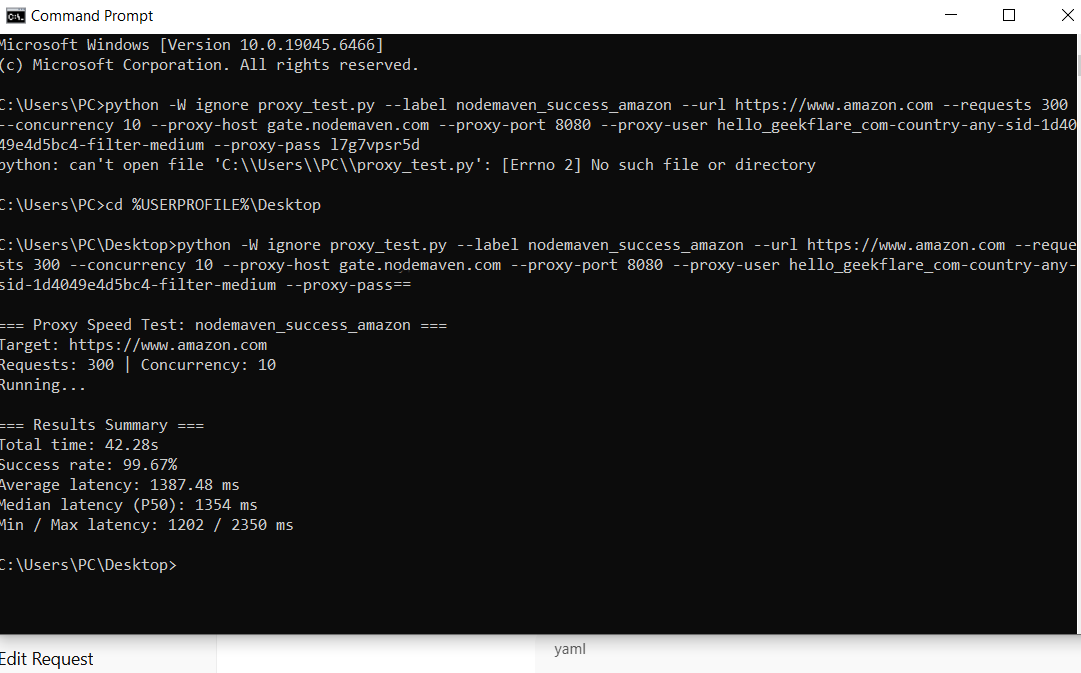
Despite Amazon’s strict defenses, NodeMaven achieved a 99.67% success rate, with only a small number of failed requests across the entire test run.
These were the results:
Target 2: Social Media
I also run some tests on X, which frequently flags or rate-limits low-quality proxy traffic.
This is the script I ran for the X success rate test:
python -W ignore proxy_test.py ^

--label nodemaven_success_x ^
--url https://x.com ^
--requests 300 ^
--concurrency 10 ^
--proxy-host gate.nodemaven.com ^
--proxy-port 8080 ^
--proxy-user hello_geekflare_com-country-any-sid-056cad622fcf4-filter-medium ^
--proxy-pass ......
Using the same test parameters, NodeMaven completed all 300 requests, achieving a 100% success rate. Even under continuous parallel requests, there were no outright connection failures, which is a strong indicator of consistent IP reputation and session handling.
Target 3: Search Engine
Finally, I tested NodeMaven against Google to measure reliability on search engines, where repeated requests often trigger blocks or CAPTCHA challenges. I again sent 300 requests using a sticky residential session.
This is the script I ran for the Google success rate test:
python -W ignore proxy_test.py ^

--label nodemaven_success_google ^
--url https://www.google.com ^
--requests 300 ^
--concurrency 10 ^
--proxy-host gate.nodemaven.com ^
--proxy-port 8080 ^
--proxy-user hello_geekflare_com-country-any-sid-861df2b9afcd4-filter-medium ^
--proxy-pass ......
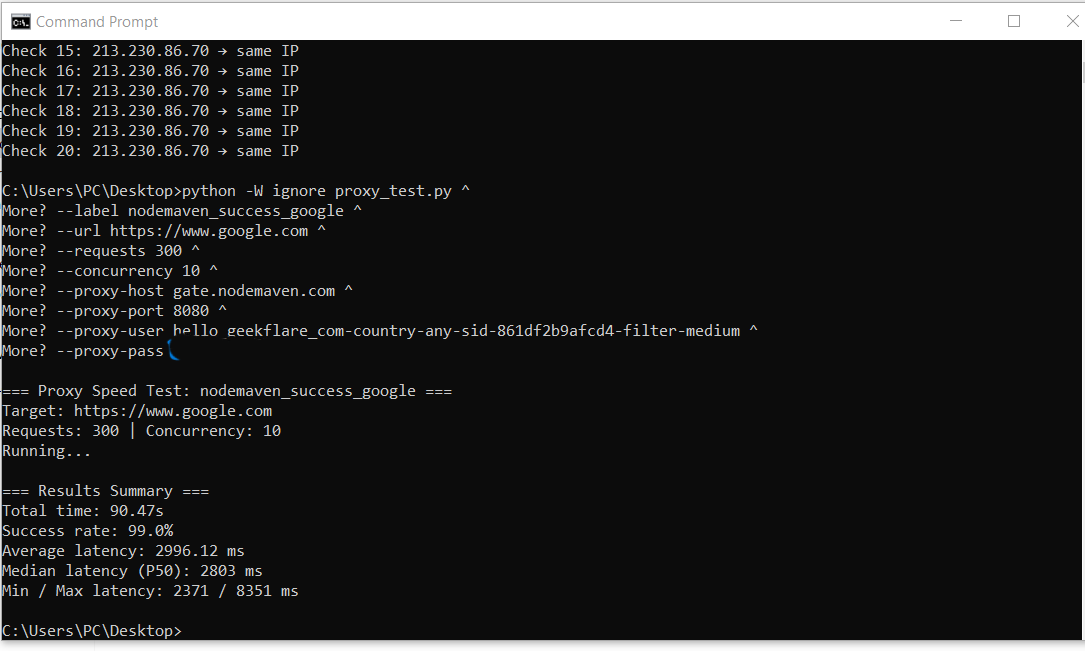
NodeMaven maintained a 99.67% success rate, with only minimal request failures throughout the test. This level of consistency is particularly important for use cases such as SERP tracking and keyword research, where unstable IP addresses can disrupt data collection.
These were the results from the test:
Stability
To verify whether NodeMaven’s sticky sessions actually maintain IP persistence, I ran a stability test using a single session ID (sid) and repeatedly checked the outgoing IP address over time..
This is the script I ran for the stability test:
import time
import requests

PROXY_HOST = "gate.nodemaven.com"
PROXY_PORT = 8080
PROXY_USER = "hello_geekflare_com-country-any-sid-0105e78ae3074-filter-medium"
PROXY_PASS = "......."
proxy_url = f"http://{PROXY_USER}:{PROXY_PASS}@{PROXY_HOST}:{PROXY_PORT}"
proxies = {
    "http": proxy_url,
    "https": proxy_url
}
CHECKS = 20
INTERVAL = 10  # seconds
print("Sticky session stability test\n")
last_ip = None
for i in range(1, CHECKS + 1):
    try:
        r = requests.get("https://api.ipify.org?format=json", proxies=proxies, timeout=20)
        ip = r.json().get("ip", "unknown")
    except Exception as e:
        ip = f"error ({type(e).__name__})"

    status = "same IP" if last_ip == ip or last_ip is None else "IP changed"
    print(f"Check {i:02d}: {ip} → {status}")
    last_ip = ip
    time.sleep(INTERVAL)
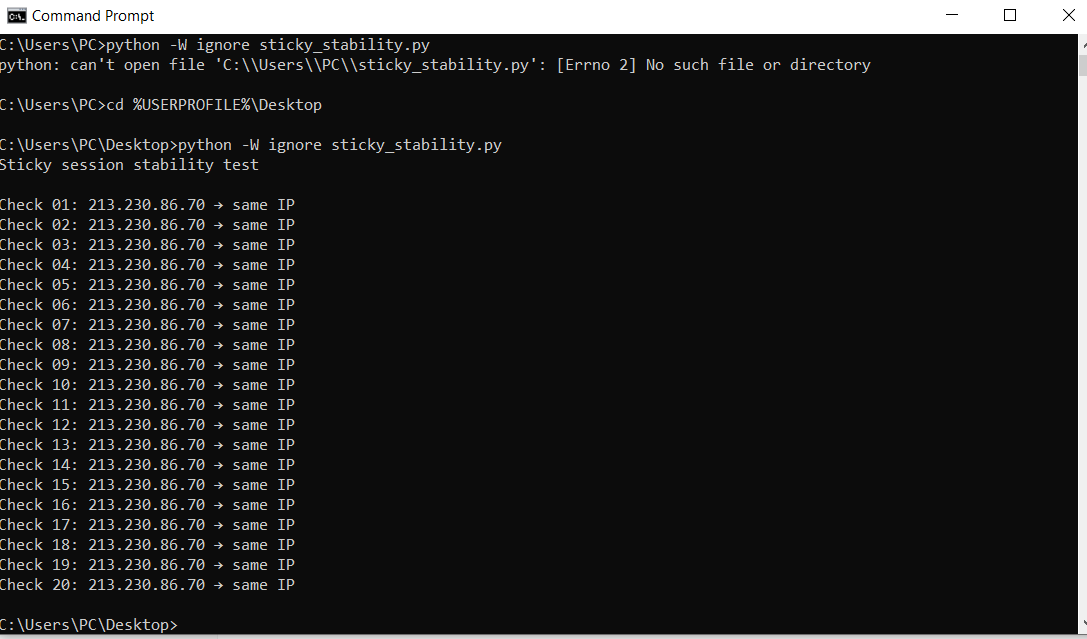
During the test, NodeMaven consistently returned the same IP address across 20 consecutive checks, with no unexpected rotations or drops. Each request resolved to the same residential IP, confirming that sticky sessions behave as advertised and remain stable over extended periods.
These were the results:
ISP Proxies
NodeMaven also offer ISP proxies with TCP and UDP protocols support. Because these IPs are hosted in datacenters but registered to Internet Service Providers such as Verizon, AT&T, or Comcast, they appear as genuine household connections to target websites.
ISP proxies are ideal for long-lasting sessions required in multi-accounting, e-commerce, and social media management. And, it is up to 5 times faster than residential proxies.
User Experience
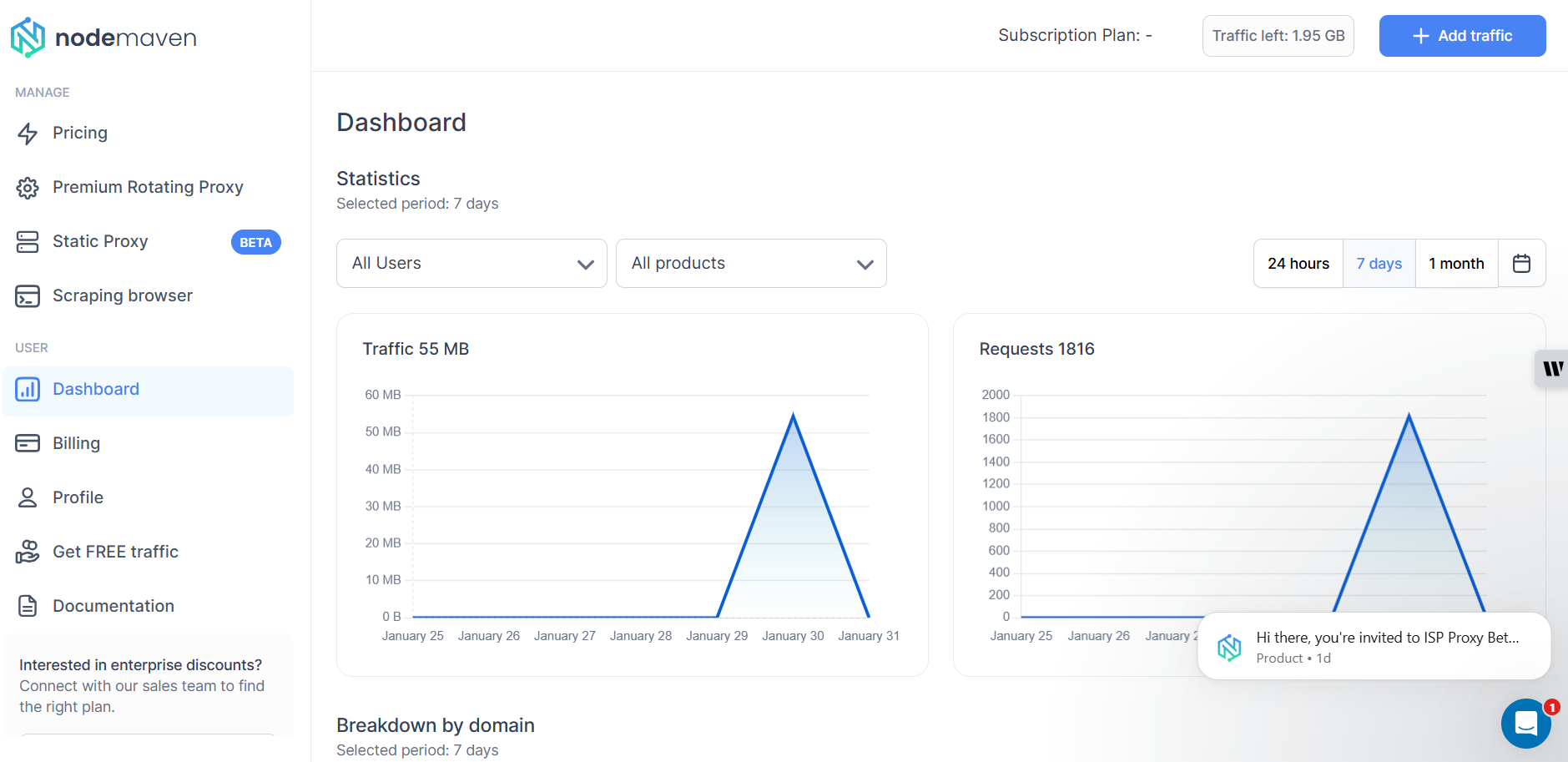
As a first-time user, I found NodeMaven’s dashboard easy to navigate. The interface is clean and well-structured. From the left sidebar, I could quickly access pricing, proxy types, documentation, and billing.
On the Proxy Setup screen, I could choose between residential and mobile proxies, select the IP version (IPv4, IPv6, or mixed), define location settings, and switch between sticky or rotating sessions.
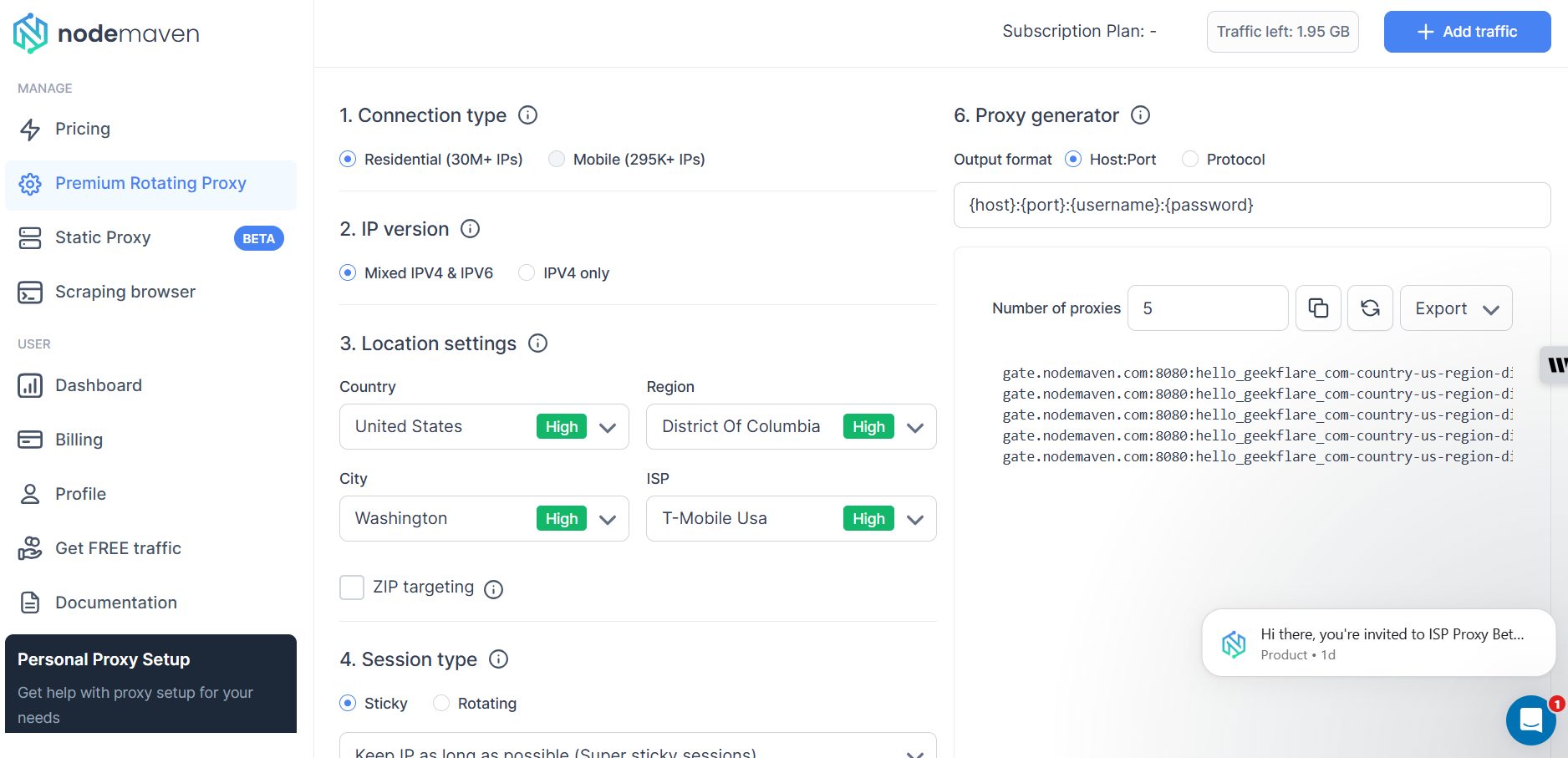
One thing I liked is the built-in proxy generator on the right-hand side. As I adjusted settings like session type or location, the generated proxy strings updated automatically. This made it easy to export ready-to-use proxies in a standard {host}:{port}:{username}:{password} format.
Overall, the dashboard feels friendly as it is minimalistic and avoids unnecessary design fluff. The documentation button also ensures that I have something I can quickly refer to if I get stuck.
Pricing
Nodemaven offers 3 pricing models: monthly billing, pay as you go and pay per IP.
- In the monthly billing, you are charged on a per GB basis, and the lowest monthly plan is the 2GB package at $4/GB or $8/month.
- If you decide to subscribe to the pay as you go model, the cost per GB goes down as you buy more data. For instance, you will pay $3.60/GB if you select the 40GB package.
- The pay per IP plan charges $4.99/month per proxy.
Both pricing tiers include access to both residential and mobile proxies. Users also enjoy features such as traffic rollover, sticky sessions up to 24 hours, and the IP Quality Filter at no extra cost. I also noticed that traffic rollover is included, which helps reduce wasted bandwidth if you don’t fully consume your monthly allocation.
Overall, NodeMaven’s pricing reflects its focus on clean, usable IPs rather than disposable traffic.
NodeMaven Promo Codes
GEEK35 – 35% discount on resident and mobile proxies
GEEK40 – 40% discount on ISP proxies
Practical Use Cases
Based on my testing and how NodeMaven structures its proxy network, it’s best suited for use cases where IP quality, session control, and location accuracy matters. Below are the most practical scenarios where NodeMaven fits naturally.
Track SERP
NodeMaven works well for SERP tracking and keyword monitoring, especially when you need consistent access to Google and other search engines without triggering frequent blocks. Features like sticky sessions, country- and city-level targeting, and IP quality filtering help keep requests stable across repeated queries.
Verifying Ads
NodeMaven’s residential and mobile IPs make it possible to view ads as real users from specific locations. This is useful for confirming ad placement, detecting geo-based discrepancies, and identifying fraudulent or misleading creatives. The ability to target by country, city, and ISP improves accuracy when checking localized campaigns.
Manage Affiliate and Social Media Accounts
NodeMaven is well suited for affiliate workflows and social media management, where platforms often flag reused or low-quality IPs. Using sticky sessions with clean residential or mobile IPs helps maintain session continuity and reduces the risk of account restrictions when managing multiple profiles or campaigns.
Monitor Prices & Competitors
NodeMaven’s proxies allow consistent access to e-commerce platforms that apply region-based pricing or anti-scraping measures. Residential IPs combined with geo-targeting help retrieve accurate pricing data without being blocked or displaying misleading content.
Final Verdict
Perfect for:
Developers, scrapers, and marketers who regularly deal with strict anti-bot systems and care more about IP quality and session reliability than raw IP volume.
SERP tracking, e-commerce scraping, social media automation, and multi-account workflows.
Solo developers and small teams who want access to both residential and mobile proxies from a single account and dashboard.
Not ideal for:
Users who prioritize ultra-low pricing or big IP volume above everything else.
Users whose workflow depends on rotating through tens of millions of IPs at the lowest possible cost.
Enterprise-scale pools exceeding 100M IPs.
Casual or one-off scraping tasks where IP quality is less important, and budget is the primary concern.