You are a founder or manager, you are looking for a way to chat with your teams and first thing you’ll hear about Slack.
Sounds relatable?
Well, yes. Slack is popular among startups and SMBs across industries. It is undoubtedly one of the best communication platforms and 100% recommended if you are looking for a free option. But, is it the only tool you should consider? How about pricing? How about now after Salesforce has acquired?
That’s all we discuss in this review.

What is Slack?
Slack is a team collaboration platform to help with workplace communication. It provides instant messaging, group chats (called ️️Channel), file sharing, voice calls (called Huddle) and integrations with hundreds of third-party tools. ️
Slack was launched in 2013 as an internal tool but today?
It is used by over 100,000 companies including popular ones you know like OpenAI, Stripe, Roku, and Geekflare ☺️.
When you sign up to Slack, you get a workspace to your business. This workspace is unique to your business and used by your entire team. You can invite your team members using their email or share the invite link.
As a workspace owner, you can customize how you want your Slack to be. Ex:
- Set workspace language
- Set default channel
- Show member name and email
- Auto message when someone join or leave channel
- Deactivate members
- Manage third-party apps integrations
Top 5 Slack Collaboration Features
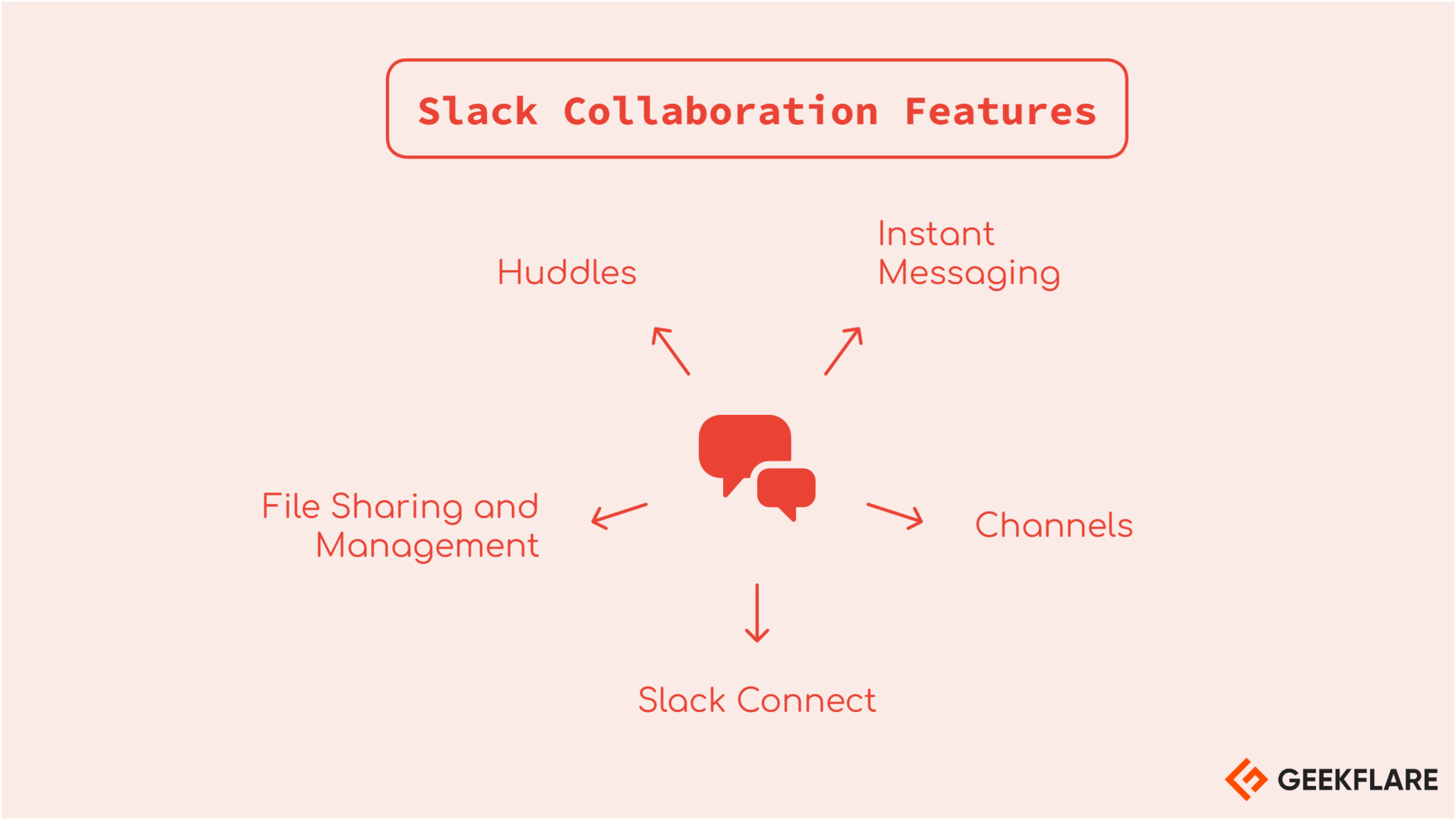
Slack offers plenty of useful collaboration tools for efficient team communication and work management. Let’s go through the top ones, one by one.
Messaging
The main reason to use Slack is messaging, and it outperforms the competitors in the industry. You can instantly chat with your colleagues and partners. You can have one-to-one chat or create a channel to chat with many.
One-to-one chat is called DM (direct messaging).
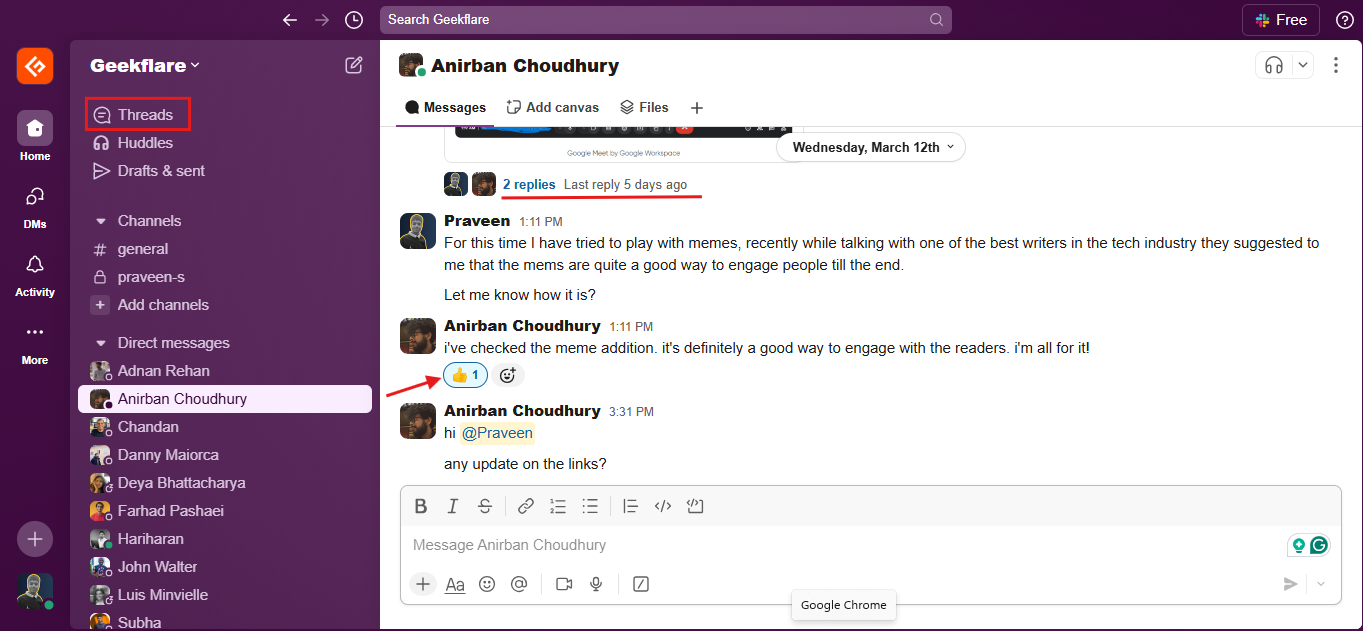
Chat interface is easy to use as you can see below, and it has the following options:
- Text formatting – style it as you need it.
- File sharing – you can share files or text snippet.
- Clips – record and send audio or video clips.
- Tag – you can tag person using @ inside chat.
- Schedule to send the message later.
- Threaded chat – reply to individual chat like threaded comment.
- Reminder – you can add particular chat to remind you later.
- Pinning – pin chat to stay on top of the channel.
- Copy – copy individual chat message or link.
- Turn off notification – don’t want to hear particular chat thread, sure!
Group Chat
Group Chat is called Channel in Slack. You can create private or public channel.
Channel notes
When it is public, it is visible to everyone in the workspace. You may not want to make every channel public.
Channel is a great way to organize chats for particular team or project. All files discussed in the channel is available within channel under “Files” tab.
Few things to note about channel:
- You can change channel visibility from public to private or otherwise.
- Huddle with everyone in the channel.
- Customize tabs in the channel.
- Integrate specific apps in the channel.
- Send emails to channel, but, this is NOT available in free plan.
- Invite external person inside channel, but, again this is only available in PRO plan.
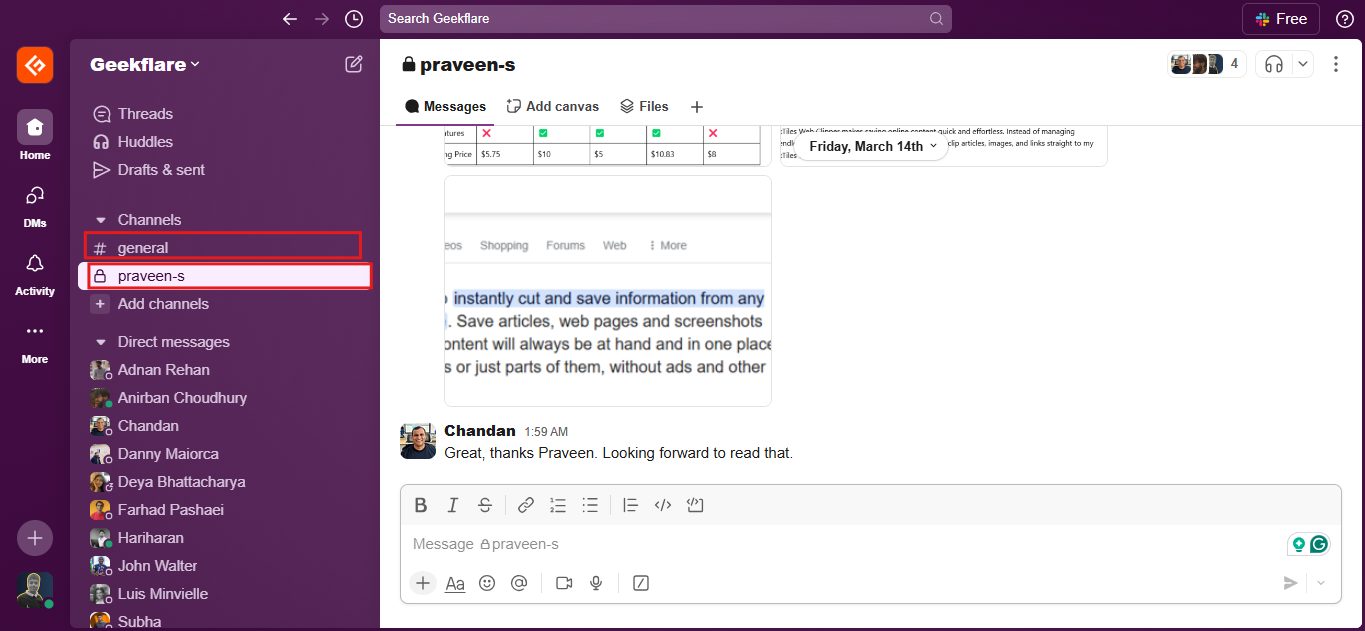
Slack Connect
Slack is primarily for internal workspace chat but what if you need to invite external vendor for specific project or time duration?
Connect helps with that. You can collaborate with external organizations within Slack. You can add them inside Channel. It is like working with your vendor or client without switching to another communication software.
Slack Connect notes
You can’t invite external people through Slack Connect in free plan.
Huddles
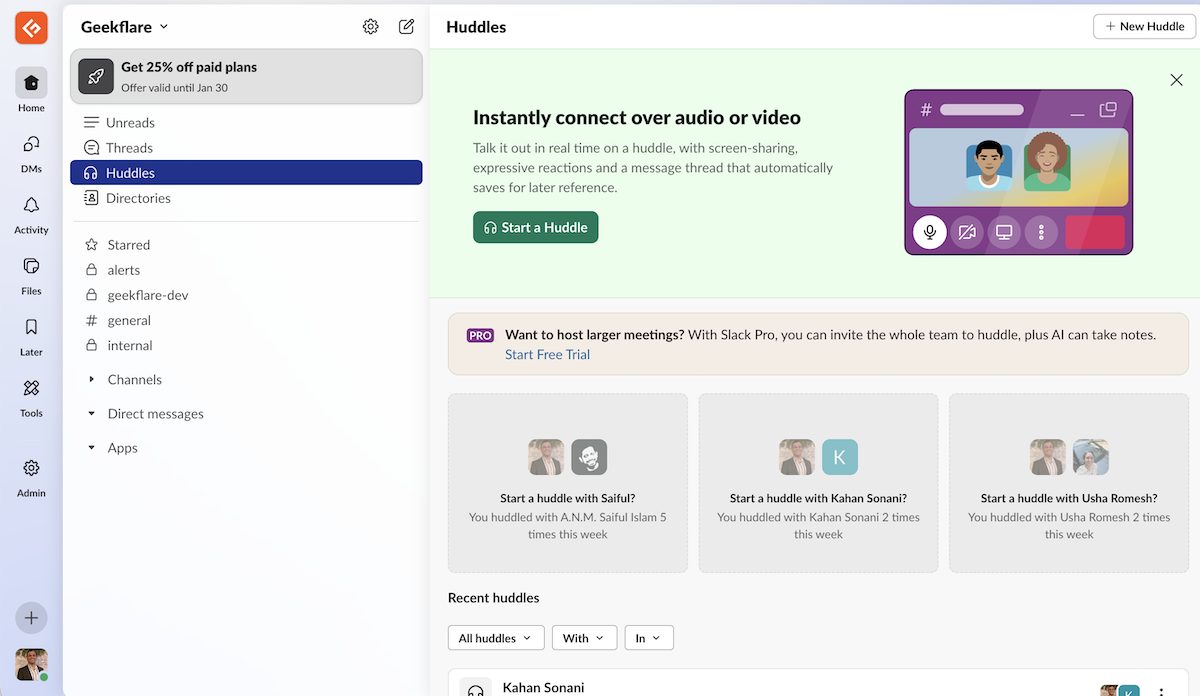
Huddle is like Google Meet to have voice and video call or conference with workspace members. The voice and video quality is an excellent, you won’t miss Google Meet.
Things to note about Huddles.
- You can huddle with one or many.
- You can huddle with everyone in the channel.
- You can share your screen, perfect for team presentation.
Huddle notes
In the free plan, you can’t invite others in the huddle.
Canvas
A new Slack feature available only in PRO plan. In Canvas, you can create content and share with your team. The content can be text, images or videos.
Canvas is useful if you like to manage projects within Slack.
Should you upgrade to PRO to use Canvas?
If you are already using project management software like Notion, Monday.com, Trello, ClickUp, etc., I don’t see the need. However, if you require messaging + projects management then upgrading to paid plan make sense.
Can you use Slack for project management?
The short answer is, yes!
Slack has expanded beyond messaging to offer project management features. While it brings useful tools to manage tasks and projects, it doesn’t entirely replace a dedicated project management platform.
Compared to leading software, it falls short in advanced reporting, workload balancing, and structured task dependencies. If your business needs detailed project tracking, integrating Slack with a dedicated tool is a better option than using it alone.
How to access Slack?
Once your Slack workspace is ready, you can access it through web browsers, desktop or mobile apps.
I would recommend using desktop app as it is faster and notification doesn’t get buried in browser tabs. And, you can install on mobile, so your work is as mobile as you are!
Slack Integration
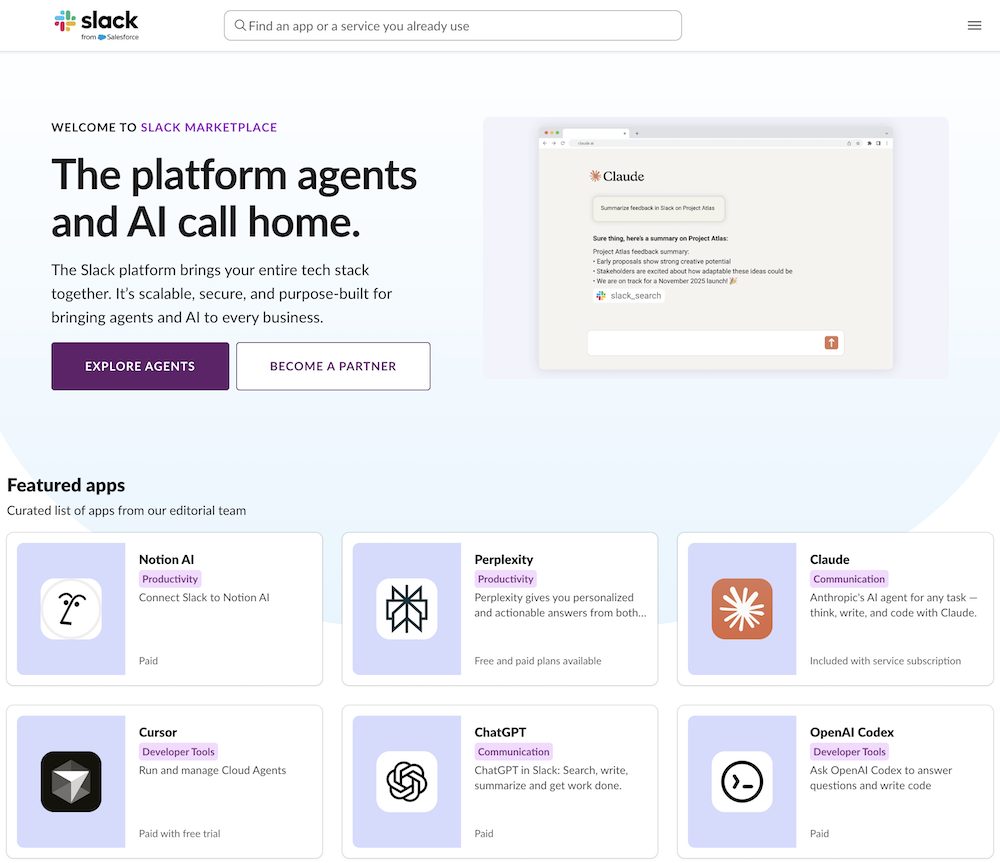
Slack integrates with over 2600 apps. That’s a huge number of apps!
For productivity, integrations like Google Drive, Trello, and Asana help manage files, track tasks, and streamline project coordination. Developers can use Jira, GitHub, and GitLab to monitor issues, track commits, and receive deployment updates directly in Slack.
Communication tools like Zoom and Microsoft Teams Calls enable teams to start meetings instantly without switching platforms. On the security front, Okta and 1Password enhance identity management and data protection.
AI apps integration like Perplexity, ChatGPT, Claude, Cursor, Replit, Linear also exist.
Did you know?
You can use Geekflare Connect to chat with multiple AI models from a single interface. You can invite your entire business to collaborate and keep AI spending lower with BYOK approach.
These integrations reduce the need for constant app-switching, keeping discussions and updates centralized.
Slack AI
AI is everywhere, so, why not with Slack?
Slack AI is a set of built-in features to enhance productivity and communication. You can do things like:
- Summarize conversations, channels, threads.
- Take notes during huddles.
- Search in natural language.
- Translate conversations, useful when you work with vendor from different world.
But disappointment 😔, Slack AI is available only to paid plans.
How about Slackbot?
Slackbot is an AI agent who understand the context, and you can ask to search specific info, help you prep meetings, get info from docs, create briefs and a lot more.
Imagine Slackbot like someone who knows everything happening inside your Slack workspace and ready to answer anything 24×7.
Slack AI data privacy
Very important thing to note, your/customer data is used to train their LLMs. Their LLMs are hosted in AWS VPC which means data stays within Slack infra.
Slack Analytics
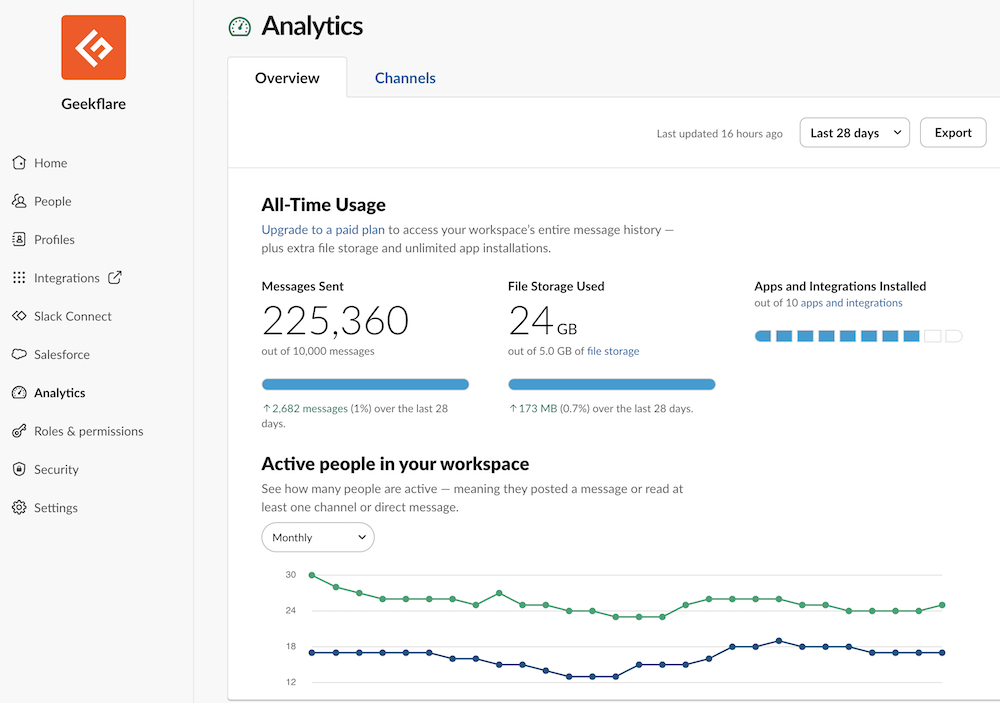
I like the high-level of overview showing messages volume, file storage and apps integration, all at one place. You can also view channel level of analytics under Channels tab which is only available for paid plan.
Slack Pricing
Slack is available as free and paid plan starts at $4.38/user/month. Let’s see how each plan is different.
| Feature | Free | Pro | Business+ |
|---|---|---|---|
| Price | $0 | $4.38/user/mo (offer for 3 months) | $9/user/mo (offer for 3 months) |
| Message History | 90-days access | Unlimited | Unlimited |
| Huddle | 1:1 | Group | Group |
| Apps integration | 10 | Unlimited | Unlimited |
Note
After 3 months, the PRO pricing increases to $8.75/mo and Business+ to $18/mo.
As expected, Slack pricing is increased after Salesforce has acquired it. An interesting story came up about Slack bill getting increased by $195K/year.
Should you subscribe to Slack Pro plan?
The free plan is often enough for small teams that primarily need messaging and happy with 90 days of chat history.
I’d stick with the free plan if I only needed Slack for internal team discussions. But if I were managing multiple projects with external partners or required access to conversations for the past 90 days, upgrading would be the better option.
Slack Alternatives
As I mentioned at beginning, there are plenty of options and here are some great Slack alternatives to try.
- Messaging: Microsoft Teams, Mattermost, Zoom, Google Meet, Discord, Rocket.chat
- Project Management: ClickUp, Monday, Notion, Asana, Trello
Which tool is cheaper than Slack?
- Microsoft Teams – it starts at $4/user/mo.
- Zulip – you can self-host and don’t bother to pay monthly fee.
- Flock – it starts at $4.50/user/mo.
Final Verdict
Perfect for:
Startups, SMBs with remote setup need real-time collaboration.
Small teams needing free chat software.
Knowledge sharing and informal documentation.
Team focused on productivity gains.
Not ideal for:
If you require advanced project management.
If you don't need real-time communication, better stick with email only.
Bigger team as pricing is per user.
To me, Slack is still the king for team communication as it offers very generous features in the FREE plan. I would recommend trying Slack free plan for some time, and you’ll know if you are going to love or hate it.