



The AI revolution is moving beyond simple chatbots. We are now entering the era of AI agents, which can perform tasks and automate complex workflows on our behalf. However, the powerful Large Language Models (LLMs) that act as the brains for these agents have a fundamental limitation: they are trapped by their static training data with no real-time connection to the outside world.
To actually perform tasks like booking a flight, monitoring a competitor’s prices, or compiling real-time research, an agent needs a browser and access to the Internet. It is an essential bridge between an AI’s intelligence and the dynamic web.
But this isn’t about your standard browser like Chrome or Firefox; you require specialized browsers built from the ground up for AI agents. In this guide, we explore the best of these AI agent browsers to add browsing capabilities to your AI. They are also called Browser-as-a-Service (BaaS) for AI.
Browserbase
Developer-friendly Platform and Stagehand Framework
Browserbase offers a powerful API to control fleets of browsers in the cloud, eliminating the significant overhead of maintaining server infrastructure. The platform is primarily aimed at developers building web automations with AI who require high reliability, advanced features, and robust debugging tools.

Browserbase includes built-in automatic CAPTCHA solving, integrated residential proxies, and session management that supports long-running sessions for complex, multi-step tasks.
For debugging, Browserbase has a Session Inspector and a Session Replay feature, giving you complete visibility into an agent’s actions and the state of the web page at any given moment.
The most significant differentiator for Browserbase is its open-source framework, Stagehand. It operates on a set of simple, natural language-driven APIs to control the browser. You can also use Playwright inside the code to interact with the page.
I like their strategic move on Statehand. This classic open-source go-to-market strategy focuses on winning developer mindshare first, knowing that infrastructure revenue will follow.
Pricing
Browserbase offers a free plan with 3 concurrent browsers. Paid plans start at $20/month, offering 25 concurrent browsers.
Hyperbrowser
Hyperbrowser distinguishes itself with a focus on security and transparency, offering headless browsers that run in isolated containers. The use of a containerized environment for each browser session is a strong selling point for security-conscious organizations, as it ensures process isolation.
You can connect Hyperbrowser with Browser Use, Claude Computer Use, and OpenAI CUA. HyperPilot lets you test these agents in action.
I tested with OpenAI Computer Use, and it actually worked like a charm. 😀

Pricing
Hyperbrowser has a free plan, and paid pricing starts at $30/month.
Airtop
Airtop’s philosophy is to enable the creation of complex web automations through simple, natural language commands.
The platform’s primary feature is its natural language automation capability, which allows you to instruct agents to perform actions like logging into a site, filling out a form, or extracting structured information using plain English commands. Recognizing the realities of automation, it supports human-in-the-loop integration, allowing for manual oversight and intervention when an agent encounters a complex situation.
Out of curiosity, I asked to get the pricing from the Geekflare Chat product page, and it actually worked. This opens a door to junior developers to automate browsers without speaking Python or JavaScript.
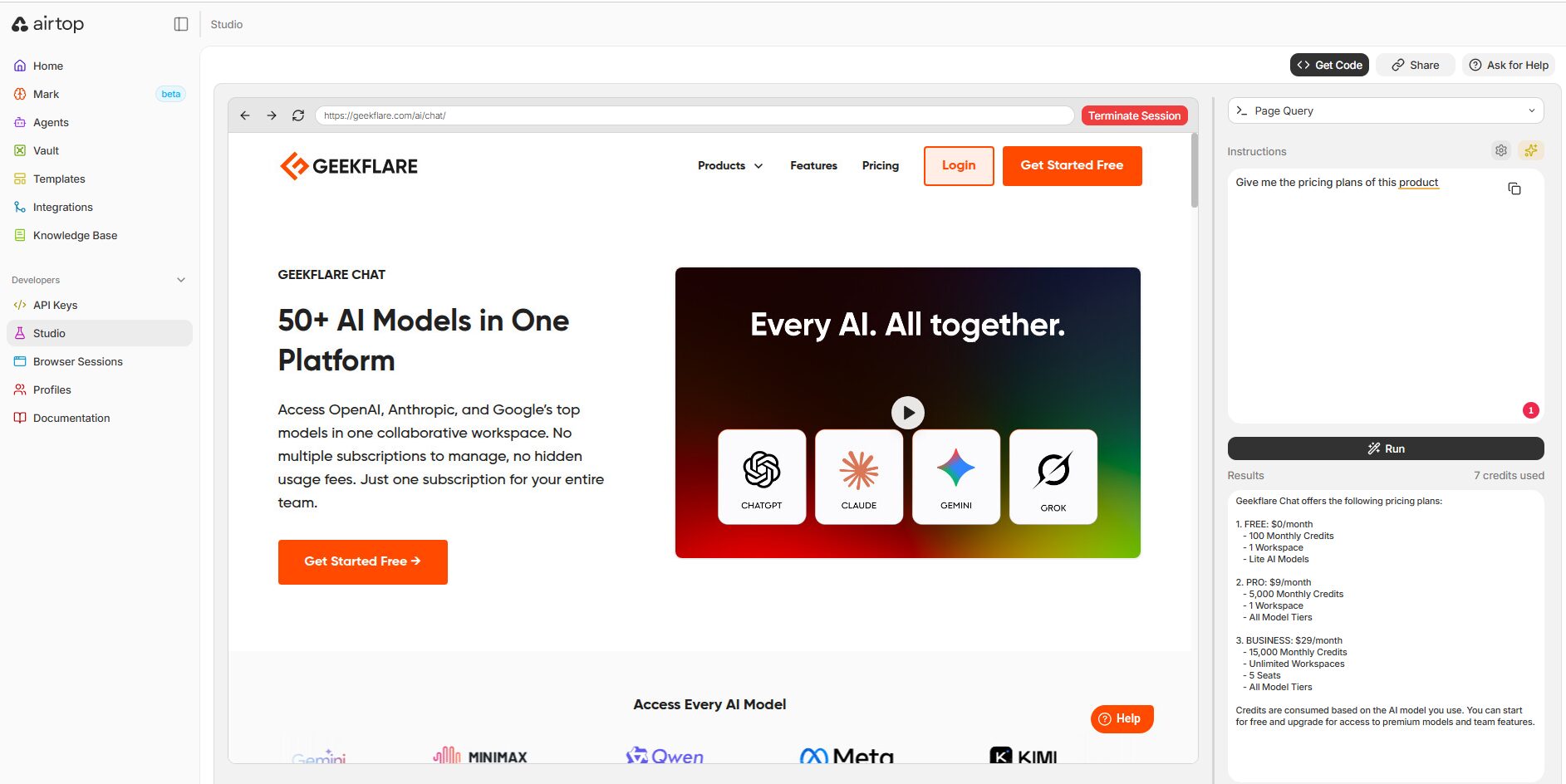
Airtop offers SDKs for Python and Node.js (TypeScript) and connects to the Anthropic Claude API for its AI reasoning capabilities. It also integrates with major automation platforms like Zapier, Make.com, and n8n.
Airtop uses a credit-based subscription model similar to Hyperbrowser. You can start with a free plan and upgrade to the Starter plan starting at $29/month.
BrowserAct
Browser Skills and CLI Built for AI Agents with Human Handoff
BrowserAct takes the AI-friendly element approach one step further. Instead of a managed cloud platform, it ships as a CLI that installs directly into coding agents like Claude Code, Cursor, and Codex, with a set of open-source Skills on top. It offers 6 main capabilities.
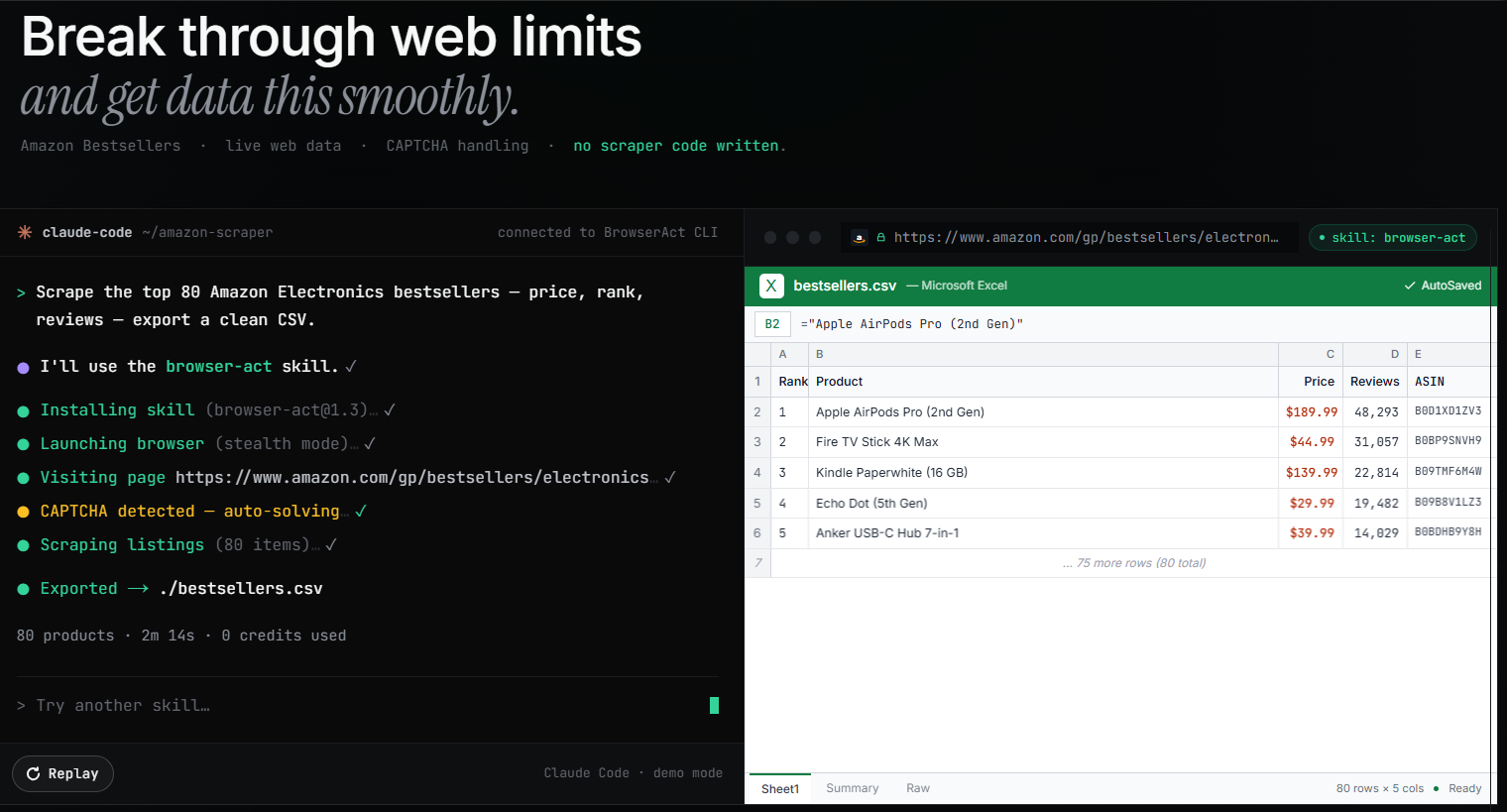
1. Designed for Agents: Rather than dumping raw HTML, the state command returns a compact, indexed view of the page. Agents act with click 4 or input 2, with no XPath or CSS selectors needed. A typical run consumes around 2,000 tokens versus ~50,000 for a Playwright MCP setup reading full-page HTML. Sensitive operations are protected by confirmation gates, and all cookies, sessions, and profiles stay on your local machine.
2. Anti-detection & blocking works in three progressive layers: stealth fingerprinting and proxy rotation at the environment level, automatic CAPTCHA solving and one-command stealth-extract at the execution level, and human handoff as the final layer.
3. Remote Assist is the handoff, the feature I find most interesting. When an agent hits a 2FA prompt or QR login, it generates a live URL. You take over from any device, including your phone, and the agent resumes the same session afterward. No restart, no lost context.
4. Better Headless Browser means stealth stays active even in headless mode. Standard headless Chrome leaks navigator.webdriver and fingerprint inconsistencies immediately; BrowserAct doesn’t. And Remote Assist works while headless, so server-side agents can still escalate to a human.
5. Three browser modes cover different trust levels: stealth (anti-detect with fingerprint masking), chrome (reuses your existing Chrome profile and logins), and chrome-direct (zero-config control of your running Chrome).
6. Concurrency & Isolation: Named sessions run parallel tasks without cross-contamination, and fingerprint-isolated profiles keep multi-account work cleanly separated.
BrowserAct Pricing
The BrowserAct Skills are free and open source (MIT). Almost everything is free. Only two features require payment: managed proxies (dynamic/static) and stealth browsers beyond the first 5.
| Feature | Free (No Signup) | Free (Login Only) | Paid |
|---|---|---|---|
| Browser automation, Chrome / Chrome-direct | ✅ | ✅ | ✅ |
| Stealth browser (≤ 5), stealth-extract, solve-captcha, remote-assist, privacy mode, Skill Forge | — | ✅ | ✅ |
| Stealth browser (> 5), Dynamic / Static proxy | — | — | ✅ |
Steel
Enterprise Visual Automation Engine
Steel.dev is a premium, enterprise-grade AI browser infrastructure. The best part is open source, which adds transparency and trust.
Steel’s architecture is built around several AI-centric concepts. It offers Element Intuitiveness, an AI-friendly method for identifying page elements, and stateful sessions that maintain context across complex, multi-step agentic workflows.
It combines computer vision to interact with dynamic page elements. This reduces the dependency on heavy DOM-based selectors and makes automations more resilient to website changes. The platform provides a fully managed cloud infrastructure with all the expected features: built-in stealth and anti-fingerprinting, integrated proxies, and automatic CAPTCHA solving.

To get started, you can test your use cases in Playground. If that satisfies your requirement, you can start with a free plan.
Pricing
Steel’s free Hobby plan offers $10 worth of credits/month and 100 browser hours. Paid plans are:
- Starter: $29/month (290 browser hours)
- Developers: $99/month (1238 browser hours)
- $499/month (9980 browser hours)
Browser Use
The Open-Source AI Browser Agent
Browser Use is a popular open-source AI browser, having over 65,000 stars on GitHub. It is a powerful framework that enables AI agents to programmatically control and interact with web browsers.
Browser Use is compatible with a wide range of models from OpenAI, Anthropic, Google, and open-source alternatives like Llama and DeepSeek. Its core mechanism involves capturing a webpage’s visual and structural data (screenshots and HTML), feeding this context to an LLM to decide on the next action, and then executing that action using an underlying Playwright automation layer.

Pricing
The API pricing starts at $0.01 per agent step.
Bright Data Agent Browser
Data Collection and Proxy Platform
Bright Data dominates the web data collection and proxy services market. Its Agent Browser is a natural extension of this core business, leveraging its vast infrastructure to offer a browser environment for AI agents.
The standout feature of the Bright Data Agent Browser is its Advanced Unlocking capability. This is powered by large-scale proxy management, including intelligent IP rotation from a pool of over 400 million residential IPs, human-like browser fingerprinting, and automatic CAPTCHA solving. The platform is explicitly designed for agentic interactions beyond simple scraping, enabling AI agents to fill out forms, execute searches, and perform other complex tasks.
It integrates into Bright Data’s MCP, providing an end-to-end AI-ready data pipeline that covers everything from data source discovery to the delivery of structured data. It features native integrations with popular AI platforms, including LangChain, LlamaIndex, Agno, Dify, and n8n.
Pricing
Bright Data Browser charges by the gigabyte (GB) of data traffic consumed. The pay-as-you-go plan costs $8.4/GB, and with the higher commitment, it reduces to $5.88/GB.
Fellou
The All-in-One Agentic Browser
Fellou is not a developer tool but an agentic browser. It aims to replace traditional web browsers and workflow automation platforms like Zapier or IFTTT. It is a downloadable browser and still in beta.
I was unable to test it as it is invite-only and requires an invitation code to activate. However, I went through certain use case demos, and it looks very promising. It can handle complex, multi-step tasks that span numerous websites and applications, such as finding relevant 𝕏 profiles and then following them, or generating content and distributing it across Twitter, LinkedIn, and Hacker News.

Dia is an alternative to Fellou if you want to try it.
Note:
I also came across Lightpanda, which is built for AI from scratch but still in development mode. Worth keeping an eye on this.
Comparing AI Agent Browsers
| Product | Core Offering | Underlying Technology | Primary Interface | Open Source |
| Browserbase | Managed BaaS | Chromium-based | API, SDK | Framework Only |
| Hyperbrowser | Managed BaaS | Chromium-based | API, SDK | No |
| Airtop | Managed BaaS | Chromium-based | API, SDK | No |
| BrowserAct | Agent CLI + Managed Infra | Chromium-based (local-first) | CLI | Yes (MIT) |
| Steel.dev | Managed BaaS | Chromium-based | API, SDK | No |
| Browser Use | OS Framework & BaaS | Chromium-based | API, SDK, GUI | Yes |
| Bright Data | Managed BaaS | Chromium-based | API, SDK | No |
| Fellou | Agentic App | Eko Framework | GUI | Framework Only |
That’s the end! I would love to hear what you are building and which AI browser you decided to use.






