I have seen many claims online that real-time batch processing is dead and has been replaced by modern real-time systems, such as microservices architectures or event-driven pipelines. However, that is far from the truth, as areas such as financial reporting, large-scale data processing, data warehousing, and payroll still rely heavily on batch processing.
I have also noticed that some organizations still rely on Cron, Windows Task Scheduler, or custom scripts. While they may work at times, they also create a fragile infrastructure that can break silently or require manual intervention. It gets worse as a failed script can delay processing by hours or even days.
That is why we still need enterprise batch schedulers. These tools offer dependency mapping, automatic retries, and cross-platform control, and as a result, enterprises get reliable systems. The Geekflare team has tested dozens of batch-scheduling software solutions for enterprise processing and selected the best based on features and reliability.
Top Batch Schedulers Comparison
Below is a quick comparison table of the batch scheduling software I will be discussing in the sections that follow.
| Tool | Best for | Deployment | Scripting Support |
|---|---|---|---|
| RunMyJobs by Redwood | SaaS and SAP S/4HANA | Cloud native | 25+ scripting languages |
| JAMS | Windows & PowerShell batch automation | On-prem, cloud | .NET, Native PowerShell |
| BMC Control-M | Large enterprises and high volume needs | On-prem, hybrid, and cloud | Shell, Python, Java, Mainframe JCL |
| ActiveBatch | Cross-platform orchestrating | On-prem, hybrid, and cloud | Python, VB, Java, Javascript |
| VisualCron | A cost-effective solution for Windows administrators | On-prem | .NET, PowerShell |
| Stonebranch | Hybrid controller for modernizing legacy batch processing | On-prem, hybrid, and cloud | REST, Python, SHELL |
| HCL Workload Automation | Managing high-volume transactional batch schedules | On-prem, hybrid, and cloud | SAP integrations |
| AWS Batch | Running batch computing workloads on AWS infrastructure | Cloud | .NET, PHP, Java, JavaScript, Python |
| Rundeck by PagerDuty | Ops teams who want to delegate batch runs to others | On-prem, hybrid, and cloud | Python, SHELL, PowerShell |
| Robot Schedule by Fortra | Native batch scheduling on the IBM i platform | Cloud | OPAL (Operator Assistance Language) |
Batch Scheduling vs. Workload Automation
You may have seen the terms “batch scheduling” and “workload automation” being used interchangeably online. However, they solve slightly different problems. On one hand, batch scheduling focuses on time and volume. For instance, process 10 TB of data at 2 AM.
On the other hand, workload automation focuses on events and logic. For instance, if a file arrives, trigger Lambda and update SAP. Or, if the task is marked as complete, create a checklist and assign it to a tester.
Most modern tools do both, but legacy schedulers are often cheaper and simpler than full automation platforms.
Best Batch Scheduling Software Reviews
I’ve reviewed the following batch scheduling tools based on reliability, dependency handling, cross-platform support, and visibility into job runs. Some are built for large enterprises with complex workloads, while others suit mid-sized teams that want simpler control. Here’s how each tool stands out and where it fits best.
RunMyJobs by Redwood
RunMyJobs by Redwood is a cloud-native SaaS workload automation platform designed for platforms running mission-critical processes. Its single-tenant SaaS configuration provides a centralized platform for monitoring real-time consumption, enforcing strict governance, and managing users. RunMyJobs is offered as a SaaS platform, eliminating the infrastructure maintenance required by traditional on-prem schedulers.
RunMyJobs stands out for its SAP S/4HANA orchestration. This tool integrates deeply with SAP environments, where you can run cross-system workflows and automate ERP background jobs from the same platform. Its pre-built connectors and integrations with enterprise applications also reduce complexity, accelerate implementation, and enhance automation.
As a low-code automation solution, RunMyJobs also supports over 25 scripting languages. I enjoyed my interaction with the drag-and-drop graphical editor, which offered tons of ready-made schedules and job templates that let me schedule jobs with a few clicks. You can also create and configure reusable templates to save time when automating future jobs.
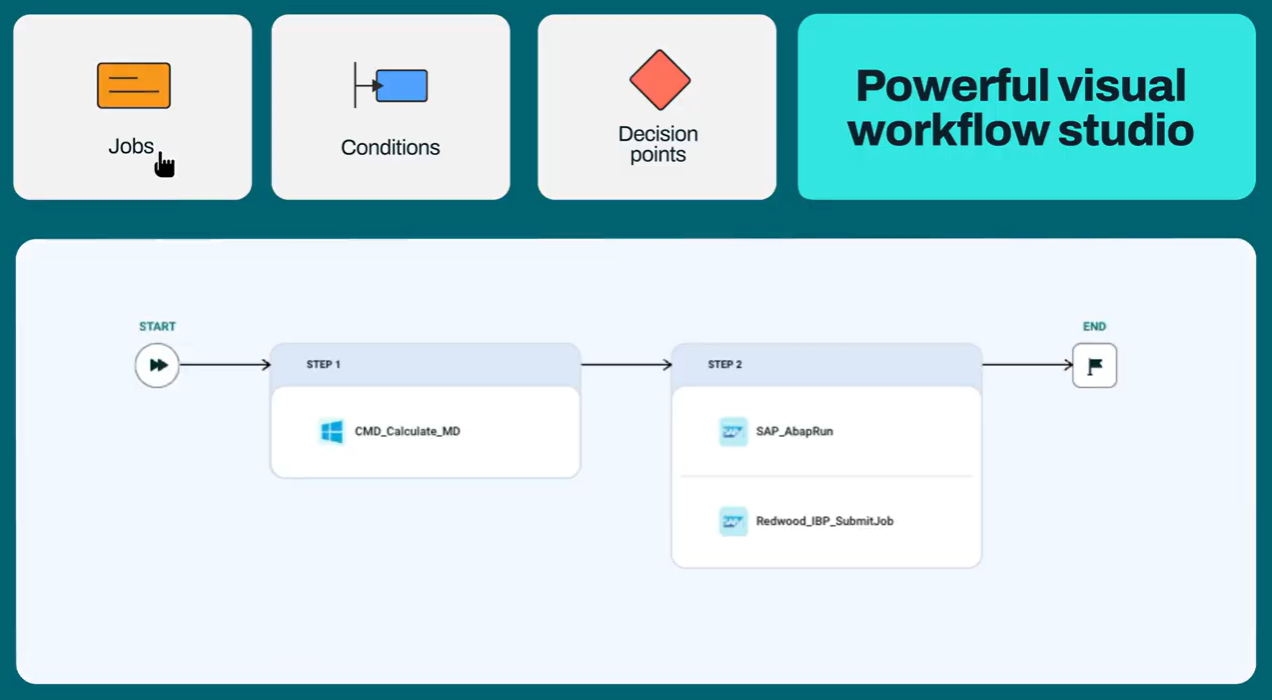
RunMyJobs offers smart SLA prioritization. The tool uses machine learning to check and monitor processes, forecast execution, and even predict potential SLA breaches. Dynamic load balancing also distributes compute resources evenly, preventing server overload. Its security certifications, such as ISO 27001, ISAE 3402 Type II, SSAE 18 SOC 1 Type II, and SOC 2 Type II, assure you that you are dealing with an audited and reputable tool.
Pros & Cons
PROS
CONS
JAMS by Fortra
Best for Windows & PowerShell batch automation
JAMS is a batch-scheduling and processing tool and an ideal Windows Task Scheduler alternative. It offers first-class support for Microsoft technologies such as Active Directory, SQL Server, PowerShell, and .NET. JAMS also serves as a centralized batch-processing platform, allowing you to orchestrate Windows, ETL, SAP, AWS, and database loads from a single location.
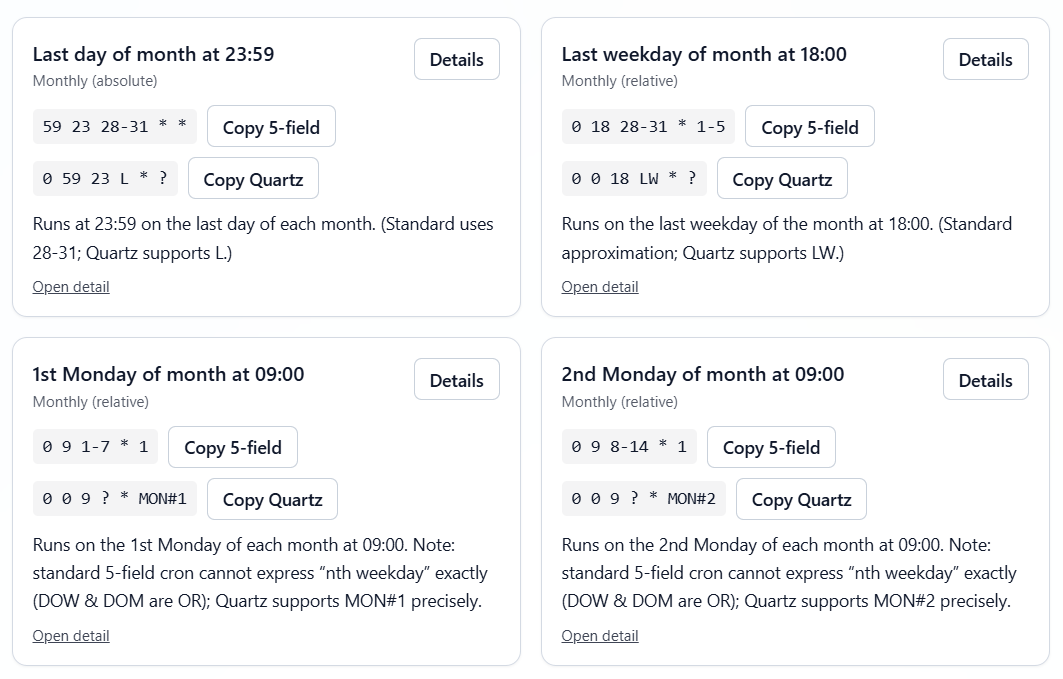
I loved the enterprise-grade observability and control over scheduled jobs during JAMS testing. I could see all the trends and variances through the visual job maps and relational views with the ability to adjust capacity before things go south. JAMS also applies automated retries and conditional logic to mitigate job faults without manual intervention.
JAMS works perfectly with REST and .NET APIs, enabling organizations to manage batch automations as code. It also features native job types for BI, PowerShell, ERPs, SQL, SAP, and Azure Data Factory tools, reducing the need for custom scripts.
Lastly, JAMS extends well into SAP job orchestration, databases, and cross-platform targets via agents. It can handle mission-critical batch workloads thanks to features such as event-based triggers, complex dependency handling, and detailed job control.
Pros & Cons
PROS
CONS
BMC Control-M
Best for large enterprises and high-volume needs
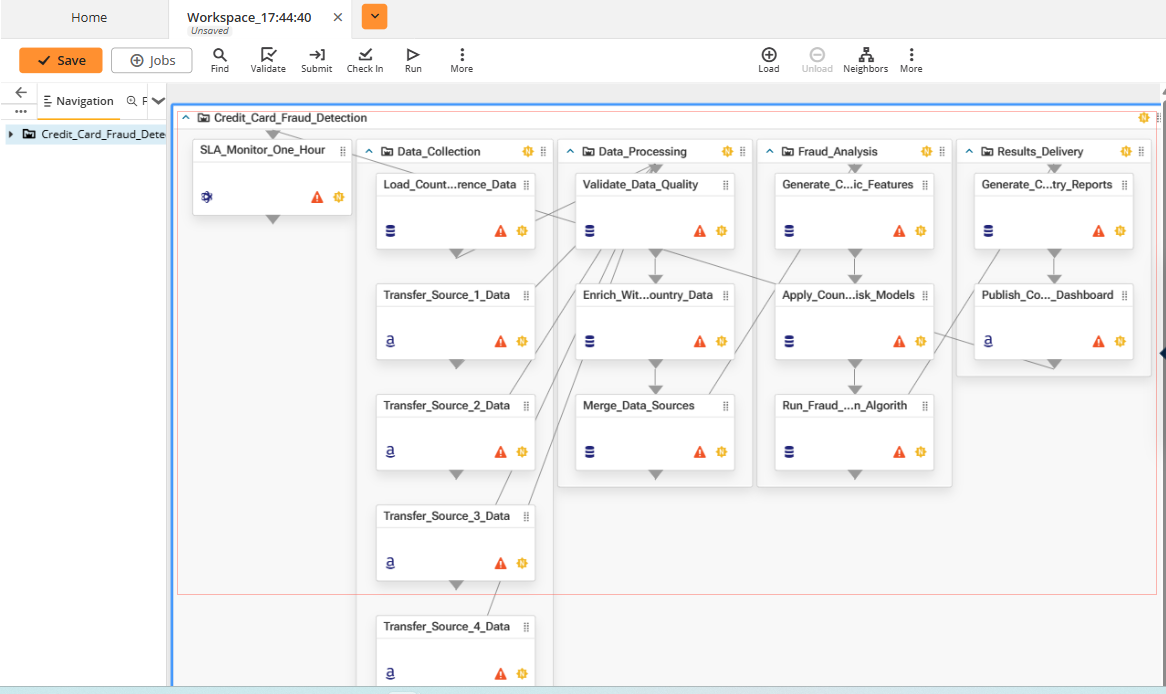
Control-M is an end-to-end workflow automation platform known for its deep mainframe integration. Its simple and native application workflow orchestration ensures the timely delivery of mainframe business services. BMC Control-M supports multi-cloud application workflows and data pipelines, reducing manual integrations to orchestrate mainframe business services.
Control-M is also known for its high-end Service Level Agreement (SLA) management and error handling. The tool provides insights into how disruptions may affect business applications.This makes it easy to prioritize incident responses before disasters strike. You can also integrate it with custom validation or predefined checkers to ensure only valid data is processed.
Control-M catches bad data at any step in a workflow to ensure high-quality inputs and outputs. This means teams complete critical jobs within the specified timeframe and agreed thresholds. During testing, I enjoyed how Control-M provided me with intelligent analysis through its user-friendly dashboard and reports.
Lastly, Control-M includes the AI Workflow Creator to speed up workflow setup. Users without deep Control-M knowledge can now create high-end workflows with AI assistance. I could describe my business intent in natural language, and the AI Workflow Creator instantly designed a workflow. It also features intelligent suggestions that you can implement and adjust to suit your job needs.
Pros & Cons
PROS
CONS
ActiveBatch by Redwood
Best cross-platform orchestrator
ActiveBatch is one of the best cross-platform batch-scheduling software solutions on the market today. It works on Windows and Linux and across multiple environments, such as on-premises, in the cloud, or in a hybrid environment.
It is known for its extensive integration, and its Super REST API Adapter and built-in connectors connect to virtually any application, database, or service. This makes it easy to automate across SAP, Oracle, Microsoft systems, cloud services, and ETL tools.
ActiveBatch is known for its scripting flexibility. This low-code/no-code automation tool supports most scripting languages like XLNT, VBScript, PERL, and PowerShell. Its script vaulting feature allows organizations to protect their existing custom script investments and ensures that they’re executed as needed and enhanced with lifecycle management capabilities
Also, ActiveBatch is packed with templates and steps, so anyone on an IT team can set up automations without custom scripting.
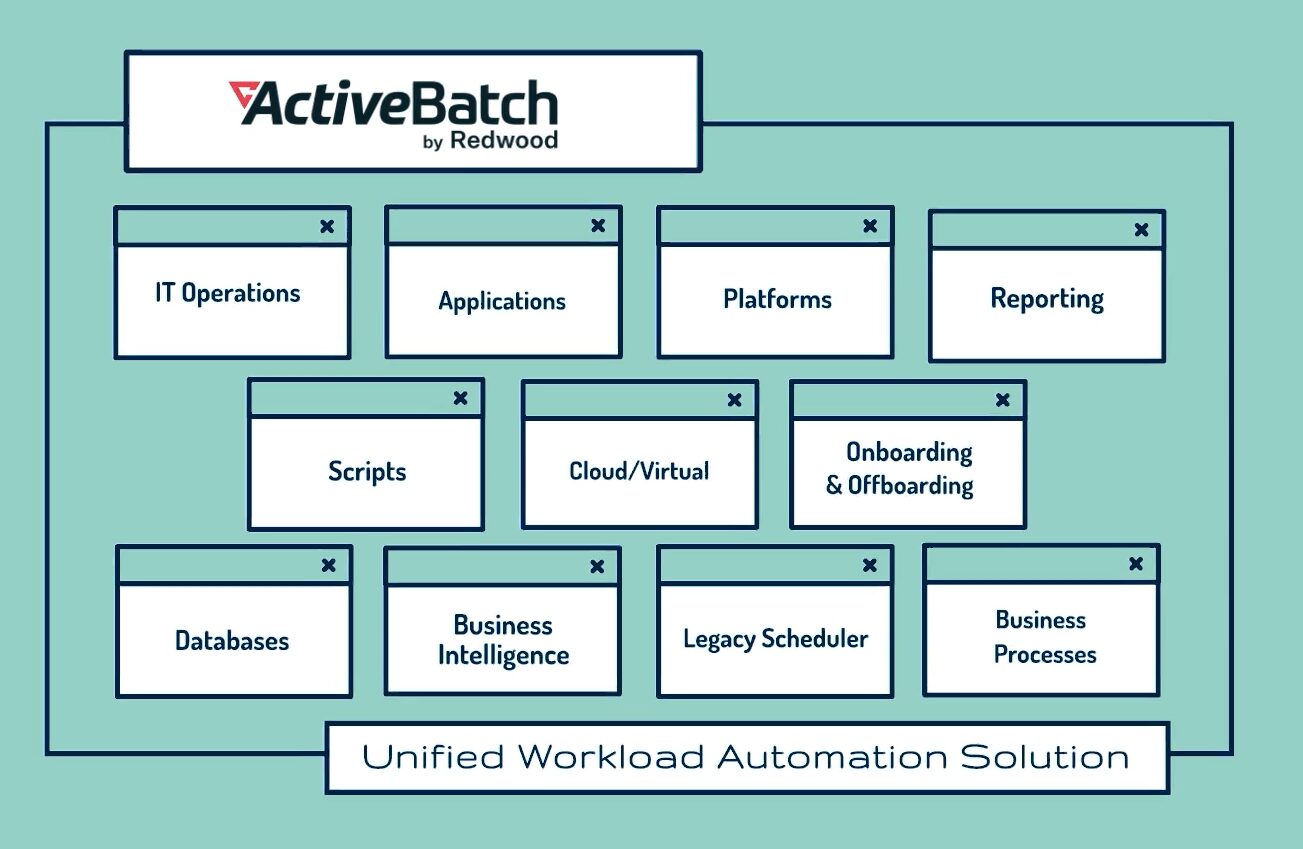
ActiveBatch is an ideal alternative for users seeking an enterprise-grade replacement for Windows Scheduler. The robust library of connectors from Microsoft, Oracle, SAP, Informatica, FTP, SQL Server, and others, makes it easy to connect all business-critical applications and systems, making ActiveBatch useful for those seeking to go beyond the Windows ecosystem.
Its scheduler supports both time-based triggers and event-driven workflows, giving organizations the flexibility to meet a variety of enterprise needs.
Pros & Cons
PROS
CONS
VisualCron
VisualCron is a Windows-native job scheduling and automation platform built primarily for Windows administrators who want powerful job scheduling without the overhead of heavyweight enterprise platforms. VisualCron gets the job done without the infrastructure overhead associated with enterprise schedulers.
The platform also offers different types of licenses, along with a guidance quiz that helps users make decisions based on their needs. VisualCron will be a natural fit if your infrastructure primarily runs on a Windows server.
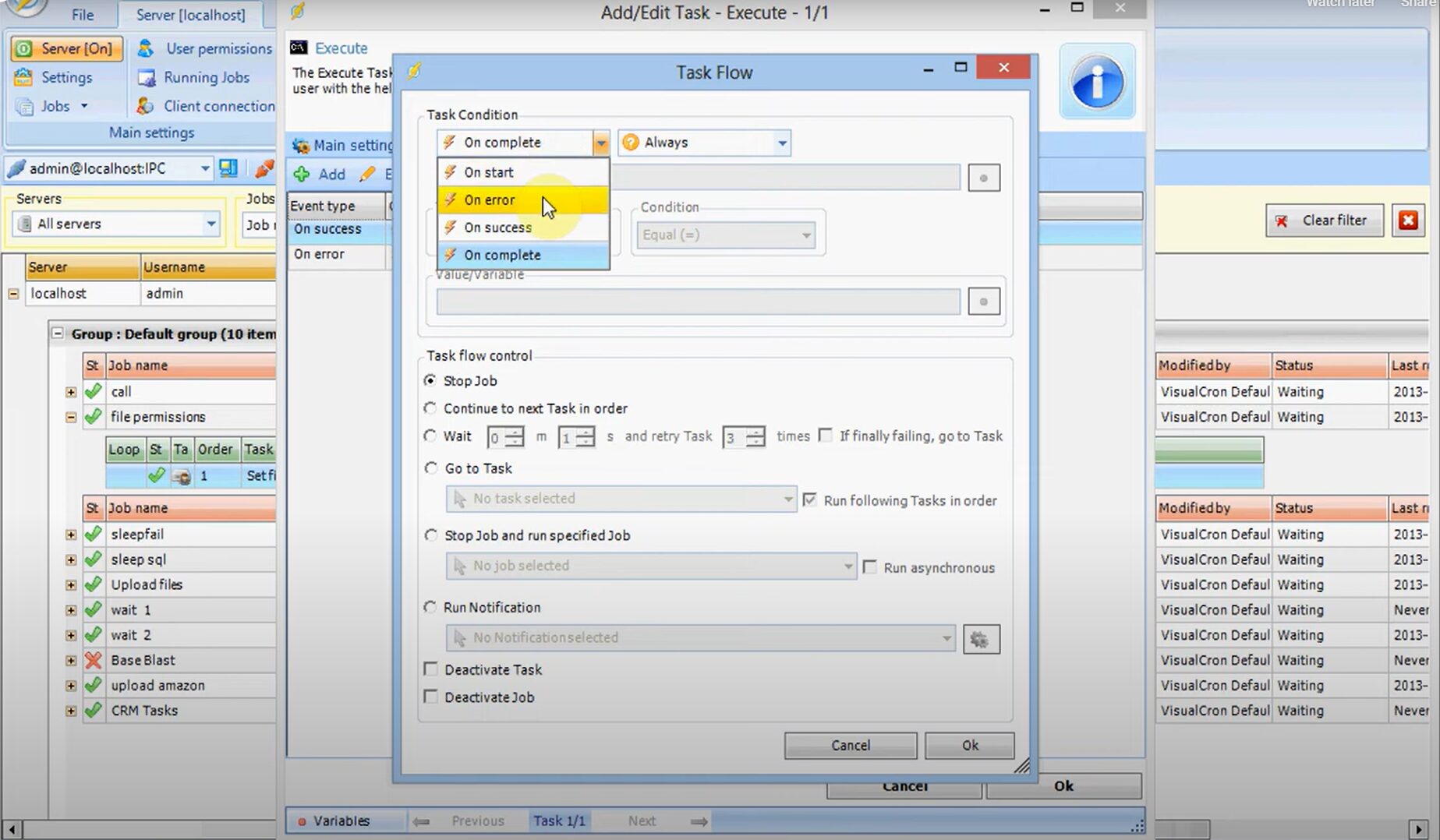
What makes VisualCron appealing for Windows administrators is its structured workflow model. It follows the Trigger > Condition > Task > Notification flow to schedule and run jobs. Basically, a trigger, which can be an event or time, fires a job; a condition/check is evaluated before the task/job is launched, and once it is completed, a notification is sent. The tool can initiate a job through an event trigger or by keeping track of time and matching the current time with the time settings.
VisualCron also features failover clustering, which ensures that if one node fails, the remaining nodes continue to provide services, reducing service disruptions. The tool also offers the Cluster Shared Volume (CSV) feature, which provides a consistent, distributed namespace that clustered roles use to access the shared storage across all connected nodes.
Pros & Cons
PROS
CONS
Stonebranch
The Stonebranch Universal Automation Center (UAC) is a hybrid workload automation platform built to modernize legacy batch environments. It supports cloud- and container-based workloads, making it a centralized control layer for organizations running a mix of mainframes, on-prem servers, and cloud services.
Stonebranch allows organizations to consolidate legacy batch processors into a single automation layer. You can orchestrate legacy system jobs and scripts alongside cloud services or container workloads without fully overhauling the infrastructure.
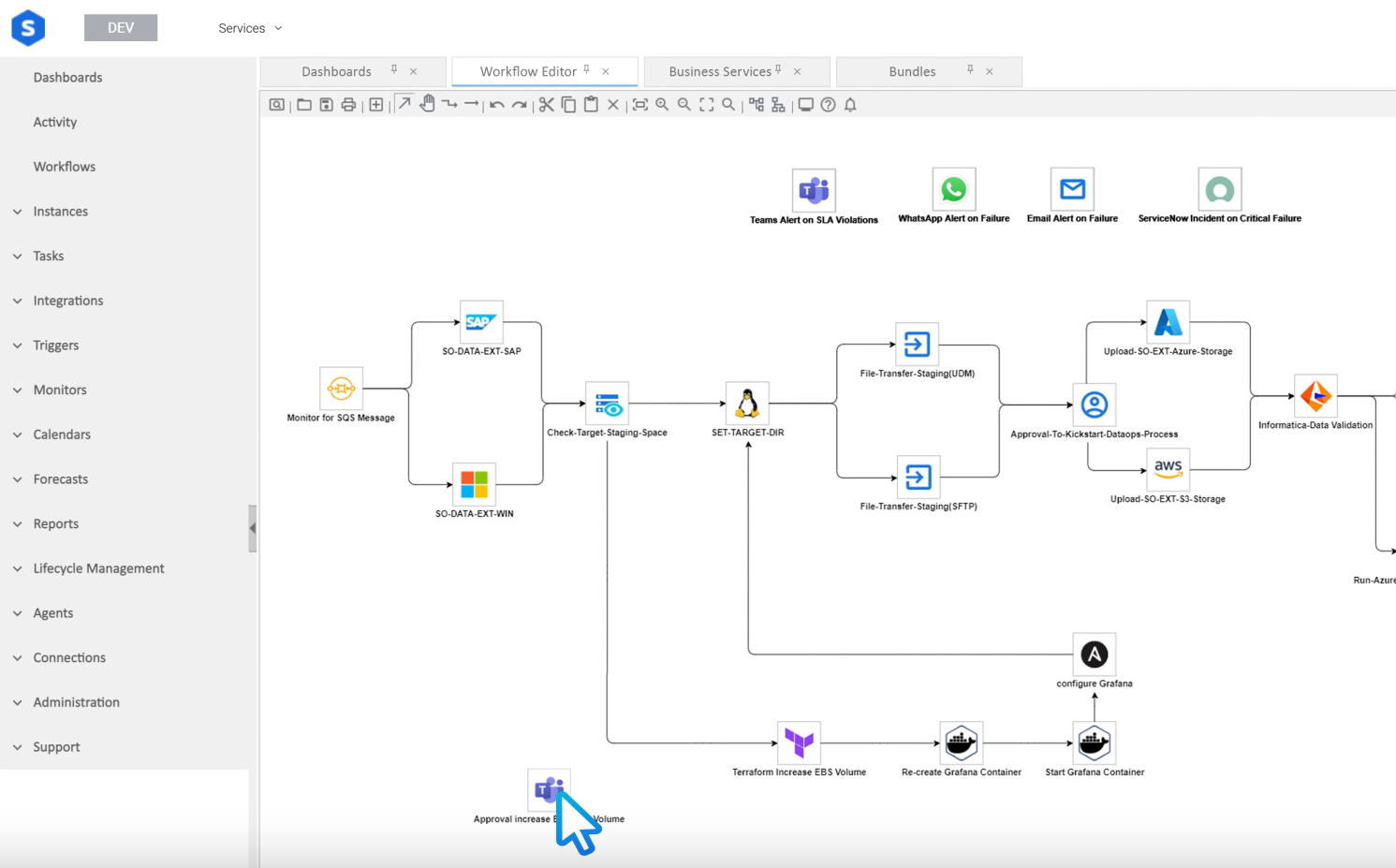
The Stonebranch Universal Automation Center (UAC) is designed with compliance in mind. It simply lets you adapt jobs based on internal requirements or changing market conditions. It is also designed to be secure, as sensitive data will never leave your servers. You also get drill-down reports and visual dashboards for SLA monitoring, with real-time updates to highlight issues and quickly find solutions.
It serves as a single, web-based controller that provides IT teams with advanced control and complete visibility into all scheduled jobs. Its drag-and-drop workflow creator let me easily set up tasks and workflows without writing code.
Pros & Cons
PROS
CONS
HCL Workload Automation
HCL Workload Automation is an advanced job scheduling software for high-volume, transaction-heavy batch environments, helping organizations monitor, define, and manage critical batch processes. Its end-to-end orchestration provides a centralized point of control for business availability across hybrid environments. Its support for containerized multi-cloud environments also helps optimize costs.
HCL Workload Automation is designed to be a scalable and reliable batch scheduler. This makes it ideal for enterprises processing large ERP batch runs, retail order flows, and financial transactions. You can connect tasks via APIs, via local agents, or go agentless. The tool ensures you will never experience downtime, as it responds in real time to business orders. You can also upgrade the agents without impacting the scheduled activities.
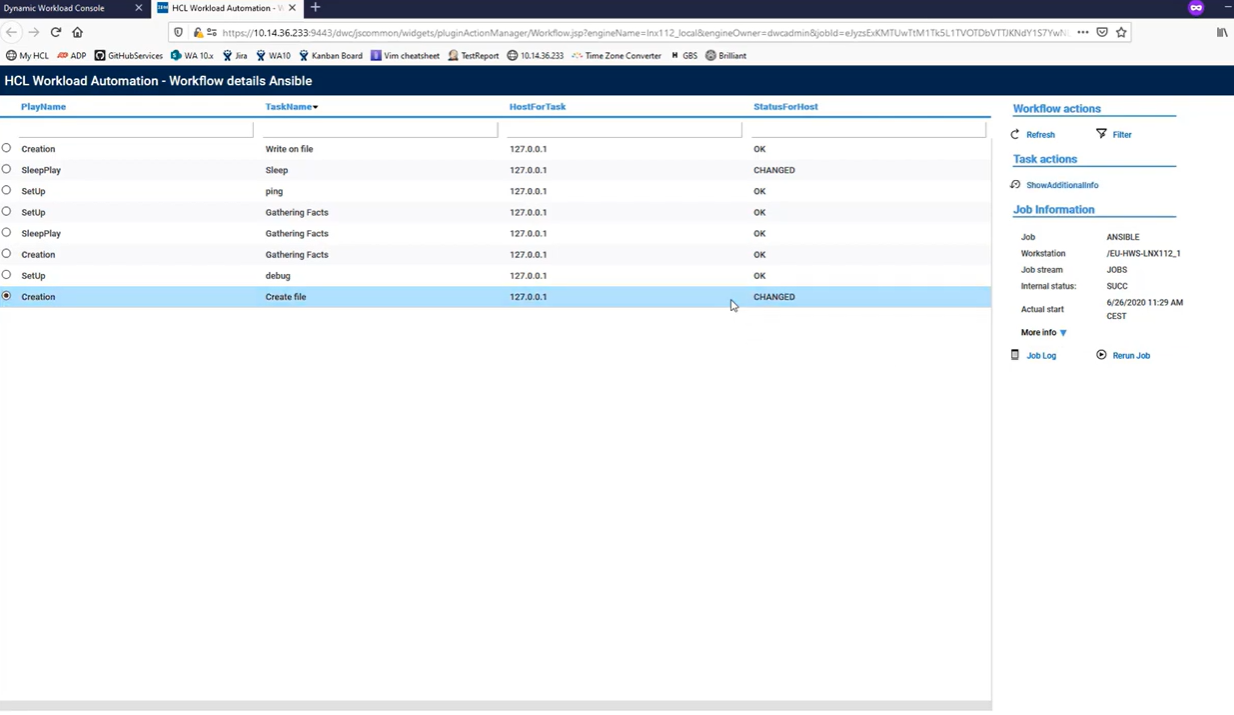
HCL Workload Automation provides easy-to-customize dashboards, embedded analytics, and graphical views that always display how jobs are performing. I also liked how it leverages AI to ensure efficient resource management, schedule tasks at optimal times and under predefined conditions to maximize throughput, and reduce costs. The platform also uses AI to detect anomalies and offer suggestions to curb them.
Pros & Cons
PROS
CONS
AWS Batch
AWS Batch is a cloud-native, fully managed service that you can use to run, schedule, and plan containerized batch ML, analytics, and simulation workloads across different AWS compute offerings like AWS Fargate, Amazon EKS, Amazon ESC, and Spot or On-Demand Instances. AWS Batch is designed in a way that you only focus on analyzing results rather than maintaining infrastructure.
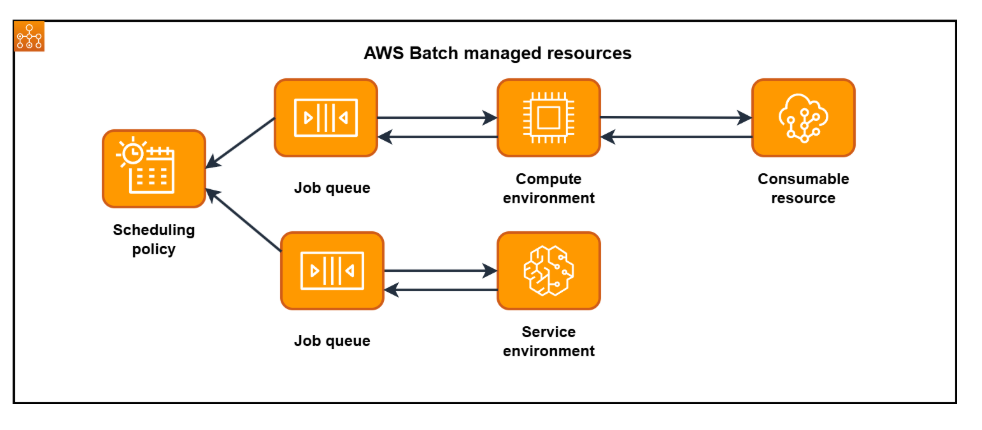
AWS Batch natively integrates with AWS Cloud, allowing users to implement management, scaling, and networking capabilities without installing any software or servers. This tool also scales automatically through its fully managed infrastructure that supports large-scale simulations and processing.
I found AWS Batch suited for different use cases during my tests. For instance, it can be very effective when running simulations at scale when testing complex systems such as advanced driver assistance systems (ADAS), autonomous vehicles, and robotics. Another example is when users want to automate content-rendering workloads with heavy dependencies.
Pros & Cons
PROS
CONS
Rundeck by PagerDuty
Rundeck is built for teams seeking a controlled, self-service tool that reduces operational overhead and improves team efficiency. Operational teams who want to delegate batch runs to others will find it very useful. For instance, instead of giving support staff or developers direct access to the server, Rundeck allows ops teams to create pre-defined tasks and allow only approved users to execute them.
You can use it to automate routine processes, such as opening ports, deploying software, provisioning, and changing configs across production and development environments. Users can create automated workflows using custom scripts, connecting APIs, using ready-made tools, or using system commands.
Another capability I find particularly valuable in Rundeck is its job activity log and audit trail.
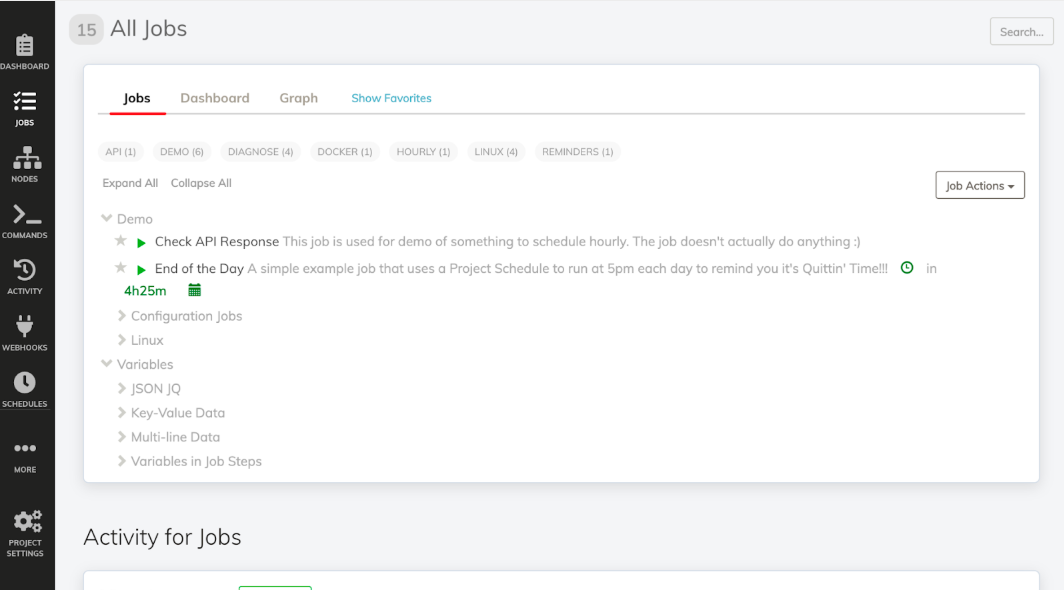
Its audit trail log captures user actions such as job runs, updates, and configuration changes, which is especially useful for compliance and governance reviews. In addition, execution logs store step-by-step output for troubleshooting and historical analysis.
Pros & Cons
PROS
CONS
Robot Schedule by Fortra
Robot Schedule is a native, automated job-scheduling and batch-job management tool within the IBM i ecosystem. With it, you can automate everything from complex to simple jobs and event-driven processes within the IBM ecosystem. IBM i centralizes the management of all your jobs, and all you need to do is create a calendar of when and how the jobs will run, and Robot Schedule will take care of the rest.
I came across more than 25 scheduling parameters on Robot Schedule during my interaction with this tool. For instance, I can schedule jobs based on parameters such as the office schedule, fiscal year, or the day of the week. Its mobile access also gives users proactive visibility into jobs even when they are not in an office setup.
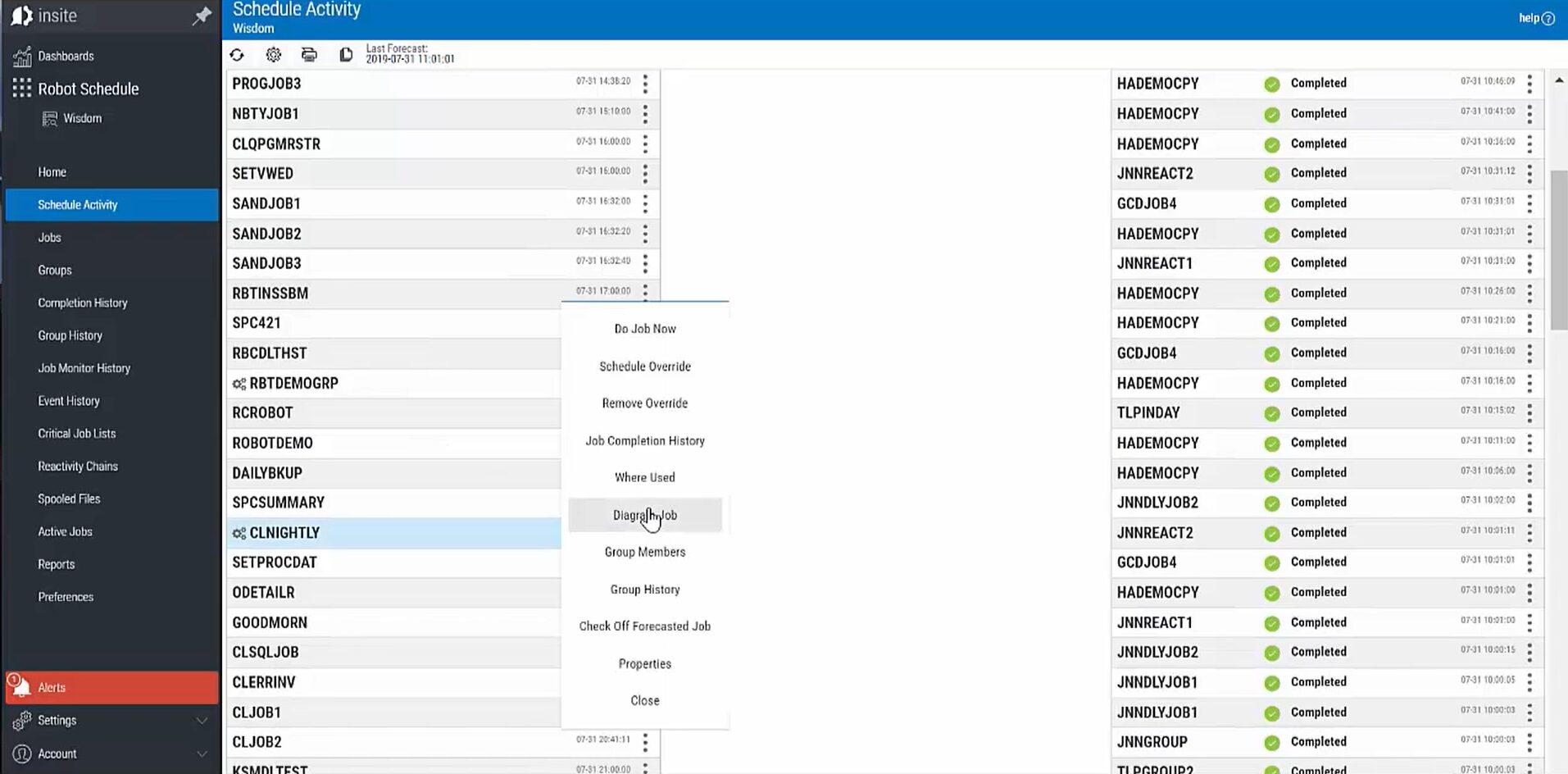
Robot Schedule’s event-driven scheduling is a big plus, as it automates non-time-based events such as running a backup when a specific tape device becomes available. This reactive scheduling tells your system to run jobs only when specific conditions are met.
Pros & Cons
PROS
CONS
Free & Open-Source Batch Schedulers
Most of the batch schedulers we have covered so far require paid licenses to operate. The following are free and open-source batch scheduling tools you can try today.
Apache Airflow
Apache Airflow is a Python-based open-source batch scheduler mostly used in data engineering. It performs well in Extract-Transform-Load (ETL) and Extract-Load-Transform (ELT) data pipelines. For instance, it can extract climate data from an API or a CSV file, transform it, and load the results into a database presented in a dashboard.
Quartz Scheduler
Quartz Scheduler is a lightweight Java job-scheduling library that can run both small and large jobs in environments such as e-commerce. It defines jobs as standard Java components and can execute virtually anything you program them to do. Even though minimalistic, Quartz Scheduler also features enterprise capabilities such as JTA transactions and clustering.
Dagster
Dagster is an open-source data orchestration platform focused on data pipelines and observability. Its focus is on developing and maintaining data assets, such as machine learning models, tables, datasets, and reports. All you need is the data assets you want to build as Python functions, and Dagster will run them at the right time and keep them up to date.
Windows Task Scheduler
Windows Task Scheduler is Microsoft’s built-in job scheduler for Windows environments. The tool monitors triggers and executes jobs/tasks when the criteria you’ve chosen have been met. It’s free and simple to use but lacks advanced dependency management, centralized visibility, and cross-platform orchestration.
dKron
dKron is a distributed job scheduler designed to be ready to run out of the box. Simply select your OS package and scroll through its easy-to-use administration panel to schedule jobs or use its simple JSON API to integrate with your existing systems. dKron uses the Raft protocol to ensure availability; if the cluster leader fails, a follower will replace it.
JobRunr
JobRunr is a Java background job processing library that allows developers to schedule and manage jobs within their applications. It supports persistent job storage and retries, making it suitable for application-level batch execution.
Critical Features for Batch Processing
Batch processing tools aren’t created the same. However, they still have some overlapping features that still define them. The following are some key features expected of batch schedulers:
- Dependency Chaining: Tasks rely on the output of a previous step, forming a sequence. For instance, a reporting job shouldn’t start until the data warehouse load finishes successfully
- Checkpoint Restart: This allows a failed job to restart from the last successful execution point instead of restarting from scratch.
- Resource Throttling: A protective mechanism that prevents batch jobs from overwhelming system resources like network bandwidth, CPU, and memory.
- SLA Alerting: Provides real-time monitoring and notifications when a task or performance approaches or misses agreed-upon thresholds.
FAQs
No, it is for CI/CD. Using it for batch jobs creates Jenkins Sprawl, where pipeline jobs are overloaded with non-deployment tasks. Dedicated batch schedulers, on the other hand, provide SLA monitoring and dependency management, features unavailable on Jenkins.
Look for tools with “Import” functionality, such as JAMS or ActiveBatch. These tools are PowerShell compatible and offer direct task import without manual reconfiguration.
ETL is the action (extract/transform), which is simply moving and transforming data between systems. Batch scheduling, on the other hand, determines when and under what conditions ETL runs. The scheduler is the trigger that runs the ETL tool.
Verdict: Which Batch Scheduler Is Right for You?
Perfect for
Windows/SQL: JAMS
SAP/Cloud First: Redwood RunMyJobs
Mainframe Data: BMC Control-M
Data Engineering: Apache Airflow