

Domain Name System (DNS) is the backbone of the internet, and it relies on specific instructions to function. These instructions are called DNS records.
If the DNS is the internet’s phone directory, DNS records are the individual entries that tell browsers which number to dial to reach a website.
DNS records are stored on authoritative DNS servers. Their primary job is to translate domain names into IP addresses.
The Anatomy of a DNS Record
To understand how DNS works, you must understand the structure of a record. A standard DNS record contains five key components:
- Name: The domain or subdomain the record applies to, ex
geekflare.comorapi.geekflare.com. - TTL (Time to Live): This indicates how long in seconds a DNS resolver should cache the information.
- Class: The protocol family. The standard is IN (Internet).
- Type: The specific kind of record like A, NS, TXT, MX, CNAME, which dictates the record’s function.
- Data: The destination or instruction. For an ‘A‘ record, this is an IP address; for an ‘MX‘ record, it is a mail server name.
5 Essential DNS Records
These are the most common records found in almost every DNS zone file.
1. A Record
The A Record is the most popular type of DNS record. The “A” stands for “Address.” It maps a domain name to an IPv4 address.
Example: geekflare.com A record is 172.66.43.88 & 172.66.40.168
How do you test it?
Well, there are many ways.
- DNS Lookup API – retrieve all the records through an intuitive UI or API.
- nslookup – inbuilt tool on macOS and Windows.
chandan@Chandans-Mac-Studio ~ % nslookup geekflare.com

Non-authoritative answer:
Name:	geekflare.com
Address: 172.66.43.88
Name:	geekflare.com
Address: 172.66.40.168

chandan@Chandans-Mac-Studio ~ %
2. AAAA Record
The AAAA Record functions exactly like an A record, but it points a domain to an IPv6 address.
IPv4 addresses are running out. IPv6 offers a virtually infinite number of addresses. AAAA records ensure your site is accessible via this modern protocol.
3. CNAME Record
A CNAME Record (Canonical Name) maps one domain name to another domain name (the canonical name), rather than an IP address.
- Use Case: You can point
www.example.comtoexample.com.
4. MX Record
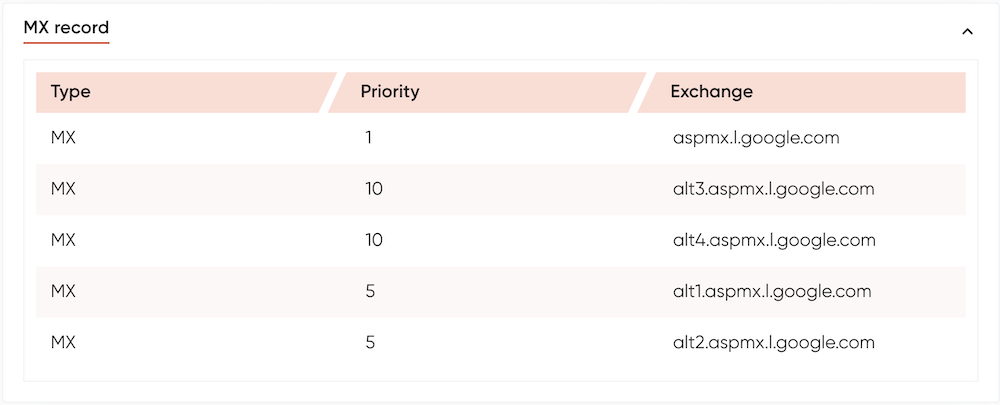
The MX Record (Mail Exchange) directs emails sent to your domain to the correct mail server. Without MX records, you cannot receive email on your domain.
- Note: MX records include a “priority” number. If you have multiple mail servers, the lowest number is tried first.
Ex: aspmx.l.google.com will be used first in below MX record of geekflare.com.
5. NS Record
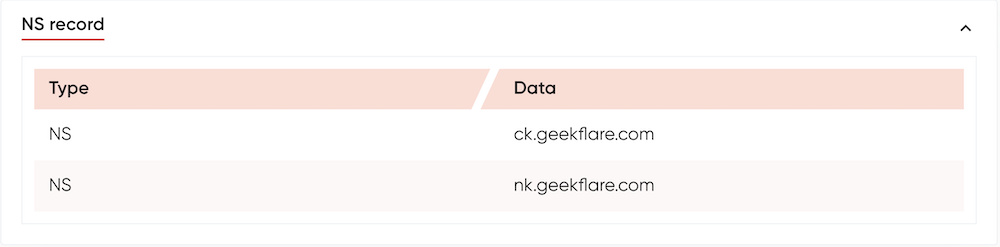
The NS Record (Name Server) indicates which DNS server is authoritative for your domain. It essentially tells the internet, “Go ask this server for the IP address.”
When you buy a domain, the registrar provides you with NS records to link your domain to your hosting provider. And, many platforms like Cloudflare gives you an option to create custom NS when you are on Business or Enterprise plan.
DNS Records for Email & Security
These records are crucial for verifying domain ownership and preventing email spam or spoofing.
6. TXT Record
TXT Records (Text) allow you to store text notes in the DNS. They are now primarily used for machine verification.
- Key Use: Verifying domain ownership for Google Search Console or SSL certificates.
You can use dig command to verify TXT records.
chandan@Chandans-Mac-Studio ~ % dig geekflare.com TXT

;; ANSWER SECTION:
geekflare.com.		300	IN	TXT	"admitad-verification: 91fa860493"
geekflare.com.		300	IN	TXT	"Sendinblue-code:642dd9bdd25d0e63013fbd24729e722c"
geekflare.com.		300	IN	TXT	"ahrefs-site-verification_8eefbd2fe43a8728b6fd14a393e2aff77b671e41615d2c1c6fc365ec33a4d6d0"
geekflare.com.		300	IN	TXT	"firebase=geek-flare---tools"
geekflare.com.		300	IN	TXT	"firebase=geekflare-ai-auth-prod"
geekflare.com.		300	IN	TXT	"google-site-verification=MRSwa454qay1S6pwwixzoiZl08kfJfkhiQIslhok3-A"
geekflare.com.		300	IN	TXT	"google-site-verification=7QXbgb492Y5NVyWzSAgAScfUV3XIAGTKKZfdpCvcaGM"
geekflare.com.		300	IN	TXT	"v=spf1 include:_spf.google.com include:_spf.firebasemail.com ~all"
geekflare.com.		300	IN	TXT	"firebase=geekflare-production"
geekflare.com.		300	IN	TXT	"openai-domain-verification=dv-mkiV9KMU5V7LdupiEzNKimsH"
geekflare.com.		300	IN	TXT	"yandex-verification: 42f25bad396e79f5"
geekflare.com.		300	IN	TXT	"urabin-verify-abc"
geekflare.com.		300	IN	TXT	"google-site-verification=KiMDhEe-34WGA-tTFcQr2Q0Yj-FTdcJTvEfvBIvSQZ8"

chandan@Chandans-Mac-Studio ~ %
7. SPF Record
Technically a type of TXT record, SPF (Sender Policy Framework) lists the IP addresses and servers authorized to send email on behalf of your domain. This prevents spammers from faking emails from your brand.
8. DKIM and DMARC (via TXT)
While not distinct types, these are critical configurations stored within TXT records to further secure email delivery and instruct receiving servers how to handle spam.
9. CAA Record (Certification Authority Authorization)
The CAA Record (Certificate Authority Authorization) adds security by specifying which Certificate Authorities (CAs) are allowed to issue TLS certificates for your domain.
Adding CAA record is one of the effective ways to control the certificate issuer on all subdomains and improve domain security.
Specialized DNS Records
- SRV (Service) Record: Specifies the host and port for specific services, such as SIP (VoIP), Microsoft Exchange, or Minecraft servers.
- PTR (Pointer) Record: The opposite of an A record. It maps an IP address back to a domain name. This is used for Reverse DNS lookups, often required for mail server reputation or internal URLs.
- SOA (Start of Authority): Contains administrative information about the zone, including the primary name server, email of the admin, and the serial number.
- DNSKEY & RRSIG: Used in DNSSEC (DNS Security Extensions) to cryptographically sign DNS records.
- ALIAS / ANAME Record: Allows you to point the root domain to another hostname. This overcomes the limitation of CNAME records.
- URLFWD / Web Redirect: Redirects HTTP traffic from one URL to another (e.g., forwarding
oldsite.comtonewsite.com). This is a web server function masquerading as a DNS record for ease of use.
Why Are DNS Records Important?
DNS records are the invisible infrastructure that makes the internet and internal network usable. The following 4 are the main benefits.
- They translate IP numbers into memorable names.
- Records like MX, SPF, and DMARC ensure your emails reach the inbox rather than the spam folder.
- Large websites use DNS records to distribute traffic across multiple servers globally.
- Advanced records verify identity to protect users from “Man-in-the-Middle” attacks and spoofing.
Conclusion
Whether you are launching a blog, configuring a corporate email server, or securing a web application, understanding DNS records is essential. I hope this quick guide helps you understand about DNS records, and you learn how to verify them.