Email bounces are more expensive than most digital marketers realize. The loss isn’t just about the wasted credit; it also damages the sender’s reputation. It gets worse if you experience lower inbox placement after your domain is flagged by email clients and your emails end up in spam or promotional tabs. DeBounce offers mailing list cleaning to help you achieve lower bounce rates.
In this DeBounce Review, I tested DeBounce’s email list validation, verification API, lead finder, and data enrichment tools to see whether it truly prevents bounces and protects deliverability. I evaluated its performance in real-world marketing scenarios across verticals such as bulk list cleaning, real-time verification, and spam-trap detection.
If you’re running cold outreach, SaaS onboarding emails, ecommerce campaigns, or newsletter blasts, keeping your list clean isn’t optional but essential. Let’s see whether DeBounce is the reliable, budget-friendly solution it claims to be.

What is DeBounce?
DeBounce is an email validation tool that helps reduce email bounce rate and protect the sender’s reputation. You just need to type in the email or upload your list, either in TXT or CSV format, and the tool will check for duplicate entries and syntax errors so that you don’t waste credit on invalid addresses.
You can even automate the cleaning process, with DeBounce checking your lists daily, cleaning them, and syncing them with your sender. You can also use this tool as a lead finder, where you generate and validate multiple email address permutations based on things like company domain, last name, or first name to ensure you land at the correct email address during cold outreach.
DeBounce is designed for digital marketing agencies, email marketers, SaaS companies, and e-commerce stores that send a high volume of cold emails.
Key DeBounce Features
I tested DeBounce beyond email cleaning to see how it performs on other fronts. These are some of the use cases.
Email List Validation
Email list validation is DeBounce’s core feature. The tool supports both single and bulk checks. I could verify one email instantly through the dashboard or upload a CSV file to validate hundreds at once. The system categorized results into valid, invalid, catch-all, disposable, and spam-trap, making it easy to download a cleaned list before launching a campaign.
Email List Monitoring
DeBounce’s email list monitoring helps maintain database health over time. Instead of cleaning your list once, you can continuously verify new or aging contacts. This is particularly useful for recurring newsletters or SaaS onboarding emails, where outdated addresses can gradually increase bounce rates if not monitored.
Verification API
DeBounce provides a verification API that automatically validates data across websites, CRMs, and custom applications. I found it useful for preventing invalid emails at the point of capture, making it one of the most reliable email verification APIs for real-time validation.
Lead Finder Tool
DeBounce includes a built-in lead finder tool that lets you search for business contacts and retrieve professional email addresses without switching platforms. While it’s more basic than dedicated prospecting tools, it can help you quickly find someone’s email address for small outreach campaigns.
Data Enrichment
DeBounce also supports data enrichment, allowing you to append additional company-related details to verified contacts through Reverse Email Lookup or API. This helps with segmentation and campaign personalization. For deeper firmographic insights, you can also explore specialized company enrichment APIs designed for advanced data expansion.
User Interface & Ease of Use
DeBounce has a user-friendly interface. Signing up is pretty easy: you need an email address, set a password, and verify your email to get started. However, DeBounce doesn’t support personal email addresses like Gmail or Outlook; it only supports business email addresses. This means personal users without websites or businesses are likely to be locked out.
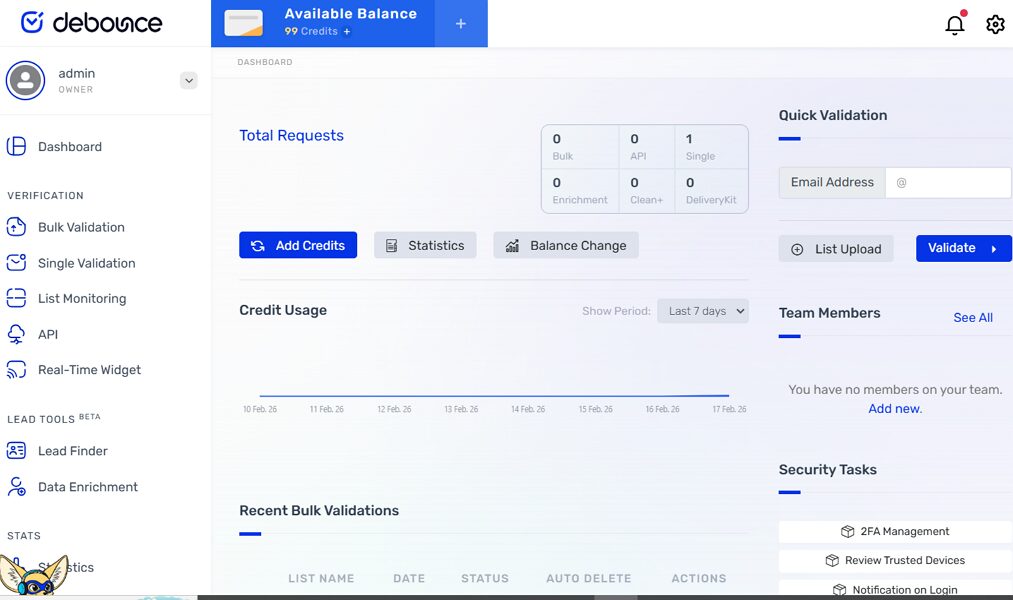
Once logged, DeBounce’s dashboard is pretty easy to maneuver. The left panel presents all the essential shortcuts to verification services, lead generation tools, stats on credit usage, billing, and account integrations.
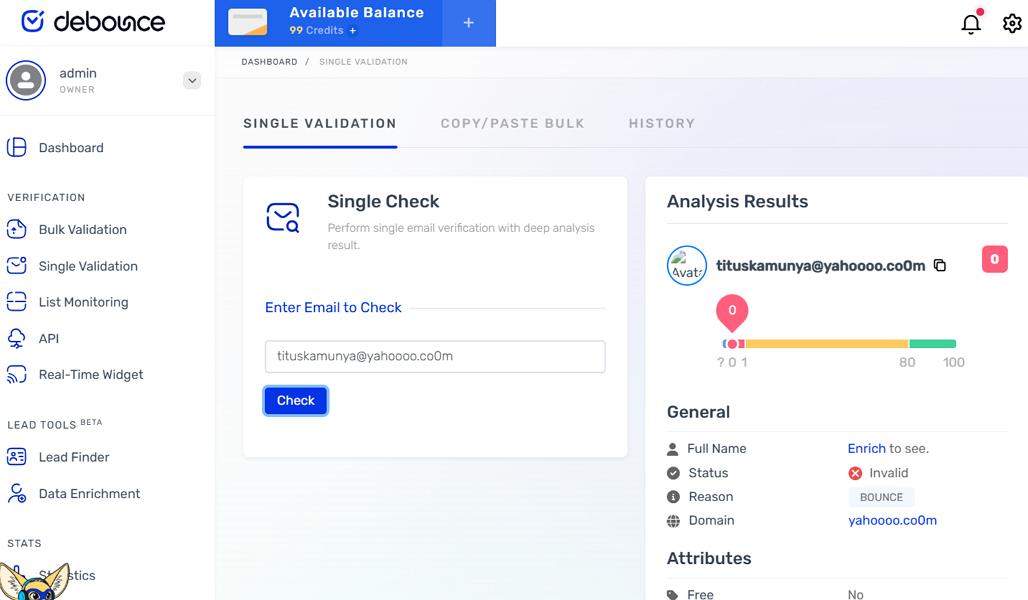
My first interaction was testing DeBounce’s bulk and single validation features. For single email validation, you just need to type the email you want to validate and click “check”. Results are instant you get a full report on the status, which can either be valid or invalid, attributes like role and mail server details.
To do bulk verification, you need to upload either .TXT or .CSV file. You can also add an integration with popular CRMs like Hubspot or email service providers like MailerLite, MailChimp, ConvertKit, SendGrid, among many others.
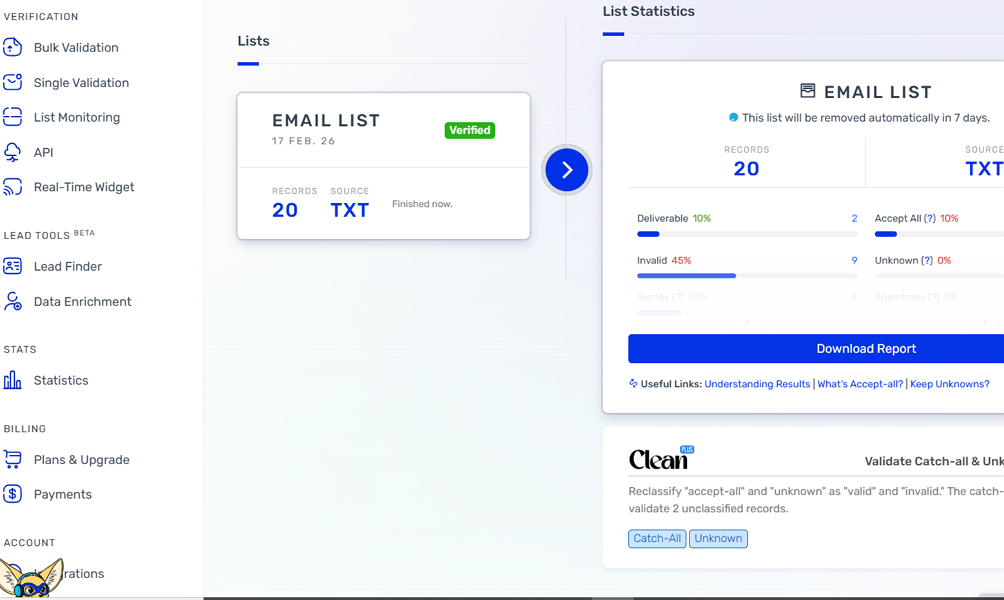
I uploaded an email list with 20 addresses, and DeBounce took about a minute to analyze it. When I clicked the validation button, it took about 3 more minutes to generate a detailed report of valid and invalid email addresses. It also provided a high-level report on the percentage of disposable addresses, emails with syntax errors, and duplicates. DeBounce also allowed me to download the report for further analysis.
Integrations & WordPress Plugin
When I explored DeBounce, I found that its integrations make it easier to plug email validation right into the tools and workflows you already use. While DeBounce doesn’t have a huge marketplace of native integrations like some larger platforms, it supports essential connections and customizable workflows that fit most email marketing stacks.
On the integrations front, DeBounce offers straightforward compatibility with CRM systems such as HubSpot, email marketing platforms like SendGrid, and form tools such as JS Widget – HTML Forms via API access and webhooks.
DeBounce also provides a WordPress plugin that allows real-time email validation on forms created with popular builders such as WP Forms, Contact Form 7, and Gravity Forms. When enabled, the plugin checks user-entered emails before submission, preventing bad addresses from ever being stored. This is particularly useful for ecommerce checkout forms, newsletter signups, and lead capture pages.
Beyond WordPress and direct API connections, you can use automation platforms like Zapier to route verified results into tools like email marketing software, CRMs, or spreadsheets.
Data Security & Privacy
DeBounce is GDPR compliant, meaning it follows the privacy and security standards required for handling personal data belonging to EU citizens under the General Data Protection Regulation.
Regarding data retention, the DeBounce privacy policy states that personal data is processed and stored only as long as necessary for its intended purpose. Once the retention period expires, for example, when a contract has been fulfilled, or the purpose for collection is no longer relevant, that personal information will be deleted.
However, DeBounce does not publicly specify timeframes for deleting list data after processing; its policy states that data is kept only as long as required and then removed.
DeBounce Pros and Cons
Pros & Cons
PROS
CONS
DeBounce Pricing
DeBounce uses a pay-as-you-go pricing model starting at $0.0003 per check. Users purchase verification credits upfront and pay only for what they use, with no contracts or monthly fees. Credits are valid until they’re fully used, and they never expire.
Pricing for bulk verification is volume-based; the more credits you purchase, the lower the per-email cost. For example, entry-level packs start at around $5 for 1,000 verifications, while larger bundles cost $1500 for 5 million credits ($0.0003 per check).
Importantly, DeBounce includes API access, deduplication, list monitoring, and all core features with every purchase, so you don’t pay extra for the verification API or integrations. Since credits don’t expire, this model suits users who want predictable pricing without recurring charges and is ideal for freelancers and small teams.
DeBounce Alternatives
DeBounce is not the only email validation and list clean-up tool out there. I wanted to see how it compares with other well-known email verification tools, and the closest competitors include ZeroBounce, Hunter.io, NeverBounce, and Bouncer. Each platform overlaps in core validation features, but they differ significantly in enrichment capabilities, pricing structure, and overall positioning.
ZeroBounce
ZeroBounce is a more feature-heavy platform focused on deliverability optimization. In addition to real-time and bulk verification, it offers AI-based email scoring, inbox placement tools, blacklist monitoring, and activity data. I’d recommend ZeroBounce if you need deeper analytics and enterprise-grade controls. However, it is generally more expensive than DeBounce, especially at lower volumes.
Hunter.io
Hunter.io is better known for lead generation than list cleaning. It allows you to search domains and find professional email addresses, then verify them within the same platform. If your primary goal is to find new B2B contacts, Hunter is stronger. But if you already have a database and want accurate, affordable cleaning, DeBounce is more cost-efficient for validation alone.
NeverBounce
NeverBounce focuses on fast, scalable email verification. It supports bulk uploads and real-time API validation similar to DeBounce. In my experience comparing specs, NeverBounce sits in the mid-range pricing category.
Bouncer
Bouncer supports both real-time and bulk verification, with competitive per-email pricing for higher-volume use. Feature-wise, it stays focused on list cleaning with toxicity checks, Bouncer shields, and the deliverability kit.
DeBounce Vs. Competitors
| Feature | DeBounce | ZeroBounce | Hunter.io | NeverBounce | Bouncer |
|---|---|---|---|---|---|
| Real-time Verification | Yes | Yes | Yes | Yes | Yes |
| Bulk Validation | Yes | Yes | Yes | Yes | Yes |
| Email Enrichment | Basic | Advanced | Limited | Limited | Limited |
| Lead Generation | Basic | Basic | Strong | No | No |
| Pricing | Pay-as-you-go from $0.0003 per check | Both fixed and pay-as-go models starting from $20 for 2,000 credits | Starting from $34 /month | Both monthly and pay-as-you-go plans starting from 0.008 per credit | Both monthly and pay-as-you go models from $0.0080 |
Final Verdict
Perfect for:
Best for budget-conscious marketers who need reliable cleaning without enterprise bloat.
Not ideal for:
Freelancers who use personal email.
DeBounce gives new users 100 credits, meaning you can verify up to 100 emails for free. After that, you can purchase credits for its pay-as-you-go plan starting at $0.0003 per check.
Yes, DeBounce can detect both spam traps and catch-all domains. During bulk validation, it categorizes emails into segments such as valid, invalid, spam trap, disposable, and catch-all.
Yes, the verification API is included with credit purchases. DeBounce does not restrict API access to higher-tier subscription plans since it operates on a pay-as-you-go credit model.
No, DeBounce is not an email sending or outreach platform. It is strictly an email verification and list cleaning tool. You’ll need a separate email marketing or outreach platform to send campaigns after cleaning your list.
Yes. DeBounce identifies all disposable emails in your list and provides a report on the same.