



If you are running a growing business, you hit a wall long before you actually need a full-blown enterprise resource planning system. You end up juggling three, four, or sometimes six separate QuickBooks files for different entities. Month-end close drags into the second week of the next month. You spend a Friday afternoon eliminating intercompany transactions by hand in a spreadsheet that breaks every time you add a new subsidiary. This is the exact gap that the Intuit Enterprise Suite closes.
Intuit Enterprise Suite, known as IES, is Intuit’s answer to a market stuck between basic accounting software and expensive, complex legacy ERP systems. Intuit brands it as an AI-native ERP, built with the same financial expertise behind QuickBooks. You get the same QuickBooks Online infrastructure that millions of small businesses already run on. It’s engineered from the ground up for multi-entity operations, intercompany accounting, and dimensional reporting that plain QuickBooks was never designed to handle.
You get:
- One login for every entity you manage
- Consolidated financial statements that used to take a bookkeeper a full day to assemble
- AI agents doing the reconciliations, categorizations, and variance checks
Intuit has been shipping features fast, with its most recent major release adding a dedicated construction edition and a wave of reporting upgrades.
This review walks you through what actually works, what still needs work, and whether it is the right fit for you.
AI Capabilities and Intelligent Automation
The AI story is where Intuit is putting most of its product investment, and you can see it. Intuit Enterprise Suite does not bolt AI onto your existing accounting workflow. It restructures the workflow around a set of purpose-built agents that each own a specific job.
Intuit AI Agents
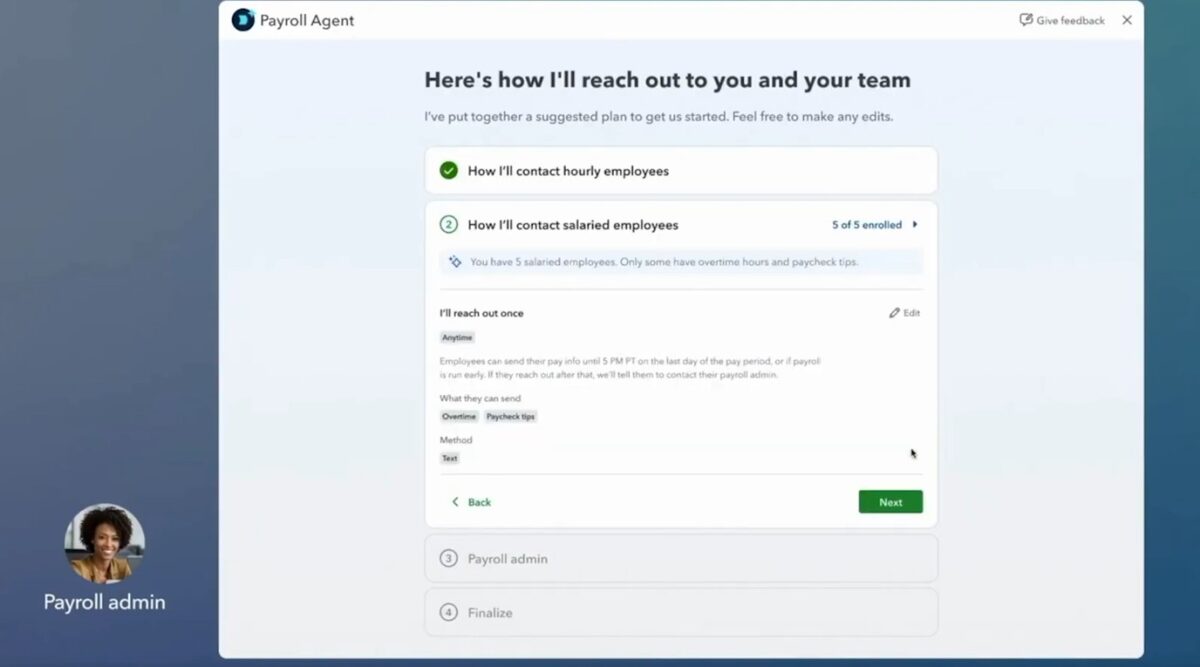
Instead of a single chatbot, you get dedicated agents for different functions. They are Finance Agent, Accounting Agent, Project Management Agent, Payroll Agent, and more.
- Accounting AI: It keeps your books clean with minimal effort from you. It automates routine transaction work so you spend less time managing entries and more time on your business. For reconciliation specifically, it compares your PDF financial statements against your account, flags anomalies, and suggests fixes. This helps you reconcile nearly three times faster than doing it manually. And during tax season, it doesn’t work in isolation. Instead, it collaborates with you and your accountant to clarify transaction questions and fill in missing details, saving everyone time.
- Business Tax AI: It runs in the background all year, not just at filing time. It finds and suggests ways to optimize your tax savings, helping you stay compliant and capture every deduction you deserve.
- Sales Tax AI: It is currently in beta and helps you charge the correct sales tax for your products and services. It also identifies potential filing issues along with recommended fixes.
- Payments AI: It studies how your business actually gets paid. It learns your business and recommends strategies, proposing personalized invoice reminders to help you collect payments faster and improve cash flow.
- Finance AI: It is your answer to the month-end scramble. It provides a more efficient month-end close and a faster path to deeper insights, summaries, and analysis. On the Enterprise side, it delivers monthly board-ready financial summaries in one glanceable dashboard, giving you real-time insights for confident, strategic decisions.
- Customer AI: It works your inbox. It identifies new leads in your email inbox and drafts personalized follow-ups for you to edit, review, and send.
- Payroll AI: It handles the prep work nobody enjoys. It proactively collects time and attendance data from your employees, spots inconsistencies, and texts your admin updates, letting you run payroll from anywhere.
- Project Management AI: It is built for people juggling multiple jobs at once. It helps you execute projects, track budgets, and learn from past projects to improve profitability. On the Enterprise side, it goes a step further by reducing manual work by 69% on average when setting up projects. It also suggests profitability targets based on historical data and peer benchmarks, so you can adjust resourcing and lock in your most valuable projects.
And tying everything together is Intuit Intelligence, a chat-style interface that combines AI, human expertise, and your business data to provide real-time insights and guidance for more confident business decisions. On the Enterprise side, it’s still listed as “coming soon,” promising instant answers to questions and deeper insights across your business.
Accounting Agent excellence
If you’ve ever lost an afternoon chasing a mismatched transaction, you know why this feature matters. The built-in Accounting Agent takes over the manual grind of bookkeeping. It updates transactions, pulls data together from different sources, and reviews everything for inconsistencies. You’re no longer stuck doing it line by line.
Here’s how it works. The agent compares your PDF financial statements against what’s recorded in your account. It catches anomalies before they turn into bigger problems. Then it suggests fixes you can act on right away. That’s a big reason reconciliation now moves nearly three times faster than the manual process.
Speed isn’t the only win here; accuracy improves too. The agent handles the tedious cross-checking that a tired human eye tends to miss. And it doesn’t work alone. During tax season, it teams up with you and your accountant. It clarifies questions about specific transactions and fills gaps in your records. Nobody has to send endless back-and-forth emails just to close the books.
The payoff is a month-end close that wraps up faster and holds up better under scrutiny. That scrutiny might come from an auditor, an investor, or just you double-checking your numbers. For growing businesses handling more transactions than ever, that means less time reconciling and more time actually running the business.
Workflow Execution
Some tasks shouldn’t sit on a human’s plate anymore. Chart of accounts standardization, variance detection, and intercompany eliminations fall into that category, and Intuit AI handles them.
Your team sets the direction and the guardrails. The AI executes within them, and it doesn’t work as a black box. Every action comes with the exact rationale and source data behind it, so your auditors can trace how a number was arrived at, rather than simply accept the final figure on faith.
This matters most with intercompany eliminations. Instead of untangling transactions between entities at period end, the system tracks them as they happen and generates eliminations automatically, linked back to the original transaction.
That transparency is the real selling point. Outside auditors and lenders don’t just want the number. They want to see how you got there.
Financial Management
Centralized Visibility
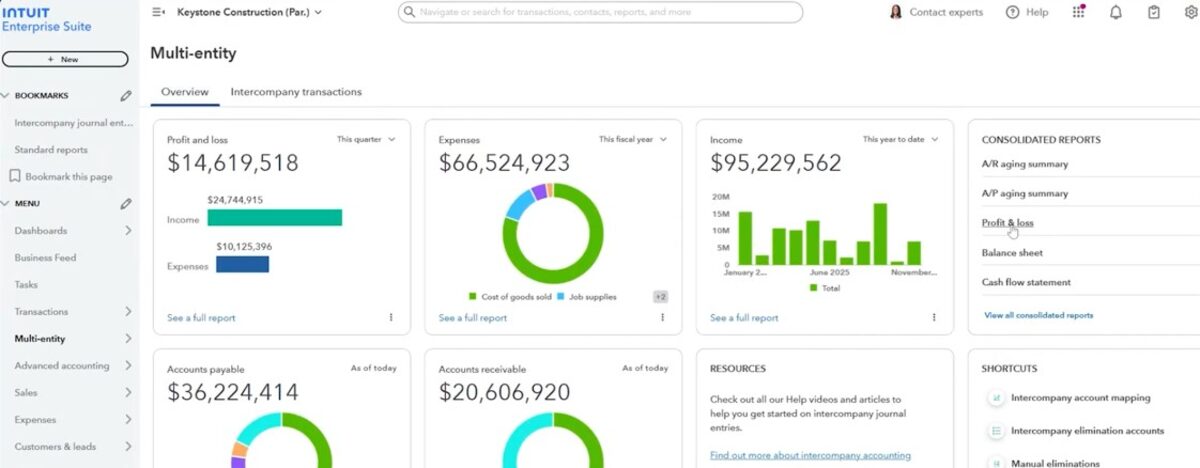
This is the feature Intuit built the whole platform around, and it’s the clearest split from standard QuickBooks Online.
You get one consolidated view of every entity, with real-time access to shared data instead of stitching reports together yourself. You can compare entities side by side and see eliminations and intercompany activity clearly, without digging through separate accounts.
Switching between companies is easy. You do it right within the platform, without logging out and back in each time. Intercompany transactions also handle themselves. When one entity bills another, the system automatically creates the matching receivable and payable entries.
Allocations get flexible too. You can split vendor expenses across entities, allocate entire account balances in one step, and filter by customer, vendor, class, location, or dimension to shape how allocations land. None of it requires transaction-level busywork.
For finance teams, this adds up to three real wins. You get richer detail when you drill into reports, tighter control over who can access or edit what, and one shared chart of accounts instead of five different versions scattered across five entities.
Advanced Reporting
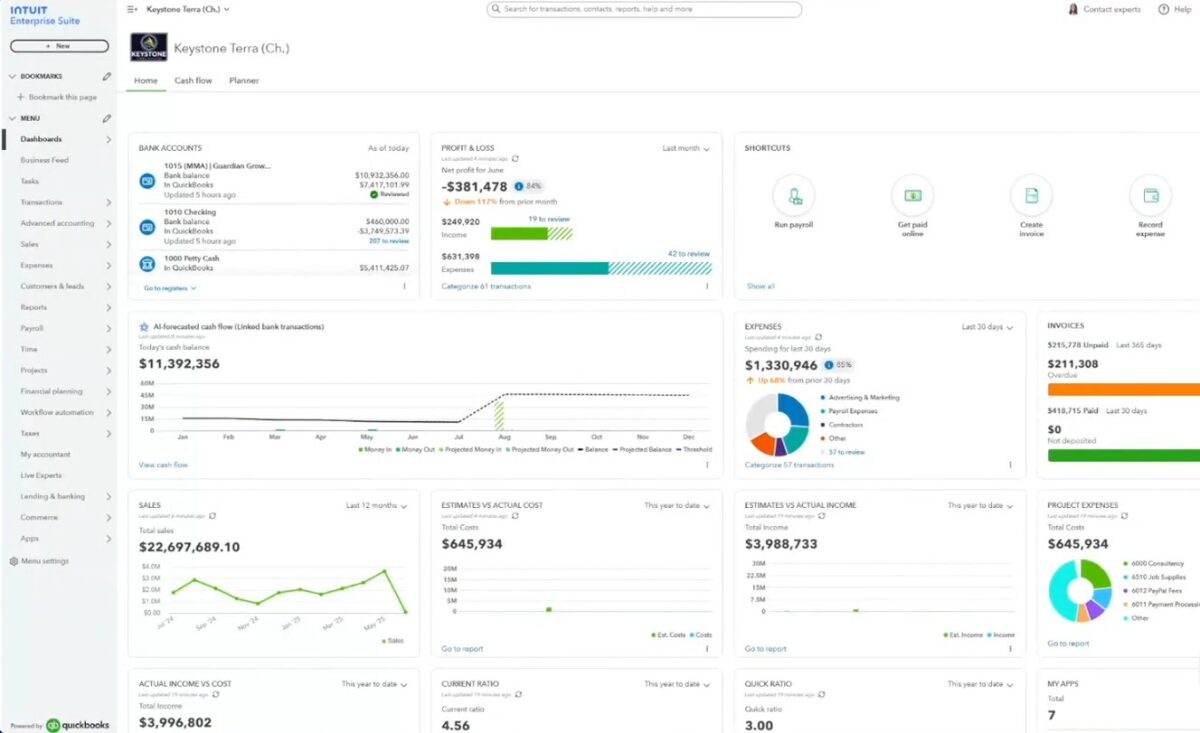
Reporting is where Intuit Enterprise Suite starts to feel like a real ERP instead of an accounting app with extra features bolted on.
You get consolidated dashboards with real-time visibility across every entity, plus more than 100 built-in KPIs, so you’re not building basic metrics from scratch.
AI generates summaries that surface trends and performance shifts automatically, cutting down the time you’d normally spend digging through numbers.
If the built-in dashboards don’t cover what you need, you can build your own with drag-and-drop widgets and reporting controls. You can also connect third-party CRM and workforce apps to get a fuller picture, not just what lives inside QuickBooks.
Custom reports come with real formatting control, which includes highlights, banded rows, grid lines, and variance arrows. This means a report actually communicates something at a glance instead of looking like a plain export. You can also combine financials, KPIs, charts, and written insights into a single document, saving you from stitching together five separate reports before a board meeting.
Actionable Intelligence
Intuit Intelligence combines AI, human expertise, and your business data to give you real-time insights and guidance, so your decisions come from something solid instead of a guess.
You can ask it anything, from “what’s driving my profit?” to “how are my invoices doing this month?” and get instant, contextual answers in plain language, using your own business data, without uploading a single file.
- Instant answers: Ask any business question and get a clear, contextual answer pulled straight from your data.
- Expert-backed guidance: Human experts review recommendations and insights before you act on them, so you’re not trusting the AI blindly.
- Smarter, data-backed decisions: It understands your business size and industry and draws on secure Intuit data across accounting, payroll, and payments to fuel predictions, catch anomalies, and recover revenue.
- Always-on automation: It handles recurring work like categorizing transactions, reconciling accounts, and preparing reports. You or your accountant can just review and approve.
- Simplified onboarding (beta): Conversational AI walks you through setup, with human experts available for migration support, so you’re up and running quickly.
The bigger idea here is that Intuit Intelligence isn’t AI working in isolation. It pairs the automation with a network of CPAs, certified bookkeepers, and industry specialists who validate the insights to help you stay tax-ready and reduce errors.
Industry-Specific Solutions
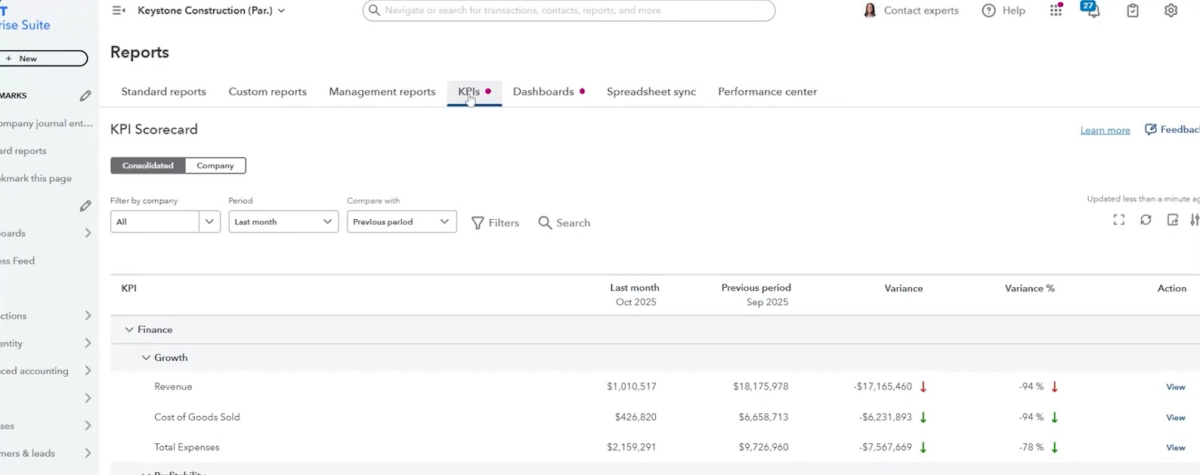
Generic accounting software forces your industry into the same chart of accounts and the same report templates, which never quite fit.
Intuit Enterprise Suite takes a different approach, with customizable industry-specific KPIs and dashboards already available if you are in field services, healthcare, nonprofit, or manufacturing.
Construction gets the newest and deepest treatment. Intuit officially launched a construction edition for Intuit Enterprise Suite. It is the first industry-specific ERP edition and a template for further vertical editions still to come.
It adds project phases so you can track budget and progress phase by phase, along with industry-standard cost groups for labor, materials, equipment, and subcontractors. It also includes enhanced project budgets with real-time AI-powered variance insights, a proposal builder with integrated e-signatures, and support for negative change orders.
The construction capabilities are also available as a module if you are on QuickBooks Online Advanced. If your business runs project-based work, this kind of built-in job costing and phase tracking removes a lot of the spreadsheet gymnastics that generic ERPs require of you.
Implementation and Migration
You have probably heard that ERP migrations have a reputation for taking months and derailing operations along the way.
Intuit is betting heavily on the opposite experience here, and its own data backs it up. Intuit reports that 90 percent of Intuit Enterprise Suite customers are set up in less than 30 days, and you could reach the first value in as few as 14 days.
The platform’s migration tooling uses AI to clean and standardize your existing QuickBooks Online data as part of the process, aligning every entity to a unified chart of accounts and optimizing your shared vendor and dimension lists automatically.
Guided onboarding starts on day one, and you get a dedicated Customer Success Manager through setup and beyond. Intuit points to real-world proof of this speed. HFMM Legacy Group, an eight-entity construction firm, migrated its historical financial data from QuickBooks into Intuit Enterprise Suite in just two hours, with zero business disruption.
Pros & Cons
PROS
CONS
Ratings
- G2: 4.6 out of 5 based on 27 reviews. Users like the ease of use and how efficiently it handles multiple entities in one place
- TrustRadius: A score of 9.1 out of 10 based on 38 ratings. Reviewers value the consolidated reporting and how much simpler it makes intercompany transactions
- Gartner Peer Insights: 4.3 out of 5 based on 4 ratings. Reviewers point to centralized reporting and strong implementation support as standout strengths.
Conclusion
Intuit Enterprise Suite is built for one job that helps you manage multiple entities without the cost and complexity of a traditional ERP once you have outgrown QuickBooks. It does that job well. Consolidated reporting, automatic intercompany eliminations, and AI agents that leave a clear audit trail turn tasks that used to take you days into tasks that take minutes.
If you manage multiple entities and want AI that actually does the work instead of just chatting about it, Intuit Enterprise Suite is worth a serious look, especially if you run a construction, professional services, or other project-based business ready to grow without a painful re-platforming down the road.
You can explore the full platform on the Intuit Enterprise Suite website, or see it in action through Intuit’s on-demand webinar library and live product demo sessions.
Final Verdict
Perfect for:
Multi-entity organization that needs one consolidated, real-time view instead of separate books for every subsidiary
Project-based business, such as construction, specialty trades, or professional services
Product-based business, such as wholesale or distribution
A dedicated finance team that needs audit-ready controls, advanced reporting, and AI-powered automation, not just basic bookkeeping
Not ideal for:
Freelancers or very small businesses with no one dedicated to managing your books, since the platform is likely more than you need
Inventory-heavy or ecommerce-driven business. Serial and lot tracking, barcode workflows, and assembly builds remain thinner here than in dedicated inventory or manufacturing systems






