Not long ago, a typical work setup meant a handful of separate apps: a document editor, a project tracker, a chat tool, a search engine, and maybe a spreadsheet or two. Each held a piece of your work. None of them talked to each other.
AI workspaces are a different kind of software. Instead of storing your work in isolated buckets, they connect your notes, documents, conversations, and tasks in one environment where AI actively helps you move faster. The AI here is more than just a feature you click on. It runs throughout the whole experience.
This article covers what an AI workspace actually is, how it works, the main types of AI workspaces you’ll encounter, their benefits, and a few limitations worth knowing before you commit to one.
What Is an AI Workspace?
An AI workspace is a software environment that combines your tools, documents, and knowledge into one place, with AI woven into the core of how it operates.
Rather than bolting a chatbot onto an existing app, an AI workspace is built so the AI can read context, recall past work, take action across connected tools, and assist without you having to start from scratch every time.
Your documents, meetings, emails, and notes still live where they always did. But now there’s an intelligent layer that reads across all of them, draws connections, and helps you act on what’s there.
Traditional digital workspaces, such as shared folder structures, project boards, and wikis, store things. An AI workspace actively works with what’s stored. That’s the practical difference.
The core components that make this possible:
- AI assistants embedded in the interface, able to draft, summarize, answer questions, or take actions based on your instructions
- Automation that handles repetitive steps without you triggering them manually each time
- Knowledge integration that connects information across files, tools, and conversations so context isn’t lost
- Contextual awareness so the AI understands what you’re working on and adapts its help accordingly
How Does an AI Workspace Work?
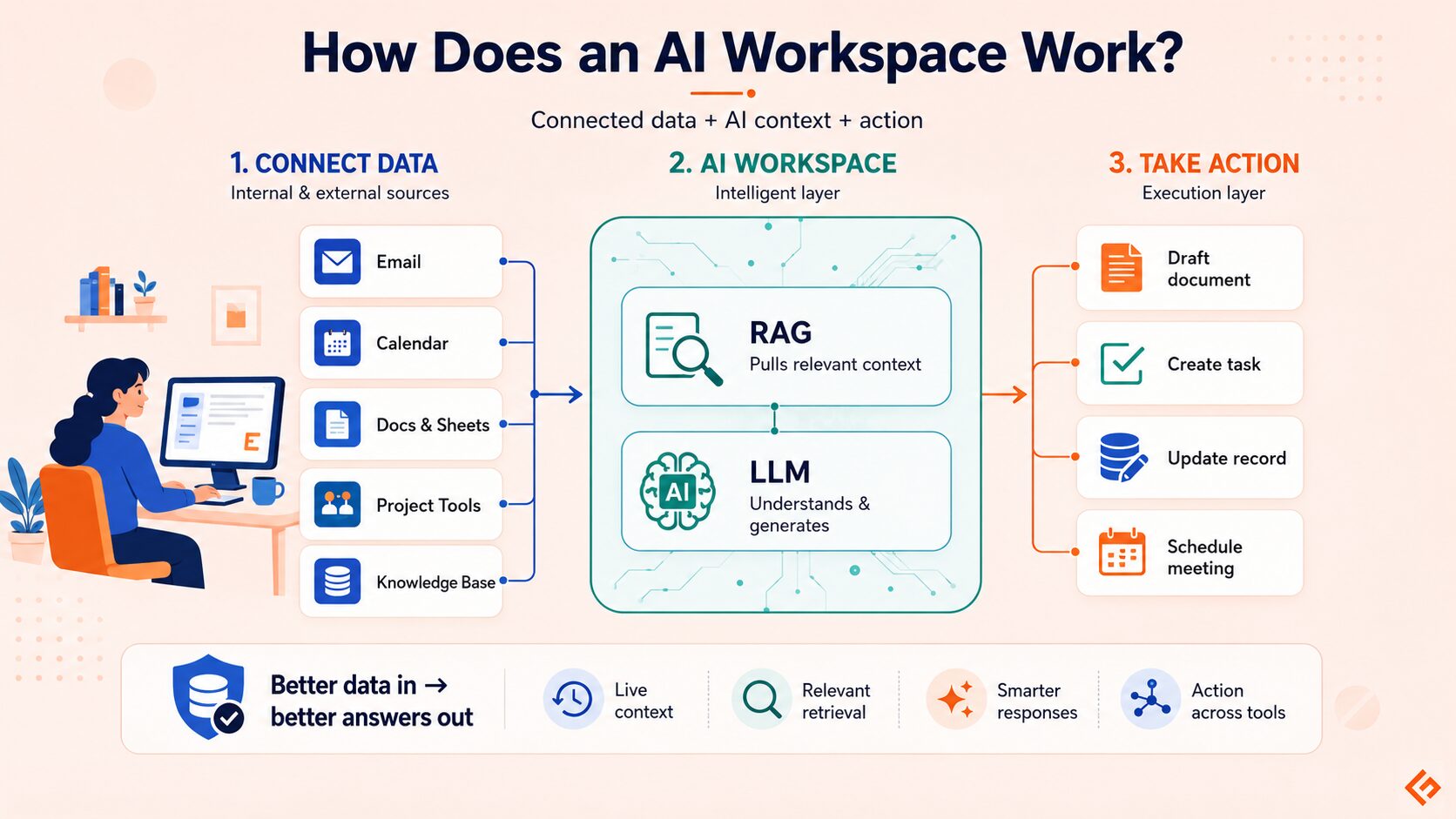
Most AI workspaces are built on large language models (LLMs), the same underlying technology behind tools like ChatGPT or Claude. LLMs are trained on large amounts of text and learn to understand and generate language across a wide range of tasks.
On top of the LLM, AI workspaces add layers that make them useful for actual work. Integrations pull in data from connected apps: your calendar, inbox, project tools, or company knowledge base.
When you ask the AI a question, it retrieves relevant information from your connected sources and uses that as context for its response. This retrieval process, often called RAG (retrieval-augmented generation), is what allows AI workspaces to give answers specific to your situation rather than generic ones.
Automation layers handle the execution side. Once the AI understands what you need, it can take action: create a task, send a draft to a colleague, update a record, or generate a document. The more tools your workspace is connected to, the more it can do without extra prompting.
The data flowing through the system is what makes or breaks the experience. An AI workspace fed with accurate, up-to-date information from your actual sources will produce far more useful output than one working from stale or disconnected data.
Types of AI Workspaces
Different categories have emerged based on the kind of work they’re built to support.
Document AI Workspaces
Document AI workspaces are built around writing and knowledge management. They let you draft, edit, organize, and retrieve written content, with AI handling tasks that would otherwise eat hours: summarizing long documents, generating first drafts, tagging and organizing notes, or surfacing relevant pages from a sprawling wiki.
Examples: Notion AI, Coda, Saga
Benefits: Faster drafting without starting from a blank page, automatic summaries of long documents, better-organized knowledge that doesn’t get buried as your team or project grows.
Conversational AI Workspaces
Conversational AI workspaces are centered on dialogue. You bring a task or question, and the AI works through it with you. Because context carries over within a session or project, it doesn’t treat every question as if it’s the first one.
Examples: ChatGPT Business, Claude Projects, Geekflare Chat
Benefits: Useful for brainstorming, research synthesis, and content generation. Claude Projects and similar tools add persistent context, so the AI stays aware of your ongoing work without you re-explaining it every session.
Developer AI Workspaces
Developer AI workspaces bring AI into the coding environment itself. Instead of a separate tool you copy-paste into, the AI sits in the editor, reads your codebase, and suggests, explains, or generates code inline. The better ones understand your project’s structure, not just the file you have open.
Examples: GitHub Copilot, Cursor, Claude Code
Benefits: Faster coding on routine tasks, more useful debugging because the AI can reason about what a function is supposed to do versus what it’s actually doing, and fewer errors caught before review. If you’re building something with AI help, this list of AI app builders covers tools that go beyond code editors.
Team AI Workspaces
Team AI workspaces are designed for collaboration at an organizational level. They connect people across roles and time zones by giving everyone shared access to documents, meeting notes, project context, and AI-assisted tools.
Examples: Microsoft 365 Copilot, Google Workspace, Fibery
Benefits: Shared context means less time getting colleagues up to speed, document storage keeps work accessible across the org, AI meeting summaries cut note-taking overhead, and cross-tool productivity improves because everyone is working from the same information.
Data and Analytics AI Workspaces
These workspaces put AI in front of data analysis. Instead of requiring SQL knowledge or a dedicated analyst to pull insights, users can ask questions in plain language and get charts, summaries, or trend analyses back.
Examples: Microsoft Fabric, Tableau with AI features
Benefits: Natural-language queries lower the barrier for non-technical users to explore data, automated insights surface patterns that might otherwise require manual analysis, and time-to-answer on data questions drops significantly.
Design AI Workspaces
Design AI workspaces apply AI to creative and visual work. They help designers move faster through ideation, generate or refine visual assets, and handle repetitive production tasks.
Examples: Figma, Canva AI
Benefits: Faster image creation and iteration, AI-assisted ideation that helps break through blank-canvas paralysis, and production tasks that used to take hours often get done in minutes.
Key Benefits of Using an AI Workspace
AI workspaces cut the overhead that slows most knowledge work down. Here’s where the difference shows up most.
Time savings and reduced busywork
Enterprise workers using AI tools save between 40 and 60 minutes per day, according to workplace analytics data from Worklytics. Much of that time comes from tasks that aren’t intellectually demanding but still eat attention: summarizing long threads, reformatting documents, generating first drafts, and tracking down information buried in your files.
Centralized knowledge and context
The bigger a team gets, the more knowledge gets siloed. One person knows how a process works, another has the client notes, and a third has the meeting history. An AI workspace pulls from all of those sources at once. You ask a question, the workspace searches across connected tools, and you get an answer grounded in your organization’s actual context.
Better focus and reduced tool-switching
Knowledge workers switch between apps dozens of times per day. Each switch costs attention. An AI workspace consolidates enough of that activity in one place that you spend less time managing tools and more time on the work itself.
Improved collaboration
When AI handles meeting summaries, tracks action items, and keeps shared documents current, teams stay aligned with less coordination overhead. Less time on status updates means more time on decisions and delivery.
Who Should Use an AI Workspace?
AI workspaces aren’t built for one type of worker, but some roles get more out of them than others.
Teams and businesses get the most from AI workspaces. The benefits of shared context, meeting summaries, and cross-tool productivity multiply when more people are working from the same environment.
Developers benefit from AI workspaces that sit inside the coding environment, understand the codebase, and handle the routine parts of writing and debugging code.
Marketers and content teams use document and conversational AI workspaces to speed up research, drafting, and editing, especially for high-volume work where the first draft is the hardest part.
Researchers benefit from workspaces that can synthesize large amounts of information, surface connections across sources, and produce structured summaries from raw material.
AI workspaces aren’t exclusively for enterprise teams. Solo operators and freelancers use them for the same reasons: less time managing information, more time on the actual work.
Limitations and Considerations
Some real tradeoffs to understand before you roll one out.
Data privacy and security
Connecting your documents, email, and internal tools to an AI workspace means sensitive information flows through external systems.
- A 2025 Cloudera survey of nearly 1,500 senior IT leaders found that 53% of organizations identified data privacy as their top concern about AI implementation.
- Check Point’s 2025 AI Security Report found that 7.5% of prompts sent to generative AI tools contain sensitive or private details.
If you’re in a regulated industry, healthcare, finance, or legal, understanding where your data goes and how it’s stored is critical.
Accuracy and the need for human review
AI workspaces produce wrong information with confidence. A document summary might miss a critical nuance. A code suggestion might compile but do the wrong thing. The output needs a human review step, especially before anything consequential happens with it.
Learning curve
AI workspaces tend to have more surface area than the tools they’re replacing, and getting useful output from them requires some adjustment. Teams that purchase licenses without changing their workflows often end up frustrated.
The productivity research is consistent on this: gains show up for organizations that figure out how the AI fits into their actual work rather than organizations that just turn it on.
The Future of AI Workspaces
The direction things are heading is toward agentic workflows, systems where AI goes beyond just responding to questions but takes action on its own across multiple steps, without a human approving each one.
An AI workspace today helps you draft an email. An agentic workspace handles the whole thread, updates the CRM, and schedules the follow-up.
Deloitte’s 2026 tech trends research describes the shift as organizations starting to manage AI agents the way they manage human workers, with defined responsibilities, governance, and oversight built in. The organizations making this work are rethinking how work gets organized at a structural level.
Deeper tool integration is the other clear trend. The more an AI workspace can read from and act on connected systems without requiring a separate setup for every new tool, the more useful it becomes.
Both the friction of integrating tools and the AI’s ability to act across those tools will keep changing over the next two to three years. Organizations paying attention to this now will have an advantage over those that wait until the market settles.