



Have you ever asked yourself what happens behind the scenes when you order through an app, check the weather on your phone, or pay for something online with your card? It is the power of APIs, and you may not even realize it. APIs work behind the scenes to power almost everything that you do online.
An Application Programming Interface (API), in the simplest terms, is a messenger that allows different software applications to communicate with each other. It is like a waiter in a restaurant: you place an order with the waiter, the waiter takes it to the kitchen, and then brings your food back to you. Similarly, an API takes your request, communicates with the server, and delivers a response back to you.
This beginner’s guide breaks down what APIs are, how they work, and why they matter. You will learn about the different types of APIs, explore real-world examples that you interact with daily, and understand how APIs are essential building blocks of the content you interact with.
What is an API?
API stands for Application Programming Interface. It has 3 parts:
- Application: Software or service. TikTok, Facebook, and Google Maps are good examples.
- Programming: The logic or code that makes the service or software work.
- Interface: The point where two systems meet and interact.
Simply put, an API is a set of rules that allow one piece of software to communicate with another one. Or it is a “contract” between two applications/systems that defines how they should communicate, which requests are allowed, and which responses to expect.
APIs exist for these reasons:
- Abstraction: APIs ensure that clients don’t need to know how a system works under the hood to use it. For instance, you can use Google Maps in Uber, where Uber doesn’t need to access Google’s entire mapping infrastructure but just the API providing location data.
- Security: API controls what information can be viewed or accessed by various services. This removes the need to give access to the entire database or server.
- Efficiency: Using an API means that you don’t have to create everything from scratch. For instance, you don’t have to create a payment system from scratch when you can use Stripe.
APIs are the hidden layer powering modern applications. Every time you interact with a website or app, multiple APIs are working together behind the scenes.
For example, the Geekflare API lets developers integrate search the web in real time, extract structured data from websites, and capture webpages as screenshots without building those tools from scratch.
You might not see APIs, but they’re the backbone of how software connects, shares data, and delivers seamless experiences across platforms.
How Does an API Work?
An API works through a simple request-response cycle. However, before we go to that, we need to understand 2 terms: the “client” and “server”.
- Client: The application that sends a request to the API asking for specific information. For instance, Uber (Client) sends a request to the Google Maps API asking for the user’s location data.
- Server: The application that receives the request from a client.
APIs use HTTP methods to define what action you want to take. These are the common methods:
- GET: Fetch/retrieve data (like reading a book from a library)
- POST: Send/create new data (like submitting a form)
- PUT: Update existing data (like editing a document)
- DELETE: Remove data (like deleting a file)
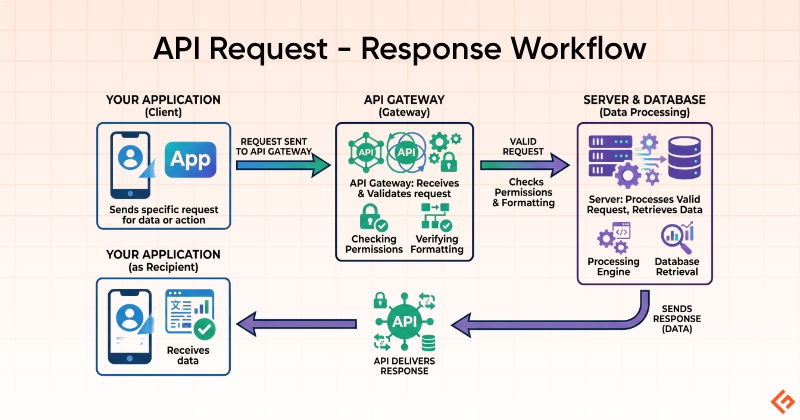
Since you now understand the key terms and methods, we can proceed to explain how an API works. A typical API follows a 4-step flow: Request → API → Server → Response. This is what happens:
- Request – Your application (the client) sends a request to the API, asking for specific data or action
- API – The API receives your request and validates it (checking for things such as permissions and formatting)
- Server – The API forwards the valid request to the server, which processes it and retrieves the needed data
- Response -The server sends the data back through the API, which delivers it to your application
A typical API request looks like this:
- Endpoint URL – The specific address where the API lives (e.g.,
https://api.geekflare.com/screenshot) - HTTP Method – The type of action you want to perform
- Headers – Authentication details, data format preferences
- Parameters – Specific details about what you’re requesting (optional)
- Body – Additional data you’re sending (for certain types of requests)
This is what an API request and response look like:
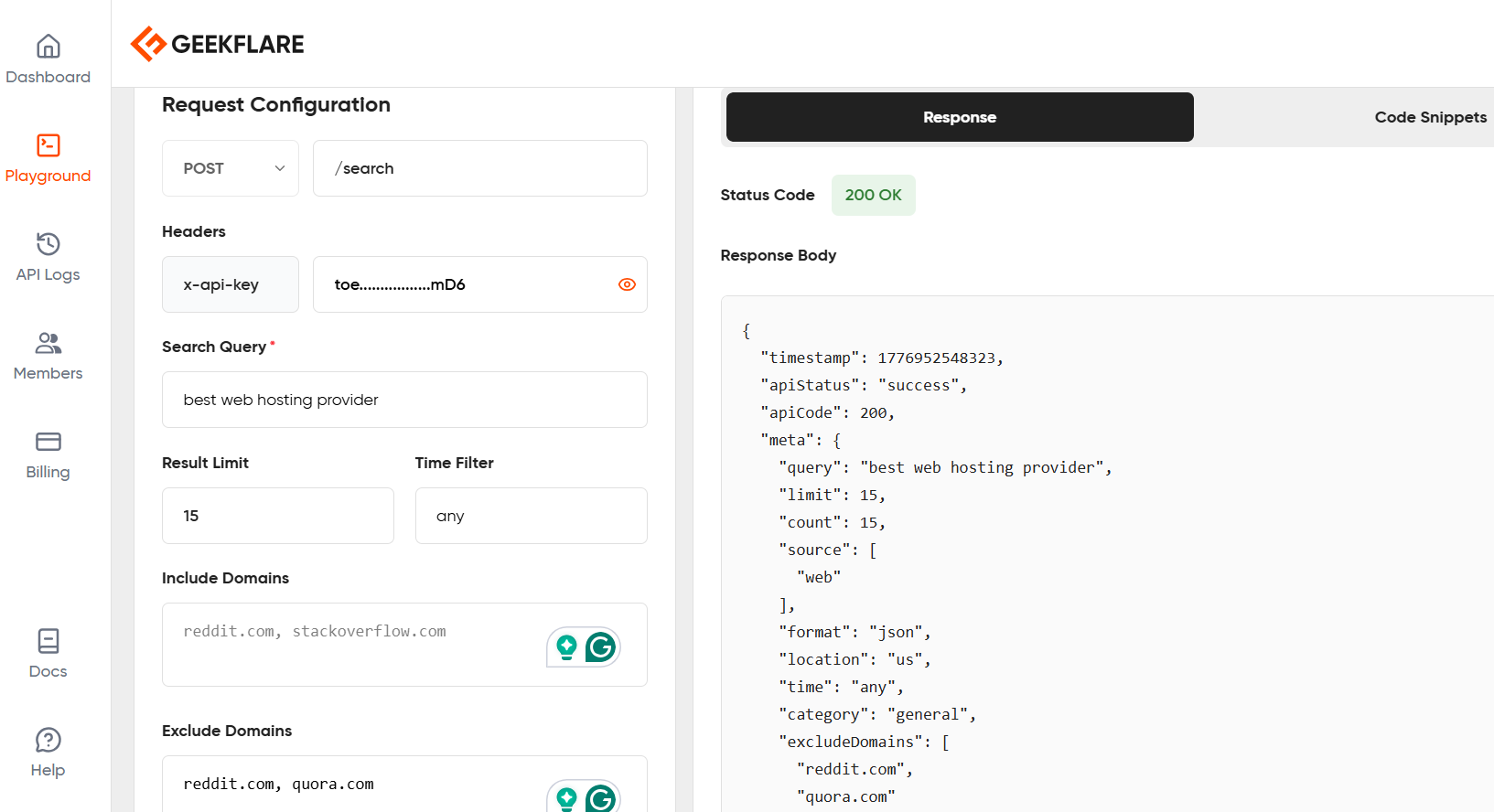
We shall use the Geekflare Search API from the Geekflare API platform. Our search query is “best web hosting provider”.
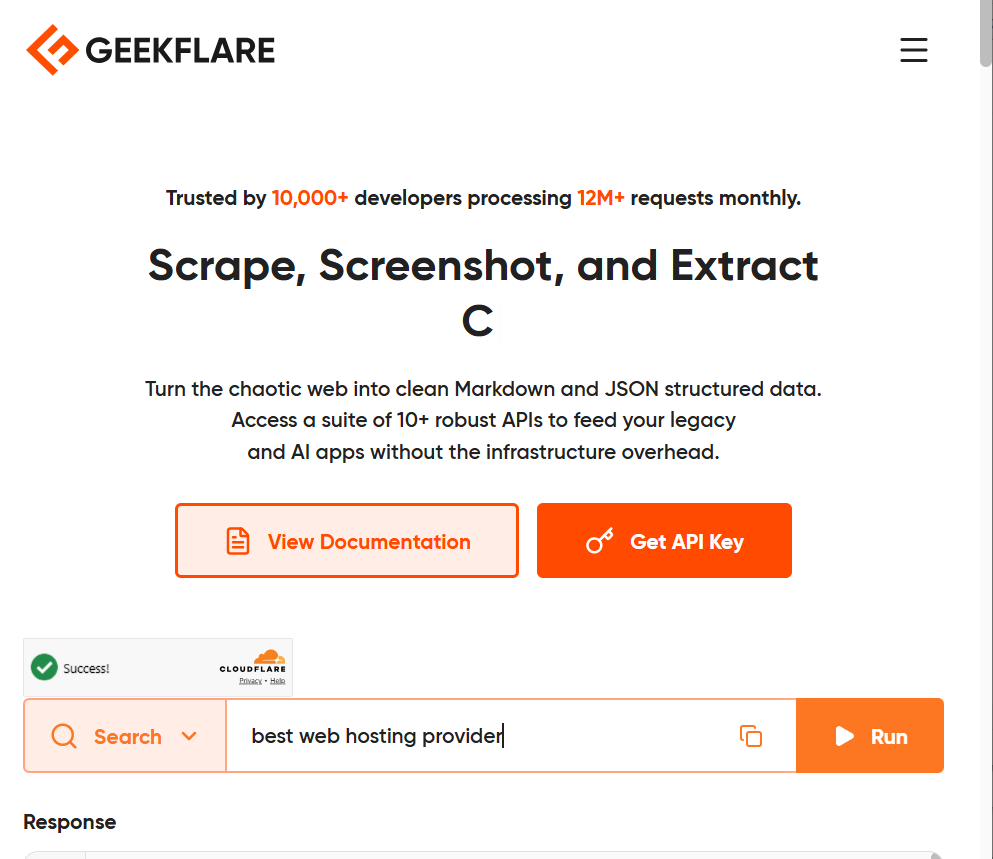
My request was:
url = "https://api.geekflare.com/search"The response was:
response = requests.post(

    url,

    json=payload,

    headers=headers

)
Everyday Examples of APIs You Already Use
You interact with dozens of APIs daily without you even realizing it. Here are some common examples:
- Google Maps embedded in Uber or Deliveroo: When you order a ride from an online taxi-hailing app such as Uber or food from Deliveroo, you’re able to see the driver’s location or delivery person in real-time. These apps have embedded the Google Maps API into their platform to provide real-time location data, route calculations, and visual maps.
- “Sign in with Google / Apple” buttons: Most websites allow users to sign up using their existing social profiles. They simply use an authentication API that verifies user identity with platforms such as Apple or Google and only shares relevant information, such as email and name.
- Weather widgets on websites: You may have come across weather forecasts on travel or news websites. Such platforms pull their data from APIs such as OpenWeatherMap or WeatherAPI.
- Payment gateways, such as Stripe and PayPal): Stripe and PayPal are among the most widely used payment gateways. These platforms provide APIs that allow e-commerce websites to process payments securely without necessarily storing customers’ confidential data.
- Social media share buttons: You may have seen websites that allow users to share posts on social media platforms such as Facebook or X. Such platforms use APIs to pull article titles, descriptions, and relevant images, then post them to a social account.
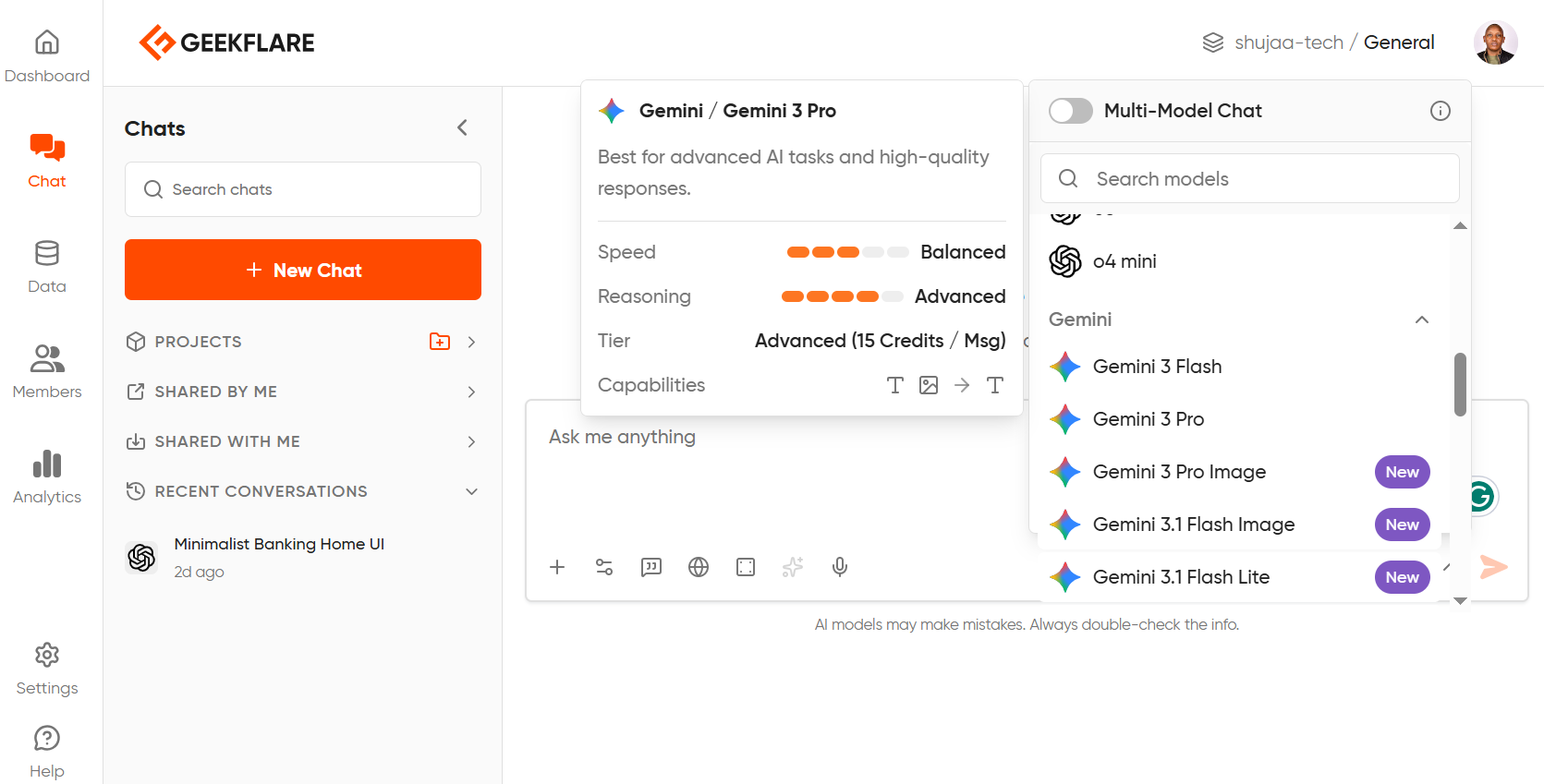
- AI-powered APIs: Website owners can now integrate artificial intelligence capabilities into platforms such as ChatGPT and Claude using the APIs from AI providers. A good example is Geekflare AI, that brings together OpenAI, Anthropic, and Google’s top models. This means you can access all your favorite models from a single interface without switching platforms.
Types of APIs
APIs come in different formats, depending on how they’re intended to be used and the underlying architecture. These are some of the most common API protocols:
- REST API: REST (Representational State Transfer), also known as RESTful APIs, uses HTTP methods such as GET, PUT, HEAD, and DELETE to interact with resources. These APIs are stateless, meaning they don’t save client data between requests.
- SOAP API: SOAP (Simple Object Access Protocol) is an XML-based messaging protocol that enables endpoints to exchange data over various transport protocols, such as SMTP (Simple Mail Transfer Protocol) and HTTP. They are mostly found in enterprises and banks.
- GraphQL: An open-source query language that specifies how clients should interact with APIs. GraphQL is quite flexible, allowing users to make an API request with just a few lines.
- WebSocket API: WebSocket APIs are well-suited for real-time communication, providing bidirectional communication between client and server. They allow continuous exchange once a connection is established and can support live chats.
- AI/LLM APIs: AI and LLM APIs allow website owners to integrate artificial intelligence capabilities into their web apps. While not a separate protocol, AI/LLM APIs (like those from Google or OpenAI) typically use REST to deliver AI capabilities to developers. There are many AI API platforms to choose from, such as OpenAI, Google, Microsoft Azure, and others.
API Request & Response
We can use a simple weather API to illustrate what an API request and response look like.
For example:
The Request: Imagine you want to check the current weather in London. Your application sends a GET request to a weather API:
GET https://api.weather.com/v1/current?location=london&units=metricThis URL tells the API:
- What you want (current weather data)
- Where you want it (London)
- How you want it formatted (metric units for Celsius)
The request might also include:
- API Key: Your authentication token (e.g., apikey=abc123xyz)
- Headers: Additional information like accepted data format (JSON or XML)
The Response
The weather API processes your request, retrieves the data from its database, and sends back a response in JSON format:
json{

  "location": "London, UK",

  "temperature": 18,

  "condition": "Partly Cloudy",

  "humidity": 65,

  "wind_speed": 12,

  "last_updated": "2024-04-24 14:30"

}
API Status Codes
Every API response includes a status code that tells you whether the request was successful or if something went wrong:
- 200 (OK): Success! The request worked, and you got your data
- 404 (Not Found): The requested resource doesn’t exist (wrong URL or the data isn’t available)
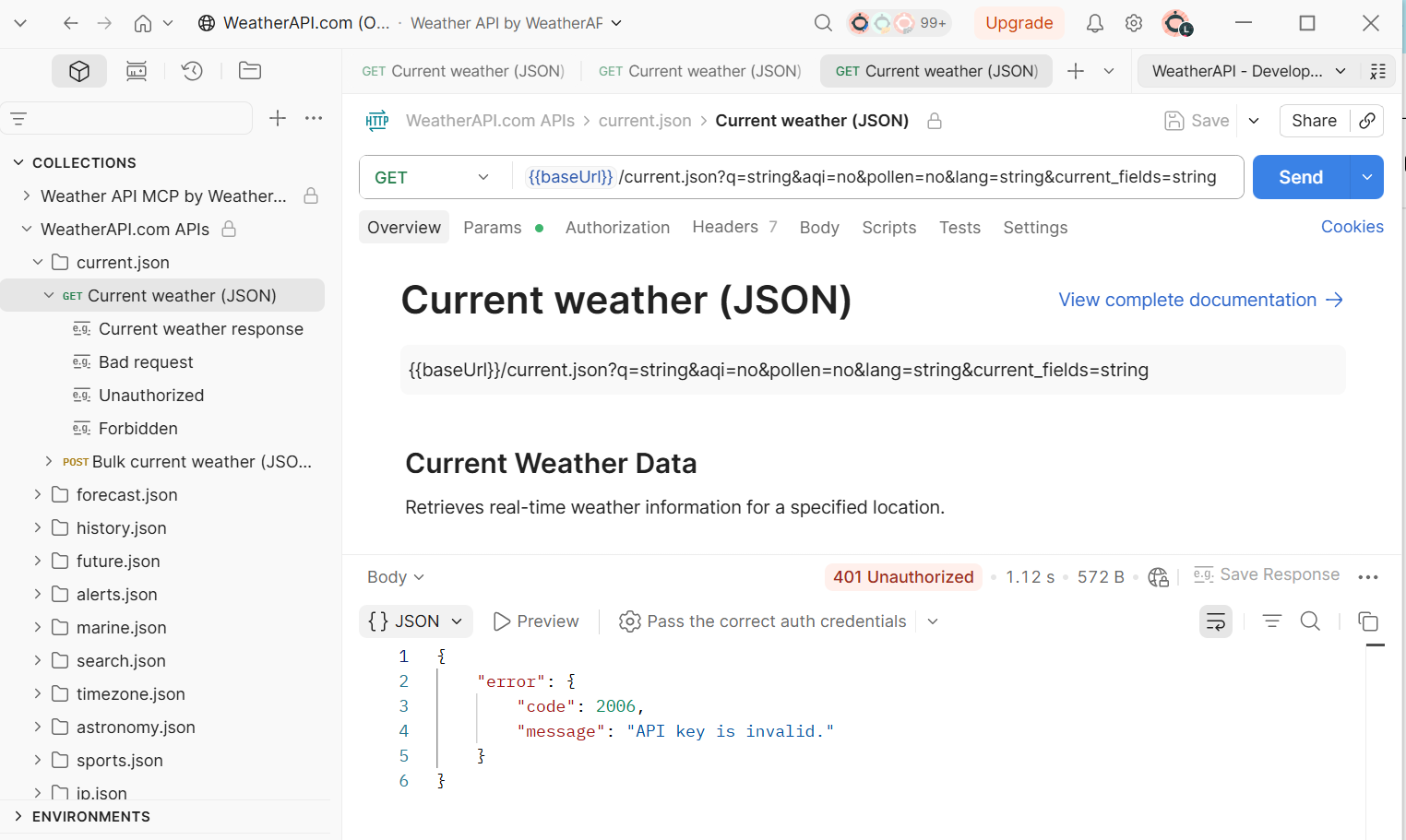
- 401 (Unauthorized): You don’t have permission to access this API (missing or invalid API key)
- 500 (Internal Server Error): Something broke on the server side (not your fault)
These codes help developers quickly diagnose problems. If you get a 401 error, you need to check your authentication. For instance, I ran the GET https://api.weather.com/london on Postman and got a 401 error since the API key was missing.
Public vs. Private vs. Partner APIs
Not all APIs are created the same, depending on who can use or access them. These are the main categories based on access levels:
- Public (Open) APIs: These are APIs that anyone can access and use. They can be free, freemium, or paid APIs. These tools are meant to democratize access to data and services, allowing developers to build applications without having to create certain structures from scratch. OpenWeatherMap, GitHub API, and the NASA API are good examples of Public/Open APIs.
- Private APIs: These are built for internal use only. Thus, such APIs aren’t exposed to the public, and organizations use them to connect different services, microservices, and systems. For instance, Netflix has various private APIs that connect its recommendation engine with its content database, user authentication system, and streaming service.
- Partner APIs: These APIs sit between public and private APIs. Such APIs are shared with specific business partners under controlled agreements to allow them to achieve common goals or transact business. Partner APIs often require authentication, legal contracts, and usage limits. A good example of partner APIs is Shopify’s sharing of specific tools with shipping providers. Or, how airlines share APIs with travel agencies to access flight availability and pricing.
What is an API Key?
An API key is a unique identifier that verifies a user’s authorization to use the API. Most APIs provide access to sensitive data, so they must validate that the application (client) making the request is authorized to do so.
APIs need authentication for several reasons:
- Security: Prevents unauthorized access and misuse of the service.
- Rate Limiting: Controls the number of requests you can make per hour or day to prevent system overload.
- Usage Tracking: Monitors who are using the API and how much they’re consuming.
- Billing: For paid APIs, keys help track usage and generate invoices accordingly.
What an API key looks like and how it works
An API key is a long string of random characters. This is how an API from the Geekflare API tool looks:
toeBc2l1jZVn……………..PHzkmD6
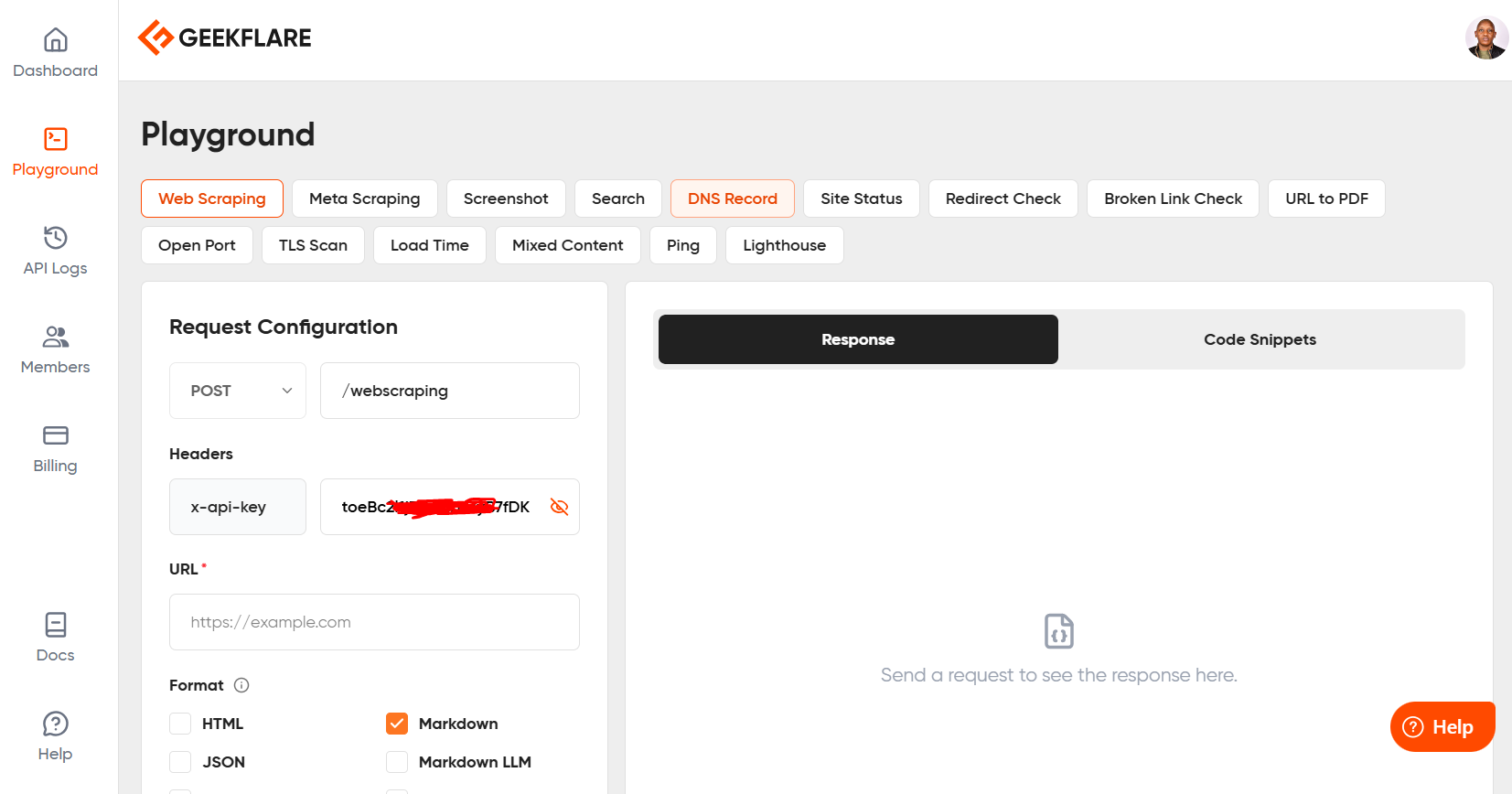
When you make an API request, you include this key either:
- In the URL as a query parameter: ?api_key=gflr_1a2b3c4d5e6f…
- In the headers: Authorization: Bearer gflr_1a2b3c4d5e6f…
- In the request body (less common)
The API receives your key, validates it against their database, and either grants access or rejects the request if the key is invalid or has exceeded its usage limits.
Best practices to keep your API Key secret
- Never expose it in frontend code: If you hardcode an API key in JavaScript that runs in a browser, anyone can view your source code and steal it. Always make API calls from your backend server.
- Use environment variables: Store API keys in environment variables or secure vaults, not directly in your code.
- Rotate keys regularly: If you suspect a key has been compromised, regenerate it immediately.
- Set usage limits: Most API providers let you set daily or monthly request limits to prevent unexpected charges if your key is misused.
APIs vs. SDKs vs. Webhooks
Most people use the terms APIs, SDKs, and webhooks interchangeably. However, they serve different purposes in how applications communicate and share data. This is how:
API: You Call It When You Need Something
An API follows a request-response system. You actively call the API when you need data or want to perform an action. It’s like calling a restaurant to place an order, where you only initiate the conversation when you’re ready.
For instance, you call the Stripe API when a customer clicks “Pay Now” to process their payment.
SDK: A Packaged Toolkit That Includes APIs as one of the tools
An SDK (Software Development Kit) is a collection of tools, libraries, code samples, and documentation that makes it easier to work with an API. While an API is just the interface, an SDK provides pre-written code and helper functions so you don’t have to write everything from scratch.
For instance, the Twilio API lets you send SMS messages, but the Twilio SDK for Python provides ready-to-use functions, such as client.messages.create(), so you don’t have to manually construct HTTP requests.
Webhook: The Server Calls You When Something Happens
A webhook is the reverse of an API. Instead of you constantly checking for updates, the server notifies you when something happens. It’s like giving the restaurant your phone number so they can text you when your food is ready. This means you don’t have to keep calling them.
For instance, when someone pays you via PayPal, PayPal’s webhook sends a notification to your server confirming the payment succeeded. You don’t have to keep asking, “Did the payment go through yet?”
| Feature | API | SDK | Webhook |
|---|---|---|---|
| Initiator | You request data | You use helper tools such as pre-written code | Server sends data to you |
| Timing | On demand when you need it | On demand when you need it | Event-driven |
| Use case | Process payment, fetch user data | Build integrations faster with pre-built code | Get notified of new orders or payments |
| Example | GET request to fetch the current weather | Twilio Python SDK with built-in functions | GitHub webhooks notify you of new commits |
When to Use Each
- Use an API when you need to fetch or send data at specific times. For instance, checking inventory, submitting forms, and searching for products.
- Use an SDK when you’re building an integration and want to speed up development with pre-built code and examples in your programming language.
- Use a webhook when you need real-time notifications about events such as a new sale, a failed payment, and a user signup.
Why API Matters for Non-developers
You don’t need to know how to code to benefit from APIs. Here’s why APIs matter across different roles:
Product Managers
When planning new features, product managers need to know what’s technically feasible and how long it will take. Understanding APIs helps you ask better questions. For example:
- “Can we integrate with Salesforce using their API, or do we need a custom integration?”
- “Does this third-party service have an API that supports real-time data?”
- “What rate limits does this API have, and will they support our expected user volume?”
Knowing API limitations such as rate limits, data formats, and authentication requirements helps you set realistic timelines and avoid scope creep.
Marketers
Marketing teams rely on multiple tools, such as CRM systems, email platforms, analytics tools, and ad networks that need to talk to each other. As a marketer, understanding APIs helps you:
- Choose tools that integrate well together through APIs
- Troubleshoot when data isn’t syncing between platforms
- Understand why certain automations have delays (API rate limits)
- Evaluate whether a new tool can connect to your existing stack
For example, if your email platform’s API only updates contact lists once per hour, you’ll know why your triggered campaigns aren’t sending emails immediately.
Entrepreneurs
Starting a business no longer requires that entrepreneurs build every component from scratch. If you’re an entrepreneur, APIs enable you to:
- Accept payments without building a payment processor by using a tool such as the Stripe API
- Add maps and location features without developing mapping technology by using ready tools such as the Google Maps API
- Send transactional emails without managing email servers with a platform such as SendGrid API
- Process AI tasks without training your own models using tools such as the OpenAI API
This reduces development time and costs, letting you validate your business idea faster.
The No-Code/Low-Code Movement is Built on APIs
Tools like Zapier, Make, and n8n have made APIs accessible to non-technical users through visual interfaces. You can connect apps and automate workflows without writing a single line of code.
For example, Geekflare integrates with these platforms:
- Zapier + Geekflare integrations: Where users can automate website monitoring and testing workflows
- Make + Geekflare integrations: Where users can build custom automation scenarios
These integrations use Geekflare’s API behind the scenes, but you interact with them through a drag-and-drop interface. You can automatically:
- Get notified when your website goes down
- Run security scans after deploying code
- Generate performance reports on a schedule
How to Test an API Without Writing Code
You don’t need to be a programmer to experiment with APIs. Here are several ways to test and explore APIs without writing a single line of code.
Postman
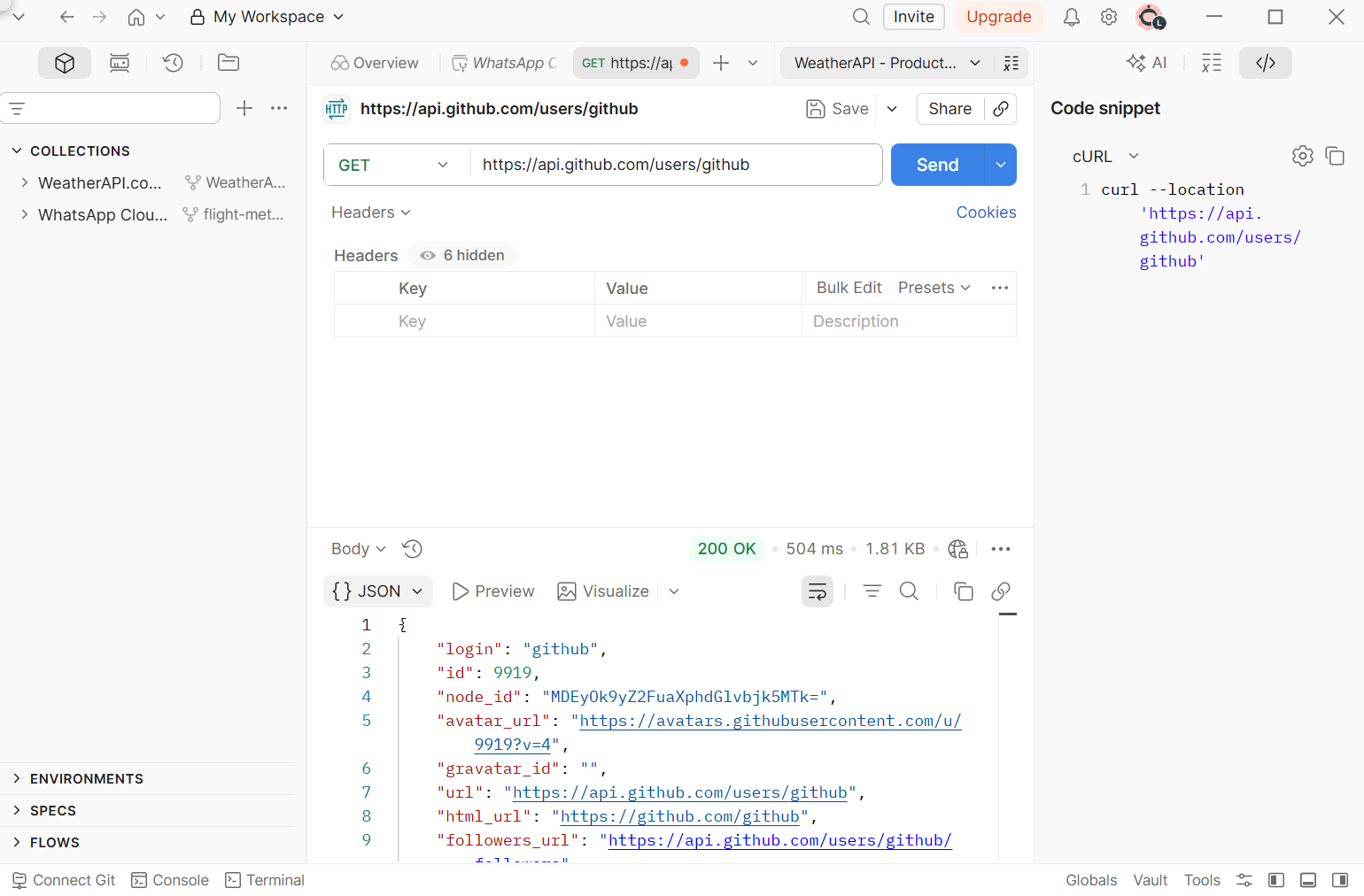
Postman is a free tool that lets you send API requests and view responses through a visual interface. Here’s how to get started:
- Download Postman from postman.com. Alternatively, use the web version.
- Create a new request
- Enter the API endpoint URL
- Select the HTTP method (GET, POST, etc.)
- Add headers or authentication if required
- Click “Send” to see the response
Postman displays the response data, status code, response time, and size.
Using Your Browser URL Bar for Simple GET Requests
For basic GET requests that don’t require authentication, you can test APIs directly in your browser’s address bar.
For instance, paste this URL into your browser:
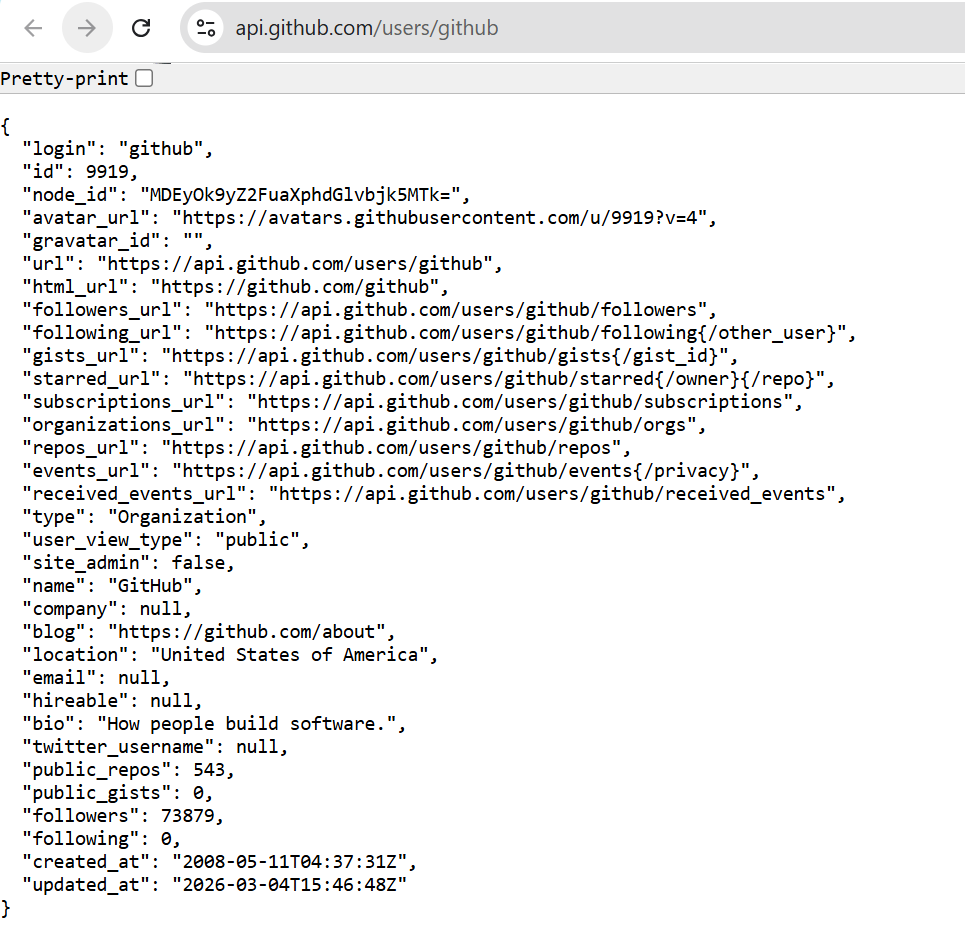
https://api.github.com/users/github
Your browser will display GitHub’s public API response, in JSON format, containing information about the GitHub user account. This works for any public API endpoint that accepts GET requests.
Public API Playgrounds
Several websites provide practice APIs designed for testing and learning:
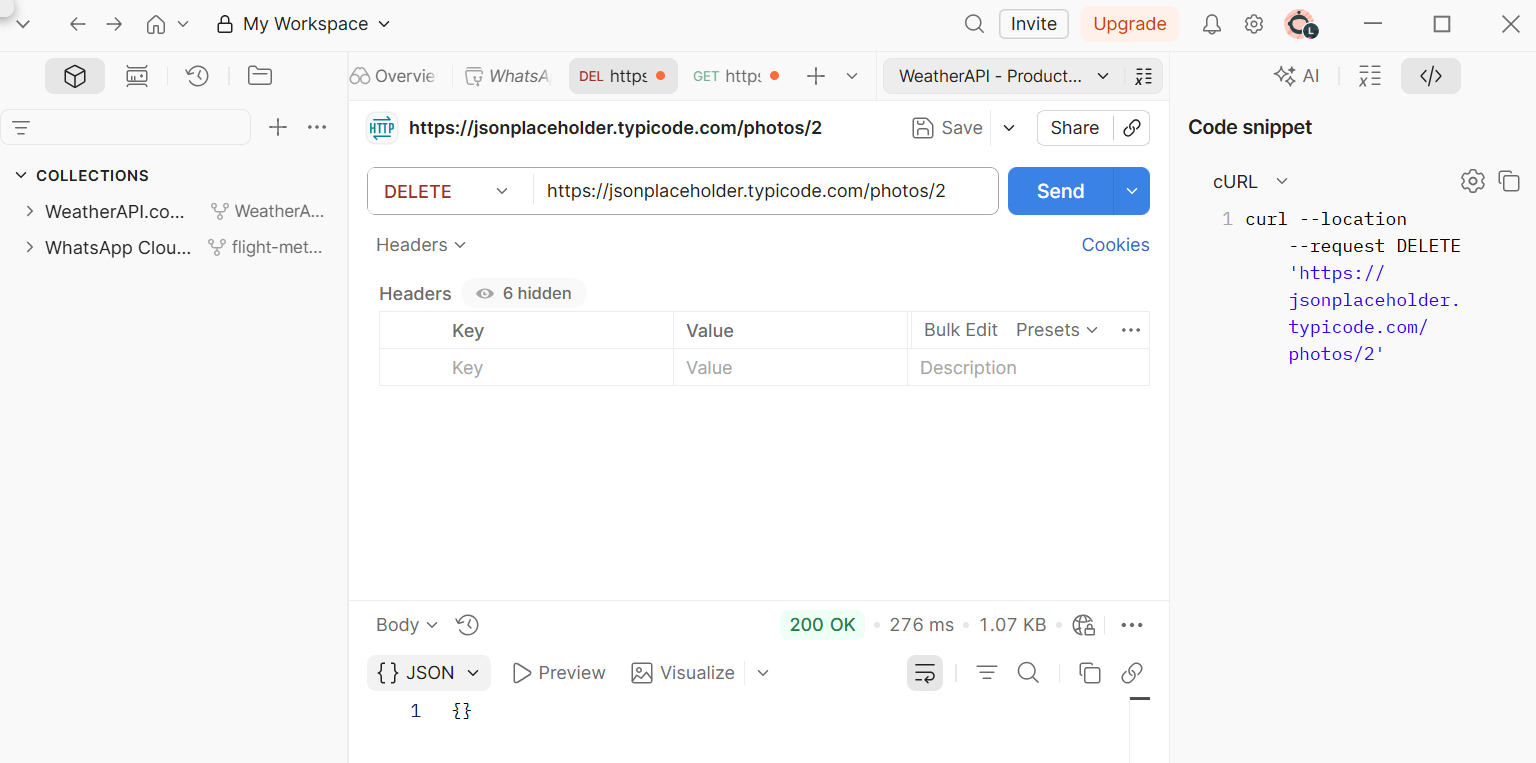
For instance, JSONPlaceholder (jsonplaceholder.typicode.com) is a free, fake REST API with endpoints for posts, comments, users, and photos. It is perfect for beginners because you can make requests without authentication.
Example endpoint to try:
https://jsonplaceholder.typicode.com/photos/2
This fetches the photo at index 2 from the list. For instance, I tested the “DELETE” method on this endpoint and got the following;
Geekflare API Playground
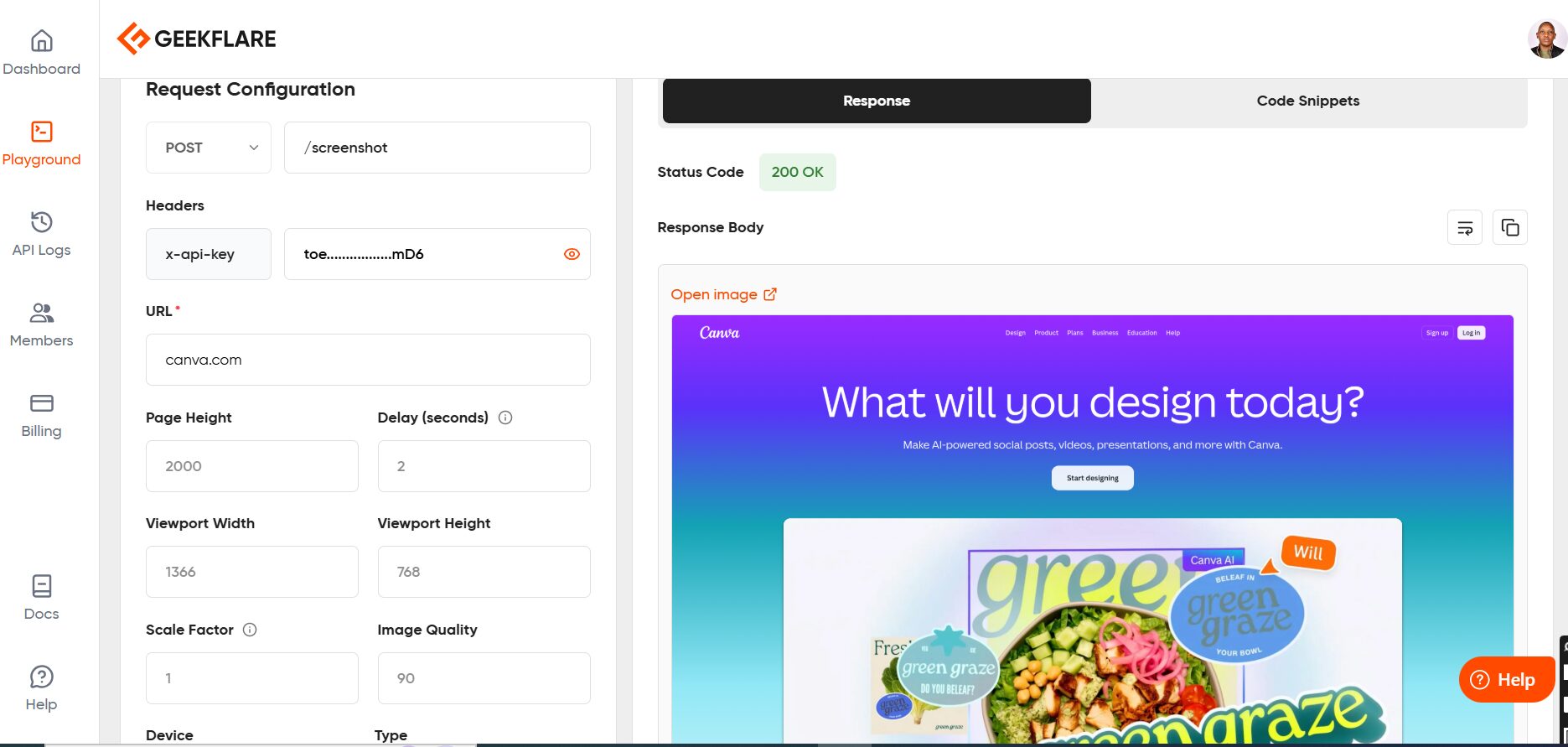
If you’re using Geekflare API services for website testing, security scanning, or performance monitoring, you can test endpoints directly in the Geekflare API Playground. This lets you:
- Test API requests with your API key
- See real-time responses
- Understand request and response formats
- Verify that your integration will work before writing code
The playground provides a safe environment to experiment with parameters, test different endpoints, and understand how Geekflare’s API responds to various requests.
I tested the screenshot API, where canva.com was my target site. These were my results:
Tips for Testing APIs
- Start with GET requests: They’re the simplest and safest to test
- Read the documentation first: Understand what parameters are required and what responses to expect
- Check authentication requirements: Some APIs need API keys even for testing
- Note rate limits: Don’t spam requests; most APIs limit how many requests you can make per hour
- Save successful requests: In Postman, save working requests so you can reference them later
FAQs
What does API stand for?
API stands for Application Programming Interface. An API is a set of rules that allows different software applications to communicate with each other.
What is a REST API?
REST API (Representational State Transfer) is the most common type of API, using HTTP methods such as GET, POST, PUT, and DELETE to interact with data. It’s stateless, meaning each request is independent and doesn’t retain information from previous requests.
Is an API the same as a website?
No. A website delivers content that humans can view in a browser. An API, on the other hand, delivers structured data (usually JSON or XML) to software applications to process and use.
Do I need to code to use an API?
Not necessarily. While developers use code to integrate APIs, non-technical users can access them through no-code tools such as Zapier, Make, or Postman. You can also test simple APIs directly in your browser’s address bar.






