Web scraping is amazing until you hit rate limits, IP bans, and anti-scraping defenses. That’s where proxies come in.
A proxy server acts as an intermediary between you and the target website, masking your IP address and distributing requests across multiple endpoints. For developers and organizations scraping data at scale, proxies are essential.
In this guide, we’ll cover what proxies are, how they work, why they matter for web scraping, and how to choose the right type for your use case. Whether you’re building a scraper, monitoring competitors, or aggregating data, understanding proxies will save you from getting blocked.
What is Proxy?
A proxy server is an intermediary that sits between your device and the Internet. When you request data from a website, your request doesn’t go directly to that website, it goes to the proxy first. The proxy then forwards your request on your behalf and returns the response to you.
Typical proxy flow:
- You send a request to a proxy server
- The proxy forwards that request to the target website
- The target website responds to the proxy
- The proxy returns the response to you
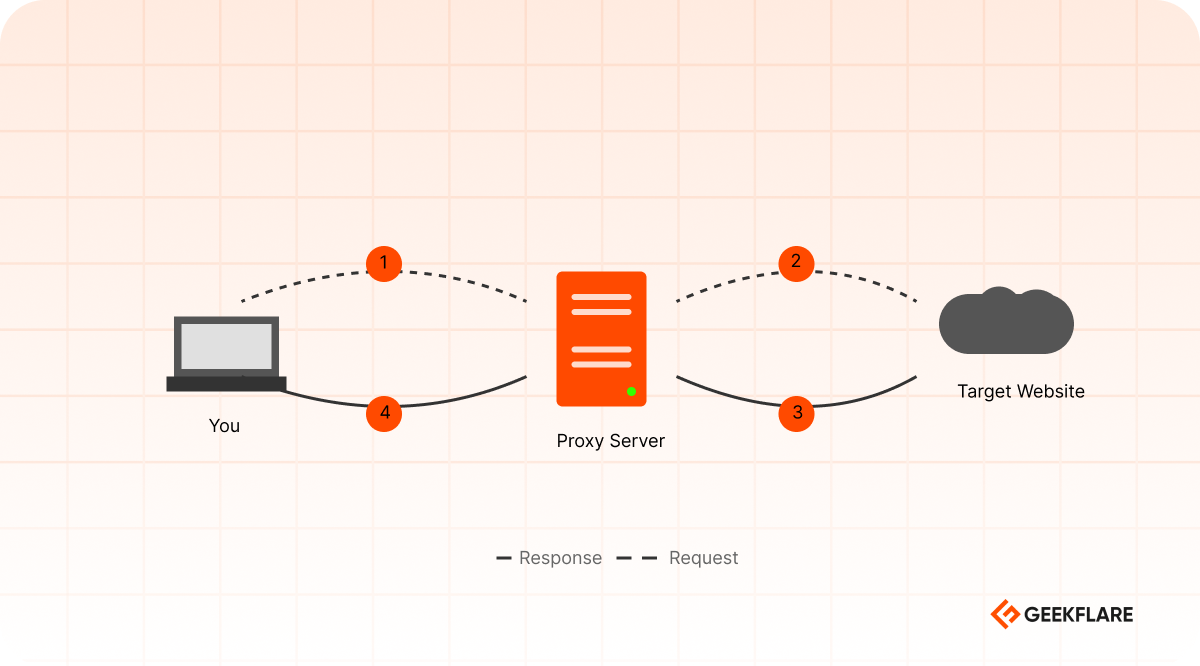
From the target website’s perspective, the proxy is the client making the request. Your actual IP address remains hidden. This creates a layer of separation between you and the server you’re accessing.
Types of Proxies
There are mainly 5 types of proxies, each with different characteristics:
- Residential Proxies – uses IP addresses from real devices. They’re harder to detect but pricier and slower, ideal for scraping heavily protected websites.
- Datacenter Proxies – they are hosted on data center servers. They’re fast and cheap but easier to get blocked.
- ISP Proxies – it blend the data center infrastructure with ISP-assigned IPs. They’re a middle-ground option for moderate protection needs.
- Rotating Proxies – it automatically changes your IP address with each request, minimizing ban risk during high-volume scraping.
- Mobile Proxies – it use mobile device IPs, essential for scraping mobile apps or mobile-specific content.
Each type has different trade-offs between cost, speed, and detection risk. We’ll explore these in detail in our dedicated proxy types guide.
How Proxies Work
Understanding how proxies actually work is essential for using them effectively. Let me break down the process and explore the different protocols that are used.
Here’s what happens step-by-step:
- User sends request to proxy >> your scraper makes a request. Instead of going directly to the target website, your request goes to the proxy server first.
- The proxy may modify certain data >> adding headers, changing user-agent strings, or adjusting other parameters to make the request appear more legitimate or to meet specific requirements.
- The proxy now sends your request to the target website, but it sends it from the proxy’s IP address, not the scraper’s servers.
- The target website receives the request and processes it. It sees the proxy’s IP address as the client, not your real IP. It has no way to know who actually made the request.
- The website sends back the requested data, like HTML, CSS, images, etc., to the proxy server.
- The proxy forwards the response back to you, and the scraper receives the data.
Why is this important for web scraping?
Websites track IP addresses to prevent abuse. If you make thousands of requests from the same IP, you’ll get blocked. Proxies solve this by:
- Distributing requests across multiple IP addresses
- Rotating endpoints so no single IP hits rate limits
- Masking your identity so websites can’t identify your scraper
- Bypassing geographic restrictions by using proxies in different regions
Without proxies, large-scale scraping is practically impossible.
Protocols: HTTP vs. HTTPS vs. SOCKS
Different proxy protocols offer different levels of security and functionality. Your choice depends on what you’re scraping and how much security you need.
HTTP Proxies
HTTP proxies are simple and fast. It handles standard web traffic. They’re the most basic proxy type.
You must note when using an HTTP proxy, your request travels through the proxy in plain text. This means proxy can see everything you are doing.
PROS
CONS
HTTP proxies are best for public data scraping and testing.
Example Python code of using an HTTP proxy with requests.
import requests
proxies = {
    'http': 'http://proxy.example.com:8080',
}
response = requests.get('https://example.com', proxies=proxies)
HTTPS Proxies
HTTPS proxies use TLS (Transport Layer Security) encryption. This is where security gets serious.
When you use an HTTPS proxy, your request goes through an encrypted tunnel between you and the proxy server and then from the proxy to the target site.
PROS
CONS
HTTPS proxies are best for scraping sites behind auth, production scraping, and any situation where security matters.
SOCKS Proxies
SOCKS (Socket Secure) works at a lower network level than HTTP. It’s more flexible and can handle various types of traffic beyond just web requests.
SOCKS 5 supports TCP and UDP and can encrypt traffic. It works with any protocols like HTTP, HTTPS, FTP, SSH, etc.
PROS
CONS
SOCKS proxies are best for scraping with tools that support SOCKS and need maximum flexibility, like working over non-HTTP protocols.
Code example of using SOCKS in Python.
import requests
from requests.adapters import HTTPAdapter
from socks import socksocket
import socket
proxies = {
    'http': 'socks5://proxy.example.com:1080',
    'https': 'socks5://proxy.example.com:1080'
}
response = requests.get('https://example.com', proxies=proxies)
SOCKS vs. HTTP comparison
| Feature | HTTP | HTTPS | SOCKS5 |
|---|---|---|---|
| Encryption | No | Yes | Optional |
| Speed | Fast | Medium | Medium |
| Protocol Support | HTTP/HTTPS only | HTTPS only | All protocols |
| Complexity | Simple | Medium | Medium |
| Best For | Public data | Sensitive data | Complex scenarios |
Proxy Chains
For advanced use cases, you can chain multiple proxies together. Your request goes through proxy 1, then proxy 2, then to the target server.
Your Server → Proxy 1 → Proxy 2 → Proxy 3 → Target WebsiteYou can chain proxies for additional anonymity, geographic routing, and redundancy.
Proxies for Web Scraping
Now that you understand how proxies work, let’s focus specifically on why they’re essential for web scraping and how to use them.
Why Proxies Are Essential for Web Scraping
Web scraping is straightforward in theory: write a script, fetch pages, extract data. In practice, websites actively fight back.
Web scraping is the automated extraction of data from websites. Instead of manually copying information, you write a script using Python, JavaScript, etc. to systematically gather data. Common use cases include:
- Price monitoring
- Market research
- Competitive intelligence
- SEO monitoring
- Lead generation
- Content verification
Without proxies, your scraper will get blocked within minutes. Here’s why.
Why Sites Block Scrapers
Websites don’t want to be scraped. They implement multiple layers of protection.
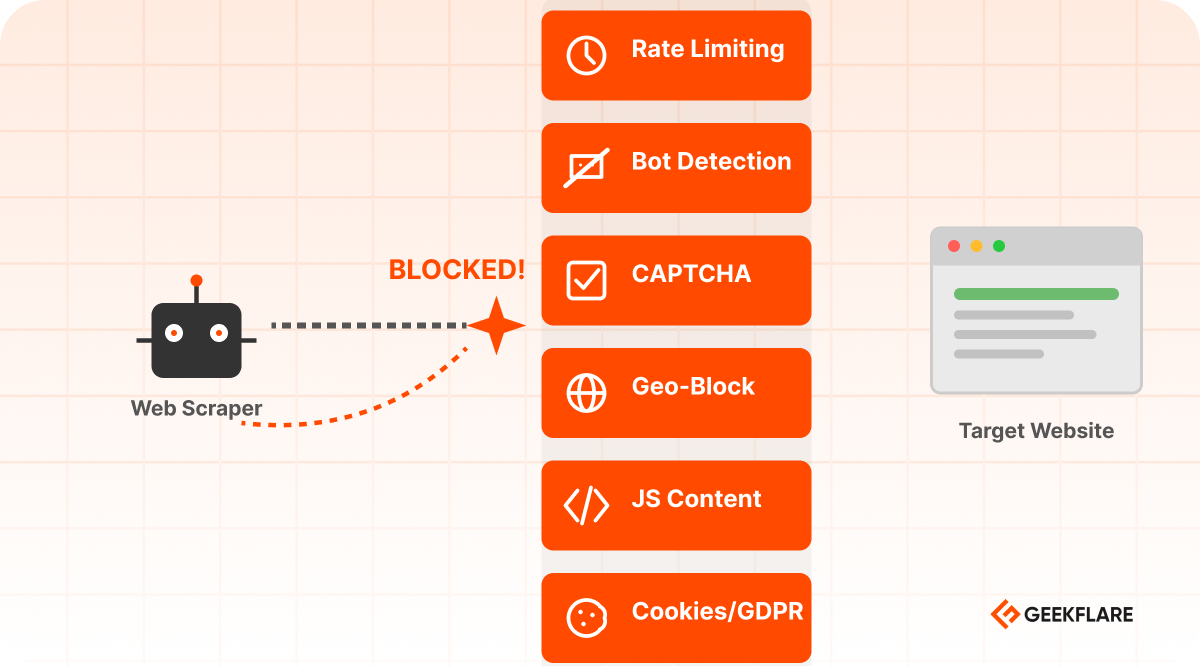
IP-Based Rate Limiting
Websites track requests by IP address. If your IP makes too many requests in a short time, you’re blocked.
How it works:
- Your scraper makes 100 requests per minute from IP
192.168.1.199 - The website detects this pattern.
- They block IP
192.168.1.199 for hours or days. - Your scraper stops working
Without a proxy, you’re stuck with one IP. Once it’s blocked, your business is stopped.
Example: Amazon blocks IPs making more than 10 requests per minute. E-commerce sites are even stricter. A single IP can only scrape a few pages before getting blocked.
IP-Based Rate Limiting → Solved by Rotating IPs
Instead of making all requests from one IP, rotate through multiple IPs. Each IP makes only a few requests before switching.
Bot Detection
Websites analyze request patterns to identify bots:
- Too many requests, too fast
- User-agent patterns
- No mouse movements, clicks, or scrolling
- Missing headers that real browsers send
- Requests at exact intervals
Bot Detection → Solved by Residential Proxies + Headers
Use residential proxies and vary your request headers to appear human. You can use the latest user agents from multiple browsers like Chrome, Edge, Safari, and Firefox.
Here is Python code to scrape using a popular scraping framework (BeautifulSoup) with multiple user agents.
import requests
from bs4 import BeautifulSoup
import time
import random

proxies = [
    'https://proxy1.example.com',
    'https://proxy2.example.com',
]

user_agents = [
    'Latest Chrome User Agent',
    'Latest Firefox User Agent',
    'Latest Edge User Agent',
]

def scrape_with_stealth(url):
    proxy = random.choice(proxies)
    user_agent = random.choice(user_agents)

    headers = {
        'User-Agent': user_agent,
        'Accept': 'text/html,application/xhtml+xml,application/xml;q=0.9,*/*;q=0.8',
    }

    try:
        response = requests.get(
            url,
            proxies={'http': proxy, 'https': proxy},
            headers=headers,
            timeout=10
        )
        return response
    except requests.exceptions.RequestException as e:
        print(f"Request failed: {e}")
        return None

for page in range(1, 11):
    url = f'https://example.com/page/{page}'
    response = scrape_with_stealth(url)
    if response:
        soup = BeautifulSoup(response.content, 'html.parser')

    time.sleep(random.uniform(2, 5))
CAPTCHA Challenges
When suspicious activity is detected, websites serve CAPTCHA puzzles. Real users solve them; bots fail.
Types of CAPTCHAs your scraper may get:
- Text-based
- Image-based
- reCAPTCHA
- hCaptcha
- Cloudflare Turnstile
CAPTCHA → Solved by CAPTCHA Solver API
Use a managed service that handles CAPTCHA solving automatically. This is much more reliable than trying to solve CAPTCHAs yourself.
Geographic Restrictions
Some websites only allow access from specific countries:
- News sites blocked outside their country
- Streaming services blocked outside licensed regions
- E-commerce sites with country-specific pricing
- Government or educational resources restricted to residents
Geo-Blocking → Solved by Location-Specific Proxies
Use a proxy with an IP from the target country.
An example code of using a proxy to scrape example.com from an France in the Geekflare API.
curl --location --request POST 'https://api.geekflare.com/webscraping' \
  -H "x-api-key: Your-Api-Key" \
  -H "Content-Type: application/json" \
  --data-raw '{"proxyCountry":"fr","url":"example.com"}'
JavaScript Content
Modern websites load content dynamically with JavaScript. A simple HTTP request gets blank HTML. You need to execute JavaScript to see the actual content.
JavaScript Content → Solved by Browser Rendering
Use a headless browser or Playwright/Puppeteer with a proxy.
Cookie Consent and GDPR Compliance
European websites must ask for cookie consent before tracking users. These consent walls block automated access unless you accept cookies first.
Cookie Consent (GDPR) → Solved by Automation
Use Selenium or Playwright to accept cookies. Don’t worry if you are using the Geekflare API; it is managed automatically for you.
Proxy Selection Guide for Web Scraping
Different scraping scenarios require different proxy types.
✔️ Use datacenter proxies for unprotected public data. It is very fast and cheap.
✔️ Use rotating datacenter or ISP proxies for moderate protection of sites. It is faster and slightly pricier than static data center proxies.
✔️ Use residential proxies with rotation for heavily protected sites to appear as real users. It is slow and expensive.
✔️ Use mobile proxies to scrape mobile app prices or mobile-only content. It is very slow and the most expensive.
Best Practices for Scraping with Proxy
✔️ Don’t scrape aggressively just because you use proxies. Always respect rate limits.
✔️ Rotate user agents and headers to appear more human.
✔️ Build retry logic as the proxy can fail intermittently.
✔️ Keep proxy connections alive for better performance.
✔️ Use delays and allowed concurrency.
Common Mistakes to Avoid
✖️ Don’t use the same proxy for a very long time.
✖️ Don’t ignore request delays. Making 1000 requests in 10 seconds looks suspicious.
✖️ Respect robots.txt and terms of service. Stop when scraping is forbidden.
✖️ Don’t start with a residential rotating proxy if your scraping task can be achieved using a data center proxy.
Conclusion
Proxies are powerful tools for web scraping, but they’re not a magic solution. They don’t bypass ethics, laws, or common sense. Start small and test which proxy works for you.
If you’re looking for reliable managed scraping solutions, consider using Geekflare Scraping API, which handles proxies, JavaScript rendering, and IP rotation automatically.