


Web scraping is the automated process of extracting data from websites and turning it into a structured format, such as a spreadsheet, JSON, or Markdown. A scraper loads a web page, finds the information you want, like prices, names, or article text, and saves it so you can analyze or reuse it.
It started as a tool for price monitoring, research, and marketing. Today, a growing share of scraping feeds AI so that LLMs and AI agents can read them.
This guide explains how web scraping works, the main types of scrapers, what people use them for, the legal questions to check, and the best practices that keep a scraper running.
What is Web Scraping?
Web scraping is the act of using bots or automated scripts to copy data from web pages.
The internet has billions of pages, but it is typically formatted in HTML for humans to read, not for machines to analyze. Companies or individuals who web scrape want to gather a sizable amount of data that cannot be collected manually in a short timeframe. The scraping process downloads the web pages, parses the code, and extracts specific data points into a local database.
For example, a retailer could run a scraper every morning that visits 500 competitor product pages and saves each product’s name, price, and stock status to a spreadsheet. Doing that by hand would take a person most of the day.
Web Scraping vs. Web Crawling
Beginners often confuse the two and misunderstand them as the same thing. While both are frequently used interchangeably, they are different.
- Web Crawling is the process of discovering and indexing web pages. It looks at the structure of the web. Ex: Googlebot crawling the web to find links.
- Web Scraping is the process of extracting specific data points or whole content from those pages. It looks at the content of the web. Ex: getting product prices from Amazon.
For a deeper comparison, read our guide on web crawling vs. web scraping.

Modern Web Scraping Bottleneck
Historically, extracting public data was straightforward. Today, many websites use bot detection such as Cloudflare Turnstile or CAPTCHAs to protect their servers, so simple DIY scraping scripts often get blocked. Our guide on scraping sites behind Cloudflare explains the common workarounds.
This is where scraping APIs, such as the Geekflare Scraping API, come in. They handle IP blocks, CAPTCHAs, and JavaScript rendering on their side, so your code only has to deal with the data that comes back.
How Web Scraping Works
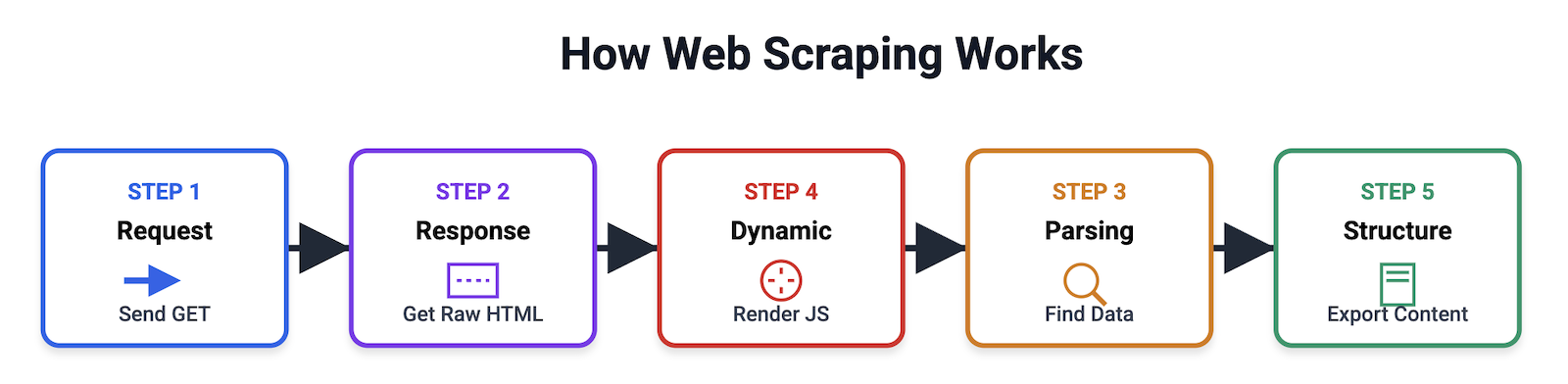
The web scraping process usually follows these five main stages:
- Sending the HTTP Request: the scraper sends a GET request to the target webpage’s URL, asking the server to return the page’s contents.
- Receiving the Response: the web server processes the request and sends back an HTTP response. A successful request will return the raw HTML content. Unsuccessful requests give errors like 403 Forbidden or 429 Too Many Requests.
- Parsing: because raw HTML is chaotic, the scraper uses parsing libraries like BeautifulSoup, Cheerio, or lxml to navigate the Document Object Model (DOM) tree via XPath or CSS selectors to locate specific text.
- Handling Dynamic Content: modern websites load content dynamically. Standard scrapers fail here. Advanced tools use headless browsers like Puppeteer or Playwright to execute JavaScript and render the page exactly as a human user would see it before extracting the data.
- Data Structuring: the scraper cleans the extracted data and exports it into a structured format like JSON, CSV, Markdown, or clean HTML.
4 Different Types of Web Scrapers
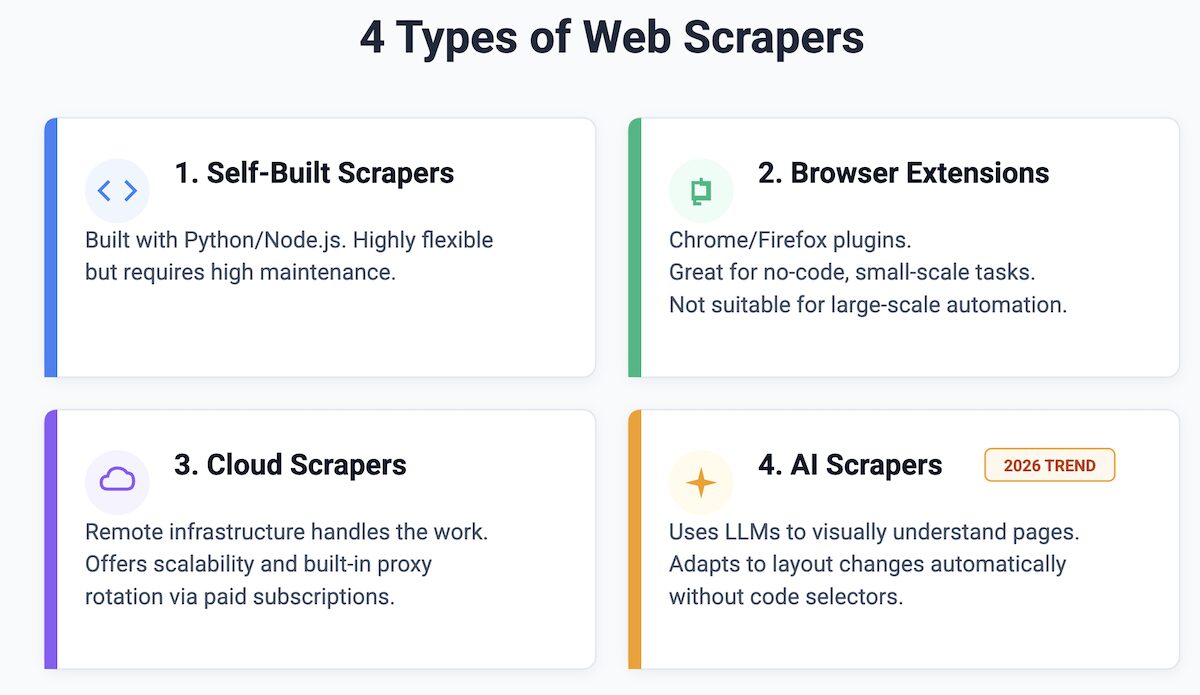
Depending on your technical expertise, you can choose from four main types of scrapers:
Self-Built Scrapers
You can build in Python or Node.js. You have full control and are highly flexible but require constant maintenance to fix broken selectors and manage proxy infrastructures. You can refer to my guide on how to build a lightweight scraper for Markdown.
Puppeteer and Playwright are popular libraries for rendering JavaScript sites when you build scrapers in-house. If you’re starting with Python, follow our tutorial on web scraping using Python.
Browser Extensions
An extension that runs directly in Chrome or Firefox. They are great for lightweight scraping and small-scale extraction.
Easy Scraper and Simplescraper are popular Chrome extensions. Our list of the best web scraping tools compares no-code options, including extensions and cloud apps.
Cloud Scrapers
Remote servers that handle the infrastructure for you. These offer high scalability and built-in proxy rotation.
Geekflare API, Bright Data, ScrapingBee are popular scraper APIs. See our comparison of the best web scraping APIs for more.
AI Scrapers
Next-gen scrapers that use LLMs to visually understand a webpage. Instead of writing code to find an HTML tag, you ask the AI to “extract all products lower than $10“. It is a new trend in scraping.
What Is Web Scraping Used For?
Here are the top use cases driving the industry today. For more examples, see our roundup of web scraping use cases.
AI & LLM Training
To harvest massive datasets from forums, articles, and public repositories to train machine learning models and AI agents. For faster processing and less token consumption, you should feed data in Markdown format.
Price Comparison
E-commerce companies and agencies scrape competitors to adjust pricing or track Minimum Advertised Price (MAP) violations across retailers.
Lead Generation
To extract public contact info from directories and B2B platforms to build highly targeted outreach lists for sales teams.
Sentiment Analysis
Scraping social media, Reddit, and product reviews to gauge public sentiment about a brand, product, or political event.
Financial Data
Investment firms collect stock prices, SEC filings, and other alternative data from the web to inform trading and research decisions.
Real Estate Aggregation
Compiling property prices, locations, and historical trends from various site listings to spot undervalued properties.
Content Aggregation
News and job aggregators collect headlines or listings from many sources to build a single, searchable feed.
Is Web Scraping Legal?
Web scraping is generally legal, provided you are extracting publicly available data. However, the legal landscape is highly nuanced. If you are scraping, you must consider the following:
1. Data Privacy Regulations (GDPR & CCPA).
2. Copyright Laws.
3. Terms of Service (ToS).
4. Respect robots.txt and rate limiting.
Disclaimer: This does not constitute legal advice. Always consult a legal professional in your region regarding your specific scraping use case.
Common Challenges of Web Scraping
If you build your own scrapers, expect to deal with these problems:
- CAPTCHAs, Turnstile
- IP Blocking & Rate Limiting
- Website Structure Changes
- JavaScript Rendering
Web Scraping Best Practices
A scraper that is polite and well built gets blocked less and causes fewer legal and ethical problems. Follow these practices:
- Check for an official API first. If the site offers an API or a data export, use it. It’s more stable than scraping the HTML.
- Read robots.txt and the terms of service. They tell you which paths the owner doesn’t want crawled and what the site allows.
- Space out requests and avoid peak hours, so you don’t slow the site down for real visitors.
- Use a clear user agent and contact details where you can, instead of pretending to be something you’re not.
- Avoid personal data unless you have a lawful basis. Privacy laws such as GDPR and CCPA apply to scraped personal information too.
- Cache and store only what you need. Don’t re-download pages that haven’t changed, and delete data you no longer use.
- Monitor your scraper’s output, because a site redesign can silently break your selectors.
Can I Use ChatGPT to Scrape a Website?
Yes, you can use ChatGPT for web scraping, but with limitations.
ChatGPT is for conversational search, not bulk data extraction. It cannot scrape 100,000 pages of a marketplace site, nor can it bypass heavy anti-bot protections.
Use ChatGPT, Claude, or Gemini to pull or summarize content from a few specific pages, not for full-scale scraping. Our guide on how to use ChatGPT for web scraping shows what works.
Future Trends in Web Scraping
As we move further into 2026, the data extraction industry is being redefined by these trends:
AI Scraping Agents
Instead of writing scripts, you will deploy AI agents. You will give a prompt like “Find all AI companies in London and extract their developers’ emails,” and the agent will navigate, click, and scrape autonomously.
Anti-Bot AI vs. Scraping AI
Bot protection and scrapers both increasingly use AI. Proxies alone are often not enough anymore, so advanced scrapers also simulate human behavior such as mouse movement and scrolling.
Scraping as a Service (SaaS)
DIY scraping is getting harder and more expensive to maintain, especially for smaller companies. That’s pushing more teams to managed scraping APIs, such as Geekflare API, which handle proxies, rendering, and blocks for them.
FAQ
What is web scraping in simple terms?
Web scraping is using software to copy information from websites automatically. Instead of copying and pasting by hand, a scraper visits pages, picks out the data you want, and saves it in a structured file such as a spreadsheet.
What is an example of web scraping?
A common example is price monitoring. An online store scrapes competitors’ product pages every day to collect prices and stock levels, then adjusts its own prices. Other examples include collecting job listings, real estate prices, or product reviews.
Is web scraping legal?
Scraping publicly available data is generally legal in many countries, but it depends on what you collect and how. Personal data falls under privacy laws such as GDPR and CCPA, and a site’s terms of service and copyright still apply. This isn’t legal advice, so check with a lawyer for your use case.
What is the difference between web scraping and an API?
An API is an official way a website shares structured data with developers. Web scraping extracts data from the pages people see, which is useful when no API exists or the API doesn’t include the data you need. When a good API is available, it’s usually the more reliable choice.
Which programming language is best for web scraping?
Python is the most popular choice because of libraries like Requests, BeautifulSoup, Scrapy, and Playwright. JavaScript with Node.js is a strong alternative, especially for sites that rely heavily on JavaScript. You can also scrape without code using browser extensions or cloud tools.