


Web scraping with Python means writing a short script that downloads web pages and pulls out the data you need, such as product names, prices, or article text. Python is the most popular language for it because libraries like Requests, BeautifulSoup, and Playwright handle most of the hard parts.
In this tutorial, I’ll build a working scraper step by step. It collects 60 books with their prices, stock status, and ratings across three pages, saves them to a CSV file, and then handles a page that only loads its content with JavaScript. At the end, I’ll show how to use the Geekflare Web Scraping API from Python when a site blocks simple scripts.
How I tested this code
I ran every script in this guide with Python 3.14, Requests 2.34, BeautifulSoup 4.15, Playwright 1.64, and the Geekflare Python SDK 0.3.2. The examples use books.toscrape.com and quotes.toscrape.com, two public sandbox sites built for scraping practice.
Prerequisites
- Python 3.9 or later.
- A terminal and a code editor.
- Basic Python knowledge: variables, loops, and functions.
Create a project folder with a virtual environment, then install Requests and BeautifulSoup:
python -m venv venv
source venv/bin/activate  # On Windows: venv\Scripts\activate
pip install requests beautifulsoup4
Step 1: Download a Page With Requests
Every scraper starts by sending an HTTP request and reading the HTML that comes back. Save this as fetch_page.py:
import requests

url = "https://books.toscrape.com/"
headers = {"User-Agent": "Mozilla/5.0 (compatible; my-scraper/1.0)"}

response = requests.get(url, headers=headers, timeout=10)
print(response.status_code)
print(response.text[:200])
Run it with python fetch_page.py. A status code of 200 means the request worked, and the second line prints the start of the page’s HTML. Two settings matter even in a script this small. The timeout stops your script from hanging forever if the site doesn’t answer, and the User-Agent header tells the site what’s making the request instead of using the library’s default.
Step 2: Find the Data in the HTML
Before you write any parsing code, open the page in your browser, right-click a book, and choose Inspect. On books.toscrape.com, each book sits in an <article class="product_pod"> element. Inside it:
- The title is in the
titleattribute of theh3 alink. The visible link text is shortened, so “A Light in the Attic” shows as “A Light in the …”. - The price is in
p.price_color. - The stock status is in
p.availability. - The star rating is a class name on
p.star-rating, such asstar-rating Three.
BeautifulSoup turns the HTML into a tree you can search with the same CSS selectors you see in your browser’s developer tools. select() returns every match, and select_one() returns the first.
Step 3: Scrape Multiple Pages and Save to CSV
The full scraper below parses each book, follows the next link to the following page, waits one second between requests, and writes everything to books.csv. Save it as scrape_books.py:
import csv
import time
from urllib.parse import urljoin

import requests
from bs4 import BeautifulSoup

BASE_URL = "https://books.toscrape.com/catalogue/page-1.html"
HEADERS = {"User-Agent": "Mozilla/5.0 (compatible; my-scraper/1.0)"}
RATINGS = {"One": 1, "Two": 2, "Three": 3, "Four": 4, "Five": 5}


def parse_books(html, page_url):
    soup = BeautifulSoup(html, "html.parser")
    books = []
    for card in soup.select("article.product_pod"):
        link = card.select_one("h3 a")
        rating_class = card.select_one("p.star-rating")["class"][1]
        books.append({
            "title": link["title"],
            "price": card.select_one("p.price_color").get_text(strip=True),
            "availability": card.select_one("p.availability").get_text(strip=True),
            "rating": RATINGS.get(rating_class),
            "url": urljoin(page_url, link["href"]),
        })
    next_link = soup.select_one("li.next a")
    next_url = urljoin(page_url, next_link["href"]) if next_link else None
    return books, next_url


def scrape(max_pages=3):
    url, all_books = BASE_URL, []
    for _ in range(max_pages):
        response = requests.get(url, headers=HEADERS, timeout=10)
        response.raise_for_status()
        books, url = parse_books(response.content, url)
        all_books.extend(books)
        if not url:
            break
        time.sleep(1)  # be polite: one request per second
    return all_books


if __name__ == "__main__":
    books = scrape()
    with open("books.csv", "w", newline="", encoding="utf-8") as f:
        writer = csv.DictWriter(f, fieldnames=books[0].keys())
        writer.writeheader()
        writer.writerows(books)
    print(f"Saved {len(books)} books to books.csv")
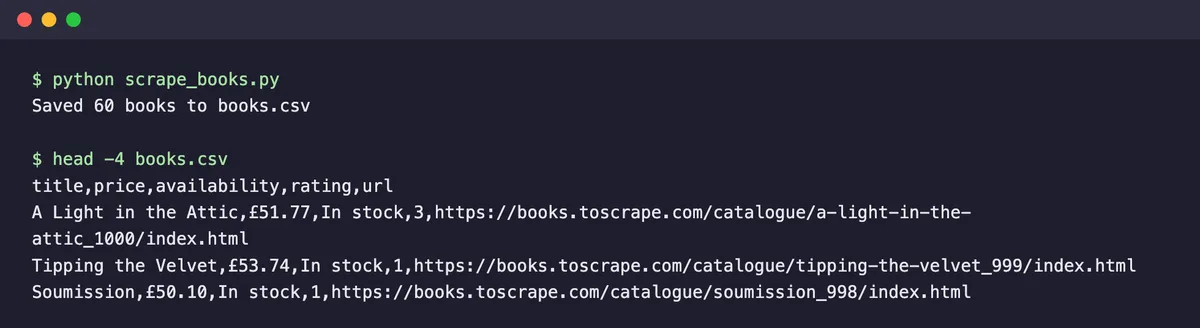
When I ran it, the script saved 60 books from three pages in about 5 seconds, most of it the one-second pauses. Every row had the full title, price, stock status, a 1 to 5 rating, and the book’s URL.
Watch out for broken characters
My first run saved prices as “£51.77” instead of “£51.77”. The site doesn’t declare a character set in its HTTP headers, so Requests guessed ISO-8859-1. Passing response.content (bytes) to BeautifulSoup instead of response.text fixed it, because BeautifulSoup reads the charset from the page’s own meta tag.
Step 4: Scrape JavaScript Pages With Playwright
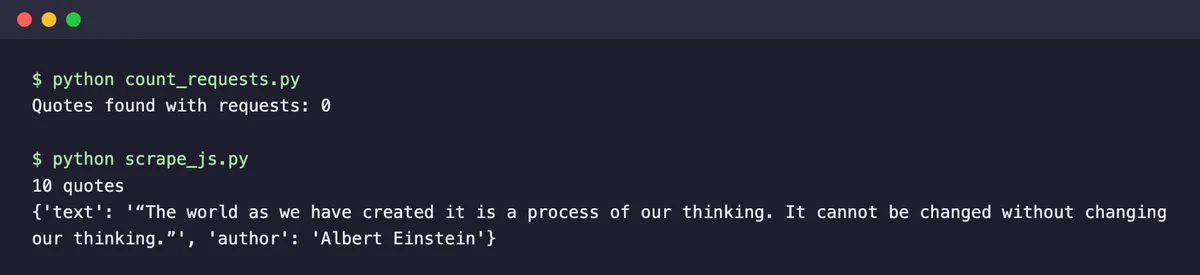
Many modern sites load their content with JavaScript after the page opens. Requests only downloads the initial HTML, so it never sees that content. On quotes.toscrape.com/js/, the same Requests and BeautifulSoup approach found zero quotes.
The fix is a headless browser that runs the page’s JavaScript before you read it. Install Playwright and its browser:
pip install playwright
playwright install chromium
Then save this as scrape_js.py:
from playwright.sync_api import sync_playwright

with sync_playwright() as p:
    browser = p.chromium.launch(channel="chrome", headless=True)
    page = browser.new_page()
    page.goto("https://quotes.toscrape.com/js/")
    page.wait_for_selector("div.quote")
    quotes = [
        {
            "text": q.locator("span.text").inner_text(),
            "author": q.locator("small.author").inner_text(),
        }
        for q in page.locator("div.quote").all()
    ]
    browser.close()

print(len(quotes), "quotes")
print(quotes[0])
I set channel="chrome" to reuse the Chrome already installed on my machine. If you ran playwright install chromium, you can drop that argument. The script waits until the quotes appear, then reads each one. It returned all 10 quotes on the page in about 3 seconds.
Playwright is slower and heavier than Requests because it runs a full browser, so use it only for pages that need it. If you’d rather not run browsers yourself, the API in the next step can render JavaScript for you.
Step 5: Use a Scraping API When Sites Block You
Sandbox sites never block you. Real sites often do, with CAPTCHAs, rate limits, or bot protection such as Cloudflare. You can work around some of this yourself, as our guide on scraping sites behind Cloudflare explains, but at some point it’s cheaper to let an API handle it. The Geekflare Web Scraping API has a Python SDK for this.
Install the SDK and copy your API key from the Geekflare dashboard. The free plan includes 500 credits a month, and a basic scrape uses 1 credit.
pip install geekflare-api
export GEEKFLARE_API_KEY="your-api-key"
This script scrapes the same JavaScript page from Step 4, with rendering done on Geekflare’s side. Save it as sdk_scrape.py:
import os

from geekflare_api.client import GeekflareClient
from geekflare_api.models import WebScrapeDto

with GeekflareClient(api_key=os.environ["GEEKFLARE_API_KEY"]) as client:
    result = client.web_scrape(
        WebScrapeDto(
            url="https://quotes.toscrape.com/js/",
            format=["markdown"],
            render_j_s=True,
            block_ads=True,
            device="desktop",
        )
    )

print(result)
It took about 4 seconds and returned the page as Markdown, with all the quotes that plain Requests couldn’t see. Reading the key from an environment variable keeps it out of your code.
Request parameters
You can change how the API loads and returns the page with these parameters:
| Parameter | Values | Description |
|---|---|---|
url | Any public website URL | Specifies the website you want to scrape. |
device | desktop, mobile | Simulates the selected device while loading the webpage. |
format | html, markdown, json, markdown-llm, html-llm, text, text-llm | Specifies the output format returned by the API. |
render_j_s | true, false | Enables or disables JavaScript rendering before scraping the webpage. |
block_ads | true, false | Blocks advertisements while loading the webpage to reduce unnecessary content. |
stealth | true, false | Enables or disables stealth mode to reduce bot detection on supported websites. |
file_output | true, false | Returns the scraped content as a downloadable file or directly in the API response. |
The response
The API returns a dictionary with these fields:
timestamp: when the API processed the request.apiStatus:successwhen the request worked.apiCode: the HTTP status code, such as200.meta: the settings used for the request, such as the URL, format, and whether JavaScript was rendered.data: the scraped content, keyed by format, for exampledata["markdown"].
Extract Specific Data With AI
Usually, you don’t want the whole page, just a few fields. Instead of writing selectors, you can ask the API’s AI Extraction feature to return structured data. It supports these extraction types:
| Extraction Type | Value | Description |
|---|---|---|
| Open-ended question | prompt | Answers a question using the page content and quotes the supporting text. |
| Custom JSON schema | schema | Extracts fields that match a JSON schema you define. |
| Listing | listing | Extracts items from category, search, or listing pages. |
| Summary | summary | Returns a condensed summary of the page. |
| Sentiment | sentiment | Identifies the overall sentiment of the page. |
| Keywords | keywords | Extracts keywords, tags, and named entities. |
AI Extraction adds 7 credits to the 1-credit scrape. For product pages and contact details, the API also has ready-made templates that return structured JSON without AI: set extractionMode to template and template to product or contact.
This example runs the listing type on the books page from Step 3, with no selectors at all. Save it as sdk_ai_listing.py:
import os

from geekflare_api.client import GeekflareClient
from geekflare_api.models import WebScrapeDto

with GeekflareClient(api_key=os.environ["GEEKFLARE_API_KEY"]) as client:
    result = client.web_scrape(
        WebScrapeDto(
            url="https://books.toscrape.com/",
            format=["json"],
            ai_prompt={"type": "listing"},
        )
    )

print(result["data"])
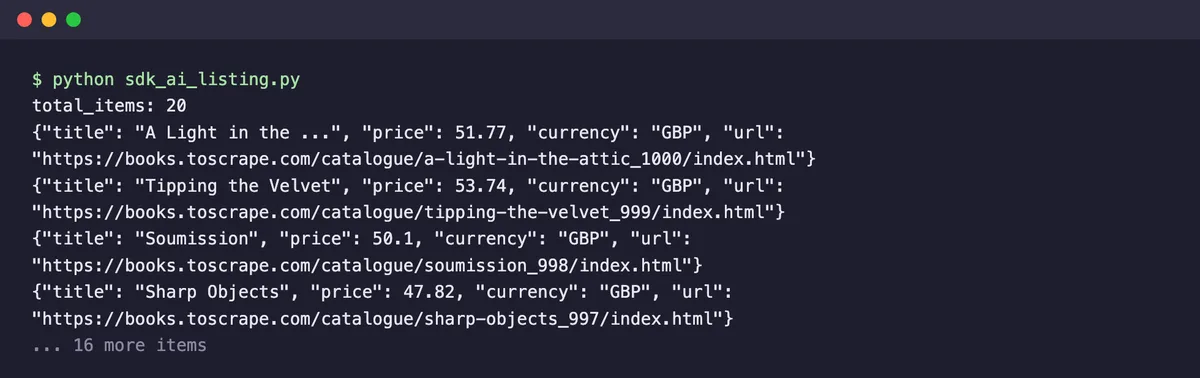
It returned all 20 books on the page in about 2 seconds, each with title, URL, image, price as a number, and currency. Like the visible page text, the titles are the shortened versions, so use Step 3’s approach if you need full titles.
For every extraction type and example, read our guide on AI Extraction with the Geekflare Web Scraping API or the AI Extraction documentation.
Use the Geekflare Playground: A No-Code Platform
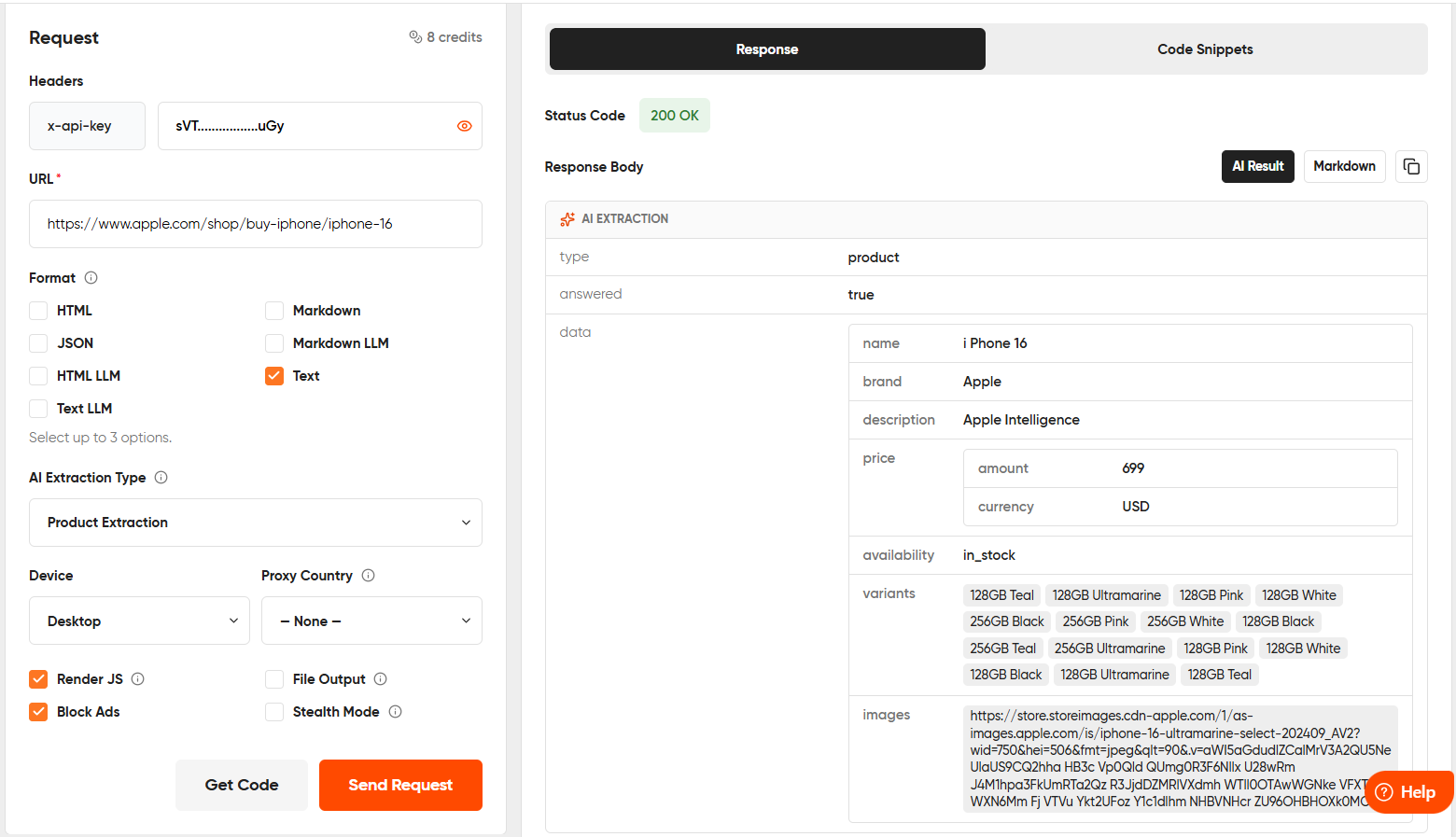
If you don’t want to write code, you can use the Geekflare Playground, a no-code platform for testing the Web Scraping API. It lets you configure the same request parameters available in the Python SDK through a simple interface.
Enter the website URL, choose the output format, select the device type, and configure options such as Render JS, Block Ads, Stealth Mode, File Output, Proxy Country, and AI Extraction Type. After configuring the request, click Send Request.
For this example, select Product under AI Extraction Type and use the following product page:
https://www.apple.com/shop/buy-iphone/iphone-16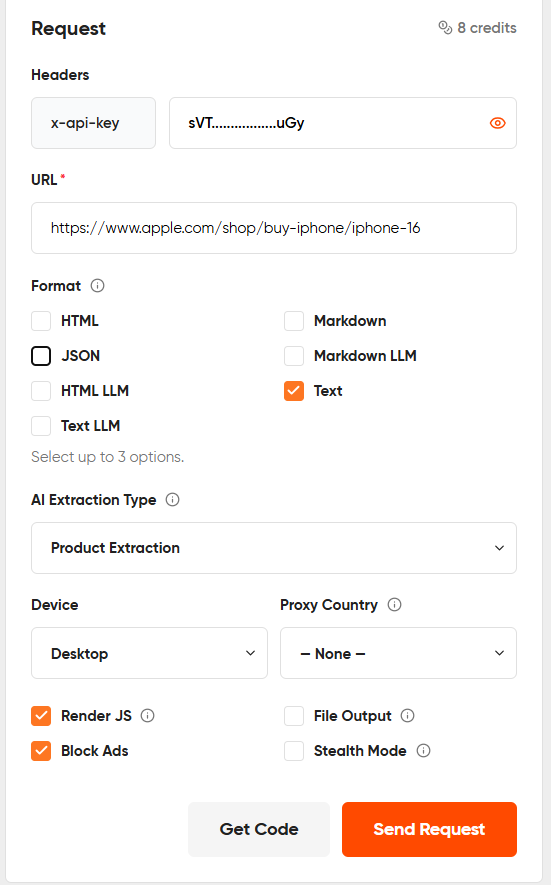
The Playground extracts the product details and displays the response instantly. You can also click Get Code to generate ready-to-use code snippets in Python, cURL, Node.js, PHP, and other supported languages using the same configuration.
Which Python Approach Should You Use?
| Approach | Use it when | Trade-off |
|---|---|---|
| Requests + BeautifulSoup | The data is in the page’s HTML, as on most blogs, catalogs, and docs | Can’t see content loaded by JavaScript |
| Playwright | The page loads data with JavaScript or needs clicks and scrolling | Slower and uses more memory, because it runs a real browser |
| Scrapy | You need to crawl thousands of pages with retries, queues, and pipelines | More setup than a single script |
| Geekflare Web Scraping API | Sites block your scripts, or you want rendering and AI extraction without managing browsers | Costs credits beyond the free tier |
For a closer look at Scrapy and other options, see our list of the best Python web scraping frameworks and libraries. If you’d rather not code at all, our roundup of no-code web scraping tools covers point-and-click options.
Tips for Scraping Responsibly
- Check the site’s robots.txt and terms of service before you scrape it.
- Add a delay between requests, as the
time.sleep(1)in Step 3 does, so you don’t overload the server. - Always set a timeout and call
raise_for_status(), so errors stop the script instead of producing empty data. - Use an official API when the site offers one. It’s more stable than parsing HTML.
- Avoid collecting personal data unless you have a lawful reason to.
Our explainer on what web scraping is covers these practices and the legal questions in more depth.
FAQ
Is web scraping with Python free?
Yes. Python, Requests, BeautifulSoup, Scrapy, and Playwright are all free and open source. You only pay if you use a paid service, such as a scraping API or proxies. The Geekflare Web Scraping API has a free plan with 500 credits a month.
Which Python library is best for web scraping?
For most beginners, Requests with BeautifulSoup is the best start because it’s simple and fast. Use Playwright for pages that load content with JavaScript, and Scrapy when you need to crawl many pages with retries and pipelines.
Can Python scrape JavaScript websites?
Yes. Requests alone can’t run JavaScript, but Playwright or Selenium can load the page in a headless browser first. A scraping API with JavaScript rendering, such as the Geekflare Web Scraping API, can do the rendering for you.
Is BeautifulSoup or Scrapy better?
BeautifulSoup is a parser, so it’s best for small scripts where you control the requests yourself. Scrapy is a full crawling framework with scheduling, retries, and export pipelines, which suits larger projects. Many developers start with BeautifulSoup and move to Scrapy as projects grow.
What are some web scraping with Python projects?
Popular projects include price trackers, job listing aggregators, news monitors, product comparison tools, SEO dashboards, and datasets for AI knowledge bases.





