

LangChain web scraping can help developers give AI agents access to fresh information from the web. Imagine creating an agent that researches a company or gathers information from multiple websites.
Sounds good, right? To do this, the agent needs to visit webpages, extract relevant content, and process that information to generate useful responses.
Web scraping makes this possible by turning website content into data that AI applications can use. Developers can then use a framework like LangChain to build agents that retrieve and process this data as part of their tasks.
In this article, we’ll explore how to build a web scraping agent using LangChain.
How to Make a LangChain Agent Scrape Websites
LangChain agents can use external tools to interact with websites and retrieve information. You can connect Geekflare’s tools to a LangChain agent to perform tasks such as webpage scraping, web search, metadata extraction, screenshot capture, and website diagnostics.
This integration gives your agent access to different web capabilities through a single framework.
How to Make a LangChain Agent Scrape Websites
LangChain agents can use external tools to interact with websites and retrieve information. You can connect Geekflare’s tools to a LangChain agent to perform tasks such as webpage scraping, web search, metadata extraction, screenshot capture, and website diagnostics.
Let’s set up the integration and build an agent that can scrape webpages and process the extracted content.
Prerequisites
Before getting started, make sure you have:
- Python 3.10 or later installed.
- A Geekflare account and API key. (You can get the API key form the dashboard)
- An API key for your chosen LLM provider.
- Basic knowledge of Python and LangChain.
Step 1: Install the Required Python Package
Geekflare provides a Python package called langchain-geekflare for connecting its web tools to LangChain agents. It requires Python 3.10 or later.
Open your terminal and run:
pip install -U langchain-geekflareThis package is built on Geekflare’s official Python SDK. It provides tools for web scraping, search, metadata extraction, screenshots, and website diagnostics.
Step 2: Configure Your Geekflare API Key
Set the key as an environment variable so the package can authenticate your requests.
For macOS or Linux:
export GEEKFLARE_API_KEY="YOUR_API_KEY"For Windows PowerShell:
$env:GEEKFLARE_API_KEY="YOUR_API_KEY"Replace YOUR_API_KEY with your actual key. Keep it private and avoid hardcoding it in your project files.
Step 3: Create a LangChain Web Scraping Agent
For this example, I’m going to use Claude Haiku as the language model. It is a lightweight option for a simple web scraping and summarization task.
We will use Hacker News as our example website and ask the agent to extract its content and summarize the latest stories.
First, we need to configure the Claude API key. You can get one from the Anthropic Console.
Set it as an environment variable, just like the Geekflare API key.
For macOS or Linux:
export ANTHROPIC_API_KEY="YOUR_ANTHROPIC_API_KEY"For Windows PowerShell:
$env:ANTHROPIC_API_KEY="YOUR_ANTHROPIC_API_KEY"Replace the placeholder with your actual API key. Keep both API keys private.
Choose how to use the Geekflare scraping tool
Geekflare provides two ways to use its tools with LangChain. You can call a tool directly from Python or connect it to an AI agent. Let’s look at both approaches.
Option 1: Use the scraping tool directly
You can call Geekflare’s scraping tool directly to extract webpage content. Create a Python file and add the following code:
from langchain_geekflare import GeekflareScrape

scraper = GeekflareScrape()

result = scraper.invoke({
    "url": "https://news.ycombinator.com/",
    "formats": ["markdown"]
})

print(result)
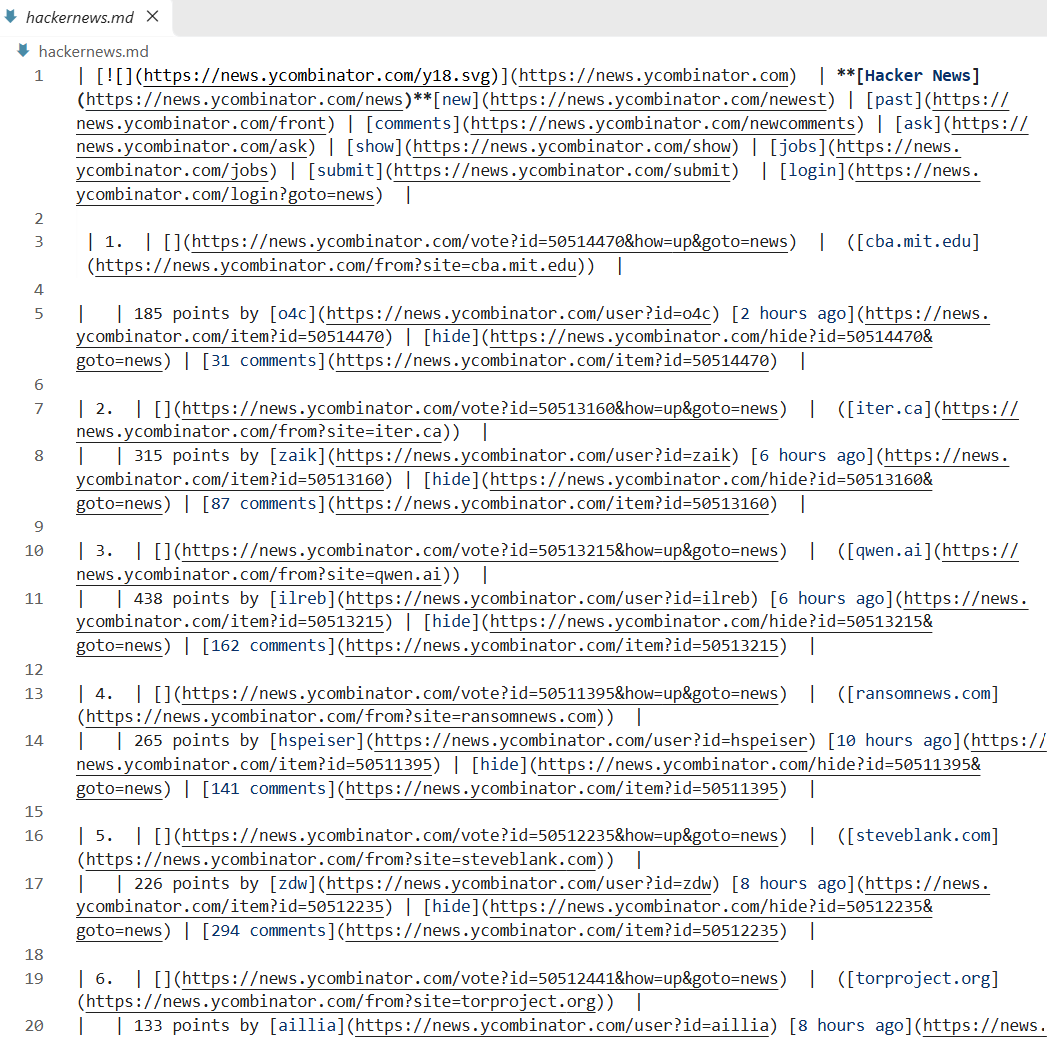
Here, GeekflareScrape() initializes the scraping tool, and invoke() sends the webpage URL to Geekflare.
The formats parameter determines how the extracted webpage content is returned. Geekflare supports these formats:
| Format | Description |
|---|---|
markdown | Converts webpage content into Markdown. |
markdown-llm | Returns Markdown formatted for LLM consumption. |
text | Extracts content as plain text. |
html | Returns the webpage’s HTML content. |
json | Returns structured JSON data. |
You can also configure other scraping parameters:
render_js: Enables JavaScript rendering for pages that require it.wait_time: Sets the time to wait for the webpage to load.device: Specifies the device type used for rendering.template: Supports predefined extraction templates such asproductandcontact.
For this example, we’re using Markdown because it provides readable webpage content that is easy to inspect and process.
Option 2: Use the scraping tool with a LangChain agent
Calling the tool directly is useful when you want to extract content from a specific URL. You can also connect it to a LangChain agent and let Claude decide when to use the scraping tool based on your prompt.
Create an agent using the following code:
from langchain.agents import create_agent
from langchain_geekflare import GeekflareScrape

agent = create_agent(
    model="anthropic:claude-haiku-4-5",
    tools=[GeekflareScrape()]
)

response = agent.invoke({
    "messages": [
        {
            "role": "user",
            "content": (
                "Visit https://news.ycombinator.com/, "
                "extract the latest stories, and summarize "
                "the top discussions."
            )
        }
    ]
})

print(response["messages"][-1].content)
Let’s understand the important parts:
create_agent(): Creates a LangChain agent using the selected Claude model.GeekflareScrape(): Registers Geekflare’s web scraping tool with the agent.model: Specifies Claude Haiku 4.5 as the language model.agent.invoke(): Sends the task to the agent. It can call the scraping tool to retrieve the webpage content and then use Claude to generate a summary.
The agent receives the extracted content and processes it to produce a response based on your prompt.
Step 4: Run the Web Scraping Agent
Save the second example as web_scraping_agent.py and run it from your terminal:
python web_scraping_agent.pyThe agent will visit Hacker News, retrieve its webpage content through Geekflare, and ask Claude to summarize the latest stories and discussions.
You can change the URL and prompt to scrape other public websites. For example, you could extract product information, research a company, or summarize articles from a news website.
Note:
Both direct tool calls and agent tool calls consume credits from your Geekflare account.
The direct approach returns the scraping API response and the agent approach uses Claude to process the extracted content and generate a natural-language response.
Here is the outcome:
Frequently Asked Questions
Can I use Geekflare with LangChain?
Yes. Geekflare provides a LangChain integration that lets developers connect its web scraping and other web data tools to LangChain agents.
Can I scrape websites directly using LangChain?
Yes. You can call Geekflare’s GeekflareScrape tool directly from Python or register it with a LangChain agent to scrape webpages.
Which LLMs can I use with Geekflare and LangChain?
You can use supported LLM providers such as Anthropic and OpenAI with LangChain. The model you choose depends on your application requirements.
Do I need an LLM to scrape webpages using Geekflare?
No. You can call GeekflareScrape directly to retrieve webpage content. An LLM is only needed when you want an AI agent to interpret, summarize, or process the extracted information.
Conclusion
LangChain makes it easier to build AI agents that can retrieve and process information from websites. Geekflare’s integration adds web scraping capabilities to these agents and gives developers control over how webpage content is extracted.
You can call the scraping tool directly for simple extraction tasks or connect it to a LangChain agent to process content with an LLM. Try both approaches and choose the one that fits your application.