


Octoparse is popular no-code scrapers, with a point-and-click desktop app for Windows and Mac, cloud runs, and more than 500 preset templates. It’s also a big step up in cost and setup from a browser extension, and many of the features people need come only with a paid plan.
This guide is for people who use Octoparse, or tried it, and want something better.
Why People Switch From Octoparse
- The free plan runs tasks only on your own computer, with 10 tasks and up to 10,000 rows per export.
- Cloud runs, task scheduling, IP rotation, CAPTCHA solving, the preset templates, and the data export API all start on the paid Standard plan.
- Standard costs $83 a month and Professional costs $299 a month.
- Residential proxies ($3 per GB) and CAPTCHA solving ($1 to $1.50 per 1,000) are paid add-ons on top of the plan.
- It’s a desktop app you install, while many alternatives run in the browser.
Octoparse Alternatives at a Glance
| Tool | Runs where | Free option | Cheapest paid | Scheduling |
|---|---|---|---|---|
| No Code Web Scraper | Chrome and other Chromium browsers | Core features, no signup | $99 one-time | No |
| Instant Data Scraper | Browser extension | Completely free | None | No |
| Data Miner | Chrome and Edge extension | 500 pages/month | $19.99/month | No |
| Browse AI | Cloud, in the browser | 50 credits/month | $19/month (annual) | Yes |
| Axiom.ai | Browser extension plus cloud | 2 hours trial | $15/month | From $50/month |
| ParseHub | Desktop app (Windows, Mac, Linux) | 200 pages per run | $189/month | Paid plans |
| Thunderbit | Chrome extension | 6 pages/month | $9/month (annual) | Paid plans |
| Geekflare Sheets template | Google Sheets | 500 API credits/month | Credit packs from $10 | Daily re-scrape |
| Listly | Web app plus extension | 10 URLs/month | $25/month (annual) | Business plan |
| WebScraper.io | Free extension plus cloud | Free local extension | $50/month cloud | Cloud plans |
| Octoparse | Desktop app (Windows, Mac) | 10 tasks, local only | $83/month | Paid plans |
If You Want a Free or One-Time Price
No Code Web Scraper
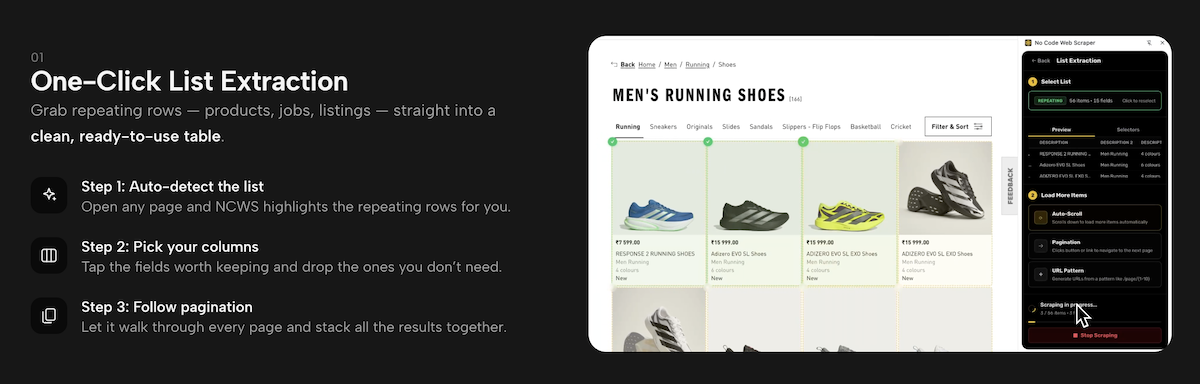
No Code Web Scraper is a point-and-click Chrome extension that turns lists on any page into a table.
Open a page, and it highlights the repeating rows, such as products, jobs, or listings. Pick the columns you want, let it follow the pagination, and export to CSV, JSON, Excel, or the clipboard. A bulk mode collects the same fields from a list of detail-page URLs, and an image downloader grabs full-size images in one go.
You can start in seconds with the Chrome extension and the paid tier is a $99 one-time license. Everything runs locally in your browser.
Note: There are no cloud runs, no scheduling, and no proxy rotation listed, so your browser has to stay open, and heavily protected sites may block you.
Pros & Cons
PROS
CONS
Pricing
- Free: core scraping features, no signup.
- Lifetime: $99 one-time, with premium features and future updates.
Instant Data Scraper
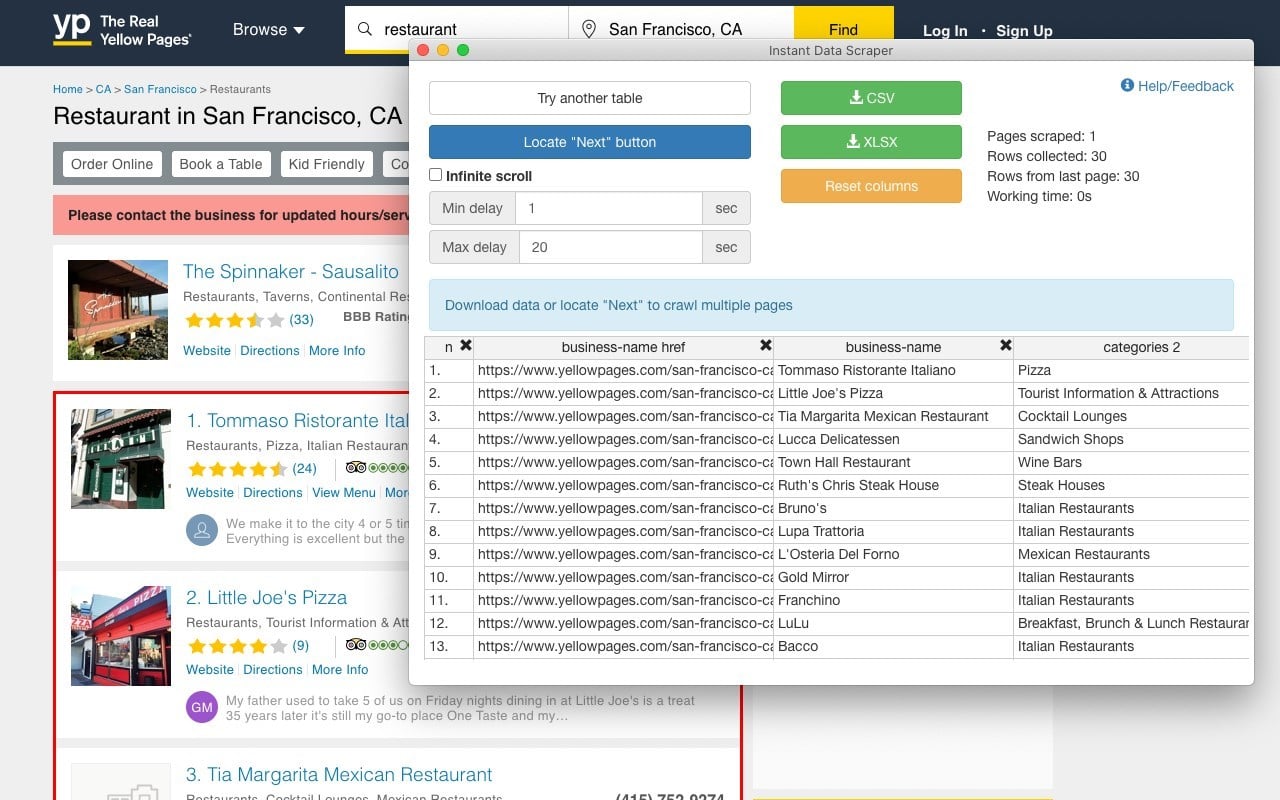
Instant Data Scraper is a free browser extension that detects tables and lists on a page automatically.
It follows “next” buttons and links, handles infinite scroll, waits for dynamic content, and lets you rename and filter columns before you export to Excel or CSV.
Its Edge listing showed more than 65,000 users and a 4.2 rating when we checked. Scraped data stays in your browser.
Better than Octoparse: It costs nothing at all and needs no setup or account. For one-off exports from a single listing.
What you give up: No scheduling, cloud runs, templates, or Google Sheets export, so it suits one-off exports rather than recurring jobs.
Pros & Cons
PROS
CONS
Data Miner
Data Miner is a Chrome and Edge extension built around recipes.
It has more than 50,000 pre-made queries for over 15,000 popular websites, so for common sites someone has often done the setup for you. It handles next-page automation and lists of URLs, and paid plans add crawling, custom JavaScript, and Google Sheets export.
Going over the free 500 pages locks your account until you upgrade.
Pros & Cons
PROS
CONS
Pricing
- Free: 500 pages a month.
- Solo: $19.99/month for 500 pages on all domains, with Google Sheets.
- Small Business: $49/month for 1,000 pages.
If You Need Cloud Runs and Monitoring
Browse AI
Browse AI runs in the cloud and can watch pages for changes, which makes it the closest replacement for Octoparse’s scheduled cloud tasks.
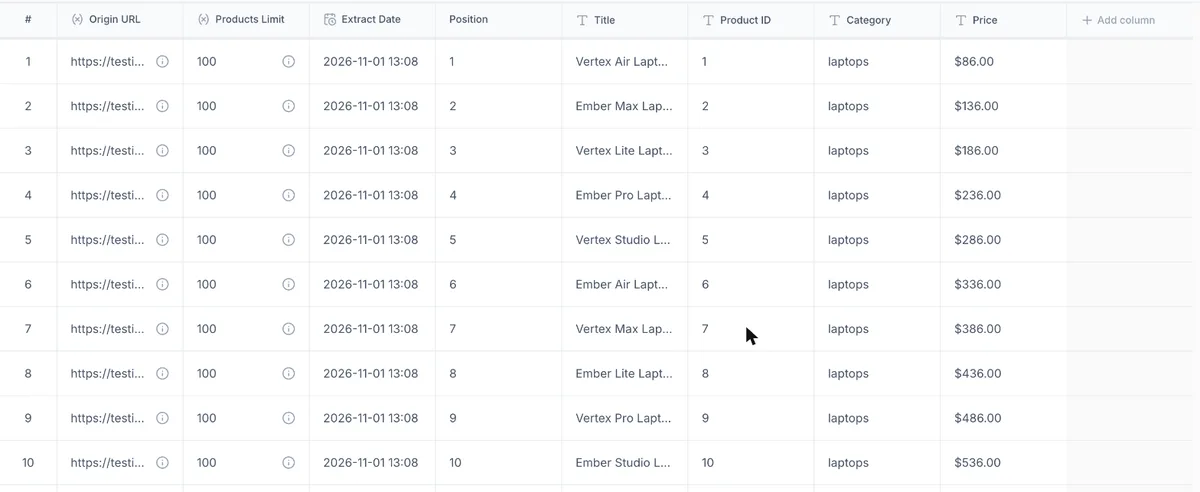
Its Table Studio builds a scraper from a URL using AI. In our test, we gave it only the first page of TestingURL.dev’s paginated product list. It found the products, followed the pagination, and returned a table with title, product ID, category, and price, stopping at 50 rows, the default limit for a list.
Better than Octoparse: Setup took no clicking or selectors, robots run in the cloud on a schedule, and it can alert you when a page changes. It also connects to thousands of apps.
What you give up: Credit-based pricing gets expensive at high volume, and the free plan has only 50 credits a month.
Pros & Cons
PROS
CONS
Pricing
- Free: 50 credits a month, 2 websites.
- Personal: $19/month billed annually ($48 monthly).
- Professional: $69/month billed annually.
Axiom.ai
Axiom.ai builds no-code browser bots that click, type, and scrape, then run in your browser or in Axiom’s cloud.
It goes beyond scraping into automation to fill forms, move data into Google Sheets, and chain steps together. All plans include Google Sheets and Excel integration and AI steps, which use your own LLM API key.
Better than Octoparse: It automates whole workflows, not just extraction, and Google Sheets integration is included on every plan.
What you give up: Pricing is by runtime hours and cloud scheduling starts on the $50 Pro plan.
Pros & Cons
PROS
CONS
Pricing
- Starter: $15/month for 5 hours.
- Pro: $50/month for 30 hours, with daily cloud scheduling.
If You Want a Desktop App Like Octoparse
ParseHub
ParseHub is the closest match to Octoparse. It is a desktop app where you click on the data and it records a project you can rerun.
It handles JavaScript sites well and its desktop app runs on Windows, Mac, and Linux.
Better than Octoparse: Linux support, and a free plan of 200 pages per run.
What you give up: The first paid plan jumps to $189 a month, and because it renders every page in a browser, it can be slow on simple pages.
Pros & Cons
PROS
CONS
Pricing
- Standard: $189/month.
- Professional: $599/month.
If You Prefer to Describe the Data in English
Thunderbit
Thunderbit is a Chrome extension where you describe what you want instead of clicking on elements, and its AI suggests the columns.
It scrapes subpages, PDFs, and images, and exports straight to Google Sheets, Airtable, Notion, CSV, or JSON.
Better than Octoparse: The fastest setup on simple pages and direct exports to the tools teams already use, at a much lower entry price.
What you give up: Credits burn quickly on multi-page jobs, and scheduling and subpage scraping need a paid plan.
Pros & Cons
PROS
CONS
Pricing
- Starter: $9/month billed annually.
- Pro: $16.50/month billed annually.
If You Want Data Straight in Google Sheets
Geekflare Google Sheets Website Scraper
Geekflare Google Sheets Website Scraper is a free template that scrapes a list of URLs into a spreadsheet through the Geekflare Scraping API.
Paste URLs into column A, optionally add a CSS selector in column B, and run it from the sheet’s menu. On TestingURL.dev, selectors for product names and prices each returned all 10 matches per page, and a product page with no selector came back as Markdown with the title and description. It can re-scrape every row daily on its own.
Better than Octoparse: No app to install, data lands directly where your team works, and it renders JavaScript pages.
What you give up: It writes one row per URL, so it’s better for tracking a list of pages than for turning one listing into a table of products, and it needs a Geekflare API key.
Pros & Cons
PROS
CONS
Pricing
Geekflare API free plan gives 500 credits a month and paid plan starts from $19/month.
Credit packs from $10.
Listly
Listly turns web pages into tables you can download to Excel or send to Google Sheets, from a web app and browser extension.
Paid plans add deep extraction, load-more handling, multiple tabs, and a data board. Scheduled extraction, an API, and proxies come with the Business plan.
Better than Octoparse: Quick table extraction with Google Sheets export.
What you give up: The free plan covers only 10 URLs a month, and scheduling needs the $90 Business plan.
Pros & Cons
PROS
CONS
Pricing
- Free: 10 URLs a month.
- Light: $30/month.
- Business: $90/month.
If You Want a Free Extension With Cloud
WebScraper.io
WebScraper.io started as a free Chrome extension and still offers unlimited local scraping at no cost, with cloud plans when you need scheduling.
You build a sitemap, its name for a scraping configuration, by clicking page elements. It handles pagination, subpages, and JavaScript-rendered content, and cloud plans add scheduling, proxy rotation, and exports to Google Sheets, Dropbox, and S3.
Better than Octoparse: A free local tool you can upgrade to the cloud later, and cheaper cloud plans than Octoparse.
What you give up: Sitemaps get complicated on nested pages, and cloud plans are priced in URL credits.
Pros & Cons
PROS
CONS
Pricing
- Free: Chrome extension for local scraping.
- Cloud: Project $50/month (5,000 URL credits), Professional $100/month (20,000 URL credits).
Is There an Open-Source Octoparse Alternative?
Yes. Maxun is an open-source, no-code platform licensed under AGPL-3.0, with a recorder that turns your browser actions into reusable robots and an AI mode that extracts data from English prompt.
You can self-host it with Docker, or use its hosted cloud from $19 a month. For other self-hosted options, including Crawl4AI and Scrapy, see our tested list of open source web scraping tools.
How to Choose
- If you mostly export one-off lists, a free extension like No Code Web Scraper or Instant Data Scraper replaces Octoparse at no cost.
- If you rely on scheduled cloud tasks, Browse AI or WebScraper.io’s cloud plans are the closest fit.
- If you like Octoparse’s visual desktop workflow, ParseHub feels the most familiar.
- If your data ends up in Google Sheets, Geekflare’s template or Listly removes the export step.
- If you want to self-host, try Maxun.
For a broader comparison of no-code tools beyond Octoparse switchers, see our roundup of the best no-code web scrapers.
FAQ
What is the best Octoparse alternative?
For most people who mainly export lists, No Code Web Scraper is best suited.
Is there a free alternative to Octoparse?
Yes. Instant Data Scraper is completely free, No Code Web Scraper’s core features are free, and WebScraper.io’s Chrome extension is free for local scraping. Data Miner and Browse AI also have free plans with page or credit limits.
Does Octoparse work on Mac?
Yes. Octoparse’s download page offers the desktop app for macOS 10.15 or later and for 64-bit Windows 10 or later. If you need Linux, ParseHub’s desktop app runs on Windows, Mac, and Linux.
Is there an open-source alternative to Octoparse?
Maxun is an open-source, no-code scraping platform under the AGPL-3.0 license, with a browser-action recorder and an AI extraction mode. You can self-host it with Docker.