

Let us connect a web scraping tool to the Vercel AI SDK and use it to extract webpage content based on user prompts.
This tutorial covers the setup, integration, and execution of a simple scraping workflow.
How Vercel AI SDK Works with Web Scraping
The Vercel AI SDK lets developers connect external tools to AI models through tool calling. A model can call a registered tool when it needs additional information to answer a prompt.
Geekflare provides an integration for the Vercel AI SDK through the @geekflare/ai-sdk package. It provides web search, webpage scraping, screenshot capture, and website diagnostics. It supports both ECMAScript Modules (ESM) and CommonJS (CJS), two standard formats for importing and using JavaScript modules. Its only peer dependencies are ai and zod.
The geekflareScrape() tool retrieves content from a given URL in Markdown, text, HTML, or JSON format.
How to Integrate Web Scraping with Vercel AI SDK
We’ll build a small Node.js application that connects the scraping tool to an AI model.
Prerequisites
- Node.js 18 or later
- A Geekflare API key
- An API key from your preferred LLM provider
Step 1: Install the Required Packages
Create a new project folder and open it in your preferred code editor. Initialize a Node.js project:
npm init -yInstall the Vercel AI SDK, Geekflare integration, and Zod using your preferred package manager.
npm install ai @geekflare/ai-sdk zodpnpm add ai @geekflare/ai-sdk zodyarn add ai @geekflare/ai-sdk zodbun add ai @geekflare/ai-sdk zodChoose any one of these options. The integration requires ai and zod as peer dependencies.
Step 2: Configure Your API Keys
The integration needs a Geekflare API key to access its scraping service. You’ll also need an API key from your preferred LLM provider to connect an AI model.
There are two ways to configure your Geekflare API key.
Method 1: Use an Environment Variable
Get your API key from the Geekflare Dashboard and set it as an environment variable named GEEKFLARE_API_KEY.
export GEEKFLARE_API_KEY="YOUR_API_KEY"$env:GEEKFLARE_API_KEY="YOUR_API_KEY"Replace YOUR_API_KEY with your actual key. The integration reads this environment variable automatically. You can also pass the key directly to the scraping tool through its apiKey option.
Method 2: Manage the Key with Vercel Connect
If you’re deploying your application on Vercel, you can use Vercel Connect to store your Geekflare API key securely and retrieve it at runtime.
First, link your project to Vercel and create a Geekflare connector:
vercel link
vercel connect create geekflare --name my-geekflare
vercel env pull
The CLI prompts you to enter your Geekflare API key when creating the connector. The vercel env pull command adds a VERCEL_OIDC_TOKEN to your .env.local file so you can retrieve the key locally. Deployed functions receive this token automatically.
Next, install the Vercel Connect SDK:
npm install @vercel/connectUse getToken() to retrieve your Geekflare API key and pass it to the scraping tool through the apiKey option:
import { getToken } from "@vercel/connect";
import { geekflareScrape } from "@geekflare/ai-sdk";

const apiKey = await getToken("geekflare/my-geekflare", {
  subject: { type: "app" },
});

const scrapeTool = geekflareScrape({ apiKey });
Replace my-geekflare with your connector name if you choose a different one. If you want to use the same connector in another project, attach it using vercel connect attach.
Finally, configure the API key for your preferred LLM provider so the AI model can run through the Vercel AI SDK.
Note
I will use Claude for this example, but you can choose any model supported by the Vercel AI SDK.
Step 3: Connect the Web Scraping Tool to Vercel AI SDK
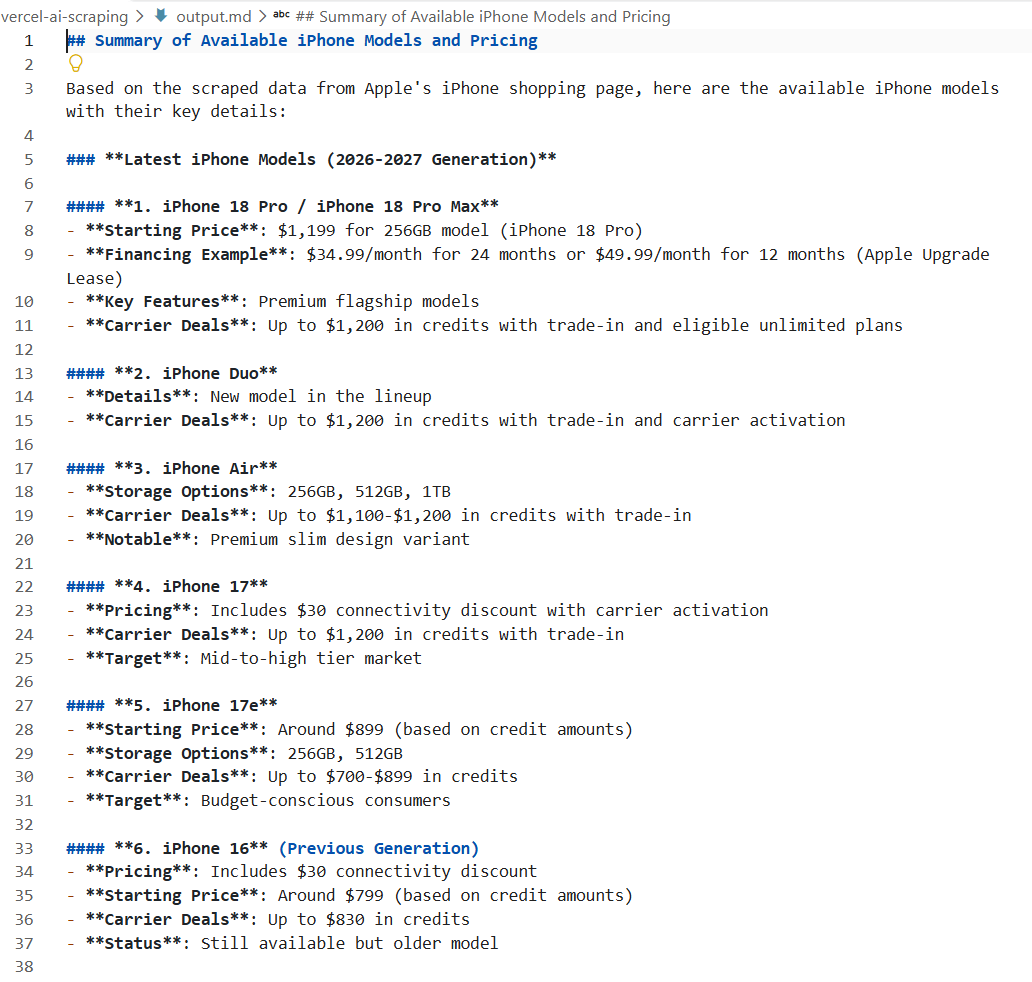
Import generateText from the Vercel AI SDK and geekflareScrape from the Geekflare integration. Register the scraping tool inside generateText() and prompt the AI model to extract product information from Apple’s iPhone store.
import { generateText, stepCountIs } from "ai";
import { anthropic } from "@ai-sdk/anthropic";
import { geekflareScrape } from "@geekflare/ai-sdk";

const { text } = await generateText({
  model: anthropic("claude-sonnet-4-5"), // Reads ANTHROPIC_API_KEY
  prompt: "Use the geekflareScrape tool to scrape https://www.apple.com/shop/buy-iphone. Set the template to 'product' to extract structured product details. Summarize the available iPhone models, their prices, and key details from the extracted content.",
  tools: {
    geekflareScrape: geekflareScrape(), // Reads GEEKFLARE_API_KEY
  },
  stopWhen: stepCountIs(5), // Let the model answer after the tool call
});

console.log(text);
Here, the prompt instructs the model to call geekflareScrape() with the Apple URL and the product template. The tool extracts the product information, and the model summarizes the results.
The scraping tool accepts two inputs:
| Parameter | Description |
|---|---|
url | The webpage URL to scrape. |
template | Use "product" or "contact" to extract structured data. |
You can configure the tool with a specific format when initializing it. For example, use markdown-llm to return clean Markdown content optimized for AI applications.
const scrapeTool = geekflareScrape({
  format: "markdown-llm",
});
Geekflare supports seven output formats:
| Format | Description |
|---|---|
markdown-llm | Clean Markdown with primary webpage content |
text-llm | Clean text with HTML and formatting removed |
html-llm | Clean HTML with unnecessary page elements removed |
markdown | Full webpage content in Markdown |
text | Full webpage content as plain text |
html | Raw webpage HTML |
json | Structured JSON output |
Here is the response:
Frequently Asked Questions
Which Vercel AI SDK versions are compatible with the Geekflare integration?
The @geekflare/ai-sdk package works with Vercel AI SDK versions 5, 6, and 7.
Which output formats does the web scraping tool support?
The geekflareScrape() tool supports Markdown, plain text, HTML, and JSON formats, including LLM-optimized variants.
What parameters does geekflareScrape() accept?
The tool accepts two inputs: url to specify the webpage to scrape and template to extract structured product or contact information.
Conclusion
Vercel AI SDK makes it easier to connect external tools to AI models. Geekflare’s integration adds web scraping capabilities through the geekflareScrape() tool, allowing models to retrieve webpage content and process it based on user prompts.
You can use it to extract webpage content, retrieve structured product or contact information, and build AI applications that work with data from the web.