



It’s 7PM on Saturday, and you are out on a date. Your biggest competitor just dropped the price of their best-selling product by 20%. If you are relying on manual checks, you won’t know until the next day, and by then you will have lost thousands in sales.
If you are a smart store owner, your automated web data collection system would have alerted you while you were watching that movie. (And you can also have AI agents that can go a step further and auto-adjust your prices in real time. But that’s a story for another day).
To build a digital scout that tells you what’s happening on the internet, you need two distinct processes working as a team: web crawling and web scraping. While people use these terms interchangeably, they are not the same thing. I’ll explain how they are different.
What is web crawling?
Web crawling is about discovery, moving across pages, following links, and mapping the content to topics and keywords. For example, if you are an e-commerce seller, it is the act of surfing the web to find and list all the different competitor websites and product pages that exist.
Or if you are planning a trip and keep moving from one travel booking site to another, exploring different destinations, itineraries, and hotel options, that’s essentially crawling done manually.
How does web crawling work?
Web crawlers, also called spiders, follow a systematic process to explore the Internet. In simple terms, this is a 4-step process:
- Starting with Seeds: The crawler begins with a list of known web addresses. If you are an e-commerce seller tracking prices on Amazon, this might be a list of major marketplaces or known competitor homepages.
- Following the Trail: Once it lands on a site, it identifies every link on that page, like women’s T-shirts, Easter sale, about, etc. It adds these new links to a list of pages to visit next.
- Mapping the Content: As it visits each page, it notes down the general structure, like this URL is a product page for a coffee maker. A crawler doesn’t store the exact information, like price, etc.
- Continuous Loop: It moves to the next link on its list and repeats the process. It can revisit these sites regularly to see if new pages are added.
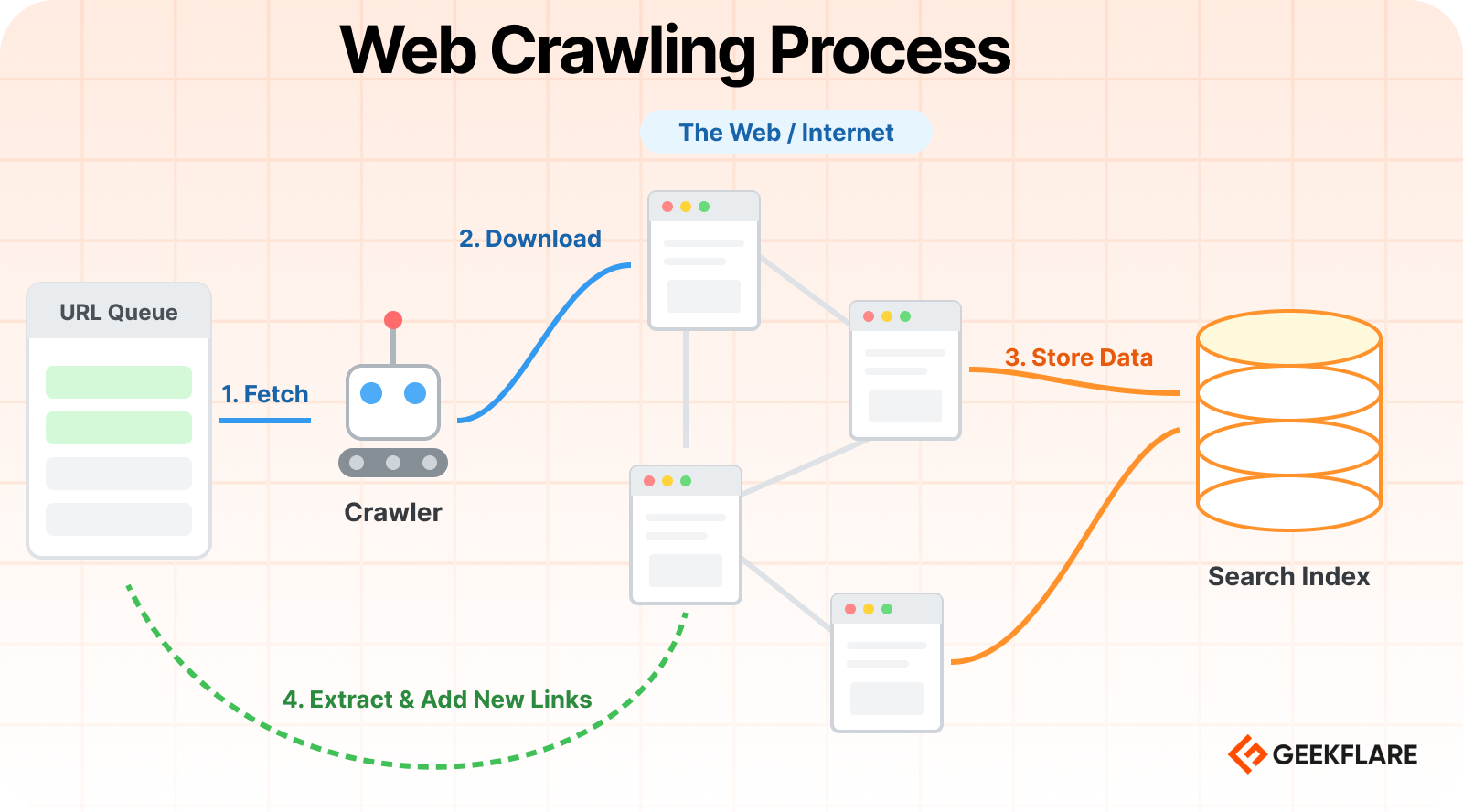
I’ve created a visual flow to demonstrate how a crawler takes a URL from a queue, downloads web pages, and stores the content in a search index.
What is web scraping?
Web scraping is about extraction, pulling specific pieces of data from those pages once you’ve found them. For example, it is the process of going to the specific competitor pages regularly to get the exact price of a product and save it to your records. This way, you will know when your competitor is offering a discount and be alerted to lower your prices.
How does web scraping work?
Once the crawler has found the specific product pages you’re interested in, the scraper takes over. This can also be explained as a 4-step process.
- Requesting the Page: The scraper goes to a specific URL from the crawler’s list and asks the website to show it the page, just like your browser does when you click a link.
- Reading the Code: The scraper then looks at the underlying code (HTML). To a scraper, a product page looks like a structured list where every item has a label.
- Targeting the Data: You tell the scraper exactly what to look for. For example, if you are a store owner, you would ask it to get the product name, the price, and the stock status.
- Saving the Results: The scraper pulls that specific information out of the HTML code and saves it into a clean format, like an Excel sheet or a Google Sheet, for your use.
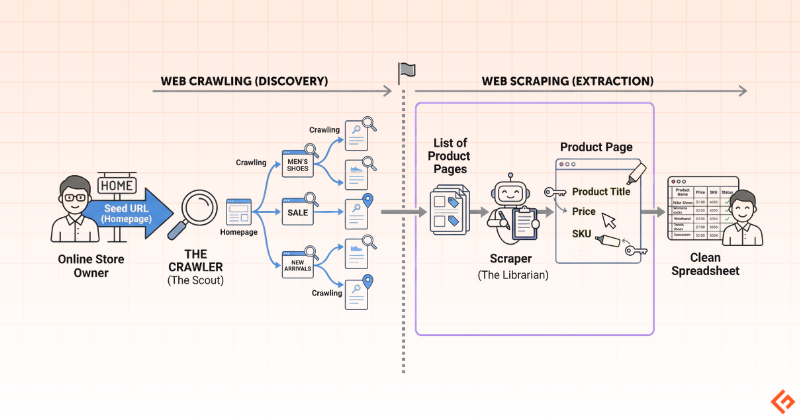
The below diagram illustrates how crawling and scraping work together.
Web Crawling vs. Web Scraping: Key Differences
Purpose
The purpose of web crawling is discovery, which means mapping out a website to understand its structure and find new pages.
The purpose of web scraping is collection, where you are focused on pulling data from those discovered pages into your system for further analysis.
Scope
Web crawling is broad-scoped and looks at the big picture of a website. It navigates through an entire domain to index content and see how pages are linked together.
Web scraping is narrow and targeted. It ignores the overall site structure and focuses only on the given pages and specific sections of a page, like a price tag or a product description.
Scale
Web crawling deals with high volumes. It often involves processing thousands of links to build a map of a large marketplace or directory.
Web scraping works on a targeted scale. It only processes the specific pages that contain the actual information you need to extract, which is usually a much smaller subset of what the crawler found.
Output
Web crawling outputs a categorized list of URLs. It tells you which links are worth visiting by labeling them as product pages, blog posts, or news.
Web scraping outputs structured information that can be used by both humans and AI bots. For a business owner, it may be in a spreadsheet format or a database, and for an AI, it can also be a direct feed of text and facts.
Data Type
Web crawling handles the connections in the web, such as links, headers, and metadata. It identifies the relationships between pages rather than the content inside them.
Web scraping handles the actual content. It pulls out semi-structured information like text, numbers, and dates, and prepares it so it can be used for business analysis, training AI models, or any other purpose.
Process
Web crawling works through a process of link-hopping. It starts at a homepage and systematically follows every internal link it finds to ensure it has seen everything the site has to offer.
Web scraping works through a process of data-harvesting. It visits the specific URLs provided by the crawler and uses selectors to find the required text located in specific parts of the page layout.
Primary Goal
The primary goal of web crawling is coverage and visibility. You want to make sure your index is up to date and that no new pages or information have been added without you knowing.
The primary goal of web scraping is accuracy and utility. You ensure that the data you are pulling is correct, formatted properly, and ready to be used in your projects.
Tools Used
Common web crawling tools include search engine bots, link-discovery scripts, and site-auditing software like Screaming Frog. These navigate large websites without getting stuck.
Web scraping relies on tools that can read page code, such as BeautifulSoup, Selenium, APIs like Geekflare Scraping API, or no-code platforms like Octoparse that allow you to locate the data you want.
Complexity
The complexity of web crawling lies in navigation. It’s a challenge to manage huge site maps and avoid infinite loops. The crawler also needs to respect the site’s traffic capacity rules so it doesn’t overwhelm the server.
The complexity of web scraping lies in the page layout. If a website changes its design or moves where specific data is displayed, the scraper will break, and you will need to update its instructions to find the data again.
Automation Level
Web crawling is usually a continuous, background process. It runs automatically to detect the moment a new piece of information is available, existing information is updated, or the structure of a site is changed.
Web scraping is typically scheduled or triggered. You might set it to run once the crawler finds a new batch of links or set it to refresh at a specific time of day to capture the latest information.
Real-World Use Cases
Web crawling is used for any task that requires discovery and monitoring.
For example:
- Search engines crawl the web to discover new pages.
- Researchers crawl the web to archive the history of the web.
- Cybersecurity firms use crawlers to scan websites and networks for vulnerabilities before attackers can exploit them.
- Brand protection services use crawlers to watch out for counterfeit products appearing on random corners of the internet.
- Crawling is the backbone of site auditing tools like Screaming Frog.
- Marketers use crawlers to discover and analyze web content and track competitors.
Web scraping is used for turning the web into a database.
For example:
- Price monitoring tools scrape e-commerce sites to track competitor pricing and trigger automatic discounts.
- AI models and assistants scrape the latest articles and documentation to provide up-to-date answers and summaries.
- Investment firms scrape financial news and government filings to predict market trends and stock performance.
- Travel and flight aggregators scrape data from hundreds of airlines and hotels to show you the best deals in one place.
- Lead generation services scrape directories and social media platforms to build contact lists for sales teams.
Summary of Differences
The differences between crawling and scraping are summarized in the below table.
| Feature | Web Crawling | Web Scraping |
|---|---|---|
| Primary Goal | Discovery: Finding new pages and mapping the site. | Extraction: Pulling specific data points from those pages. |
| Purpose | To see what’s out there. | To see what the value is. |
| Scope | Broad. It looks at the entire site structure. | Narrow. It looks at specific fields (like price or SKU). |
| Scale | Huge. Can involve millions of links. | Targeted. It usually involves specific pages. |
| Output | A list of URLs (web addresses). | A spreadsheet or database (CSV, Excel, etc.). |
| Data Type | Unstructured (just raw links). | Structured or semi-structured (labeled names, prices, and dates). |
| Process | Following links from page to page. | Identifying and copying specific text from a page. |
| Tools Used | Search engine bots, link discovery scripts. | Data extraction tools, highlighter extensions. |
| Complexity | High (managing millions of links). | Medium (managing site layout changes). |
| Automation | High. Runs continuously to find updates. | High. Scheduled to pull data at specific times. |
How Web Crawling and Web Scraping work together
In a real-world data collection workflow, crawling and scraping operate as a team. It’s a continuous loop of discovery and extraction.
This process is most powerful when it is automated. The crawler monitors the site for changes (like a new product launch), and the moment it finds something new, it automatically triggers the scraper to grab the details and send you an alert.
If you only had a scraper, you would have to manually find and paste every single URL yourself, which is impossible to do at scale. If you only had a crawler, you would have a massive list of website links but no actual data to use. Therefore, they both are best when working in tandem.
Conclusion
You don’t need to be a developer to understand that the internet is the world’s largest source of free information. Below is a checklist to help you turn the web into a vast, programmable database.
Identify the Goal: What specific information do you require today?
Find the Seed: Which websites hold that information?
Start with the Geekflare API to scrape any sites into Markdown, JSON, or HTML. You can use it programmatically or through an intuitive playground. And for no-code, you leverage Zapier to Geekflare integration.
FAQs
Is web crawling the same as web scraping?
No, they are different but related processes. Web crawling is the act of discovering and mapping pages on a website, while web scraping is the act of extracting specific data from those pages.
Can web crawling and web scraping be used together?
Yes, in most workflows, both are used together. The crawler acts as a scout to find new or updated URLs, and then the scraper goes into those specific links to collect the actual information you need.
What tools are commonly used for web crawling?
Simple crawlers like BeamUp or Visualping are often used to discover new links or monitor site changes. Marketers often rely on the massive data already indexed by tools like Ahrefs or Semrush.
Which programming languages are best for web scraping?
Python is the most popular choice because it has powerful libraries like BeautifulSoup and Scrapy that make reading site code very easy. JavaScript (using Node.js) is also used, especially for scraping modern websites that load content dynamically.
How do search engines use web crawling?
Search engines like Google use crawlers to constantly scan billions of pages across the entire internet. This allows them to index the web and create a massive directory so they can show you the most relevant and up-to-date results when you search for something.
Is web scraping legal for all websites?
Generally, scraping publicly available data is legal, but you must respect a website’s Terms of Service and their robots.txt file. You should also avoid collecting private user data or overwhelming a site’s server with excessive traffic.
How do websites block web crawlers and scrapers?
Websites use CAPTCHA, IP blocking, or rate limiting to block or slow down frequent requests. They may also use the robots.txt file to tell crawlers which parts of the site are off-limits and not to be crawled.






