



Browser fingerprinting is now one of the major methods of online user profiling. For a long time, IP tracking was sufficient, yet easily avoidable via proxies and VPNs.
But due to the evolving complexity of the modern World Wide Web, it is now a component of a broader website protection and online surveillance system.
Modern detection systems combine browser, device, and behavior signals into a full identity profile. Although it is generally accepted to keep fingerprints depersonalized (avoiding real names, surnames, emails, etc.), privacy advocates still consider it a threat to users’ online well-being.
On the other hand, websites use browser fingerprinting to separate malicious bots from legitimate visitors. It helps prevent cybercrime like account takeovers, malicious spam, and bot traffic in general. Developers also use browser fingerprinting to test website localization, rate limiting, and account authentication.
All of this would not be possible with IP address tracking alone. Currently, you will see both methods combined in the majority of cases.
What Is Browser Fingerprinting?
Browser fingerprinting is an effective method to identify individual internet users based on their unique browser configuration and hardware setup. It works alongside IP tracking but also covers dozens of other metrics.
Here are some of them:
- Browser version
- Operating system
- Screen size and aspect ratio
- Timezone
- Language
- WebGL/GPU
- JavaScript rendering
- Behavior analysis
- Fonts, and more
Let’s take fonts as an example. Whenever you install new software on your device, it may add new fonts that it uses. Over time, your device creates a unique font collection. If you take a million used desktop devices, you will get thousands of unique font setups.
Browser fingerprinting identifies this uniqueness and then considers the additional criteria listed above. All things considered, it is extremely rare for two separate devices to have the same browser fingerprint.
Why Websites Use Browser Fingerprinting
Browser fingerprinting is integral to modern website cybersecurity. Let’s take four concrete examples to illustrate how it works.
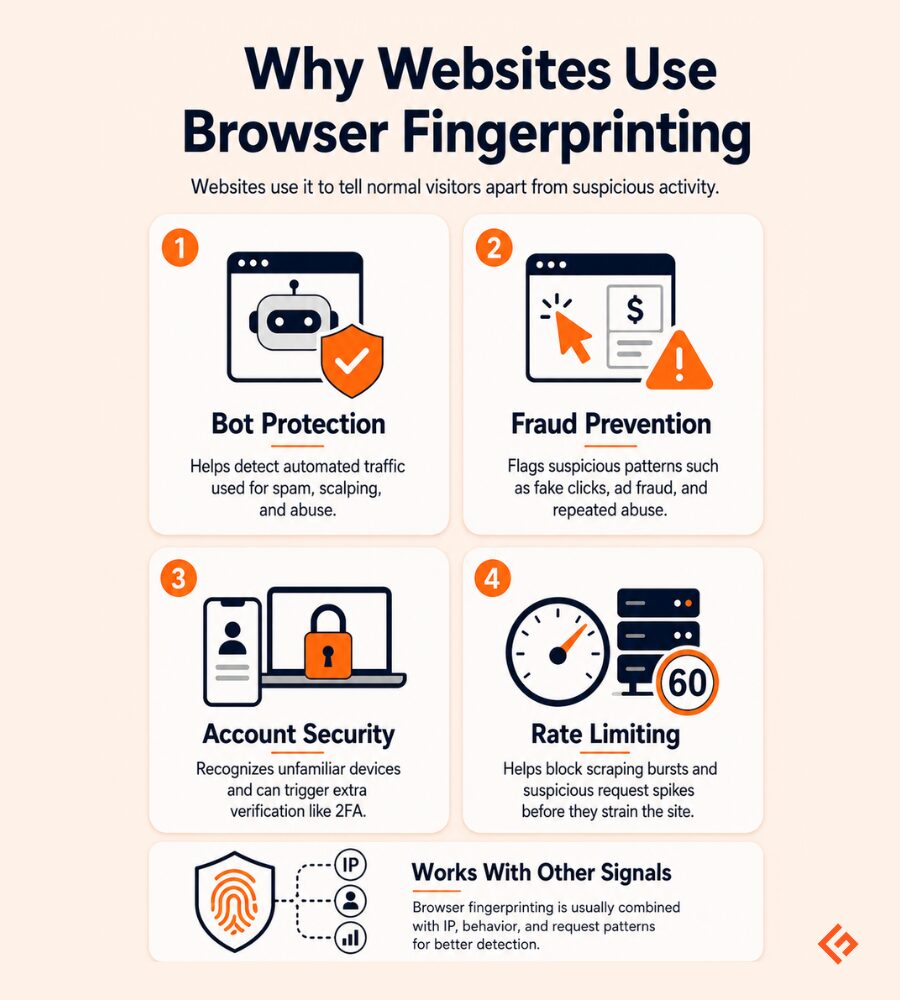
Bot Protection
It is widely and efficiently used for bot protection. Previously, cookies and IP addresses identified separate users. But you can easily delete cookies and change your IP address.
Browser fingerprinting is much more precise. If you launch several bots to automate shopping and clear out limited stock ahead of others, your browser fingerprint will give you away, likely resulting in a ban.
Fraud Prevention
Modern browser fingerprinting also plays a key role in fraud prevention, such as ad fraud. In this case, bots may fake clicks on ads to drive more revenue or repeatedly ‘click’ competitors’ ads to increase their costs and distort statistics.
Account Security
Username and password authentication is the leading account authentication method. If hackers obtain credentials, they may take over the account.
Websites leverage this technology to identify login attempts from unrecognized devices and may display a second authentication challenge, like two-factor authentication. This way, malicious actors cannot access the account even if they have the correct credentials.
Rate Limiting
Lastly, browser fingerprinting is used to set the desired rate limiting, mostly to block DDoS (Distributed Denial of Service) attacks and web scrapers. Unethical web scraping often sends large numbers of concurrent requests for specific data, which can slow down the website or even make it completely inaccessible.
Browser fingerprinting inspects the client’s request. If there are automation signatures and other abnormalities from a normal human visitor, it denies access to protect website resources.
Before browser fingerprinting, most of these challenges could have been addressed by rotating IPs. Each data request or bot action was sent from a different IP, concealing its broader activities. Due to the methods explained above, it is no longer viable.
Why IP Rotation Alone No Longer Works
Rotating IP addresses to avoid access restrictions is no longer enough, because IP addresses are now only a small part of user profiling. The same applies to cookies, which are also no longer sufficient to separate bots from legitimate users.
VPNs and proxies significantly weakened IP-based detection. Both technologies mask the original user IP address and replace it with an alternative, making it appear to come from a different source.
Rotating residential proxies can reconnect to different user devices every few seconds, making it even harder. Meanwhile, VPNs encapsulate user traffic in an encryption layer, which introduces additional challenges.
Instead, websites now check the whole user identity consistency. They inspect HTTP requests (the way clients request data from servers). If they notice a user claiming to be coming from a Windows device in the US but with attributes of a Linux server in Russia and language set to Japan, it triggers the website’s anti-bot protection algorithms.
Can You Bypass Browser Fingerprinting?
As with all software, tech-savvy developers came up with workarounds. Instead of spoofing separate metrics, it is now possible to simulate full identity profiles.
This process is challenging and involves multiple tools. Python’s Selenium-Driverless package and Playwright-Stealth plugin can strip out automation signatures specific to bots and web scrapers, making them appear like real human visitors.
Another option is using an anti-detect browser. It doesn’t involve writing code and lets you spoof all of the criteria used for browser fingerprinting, but you will have to pay for a subscription in most cases.
Lastly, proxy servers are still mandatory because each profile must use a unique IP address to remain undetected.
How Automation Tools Accidentally Expose Themselves
Web automation tools are primarily built for testing, and not for stealth. Without additional obfuscation, using them to bypass browser fingerprinting is futile.
Headless browsers (without a graphical user interface) are often used for resource-heavy tasks such as large-scale data collection. They may be configured to mimic a simple Windows device, but the browser fingerprint reveals no Windows interface, a generic font setup, and stripped-down configurations, never seen in common browsers.
Another nuance is the navigator.webdriver attribute. By default, automated testing tools set this attribute to true, immediately giving away that they are not human visitors. It is essential to use specialized tools, such as the Selenium-Driverless library, to remove this value entirely.
AI-powered behavior analysis now safeguards many highly protected websites. It notices the smallest details, such as mouse movements, click patterns, instantaneous form filling, and more. Without mimicking human behavior, AI-powered anti-bot systems will easily identify automated software.
Lastly, reusing the same browser fingerprints more than once can be enough to raise an alarm. If the same fingerprint performs different tasks, such as scraping multiple parts of a website at once, it is a bright red flag.
Why Fingerprint Consistency Matters
Since bot detection has become so sophisticated, you cannot just switch between random browser fingerprints to appear like a regular user. Your browser fingerprint must be consistent, and all modified metrics must form a coherent, technologically viable identity.
If you are building multiple profiles on social networks, regularly changing your browser fingerprint is not recommended. Although people use several devices to access social media, they don’t usually exhibit multiple radically different fingerprints, especially over a short period.
Here are a few examples.
- You should ensure a coherent regional profile. If you use a proxy in Germany, your time zone, language settings, and German-specific fonts should be reflected in your browser fingerprint.
- You should maintain logic when rotating browser fingerprints. A single IP address, whether it’s a proxy or your original ISP, should not be used to perform actions from radically different browser profiles.
- Switching from a PC to an Android phone and a tablet makes sense. However, switching between multiple Windows versions, then to Linux, and then to iOS in the same session is a bad idea, because that’s not what regular internet users typically do.
Browser Fingerprinting in Real-World Testing
In real-world testing, switching browser fingerprints has concrete and widely deployed use cases.
Websites with global reach use it for geographical testing. Developers can create dozens of user profiles from different countries and verify whether website localization is accurate.
That is particularly useful for localization quality assurance. QA specialists create, for example, profiles from India with its language, font, and time settings. A website should render all elements in accordance with these criteria. If it doesn’t, QA identifies the error and informs the developers.
The same logic applies to ad verification. Marketing professionals use different profiles to inspect the ad placements. If a user is coming from the US, they should see US-optimized ads, and visitors from France should get French content.
Lastly, it’s a common method to check regional prices. Hotels and airlines often adjust prices by region. So if you aim to conduct an accurate global pricing comparison, you will need multiple profiles from different countries to build a complete data set.
Keep in mind that all of these use cases still require proxies, as IP tracking is used alongside browser fingerprinting. To obtain high-quality IPs, developers seek reliable proxy service providers like IPRoyal, which has servers worldwide and provides residential, datacenter, ISP, and mobile proxies for different use cases.
Conclusion
IP addresses are still important, and in most cases, you need to rotate them. But unlike before, browser fingerprint management is just as essential, if not more.
Most modern websites now use browser fingerprinting. They inspect software and hardware details and scrutinize behavior patterns to identify and neutralize malicious bots.
If you understand how this logic works, you can use browser fingerprinting for testing, automation, and accurate geographical localization of your growing site.






