Every applicant tracking system does the same basic job like it collects applicants and moves them through a hiring pipeline. But a tool built for a 15-person startup, a staffing agency, and a retailer hiring 5,000 store workers a year will look very different.
The easiest way to make sense of the market is to sort ATS products along four lines:
- Who uses them
- How much they cover
- How they’re deployed
- What size of company they’re built for
Most products fit several labels at once. A single tool can be cloud-based, built for mid-size companies, and part of an HR suite.
Types of ATS at a Glance
| Classified by | Main types | The question it answers |
|---|---|---|
| Who uses it | In-house, agency, high-volume | Whose hiring are you managing? |
| Scope | Standalone, HR suite, all-in-one recruiting, enterprise suite | What else should it do besides tracking applicants? |
| Deployment | Cloud, on-premises, hybrid, open-source | Where does it run, and who maintains it? |
| Company size | Small business, mid-market, enterprise | How complex is your hiring? |
By Who Uses It
In-house (corporate) ATS
This is what most people mean by an ATS. It manages hiring for one company. Recruiters and hiring managers share a pipeline for each open job, collect interview feedback, and send offers.
The focus is on collaboration and a consistent process. Features like interview scorecards, approval workflows, and hiring manager access matter more than sales-style tools.
Examples: Greenhouse, Workable, Lever, Teamtailor.
Agency and staffing ATS
Recruiting agencies hire on behalf of clients, so their system has to track two sides at once: candidates and the companies paying for placements. An agency ATS usually includes a CRM for client relationships, client portals where hiring managers review candidates, placement tracking, and sometimes billing and commissions.
Using an in-house ATS in an agency usually means running client deals in a separate spreadsheet or CRM. We cover agency tools in more detail in our guide to recruitment software.
Examples: Bullhorn, Recruit CRM, Recruiterflow, and the staffing edition of Zoho Recruit.
High-volume and frontline ATS
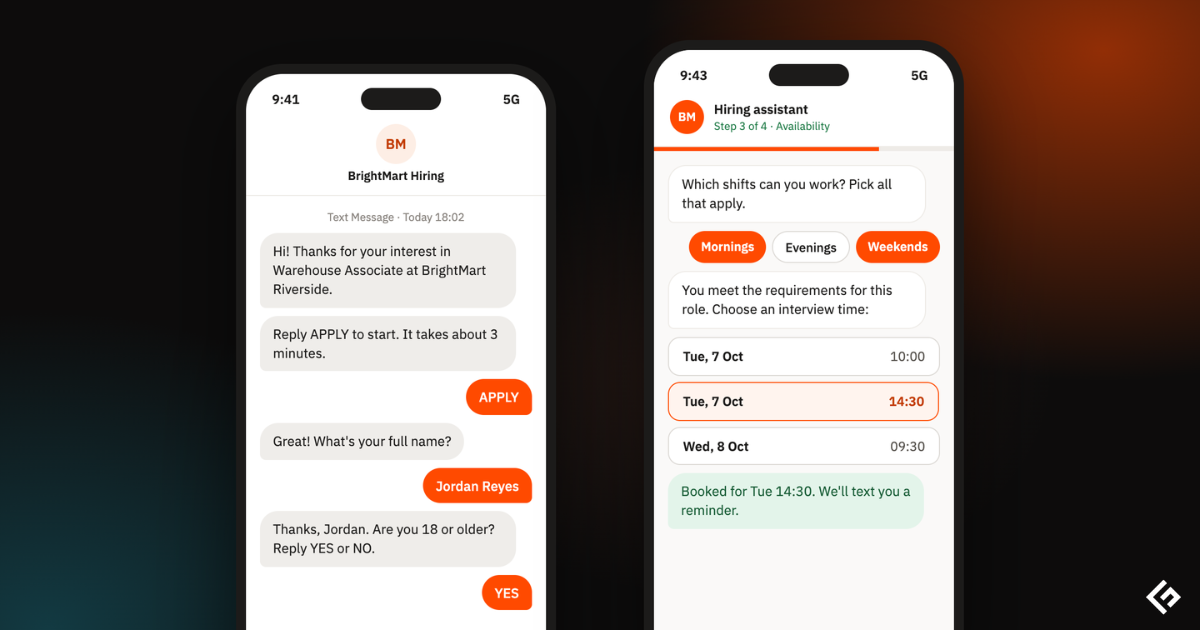
Retail, restaurants, logistics, and healthcare hire hourly workers in large numbers, often on a phone. A traditional desktop application form loses too many of those candidates.
High-volume systems are built around speed. Candidates can apply by text message or chat, answer a few screening questions, and book an interview on the spot.
Conversational AI assistants handle most of the back-and-forth, and managers at each location see only their own candidates.
Examples: Workday, Fountain, and the frontline tools in iCIMS and SmartRecruiters.
By Scope
Standalone ATS
A standalone ATS focuses on recruiting and does it well. It connects to your HR system through an integration, and the new hire’s data passes across once they accept an offer.
This is the right fit when recruiting is complex enough to need specialist features, or when you already have an HR system you’re happy with.
ATS inside an HR suite
Many HR platforms now include recruiting as a module. Because everything shares one database, an accepted offer turns straight into an employee record, with payroll, benefits, and onboarding following automatically.
The trade-off is depth. Recruiting modules in HR suites are often simpler than dedicated tools, especially for sourcing and reporting.
Examples: Workday Recruiting, Rippling Recruiting, BambooHR, Deel ATS.
All-in-one recruiting platform
A newer category combines the ATS with a recruiting CRM, sourcing, interview scheduling, and analytics. The goal is to replace three or four separate tools. These platforms are popular with fast-growing tech companies that source heavily.
Examples: Ashby, Gem.
Enterprise talent acquisition suite
At the top end, the ATS is one part of a larger suite that includes career sites, recruitment marketing, CRM, onboarding, and internal mobility. These suites handle many countries, brands, and languages, and connect to large HR systems such as Workday, SAP, and Oracle.
Examples: iCIMS, SmartRecruiters, Oracle Recruiting Cloud.
By Deployment
Cloud-based ATS
Almost every ATS sold today runs in the cloud. The vendor hosts the software, handles updates and security, and you log in through a browser. Setup is fast, and new features arrive without any work on your side.
On-premises ATS
An on-premises ATS runs on your own servers. It gives full control over data and customization, but you pay for hardware, maintenance, and IT staff. This model is fading fast.
On-premises still makes sense in a few cases, such as government agencies or companies with strict data residency rules.
Hybrid ATS
A hybrid setup keeps some data or components on your own servers and runs the rest in the cloud. It’s usually a stepping stone for large organizations moving off legacy systems, or a way to meet rules that require certain data to stay in-house.
Open-source ATS
Open-source ATS software is free to download, modify, and host yourself. You avoid license fees and get full control of the code and data. In exchange, you need developers to install, secure, update, and integrate it, and there’s no vendor support unless you pay for it.
| Deployment | Best for | Main drawback |
|---|---|---|
| Cloud | Most companies | Less control over data and customization |
| On-premises | Strict data rules, legacy environments | High cost and IT effort, few vendors left |
| Hybrid | Large organizations mid-migration | Complex to set up and run |
| Open-source | Teams with developers and tight budgets | You handle hosting, security, and support |
By Company Size
Small business ATS
Small teams need something they can set up in an afternoon. These tools focus on the basics: job posting, a simple pipeline, email templates, and a careers page. Several offer free plans for one or two open jobs, and paid plans often cost less than $100 a month.
Mid-market ATS
Once you have a dedicated recruiting team and dozens of hiring managers, you need more structure: interview scorecards, approval workflows, reporting, and integrations with your HR system and calendar.
Enterprise ATS
Enterprise systems handle thousands of requisitions across countries and business units. They add advanced permissions, audit logs, compliance tools for different regions, and deep integrations. Implementation usually takes months and often involves a partner.
How AI Is Blurring the Lines
AI features are showing up in every type of ATS, from free small-business tools to enterprise suites. Match scoring, interview notetakers, and AI assistants no longer mark a separate category.
What does vary is how far vendors let AI act on its own. Some only suggest, while others offer agents that source and screen candidates with limited human input. Our guide to AI in applicant tracking systems covers this in detail.
Which Type of ATS Do You Need?
Start with your situation, not the product list.
| If you… | Look at |
|---|---|
| Are a small company hiring a few roles a year | A small business ATS, possibly on a free plan |
| Already run payroll and HR on one platform | That platform’s recruiting module |
| Have a recruiting team and many hiring managers | A standalone or all-in-one mid-market ATS |
| Place candidates with client companies | An agency ATS with a built-in CRM |
| Hire hundreds of hourly workers | A high-volume or frontline ATS |
| Operate in many countries with complex approvals | An enterprise talent acquisition suite |
| Have developers and strict data control needs | An open-source or self-hosted ATS |
Once you know the type, compare specific products in our list of the best applicant tracking systems.