An applicant tracking system (ATS) is software that manages hiring from the moment a job opens to the moment someone accepts an offer. It posts jobs, collects applications, organizes candidates, and keeps everyone on the hiring team working from the same record.
If you’ve ever applied for a job online, you’ve almost certainly used one. Jobscan’s 2026 report found a detectable ATS on the career sites of 97.4% of Fortune 500 companies.
This guide explains what an ATS does, how it works step by step, the main types, how AI is changing it, and which common beliefs about it aren’t true. If you’re a job seeker, there’s a short section for you near the end.
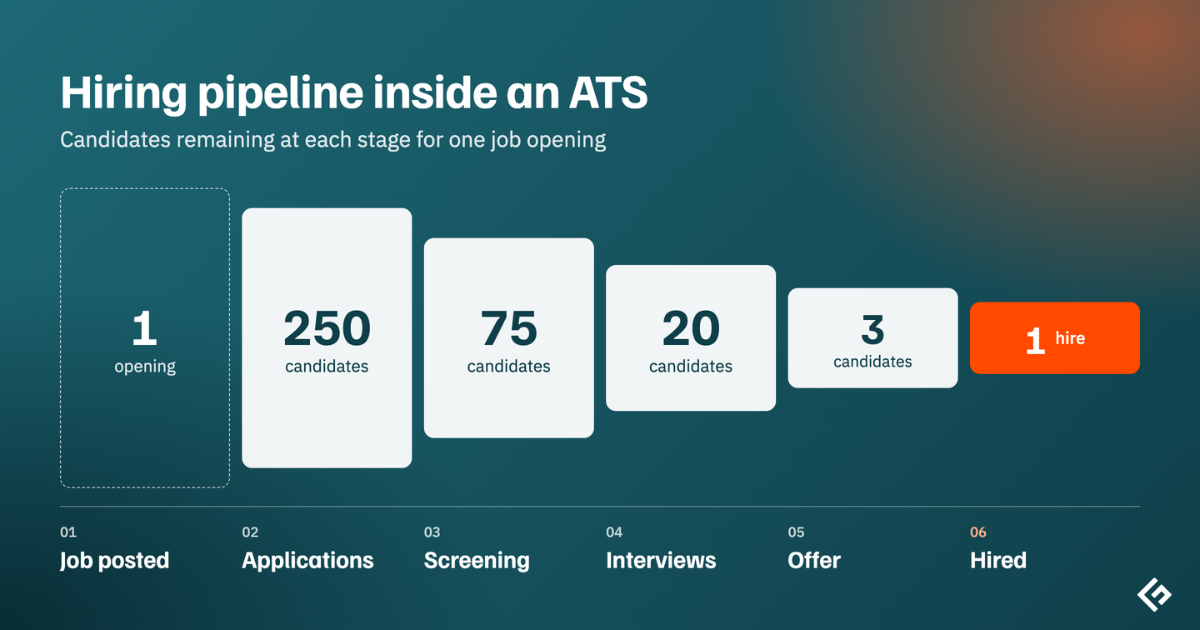
What Is an Applicant Tracking System?
An ATS is a database of candidates wrapped in a workflow. Every applicant becomes a profile with their resume, answers, messages, interview feedback, and status. Every job has a pipeline of stages, such as Applied, Phone Screen, Interview, Offer, and Hired, and candidates move through it one step at a time.
Before an ATS, most teams ran hiring out of an email inbox and a spreadsheet. That works for one or two roles. It falls apart when you have dozens of openings, hundreds of applicants, and several interviewers who all need to see the same notes.
Recruiters, HR teams, and hiring managers are the main users. Candidates interact with it too, through the careers page, application form, and emails it sends.
Quick definition
An applicant tracking system (ATS) is recruiting software that centralizes job postings, applications, candidate screening, interviews, and hiring decisions in one place.
How Does an ATS Work?
Most ATS platforms follow the same basic flow, even if the screens look different. Here’s what happens behind the scenes for a single job.
1. The job is opened and approved
A hiring manager requests a new role. The ATS routes the request for approval, often to finance or HR, and records details like the salary range, location, and interview team.
2. The job is posted
The ATS publishes the job on your careers page and pushes it to job boards like LinkedIn and Indeed with one click. It tags each application with its source, so you can later see which channels bring in the best people.
3. Applications come in and get parsed
When someone applies, the ATS stores their resume and uses a resume parser to pull out structured data such as name, contact details, work history, skills, and education. That turns thousands of differently formatted documents into searchable profiles.
4. Candidates are screened
This is the step people worry about most. Screening usually combines a few methods:
- Knockout questions: Simple yes or no questions, such as whether the candidate is authorized to work in the country or has a required license.
- Filters and search: Recruiters filter by location, experience, or skills, and search the database with keywords or Boolean strings.
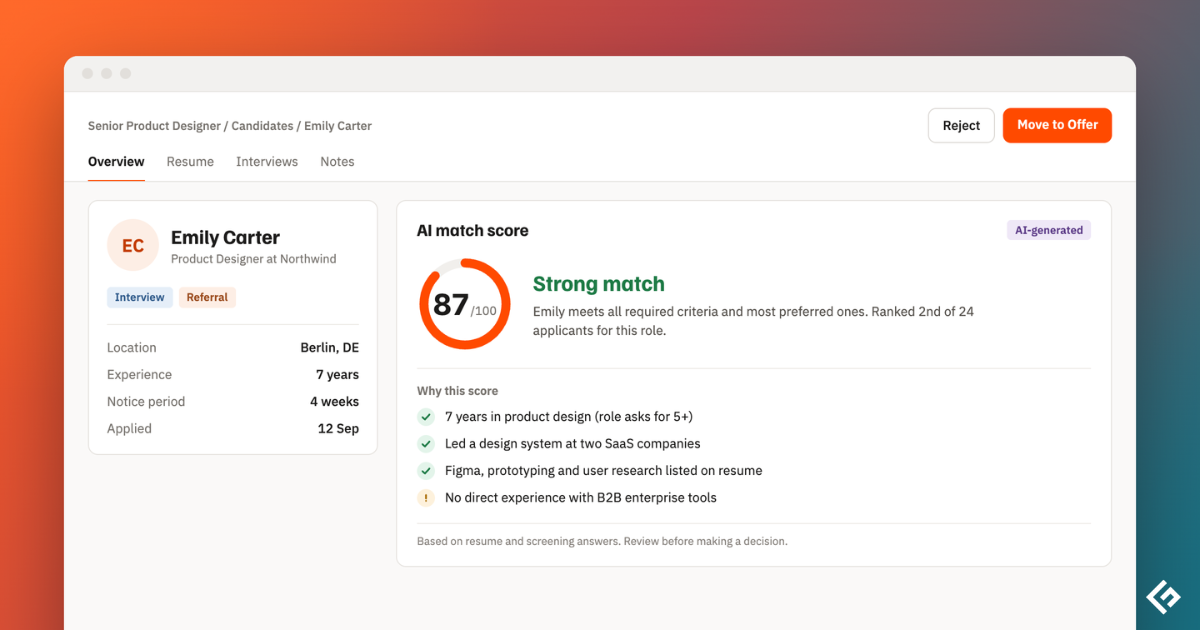
- Match scoring: Many modern systems score each applicant against the job requirements. The better ones explain the score so a recruiter can check it.
In most setups, the ATS sorts and highlights candidates. A person still decides who moves forward.
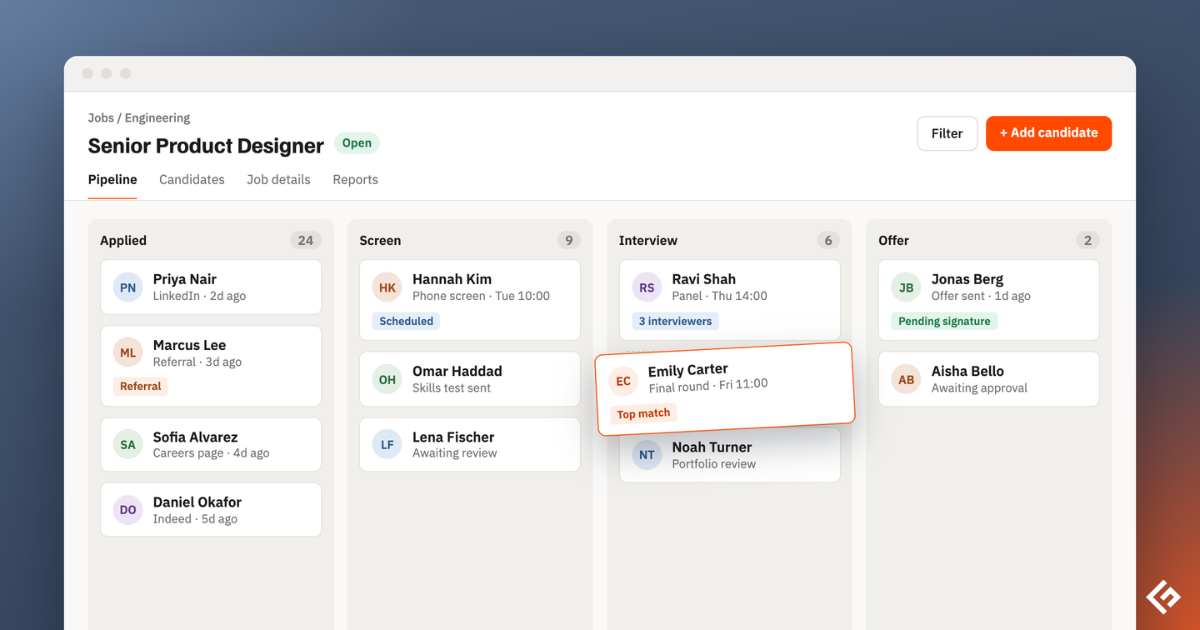
5. Interviews are scheduled and scored
The ATS connects to Google or Microsoft calendars so candidates can pick a time slot without a long email chain. Interviewers fill in scorecards against the skills the team agreed on, and all feedback lands on the candidate’s profile.
6. Candidates get updates
Templates and automations send confirmations, interview invites, reminders, and rejection emails. Some systems also send text messages and let candidates check their status on a portal.
7. The offer goes out
The team makes a decision, the ATS generates an offer letter from a template, routes it for approval, and collects an e-signature.
8. The hire moves to HR
Once the offer is accepted, the ATS passes the new hire’s details to the HR system for onboarding and payroll. That handoff is where an ATS stops and an HRIS takes over. Our comparison of ATS vs HRIS goes deeper on the difference.
How recruiters search the candidate database
An ATS also works as a long-term talent pool. When a new role opens, recruiters search past applicants before posting anywhere. Older systems relied on exact keyword matches, so a search for “JavaScript” could miss someone who only wrote “React.” Newer systems add semantic search, which understands related skills and job titles, and some suggest strong past candidates automatically.
Key Features of an ATS
Feature lists vary a lot between products, but these are the building blocks you’ll see in almost every one.
| Feature | What it does |
|---|---|
| Job posting and distribution | Publishes jobs to your careers page and job boards from one place |
| Careers page builder | Creates a branded page where candidates browse and apply |
| Resume parsing | Turns resumes into structured, searchable profiles |
| Screening tools | Knockout questions, filters, and match scoring |
| Pipeline management | Moves candidates through customizable hiring stages |
| Interview scheduling | Syncs calendars and lets candidates self-book |
| Scorecards and feedback | Collects structured ratings from each interviewer |
| Candidate communication | Email and text templates, automations, and status updates |
| Offer management | Generates, approves, and sends offer letters |
| Reporting | Tracks time to hire, source of hire, pass-through rates, and more |
| Integrations | Connects to job boards, calendars, HR systems, background checks, and assessments |
Types of Applicant Tracking Systems
ATS products differ in who they’re built for and how they’re delivered. The most useful ways to tell them apart are:
- Standalone vs HR suite: A standalone ATS focuses only on recruiting and connects to your HR system. An ATS inside an HR suite shares one database with payroll and onboarding.
- In-house vs agency: In-house systems manage hiring for one company. Agency systems also track clients, placements, and billing, and usually include a CRM. Our guide to recruitment software covers agency tools in detail.
- Cloud vs on-premises: Nearly all modern ATS products are cloud-based. On-premises installs still exist for strict data rules.
- By company size: Small business tools are simple and quick to set up. Enterprise systems handle complex approvals, many locations, and high volume.
- High-volume or frontline: Built for hourly hiring, often with text-based applications and instant interview booking.
For a closer look at each category, read our guide to the types of ATS.
How AI Is Changing Applicant Tracking Systems
AI has moved from a marketing label to working features in most ATS products. The most common ones today are:
- Explained match scores: The system rates each applicant against the job and shows why.
- Interview notetakers: AI records, transcribes, and summarizes interviews, then maps notes to the scorecard.
- Writing help: Drafts of job descriptions, outreach emails, and rejection messages.
- Agents: Tools that source candidates, screen them against criteria, or schedule interviews with limited human input.
- Fraud detection: Checks for fake identities, bot applications, and AI-written spam.
Fraud detection matters more than it used to. Gartner predicted that by 2028, one in four candidate profiles worldwide will be fake. In its survey of 3,000 job candidates, 6% admitted to interview fraud, such as having someone else sit the interview for them.
AI in hiring is also regulated. New York City requires bias audits for automated hiring tools, and the EU AI Act treats AI used in recruitment as high risk. We cover this in more detail in our guide to AI in applicant tracking systems.
Benefits of Using an ATS
For employers
- Faster hiring
- Fairer, more consistent decisions
- A reusable talent pool
- Better data
- A paper trail
For candidates
- Faster replies and clear updates instead of silence.
- Easier applications, including on a phone.
- Self-scheduling for interviews.
Limitations and Risks
An ATS is only as good as how it’s set up. The most common problems are:
- Knockout questions or rigid keyword rules can screen out good people who describe their skills differently.
- If the criteria or past data are biased, automated scoring can repeat that bias at scale.
- Long forms, account creation, and no updates push candidates away.
- An ATS holds a lot of personal data, so access controls, retention rules, and consent matter under laws like GDPR.
- If hiring managers keep feedback in email or chat, the system never becomes the single source of truth.
Common Myths About Applicant Tracking Systems
“An ATS rejects 75% of resumes before a human sees them”
This number is everywhere, and there’s no study behind it. It traces back to a 2012 sales pitch from Preptel, a resume-optimization company that closed the following year and never published its method. In practice, most rejections are made by recruiters, often because of sheer volume, not by software acting alone.
“An ATS makes hiring unbiased”
Structured scorecards and consistent stages reduce some bias. But an ATS follows the rules people give it, and AI scoring can inherit bias from its training data. That’s why bias audits and human review still matter.
“Only big companies need one”
Many ATS products are built for small teams, and some have free plans. Once you’re hiring for several roles at once or involving more than two or three interviewers, an ATS usually saves more time than it costs.
“An ATS replaces recruiters”
It replaces admin work. Recruiters still write the job, judge fit, sell the role, and make decisions. AI agents are taking on more of the repetitive steps, but hiring decisions remain with people in almost every setup.
“An ATS can’t read creative resumes”
Partly true. Most systems read PDF and Word files fine, but text inside images, multi-column layouts, and tables can confuse a parser. The recruiter can still open the original file, but the structured profile may be incomplete.
Tips for Job Seekers Applying Through an ATS
If you’re on the other side of the process, a few habits help your application get read properly.
- Use the same terms as the job posting where they honestly describe your experience.
- Stick to standard section headings like Experience, Education, and Skills.
- Use a simple one-column layout, and avoid putting key information in images, headers, or text boxes.
- Submit a PDF or Word file unless the posting asks for something else.
- Answer knockout questions carefully, because they’re often the only automated filter.
A good resume builder can help you create a clean, readable layout.
ATS vs HRIS vs Recruiting CRM
These three tools are often confused. Here’s the short version.
| Tool | Main job | Who it tracks |
|---|---|---|
| ATS | Manages active hiring for open jobs | Applicants |
| Recruiting CRM | Builds relationships with potential candidates before they apply | Prospects and talent pools |
| HRIS | Manages employee records, payroll, benefits, and time off | Employees |
Many modern platforms combine an ATS with a CRM, and some HR suites include an ATS.
Do You Need an ATS?
You probably do if any of these sound familiar:
- You’re hiring for more than a couple of roles at the same time.
- Applications arrive through several channels and some get lost.
- Interview feedback lives in email threads and chat messages.
- Candidates complain about slow or missing replies.
- You can’t answer simple questions like how long it takes to hire or where your best hires came from.
When you’re ready to compare products, start with our list of the best applicant tracking systems.
FAQ
What does ATS stand for?
ATS stands for applicant tracking system.
Is an ATS the same as recruiting software?
An ATS is one type of recruiting software. Recruiting software is the wider category, which also includes sourcing tools, recruiting CRMs, assessment platforms, and interview scheduling tools.
Can an ATS reject candidates automatically?
It can, if the employer sets up knockout questions or automatic rules. Most employers use an ATS to sort and rank candidates, and recruiters make the final decision.
Can an ATS read PDF resumes?
Yes. Most modern systems parse PDF and Word files well. Problems usually come from text inside images, tables, or multi-column layouts.