An ATS and an HRIS both store information about people, which is why they’re easy to mix up. The difference comes down to timing. An applicant tracking system (ATS) manages people before they’re hired. A human resources information system (HRIS) manages them after.
Quick answer
An ATS handles recruiting like job postings, applications, screening, interviews, and offers.
An HRIS handles employees: personal records, payroll, benefits, time off, and compliance.
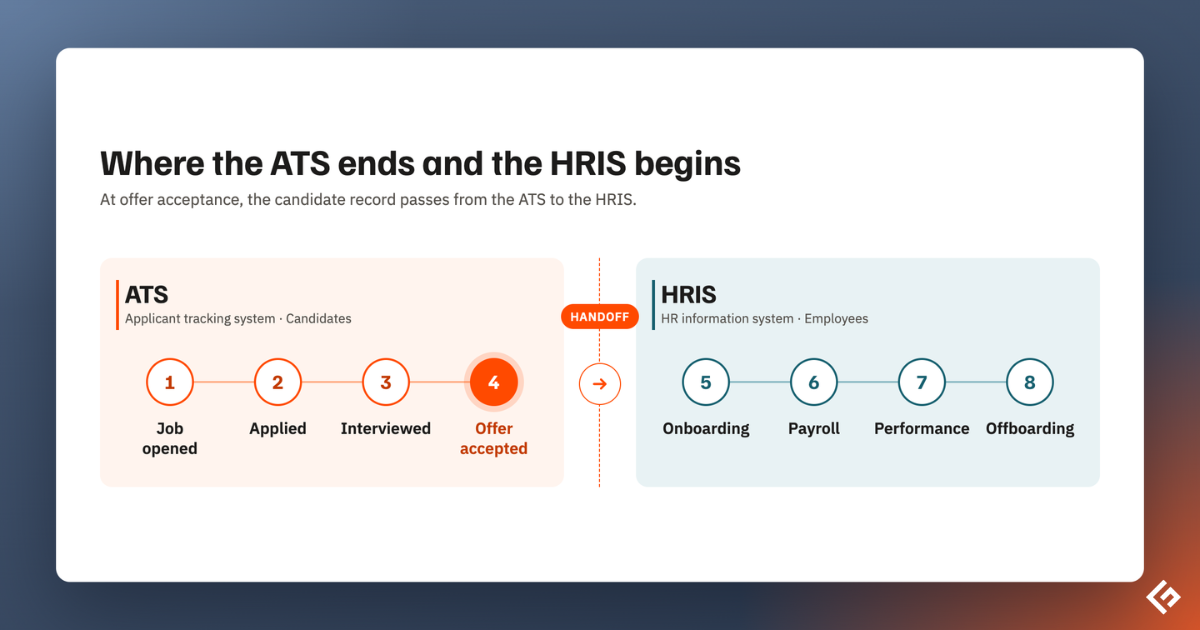
When a candidate accepts an offer, their data moves from the ATS to the HRIS.
ATS vs HRIS at a Glance
| ATS | HRIS | |
|---|---|---|
| Main job | Hire new people | Manage current employees |
| Who it tracks | Candidates and applicants | Employees and former employees |
| Stage of the lifecycle | From job opening to accepted offer | From first day to exit |
| Main users | Recruiters, hiring managers, interviewers | HR, payroll, managers, and every employee |
| Core features | Job posting, resume parsing, pipelines, interview scheduling, scorecards, offers | Employee records, payroll, benefits, time off, org charts, compliance reports |
| Key metrics | Time to hire, source of hire, pass-through rates, offer acceptance | Headcount, turnover, payroll costs, absence rates |
| Data sensitivity | Resumes, contact details, interview notes | Salaries, bank details, tax IDs, health and benefits data |
| Typical pricing | Per recruiter, per job, or by company size | Per employee per month |
What an ATS Does
An ATS runs the hiring process. It publishes jobs to your careers page and job boards, collects applications, and turns resumes into searchable profiles. Recruiters move candidates through stages, schedule interviews, collect feedback, and send offers, all from one place.
You can read more in our guide to what an ATS is and how it works.
The people inside an ATS are mostly outsiders. Most applicants will never work for you, so the system is built for high volume, quick decisions, and a good candidate experience.
What an HRIS Does
An HRIS is the system of record for your workforce. It stores each employee’s personal details, job title, manager, salary, and employment history. Around that core, most HRIS platforms handle some mix of:
- Payroll and tax filings
- Benefits enrollment
- Time off and attendance
- Onboarding tasks and documents
- Org charts and reporting lines
- Compliance reports and audits
- Employee self-service, such as updating an address or downloading a payslip
Because it holds salaries, bank details, and tax IDs, an HRIS needs stricter access controls than an ATS. Almost every employee logs in, while only the hiring team uses the ATS.
HRIS, HRMS, or HCM?
You’ll see these terms used almost interchangeably.
- HRIS usually means core records and payroll.
- HRMS often adds talent features like performance reviews.
- HCM (human capital management) is the broadest, covering the full employee lifecycle including recruiting and learning.
The Key Differences
They cover different stages
The ATS covers the stretch from job opening to signed offer. The HRIS starts on the new hire’s first day, or during pre-boarding, and follows them until they leave. The two meet at a single moment: the accepted offer.
They serve different users
An ATS is built for recruiters and hiring managers, plus candidates who see the careers page and application form. An HRIS is used by HR and payroll teams and by every employee through self-service.
They answer different questions
An ATS tells you how fast you’re hiring, where good candidates come from, and where they drop out. An HRIS tells you how many people you employ, what they cost, and who’s leaving.
They follow different data rules
Candidate data usually has shorter retention periods and consent requirements, especially under GDPR, since most applicants never join. Employee data must often be kept for years for tax and employment law.
Where the ATS Hands Off to the HRIS
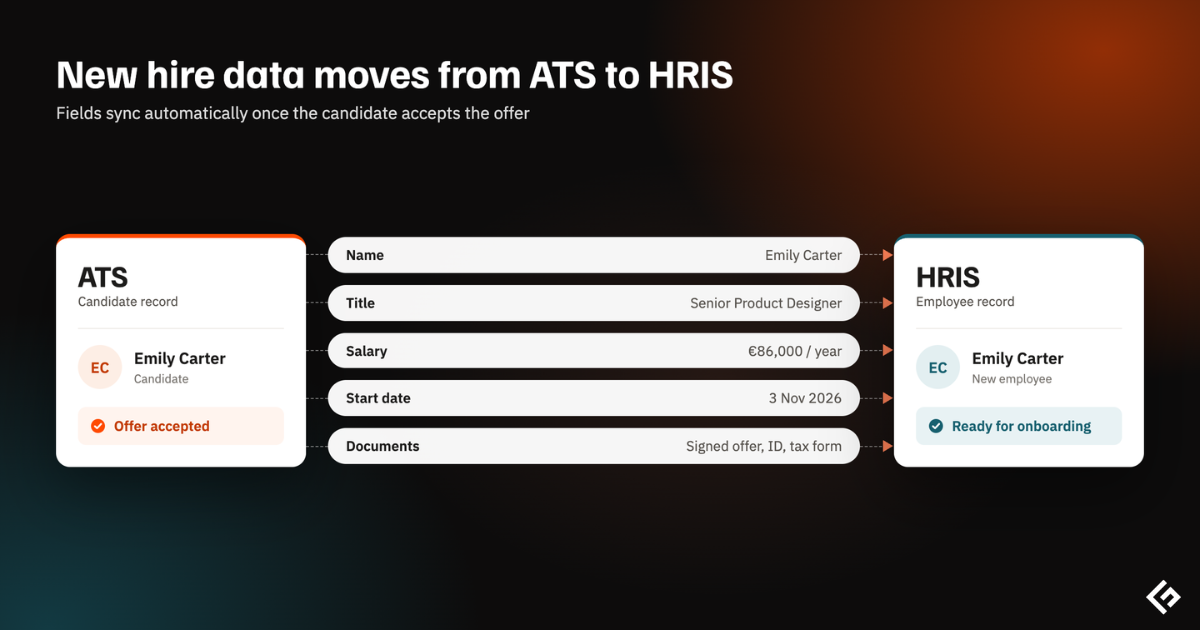
The handoff is where most of the value, and most of the problems, sit. When an offer is accepted, the new hire’s details should flow into the HRIS automatically, including:
- Name, contact details, and home address
- Job title, department, location, and manager
- Start date and employment type
- Salary, pay frequency, and any signing bonus
- Signed offer letter and documents
Without an integration, someone retypes all of this, which is slow and invites errors in payroll. With one, onboarding tasks, IT accounts, and payroll setup can start as soon as the offer is signed.
Do You Need Both?
Most growing companies end up with both functions. The real question is whether they come from one vendor or two.
Option 1: An HRIS with a built-in ATS
Many HR platforms now include recruiting as a module, including BambooHR, Rippling, Workday, and Deel. Everything shares one database, so an accepted offer becomes an employee record without an integration.
The catch is depth. Built-in recruiting modules are often simpler than dedicated tools. BambooHR, for example, caps open jobs by plan, starting at five on its entry tier. Deel sells recruiting as an add-on that requires its HR platform.
Option 2: A standalone ATS connected to your HRIS
Dedicated ATS products usually offer stronger sourcing, structured interviews, reporting, and candidate experience. They connect to your HRIS through a native integration or an API, and pass the new hire across when they accept.
| HRIS with built-in ATS | Standalone ATS + HRIS | |
|---|---|---|
| Setup | One system, one contract | Two systems plus an integration |
| New hire handoff | Automatic, same database | Depends on the integration quality |
| Recruiting depth | Basic to moderate | Moderate to advanced |
| Best for | Smaller teams with simple hiring | Teams that hire often or at scale |
| Risk | Outgrowing the recruiting module | Integration breaking or data drifting |
A rough rule: if you hire a few people a year and already like your HR platform, try its recruiting module first. If recruiting is a constant, multi-person job, a dedicated ATS usually pays off.
How to Connect an ATS and an HRIS
- Check for a native integration
- Map the fields
- Decide the trigger
- Test with a real hire
- Sync open roles back
Which One Should You Buy First?
If you have employees, you need somewhere to run payroll and keep records, so most companies get an HRIS first. An ATS becomes worth it once hiring outgrows email and spreadsheets, usually when several roles are open at once or several people interview each candidate.
To compare recruiting options, see our list of the best applicant tracking systems.
Good to Know
What is the difference between an ATS and an HRIS?
An ATS manages recruiting, from job posting to accepted offer. An HRIS manages employees after they’re hired, including records, payroll, benefits, and time off.
Can an HRIS work as an ATS?
Some can. Many HR platforms include a recruiting module, but these are often simpler than dedicated ATS products. They suit companies with light or occasional hiring.
Is an ATS part of an HRIS?
Not by default. An ATS can be a standalone product or a module inside a broader HR suite. HCM platforms include recruiting, while basic HRIS tools often don’t.
Should an ATS integrate with an HRIS?
Yes, if you use both. An integration moves new hire data automatically when an offer is accepted, which avoids retyping and payroll errors.