Imagine a single hire with no integrations at all. A recruiter copies the job description into four job boards, interview times get settled over a dozen emails, someone downloads the signed offer and uploads it to the HR system. Then payroll retypes the salary, hopefully correctly.
That’s what an applicant tracking system without integrations looks like, and it’s why the integrations page is one I always read closely when comparing vendors. An ATS on its own is just a database. The connections are what turn it into the center of your hiring.
Put simply, an ATS integration is a link between your ATS and another tool, such as a job board, calendar, background check provider, or HR system, so data moves between them without anyone copying it by hand.
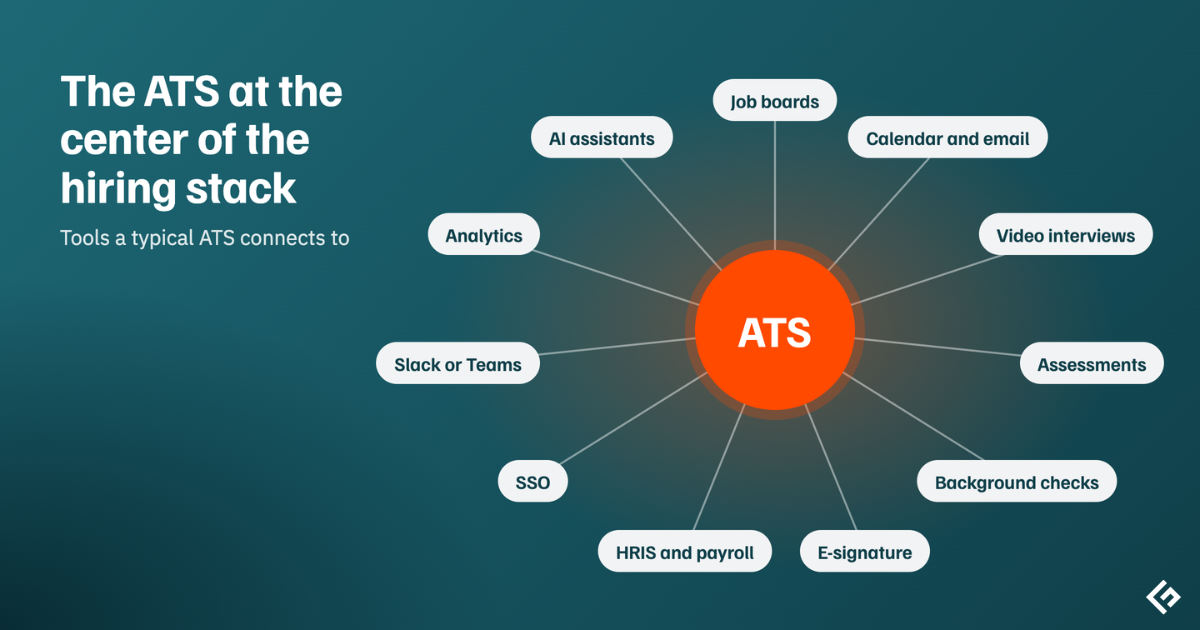
Why Integrations Matter
A typical hire touches eight or more tools. Every place where data gets retyped is a place where it can go wrong, and the most expensive mistakes tend to happen right at the end, when a salary or start date lands in payroll.
Good integrations remove most of that. Candidates book their own interview slots. Background checks start the moment someone reaches the right stage. The offer goes out for e-signature and the signed copy files itself. When it works, everything about a candidate sits on one profile.
The Integrations You’ll Actually Use
Software vendors love to quote big integration counts. In practice, a handful of connections do most of the work. Below is a quick map, followed by a closer look at the ones that matter most.
| Integration | What it does | Data flow |
|---|---|---|
| Job boards and aggregators | Posts jobs to LinkedIn, Indeed, and niche boards, and brings applications back | Out, then back |
| Careers site | Lists open roles on your website and collects applications | Out, then back |
| Calendar and email | Schedules interviews and logs emails on the candidate’s profile | Two-way |
| Video interviewing | Adds meeting links or one-way video interviews | Two-way |
| Assessments | Sends tests and returns scores | Two-way |
| Background checks | Orders checks and returns results | Two-way |
| E-signature | Sends offers for signature and stores the signed copy | Two-way |
| HRIS and payroll | Creates the employee record when an offer is accepted | Mostly ATS to HRIS |
| Single sign-on | Lets staff log in with company credentials | Identity provider to ATS |
| Slack or Teams | Pushes hiring updates and feedback reminders | ATS to chat |
| Sourcing tools and CRM | Imports sourced prospects with their history | Two-way |
| Analytics and BI | Sends hiring data to dashboards and warehouses | ATS to BI |
| AI assistants (MCP) | Lets tools like Claude or ChatGPT query hiring data | Two-way |
Job boards
Almost every company uses this one. You post once and the job goes out to many boards, with each application tagged by where it came from. Over time that is how you learn which boards are worth paying for.
One thing worth checking whether candidates can apply without leaving the job board. Every extra page or login in an application costs you applicants.
Calendar, email, and video
Connect Google Workspace or Microsoft 365 and candidates can pick from your calendar instead of emails for two days. Every email also lands on the candidate’s profile. Video integrations with Zoom, Teams, or Google Meet add meeting links automatically, and many systems now record and summarize interviews too.
Assessments and background checks
When a candidate reaches a certain stage, the ATS triggers the check and brings the result back, so recruiters aren’t logging into three portals. If you hire in places that require candidate consent for background checks, make sure the integration handles it.
E-signature and offers
Many ATS products generate offer letters from templates and collect signatures themselves. If your developers are building a custom offer flow, our guide to e-signature APIs covers the options.
HRIS and payroll
If I had to pick one integration to get right, it would be this one. When a candidate accepts, their name, title, manager, start date, and salary should flow into the HR system. We go deeper on this handoff in ATS vs HRIS.
SSO and chat tools
Single sign-on, Microsoft Entra ID, or Google is mostly about security. When someone leaves, turning off their company account also cuts off ATS access, which is exactly what you want. Chat integrations push hiring updates into Slack or Teams. For a lot of teams, that’s where people actually notice a reminder to submit feedback.
AI assistants
This is the newest kind and Greenhouse, Ashby, Workable, and Pinpoint all launched MCP servers, which let assistants like Claude, ChatGPT, or Copilot read hiring data and update it. Our guide to AI in applicant tracking systems covers what that looks like in practice.
How Integrations Are Built
Two vendors can both list “Integrates with BambooHR” and mean very different things. It’s worth asking how the connection is actually built.
A native integration is built and maintained by the ATS software vendor. You switch it on in settings, and it’s the most reliable option. Marketplace apps are built by third parties and listed in the vendor’s store.
If neither exists, your developers can use the ATS’s REST API. That’s the most flexible route, and also the one that needs someone to maintain it.
And for simple jobs, no-code tools like Zapier or Make can link a trigger to an action in minutes.
Is a Bigger Integration Count Better?
Not really. Pinpoint lists more than 100 integrations, Workable more than 270, Greenhouse’s partner directory more than 450, and iCIMS more than 800 partner technologies. Those numbers tell you about the size of the ecosystem. They don’t tell you whether the five tools you actually use connect well.
I’d rather see a short list with native, two-way connections to my calendar, HR system, and background check provider than a long list of thin ones.
Where Integrations Go Wrong
The most common problem is a partial sync. The integration pushes data one way but never brings updates back, or it quietly skips a field you rely on. Close behind is field mapping like “Sales” in one system and “Sales Team” in the other, or locations written three different ways.
Duplicates are another classic. The same candidate arrives through a job board and a referral and ends up as two people.
Checking a Vendor’s Integrations Before You Buy
Start by listing every tool your hiring process touches today, then confirm each one connects. For each connection, ask whether it’s native or third-party, what data syncs, and in which direction. Payroll and the HR system deserve the most scrutiny.
Check which plan includes the integrations you need, because it isn’t always the one in the demo. If you plan to build your own, ask for the API documentation and rate limits, and check for webhook support.
Most importantly, test the key connections during the trial with a real job and hire. Ten minutes of watching a test hire land in payroll tells you more than any integrations page.
If you’re still choosing a system, our list of the best applicant tracking systems notes integration counts for each.