Managing the workforce is always a challenge, especially if you’re not using any specialized software for it. This is because of how the market is evolving. It is now a mix of a distributed or growing workforce, with still a large workforce working remotely.
Gallup’s Hybrid Work Study reveals that 80% of the workforce is geographically distributed, with 52% of remote-capable workers now in a hybrid environment and only 26% working remotely exclusively.
For organizations, this means a challenge to manage them, especially when they’re scattered geographically.
In this guide, I’ll discuss the top employee management software. These tools will help you manage operational demands, automate manual administrative burden and improve core workflows.
What is Employee Management Software?
Employee management software (EMS) is a specialized subset of HR software that focuses on overseeing and automating daily workforce operations via a single interface.
It helps automate administrative tasks while centralizing employee data. On the compliance side, EMS ensures compliance with local and international labor laws and tax regulations, reducing the burden so that businesses can focus on strategic workforce planning and employee engagement.
EMS gives employees many self-service tools such as:
- Payslip/pay stub access
- Leave requests and approvals
- Attendance and shift viewing
- Performance review access
- Training and onboarding modules
- Personal profile and document updates
Administrators/mangers, on the other hand, get access to tools like:
- Performance tracking dashboards
- Workforce scheduling and shift management
- Team attendance and time tracking
- Reporting & analytics
To better understand, below are the core ROI benefits of using employee management software:
- Significant time saved by automating repetitive administrative tasks such as leave requests, shift creation, etc.
- Reduced compliance risk by offering built-in legislative tracking and ensuring it matches evolving local and international labor laws.
- Enhanced employee retention by offering key job information such as performance tracking, scheduling, pay stubs, etc.
Top Employee Management Software
Hibob
Hibob is one of the top employee management software solutions for modern businesses. It is completely cloud-based and offers full support for HRIS (Human Resources Information System). It’s best suited for mid-sized and culture-driven teams.
I recommend Hibob for remote-first teams and businesses that are rapidly growing (with a headcount of 50 to 1500 employees). You can try Hibob via its free demo option. They offer no free trial.
I found Hibob’s interface intuitive and engaging. Its social-media-inspired dashboard is welcoming and invites employees to engage. If you want a full glimpse without going through its demo, check out this detailed HiBob core HR demo.
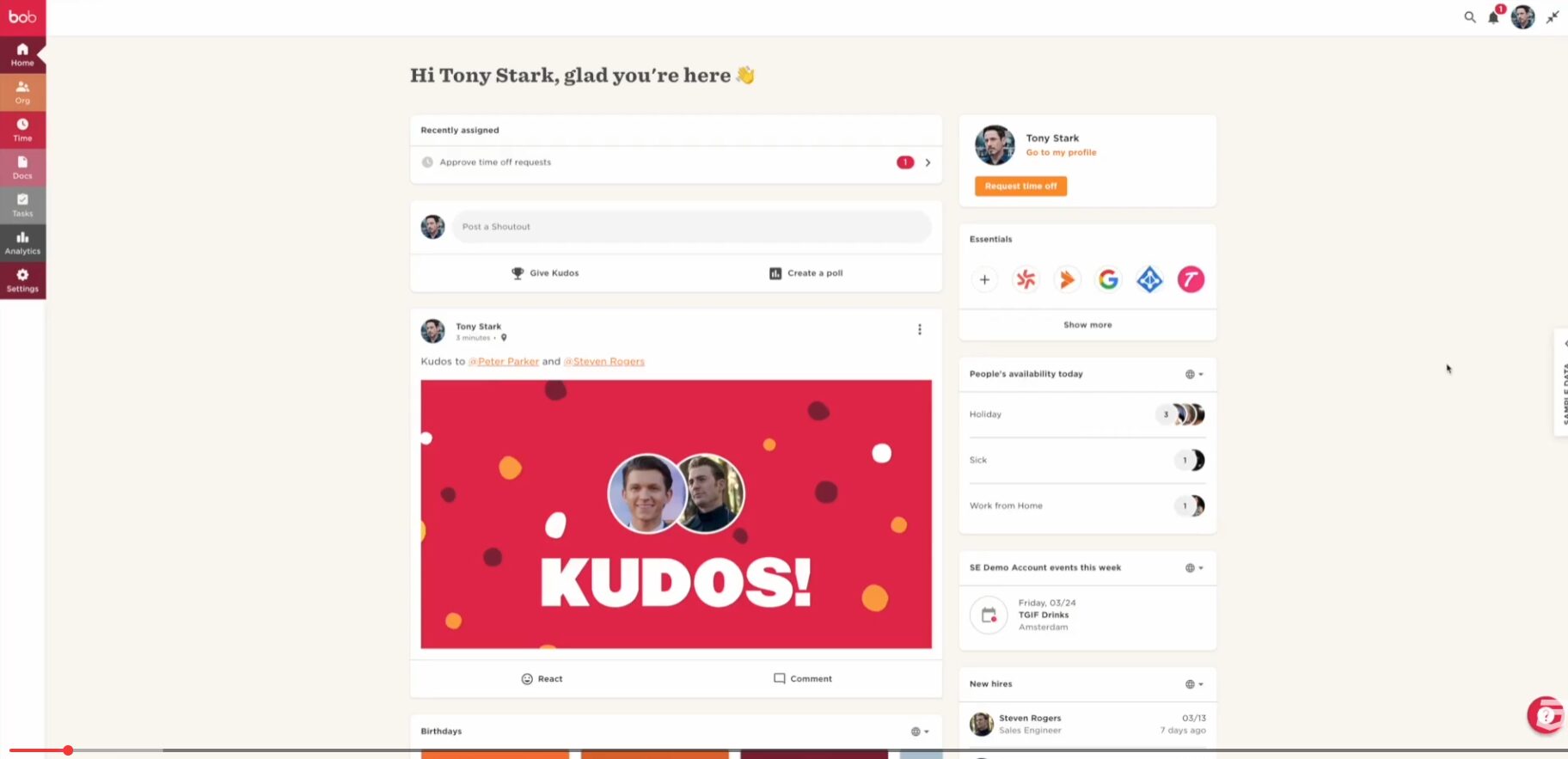
As it is an all-in-one HR solution, it offers core HR features, talent management, payroll solutions, finance, and planning & compensation.
Hibob key features include:
- Centralized employee data
- Document management
- Lifecycle workflows with automation and checklists
- Analytics & reporting with dynamic interactive charts
- Mobile app
Hibob Pros & Cons
PROS
CONS
Hibob Pricing
Hibob has no public pricing. To get a quote, contact their sales team.
Workforce
Workforce is perfect if you’re looking for an all-in-one HR solution that also includes a well-placed employee management solution. It is crafted for small to medium-scale businesses, especially those that are operations-heavy and front-line, such as in retail, hospitality, and healthcare sectors.
At its core, you get a feature-rich HR, scheduling, and payroll solution. Here, you can build staff schedules, onboard new hires, and even calculate complex pay taxes. The dashboard for both the web and mobile app is neat and offers visible insight into your workforce.
Workforce offers no free plan to try; however, you can give its demo a try before making a purchase decision. It is best suited for hourly billing businesses and comes with 1-click payroll compliance, all-in-one HRIS, and forecasting & shift swapping.
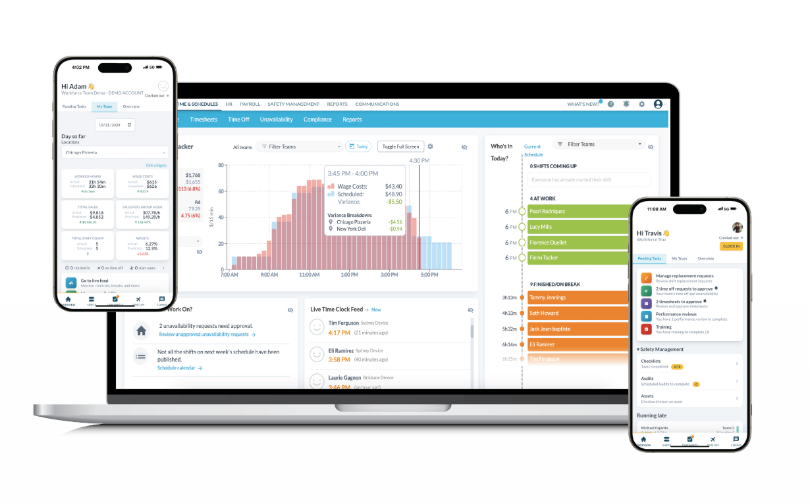
Workforce key features include:
- HR templates and resources for quick-start and guidance
- Build schedules and manage labor costs
- Use AI for labor forecasting
- Onboarding, HRIS, application tracking
- Complete payroll automation from approval to wage & hour automation
Workforce Pros & Cons
PROS
CONS
Workforce Pricing
Workforce.com follows per-user pricing. To get a quote, you need to contact their sales team. They offer separate pricing for employee scheduling, HR, and payroll solutions.
Connecteam
Connecteam is a mobile-first platform that helps business managers keep connected with their remote and field personnel.
It is ideal for small to medium-scale businesses, while small businesses can enjoy its free plan with no limits (provides access to all features). As for use case, I recommend it for businesses that deal with mobile workforces in logistics, retail, and cleaning.
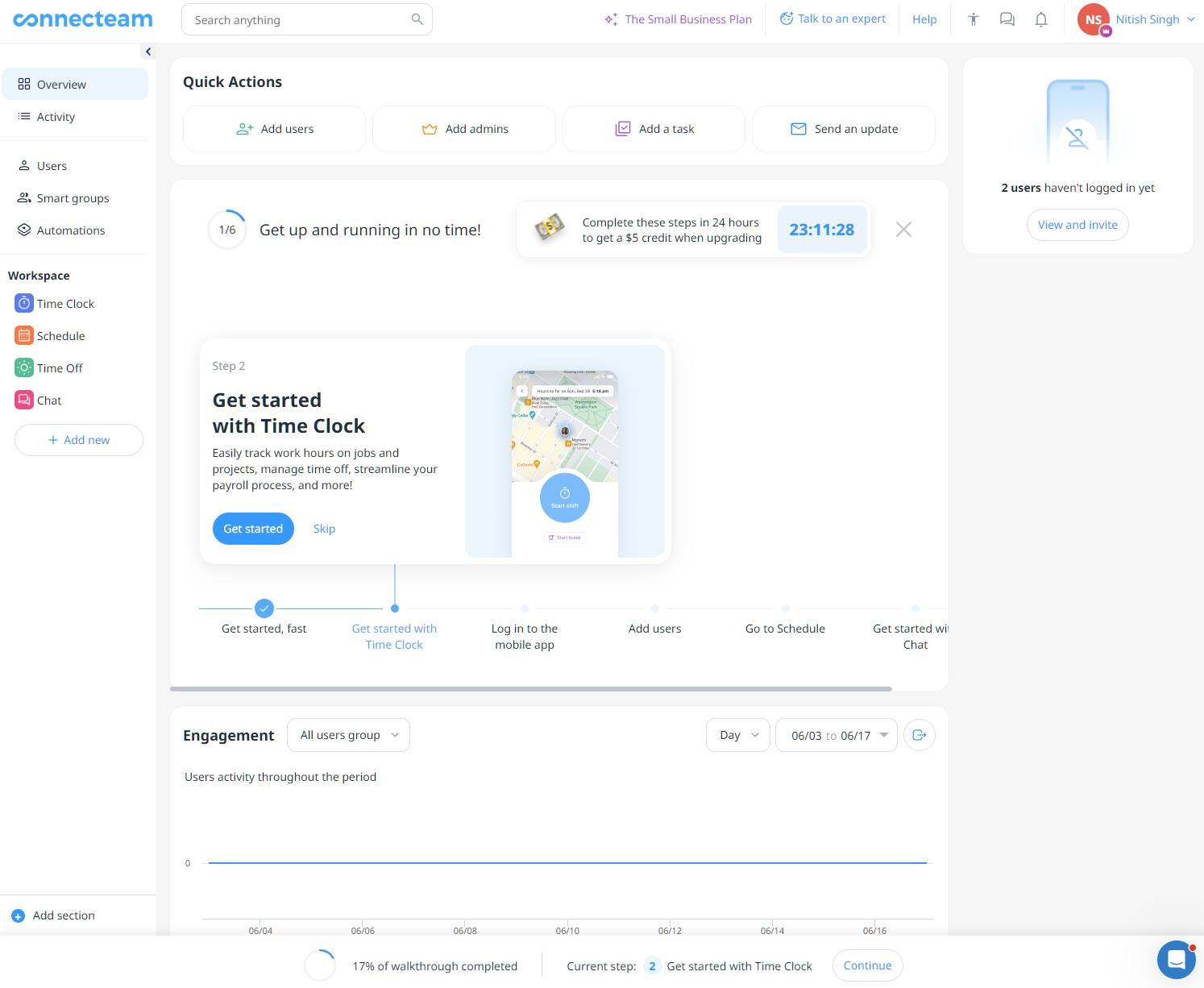
Its free plan is very useful to try out all features. The dashboard is clean with clear options available across the sidebar. Additionally, its user interface is completely customizable and uses user permissions to ensure streamlined communication. The mobile app is equally powerful. However, I felt the necessity to enter a mobile number to access its web interface slightly annoying.
Connecteam’s key features include:
- Mobile time tracking
- Drag-and-drop shift scheduling
- Real-time task management
- Internal chat hubs
Connecteam Pros & Cons
PROS
CONS
Pricing
Connecteam paid pricing starts at $29 per month (billed annually). It also offers a free plan for businesses with up to 10 employees. All plans come with a trial.
Homebase
Homebase is a simple-to-use employee management software that offers core HR features such as scheduling, time tracking, payroll, and hiring.
Homebase is best for local and brick-and-mortar storefronts where people work in shifts. With Homebase, they can simplify payroll execution and shift coordination.
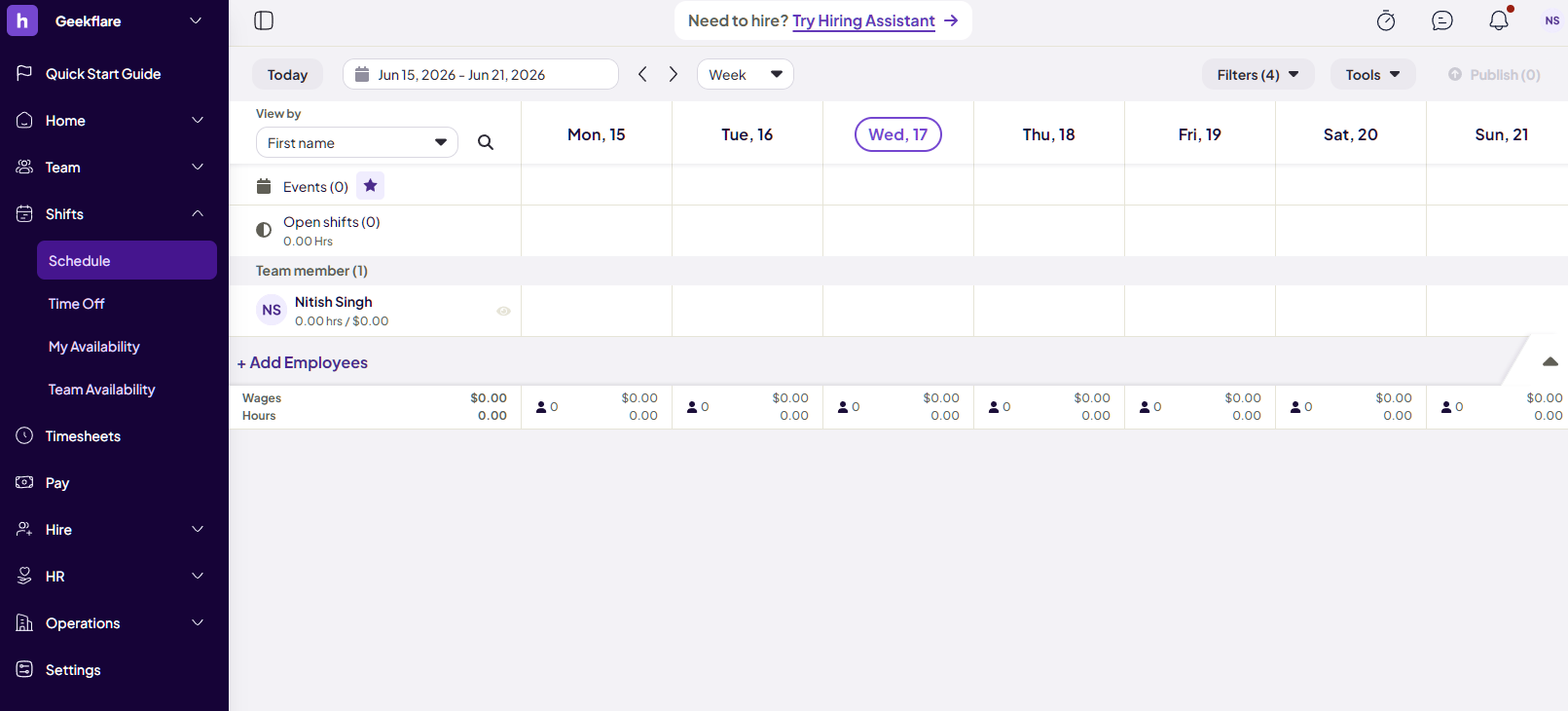
Homebase’s 14-day trial plan is decent. Once you sign up (it only supports US, UK, and Canada locations), you can do a quick schedule by uploading a file/screenshot or photo. It also allows quick setup via IRS EIN verification, which can be handy for local businesses. Additionally, I found its interface clean, especially its schedule management.
Homebase key features include:
- Drag-and-drop shift builder
- GPS clock-in verification
- Built-in labor cost controls and budgeting options.
- Built-in payroll with option to integrate with popular payroll options
- Full tax-filing payroll add-ons (restricted to US and offered via paid standalone add-on)
Homebase Pros & Cons
PROS
CONS
Pricing
Homebase pricing starts at $24 per location per month (yearly plan) with no limits on employees. It offers a free basic plan with 1 location support and up to 10 employees. In addition, you may have to pay extra for add-ons.
BambooHR
If you want user-friendly employee management software, then BambooHR is a great choice. BambooHR is an HR software that also includes hiring & onboarding, data & reporting, and payroll.
I went through its free demo to find that it is a perfect fit for small to medium-sized businesses (SMBs). The whole experience is smooth and worthwhile for both employees and employers. However, what most impressed me is the employee record and management capabilities of BambooHR, as it offers seamless data flow (end-to-end employee lifecycle) and employee self-service. In addition, their analytics and reporting are impressive, as they help provide employee performance insights via dynamic dashboards.
BambooHR key features include:
- Integrated application tracking system (ATS) with support for external job boards
- Digital onboarding/offboarding workflows with checklists
- Performance management and appraisal
- Reporting and analytics with charts and graphs
- Secure centralized employee database
BambooHR Pros & Cons
PROS
CONS
Pricing
BambooHR pricing starts at $10 USD per employee per month for its basic Core plan. The cost of implementation fees is different.
monday.com
monday.com is one of the most advanced employee management software solutions out there. It works like an operating system where you can configure almost everything to match your employee management and HR pipelines.
Due to its advanced feature set, we recommend monday.com to medium to large and enterprise teams. It’s best suited for cross-functional teams with a creative outlook. Moreover, it is the right tool for building custom workforce management pipelines via a unified collaborative workspace.
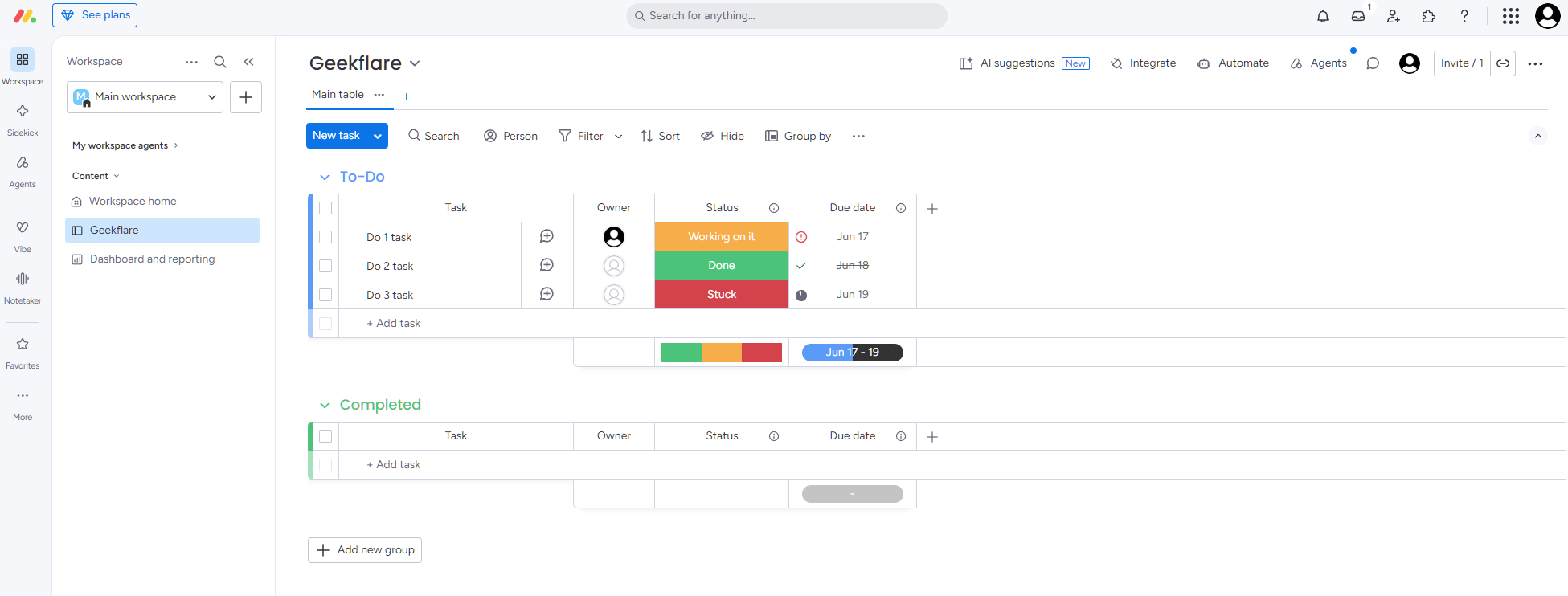
I have been using monday.com in the past (with an on-and-off relationship). It served me well, and it’s surprising to see how much it has evolved (AI integration being the latest). Its free plan was good to get started, but quickly got limited, and hence I jumped back to Trello as a freelancer. monday.com has a strong user interface that prioritizes ease of use.
monday.com key features include:
- Fully customizable tracking boards
- Paperless onboarding checklist
- Automated recruitment pipelines
- Agent-driven automation
- Custom KPI performance dashboards
monday.com Pros & Cons
PROS
CONS
monday.com Pricing
monday.com offers free and paid plans. The free plan offers up to 2 seats with up to 3 boards, 3 docs, and access to 200+ templates.
The paid plans start at $9 per seat/month (3-seat minimum). Each paid plan has its own AI credits/month and access to AI tools.
Gusto
Gusto is my favorite when it comes to a complete end-to-end HR solution with an employee management solution. It is cloud-based and helps businesses automate core HR operations.
It’s great for small to medium-scale businesses, especially for growing businesses, as it adapts to new demands easily.
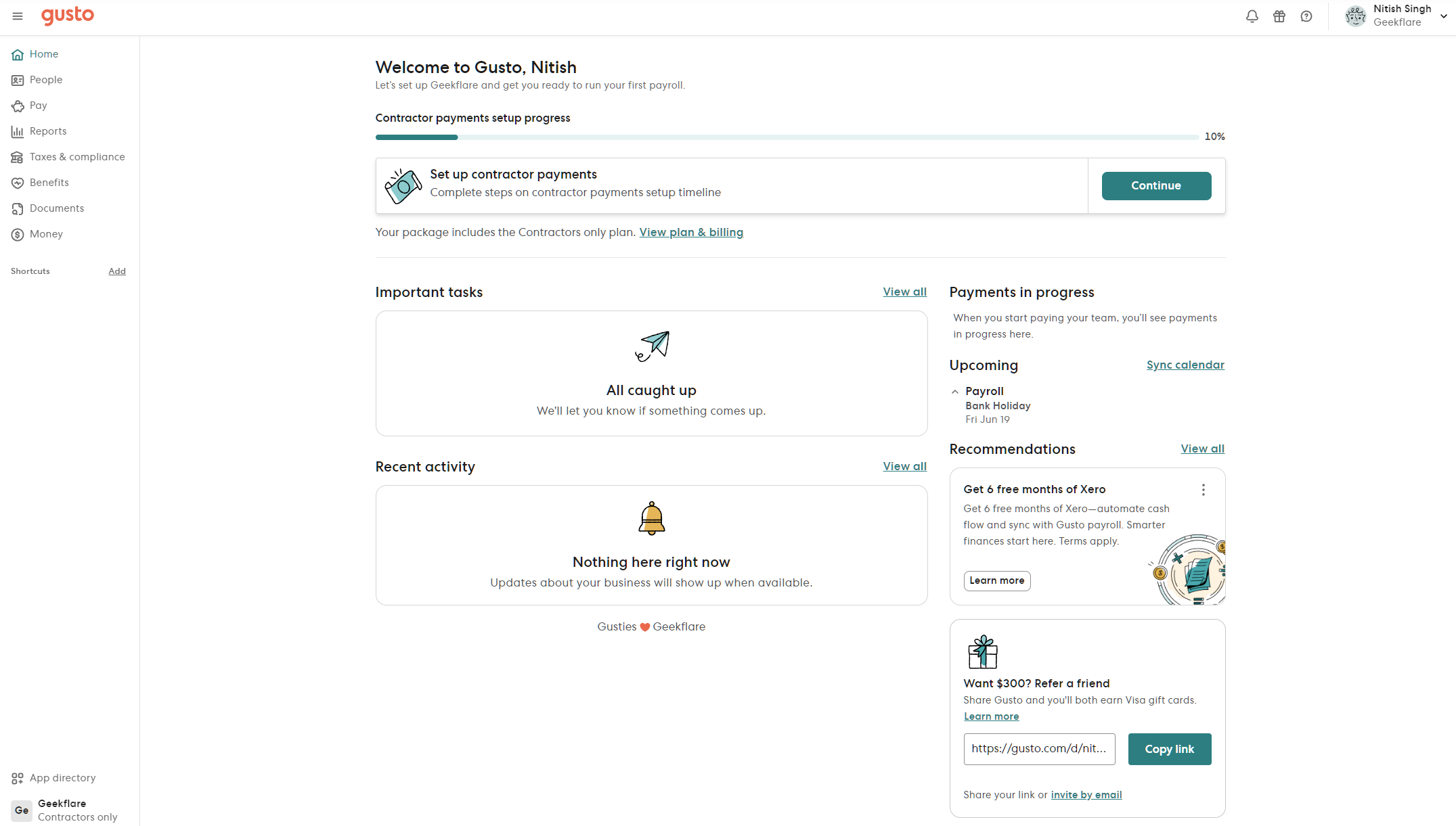
Gusto does let you create a free account, but doesn’t let you access any features. Once registered, it gives you a long onboarding process, only to suggest which plan is best for you. However, Gusto does let you browse its interface. I liked the interface and dashboard. It’s minimal and intuitive, while giving insights into important things such as tasks and activity.
Gusto’s key features include:
- Supports local, state, and federal tax filing with multi-state payroll
- Paperless employee self-onboarding
- Time and PTO tracking
- Group health insurance administration
Gusto Pros & Cons
PROS
CONS
Gusto Pricing
Gusto team’s pricing starts at $49/month with $6/month per person cost.
Deel
Deel is a perfect pick for organizations that deal with remote contractors and global compliance. It excels at handling and resolving global regulatory challenges and provides a seamless solution for hiring, onboarding, and paying talent all over the world. It supports more than 150 countries.
We suggest Deel for international clients working in a remote-first setup with distributed talent. They can use Deel to easily scale and manage both contractual and full-time international workers.
Personally, I have been part of Deel as a contractor, working for global clientele. As a contractor, I had one of the best contract and payment handling experiences via Deel. It offers seamless onboarding, contract signing, and dispute management.
Deel’s key features include:
- Global Employer of Record (EOR) hosting
- Automates international compliance management
- Automates global tax form collection (including W-8/W-9)
- Easy administration via tools
Deel Pros & Cons
PROS
CONS
Deel Pricing
Deel offers different tiers of plans for different features.
For Hire Employee of Record plans start at $599 per employee per month.
Deel HR capabilities start at $5 per employee per month;
Managed payroll starts at $29 per employee per month.
Workday
Workday is an enterprise HCM (Human Capital Management) system that automates work across HR, Finance, and IT. It is best for large enterprises as it offers deep analytics, scalability, and financial management integrations.
Workday is an AI-powered offering that includes AI agents that understand work and help in finding, building, and automating work processes across the organization. For example, its WorkdayGO (a specialized deployment framework) drives faster and easier deployment.
As Workday excels at enterprise-level, it is fully equipped with legal, IT, and finance tools to meet enterprise-level demands.
Workday’s key features include:
- Skill-cloud mapping with predictive workforce planning
- International compliance and regulatory demands
- Enterprise multi-country payroll networks
- AI-agents to automate work processes
Workday Pros & Cons
PROS
CONS
Workday Pricing
Workday has no public pricing. To get a quote, contact their sales team.
Justworks
Justworks is ideal for small businesses that don’t want to spend on enterprise-level solutions such as Workday. Justworks fits U.S. businesses with a focus on Professional Employer Organization (PEO) co-employment capabilities.
Justworks’ live demo gives insights into their capabilities. From my perspective, it offers a clean interface with well-distributed features to handle hiring, onboarding, payment, international benefits, and much more.
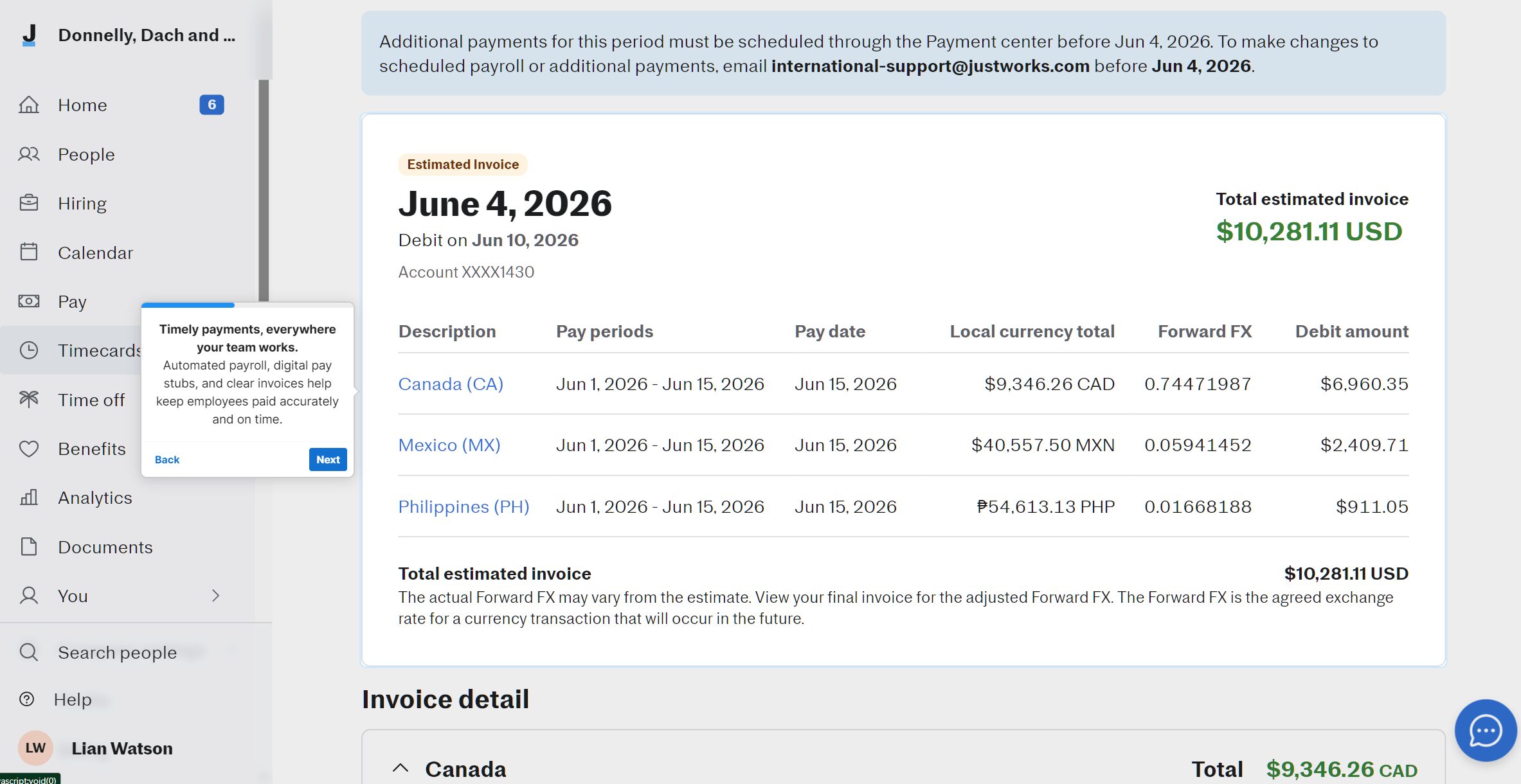
Justworks’ key features include:
- Automated federal, state, and local payroll tax filing
- Paperless worker onboarding
- Timely payments for both local and international employees/contractors
- Offers benefits to international employees
- Built-in statutory policies based on the country’s mandatory leave requirements
Justworks Pros & Cons
PROS
CONS
Justworks Pricing
Justworks pricing starts at $8/month/employee with a $50 per month base fee.
Eddy
Eddy is one of the best HR & payroll software that also handles employee payroll and other features. It offers a streamlined set of features, ideal for small to medium-scale businesses. In fact, Eddy excels at HRIS for payroll processing.
We recommend Eddy for businesses in various industries that have non-desk workers, including plumbing firms, construction companies, and local manufacturing.
Eddy offers a free demo and a 7-day trial (however, I never got to try it as they never sent a verification email).
Eddy’s key features include:
- Hourly time tracking software
- Single-system payroll execution
- HRIS payroll processing
- Onboarding software for streamlining onboarding, including e-signature support
Eddy Pros & Cons
PROS
CONS
Pricing
Eddy offers affordable pricing starting at a base $50 per month fee and $4/month per person. All three available plans (Starter, Growth, Premium) offer paid add-ons, which can add further cost.
Employee Management Software Comparison
To help you make your decision easier, we created a comparison table for the best employee management software. Check it out below.
| Platform Name | Starting Price | Employee Portal | Scheduling |
|---|---|---|---|
| HiBob | Custom | Yes | Yes |
| Workforce.com | Custom | Yes | Yes |
| Connecteam | $29/month | Yes | Yes |
| Homebase | Free, $24 per location/month | Yes | Yes |
| BambooHR | $10 per employee/month | Yes | Yes |
| monday.com | $9 per seat/month | Yes | No (requires custom configuration) |
| Gusto | $49 per month plus $6 per person/month | Yes | Yes (Plus and Premium tier) |
| Deel | $5 per employee/month | Yes | Yes |
| Workday | Custom | Yes | Yes |
| Justworks | $50/month base + $8 per person | Yes | No |
| Eddy | $50/month base + $4 per person | Yes | Yes |
How to Choose the Right Platform
To choose the right platform, you need to take care of the following points:
- Assess your company size and growth trajectory: Every employee management software is created with a target audience in mind. This makes a few of them ideal for SMBs, while others excel at enterprise-level handling. To ensure proper alignment, it’s best to select what suits your organization best. For example, don’t buy enterprise software for a 20-person team or get an SMB-focused employee management software and expect it to do well in enterprise settings.
- Evaluate your remote vs. in-office split: Just like assessing company size and growth trajectory, it is also vital to evaluate your geographical position, especially when it comes to remote and in-office split. For example, if your business has strong in-office presence, then look for a system that offers operational velocity, such as offering automated breaks, shift swapping, etc. A more remote setup requires stronger compliance and culture tools like Deel or HiBob.
- Calculate the hidden costs of implementation and data migration: On paper, it’s always a great idea to migrate. The new solution fits requirements, and it has long-term benefits. However, according to IT procurement research by Gartner and Panorama Consulting Group, the actual cost always exceeds projected costs, with software licensing cost taking 25 to 40% of actual first-year expenses. The rest are hidden costs that are paid on top of the software price. These can include paying tech experts to set up, training, and other expenses. In fact, in a few cases, such as Workday, the setup fees can cost more than the software licensing itself.