

Employee experience platform is a loose label. One vendor uses it for a recognition app with a gift card store, another for an intranet, and a third for surveys that feed manager action plans. A good purchase starts with knowing which of those problems you actually have.
This guide covers best EEP, sorted by what each one does best, with pricing and hands-on testing from some.
Quick Comparison
| Tool | Type | Best for | Starting price | Free plan or trial | Link |
|---|---|---|---|---|---|
| 01 Motivosity | Recognition and rewards | Peer recognition with rewards | Custom | Demo only | Visit |
| 02 WorkTango | Surveys and recognition | Combining surveys with recognition | Custom | Interactive demo | Visit |
| 03 Enculture | Conversational culture intelligence | Continuous listening through AI chat | Custom | Free Culture Health Check | Visit |
| 04 Leapsome | Modular HR and talent suite | All-in-one HR and talent | $7/employee/mo | 14-day free trial | Visit |
| 05 Culture Amp | Employee surveys and analytics | People science and survey analytics | Custom | None listed | Visit |
| 06 Workvivo | Employee communications hub | Internal communications | Custom | Demo only | Visit |
| 07 Lattice | Performance and engagement | Performance management and engagement | $4/seat/mo | None listed | Visit |
| 08 15Five | Manager effectiveness | Improving manager effectiveness | $4/user/mo | None listed | Visit |
| 09 Blink | Frontline communications | Frontline teams | $3.75/user/mo | 14-day trial | Visit |
| 10 Qualtrics | Enterprise experience management | Large enterprises | Custom | Product tour | Visit |
| 11 Microsoft Viva | Microsoft 365 employee suite | Companies using Microsoft 365 | $2/user/mo | Included features in Microsoft 365 | Visit |
| 12 Workday Peakon | Employee listening | Workday customers | Custom | Demo only | Visit |
| 13 Simpplr | AI intranet platform | Enterprise intranet | Custom | 14-day trial, limited spots | Visit |
| 14 Bonusly | Peer recognition | Recognition for smaller teams | $3/user/mo | 30-day trial | Visit |
What Separates These Platforms
Most tools here started in one of four camps, and they still lean that way.
- Recognition and rewards tools, such as Motivosity and Bonusly, give people points to send each other and a store to spend them in.
- Listening tools, such as Culture Amp, Qualtrics, Enculture, and Workday Peakon, measure sentiment and push the results to managers.
- Communication tools, such as Workvivo, Blink, Simpplr, and Microsoft Viva, keep news, knowledge, and conversations in one place.
- Talent suites, such as Leapsome, Lattice, and 15Five, tie engagement to reviews, goals, and manager habits.
WorkTango straddles the first two. Pricing also splits sharply, since Blink, Bonusly, Lattice, 15Five, and Viva publish rates while most enterprise tools only quote after a demo.
Best Employee Experience Platforms
01. Motivosity
Recognition and rewardsPeer recognition with rewards
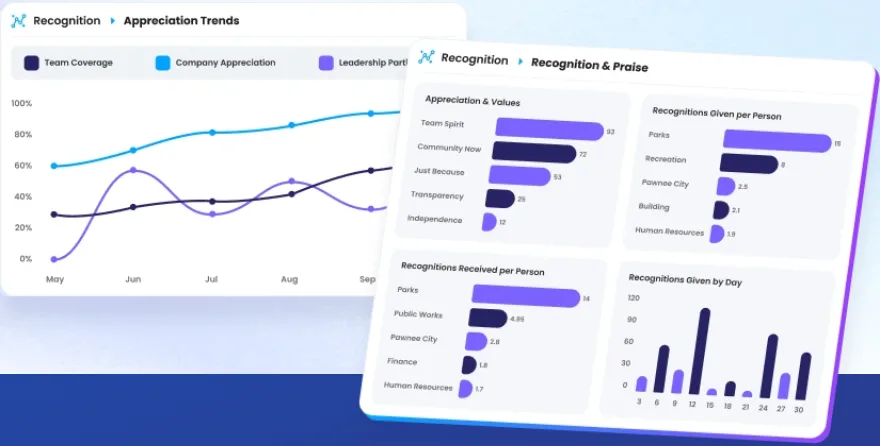
Motivosity is built around appreciation between coworkers. Peer and manager recognition run through a social feed, and people spend what they earn in a global reward marketplace, a branded company store, or on the ThanksMatters Visa card.
A 400-person company spread across several offices can fund monthly recognition budgets, automate service anniversaries, and give managers a spot bonus pool from the same platform.
Our take: Motivosity suits companies that want recognition to happen every week, with a marketplace people will actually use.
Standout features:
- Peer and manager recognition, funded or unfunded, in dollars or points
- Automated service awards, birthdays, and new hire celebrations
- Nomination awards, achievements, and wellness challenges that sync with wearables
- Lifestyle spending accounts with spend controls by category
Pros & Cons
PROS
CONS
Pricing
Pricing is custom for companies from 75 to 10,000+ employees.
Popular bundles are Celebrating People, Building Culture, and Scaling Globally.
A Small Business bundle for companies under 250 employees has a $3,000 minimum spend.
02. WorkTango
Surveys and recognitionCombining surveys with recognition
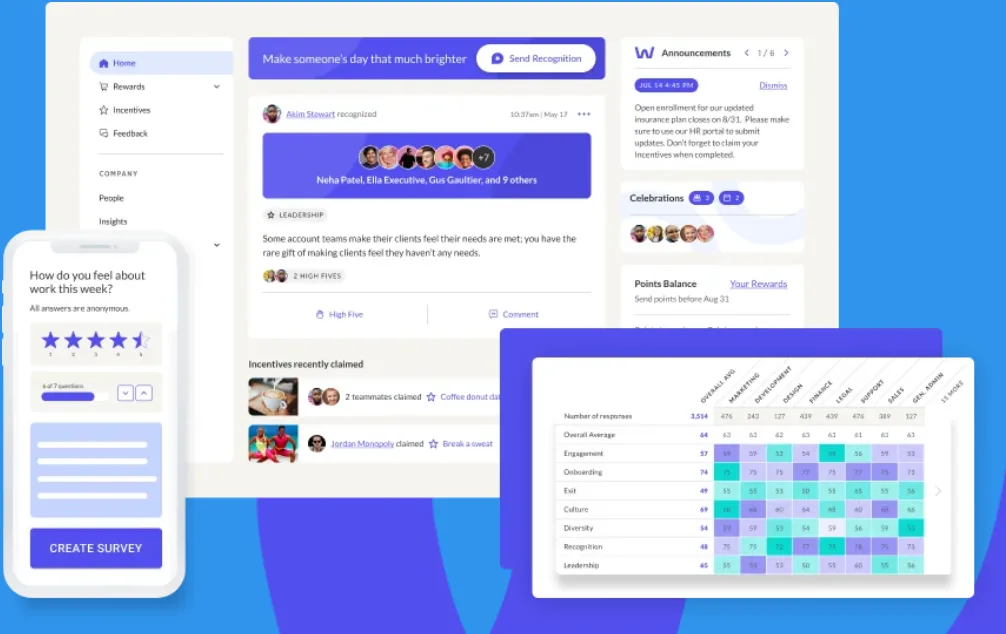
WorkTango joins two products most companies buy separately. Surveys & Insights handles engagement and lifecycle surveys with heat maps and role-based dashboards, and Recognition & Rewards covers peer recognition, awards, and incentives.
An HR team can run a quarterly pulse, spot the lowest-scoring department on a heat map, and reply to anonymous comments through Anonymous Conversations while the author stays hidden. Newer additions include Coach for survey analysis and Constellation for AI-moderated listening.
Our take: A good fit if you’d rather not stitch together a survey tool and a recognition tool. BI WORLDWIDE bought WorkTango in July 2026 and plans to move rewards fulfillment onto its own network.
Standout features:
- Unlimited surveys with research-based templates and industry benchmarks
- Anonymous Conversations for confidential replies to feedback
- Rewards marketplace with more than 10 million products
- 40+ HRIS and SSO integrations, plus Slack, Microsoft Teams, iOS, and Android
Pros & Cons
PROS
CONS
Pricing
WorkTango sells Employee Surveys & Insights, Recognition & Rewards, or the full platform, all priced on request.
An interactive demo is available on its website.
03. Enculture
Conversational culture intelligenceContinuous listening through AI chat
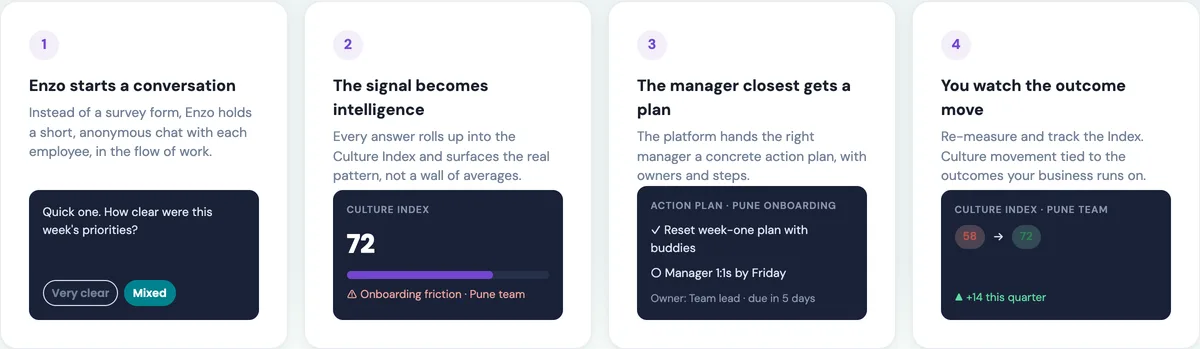
Enculture drops the survey form altogether. Its AI companion, Enzo, holds short anonymous chats with each employee, about two minutes long, and picks the question based on role and timing. Answers roll into a Culture Index, and the nearest manager gets an action plan with owners and due dates.
Four conversational arcs set the rhythm. Pulse keeps a light check going, Business Alignment measures culture against company goals, Perpetual Culture runs a deeper year-round read, and Milestone covers moments from onboarding through exit.
A company in the middle of a reorg could see a dip on one team within weeks, assign the fix to that team’s lead, and check whether the Index moved by next quarter.
Our take: The action loop is the good idea here, since plenty of survey tools stop at a score. Enculture runs a CHRO roundtable in India and has solutions for global capability centers, so Indian enterprises should take a close look.
Standout features:
- Enzo, a configurable AI companion that replaces survey forms
- Culture Index tracked by team and quarter
- Action plans with owners and due dates, tracked to closure
- Leadership assessments and 360-degree feedback
Pros & Cons
PROS
CONS
Pricing
Pricing is custom and quoted through sales.
The Culture Health Check is free to take on its website.
04. Leapsome
Modular HR and talent suiteAll-in-one HR and talent
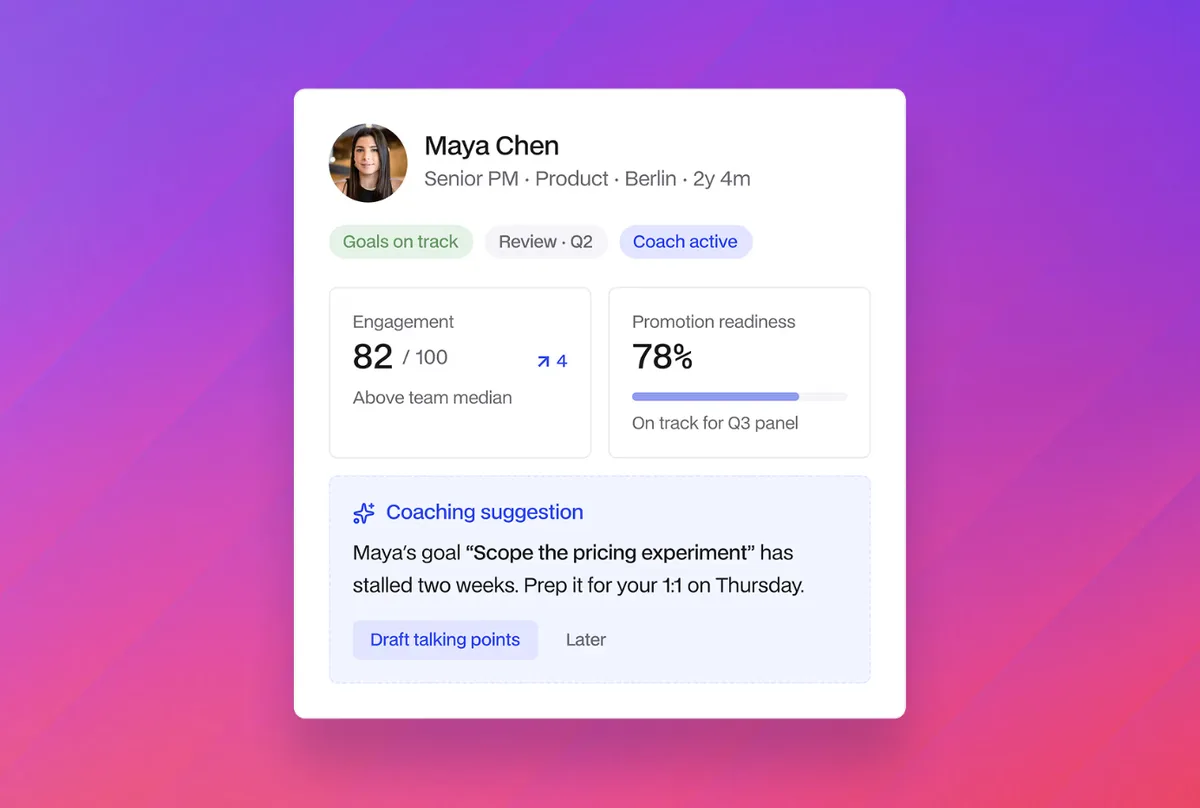
Leapsome covers most of the HR stack, with an HRIS, performance reviews, goals, engagement surveys, learning, compensation, recruiting, and time tracking on one employee record. Each is sold as a module, so you can start with reviews and add the rest later.
The company now positions itself around agentic HR, with AI agents that flag retention risks, close skill gaps, and coach employees.
Our take: Leapsome makes the most sense when a small people team wants one system in place of several. It’s more than you need if your only goal is a pulse survey.
Standout features:
- Performance reviews, goals, and OKRs linked to engagement data
- HRIS with absences, documents, and payroll prep
- Learning paths and compensation reviews
- Support for 38 languages
Pros & Cons
PROS
CONS
Pricing
A 14-day free trial is available.
Agentic HRIS Foundation is $7 per employee per month, and free with any Talent Suite module until December 31, 2026.
Agentic HRIS Pro is on offer at $5 per employee per month, down from $10.
Talent modules such as reviews, goals, and surveys are added per employee.
05. Culture Amp
Employee surveys and analyticsPeople science and survey analytics
Culture Amp is the survey specialist, and it has more than 6,000 customers. Engage runs pulse, onboarding, exit, and DEI surveys with benchmarks and AI comment summaries. Perform adds reviews, 1-on-1s, goals, and development plans.
One addition is a connection for Claude and ChatGPT, so you can ask about your team and get answers based on your own Culture Amp data.
Our take: Pick Culture Amp when survey quality and benchmarks matter most and you have someone to act on the results. Smaller teams may find simpler tools easier to run.
Standout features:
- Ready-to-use surveys with benchmarking
- AI Coach built into every module
- Retention Insights for spotting attrition risk
- HRIS, Slack, and Microsoft Teams integrations on every plan
Pros & Cons
PROS
CONS
Pricing
Engage, Perform, and the full platform are all priced by quote.
People Science Consulting is an add-on to Engage or Perform.
06. Workvivo
Employee communications hubInternal communications
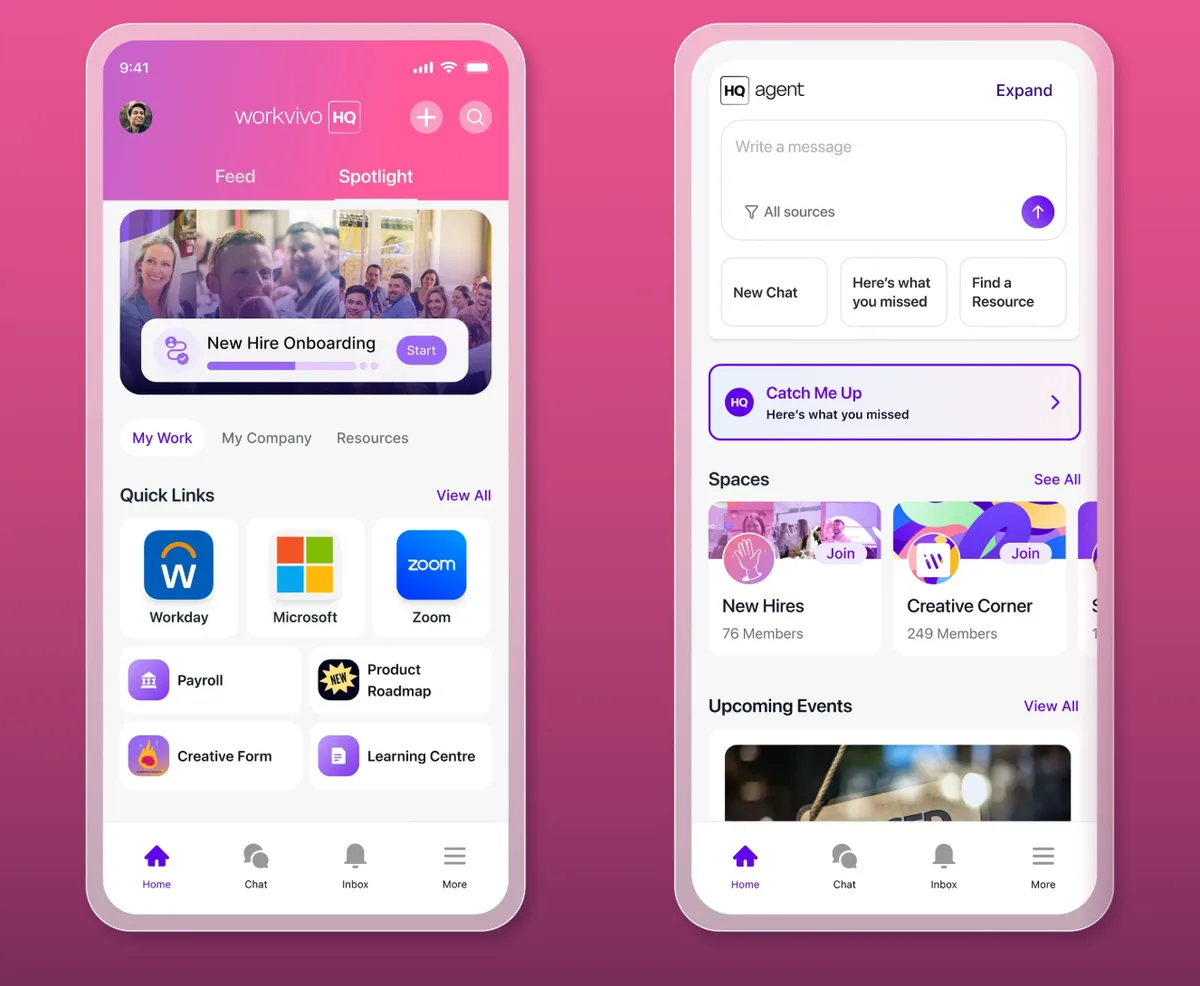
Workvivo by Zoom feels like a social network for work, with an activity feed, shoutouts, spaces, livestreams, and podcasts.
The product now comes in two parts.
Workvivo HQ handles communications and knowledge, and Seer handles engagement surveys and analysis.
A company with staff in several countries can publish one news article with auto-translate, target it by audience, and see which teams engaged with it.
Our take: Workvivo is good for when internal communication is the main gap. If surveys matter just as much, consider Seer alongside HQ from the start.
Standout features:
- Smart activity feed, spaces, shoutouts, and badges
- AI Compose and AI Catch Me Up for writing and summaries
- Livestreams, newsletters, and push notifications
- Knowledge pages, a people directory, and an org chart
Pros & Cons
PROS
CONS
Pricing
Workvivo builds a custom package and quotes it on request.
You can start with HQ or Seer, then add HQ Agent, chat, digital signage, or deeper analytics.
07. Lattice
Performance and engagementPerformance management and engagement
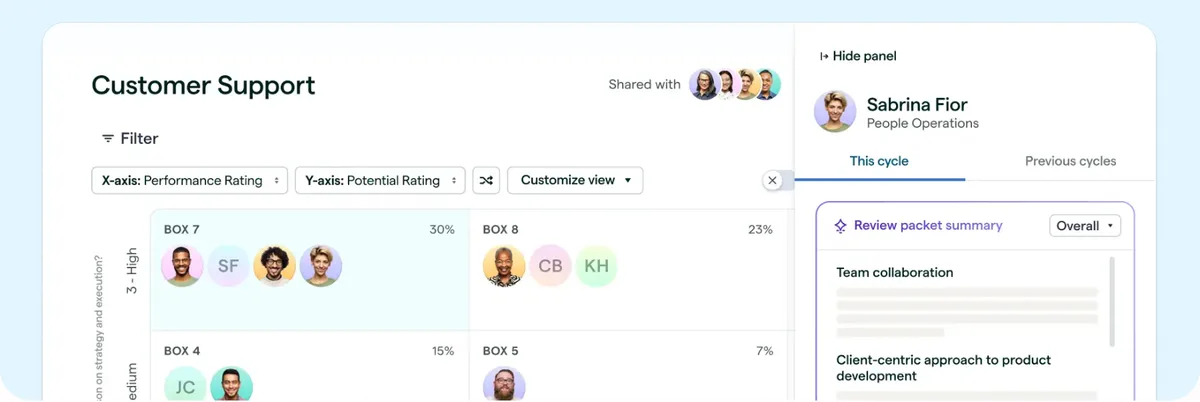
Lattice centers on performance, with reviews, calibration, succession planning, and promotions tied to 1:1s, weekly updates, and feedback. Engagement surveys are one product among several, which makes it a natural pick when your experience problem is really a manager and growth problem.
Our take: Lattice is easier to budget for than most, thanks to public per-seat prices. Add up the products you need, because the low Engagement price isn’t the full story if you also want reviews and goals.
Standout features:
- Performance reviews, talent reviews, and calibration
- Goals and OKRs with Salesforce and Jira integrations
- Pulse, onboarding, and exit surveys with action planning and eNPS
- AI Agent that answers policy and career questions
Pros & Cons
PROS
CONS
Pricing
Foundations is $13 per seat per month and bundles performance, goals, analytics, an AI agent, and integrations.
Individually, Performance is $10, Goals & OKRs is $8, and Engagement is $4 per seat per month.
08. 15Five
Manager effectivenessImproving manager effectiveness
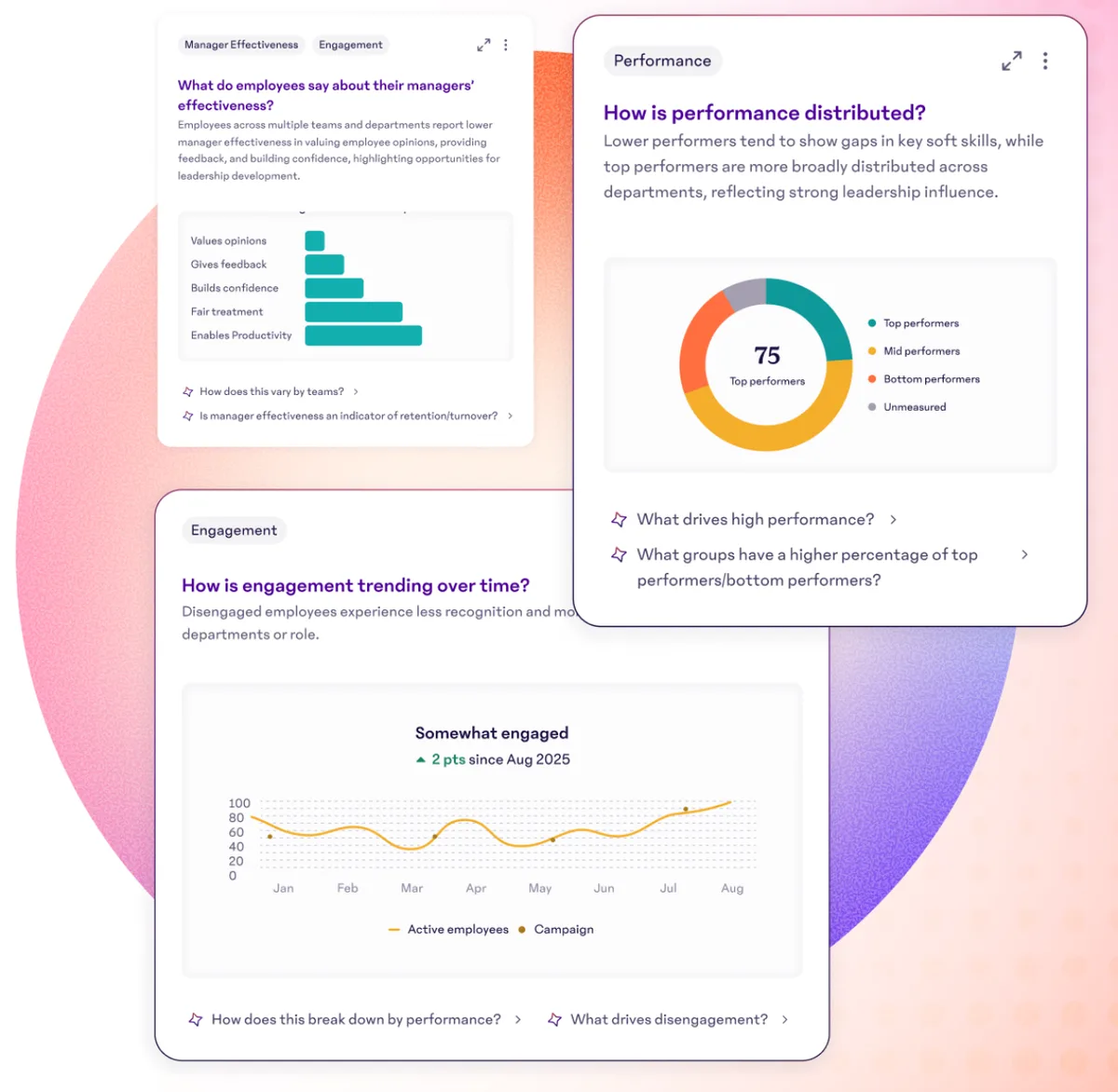
15Five aims at the manager in the middle. Weekly check-ins, 1-on-1 agendas, and High Fives sit alongside engagement surveys and 360 reviews, and an AI thought partner called AMAYA helps managers interpret what they see.
If survey scores keep flagging the same teams, Engage’s predictive impact score and heat maps show which drivers to fix first, and Total Platform adds manager training microlearnings.
Our take: 15Five works well for companies that see managers as the fix for engagement. Its entry price is low, though most buyers will want Perform or the full platform.
Standout features:
- Engagement surveys with heat maps, benchmarking, and action planning
- AI-assisted performance reviews and the AMAYA thought partner
- Weekly check-ins, 1-on-1 agendas, and High Fives
- Talent matrix, career paths, and turnover analysis
Pros & Cons
PROS
CONS
Pricing
Engage is $4 per user per month.
Perform is $11 per user per month.
Total Platform is $16 per user per month.
All three are billed annually, and manager training content from $49 per manager per month is separate.
09. Blink
Frontline communicationsFrontline teams
Blink is made for people who don’t sit at a desk, with a feed, chat, and knowledge hub in one mobile-first app. Native apps cover iOS, Android, Windows, and Mac.
Looking Inside Blink
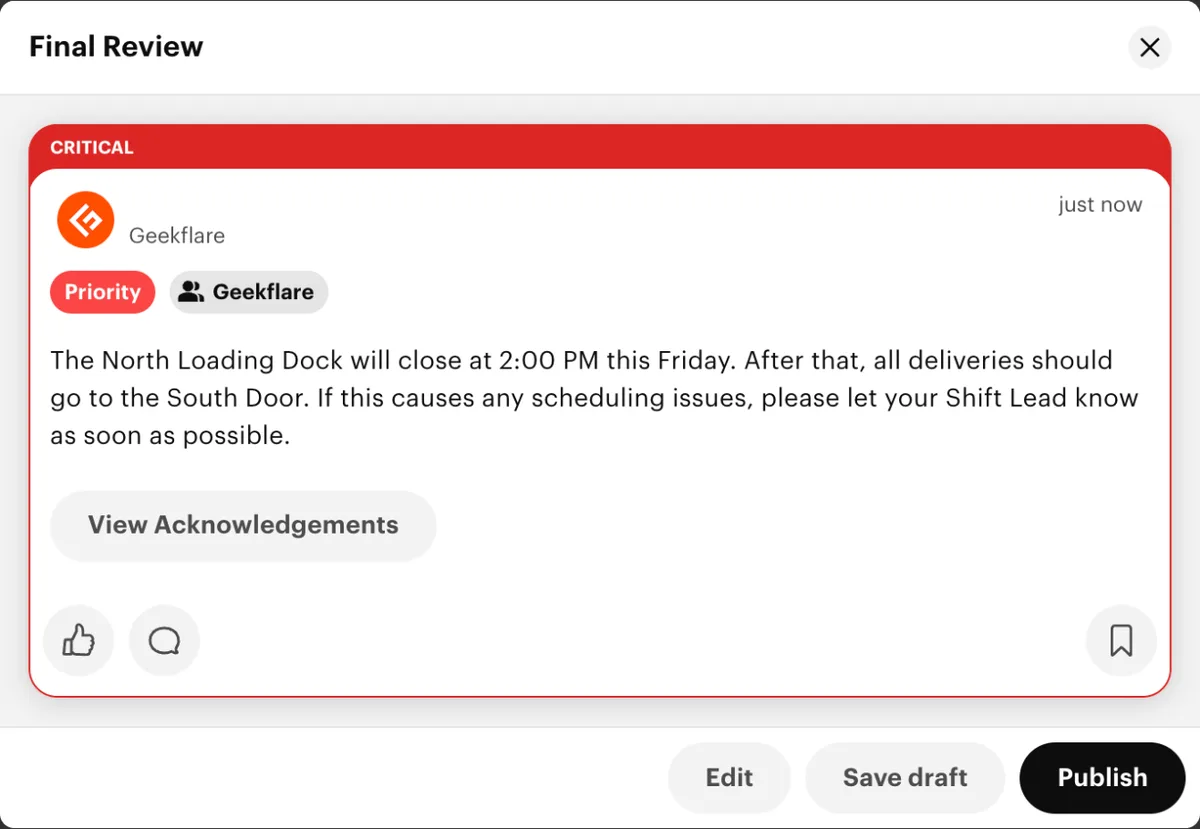
You get example posts on feed as you sign up for the first time. One is a water shutoff notice marked Critical, with a counter reading 3 of 12 people have acknowledged. If you run shifts, that counter is the feature to look at first, because it tells you who still hasn’t seen a safety notice.
I wrote a rough note about a loading dock closing, and the Priority category turned it into the same red Critical post with a View Acknowledgements button.
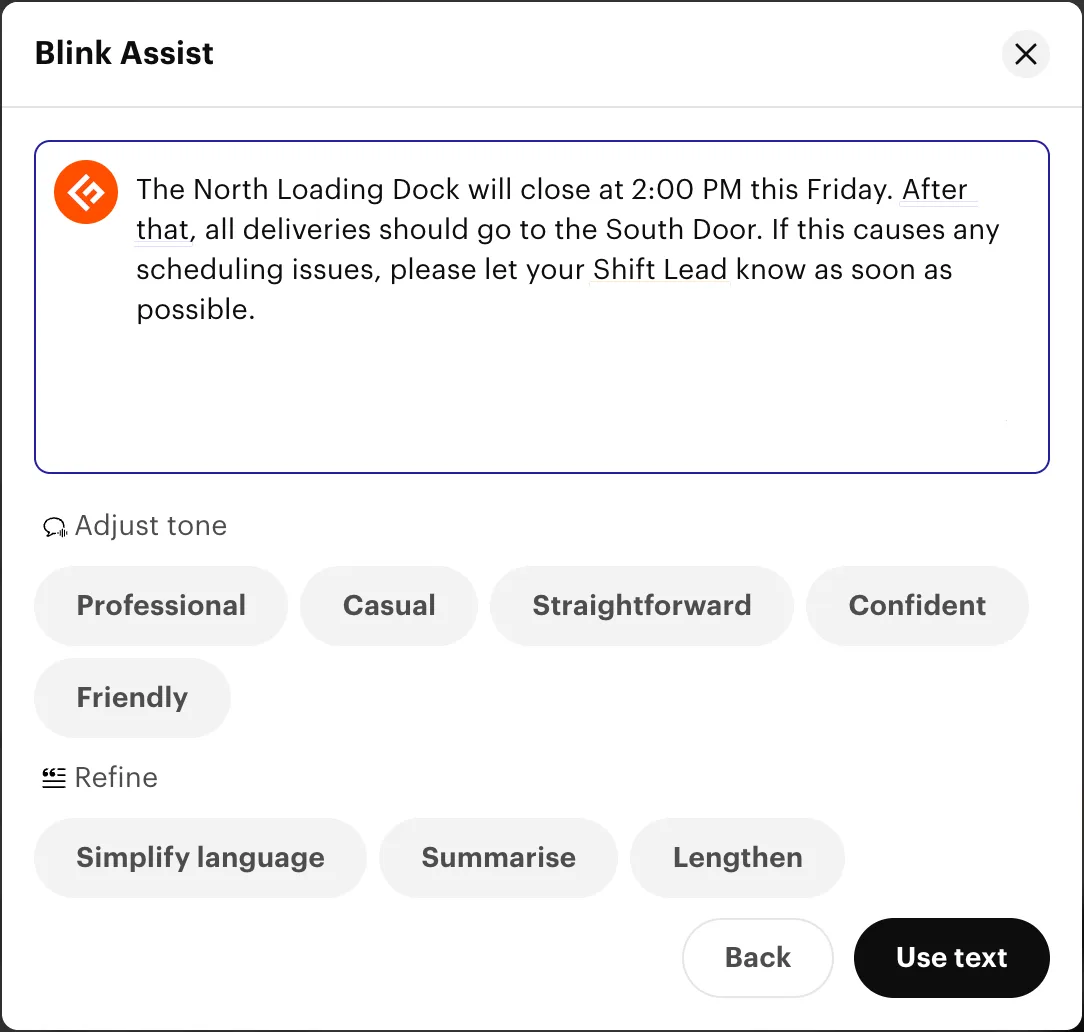
Blink Assist was less consistent. The Professional tone turned my short note into longer words, ending with a request to notify your Shift Lead at your earliest convenience, which is stiff for a warehouse. Simplify language brought it back to more clear words, so try that setting first.
The Hub is where policies and guides live. Its starting screen offers pages, policies, videos, files, forms, and apps, and the sample Health & Safety policy carries a label asking staff to sign at the bottom.
Our take: Blink is the first tool I’d try for a frontline-staff business, and its per-user price makes that low risk. Look elsewhere if surveys are the priority, since full employee feedback surveys is on the Enterprise plan.
Standout features:
- Critical posts with acknowledgement tracking
- Blink Assist for writing, tone changes, and feed summaries
- Knowledge hub with pages, policies, and a digital form builder
- Multi-language publishing and real-time translation on Pro
Pros & Cons
PROS
CONS
Pricing
The free trial runs for 14 days.
Core starts at $3.75 per user per month, billed annually.
Pro starts at $5 per user per month and adds an AI assistant, translation, and live streaming.
10. Qualtrics
Enterprise experience managementLarge enterprises
Qualtrics treats employee experience as one part of a wider experience data program, and it can link engagement results to customer outcomes. That connection suits companies already using Qualtrics for customer research.
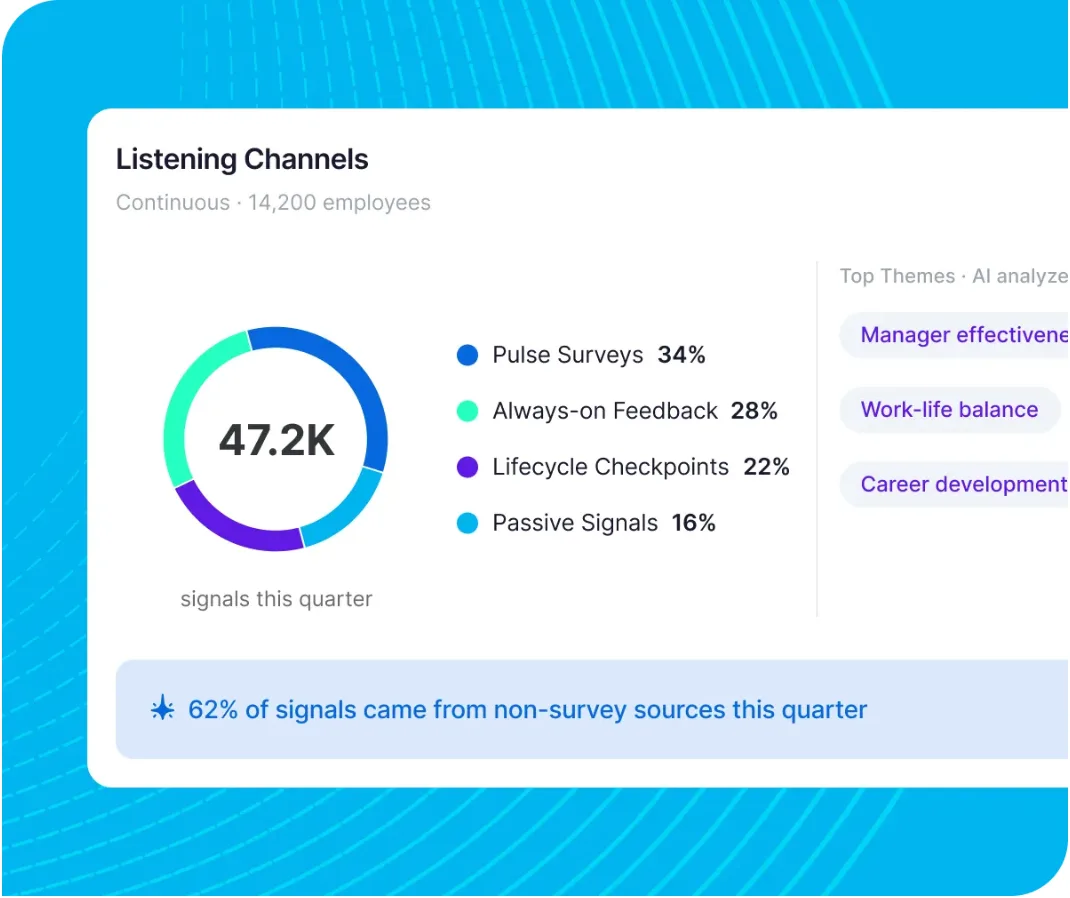
Its listening goes beyond scheduled surveys, combining pulse surveys, always-on feedback, lifecycle checkpoints, and passive signals, with AI sorting thousands of comments into themes. Qualtrics reports that the State of Iowa raised trust in leadership by 20% within six months.
Our take: Qualtrics fits large organizations with a dedicated people analytics team. For a 200-person company, it’s probably more machinery than you’ll use.
Standout features:
- Engagement, pulse, and lifecycle surveys
- 360 development feedback with expert frameworks
- Personalized insights and recommended actions for each manager
- Links between employee data and customer outcomes
Pros & Cons
PROS
CONS
11. Microsoft Viva
Microsoft 365 employee suiteCompanies using Microsoft 365
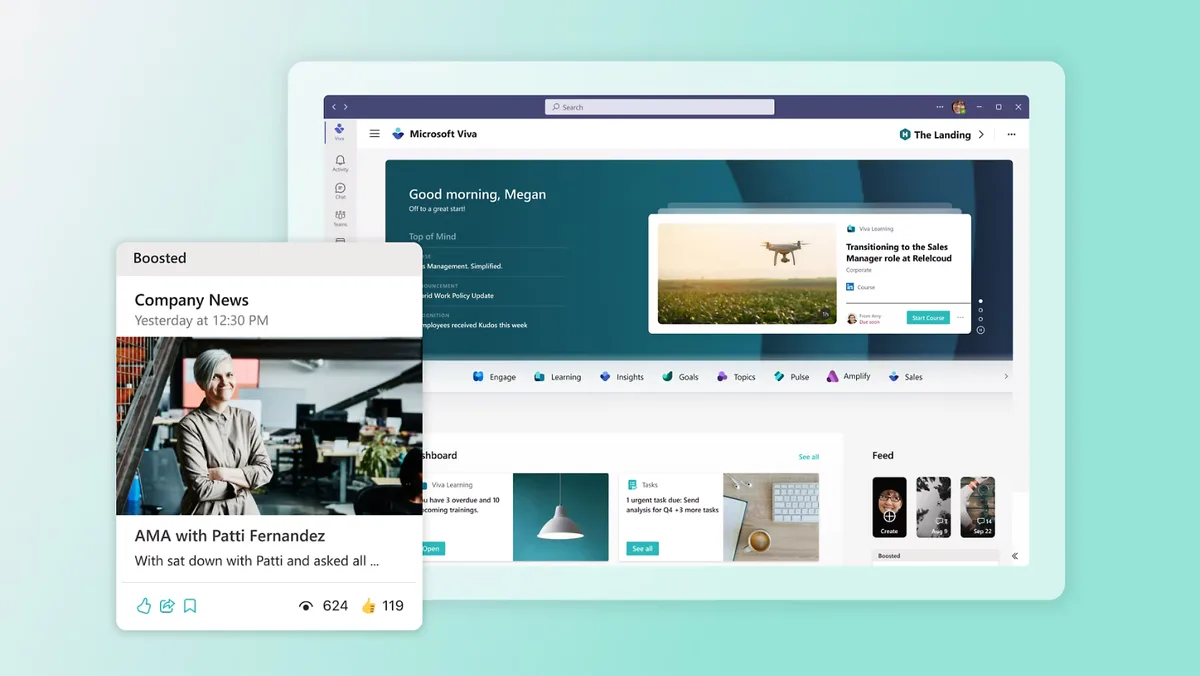
Microsoft Viva is a set of seven apps that is inside Microsoft 365 and Teams. Connections and Engage handle news and communities, Amplify runs campaigns, Insights and Glint cover analytics and surveys, Pulse gives managers quick check-ins, and Learning tracks training.
Some of this already comes with Microsoft 365 enterprise plans, including a branded employee destination and communities in Viva Engage. Check what you own before you buy anything.
Our take: Viva belongs on the shortlist for any company already standardized on Microsoft.
Standout features:
- Viva Connections for a company-branded employee destination
- Viva Engage for communities, and Viva Amplify for multichannel campaigns
- Viva Glint and Viva Pulse for organization-wide and team surveys
- Viva Insights for manager and leader analytics
Pros & Cons
PROS
CONS
Pricing
Employee Communications and Communities is $2 per user per month.
Workplace Analytics and Employee Feedback is $6 per user per month.
The full Viva Suite is $12 per user per month.
12. Workday Peakon
Employee listeningWorkday customers
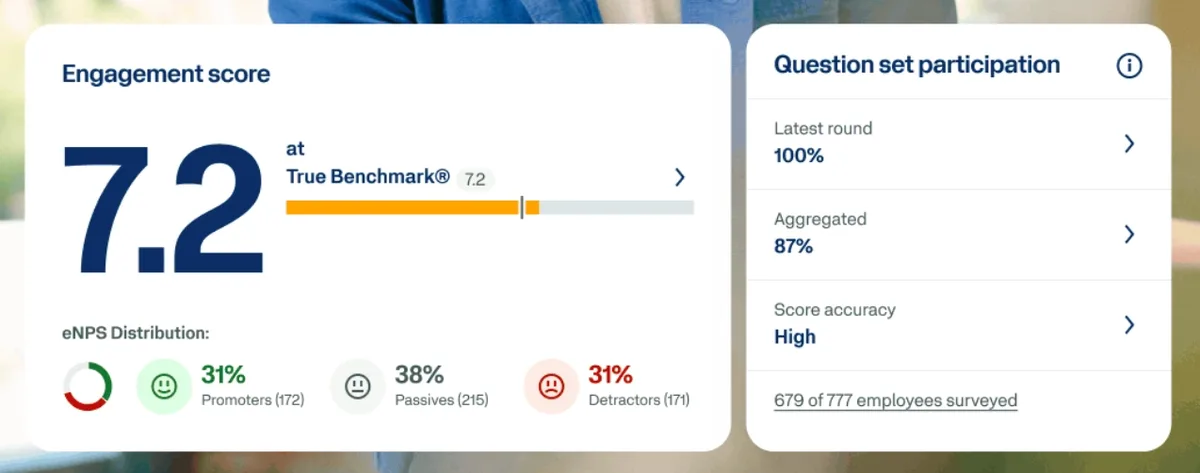
Workday Peakon Employee Voice is a listening platform covering engagement, well-being, and diversity across the employee lifecycle. Its large benchmarking dataset lets you compare an engagement score against its True Benchmark figure, and a personal dashboard gives employees and managers a way to start conversations about the results.
Our take: Peakon is the natural choice if Workday already runs your HR. If it doesn’t, compare it closely with Culture Amp before committing.
Standout features:
- Engagement score and eNPS distribution reporting
- True Benchmark comparisons from a large dataset
- Personal dashboards for employees and managers
- Sana Coach agent for spotting burnout and retention issues
Pros & Cons
PROS
CONS
13. Simpplr
AI intranet platformEnterprise intranet
Simpplr is an intranet first, with communications, knowledge, people, and workflows in one AI-powered experience. The platform is used by more than 2 million users and Gartner named it a Leader in the 2026 Magic Quadrant for Intranet Packaged Solutions.
A global company with documents spread across SharePoint, OneDrive, Google Drive, and Box can search them from one place, then let staff complete tasks from the same screen.
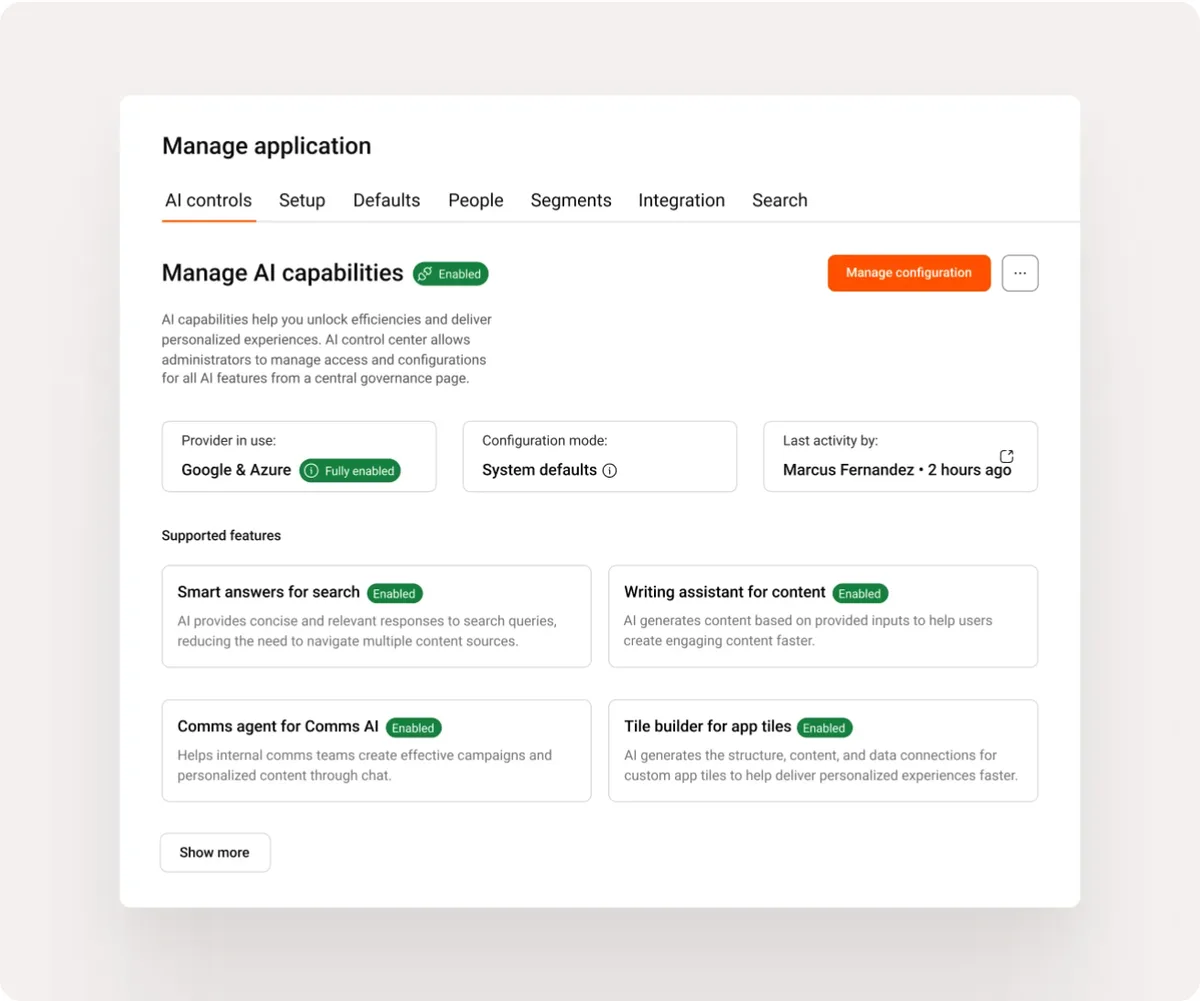
Our take: Consider Simpplr when finding information is the daily complaint. Admins also get per-feature controls over AI, which helps if your IT team has governance concerns.
Standout features:
- Multichannel internal communications
- Enterprise search across connected content sources
- AI assistance and agents for everyday tasks
- Admin controls for AI capabilities
Pros & Cons
PROS
CONS
14. Bonusly
Peer recognitionRecognition for smaller teams
Bonusly gives each person a points allowance to hand out with public thank-yous, and those points turn into rewards. Its Team plan has a public price, which is rare among recognition tools on this list.
Looking Inside Bonusly
After you signup, you get 100 points to give away, a 10-point welcome from Bizy, the AI assistant, and a short checklist. The rewards catalog lists 1,050+ items, from gift cards to the 7 Wonders.
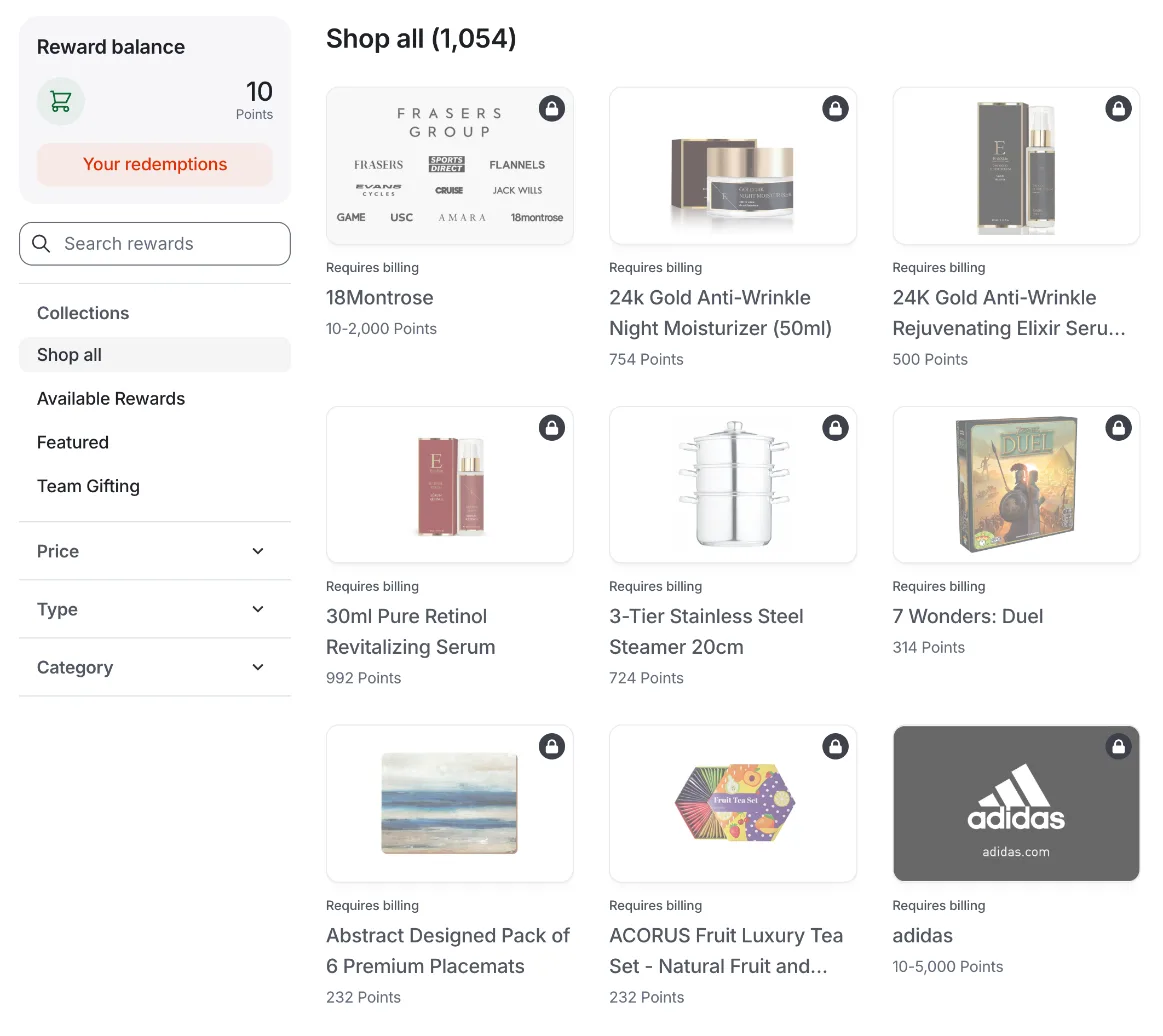
Bizy needs teammates to be useful. When I asked it to draft a thank-you for someone who fixed a checkout bug, it told me to invite people first, so add a few colleagues early if you want to judge the assistant fairly.
The admin dashboard shows where the plans divide. Peer-to-peer and Celebrations report on the Team plan, while Awards and Incentives display an upgrade prompt for Organization.
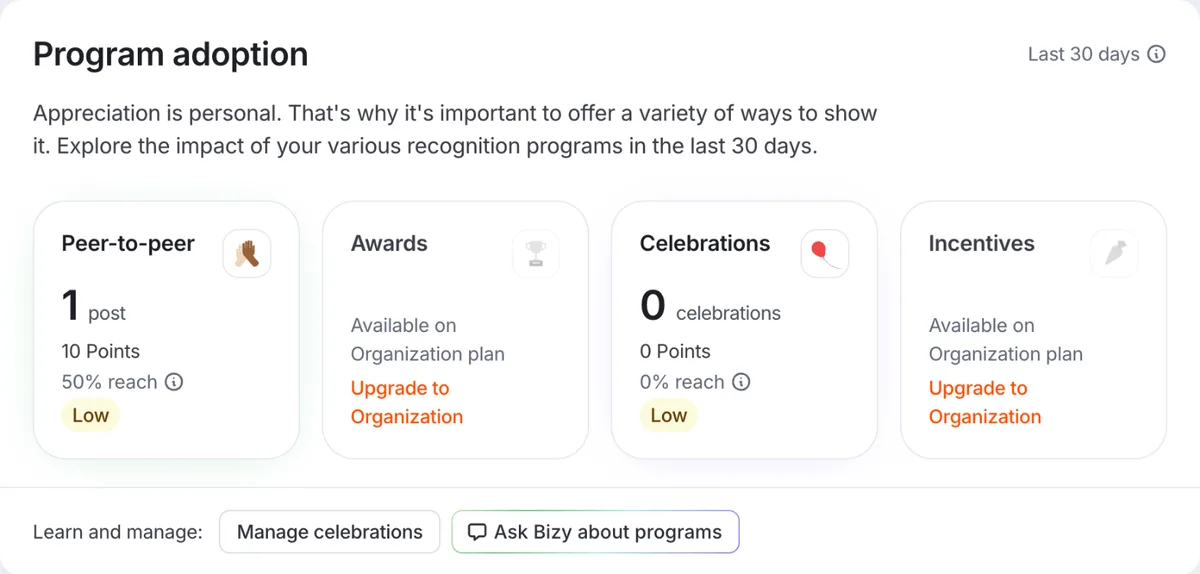
Our take: Bonusly is an easy way for a smaller team to try peer recognition, because the subscription is cheap and rewards are only paid for when redeemed. Companies that want formal awards and spot bonuses should budget for Organization.
Standout features:
- Peer recognition with Slack, Microsoft Teams, iOS, and Android apps
- Bizy AI assistant for recognition help and questions
- Automated milestone celebrations
- 1:1 meetings with smart agendas, goals, and performance recaps
Pros & Cons
PROS
CONS
Pricing
The 30-day trial covers Team or Organization, with Bizy free during it.
Team with Bizy is $5 per user per month, or $50 per user per year.
Team without Bizy is $3 per user per month, or $30 per user per year.
Honorable Mentions
Surveys, kudos, 360 reviews, and OKRs on a budget, with a free sign-up and Engage listed at $3 per employee a month.
Enterprise recognition platform with a global rewards marketplace, sold through a demo.
Formerly Officevibe, with pulse surveys, anonymous feedback, Good Vibes recognition cards, and AI-recommended actions.
Enterprise recognition that uses AI to turn appreciation data into insights for leaders.
Communications, intranet, and knowledge for frontline and office staff, aimed at enterprises.
What Is an Employee Experience Platform?
An employee experience platform is software for improving how people feel about and get through work. Depending on the vendor, that can mean surveys, recognition, internal communication, onboarding, performance reviews, or some mix of them.
It usually is on top of your HR system instead of replacing it. If you’re still sorting out that core layer, our ATS vs HRIS comparison and employee management software guide are better starting points.
Employee Experience vs Employee Engagement Platforms
Engagement software measures how committed people feel, mostly through surveys and driver analysis. Experience software takes a wider view and tries to change the day-to-day, from onboarding and communication to recognition and growth.
The line blurs in practice. Culture Amp started in surveys and now runs reviews, while Workvivo started in communication and now sells surveys through Seer.
How to Choose an Employee Experience Platform
- Name the problem first, because low survey scores, missed announcements, and unrecognized work all point to different tools.
- Count your deskless staff, and test the mobile app with them if they’re a large share of your company.
- Check that it syncs with your HR system, so joiners and leavers update without manual work.
- Ask who will act on the results, since survey data with no owner tends to go nowhere.
- Price the whole year, including rewards, add-on modules, and any minimum spend.
FAQ
What does an employee experience platform cost?
It starts around $2 to $5 per user per month for tools like Microsoft Viva, Blink, 15Five, Lattice, and Bonusly. Enterprise platforms such as Qualtrics, Culture Amp, and Workvivo quote on request.
Do small companies need one?
Not always. A company with under 50 people can often start with a focused tool such as Bonusly or a pulse survey from 15Five, then add more once a specific problem shows up.
Which platform is best for frontline workers?
Blink is built for deskless staff, with a mobile-first feed and acknowledgement tracking on critical posts. Staffbase and Workvivo are also worth comparing at enterprise scale.
Conclusion
Start from the gap you need to close. For recognition, look at Motivosity or Bonusly. WorkTango covers recognition and surveys together, and Enculture is worth a look if you want to move away from survey forms.
Teams that want one HR and talent system should compare Leapsome and Lattice. Blink suits frontline communication, and Viva is the practical option for Microsoft 365 companies.