Most ATS rollouts don’t fail on launch day but quietly after a few months when hiring managers drift back to leaving feedback in Slack threads and the new system nobody trusts.
Buying the software is the easy part. This guide is about a realistic implementation plan, the problems I see come up again and again in vendor docs and user reviews, the habits that keep an ATS useful, and how to use it to give candidates a better experience.
How Long It Takes
Less than you might fear, if you keep it simple. A small team on a simple ATS can be live in a few days to two weeks. A mid-size company usually needs four to eight weeks.
Pinpoint, for example, says most of its small and mid-size customers go live in four to six. Enterprise rollouts, with many locations, integrations, and years of data to move, often run for several months.
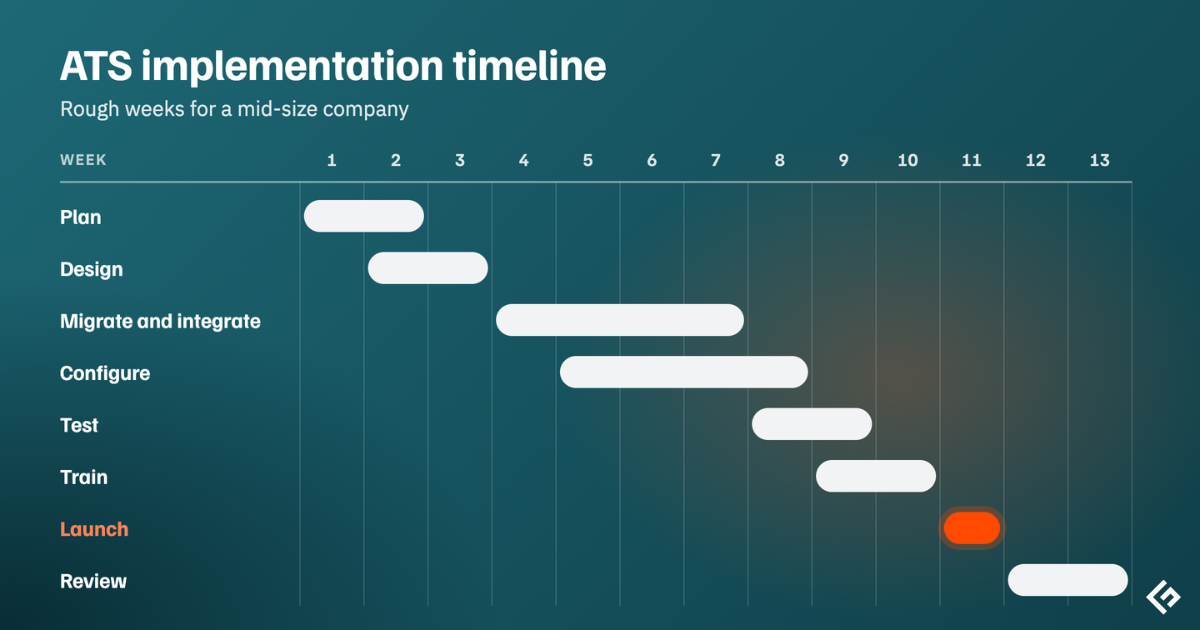
A Plan That Works
For a mid-size company, the weeks break down roughly like this.
| Phase | What happens | Rough timing |
|---|---|---|
| Plan | Goals, baseline numbers, an owner | Week 1 |
| Design | Hiring stages, scorecards, approvals, templates | Weeks 1 to 2 |
| Migrate and integrate | Move candidate data; connect job boards, calendar, HRIS | Weeks 2 to 4 |
| Configure | Permissions, compliance settings, careers page | Weeks 3 to 5 |
| Pilot | One team, a few real jobs | Weeks 4 to 6 |
| Train | Recruiters, hiring managers, interviewers | Weeks 5 to 6 |
| Launch | Switch over and retire the old way | Weeks 6 to 8 |
| Review | Check adoption and numbers | 30 and 90 days in |
Start with why, and write the numbers down
Before you configure, agree on what you’re trying to fix.
Faster hiring?
Fewer lost candidates?
Less admin?
Better reporting?
Then record where you are today in time to hire, applications per job, offer acceptance rate.
Give it an owner
An implementation that belongs to everyone belongs to no one. You need one person in talent acquisition or HR, who makes the calls. You need an admin who’ll configure the system and stay its expert afterward. And involve IT or security in early for SSO, integrations, and a review of how candidate data is handled.
Fix the process before you configure it
This is the step I’d spend the most time on. It’s tempting to copy your current process into the new software as it is.
Please, don’t.
Agree on a standard set of pipeline stages, a scorecard for each type of role, who approves new jobs and offers, and a set of email templates.
Keep it simpler so adding a stage later is easy. Removing one after people have built habits around it is not.
Be picky about what you migrate
You probably don’t need to migrate everything. Active candidates and open jobs should move. Strong recent applicants are worth keeping.
Five-year-old applications? Nah!
Clean up duplicates before you import, and ask the vendor what migration help is included and what costs more.
Connect the tools people use every day
Connect to job boards, your calendar and email, and your HR system. Add e-signature, background checks, assessments, and SSO as you need them. Our guide to ATS integrations walks through each one and how to test it.
Set permissions and the compliance basics
Hiring managers generally shouldn’t see salary history or candidates for other teams. Turn on consent capture and data retention rules, add equal opportunity questions where the law requires them, and decide how you’ll tell candidates if AI screens or interviews them.
Several laws now require exactly that, as we cover in AI in applicant tracking systems.
Pilot with real jobs
Pick two or three real roles and one team that’s willing to put up with a few rough edges. Apply to your own jobs, book an interview, leave feedback, push a test hire through to the HR system and check that payroll picks it up.
You’ll find things to fix, and it’s much better to find them now.
Train people for their role, briefly
Recruiters need proper hands-on training, hiring managers need a lot less and interviewers mostly need to know where their schedule lives and how to fill in a scorecard.
A two-minute video and a one-page guide can do the job here.
Launch
Pick a cutover date and stick to it. If the old shared inbox or spreadsheet stays open, people will keep using it. Tell everyone where hiring lives now and who to ask when they get stuck.
Check in at 30 and 90 days
Compare your numbers with the baseline. Look at how many interviewers actually submit feedback in the system. Ask users what’s annoying them, and fix the top issues.
A surprising amount of long-term value comes from these small fixes in the first few months.
The Problems That Keep Coming Up
Low adoption by hiring managers can be the big one. If the ATS feels like extra work, feedback stays in email and chat and the system never becomes the source of truth. The fix is to make their part tiny, use mobile and Slack or Teams notifications, and have senior leaders visibly use it themselves.
Duplicates and inconsistent job titles get imported along with everything else, and reports never look right.
Then there’s over-customization. Every team wants its own stages and fields, and six months later nobody can compare anything. Start with a standard process and allow exceptions only where they’re genuinely needed.
Integrations that only half work, which a proper pilot catches. No clear owner, which you avoid by naming one before kickoff. A worse candidate experience than before, usually from long forms and forced account creation. And budgets that blow past the subscription because of add-ons, extra seats, and migration services, which our ATS pricing guide helps you plan for.
Habits That Keep an ATS Useful
Once you’re live, the system is only as good as how it’s used. A few habits make a real difference.
Keep stage names the same across jobs, or your reports won’t mean much. Use structured scorecards so every candidate for a role is judged on the same things. Set a feedback deadline, something like 24 hours after an interview, and let the system send the reminders.
Automate the repetitive emails like confirmations, scheduling, and rejections. Merge duplicates, tag candidates consistently, and archive old jobs. Look at your reports once a month.
Review who has access every so often, and remove people who’ve left.
Using Your ATS to Treat Candidates Better
Candidates meet your ATS long before they meet you. If the experience is clumsy, you lose people you never knew you wanted.
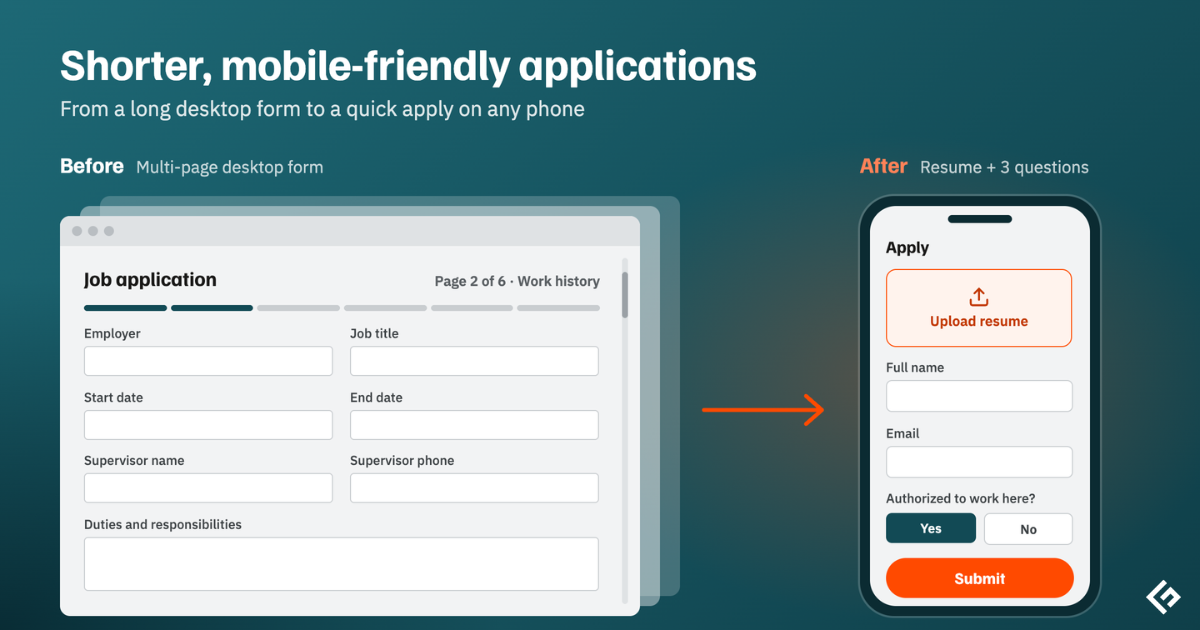
Start with the application itself. In iCIMS’s frontline hiring research, 60% of job seekers started an application and didn’t finish it, and the main reason was length.
Most people are on a phone, Appcast found that 71% of job applications came from mobile devices. Keep forms short, skip forced account creation, and let people upload a resume from their phone.
Greenhouse found that 61% of job seekers have been ghosted after an interview. That’s entirely avoidable with an ATS. Automatic confirmations, a quick update when someone moves stages, and a polite rejection, even after an interview, cost you almost nothing to set up.
Let candidates schedule themselves. Self-scheduling links tied to real calendars remove days of back-and-forth.
If you use AI to screen or interview, say so upfront. In Greenhouse’s survey, 70% of candidates who faced an AI interview weren’t clearly told in advance, and 38% had walked away from a hiring process because it included one. A clear sentence on the careers page and in the invite goes a long way.
Many ATS products can send a short survey after interviews. It’s the cheapest candidate research you can do.
What to Measure Once You’re Live
The share of interview feedback submitted in the ATS tells you whether people have actually adopted it. Time to hire and time in each stage show whether the process got faster, and our ATS statistics give you industry benchmarks to compare against. Application completion rate tells you if your form is too long. Offer acceptance rate and a simple candidate satisfaction score show how the process feels from the outside.