Vendor evaluation often starts when a company considers adopting a new SaaS product or working with an external technology provider. Procurement, IT, security, and business teams need enough information to decide if the vendor is worth taking to the next stage. They may look at product details, security practices, policies, documentation, and other public information.
Gathering these details can take time. The information may sit across several pages on the vendor’s website, along with other public sources. Teams then have to collect the relevant details, review them, and put the findings together before they can get a clear picture of the vendor.
AI vendor due diligence offers a way to reduce this research effort. Web APIs can gather the information needed for an initial review, and AI can analyze the collected data and organize the findings into a useful report.
In this article, we’ll build a workflow around this idea and see how web APIs and AI can work together for an initial vendor assessment.
What Is AI Vendor Due Diligence?
Vendor due diligence is the process of reviewing a company before your business decides to work with it. The review can cover areas such as the vendor’s products, security information, policies, technical documentation, and public company information.
AI can assist with the early stages of this process. It can review information gathered from several sources and help organize the findings into a format that is easier to assess.
The goal is not to let AI approve or reject a vendor. Human teams still need to verify important claims and carry out checks that require private documents or specialist review. AI can handle the initial research and give teams a clearer starting point for a deeper assessment.
How the AI Vendor Due Diligence Workflow Works
A vendor review requires information from several parts of a company’s online presence. Product pages can explain what the vendor offers, documentation can show how its technology works, and security or policy pages can provide details that matter during an initial review.
The workflow brings these sources into a single research process. It starts by finding relevant vendor pages and collecting their content. The collected information then goes through an AI model, which can identify important details, organize the findings, and point out areas that may need closer attention.
The workflow follows four main stages:
- Find relevant vendor information: Search for the vendor’s website, product pages, documentation, policies, and other useful public sources.
- Collect information from the web: Extract the content and technical details needed for the initial assessment.
- Analyze the findings with AI: Give the collected information to an AI model and ask it to identify key facts, potential concerns, and missing information.
- Create a vendor assessment: Present the findings in a structured report that gives the procurement, IT, security, or business team a clear starting point for further review.
Using Geekflare APIs for Vendor Research
Geekflare provides a collection of APIs for working with web data and performing different website checks. These APIs can help gather public information about a vendor and check basic technical details about its website.
For this workflow, we’ll use five Geekflare APIs:
| Geekflare API | What It Does |
|---|---|
| Search API | Finds relevant pages and public sources related to the vendor. |
| Web Scraping API | Extracts content from selected vendor pages for analysis. |
| TLS Scanner API | Checks the vendor website’s TLS configuration and certificate details. |
| Screenshot API | Captures selected pages for visual reference. |
| Uptime API | Checks whether the vendor website is accessible. |
These APIs cover different parts of the initial review. Search and scraping help gather information about the vendor, its products, and its policies. TLS and uptime checks add basic technical signals, while screenshots provide visual evidence from selected pages.
Geekflare also provides SDKs that help developers work with its APIs from different programming languages. This makes it possible to integrate the APIs directly into applications and automated workflows.
For AI based workflows, Geekflare provides Geekflare MCP. It connects Geekflare’s APIs to compatible AI assistants through the Model Context Protocol.
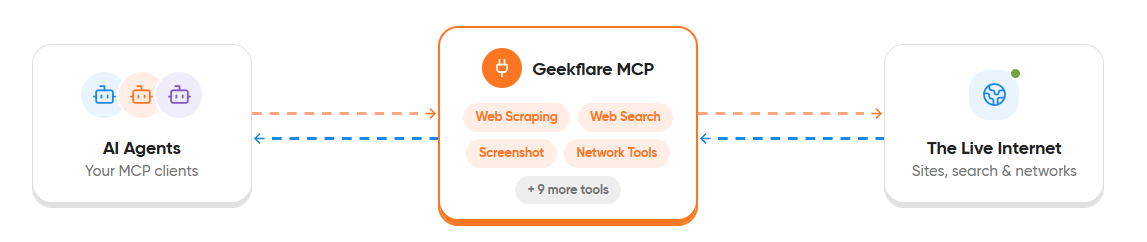
An AI assistant can then access the relevant Geekflare tools during a conversation and use their results as part of a larger workflow.
Connect Geekflare MCP to Claude
Setting up Geekflare MCP with Claude takes only a few minutes. You’ll need a Geekflare account and an API key to get started.
Create an account on Geekflare and copy your API key from the dashboard. Then follow the Geekflare MCP setup guide to connect Geekflare MCP to Claude.
The guide covers the MCP configuration, so there is no need to repeat the setup steps here. Once the connection is ready, Claude can access the Geekflare APIs required for the vendor research workflow.
Next, we can give Claude a prompt that defines the vendor assessment and lets it decide which connected tools to use.
Run the AI Vendor Due Diligence Workflow
Once Geekflare MCP is connected to Claude, the research can be handled through a single prompt. The prompt gives Claude the vendor website, defines the areas to review, and asks it to use the available Geekflare tools to gather the required information.
Give Claude the Vendor Research Prompt
Copy the following prompt into Claude:
Perform an initial vendor due diligence review for [VENDOR NAME]
using its website: [VENDOR URL].

Use the Geekflare tools available through MCP to complete the
research. Use the following APIs where relevant:

1. Search API
   Find the vendor's product pages, pricing information,
   security pages, privacy policy, terms of service,
   documentation, compliance information, and other relevant
   public sources.

2. Web Scraping API
   Extract useful content from the relevant vendor pages
   found during the search. Use the extracted content for
   the detailed analysis.

3. TLS Scanner API
   Check the vendor website's TLS configuration, certificate
   details, validity, and other available TLS information.

4. Uptime API
   Check the availability of the vendor website and include
   the result in the technical assessment.

5. Screenshot API
   Capture the vendor homepage and other important pages
   identified during the research. Use the screenshots as
   supporting evidence.

Analyze the information collected through these APIs and
create an initial vendor due diligence report.

Structure the report into:

- Vendor overview
- Products and services
- Pricing information
- Security information
- Privacy and policy information
- Technical findings
- Website availability
- TLS findings
- Important observations
- Missing or unclear information
- Areas that require manual verification
- Source URLs

Clearly distinguish facts found in public sources from your
analysis. Do not treat missing information as evidence that
the vendor does not have a certification, policy, or security
practice.
Note: This example uses Notion as the sample vendor and its official website, https://www.notion.com/, for the analysis. Replace the vendor name and URL with the company you want to evaluate.
Claude can then use the connected Geekflare tools to search for relevant pages, collect their content, and run the requested website checks. The results can be brought together into a single vendor assessment for further review.
Understanding the Results
The completed assessment brings together the findings collected through the five Geekflare APIs.
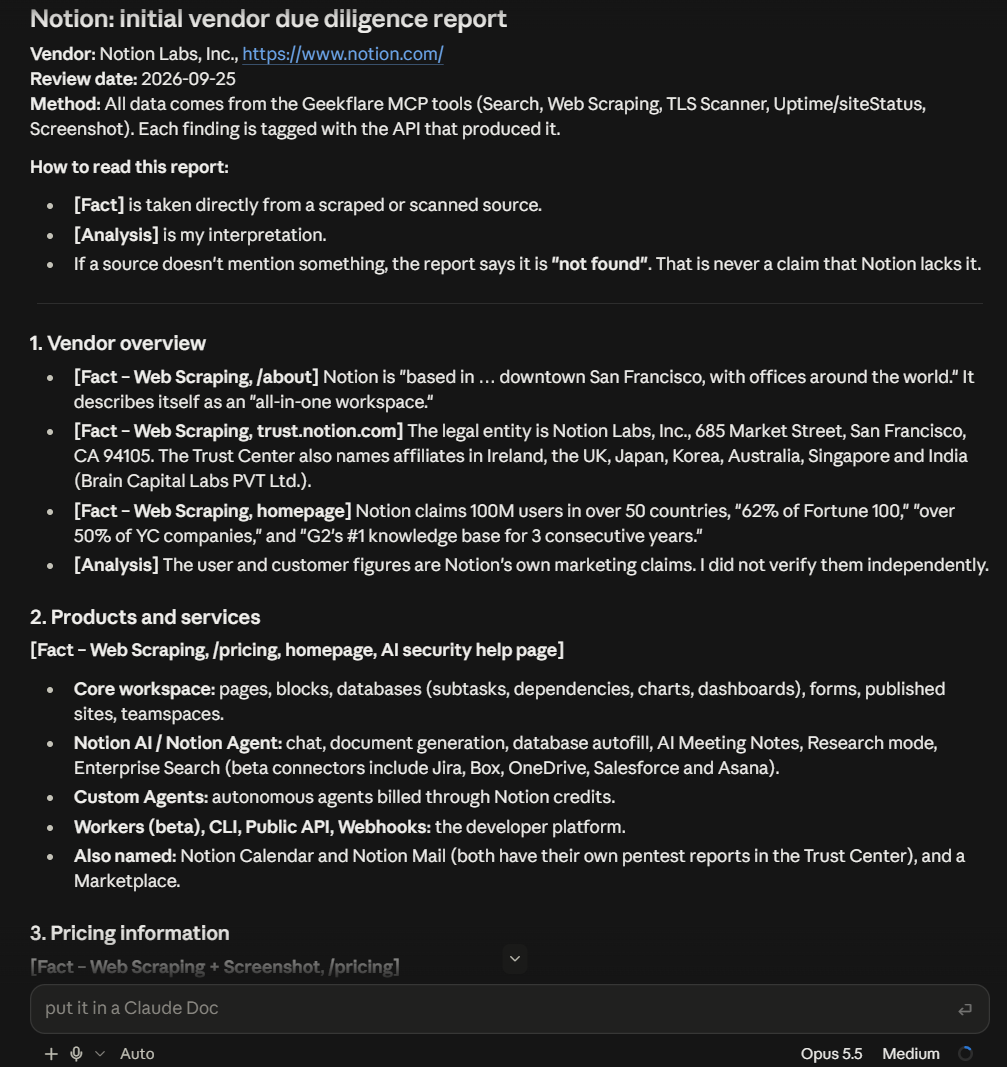
Each API contributes a different type of evidence, giving the reviewer a clearer view of the vendor.
| Assessment Area | Geekflare API | What the Results Show |
|---|---|---|
| Company and products | Search API, Web Scraping API | Vendor details, products, services, documentation, and other public information |
| Pricing | Search API, Web Scraping API, Screenshot API | Plans, pricing, features, and other publicly listed billing details |
| Security and compliance | Search API, Web Scraping API | Security practices, certifications, compliance information, and available documentation |
| Privacy and AI data use | Web Scraping API | Privacy practices, subprocessors, data retention, and AI related policies |
| Website availability | Uptime API | Current website status and HTTP response |
| TLS security | TLS Scanner API | TLS versions, certificate details, cipher information, and reported security issues |
| Visual evidence | Screenshot API | Screenshots of important vendor pages for reference |
| Information gaps | All relevant APIs | Details that could not be found, retrieved, or verified during the research |
The Notion assessment shows how these results can be used together. The research identified security certifications and controls, while the technical checks provided information about the website’s availability and TLS configuration.
The report also flagged several areas for manual verification, such as gated security reports, legal documents, data residency, and Enterprise specific controls.
This is an important part of AI vendor due diligence. The goal is not to let the AI approve or reject a vendor. The generated report gives the reviewer a structured view of the available evidence and highlights the questions that need further investigation.
What the AI Vendor Assessment Tells You
The value of this workflow comes from bringing different types of vendor information into one assessment. Instead of reviewing separate search results, web pages, and technical checks, a business team can start with a single report that points to the information that needs attention.
The report can help teams identify several useful signals:
- What the vendor offers: Product and service information gives teams a clearer view of the vendor’s offering.
- What the vendor publicly states: Security, privacy, pricing, and policy pages show the information the vendor makes available.
- Basic technical signals: TLS and uptime checks provide additional information about the vendor’s public website.
- Information gaps: The AI can flag areas that were not clear or could not be verified from public sources.
- Sources for verification: Links to the original pages let teams review important findings themselves.
The output should be treated as an initial assessment, not a final vendor approval. Public web data cannot replace checks such as reviewing contracts, security certifications, compliance documents, or other information shared directly by the vendor.
This makes the workflow most useful at the early stage of vendor research, when a team needs to gather and organize public information before moving to a deeper review.
What to Keep in Mind
An AI generated assessment can speed up the initial research, but it cannot replace a full vendor review. The workflow relies on information available through public sources, so some important details may be unavailable or incomplete.
A vendor may share security certifications, audit reports, compliance documents, or contractual details only after a formal request. AI also cannot independently confirm every claim found on a vendor’s website.
Teams should verify important findings with the vendor and review relevant documents before making a procurement or security decision. The AI generated report works best as a starting point that helps identify areas that need closer attention.
The quality of the assessment also depends on the sources collected during the research. An outdated page or missing information can affect the results, so important findings should always be checked against the original source.
Conclusion
Vendor research can involve a lot of scattered information. Product details may sit on one page, security information on another, and technical details may require separate checks. An AI assistant can bring these tasks together when it has access to the right web tools.
Geekflare APIs provide the web search, scraping, TLS, screenshot, and uptime capabilities needed for this workflow. Geekflare MCP connects these capabilities to an AI assistant, allowing the research to run through a natural language request.
The result is a practical starting point for vendor assessment. Businesses can use the generated report to identify important findings, spot information gaps, and decide which areas need deeper verification before moving forward with a vendor.
Frequently Asked Questions
What is AI vendor due diligence?
AI vendor due diligence uses AI to review publicly available information about a vendor and organize the findings into a structured assessment. It can help with the initial research before a deeper review.
How can AI vendor due diligence help businesses?
AI vendor due diligence can reduce the manual work involved in finding vendor information. It can gather details from multiple public sources, identify missing information, and highlight areas that may need further verification.
Can Geekflare APIs be used for AI vendor due diligence?
Yes. Geekflare APIs can provide web search, page content, TLS details, screenshots, and uptime data for an AI vendor due diligence workflow. Geekflare MCP can connect these APIs to compatible AI assistants.