



APIs (Application Programming Interfaces) are the backbone of modern software and the web. It’s how apps and services talk to each other.
And, as a geek, you built an impressive, functional, and game-changing API.
However, you’re still looking for the much-needed hook to engage developers to use your APIs.
The truth is simple: you have 5 minutes where you need to make your API understood, or developers will jump ship.
Still think that’s way too fast for a developer to jump ship? Let’s see some numbers.
- Postman’s survey of 2025 cites that 55% of developers cite that incomplete documentation is the number one obstacle to API integration.
- Well-documented APIs see higher adoption rates across all industries.
All of this mean that API documentation should be one of the top priorities. After all, developers use this documentation as their primary learning source and want to integrate the API as quickly as possible.
Writing great docs means stitching multiple things together, which most teams struggle with, and that’s where the right tooling can make the difference. An API documentation tool helps you write high-quality documentation without losing consistency or technical accuracy.
In this guide, I’ll list the best API documentation tools for your next API project.
This guide is aimed at developers, developer relations, technical writers, and startup founders who work with APIs, or the geek inside you trying to make your next API project appeal to your audience.
Let’s get started.
What Makes Great API Documentation?
To write useful API documentation, you need to consider:
- Clarity and structure
- Search
- Code Examples
- Authentication guides
- Error Reference
Each element holds value and should be done right.
Docs are the first impression for most developers. You can consider docs to be the “product” before they actually use your API to write code.
Let’s look at the elements that make an API documentation great.
Clarity and structure
Clarity and structure determine the readability of your documentation. Undoubtedly, you need to write clear documentation that is free from:
- Long verbose description
- Explanations that are hard to understand
The goal is to make developers feel that they’re productive, rather than wasting time to understand the API.
However, this doesn’t mean API documentation should be overwhelming. It should include key information, such as:
- Getting started guides
- Error codes
- Endpoint methods
- Request/response format
- Use case tutorials
- Changelog
Search
Single-page documentation is rare, and even then, it needs search options. Without the search feature, even the best documentation feels inaccessible.
It gives both new and experienced developers a tool to quickly search for aspects that they need to know. For example, a Shopify developer might want to see how well a payment API integrates by searching for the term “Shopify.” There are other instances as well where search comes in handy. For instance, “How do I authenticate” or “OAuth Setup.”
With a proper search option, developers get the following benefits:
- Instant results
- Access to code samples/parameters related to their project
- Learn more about the documentation than just scrolling through
Code Examples
Code examples are very important to your API documentation because they allow developers to learn quickly how the API works and how they can use the API in their application.
These code examples should be in multiple languages and should offer “Try it out” buttons for immediate testing.
Personally, I have been working with APIs to create bots that keep track of online products across multiple eCommerce platforms, be it Amazon, Flipkart, Blinkit, and so on.
For my personal web scraper project, I used the Geekflare web scraping API. It uses code examples to great effect.
If you go to the documentation page, you’ll notice code examples on the right side of the page. This is a great example of how to use code examples. It’s well-done, clean, and invites the developer to quickly start using the API by including an option to try out the code.
Authentication Guide
Authentication guides will help you keep developers happy as they know what is supported and how to implement it.
For example, you must tell the developers how the API is authenticated or how you can implement OAuth. These must be done with code examples.
Geekflare API has a dedicated section for authentication.
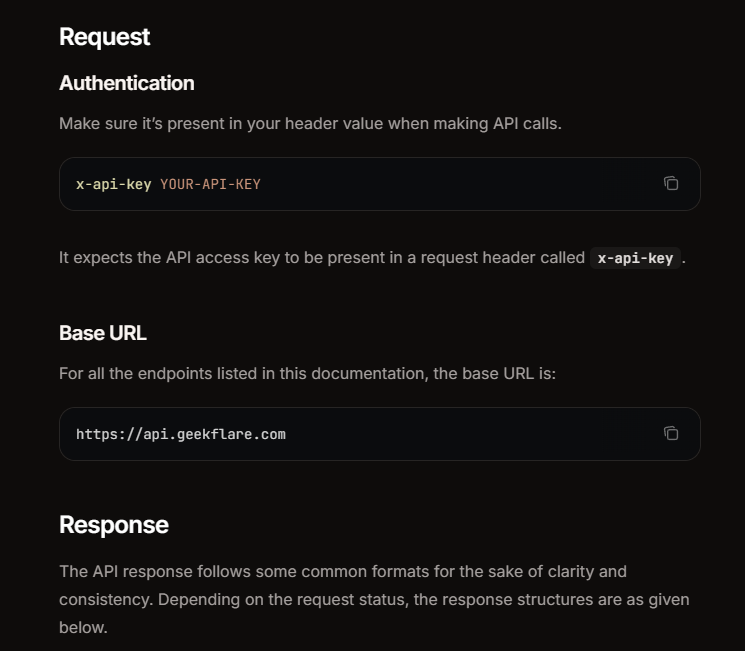
Depending on the API type, you may also want to include code snippets in popular languages.
Doing all these can not only improve customer acquisition, but also help reduce support tickets.
Error Reference
Lastly, make sure that your API documentation covers error references. These error references ensure that developers have something to check without feeling overwhelmed or lost. It keeps troubleshooting easy and meaningful, especially for common errors.
How to Choose the Right Tool
Choosing the right tool can lead to more impactful API documentation for your audience. Check the table for quick decision-making.
| Need | Go For | Pricing | AI feature |
|---|---|---|---|
| Open-source & self-hosted | Slate, Docusaurus | Free (open-source) | None, but offers integration with own/other AI tools |
| Modern, polished out of the box | Mintlify, Readme.com | Paid, with free trials/tiers | AI-powered search & chat (Mintlify); AI writing assistant + personalized docs (Readme) |
| OpenAPI/Swagger auto-generation | Redoc, Swagger UI | Free (open source); Redoc offers paid cloud tier | None |
| Large-scale enterprise docs | Backstage, Confluence | Backstage: free, open-sourceConfluence: Paid tiers (free for smaller teams) | Confluence offers Atlassian Intelligence; Backstage relies on plugins |
| Fast setup, no engineers needed | Mintlify, GitBook | Paid, with free tiers for smaller teams | AI search + writing assistance on both |
API Documentation Tools Detailed Breakdown
Mintlify
Mintlify is an intelligent knowledge platform that allows developers to create world-class documentation with an AI workflow to help speed up the creation process.
It is MDX-based (allows Markdown and JSX syntax together), allowing for workflow creation. To manage distribution, it uses GitHub, ensuring full version control for seamless collaboration, especially for startups and scale-ups wanting to deploy polished docs fast.
To test it out, I ran its “Generate with AI” on my personal project. It automatically set up my repository to use workflows and help automate everything.
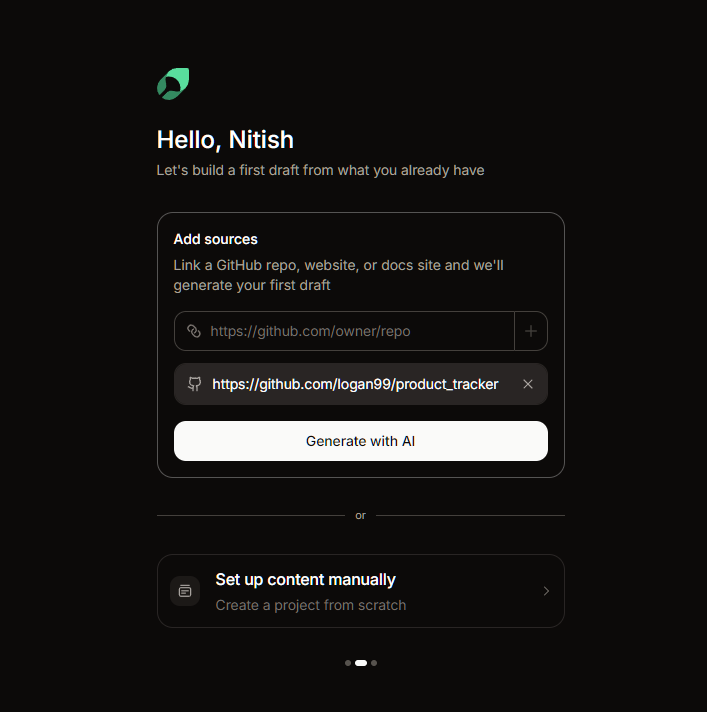
After an initial scan, it went ahead and built a documentation structure, generated page content, and applied branding, leading to a great starting point for anyone to further refine the docs before releasing them publicly.
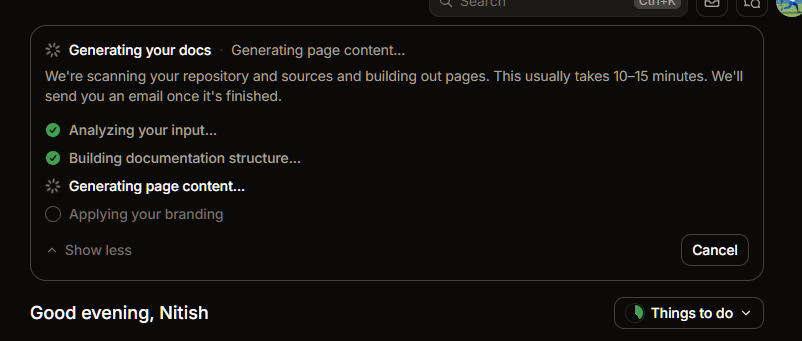
And, it did a great job at it! I found the initial draft very useful as it sets the project up for changes and polish.
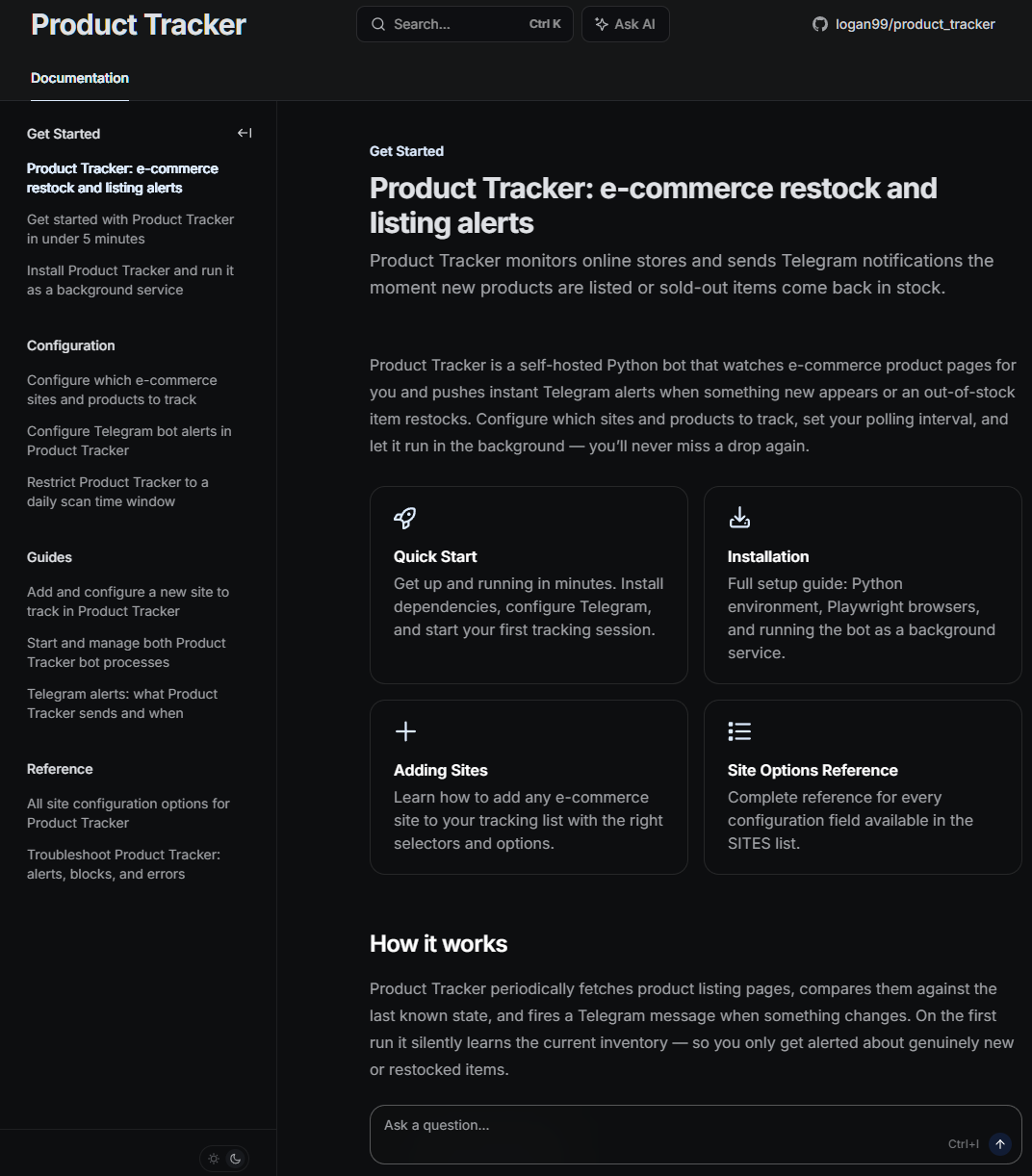
As for key features, Mintlify shines in the following:
- MDX-based docs-as-code workflow: It provides developers the means to create workflows and improve efficiency with bi-directional GitHub sync.
- Self-updating knowledge management: An AI agent that proposes doc updates by opening pull requests.
- AI-powered search: Offers specialized agentic retrieval search for better context retrieval.
- OpenAPI Support: I found Mintlify to offer full OpenAPI support, allowing developers to read and test API endpoints without leaving documentation.
- Custom Components: As Mintlify is MDX-based, it supports React component embedding, allowing developers to include interactive demos, custom UI, and live code playgrounds right into the docs.
- Analytics: Offers insights including history, popular pages, and referrals.
Pros & Cons
PROS
CONS
Pricing
Free: $0, good for managing hobby projects.
Enterprise: custom pricing; ideal for scaling and global teams.
AI usage is metered on top of the paid plans.
Why is Mintlify becoming the default for AI-native companies?
Mintlify is popular and is used as a default for AI-native companies such as Anthropic, Grok, and Perplexity. Three reasons include:
- Mintlify is built with AI-agents in mind, offering seamless integration with LLMs.
- It is co-built with Anthropic, offering features like llms.txt
- Improves speed to market and focus on deliverable
Slate
Slate is an open-source documentation generator. It’s popular among developers, with 36K+ stars at the time of writing. It was developed by Robert Lord in 2013. It’s best for teams that want full control with a classic API reference look.
Note: The official Slate repository was archived by its creator on GitHub in early 2026 and is now read-only. The creator, Robert Lord, has the latest version hosted on a self-hosted domain.
With Slate, developers can create static HTML docs.
The key reason behind its popularity is its three-column layout (inspired by Stripe).
- The first column contains navigation
- Second offers description
- The third offers a code sample
It not only makes it easy for developers to manage documentation, but also allows users to follow it.
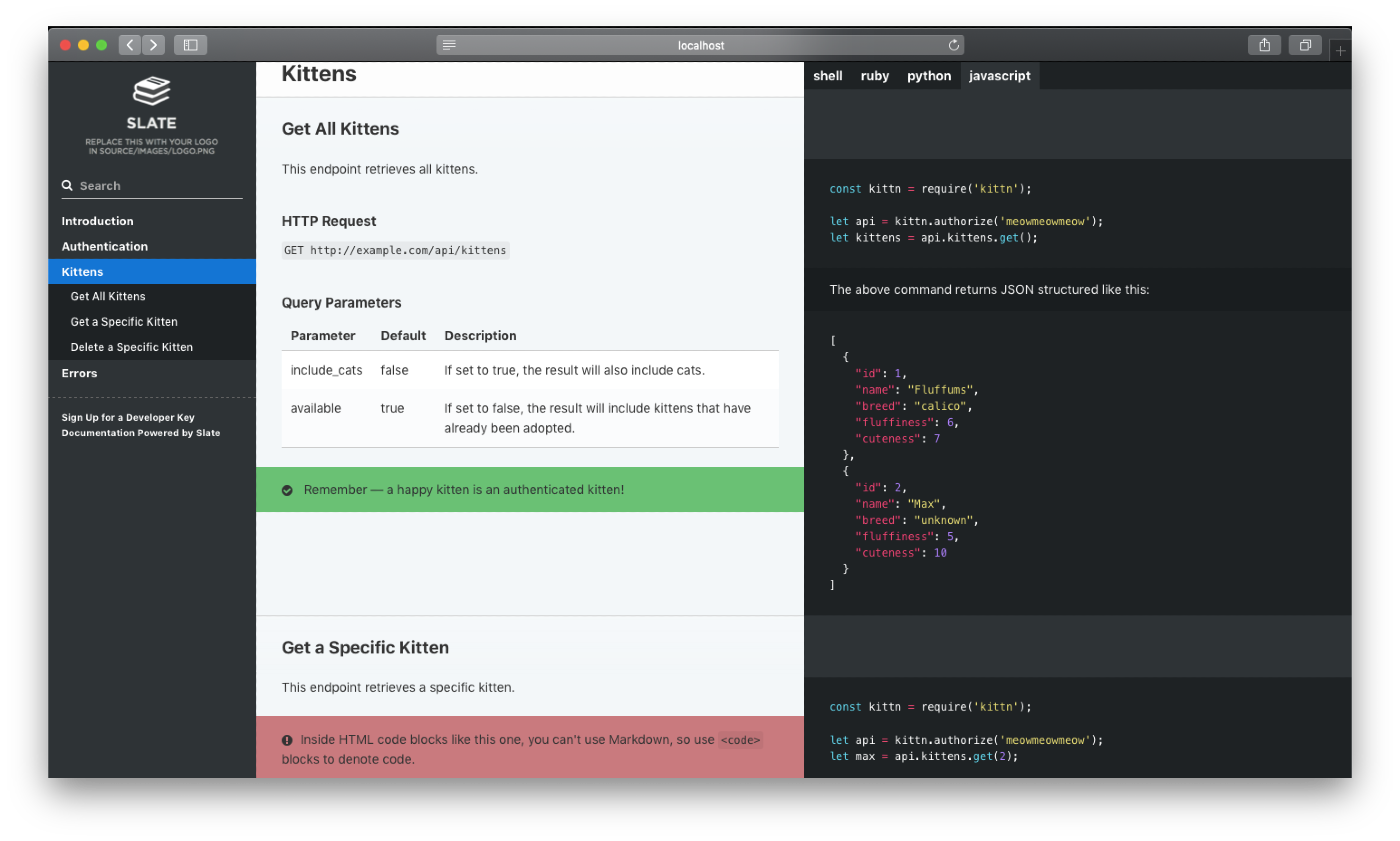
Slate API Documentation tool key features:
- Markdown-based: I found its Markdown support useful, as it helps developers to host a stylish yet functional HTML site. It also allows easy contribution by other developers.
- Single-page docs: With Slate, developers can create single-page docs, which is useful for finding instant information by using search or the Ctrl + F keyboard shortcut. However, this approach might not be ideal for large projects, but excellent for small to medium-scale APIs.
- Syntax highlighting: Improves readability and usability with syntax-highlighted code samples. Slate handles it via its built-in integration with the Rouge syntax highlighter.
- Self-hosted: Allows self-hosting and works with GitHub Pages.
Pros & Cons
PROS
CONS
Pricing
Slate is free to use and available under open-source licensing.
Slate took inspiration from Stripe’s three-column layout. They codified and democratized it to the larger developer audience.
Redoc
Redoc is a feature-rich API document tool that was created by Rebilly to solve their internal API documentation problem.
Over time, it has become one of the most widely used OpenAPI rendering tools and has earned over 23K GitHub stars.
If you want to test, you can give its live demo a try. To test, you need a spec file. For this, I went with the Swagger Petstore spec file, a popular, and classic test spec.
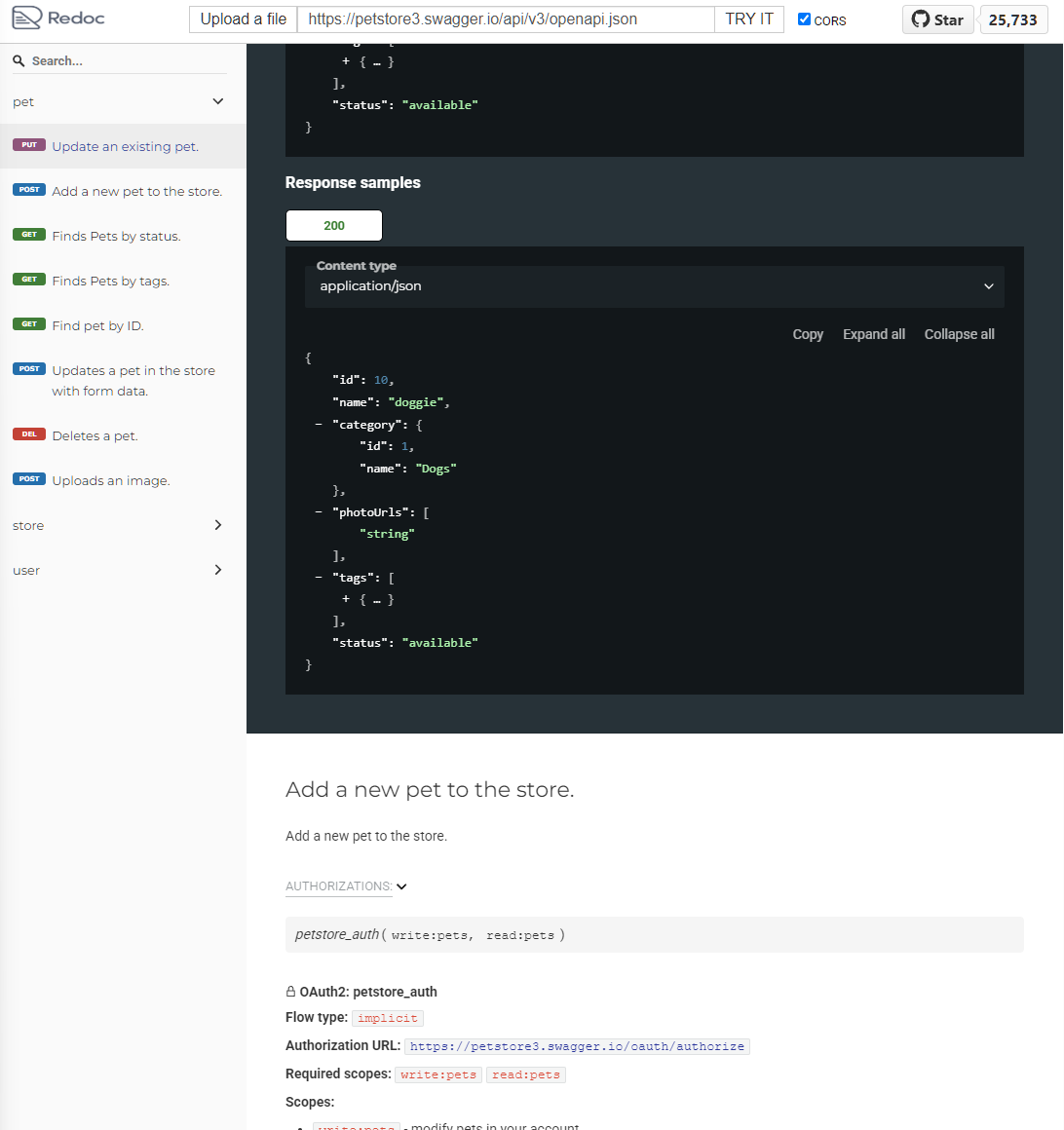
It did look good and usable. There are proper code examples, a nice menu on the left, and drop-down menus offering insights into the APIs.
Impressive! And a good option for sure. And this showcases Redoc’s OpenAPI Swagger spec compatibility. All you need to do is redirect Redoc to your OpenAPI Swagger spec, and it will automatically generate the three-panel reference site.
Redoc key features include:
- Three-panel layout offering great readability and accessibility
- Search option that helps get endpoint details instantly
- Support for OpenAPI 3.0 and 3.1
- Ability to use styles and themes to match your branding.
- Use CDN or self-hosting for easy deployment.
- Free to use, open-source, available under MIT license
I suggest Redoc to teams that have an active OpenAPI spec documentation and want production-ready docs via automation. However, it may fall short if you’re looking for a tool that offers features to write narrative guides, tutorials, or conceptual docs.
Pros & Cons
PROS
CONS
Pricing
Redoc is available free via an MIT license. It is open-source. However, it does offer a paid version with CI/CD integration via its Pro and Enterprise plans.
Readme.com
Readme.com is an AI-powered all-in-one developer hub. Here, you get access to docs, an API explorer, changelogs, and a thriving community of developers helping each other and improving the product.
With Readme.com, you can build API docs, technical docs, help center, and even SDK docs.
To give it a try, I went ahead and signed up. As a documentation manager, you can choose to upload your OpenAPI file or use Markdown for technical documentation. Furthermore, it offers API Designer, where you can manually define an API.
To test, I used the same Swagger Petstore test spec. And it looked good!
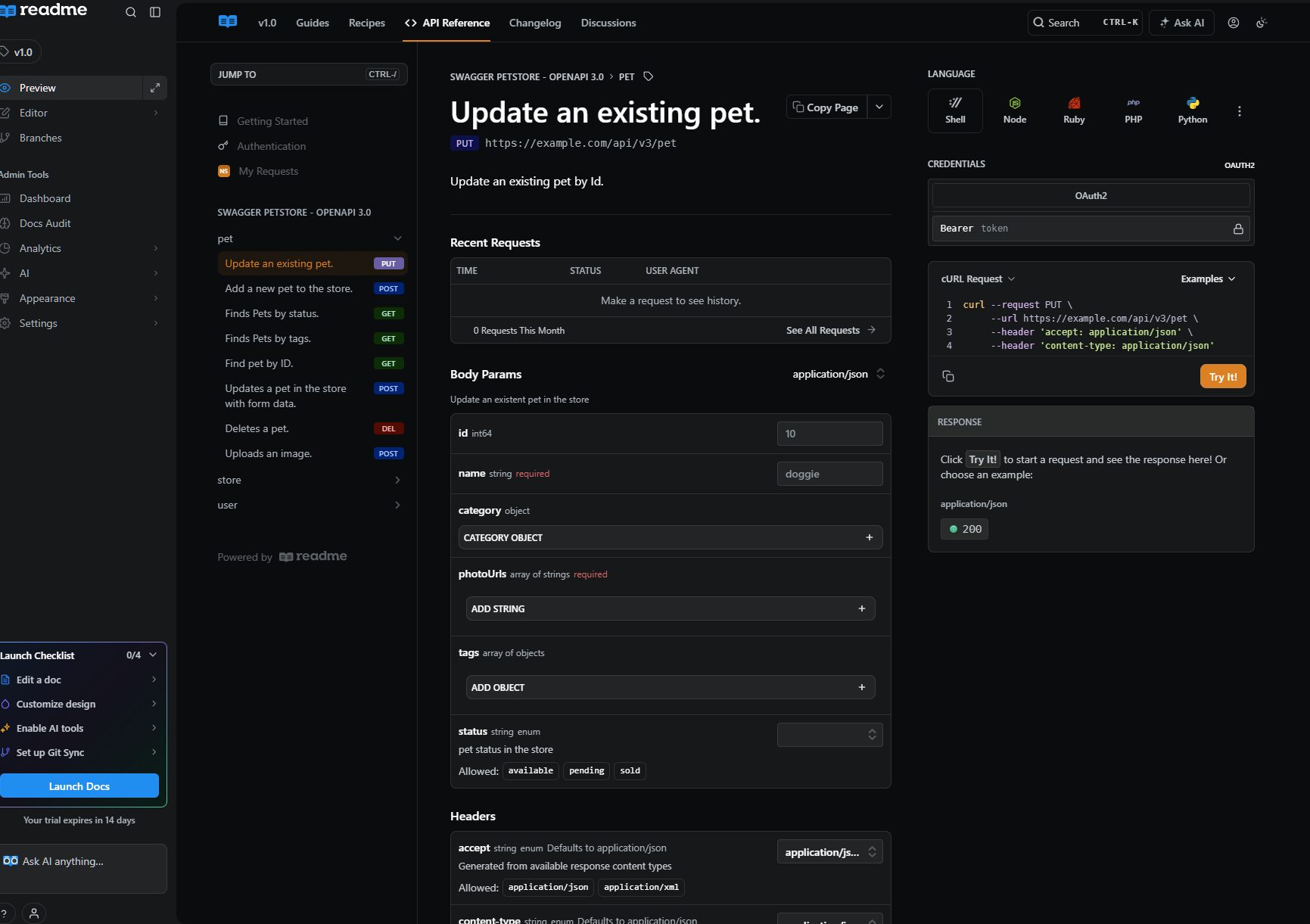
Readme’s AI tools help you in the journey. You can ask its AI (Ask AI) for help. It also gives access to AI linting, MCP Server (use Cursor or Claude to interact with docs), and an AI writer to help write the documentation.
Readme.com key features include:
- OpenAPI support with import spec option and GitHub/CI sync.
- API explorer for easy access to API calls
- Analytics dashboard where you can track page views, endpoint usage, and other stats
- Built-in changelog to help collaboration easily
- AI integration to help in creating, maintaining, and expanding documentation
I suggest Readme.com to teams that want a full combo with tracking and visibility built-in. It helps you understand your audience and improve documentation by learning where the visitors drop off or are highly engaged.
Pros & Cons
PROS
CONS
Pricing
Readme.com offers a free plan. Paid plans start at $250 per month. The free plan is good enough for smaller or personal documentation, while paid plans offer key features for businesses to manage and serve their documentation to a larger audience.
Document360
Document360 offers API documentation software that helps create and maintain API docs with ease. It is a solid tool for technical writers working on SaaS products, where good API docs can make or break the deal.
It allows a full knowledge base creation where you can serve API docs, user guides, and support content to your audience.
It allows a demo, which you can register for via a company email. As seen in the below image, the Document360 interface has a nicely organized hierarchical navigation sidebar that allows for quick access to specific API endpoints and functional categories. This structure helps in managing complex documentation.
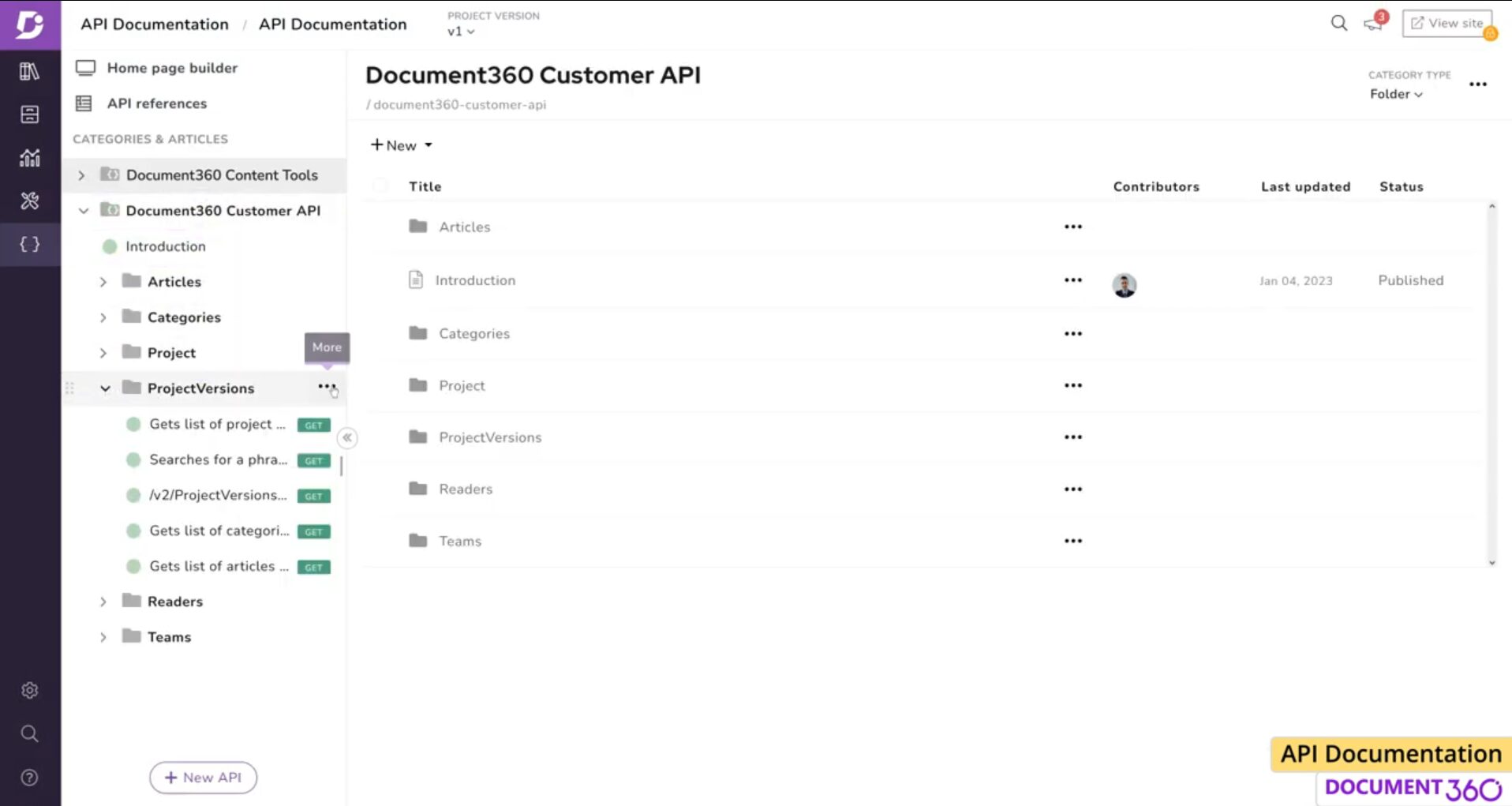
However, the main content area feels disconnected from the sidebar, which occasionally makes navigating through multiple nested structures feel complex. For those managing extensive API references, a more code-centric layout might be suitable.
Document360 supports easy import via a Swagger or Postman link, or just uploading a JSON spec. Advanced teams can also set up auto-sync to automatically update when changes occur.
Document360 is feature-rich with notable features like:
- Flexible API import with support for Swagger/Postman, JSON upload, or auto-sync
- Offers built-in endpoint testing, allowing code in doc execution
- Support different languages, including C#, Java, JavaScript & Python
I suggest Document360 for teams that want a general product that supports everything under one roof. However, this may make it undesirable for teams that want deep OpenAPI integration.
Pros & Cons
PROS
CONS
Pricing
Document360 doesn’t have any public info on pricing. To know more, contact their sales team.
Swagger UI
If you’re looking for an original OpenAPI renderer, then you need to use Swagger UI. It is the first and original tool that helped visualize OpenAPI specs. In fact, it is the default option for many technical writers out there.
Swagger UI offers a user interface to make it easy to implement visual documentation. It offers a live demo with the Swagger Petstore test file I was trying out.
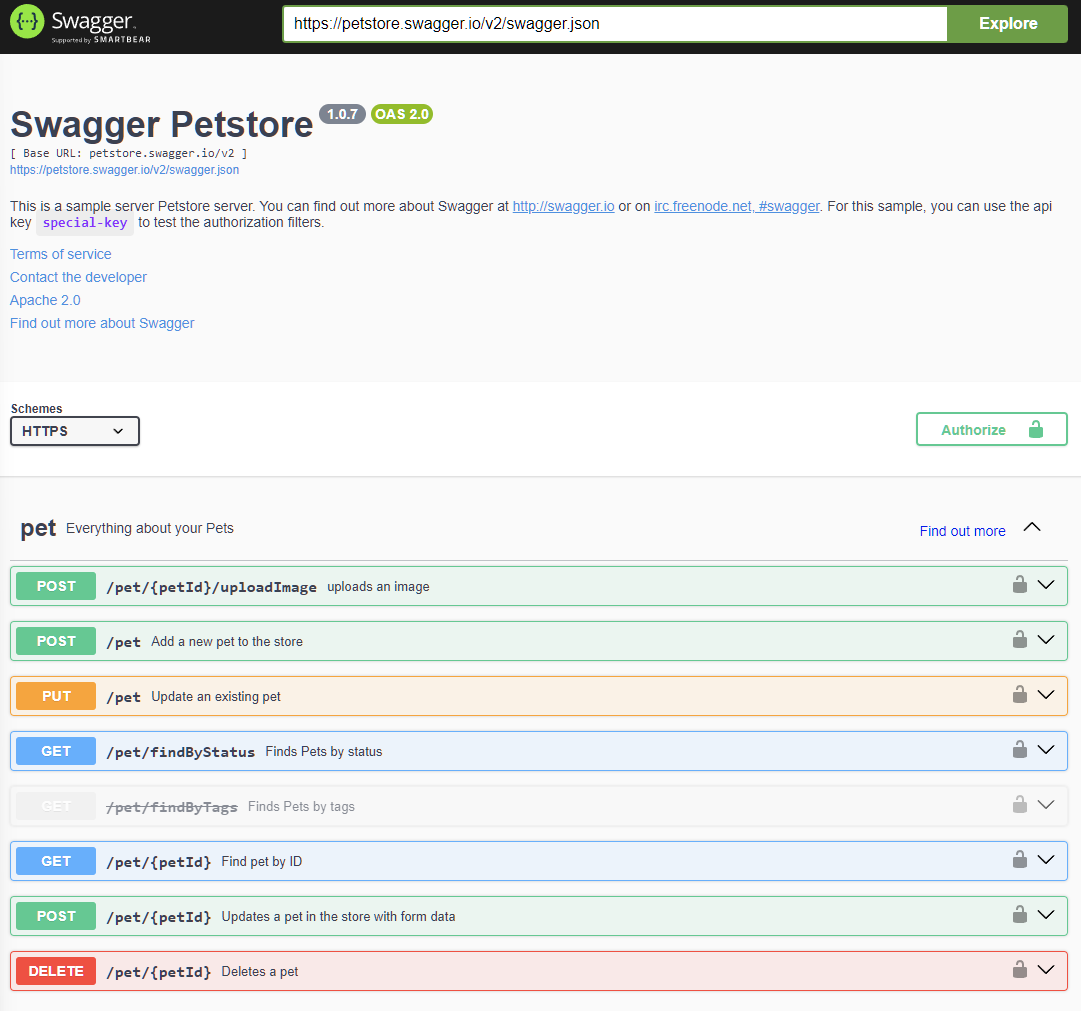
Core OpenAPI support makes Swagger UI perfect for teams that want a quick, standard, and embeddable API explorer. It helps them get started and not waste time adopting a full documentation platform.
Some of the key Swagger UI features include:
- Supports both OpenAPI 2.0 and 3.0 specs for auto-generated docs
- Offers a try-it-out console to test endpoints
- No dependency on any environment or tool
- Customizable with full access to source code
- Offers SwaggerHub for easy documentation visualization
Even with default OpenAPI support, Swagger UI might not be a great pick for everything. It acts more like a render endpoint solution than a complete documentation platform.
Pros & Cons
PROS
CONS
Pricing
Swagger UI is open source and free to use. However, they do offer paid plans that start at $22.80/month with features like version control, collaboration, centralized API design management, and more.
GitBook
GitBook is an AI-powered API documentation tool. It has deeply integrated AI and gives your team the ability to use AI-capabilities/agents to streamline product documentation.
With the free plan, you can sign up and testing/using GitBook to see if it fits your requirements. Once I logged into its free account, I found it supports a wide variety of imports, including OpenAPI spec and Git Sync. It also has a Docs template to give teams a head start when creating documentation.
As a test procedure, I used the OpenAPI option to test Swagger Petstore. It took a few minutes to load the specifications, but once done, it was professional, clean, and useful.
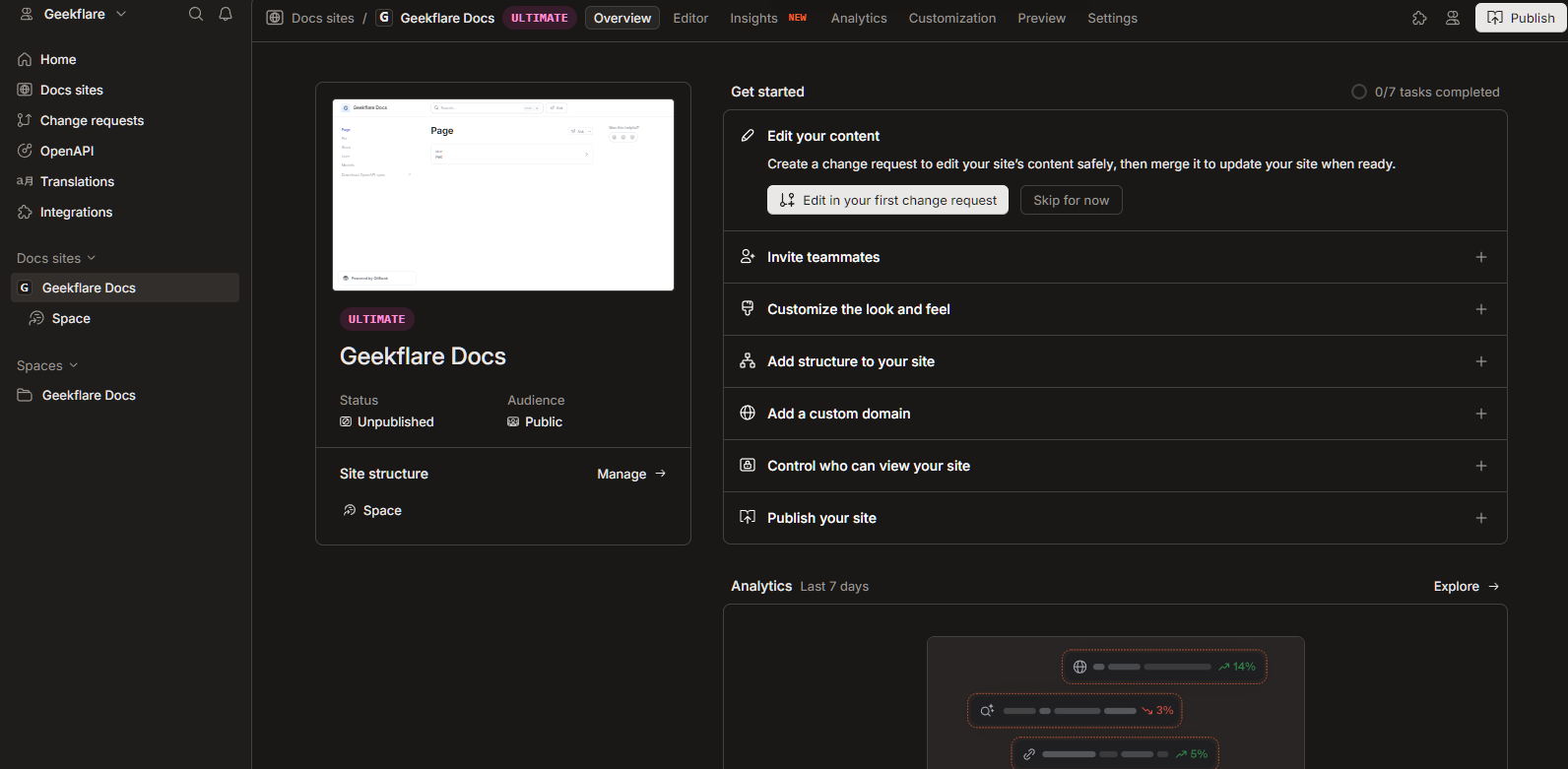
GitBook key features include:
- Block-based editor with a Notion-style interface
- Supports OpenAPI and GitSync
- AI agent helps with doc improvements and flags issues
- Supports custom domains and branding
GitBook fits right for teams that want seamless API documentation creation and management with AI inclusion.
Pros & Cons
PROS
CONS
Pricing
GitBook offers free and paid plans, starting at $65 per site/month with an additional cost of $12 per user/month. Its free plan is good for testing and running small projects.
All plans (except Enterprise) come with a 14-day free trial.
Docusaurus
Docusaurus is Meta’s open-source docs framework. It is React-based and hence highly customizable.
Docusaurus supports MDX, which means writing in Markdown with embedded React components. This opens up interactive docs.
Docusaurus playground gives you a glimpse of what it is capable of. You can try it out in CodeSandbox or StackBlitz in JavaScript or TypeScript.
It is best treated as a general-purpose framework to build documentation rather than just an API documentation tool. You can use your OpenAPI specs via plugin support.
Docusaurus key features include:
- MDX support that works with static HTML files
- React customization with access to plenty of plugins
- Offers localization out of the box
- Static site generator with the option to deploy anywhere
I would recommend Docusaurus to any technical team/individual out there. However, be careful before you choose it, as it doesn’t natively render OpenAPI specs but relies on third-party plugins to do so. It also makes setup time-consuming. If your team is comfortable with React and Git-based workflows, then Docusaurus is a great pick.
Pros & Cons
PROS
CONS
Pricing
Docusaurus is free and open-source.
Honorable Mentions
The below API documentation tools deserve honorable mentions, though they didn’t make it to the main list.

APIDOC

Backstage

Stoplight

Fern

Postman
New Trends in API Documentation
API documentation is evolving rapidly in recent times. Based on my research, the following are the new trends in this field:
- AI documentation tools like Mintlify, GitBook, and others are offering AI-powered search, improving developers’ experience with AI agents understanding user intent better. For example, if a developer types, “how do I authenticate?” the AI agent can identify and render the correct pages (OAuth Setup or API Keys).
- It’s common to see that most API documentation tools/platforms offer interactive API playgrounds or demos to help you decide before you start integrating. It started with Swagger UI, and now most platforms, such as Readme.com, offer endpoint testing with real requests and responses.
- Auto-generated docs from code are my favorite, as it helps cut time to market. It gets you started quickly with an initial draft that you can edit. I tried it with Mintlify and was genuinely impressed by what’s on offer.
- LLM-readable docs are also trending because of AI agents. They consume APIs autonomously and help not only humans, but also machines understand your documentation. Here, teams need to customize the llms.txt file to help AI systems have a means to understand your site/doc.
Best Practices for Writing API Docs
Below are the best practices for writing API docs:
- Always give readers a quickstart guide to get readers familiar with what’s on offer, so that they can get started in under 5 minutes.
- Make sure to show real, copy-paste-ready code examples in multiple languages. This will help them get started quickly and actually learn.
- Ensure that every error code is documented with a cause and fix. It will help reduce support tickets and keep developers happy.
- Authentication is vital and hence must be clearly visible. The section should be direct and in front, impossible to miss.
- Give developers a changelog to understand what’s changed.
Conclusion
As per our research and comparison, there is no “single” best API documentation tool. The choice depends on multiple factors, including tech stack, team size, and other finer requirements that you might have.
For example, you can opt for Mintlify if you’re looking for speed and a modern tool. I also recommend checking out Slate or Redoc for OpenAPI support. And, if you want the default OpenAPI/Swagger support, then Swagger UI is your best bet. For full control, I recommend Docusaurus.
In short, the choice is yours to make.






