



SEO monitoring tools are essential for tracking website performance, identifying issues, and optimizing search rankings by providing real-time data and insights. They provide valuable insights into keyword effectiveness, competitor analysis, and overall site health, ensuring optimized online visibility.
Similar to how Google analyzes your website via crawlers, SEO monitoring tools deploy crawlers to monitor your keyword rankings, content changes, backlinks, site health, and more. You can even crawl your competitors’ websites to identify strengths and shortcomings and find opportunities to overtake them.
Below are some of the best SEO monitoring tools based on key features such as real-time alerts, keyword tracking, backlink monitoring, site audit capabilities, competitor analysis, and a user-friendly interface.
Conductor
Best for Real-Time SEO Monitoring
Conductor formerly ContentKing, is a website auditing and monitoring platform built for 24/7 SEO monitoring. It helps teams track SEO issues, website changes, page health, and performance problems in real time before they affect search visibility.
Conductor has also expanded beyond traditional SEO monitoring. Its wider platform now includes AI visibility tracking, AEO and SEO intelligence, competitor analysis, ROI measurement, AI content generation, and optimization for search and LLM visibility.
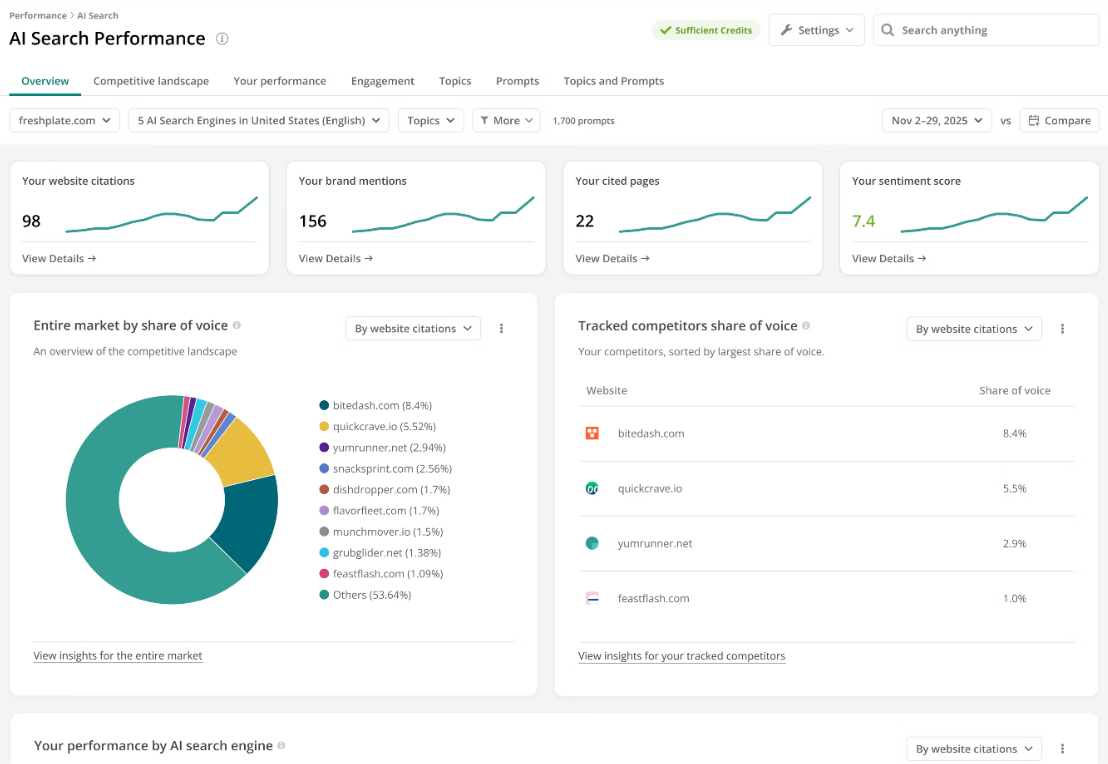
Conductor Monitoring continuously audits your website and alerts you when important SEO issues or page changes are detected. It can also monitor Core Web Vitals using Lighthouse data and alert you when performance scores or Web Vitals fall below good thresholds.
All your performance data is stored and visualized in a centralized dashboard. You can also use Conductor’s Chrome extension to view page-level SEO metrics, tracked changes, issues, Google Analytics data, and Google Search Console data directly in your browser.
Top Features
- Monitor your website 24/7 with real-time change tracking and alerts, gaining insights beyond what standard crawlers can provide.
- Track SEO issues, page health, indexability, content elements, social markup, and tracked changes across monitored pages.
- Monitor Core Web Vitals and Lighthouse performance metrics, and receive alerts when critical metrics fall below good thresholds.
- Use AI visibility tracking, competitor analysis, and content intelligence to support both traditional SEO and AI search optimization.
- Create customizable SEO alerts for changes in specific sections, elements, issues, Web Vitals, and more, keeping your website’s performance in check.
Pros & Cons
PROS
CONS
Pricing
Conductor offers a free trial, but pricing is only available on request.
Visualping
Best for Visual Change Detection
Visualping takes a different approach to SEO ranking, so that you know why your ranking dropped, and not just when it does.
To achieve this level of clarity and information gathering, Visualping watches the actual web page to catch the changes that cause the drop.
It’s fascinating. And, you can also try it out by visiting Visualping’s official site, where you can enter your site URL and choose an alert of your choice.
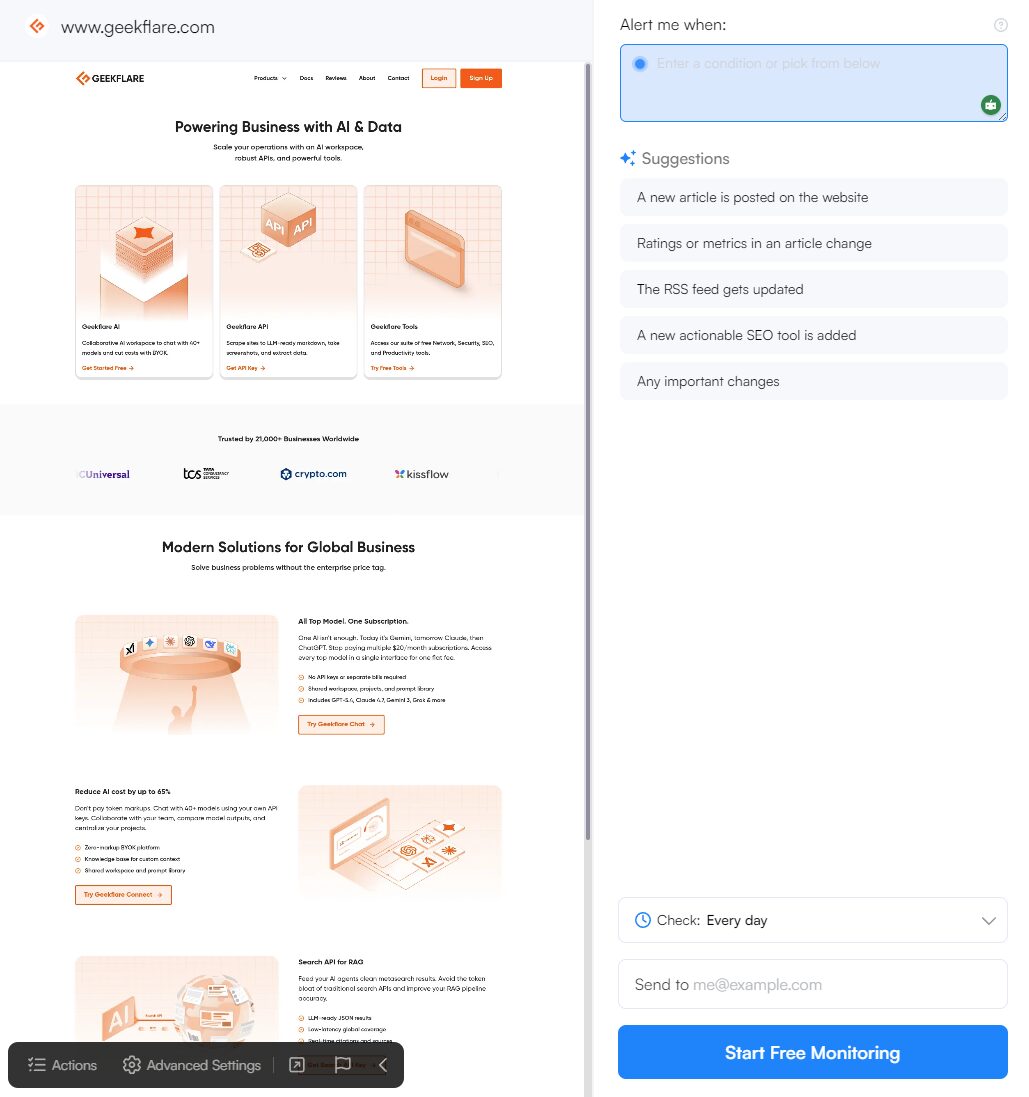
This leads us to its free trial and free forever plans. You can try out any of them based on your needs. Free trials give you access to more features and, hence, let you test drive the solution closer to your business needs.
As for credibility, Visualping is an industry leader and is trusted by 2 million users, and is top-rated on G2 for website change monitoring.
The best part about Visualping is its delivery system. As soon as it identifies changes, it sends them via email or text message or can notify the team via MS Teams or Slack.
The dashboard is also neat, which lists all your projects with active and inactive pages. You can also manually run checks if needed.
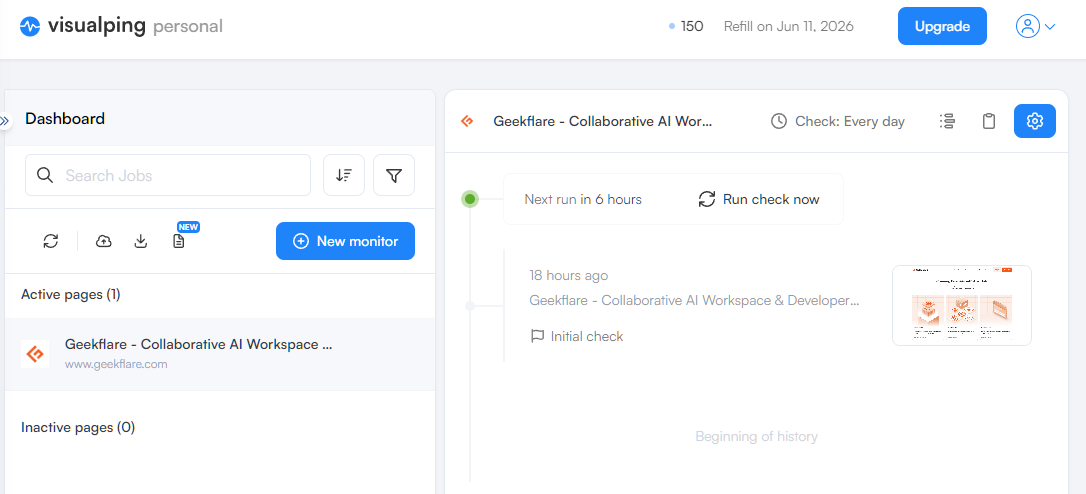
Under the hood, Visualping uses three core detection modes to ensure accuracy. These include:
- Visual mode: compares screenshots for any changes (pixel level)
- Text mode: compares text while ignoring layout shifts
- Element mode: compares specific page sections while ignoring everything else
These modes work together to provide accuracy and value to the users. On top of these, there is an AI layer that helps summarize the changes in plain English and lists changes against your monitoring criteria.
Features
- SEO-feature scanning with the ability to detect headings, keywords, visual rendering, robot.txt, and internal & inbound links
- Ability to monitor SERP rankings and alerts when Google makes changes to a particular link’s meta description, snippets, and so on.
- Can detect code changes, ideal to monitor SEO titles, descriptions, and bots.
- AI layer summarizes the changes and helps create AI briefings offering actionable points.
- Offers APIs for better integration with custom solutions.
Pricing
Visualping offers 3 plans. Personal, Business and Solutions. The Personal plan is free for upto 150 checks and 5 pages, after which the price escalates depending on number of checks required. The Business plan starts at $100/month. The Solutions plan has custom pricing.
SE Ranking
Best Affordable Agency SEO Solutions
SE Ranking is an agency-focused SEO tool for professionals managing multiple domains. It offers solutions for keyword planning, position tracking, website auditing, backlink analysis, content optimization, and competitive research.
You can create on-brand reports and dashboards that align with your branding. SE Ranking’s Agency Pack lets you use white-label reports, client seats, lead generation tools, and get listed in its Agency Catalog, where your SEO services can be shown to potential clients.
SE Ranking now also supports AI search tracking. Its AI Results Tracker shows how your website and brand appear in Google AI Overviews, Google AI Mode, Gemini, ChatGPT, and Perplexity. It helps you track AI snippets, competitors, keywords, and brand visibility across AI-generated answers.
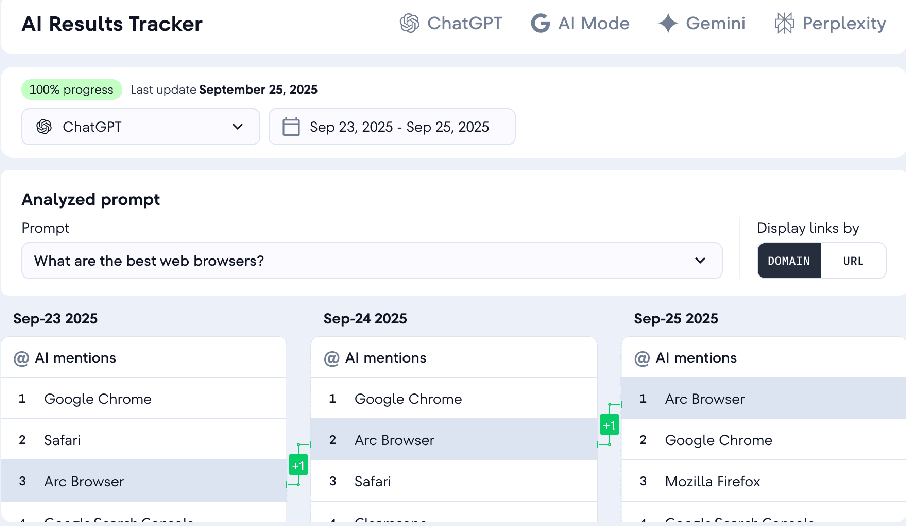
SE Ranking analyzes on-page, off-page, and technical SEO factors to identify issues that can affect rankings. It also provides API access for analyzing keyword rankings, backlinks, domain metrics, site audit issues, and competitor insights.
Top Features
- Use keyword tracker to monitor keyword rankings across multiple search engines, devices, locations, and the top 100 search results.
- Track AI Overviews and AI search presence to understand where your site, competitors, and keywords appear in AI-generated results.
- Use SERP checker and competitive research tools to monitor competitors’ search visibility and top-ranking pages for your target keywords.
- Build an accurate backlink profile for your domain with SE Ranking’s backlink data and create branded reports for clients.
- Run website audits to find technical SEO issues and improve overall site health.
Pros & Cons
PROS
CONS
Pricing
The Core plan costs $103.20/month for 10 projects and 1 manager seat, while the Growth plan costs $223.20/month for 30 projects and 3 manager seats. Both plans offer a 14-day free trial.
You also get add-ons for API access, agency, and AI search at an additional cost.
There is also an enterprise plan with custom pricing.
Semrush
Best All-in-One SEO Software for Marketers
Semrush is an all-in-one SEO software for marketers specializing in keyword research, competitor analysis, and campaign management. It has a database of 27.9 billion keywords, 808 million domains, and 43 trillion backlinks. You can research international and local keywords, conduct site audits, track keyword rankings, and identify backlink opportunities from one tool.
Semrush’s Backlink Analytics lets you dig deep into your or your competitor’s backlink profile. You get essential backlink metrics and can compare backlink profiles side-by-side to find link-building opportunities.
With Semrush, you can evaluate website health with regular SEO audits based on 140+ checks, including SEO issues related to broken links, duplicate content, HTTPS implementation, site performance, hreflang, and more parameters.
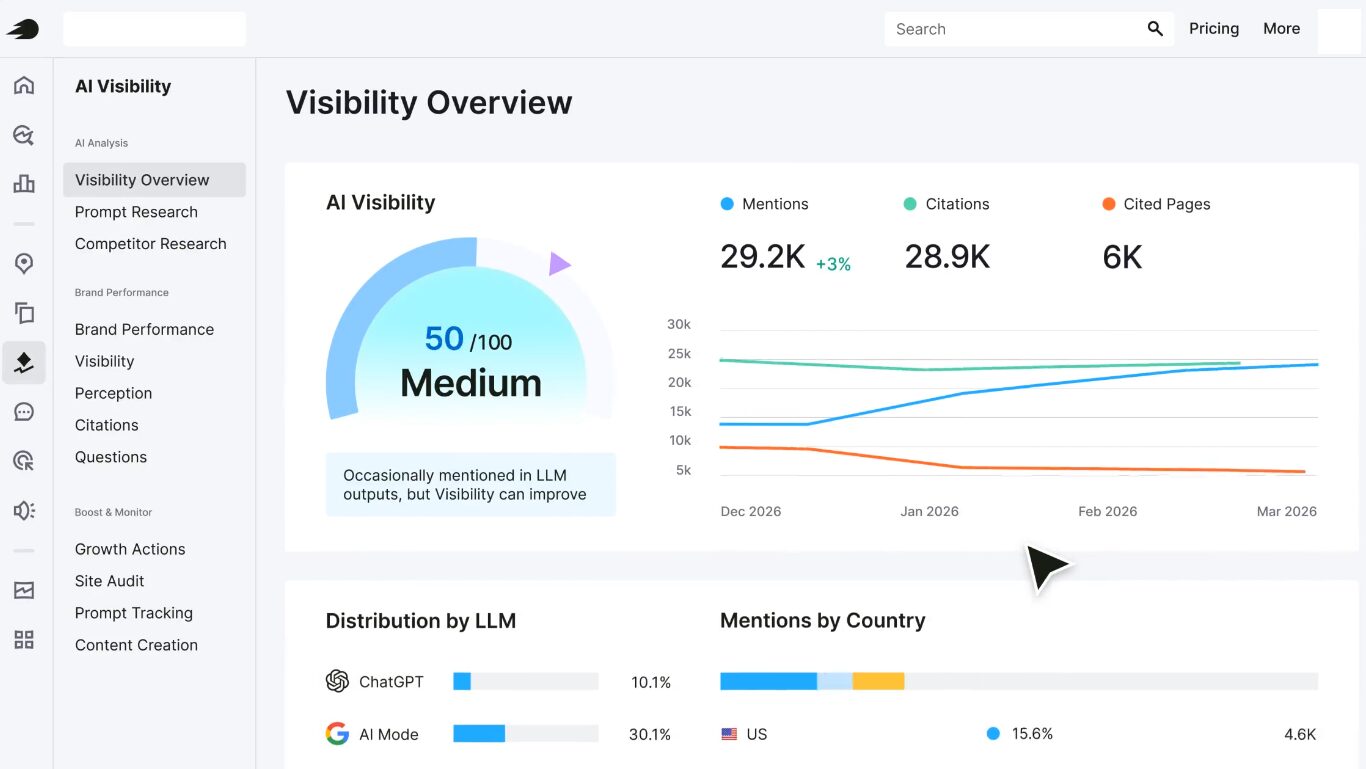
Semrush has also added AI search visibility tools. Its AI Visibility Toolkit helps marketers understand how their brand appears in AI-generated answers and compare visibility against competitors across AI search systems.
Top Features
- Use the Keyword Magic Tool to discover thousands of relevant keywords, complete with search volume and difficulty metrics.
- Study competitors’ backlink profiles and compare them side-by-side to find link-building opportunities with Backlink Analytics.
- Leverage an on-page SEO checker to receive tips on link building, content writing, SERP feature targeting, and more.
- Use competitor discovery to find domains competing with yours for traffic and visualize performance using a competition map.
- Detect ranking algorithm updates for Google and Baidu SERPs proactively based on multiple signs that could indicate an update.
- Track brand visibility in AI-generated answers with Semrush’s AI Visibility Toolkit.
Pros & Cons
PROS
CONS
Pricing
Semrush offers the below plans:
- Pro: $117.33/mo (with free trial)
- Guru: $208.33/mo (with free trial)
- Enterprise: $416.66/mo
Moz Pro
All-in-One SEO Growth Platform with Competitors Monitoring
Moz Pro, part of Moz’s SEO suite, is an all-in-one SEO and competitor monitoring platform. Powered by Moz AI, it helps improve rankings and run SEO campaigns with keyword research, rank tracking, site audits, backlink analysis, SERP analysis, and on-page optimization.
Moz Pro automatically groups relevant keyword suggestions by search intent, making your SEO team more productive in keyword research. It also shows metrics such as search volume, difficulty, organic CTR, and priority to help you choose keywords with better ranking potential.
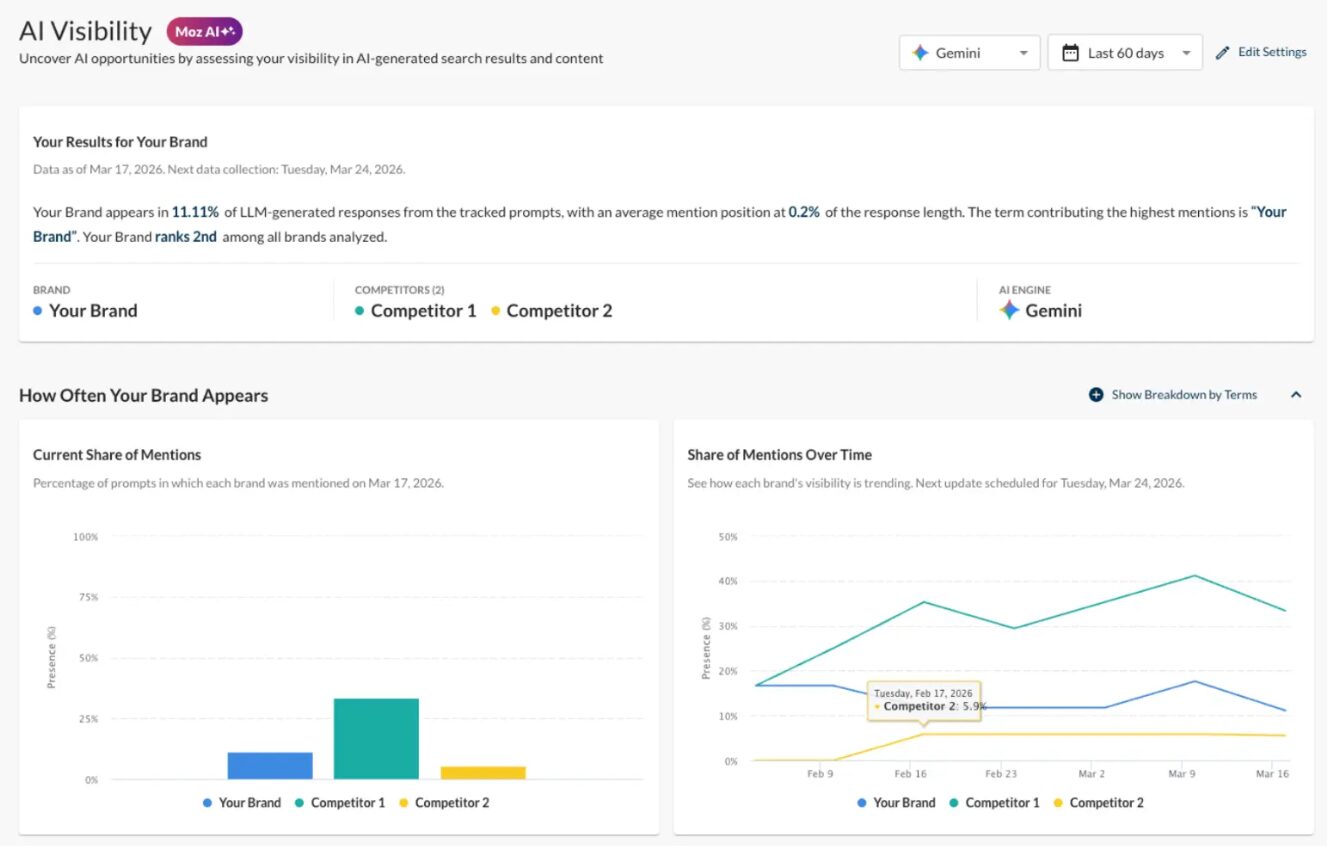
Moz Pro specializes in competitor research and SERP analysis, allowing you to track keyword rankings and gain AI-assisted SEO insights. You can also monitor competitors’ top keywords and best-performing pages to uncover opportunities and stay ahead.
Top Features
- Use Rank Tracker to monitor website rankings across search engines, locations, and devices.
- Optimize website content strategy with Moz’s On-Page Grader, get actionable recommendations to improve your page rankings, and attract more qualified traffic.
- Find high-impact keywords grouped by search intent, with corresponding metrics such as search volume, difficulty, organic CTR, and priority.
- Use Moz AI to understand the why behind search intent and get actionable insights on the next-best steps or recommendations on SEO issues.
- Use Site Crawl for in-depth site audits and detailed error reports, with clear instructions for validating fixes.
- Use Keyword Explorer and SERP Analysis to identify keywords that trigger AI Overviews and find content opportunities where your site is not featured.
Pros & Cons
PROS
CONS
Pricing
Moz offers a free trial and 3 paid plans.
- Standard: $79/mo
- Medium: $143/mo
- Large: $239/mo
SEOMonitor
Suitable for SEO Agencies
SEOmonitor is an agency-first SEO monitoring software. It distinguishes itself in the SEO industry through predictive analytics, rank tracking, forecasting, and objective performance tracking.
If you’re an agency owner, you can use forecast insights to estimate SEO traffic, monthly clicks, and year-over-year search trends. SEOmonitor also helps agencies connect rankings with business metrics by pulling Google Analytics and Google Search Console data into its Organic Traffic module.
SEOmonitor features an agency-friendly dashboard as a centralized hub for monitoring SEO activities. It also supports content audits, helping you identify the impact and opportunities hidden within content modifications.
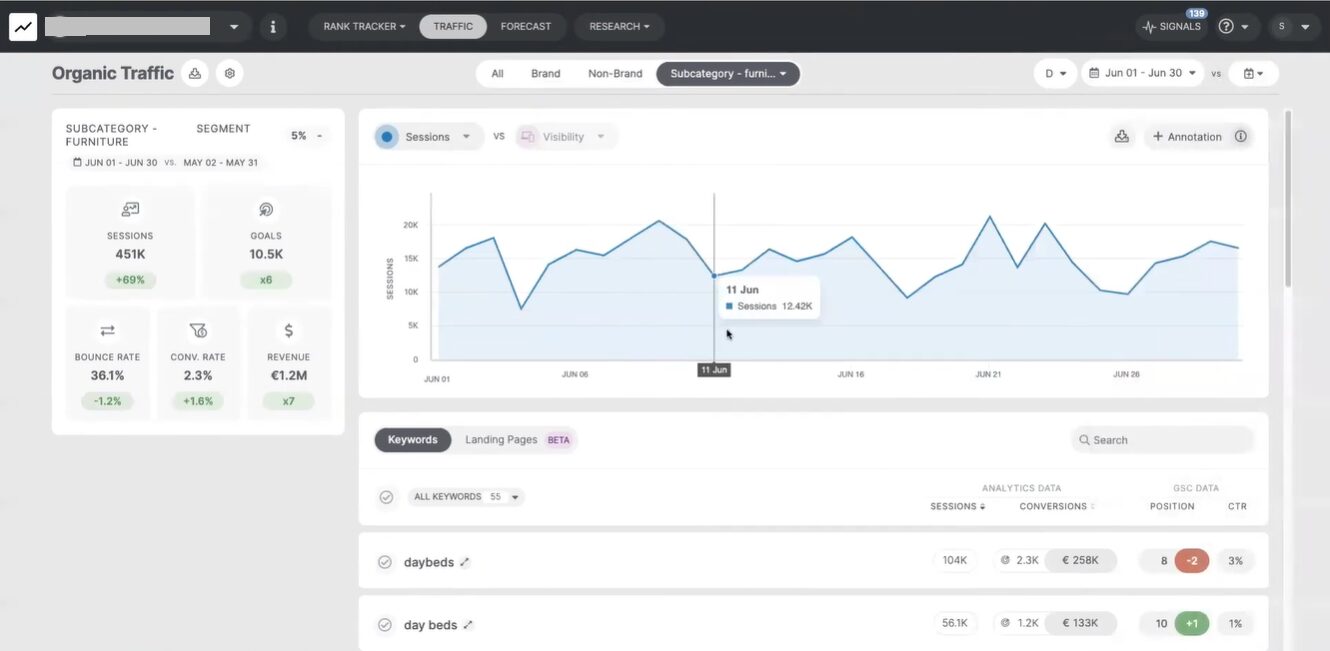
SEOmonitor has native integrations with visualization apps like Looker Studio, spreadsheet apps like Google Sheets, and API access for integrating SEO data into external workflows. Looker Studio, Sheets, and API access are available without additional cost.
Top Features
- Use predictive analytics to forecast SEO traffic accurately and estimate monthly clicks and year-over-year search trends.
- Leverage AI to curate keyword lists based on competitor and SERP features with advanced metrics like competitor trends and keyword-gap analysis.
- Track Google rankings, AI Overviews, and AI Search visibility across ChatGPT, Gemini, and Perplexity with one keyword strategy.
- Track AI Overview mentions and website citations separately, with daily updates where Google AI Overviews are available.
- Get alerts for search ranking changes from keyword modifications, headings, or page content across your or all agency campaigns.
- Facilitates benchmarking and goals tracking against competitors.
Pros & Cons
PROS
CONS
Pricing
SEOMonitor offers 2 plans.
- Starter: €82/mo billed yearly
- Pro: €248/mo billed yearly.
Free trial is available on both plans.
SEOMator
Best for Automated SEO Audits
SEOmator is an AI-powered SEO and SEM platform designed to enhance search engine monitoring and website optimization for maximum effectiveness.
The platform consolidates essential SEO tools and functions into one dashboard, allowing you to gather insights into website health, search rankings, backlinks, keyword research, and SEO audit performance from one hub.
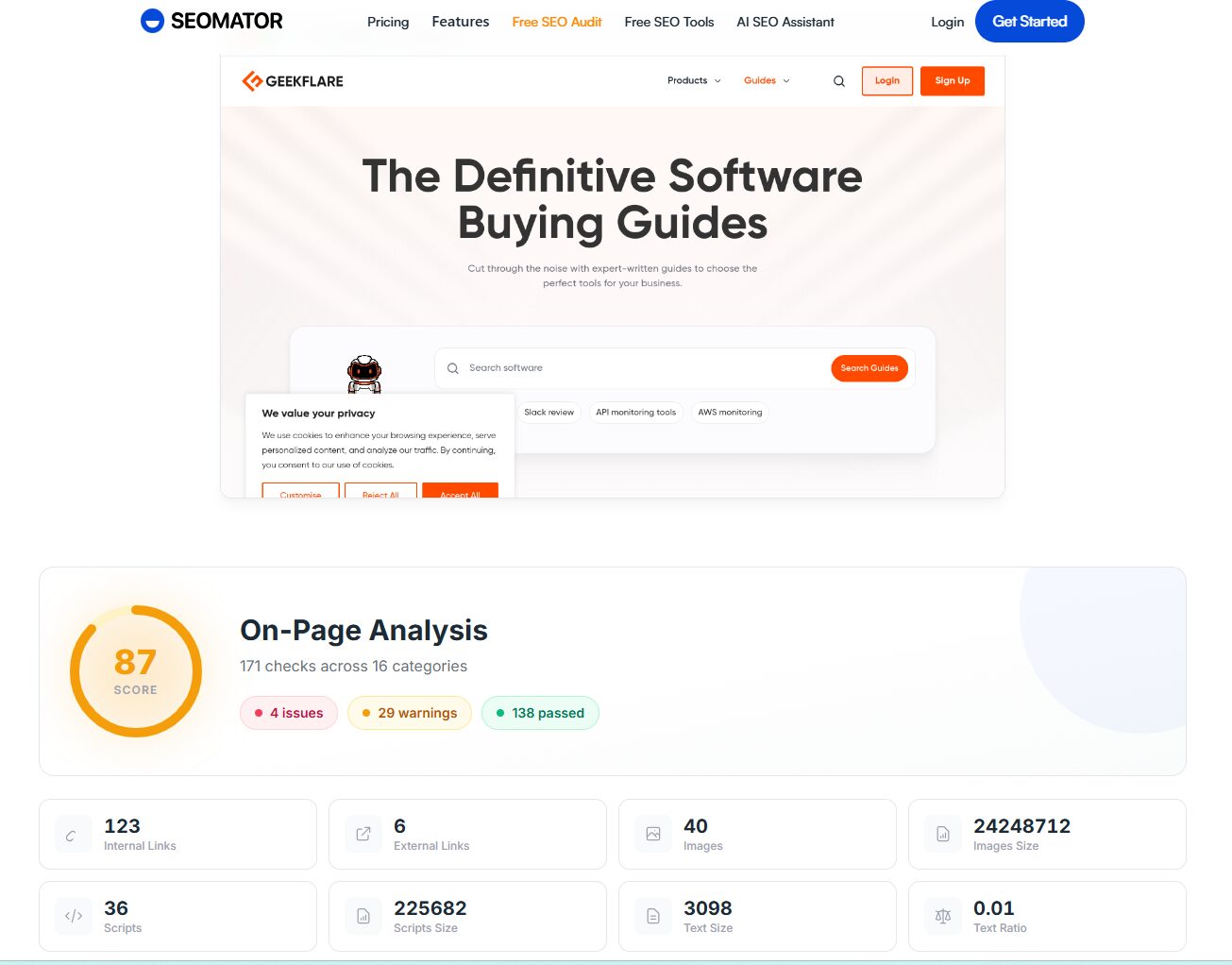
Its SEO audit tool checks on-page and off-page elements such as keywords, meta tags, backlinks, website structure, duplicate content, missing alt tags, slow page load times, and broken links.
Below is an SEO audit report of Geekflare Guides created by SEOmator.
For rank monitoring, SEOmator tracks website positions across traditional organic results and SERP features, including Knowledge Panel, videos, images, maps, hotels, People Also Ask, and more. It also offers a free GEO Audit Tool to analyze website readiness for AI search engines such as ChatGPT, Perplexity, Google AI Overviews, Gemini, and Copilot.
Top Features
- Use AI SEO Assistant to automate keyword research, find AI Overview keywords, get Google auto-suggest ideas, and create SEO strategy inputs.
- Track your website’s ranking positions for your chosen keywords across organic results and other SERP features.
- Use the Rank Tracker to monitor visibility across Knowledge Panel, videos, images, maps, hotels, People Also Ask, and more.
- Run SEO audits to identify technical and content-related issues affecting search visibility.
- Use the GEO Audit Tool to check citability, E-E-A-T signals, schema gaps, AI crawler access, and AI search optimization opportunities.
Pros & Cons
PROS
CONS
Pricing
Seomator offers 3 plans, with 7-day free trials available on all of them.
- Lite: $49/mo
- Standard: $99/mo
- Advanced: $279/mo
OnCrawl
Best to Monitor Crawl Errors
Oncrawl is a technical SEO analysis platform designed for large-scale and complex websites. It’s suited for businesses requiring in-depth analysis beyond basic SEO metrics. It offers analysis through its SEO Log Analyzer, helping businesses understand server-side data, monitor crawl behavior, and gain insights into search engine interactions and bot activity.
This tool combines crawl data, server logs, and performance metrics to understand how technical SEO signals influence organic search performance. You can use it to analyze crawlability, indexation, site performance, internal linking, and crawl budget across large websites.
The SEO Data Platform of Oncrawl works as a centralized hub for technical SEO data, historical analysis, dashboards, and reporting. It also supports AI Search Lens, which helps identify what LLMs see, what they ignore, and where you need to act for AI search visibility.
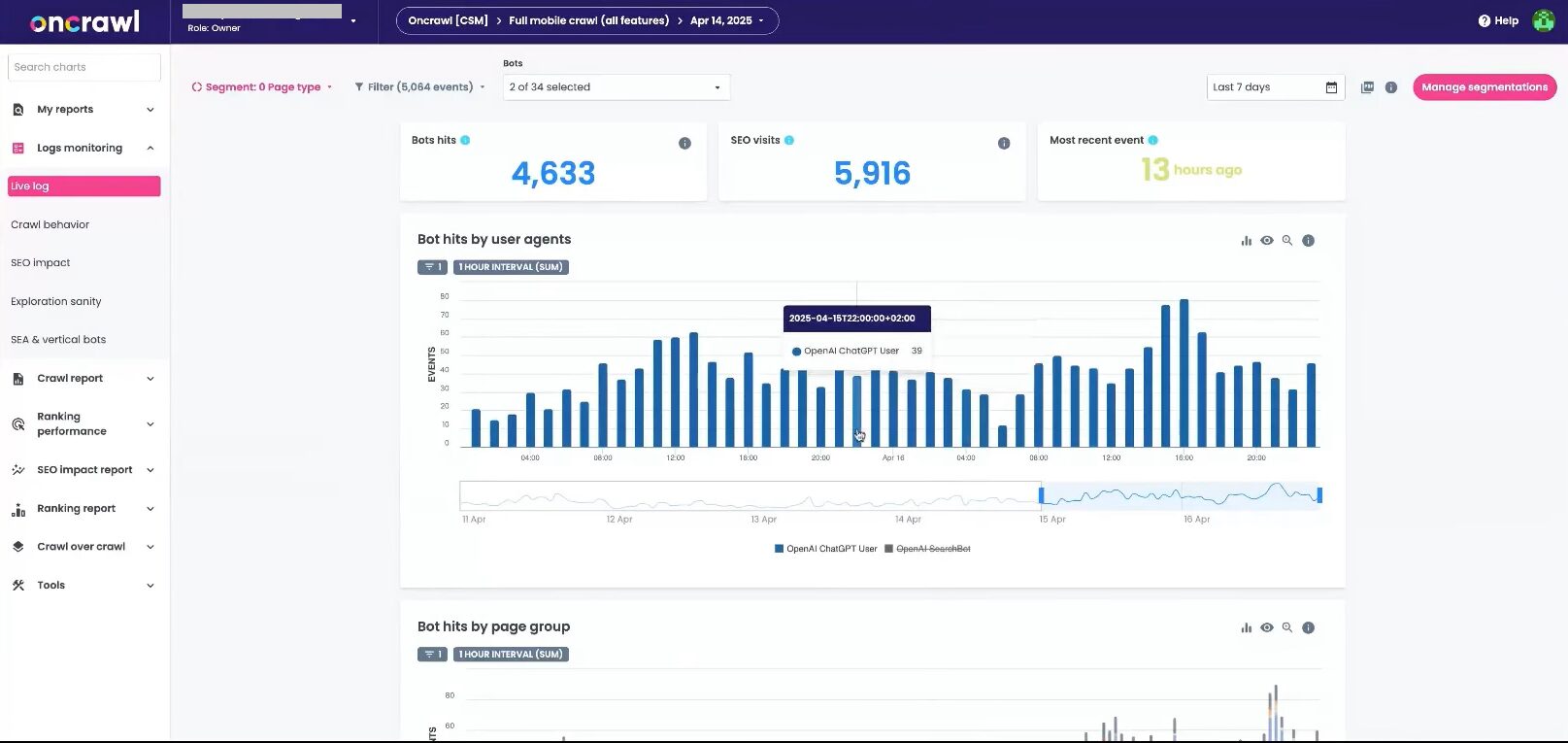
Oncrawl integrates with tools such as Google Search Console, GA4, Adobe Analytics, Piano, Majestic, Looker Studio, and API workflows. Its pricing page also lists log file analysis, API access, cloud storage exports, and ranking performance analysis as available capabilities.
Top features
- Configure crawlers to suit your workflow, schedule, and website structure.
- Build a complete technical SEO audit based on multiple data sources and metrics.
- Use log file analysis to understand bot behavior, crawl frequency, crawl waste, and search engine access to key pages.
- Use crawl-on-crawl comparison to compare two website versions and find how website redesigns or technical changes have impacted SEO efforts.
- Enable powerful segmentation systems to group or break website pages and better spot trends and technical behavior.
- Assess content quality and duplication issues with near-duplicate detection and content analysis.
- Use AI Search Lens to understand AI search visibility using crawl and log data.
Pros & Cons
PROS
CONS
Pricing
Oncrawl offers custom pricing on both its plans – Basic and Core.
Brightlocal
Best for Local SEO Monitoring
BrightLocal is a web-based tool designed specifically for local SEO. Unlike general SEO platforms, it focuses on localized search visibility and offers features like local rank tracking, citation tracking, Google Business Profile audits, reputation management, local SEO audits, and white-label reporting.
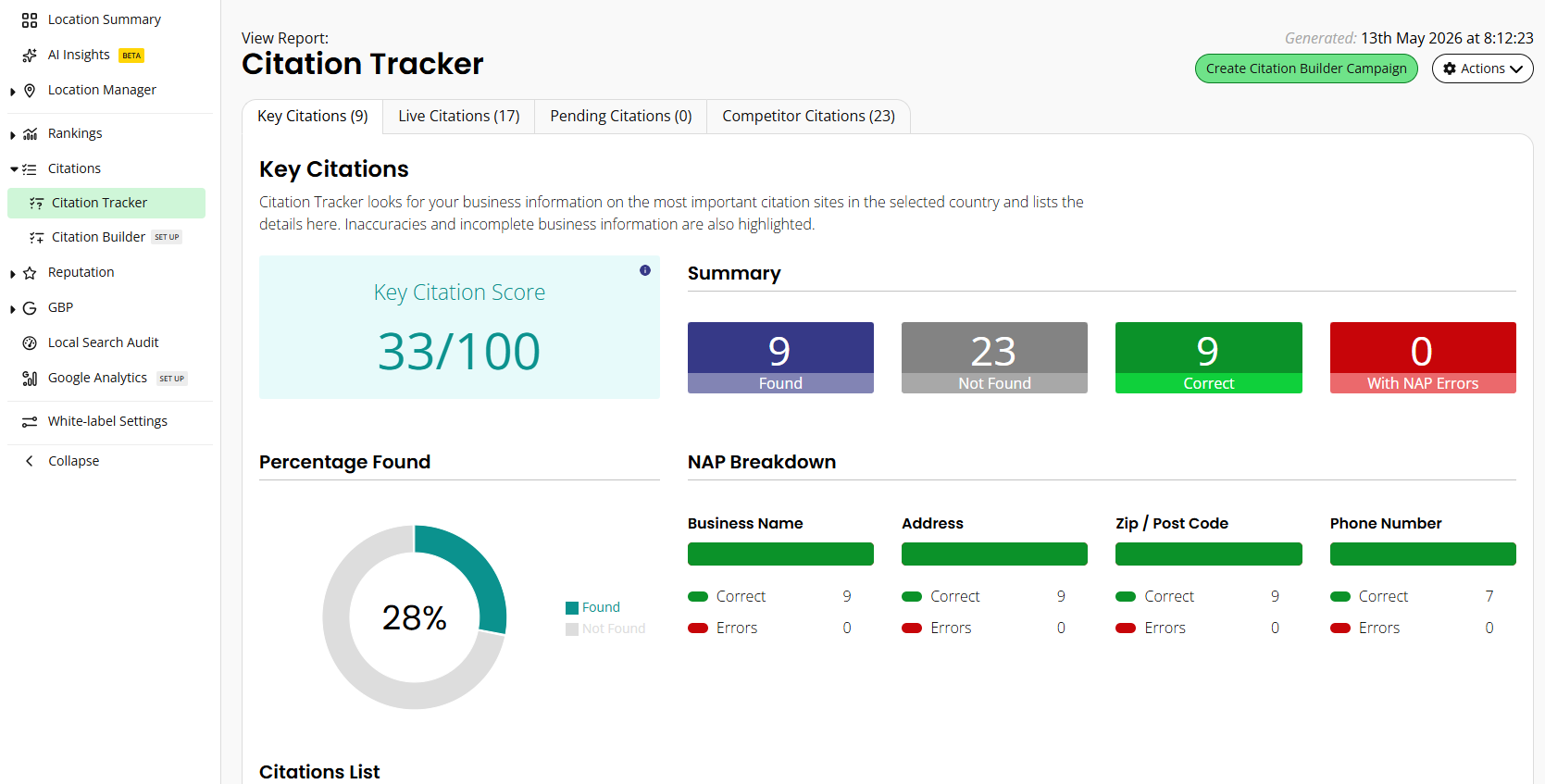
BrightLocal’s local-first approach is useful for agencies, consultants, and businesses that want to improve visibility for physical locations, service areas, or multi-location brands.
With BrightLocal, you can perform local SEO audits, track local rankings, monitor citations, audit Google Business Profiles, and benchmark performance against top-ranking competitors. You can also create and share white-label reports, enhancing your reporting capabilities. BrightLocal also offers AI Insights to get clear, prioritized actions to improve local SEO.
Top Features
- Use Local Rank Tracker to find local business rankings across Google Search, Google Maps, and Bing.
- Monitor keyword rankings at city, ZIP code, and neighborhood level with Local Search Grid.
- Create keyword groups to track performance for different products and services.
- Get detailed reports on inaccurate existing listings with tools for citation building, citation tracking, and duplicate removal.
- Track competitor rankings and benchmark performance metrics against them.
- Audit Google Business Profiles for issues and compare performance against top-ranking competitors.
Pros & Cons
PROS
CONS
Pricing
Brightlocal offers 3 plans:
- Track: $29/mo
- Manage: $37/mo
- Grow: $44/mo.
A free trial is available on all plans.
Screpy
Inbuilt Uptime and Lighthouse Monitoring
Screpy is an AI-powered SEO and web analysis tool with built-in uptime monitoring, PageSpeed monitoring, SERP keyword tracking, on-page audit, competitor tracking, and white-labeled PDF reports.
It enables continuous tracking of SEO performance from one dashboard, helping users monitor website health, keyword rankings, uptime, page speed, and technical issues. Screpy’s official site also mentions team collaboration, unlimited projects, and customizable reports.
Screpy tracks page speed metrics and provides AI-powered analysis to help identify performance and SEO issues. It also includes AI tools such as Article Writer and Deep Research on its pricing page.
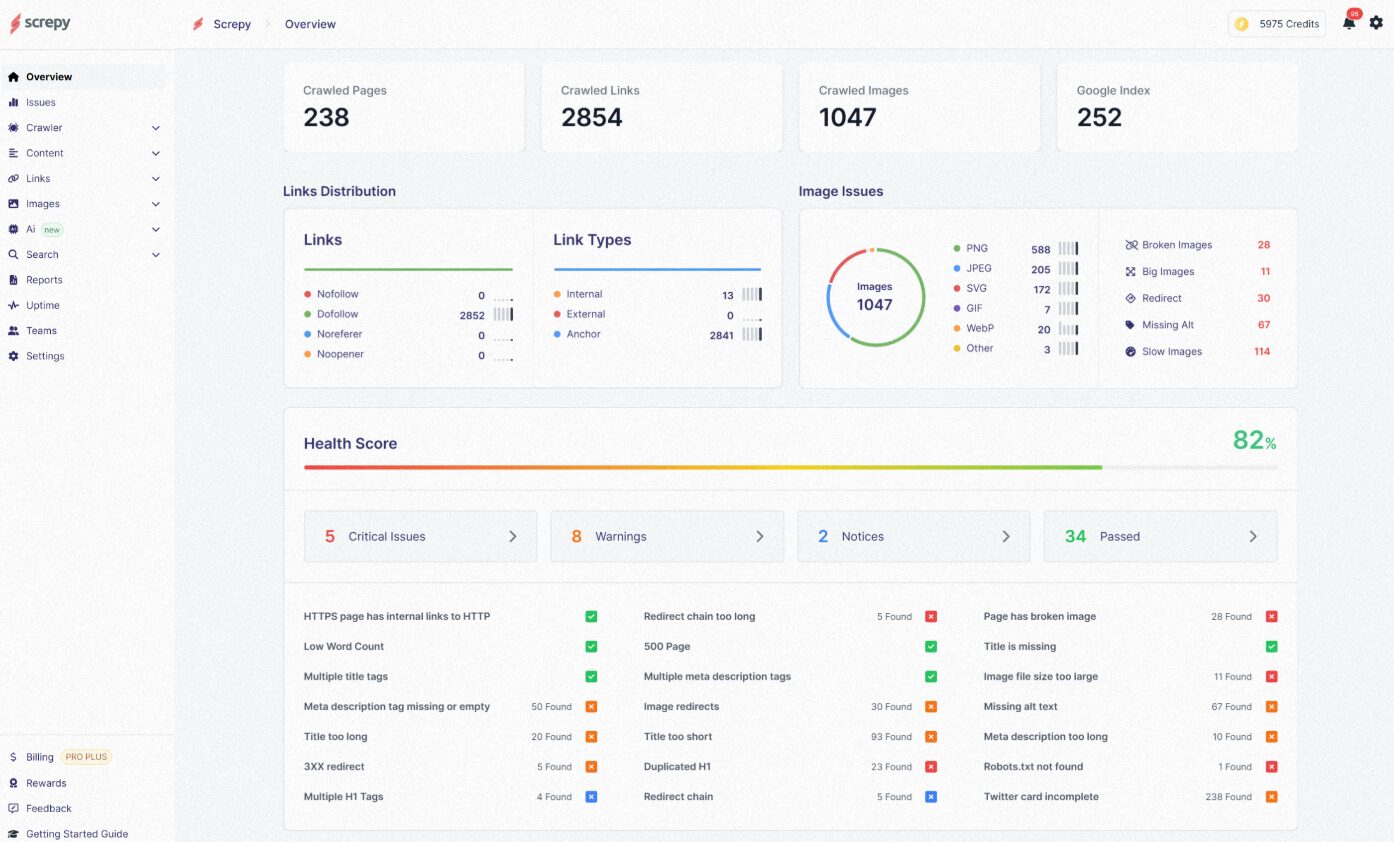
With its user-friendly dashboard, Screpy provides actionable insights, making improving SEO, fixing broken links, monitoring uptime, and enhancing overall site health easier.
Top Features
- Use SERP Keyword Tracker to monitor keyword performance and generate keyword reports.
- Track competitors’ SEO strategies with Competitor Tracking.
- Use AI-powered site audit reports to identify SEO issues and get task-based recommendations.
- Configure SEO crawls to analyze your website and monitor on-page issues.
- Monitor uptime and receive alerts when your website goes down.
- Track PageSpeed metrics to identify performance issues affecting user experience.
Pros & Cons
PROS
CONS
Pricing
Screpy offers a free forever plan with basic features. Apart from this, there are 3 paid plans.
- Lite: $10/mo
- Pro: $30/mo
- Advanced: $59/mo
Ahrefs
Best for Backlink and Rank Monitoring
Launched in 2011 as a backlink analysis tool, Ahrefs has evolved into an AI marketing platform with features like link building, keyword research, competitor analysis, rank tracking, site audits, content optimization, and AI search visibility tracking. Brands including Adidas, Uber, Alibaba, HubSpot, and more are listed on Ahrefs’ website as users.
Ahrefs’ core capabilities, like backlink and rank monitoring, make it a solid alternative to Semrush and similar SEO tools. Its Rank Tracker lets you monitor keyword rankings on desktop and mobile across 190+ countries and compare Share of Voice against competitors.
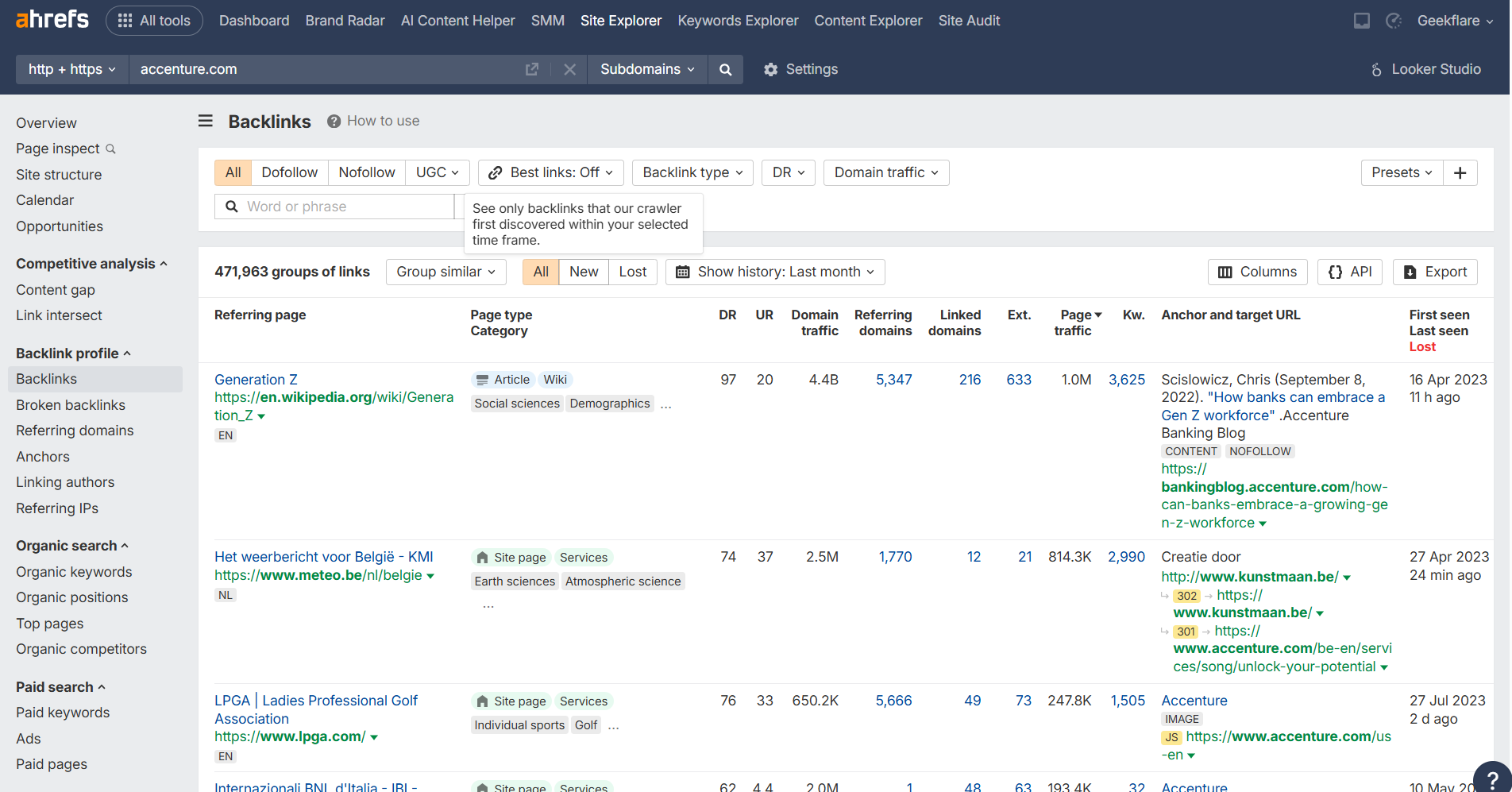
You can track your website alignment with SERP features and find the gaps for more featured rankings. It’s also among the most powerful backlink analysis tools, with the world’s largest index of live backlinks and fresh data updates every 15–30 minutes. Ahrefs’ Site Explorer lists 35 trillion live backlinks and 10+ years of historical data.
Top Features
- Use interactive graphs to visualize and monitor your website’s Google rankings, traffic, Share of Voice, and position across multiple keywords and SERP features.
- Use Site Explorer to research your competitor’s website for organic traffic, AI visibility, backlink profile, paid traffic, and keyword data.
- Get site audit reports across 170+ technical and on-page SEO issues presented via charts, graphs, and instructions to fix them.
- Compare snapshots between two historical dates to determine which keywords and pages caused traffic spikes or dips.
- Use Competitors Overview to compare your data against competing domains and understand ranking positions, traffic share, and SERP features.
- Use Ahrefs AI and Keywords Explorer to brainstorm keyword ideas, cluster similar keywords, and support content optimization workflows.
Pros & Cons
PROS
CONS
Pricing
Ahrefs offers 3 plans.
- Lite: $108/mo
- Standard: $208/mo
- Advanced: $374/mo.
All plans are as per annual billing.
Google Search Console (GSC)
Free SEO Monitoring
Google Search Console (GSC) is a free web-based SEO monitoring service provided by Google that enables you to monitor, maintain, and optimize your site’s presence in Google Search results. It helps you measure search traffic, fix indexing issues, submit sitemaps, and understand how Google sees your website.
Search Console Insights, updated as a dedicated Insights report, helps content creators, bloggers, and site owners understand website performance more easily. It shows how content is performing without requiring advanced SEO or analytics expertise.
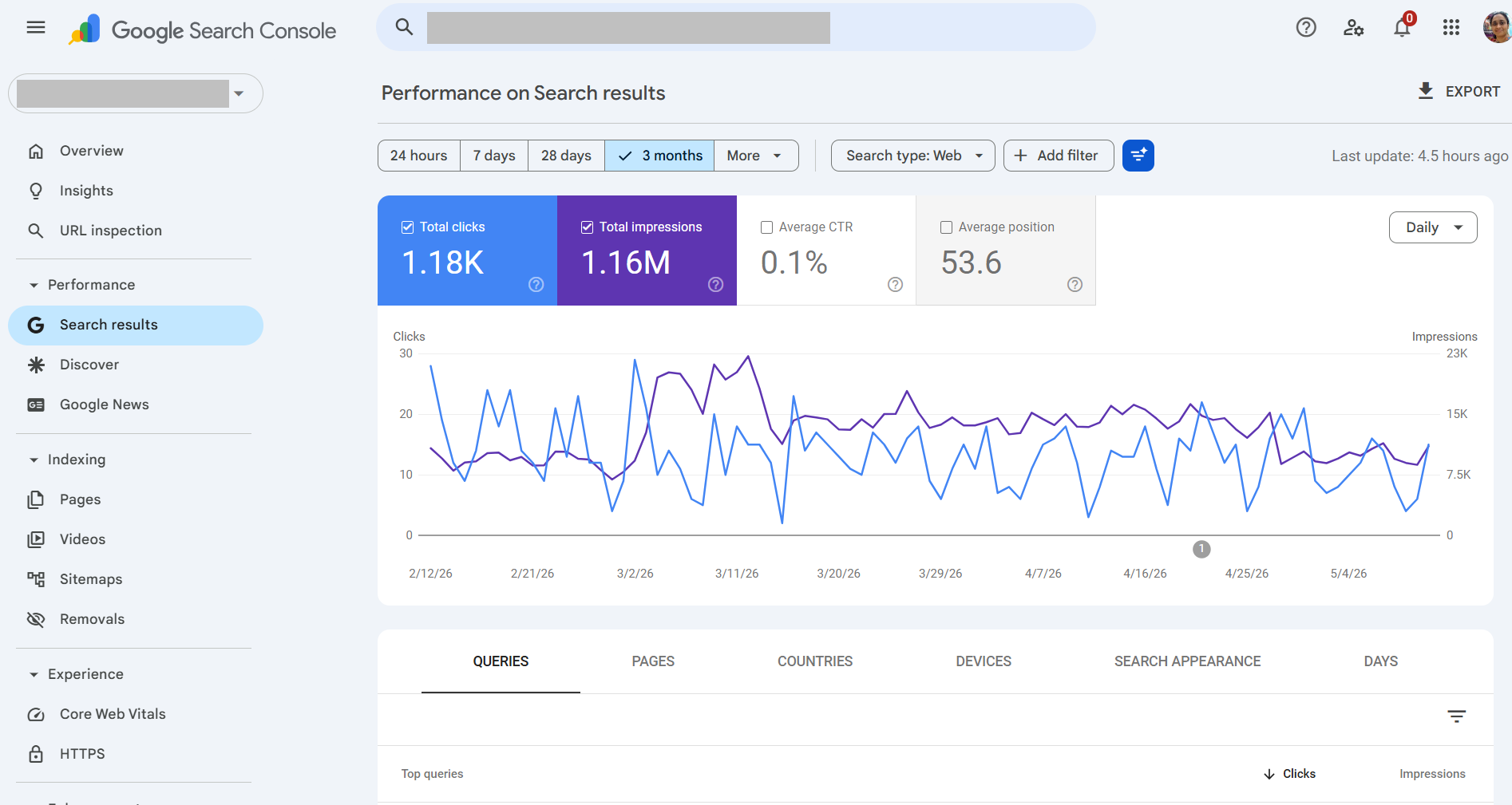
You can also monitor technical SEO and user experience signals inside Search Console. Its reports cover indexing, sitemaps, links, Core Web Vitals, HTTPS, AMP issues, manual actions, and security issues such as hacked content or malware.
Top Features
- Check your website indexing status by Google crawlers and request re-indexing for updated content.
- View search traffic data from Google SERPs, see how often your site appears in search results, and which queries generate clicks, impressions, click-through rates, and average position.
- Receive alerts about issues like indexing problems, manual actions, or security issues such as hacking and malware.
- Submit sitemaps to help Google better understand the structure of your website.
- Use the Links report to find which sites link to yours and analyze internal and external links.
- Monitor Core Web Vitals using field data for LCP, INP, and CLS to understand page experience issues.
- Use Search Console Insights to understand top-performing and trending content more easily.
Pros & Cons
PROS
CONS
Pricing
Google Search Console is free; the prerequisites are an active Google account and a website.
Little Warden
Monitor 30+ Critical Metrics
Little Warden stands out for its focus on technical SEO automation and website change monitoring. You can monitor anything from API responses, competitor price changes, website content changes, domain renewals, SSL certificates, redirects, and more.
Little Warden’s integration with Google Sheets allows you to export all changes through Google Sheets, so you don’t have to visit the dashboard for every small update. It automates technical SEO tasks such as monitoring SSL certificates, domain expirations, redirects, HTTP responses, robots.txt changes, indexability, and Core Web Vitals.
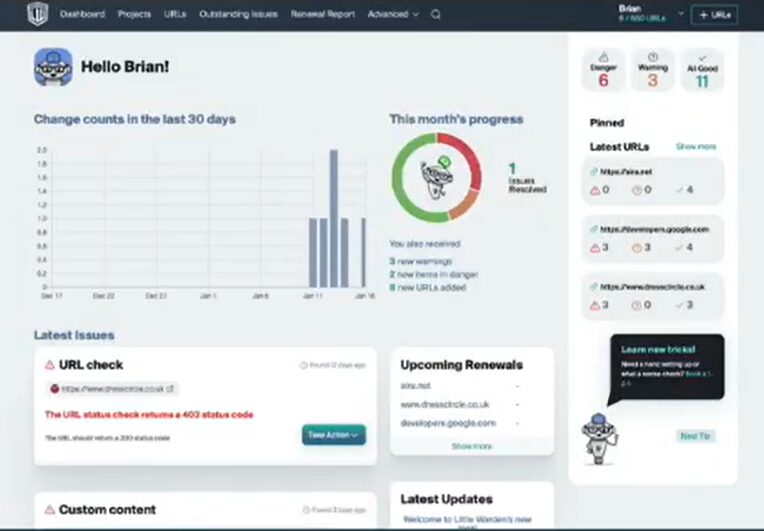
It is especially useful for agencies managing multiple client websites, where small technical changes can cause ranking, crawling, or reporting issues. You can receive notifications through Slack, email, Messenger, API, and webhook.
Top Features
- Use an indexability checker to prevent a page from being deindexed due to SEO error or misuse of the meta robots tag or X-Robots tag.
- Monitor XML sitemaps for validation issues and sitemap changes.
- Track content changes at granular levels, including text, regular expressions, page elements, title tags, and meta descriptions.
- Monitor domain name expiration and SSL certificate expiration to avoid missed renewals.
- Track response and redirect issues, including URL response checks, HTTP to HTTPS redirects, WWW to non-WWW redirects, 404 responses, and geo redirects.
- Check technical changes such as nameserver changes, MX record changes, IP address changes, malware detection, canonical tags, hreflang changes, and Core Web Vitals.
Pros & Cons
PROS
CONS
Pricing
Little Warden offers the following annual plans.
- Freelancer: $349.99/year
- Small Team: $549.99/year
- Agency: $899.99/year
- Large Agency: $1999.99/year
What is SEO Monitoring?
SEO monitoring is the process of tracking your website’s visibility and ranking across search engines. It involves monitoring key SEO metrics like keyword ranking, domain authority, organic traffic, backlinks, and page speed to analyze the ROI from your SEO efforts.
What are the Benefits of SEO Monitoring Tools?
There’s not one but many benefits of investing in an SEO monitoring tool, such as:
- Track Keyword Rankings: SEO analysis tools allow you to track keyword rankings over time, helping you understand how well your content performs in search rankings and make adjustments to your keyword strategy
- Improve Site Health: Regular SEO audits help identify technical issues in your website, like broken links, slow loading times, and poor mobile responsiveness.
- Competitor Analysis: SEO analysis tools go beyond your website to analyze your competitors’ SEO strategy, allowing you to find opportunities for improvement and develop strategies to outperform competitors
- Backlink Monitoring: SEO tools help you find broken, lost, or harmful backlinks before Google crawlers find them. Powered by AI, many tools now provide insights, solutions, and suggestions to improve link-building for your website.
- Real-Time Alerts: Google crawlers work autonomously, and this uncertainty creates urgency among SEO experts to resolve SEO issues before crawlers find them proactively. Luckily, SEO monitoring tools offer real-time alerts for website health, changes in rankings, or site performance.
- Enhance Decision-Making: SEO analysis tools provide accurate data and insights into your search visibility. Use this data to make rock-solid decisions and guide your team in optimizing SEO campaigns and website content strategy.
- Boost Organic Search Traffic: SEO tools provide detailed insights into what’s working and not for search rankings. It highlights top-ranking keywords plus compares your content against SERP features to improve organic traffic and click-through rate (CTR)
- Increase Efficiency: Manually monitoring your website SEO can take weeks. Extracting insights from that analysis might take another. SEO monitoring tools automate these processes and free up your team to focus on strategy development and content creation rather than getting bogged down in data collection and analysis
- Stay Updated with Algorithm Changes: With AI in action, most search engines, especially Google, have been tweaking their algorithms frequently. SEO tools notice and alert you of such changes in real-time, allowing you to adjust strategies without delays
How to Choose the Best SEO Monitoring Tools?
Here are some key factors to consider when selecting your ideal SEO monitoring tool:
- Determine Your Budget: As a business, any investments in hardware or software require an approved budget. I get it. So the prominent thing is to ensure that the SEO tool fits your budget and delivers on ROI
- Identify Key Features You Need: You can choose between an all-in-one SEO tool that covers all aspects of SEO or a specialized tool that focuses on specific areas such as backlink analysis (e.g., Moz) or technical SEO audits.
- Check User Interface and Usability: Before choosing an SEO tool, try it to check for ease of use and learning curve. Consider whether your team could master it without spending time and money on extensive training.
- Consider Scalability: Ensure that SEO tool is flexible enough to scale up monitoring as your website grows and traffic and SEO-building activities surge.
- Data Accuracy: Different SEO tools use unique algorithms and data sources, leading to variations in their metrics. Choose a tool that offers the industry’s benchmark accuracy rates.






