



Claude Code took a 437-page Semrush Site Audit of our own site, ranked what to fix, and checked each problem on the live page. The whole test cost 1,700 Semrush API units and about $2 of Claude usage.
I ran this on Geekflare Guides, the section you’re reading now. Semrush did the crawling. Claude Code read the results through the Semrush MCP server, cross-checked them with live page tests, and suggested the fixes. Then I applied the quick-win ones and crawled again to see what moved.
What You Need
| Requirement | Details |
|---|---|
| Semrush plan with MCP access | Semrush One Starter, Pro+, and Advanced plans. These include 50,000 API units. |
| API units | Every report the MCP fetches spends units. My whole test used 1,700. |
| A completed Site Audit | The MCP can read projects but can’t create them, start a crawl, or change settings. Run at least one audit in Semrush first. |
| Claude Code | Download and install from Anthropic website. |
| Optional: a live-check MCP | Semrush data is only as fresh as the last crawl. I added the Geekflare MCP to check pages as they are right now. |
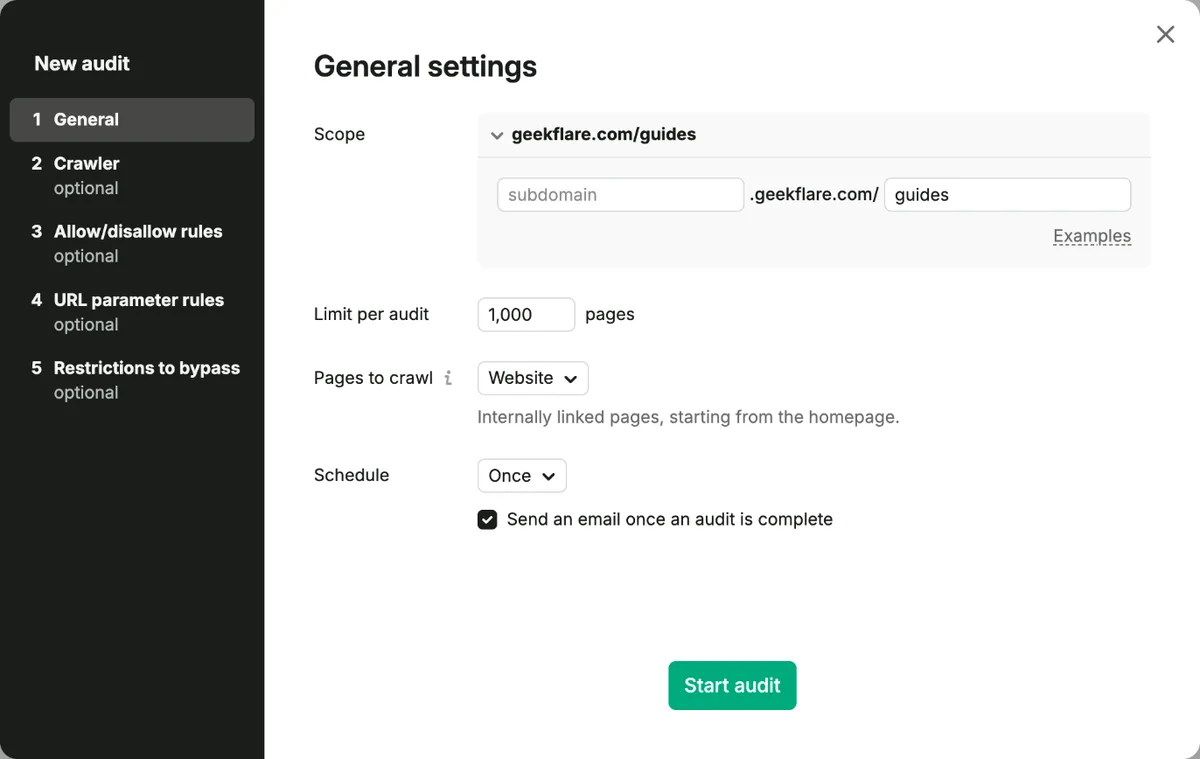
I set up a separate Semrush project for the test and limited the crawl to the /guides subfolder. Open Site Audit, click Set up on the project, expand Scope, and type the folder name into the subfolder box. A 1,000-page limit covered all 437 pages with room to spare.
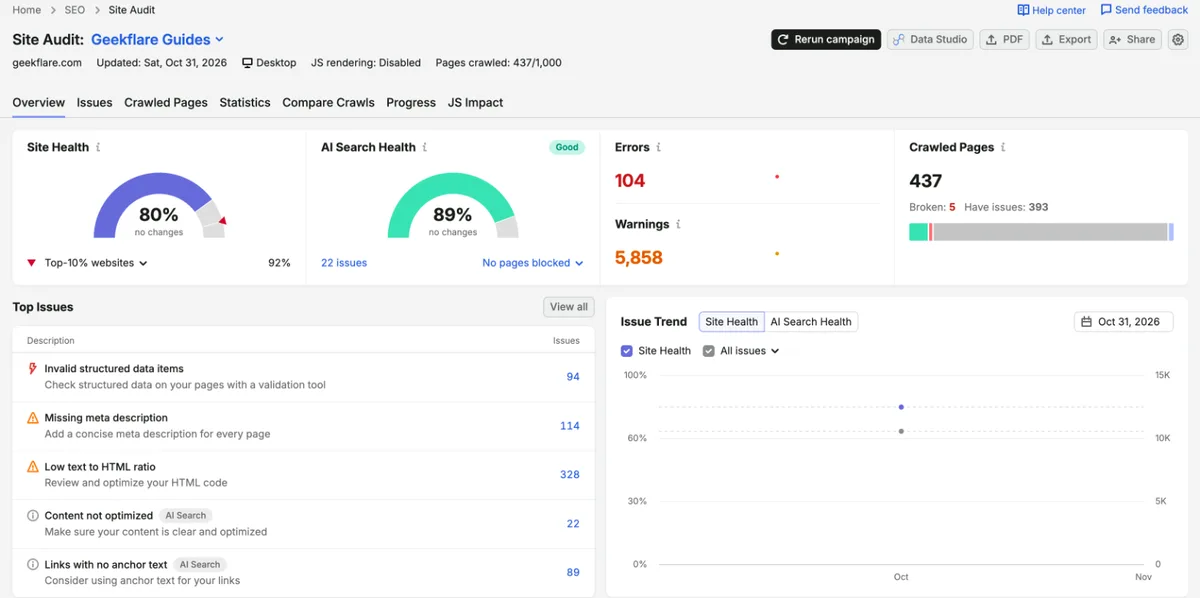
The first full crawl took about 25 minutes and finished at 80% site health with 104 errors and 5,858 warnings.
Step 1: Connect Claude Code to the Semrush MCP
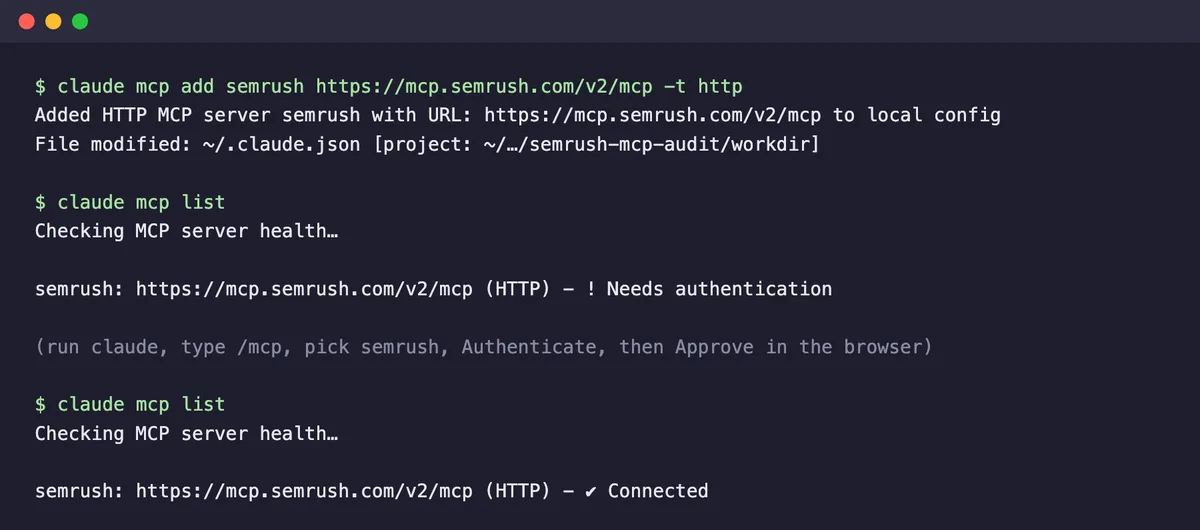
Semrush hosts the MCP server, so there’s nothing to install. In your project folder, run:
claude mcp add semrush https://mcp.semrush.com/v2/mcp -t httpThen start claude, type /mcp, pick semrush, and choose Authenticate. A browser tab opens on Semrush. Approve the access request, and claude mcp list should now show the server as connected. The setup is in Semrush’s MCP documentation if you use a different client.
Once connected, Claude sees 14 Semrush tools. Twelve are discovery tools, such as site_audit and projects, which list the reports available. The other two do the work: get_report_schema tells Claude which parameters a report needs, and execute_report fetches the data.
Discovery and schema calls are free. My unit balance didn’t change after Claude mapped every Site Audit report.
For live checks, I also connected the Geekflare MCP, which brings tools such as metaScrape, redirectCheck, brokenLink, and lighthouse into the same session:
claude mcp add --transport http geekflare https://mcp.geekflare.com/YOUR_API_KEY/mcpOne more file saved me from expensive mistakes. A few Site Audit reports cost 10,000 units per call, so I put the prices and some rules in a CLAUDE.md file in the project folder. Claude Code reads it at the start of every session.
# SEO audit rules
Semrush Site Audit prices:
- 100 units: list_projects, snapshots, info, meta_issues, issue_details, page_list
- 1,000 units: page_info
- 10,000 units: snapshot, history (history is 10,000 per snapshot)

- Never run snapshot or history unless I ask for them by name.
- Confirm issues on the live page with the geekflare tools before proposing a fix.
- Draft fixes only. Don't change the site.
- End every answer with the Semrush reports you called and their units.
When I asked for the health score, Claude told me it was only available from the 10,000-unit snapshot report and skipped it instead of quietly spending a fifth of my monthly units.
Step 2: Pull the Audit Data
Site Audit data comes through eight reports. You don’t need to name them, because Claude picks the right one from your request, but knowing what each holds helps you ask for the right thing. These are the prompts I used, with what Semrush billed me for each.
| What you want | Reports Claude used | Units billed | Prompt I used |
|---|---|---|---|
| The audit list | list_projects, snapshots | 200 | List my Semrush projects, find “Geekflare Guides”, and show its Site Audit snapshots with dates and IDs. |
| A summary | info, meta_issues | 200 | Summarize the latest Site Audit: pages crawled, errors, warnings and notices, and the top 10 issues by number of affected pages. Explain each issue in one plain sentence. |
| One issue in depth | meta_issues, issue_details | 100 | Open the “Structured data that contains markup errors” issue, list the affected URLs, then check 2 of them live and tell me exactly which property is invalid. |
| One page | page_list, page_info, meta_issues | 300 | Find /guides/free-website-monitoring-tools/ in the latest audit, show every issue on it, run a live Lighthouse and meta tag check, and tell me which issues are real and which are noise. |
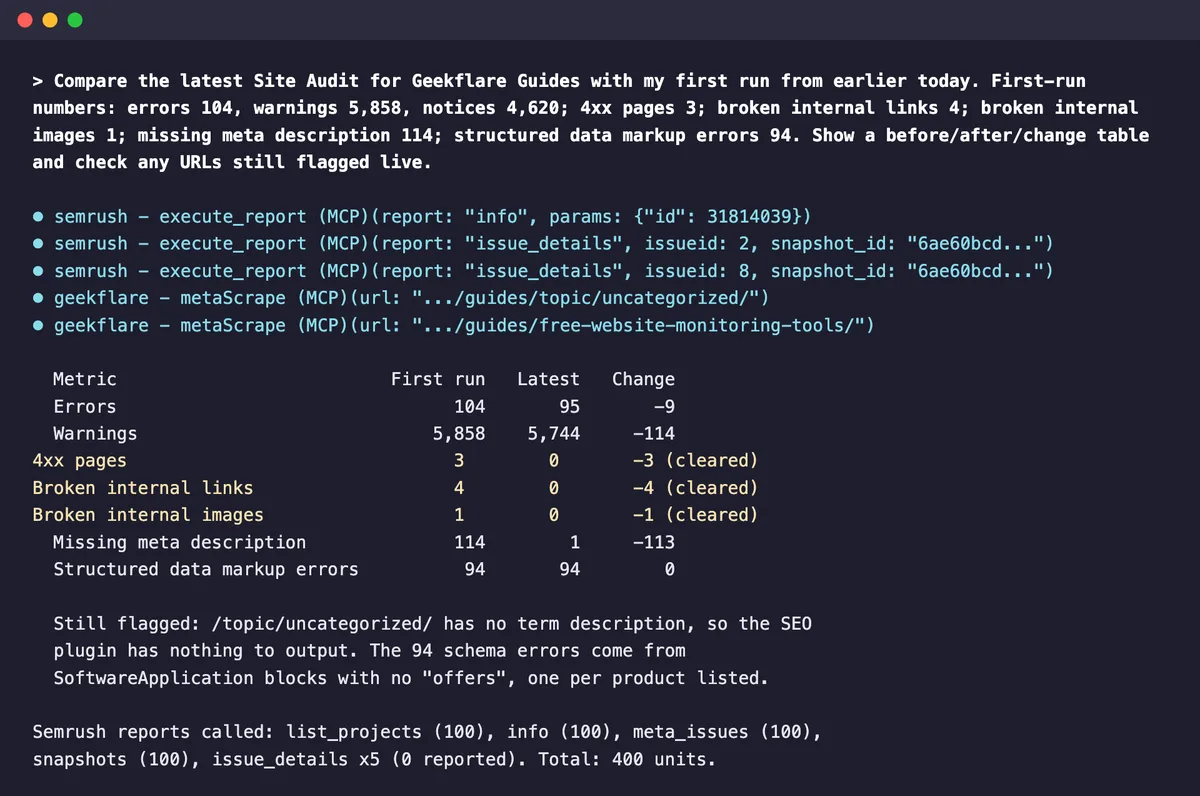
| Two audits compared | info, meta_issues, issue_details | 400 | Compare the latest Site Audit with my first run. First-run numbers: errors 104, warnings 5,858, 4xx pages 3, broken internal links 4 (and so on). Show a before/after/change table and check any URLs still flagged live. |
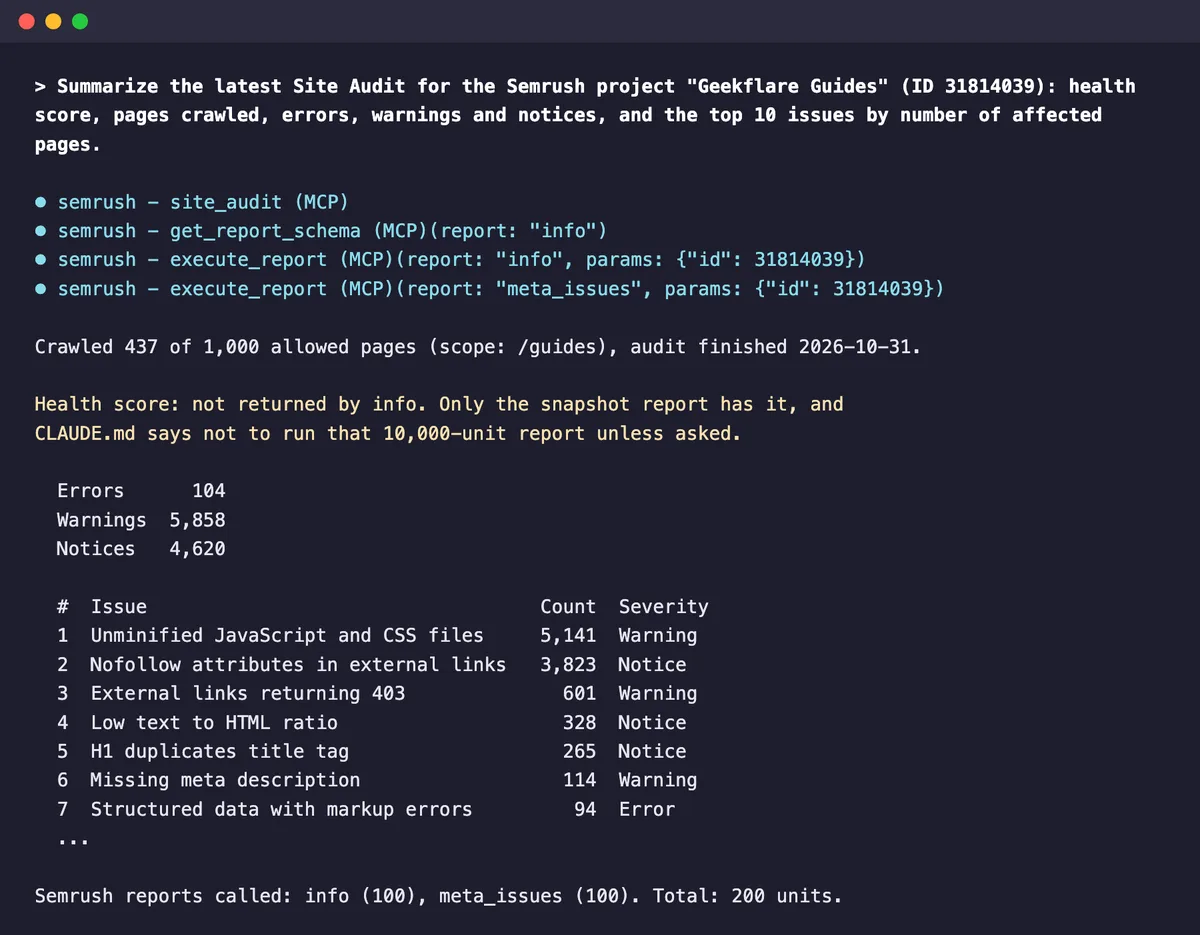
The summary was accurate against the Semrush dashboard, and Claude flagged something the dashboard doesn’t make obvious.
The single-issue prompt is where it earned its keep. Semrush’s issue report gave me URLs but not the error text, so Claude scraped two of the pages, pulled out the JSON-LD, and found the problem: every SoftwareApplication block came from an old product block in our theme and had no offers property.
It also noticed that all 18 blocks on one page carried the same placeholder rating of 3 from a single review, which is a bigger risk than the missing field. Semrush hadn’t flagged that.
The page prompt was good at sorting noise. Two “external links returning 403” warnings pointed to a site behind a Cloudflare challenge, which Claude confirmed with a redirect check, and the nofollow warnings were all affiliate and share links. Neither needed a fix.
Let Claude run small scripts
In my first run of the issue prompt, Claude scraped the page but couldn’t parse the 234,000-character HTML because I hadn’t allowed it to run Python. Approve a quick python3 command when it asks, or the live checks stall.
Step 3: Findings and Fixes
A Site Audit lists problems by severity. What I actually need is an order of work. So I asked Claude to pull issue details for the errors I cared about and rank them by impact, then effort, with an owner for each:
Using the latest Site Audit, build a fix plan. Pull issue_details (limit 100) only for 4xx pages, broken internal links, broken internal images, pages that could not be crawled, and missing meta description. Make one table: issue, URLs affected, impact, effort, who fixes it, and the first step. Sort by impact, then effort. Then draft the exact fixes for the top 3.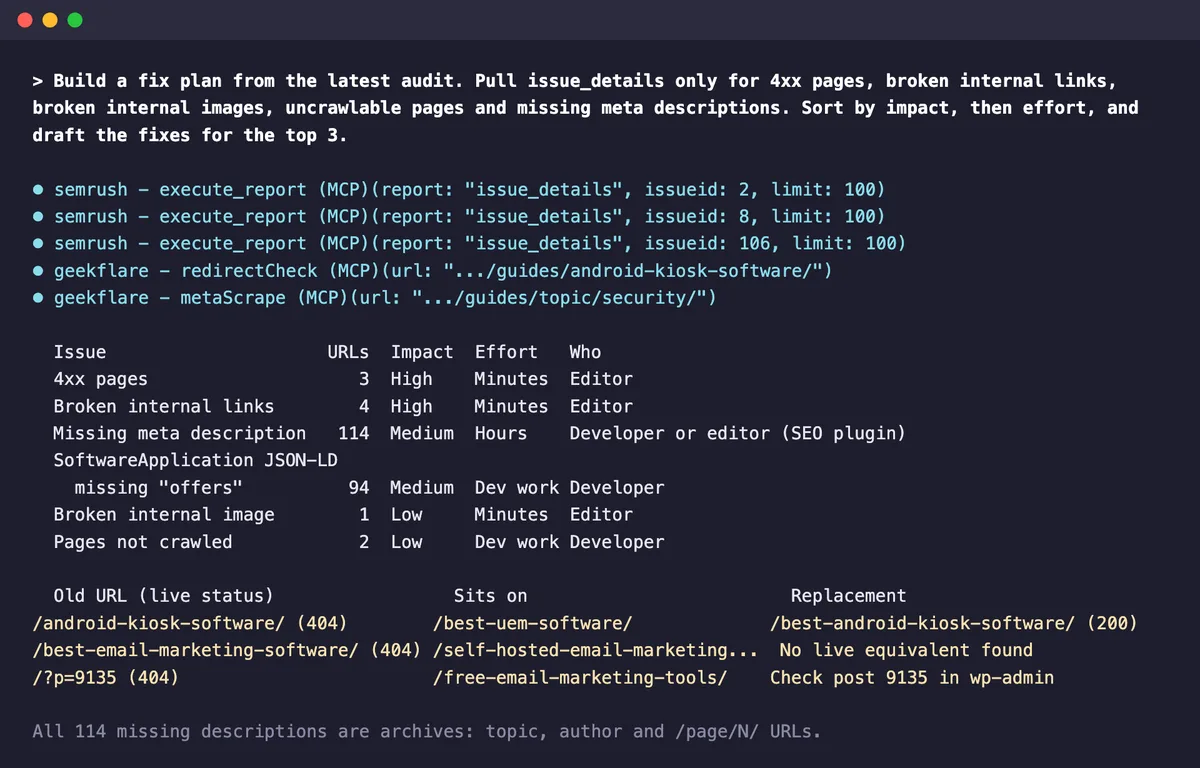
The plan put three 404s and the four broken links pointing to them at the top. For each link it gave the page it sat on and a replacement, after checking the replacement returned 200. Where it couldn’t find a live equivalent, it said so rather than inventing one.
Two of its findings needed a human, and both were good catches:
- The “404s” were links to an unpublished draft. Three live posts linked to our email marketing roundup, which is still a draft. Claude reported it as a missing page. Only someone with WordPress access could see why.
- A broken logo was really our firewall. The one broken image returned 403, not 404. The file was named
ai.azure-logo.png, and one of our Cloudflare rules blocks any path containing.azure. Renaming the upload fixed it.
For the 114 missing meta descriptions, Claude noticed every URL was an archive page like categories, author pages, and their paginated versions. So the fix was a template in Yoast plus descriptions.
Here is what I changed before the second crawl:
| Fix | Issue it targets |
|---|---|
| Pointed one broken link to the right article | Broken internal link, 4xx page |
| Removed three links to the unpublished draft | Broken internal links, 4xx pages |
| Re-uploaded the blocked Azure logo under a new name | Broken internal image |
| Wrote descriptions for 10 categories | Missing meta description |
| Set the Yoast meta description template for categories and authors | Missing meta description |
I left the structured data error alone for now which we will pick it later to fix.
What It Costs
The Semrush Site Audit API reference lists a price for each report. My balance went from 50,000 to 48,300 units.
| Report | Listed price | What I was billed |
|---|---|---|
| list_projects, snapshots, info, meta_issues, page_list | 100 units | 100 units |
| issue_details | 100 units | 0 |
| page_info | 1,000 units | 100 units |
Budget from the listed prices anyway, since they may be enforced later. At my real rate, the 50,000 units in an entry plan cover about 500 report calls a month. That’s plenty for one site. It gets tight if you audit several sites weekly.
The Claude side cost $2.06 across eight runs at API rates, with each one taking between 14 and 85 seconds.
The limits I hit:
- It can’t crawl. The MCP only reads finished audits. Starting a crawl, changing scope, or rerunning still happens in Semrush.
- There’s no compare report. Semrush’s Compare Crawls view isn’t available over MCP, and
infoonly returns the latest run.issue_detailsaccepts an older snapshot ID, but for my first crawl it returned the same totals as the new one and no URLs. Save each run’s summary, or paste the old numbers into the compare prompt as I did. - The health score costs extra. The cheap
inforeport has error and warning counts but no score. - Some details are missing. The structured data issue came back without its error column, so Claude needed live checks to find the cause.
Before and After on Geekflare Guides
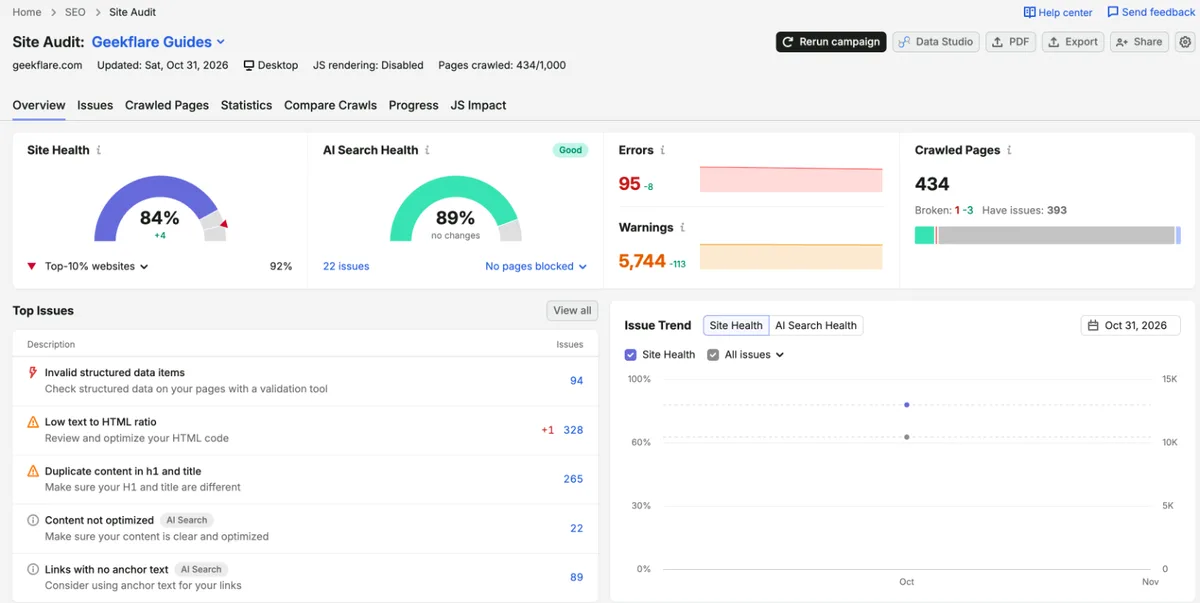
My second crawl ran right after the fixes. I confirmed the fixed pages as the crawler sees them, ran a second crawl, and gave Claude the first run’s numbers to compare.
| Metric | First crawl | SECOND crawl | Change |
|---|---|---|---|
| Site health | 80% | 84% | +4 points |
| Errors | 104 | 95 | -9 |
| Warnings | 5,858 | 5,744 | -114 |
| 4xx pages | 3 | 0 | Cleared |
| Broken internal links | 4 | 0 | Cleared |
| Broken internal images | 1 | 0 | Cleared |
| Pages that couldn’t be crawled | 2 | 1 | -1 |
| Missing meta description | 114 | 1 | -113 |
| Structured data errors | 94 | 94 | No change as we will fix this later |
Check fixes the way the crawler sees them
Before you rerun an audit, request a fixed page with the crawler’s user agent and the normal URL. If any layer says HIT or STALE with an old timestamp, purge it first. A crawl of stale pages costs time and tells you nothing.
FAQ
Can Claude Code run a Semrush Site Audit by itself?
No. The Semrush MCP is read-only for projects, so it can’t create a project, start a crawl, or change audit settings. Run the audit in Semrush, then use Claude Code to read and act on the results.
Which Semrush plans include MCP access?
Semrush One Starter, Pro+, and Advanced plans include MCP access with 50,000 API units.
How many API units does a Semrush MCP audit use?
My whole test, covering the audit list, summary, issue drill-down, page check, fix plan, and two compare runs, used 1,700 units. Avoid the snapshot and history reports unless you need them.
Do I need Claude Code, or will the Claude app work?
The Semrush MCP also works in the Claude app as a connector. Claude Code is better for audits because it can run scripts to parse page HTML, read your project files, and save the fix plan alongside your code.