



A URL redirection service forwards visitors from one URL to another without redirection logic in your web server. You point the old domain’s DNS at the service, add a rule, and it answers every request with a 301 redirect.
It’s the simplest way to handle a rebrand, a site migration, parked or typo domains, and vanity URLs for campaigns.
The services below range from free DNS-only forwarders to platforms that manage millions of redirects.
URL Redirection Services Comparison
| Service | Type | Best for | Redirect types | Price | Link |
|---|---|---|---|---|---|
| 01 redirect.pizza | Best overall | Domain and URL redirects with a generous free plan | 301, 302, 307, 308, frame, meta refresh | Free plan, paid from $14.95/month | Visit |
| 02 Cloudflare | Best free option | Redirect rules for domains already on Cloudflare | 301, 302, 307, 308 | Free | Visit |
| 03 urllo | Best for large portfolios | Redirect management for big domain portfolios and migrations | 301, 302 | From $49/month | Visit |
| 04 RedirHub | Best for branded links | Domain redirects, branded links, and QR codes in one place | 301, 302, 307, 308 | From $49/month | Visit |
| 05 redirection.io | Best for developers and SEO teams | Redirect rules with traffic logs and pre-publish testing | 301, 302, custom status codes | Free plan, paid from €20/month | Visit |
| 06 Site Detour | Best for QR campaigns | Hosted redirects with dynamic QR codes and audience targeting | 301, 302 | From $12/month | Visit |
| 07 freedirector.io | Best budget option | Cheap forwarding for domains and subdomains | 301, 302 | Free plan, Professional $4.99/month | Visit |
| 08 ForwardDomain.net | Best free open-source option | DNS-only forwarding with no signup | 301, 302 | Free | Visit |
Best URL Redirection Services
01. redirect.pizza
Best overallDomain and URL redirects with a generous free plan
redirect.pizza is a hosted redirect service that covers parked domains. You add a CNAME or A record, and it issues the HTTPS certificate and starts redirecting.
The create form takes several source URLs at once, one per line. When I added both a domain and one of its paths, it pointed out that the path rule wasn’t needed, since a bare domain already redirects every path behind it.
Redirect type, path forwarding, query string forwarding, and click tracking are toggles on the same screen. Paid plans add regex matching and dynamic destinations, which send visitors to different URLs based on conditions such as their country or device.
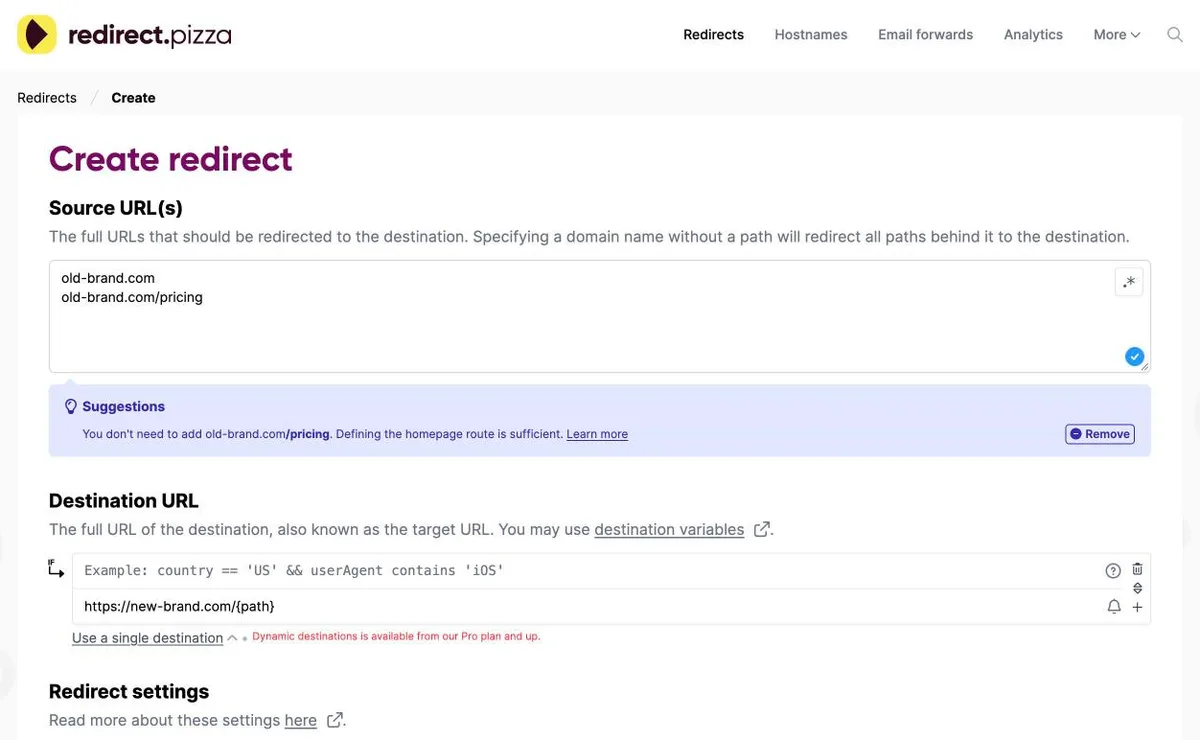
Email forwarding for redirected domains is included on every plan.
Our take: The easiest service to recommend for most people. The free plan handles five hostnames, and the paid plans add the rules you need for bigger migrations.
Redirect features:
- Six redirect types, including 307, 308, frame masking, and meta refresh
- Path and query string forwarding
- Regex source matching and conditional destinations by country or user agent (Pro and up)
- Wildcard subdomains, destination monitoring, and email forwarding
- CSV import and export, tags, bulk actions, and an API
Pros & Cons
PROS
CONS
Pricing
The free plan covers 5 source hostnames and 250,000 requests a month.
Basic costs $14.95 per month for 15 hostnames, Pro $55 for 100, and Business $219 for 500.
02. Cloudflare
Best free optionRedirect rules for domains already on Cloudflare
If your domain already uses Cloudflare, you don’t need a separate redirect service. Cloudflare offers two redirect tools on every plan, including Free, as long as the domain’s DNS records are proxied through it.
Single Redirects are rules inside a zone. They can be static, wildcard (for example, https://*.example.com/files/*), or dynamic, built with Cloudflare’s rules expressions, and each one can keep or drop the query string.
Bulk Redirects work at the account level, where you upload lists of source and target URLs and switch them on with a rule.
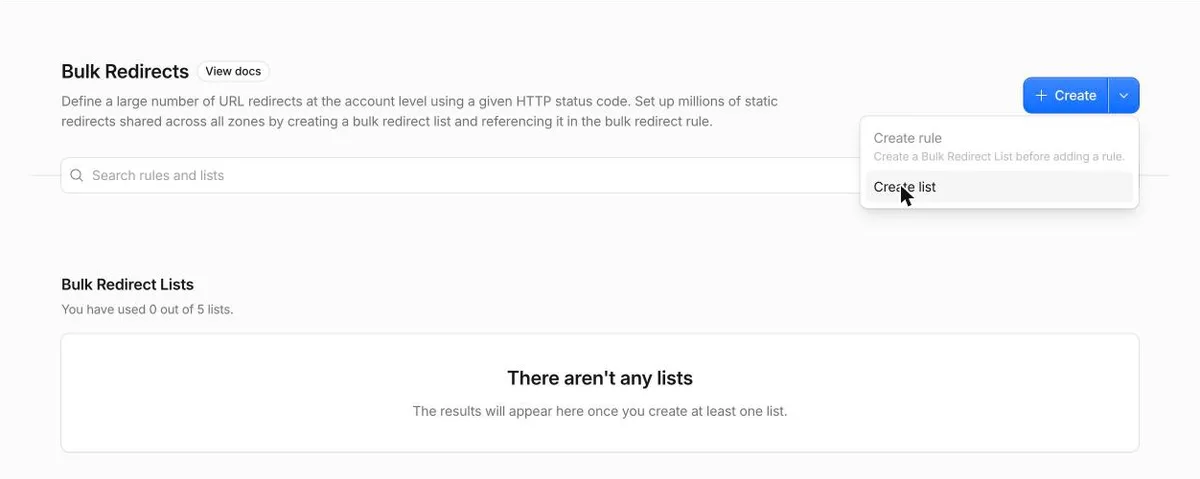
Bulk Redirects ask you to create a list first, then a rule that uses it. The Free plan allows 5 lists, 15 bulk redirect rules, and 10,000 URL redirects across those lists, plus 10 Single Redirect rules per domain. The Rules simulator shows whether a rule will fire for a given URL before you rely on it.
Our take: The best free choice if you already use Cloudflare. It’s less friendly for non-technical teams, and there’s no point moving DNS to Cloudflare only for a couple of redirects.
Redirect features:
- Static, wildcard, and dynamic Single Redirect rules
- Bulk Redirect lists with subpath matching, subdomain matching, and path suffix forwarding
- Query string preservation per rule
- Rules simulator for testing rules against a URL
- Management through the API
Pros & Cons
PROS
CONS
Pricing
Redirects are included on every Cloudflare plan.
Paid plans raise the limits to 25,000 (Pro), 50,000 (Business), and 1 million (Enterprise) bulk redirects.
03. urllo
Best for large portfoliosRedirect management for big domain portfolios and migrations
urllo, earlier known as EasyRedir, is suitable for companies with a lot of domains and URLs to look after.
The Performance plan includes automatic SSL, path and query forwarding, bulk imports with help from its support team, detailed analytics with a lost traffic history, and an API. It scales to 50,000 source URLs, with unlimited team members and role-based access.

Advanced matching, with path wildcards, case and slash insensitivity, and custom rules for URLs that match nothing, is a $50 monthly add-on. HSTS, HTTPS upgrades, and protection against your domains being embedded elsewhere cost $100, and SAML SSO with audit logs costs $150.
Our take: A strong choice for enterprise migrations and marketing teams with hundreds of domains.
Redirect features:
- Path and query parameter forwarding
- Partial path matching, case and slash insensitivity, and custom match-not-found rules (add-on)
- Bulk imports with expert help
- Traffic analytics, referrers, and reports on traffic that didn’t match a rule
- Management API, SAML SSO, and audit logs
Pros & Cons
PROS
CONS
Pricing
The Performance plan starts at $49 per month, with a 14-day free trial.
Add-ons cost $50 to $150 per month each.
04. RedirHub
Best for branded linksDomain redirects, branded links, and QR codes in one place
RedirHub combines domain redirects with branded short links and dynamic QR codes on your own domain. A marketing team can run campaign links and a site migration from the same dashboard.
Domain redirects cover 301, 302, 307, and 308, with HTTPS on every domain, wildcard subdomains, and CSV import for migration mappings. Every change is recorded, and paused redirects stay saved instead of being deleted.
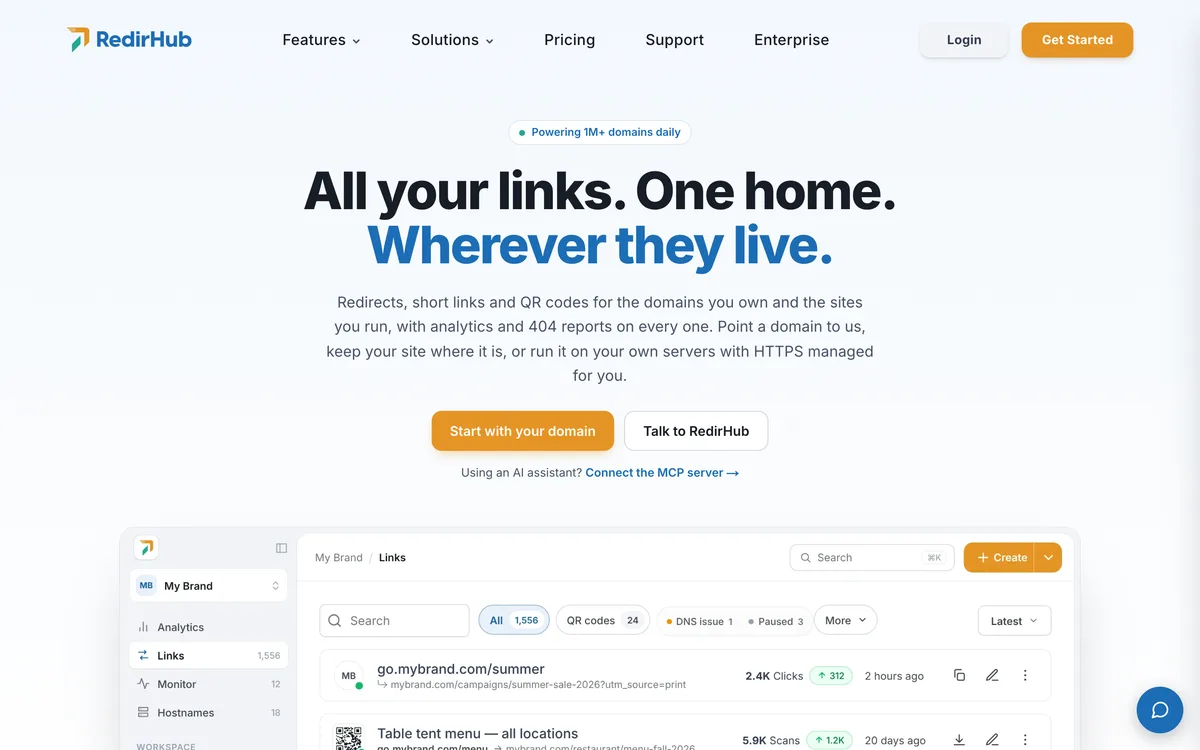
It also has an MCP server, so you can create and update redirects from an AI assistant, alongside a standard API.
A domain that already runs your website can keep its DNS and hosting. With Integration Mode, a WordPress plugin, a Cloudflare Worker, a Next.js app, or a Caddy server serves the redirects you manage in RedirHub, and HTTPS stays with your platform. Edits go live in about a minute without a redeploy. After a redesign, the 404 report shows which old URLs now return “page not found” and which pages still link to them, so you can fix them from the dashboard. This mode caps each domain at 50,000 redirects and skips masked redirects and wildcard domains.
If you run your own servers, the Self-Hosted Edge add-on puts a Docker container in front of your app. It serves your redirects and short links locally, so visitor traffic never passes through RedirHub, and RedirHub issues and renews the SSL certificate for every domain, including your customers’ custom domains.
Our take: A good fit when redirects and campaign links belong to the same team. The entry price is high if you only need to forward a couple of domains.
Redirect features:
- 301, 302, 307, and 308 redirects with automatic HTTPS
- Wildcard domains and wildcard SSL certificates
- Bulk CSV import and website migration mappings
- Branded links, dynamic QR codes, and click analytics
- Redirects served from your existing WordPress, Cloudflare, Next.js, or Caddy site, with a 404 report
- API and MCP server, with change history
Pros & Cons
PROS
CONS
Pricing
Core costs $49 per month for 25 domains.
Pro costs $119 per month for 250 domains.
Pro with Self-Hosted Edge costs $219 per month for 250 domains.
05. redirection.io
Best for developers and SEO teamsRedirect rules with traffic logs and pre-publish testing
redirection.io is a rules engine for redirects and HTTP behavior. It runs either as a managed proxy or as an agent on your own server, such as an Nginx module or a proxy in front of your app.
Each rule starts with a trigger, which can be a URL with markers and restrictions on the request method, headers, or the status code your server returned. Restricting a rule to 404 responses, for example, redirects a URL only once the old page is gone.
Before you save a rule, the Impact step tests it against example URLs. My test rule for /blog/old-post showed as matching with its 301 target, without the project being installed on any site.
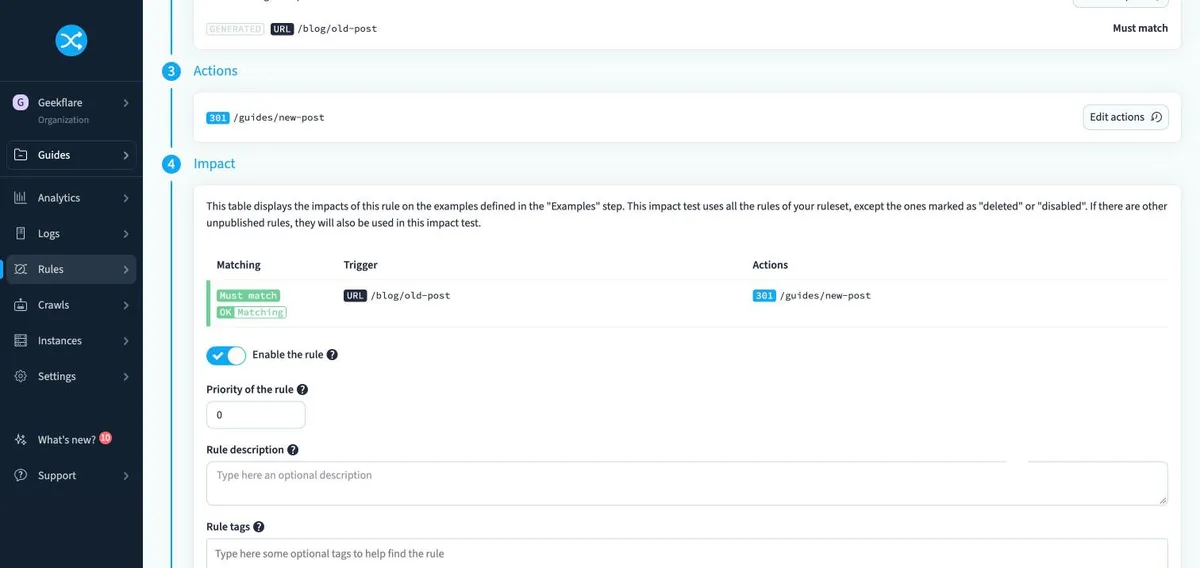
Beyond redirects, rules can override meta tags, add response headers, inject HTML, and serve robots.txt or sitemap.xml files. Traffic logs show which URLs return 404s, so you know what to redirect next.
Our take: The good option for SEO teams and developers running migrations. It takes more setup than a simple domain forwarder.
Redirect features:
- Triggers with markers, wildcards, and restrictions on status code, headers, or method
- Impact testing against example URLs before publishing
- Redirect mapping files and JSON import and export
- Traffic logs and 404 reports
- Managed instance or self-hosted agent
Pros & Cons
PROS
CONS
Pricing
The free plan includes 10 rules and 1 GB of traffic a month.
Starter costs €20 per month billed yearly.
06. Site Detour
Best for QR campaignsHosted redirects with dynamic QR codes and audience targeting
Site Detour hosts redirects and dynamic QR codes for marketing teams, with landing pages in the same account. You point a domain at it, and it handles HTTPS, path and query string rules, and live traffic stats.
A rule can send visitors to different destinations based on location, device, or time of day, so an iPhone user scanning a printed QR code can land on the App Store while everyone else goes to your site.
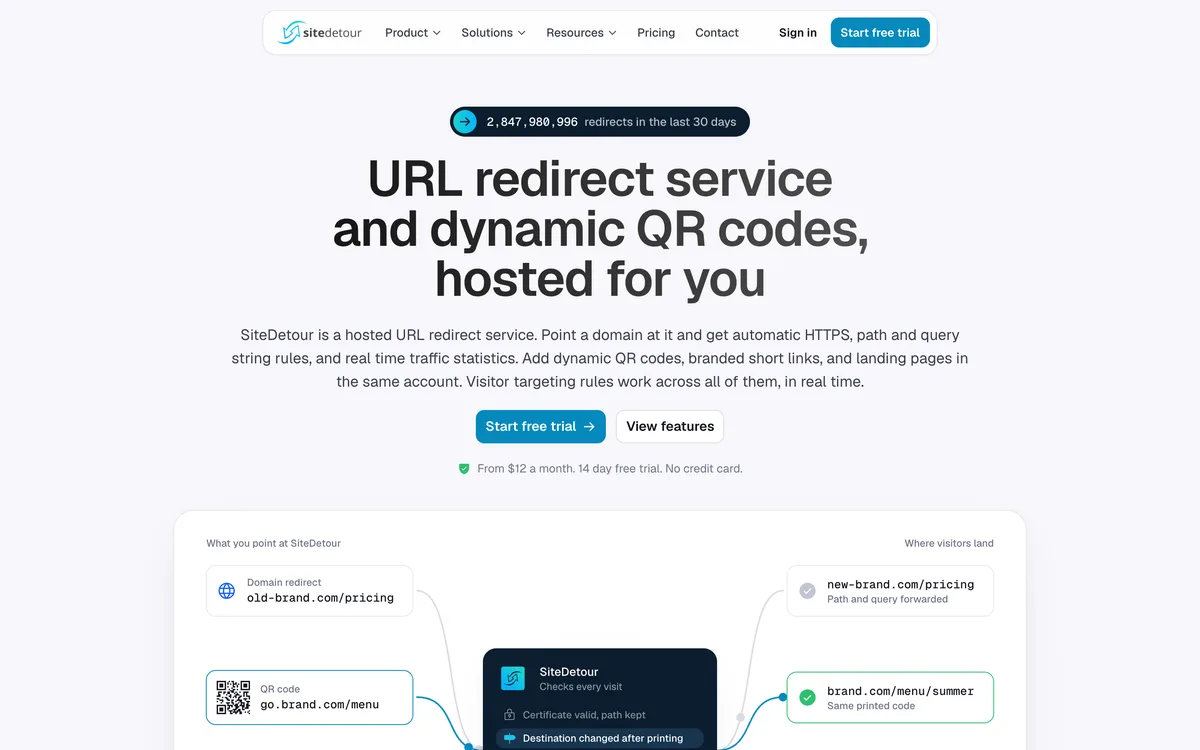
Site Detour doesn’t limit traffic, so a viral campaign won’t push you onto a bigger plan.
Our take: A good pick for printed QR codes and campaigns that need targeting. Teams that only forward domains can find cheaper options above.
Redirect features:
- 301 and 302 redirects with automatic HTTPS
- Path and query string rules with no cap on destinations
- Audience targeting by location, device, and time
- Dynamic QR codes you can change after printing
- Real-time stats, API, and team accounts
Pros & Cons
PROS
CONS
Pricing
Personal costs $12 and Professional $45 per month.
Business starts at $175 per month.
Every plan has a 14-day free trial.
07. freedirector.io
Best budget optionCheap forwarding for domains and subdomains
freedirector.io forwards a domain or subdomain to a URL. You add an A record pointing to its server, then create a redirector with the domain, the destination, and a 301 or 302 status.
The onboarding form makes you set up DNS before you create the redirector, and the only options are the destination and the status code.
Path forwarding and basic analytics are included, with 7 days of data on the free plan and 90 days on Professional. Redirects run over plain HTTP, so domains on HTTPS-only extensions such as .app and .dev won’t work.
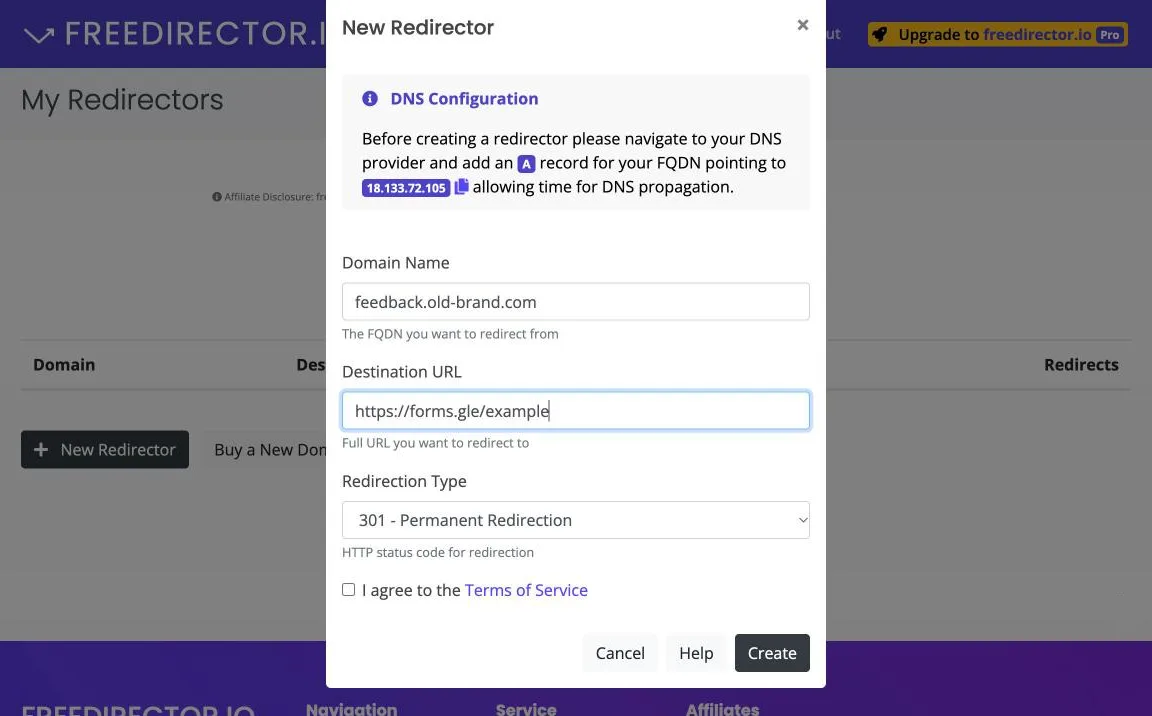
Our take: The cheapest paid way to forward many domains. Look for something else if you want advanced rules.
Redirect features:
- 301 and 302 redirects
- Apex domains and subdomains
- Path forwarding
- Analytics with 7 days of data (90 days on Professional)
Pricing
The free Standard plan covers 5 domains or subdomains.
Professional costs $4.99 per month for 50.
08. ForwardDomain.net
Best free open-source optionDNS-only forwarding with no signup
ForwardDomain.net is free and open source, and you don’t need to create an account. You point the old domain at its server with an A or CNAME record, then add a TXT record that holds the destination.
Its homepage generates the records for you. Entering old-brand.com and https://new-brand.com/* gave me an A record and a TXT record ready to paste into my DNS provider. The asterisk at the end forwards the rest of the path, and an http-status option switches the default 301 to a 302.
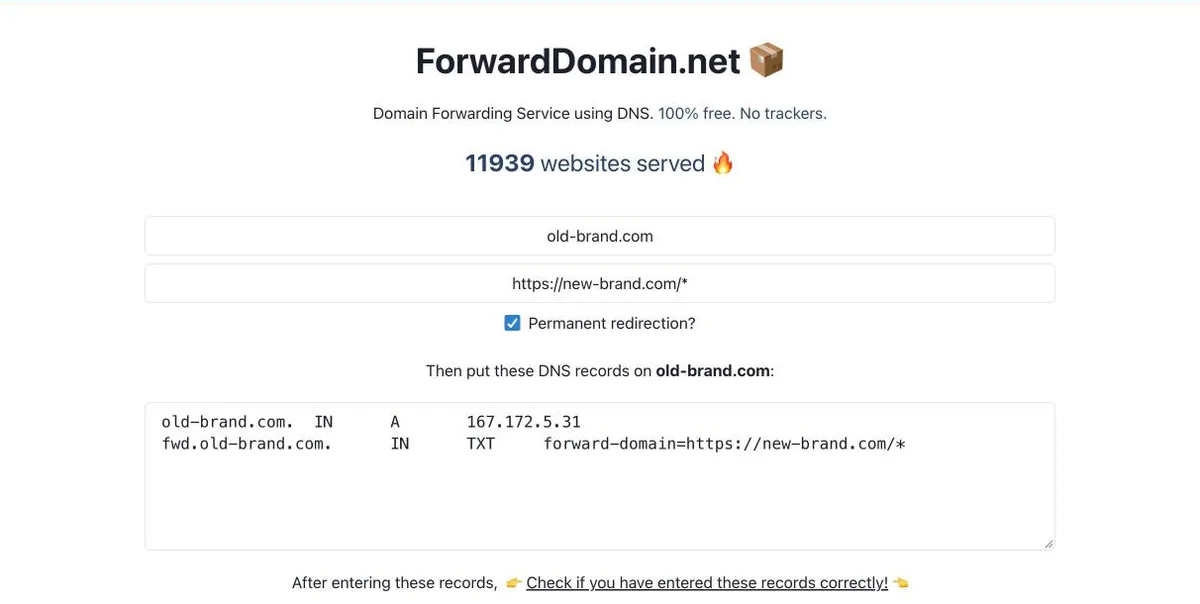
It keeps no traffic logs or visitor data, and there’s no uptime guarantee. The team behind it also runs redirs.com, a paid service with analytics and wildcard subdomains.
Our take: Good for forwarding a personal or typo domain at no cost. For a business domain that earns money, use a service with support and an uptime commitment.
Redirect features:
- 301 by default, or 302 with the http-status option
- Path forwarding with a trailing asterisk
- Automatic HTTPS certificates
- DNS checker to verify your records
- Open source, so you can host on your server
Honorable Mentions
A newer service from the team behind ForwardDomain.net. It supports 301, 302, 307, and 308, path and query forwarding, wildcard hostnames, regex matching on Pro, and an API.
Short.io is a URL shortener rather than a domain redirect service, but every short link is a redirect on your own branded domain. You can target visitors by country or device, set expiring links, run A/B tests, and redirect your domain’s main page and 404s. There’s a free plan, and paid plans start at $5 per month.
How to Check Your Redirects Work
Once a redirect is live, check it from outside your browser, which caches 301s and can hide mistakes. Our free Redirect Tester traces every hop a URL takes, with the status code, Location header, and response headers at each step.
As you can see below, running http://easyredir.com through it shows urllo’s own rebrand. The URL takes two 301 hops, first to https://www.easyredir.com/ and then to https://www.urllo.com/, before it returns a 200.
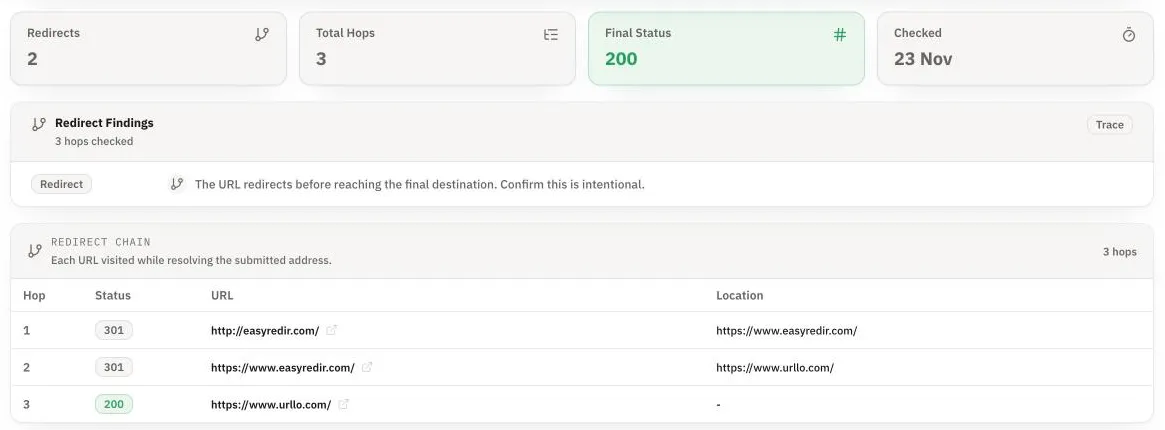
For a whole list of URLs, the Redirect Checker API returns the same chain as JSON for every URL you send, so you can check thousands of migrated pages in a script. It can also route the check through a proxy in another country, which helps confirm that geo-redirects send each market to the right site.
301 vs. 302 vs. 307 vs. 308 Redirects
- 301 is a permanent redirect. Use it for rebrands, domain changes, and pages that have moved for good, since search engines pass the old URL’s signals to the new one.
- 302 is a temporary redirect for short-term moves, such as a seasonal campaign or maintenance page.
- 307 and 308 are the temporary and permanent versions that keep the request method, so a form POST stays a POST.
- Frame and meta refresh redirects keep the old URL in the address bar or redirect from the page itself. Avoid them for SEO, and use them only when you have a specific reason.
If you’re moving a site from HTTP to HTTPS on your own server, our HTTP to HTTPS redirect guide covers the server configs.
Conclusion
redirect.pizza is the easiest all-round choice, with a free plan for small needs and good features as you grow. If your domain is already on Cloudflare, its free redirect rules are hard to beat.
For large migrations, urllo and redirection.io give you the control and reporting you need, while RedirHub and Site Detour suit marketing teams that also run branded links and QR codes. Whichever you choose, check the result with a redirect checker before you switch off the old site.