



When someone types your domain without https:// or follows an old link, the browser asks for the HTTP version first. A redirect answers that request with the HTTPS address, so the visitor lands on the encrypted page with the same path.
Most setups need a few lines of config, though a tiny typo can break them. An Apache rewrite rule without the right flag sends a temporary 302 instead of a permanent 301, and one misplaced Nginx line traps every visitor in a loop.
I ran the server configs in this guide on Apache 2.4, Nginx 1.30, Caddy 2.11, HAProxy 3.4, and Traefik 3.7, so you can copy them as they are after swapping in your domain.
| Platform | Where to set it | Status code |
|---|---|---|
| Apache | Virtual host or .htaccess | 301 |
| Nginx | Separate port 80 server block | 301 |
| Caddy | Automatic | 308 |
| HAProxy | Frontend rule | 301 |
| Traefik | Entry point | 301 for GET, 308 for POST |
| cPanel | Force HTTPS Redirect toggle or .htaccess | 301 with the .htaccess rule |
| Cloudflare | Always Use HTTPS or a redirect rule | 301 on a redirect rule |
| GitHub Pages | Settings, then Pages | 301 |
| Netlify | Automatic | 301 |
| Vercel | Automatic | 308 |
Why Redirect HTTP to HTTPS
Anything sent over plain HTTP can be intercepted along the way. Google has also used HTTPS as a ranking signal since 2014. Browsers are getting stricter too, and Google said Chrome 154 would ask for permission before a first visit to a public site without HTTPS.
Before You Start
- Install a valid certificate first, and make sure it covers every hostname you redirect, including www. Many hosts include one for free, and we’ve listed other free SSL/TLS certificate options.
- Back up the config file you’re about to edit.
- Test with curl instead of a browser, because browsers can cache a 301 and keep showing you the old result.
- Use a permanent redirect. Google treats 301 and 308 as a signal that the target should be the canonical page, and it doesn’t treat 302 or 307 that way.
Apache
If you can edit the server config, put the redirect in the port 80 virtual host. Apache’s documentation recommends Redirect over mod_rewrite for this job, and it carries the path and query string across for you.
<VirtualHost *:80>
    ServerName example.com
    ServerAlias www.example.com
    Redirect permanent / https://example.com/
</VirtualHost>
This sends www requests to the root domain as well. Check the syntax, then reload Apache.
On RHEL-based systems, the service is called httpd.
sudo apachectl configtest
sudo systemctl reload apache2
Without access to the server config, add this rule to the .htaccess file in your document root. AllowOverride has to permit it, and on Debian or Ubuntu you may need to run sudo a2enmod rewrite first.
RewriteEngine On
RewriteCond %{HTTPS} off
RewriteRule ^ https://%{HTTP_HOST}%{REQUEST_URI} [L,R=301]
Don’t leave out [L,R=301]. When I removed it, Apache still redirected but answered with a 302.
Nginx
Give port 80 its own server block and keep the return line in it.
server {
    listen 80;
    listen [::]:80;
    server_name example.com www.example.com;
    return 301 https://$host$request_uri;
}

server {
    listen 443 ssl;
    listen [::]:443 ssl;
    server_name example.com www.example.com;
    ssl_certificate /path/to/fullchain.pem;
    ssl_certificate_key /path/to/privkey.pem;
    root /var/www/html;
}
I tried the same return line in one block listening on both 80 and 443, and the HTTPS request kept redirecting to itself until curl gave up.
Using $host also keeps the hostname the visitor asked for, whereas $server_name always returns the first name in the list.
sudo nginx -t
sudo systemctl reload nginx
Caddy
Caddy needs no redirect rule. Once a site address is a domain name, automatic HTTPS gets a certificate and sends HTTP traffic to HTTPS. My test site answered with a 308.
example.com {
    root * /var/www/html
    file_server
}
The domain has to point to the server, and ports 80 and 443 need to be reachable. Add tls internal inside the block for a hostname that isn’t public.
To turn the redirects off, set auto_https disable_redirects in the global options.
HAProxy
Add the rule to a frontend that binds both ports. The certificate file should contain the full certificate and its private key.
frontend web
    bind :80
    bind :443 ssl crt /etc/haproxy/certs/example.com.pem
    http-request redirect scheme https code 301 unless { ssl_fc }
    default_backend app
Keep code 301 in the rule, since HAProxy returned a 302 without it. Run sudo systemctl reload haproxy afterward.
Traefik
Traefik handles this in the static configuration, so one setting covers every router on the entry point.
entryPoints:
  web:
    address: ":80"
    http:
      redirections:
        entryPoint:
          to: websecure
          scheme: https
  websecure:
    address: ":443"
    http:
      tls: {}
Traefik 3.7 answered GET requests with a 301 and POST requests with a 308, which keeps the request method intact. Static configuration loads at startup, so restart Traefik after the change.
cPanel
Many shared hosts offer a toggle, so check for that first. Go to Domains in cPanel and turn on Force HTTPS Redirect next to your domain. cPanel’s documentation says the domain needs a valid certificate, and your host can help if the toggle won’t turn on.
You can also do it by hand.
- Open File Manager and go to your document root, usually public_html.
- Turn on hidden files in Settings so that .htaccess shows up.
- Add the rule below at the top of the file. On WordPress, place it above the
# BEGIN WordPressline, because WordPress rewrites everything inside that block. - Save the file and test the redirect.
RewriteEngine On
RewriteCond %{HTTPS} off
RewriteRule ^ https://%{HTTP_HOST}%{REQUEST_URI} [L,R=301]
If the file already has RewriteEngine On, you don’t need to repeat that line.
Cloudflare
Cloudflare can redirect visitors before a request ever reaches your server, and the setting is available on every plan.
- Select your domain in the Cloudflare dashboard.
- Go to SSL/TLS, then Edge Certificates.
- Turn on Always Use HTTPS.
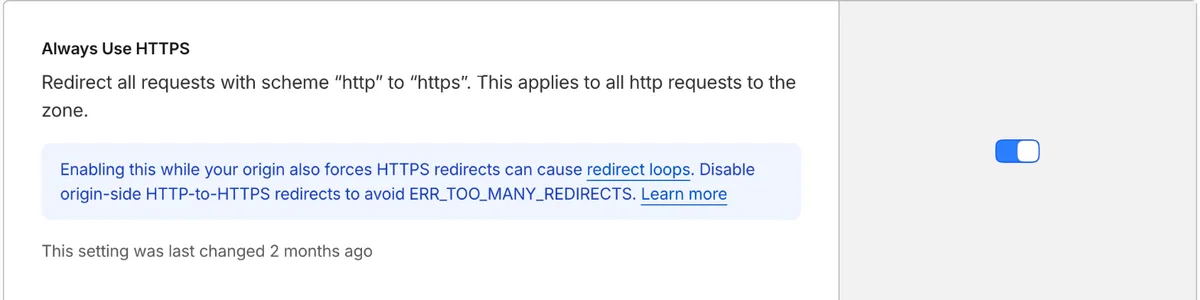
You won’t see the option if your encryption mode is set to Off. It also applies to every subdomain and host in the zone. If only part of your site supports HTTPS, use a redirect rule instead by going to Rules, then Overview, and choosing the Redirect from HTTP to HTTPS template.
Cloudflare’s migration guide lists the settings for a site-wide rule, which you can narrow down to the hosts that need it.
- Wildcard pattern for the request URL:
http://* - Target URL:
https://${1} - Status code: 301
- Preserve query string: on
Older tutorials use Page Rules for this, but Cloudflare has deprecated them, so a redirect rule is the better choice for new setups. Also turn off any redirect at your origin while Always Use HTTPS is on, as Cloudflare warns the two together can cause a loop.
GitHub Pages
A site on the default github.io domain is already covered. The Enforce HTTPS box was checked and locked on my test site, and HTTP requests got a 301 with the path and query string intact.
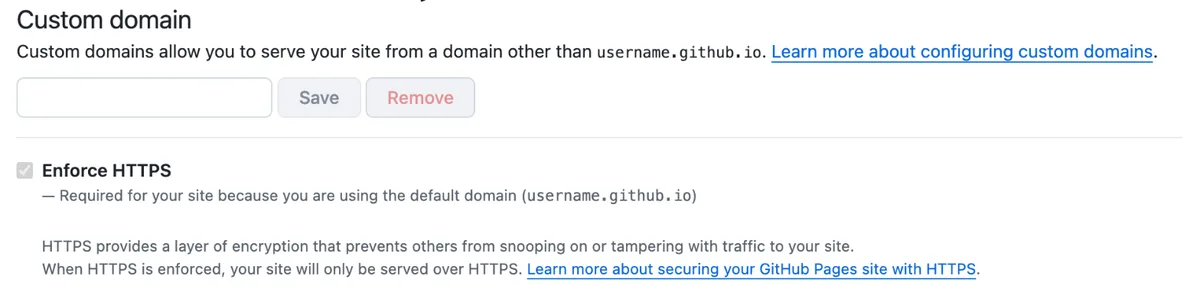
On a custom domain, go to your repository’s Settings, then Pages, and select Enforce HTTPS. GitHub has to issue the certificate before that works. If it’s still not ready after several minutes, GitHub suggests removing the domain, then adding it again to restart the process.
Netlify and Vercel
Neither needs a redirection setup. HTTP requests to Netlify-hosted sites, including a default netlify.app address, returned a 301. Sites on Vercel returned a 308, and Vercel’s documentation says the redirect can’t be disabled.
On Netlify, a custom domain gets a Let’s Encrypt certificate automatically. You can check its status under Domain management, then HTTPS. On Vercel, connect WebSocket clients straight to wss://, because WSS doesn’t support redirects.
WordPress and Joomla Settings
A server redirect doesn’t change the URLs your CMS generates, so update those too.
In WordPress, go to Settings, then General, and change both the WordPress Address and Site Address to https://. WordPress also supports forcing logins and admin sessions over HTTPS by adding this line to wp-config.php.
define( 'FORCE_SSL_ADMIN', true );In Joomla, go to System, then Global Configuration, open the Server tab, and set Force HTTPS to Entire Site.
How to Check the Redirect
Request an HTTP page with a path and query string, so you can see that both survive.
curl -I "http://example.com/some/page?x=1"A working setup returns something like this.
HTTP/1.1 301 Moved Permanently
Location: https://example.com/some/page?x=1
Then follow the redirect to the end. You want a final 200 with one redirect, or two if you also move www to the root domain.
curl -sL -o /dev/null -w "final %{http_code}, redirects %{num_redirects}\n" http://example.com/Repeat this for the root domain, www, and any subdomains. If you’d rather not use a terminal, Redirect Tester tool shows each hop and Mixed Content Test finds resources still loading over HTTP, and TLS Scanner checks the certificate and protocol setup.
Finally, update your internal links, canonical tags, and sitemap so they point straight to HTTPS.
Common Redirect Problems
Too Many Redirects
ERR_TOO_MANY_REDIRECTS usually means two layers disagree about whether the request is secure. It often happens behind a load balancer or proxy that handles TLS and talks to your server over plain HTTP. Your server sees HTTP on every request, so it keeps redirecting. I reproduced this with HAProxy in front of Apache, using the standard %{HTTPS} off rule.
If your proxy sets the X-Forwarded-Proto header, check that instead. On Apache, replace the condition with this one.
RewriteCond %{HTTP:X-Forwarded-Proto} !httpsOn Nginx, use this in the server block.
if ($http_x_forwarded_proto != "https") {
    return 301 https://$host$request_uri;
}
Both fixes stopped the loop in my setup. Cloudflare’s Flexible mode causes the same problem, since it reaches your origin over HTTP. Cloudflare’s troubleshooting guide covers that case and other settings to check.
Mixed Content Warnings
A redirect doesn’t fix pages that still reference images, scripts, or stylesheets over http://. Replace those links with HTTPS versions in your templates and content. On WordPress, the SSL Insecure Content Fixer plugin can handle many of them while you clean up the source.
Certificate Errors After the Redirect
This usually means the certificate doesn’t cover the hostname the visitor requested, with www being the classic example. Add the missing name to the certificate, then verify it with an SSL checker.
Forms and API Calls Fail
Many clients turn a POST into a GET after a 301, so the request body gets lost. A 308 keeps the method, but the first request has still gone out over HTTP with its data exposed. Change forms and API clients to use https:// directly.
Add HSTS After the Redirect Works
A redirect still leaves that first HTTP request unprotected. HTTP Strict Transport Security (HSTS) tells browsers to go straight to HTTPS on later visits. Send the header from the HTTPS side only.
On Apache, add this inside the port 443 virtual host, with mod_headers enabled.
Header always set Strict-Transport-Security "max-age=31536000; includeSubDomains"On Nginx, add this to the port 443 server block.
add_header Strict-Transport-Security "max-age=31536000; includeSubDomains" always;Cloudflare has an Enable HSTS option on the same Edge Certificates page. Browsers remember this policy, so a mistake can lock visitors out of any subdomain that doesn’t support HTTPS. The HSTS preload site suggests starting with 5 minutes, then moving to a week and a month, and waiting out each period before you go further.
The preload list goes one step further by building your domain into browsers. It requires a max-age of at least one year, includeSubDomains, the preload directive, and an HTTP redirect to the same hostname first. Leaving the list again takes a long time, so treat it as a long-term commitment.
FAQ
Does redirecting to HTTPS hurt SEO?
Not when the redirects are permanent and each old URL points to its HTTPS version. Google treats 301 and 308 redirects as a signal that the new URL should be canonical.
Should I use a 301 or a 308?
Either works for a normal website, since Google treats both as permanent. A 308 keeps the request method, while a 301 can turn a POST into a GET. Most people can keep whichever code their server or host returns.
Do I still need a redirect if I use HSTS?
Yes. A browser only learns your HSTS policy after it has loaded your site over HTTPS, and non-browser clients may ignore it. The redirect covers first visits and those clients.
Can I redirect to HTTPS without server access?
Yes. You can use a toggle in your hosting panel, an .htaccess file on Apache-based hosting, or a service like Cloudflare that sits in front of your site.
Why is my site still loading over HTTP after I added the redirect?
Check with curl first, since your browser may be showing a cached result. Then confirm that you edited the config for the right site, reloaded the server, and that no other rule runs first.
Conclusion
Set the redirect at the layer that receives traffic first, and only there. That means a Cloudflare setting if your site is behind Cloudflare, a load balancer rule if you use one, and otherwise your web server config or .htaccess file.
Once it’s live, confirm a 301 or 308 with curl, and test the site before you add HSTS.