


Moving a website to a new hosting provider can feel like a server-side task, but DNS still plays a key role in getting users to the right destination. The domain may also have DNS records for email, subdomains, security, and other services.
A hosting change can leave some of these records pointing to an old server or affect services that rely on the domain. Checking the existing DNS setup before the move gives you a clear picture of what is already configured.
A DNS migration checklist helps turn that review into a practical set of checks. You can identify the records that need to change and keep track of those that need to stay as they are.
In this guide, we’ll use the Geekflare DNS Records API to inspect a domain and review its DNS configuration. The results will then help us build a checklist for a planned hosting migration.
DNS Records to Check Before a Hosting Migration
Start with the domain’s current DNS configuration before changing the hosting provider. These records show how the domain handles web traffic, email, subdomains, and related services.
Focus on the following records during your initial review:
- A and AAAA records: Check the IPv4 and IPv6 addresses used by the domain. These commonly change when a website moves to a new server, so note their current values before the migration.
- CNAME records: Review aliases used by subdomains and external services. Keep track of these entries before changing the hosting configuration.
- MX and TXT records: Check the domain’s email configuration and verification data. MX records identify mail servers, while TXT records can contain SPF, DKIM, DMARC, and other verification information.
- NS and SOA records: Check the nameservers and the domain’s primary DNS information. These records help you understand the current DNS authority and configuration.
- CAA records: Check the certificate authorities permitted to issue certificates for the domain. Keep the required entries in place after the hosting move.
- SRV records: Check services that rely on specific servers and ports, such as communication or other network services. Record these entries if they are present in the domain’s configuration.
Check a Domain’s DNS Records With the Geekflare DNS Records API
A DNS migration checklist is useful when you have the actual DNS data to review. The Geekflare DNS Look API lets you query a domain and retrieve its current DNS records. This gives you the information needed for the checks above.
Geekflare provides SDKs for integrating its APIs into applications. We’ll use the Python SDK in this example to query a domain and review its DNS records.
Prerequisites
Before querying the DNS Records API with Python, prepare the following:
- Python 3.9 or later installed on your system.
- A Geekflare API key. Create a Geekflare account if you do not have one, then open the dashboard and copy your API key.
- The Geekflare Python SDK installed with
pip. - A domain name for the DNS lookup.
Install the Geekflare SDK with:
pip install geekflare-apiRun the Python Script
For this example, we’ll use the OpenAI website as the target URL and query several DNS record types through the Geekflare DNS Records API.
# pip install geekflare-api
from geekflare_api.client import GeekflareClient
from geekflare_api.models import DnsRecordDto

with GeekflareClient(api_key="YOUR_GEEKFLARE_API_KEY") as client:
    result = client.dns_record(
        DnsRecordDto(
            types=["AAAA", "CNAME", "MX", "CAA", "A"],
            url="https://openai.com/"
        )
    )
    print(result)
The types parameter lets you choose the DNS record types you want to retrieve. The API supports AAAA, CNAME, MX, CAA, A, NS, SRV, SOA, and TXT records.
You can specify any combination of these types based on your requirements. If you leave types unspecified, the API returns all available record types for the domain.
Understanding the Response
The response contains the DNS records returned for the OpenAI domain based on the selected record types. Each record type provides a different part of the domain’s DNS configuration.
For example, the A record shows the IPv4 address, while AAAA provides the IPv6 address. MX records identify mail servers, and CNAME records show aliases for other hostnames. CAA records specify the certificate authorities allowed for the domain.
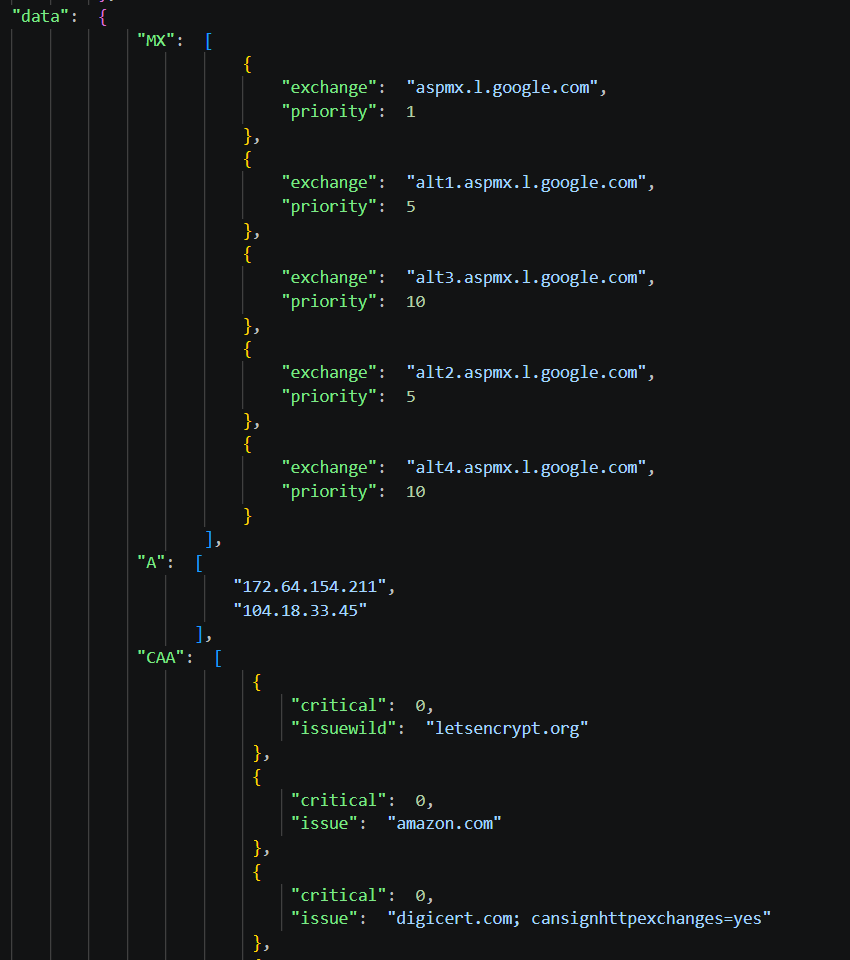
Review these values before a hosting migration and note any records tied to the website or other services. These values can then serve as a reference when you review the DNS configuration after the migration.
Try the DNS Records API in the Geekflare Playground
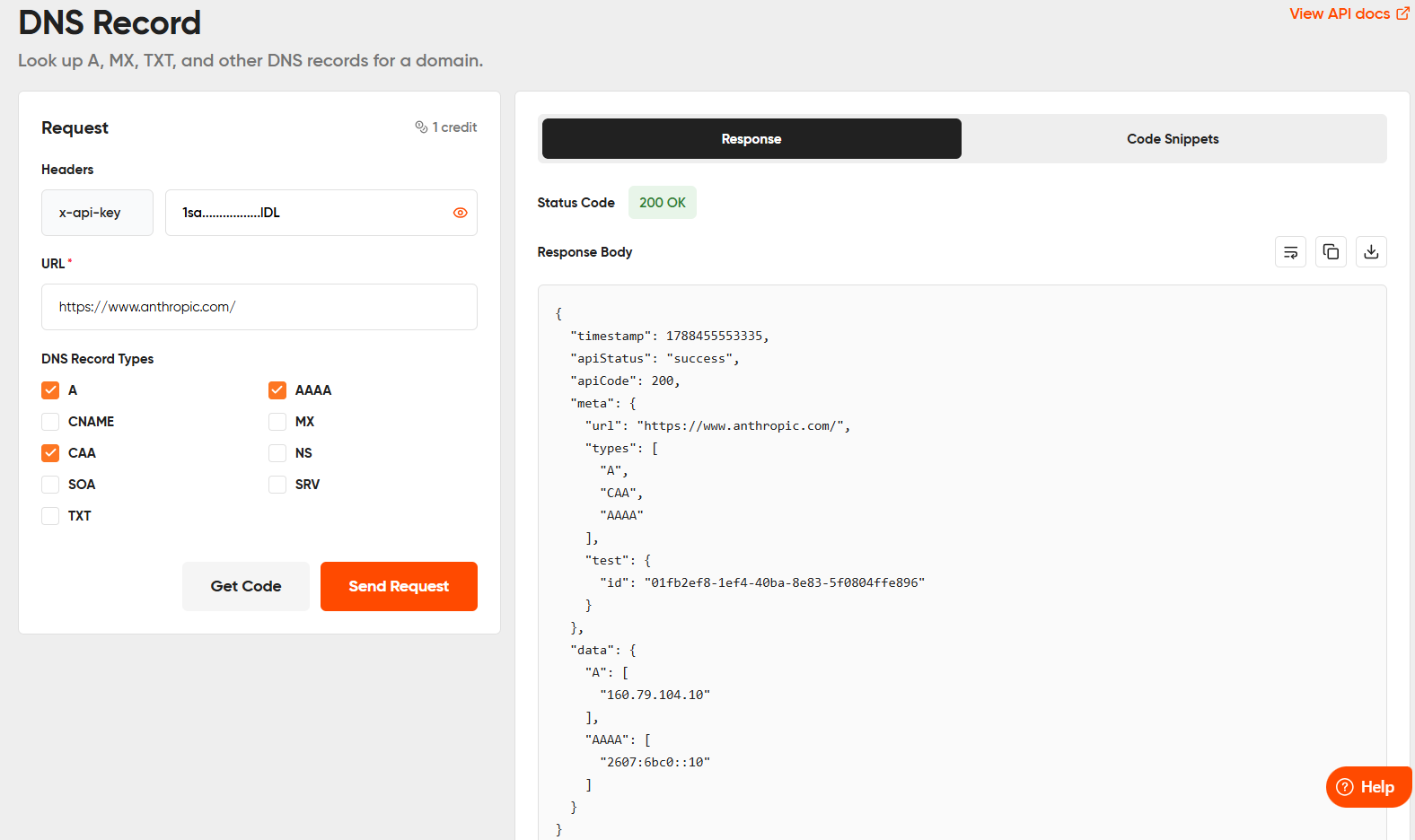
You can also test the DNS Records API directly in the Geekflare Playground. For this example, enter https://www.anthropic.com/ as the target URL and select the DNS record types you want to inspect.
The Playground returns the DNS data directly, letting you review the domain configuration before using the API in your application.
Turn the DNS Response Into a Migration Checklist
Use the returned DNS data as a reference before changing the hosting configuration. Review each record against the services connected to the domain and note any value that needs attention during the move.
- Website records: Note the current A and AAAA values. These are typically updated to point to the new server.
- Subdomains: Review CNAME records for subdomains that point to other services.
- Email: Record MX and relevant TXT records. These often need to remain unchanged during a website migration.
- DNS management: Note the NS records to confirm the current nameservers.
- SSL/TLS: Check CAA records if the domain uses certificate authority restrictions.
These checks form the core of your DNS migration checklist. After the new hosting configuration is ready, compare the DNS values against the checklist and confirm that the required changes are in place.
Conclusion
A hosting migration can affect several services tied to a domain, making DNS checks an important part of the preparation. A DNS migration checklist gives you a clear reference for the records that need attention before changing the hosting configuration.
The Geekflare DNS Records API provides a simple way to retrieve these records programmatically. You can use the Python SDK to inspect a domain, review the response, and turn the results into a practical checklist. The Geekflare Playground also provides a quick way to test the API before integrating it into your own workflow.
Frequently Asked Questions
What is a DNS migration checklist?
A DNS migration checklist is a list of DNS records and settings to review before moving a website to a new hosting provider. It helps you identify records that need updating and those that should remain unchanged.
Which DNS records should I check before a hosting migration?
Check A, AAAA, CNAME, MX, TXT, NS, and CAA records. The exact records you need to review depend on the services connected to the domain.
How can I check DNS records programmatically?
You can use the Geekflare DNS Records API to query a domain and retrieve its DNS records. The Python SDK provides a way to make these queries from a Python application.
Should DNS records be checked after a hosting migration?
Yes. Run the same DNS checks after the move and compare the results with your pre-migration reference. This helps confirm that the expected records point to the correct services.





