



The web is unforgiving. Your site might be the best, but it can still make visitors leave fast if there are unintended 404 errors. It not only damages user experience (UX) but also likely pushes up bounce rates.
Though there is no direct study that supports the idea that 404 errors increase bounce rates, 53% of mobile users abandon a site if it doesn’t load in 3 seconds. This confirms that any friction will only result in further increases in bounce rates.
It doesn’t impact ranking signals, as confirmed by Google’s John Mueller. But this indirectly impacts SEO, including wasted crawl budget (soft 404s) and lost link equity (PageRank).
That’s why it is important to hunt down broken links and fix them. In this article, I’ll cover 4 distinct ways to hunt down broken links. These include:
- Standalone tools
- SEO platforms
- Using APIs for automated monitoring
- DIY Python Script
You can choose any of them based on your budget and technical skill level.
Let’s get started.
Method 1: Standalone Tools
It’s always best to start with free standalone tools. They are easy to use and help in quickly finding and fixing broken links.
Geekflare’s Broken Link Checker helps you find broken links for a single web page. It gives you a detailed result, listing working and broken links, along with the reason for each of the links that need attention.
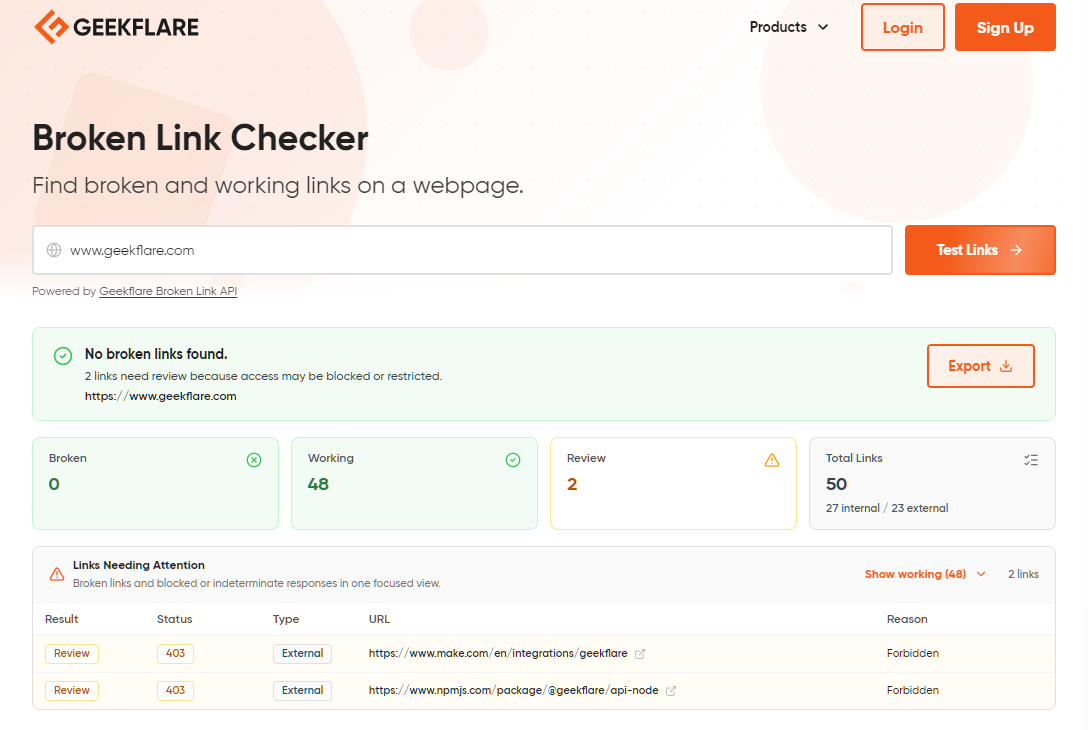
You can export the results or directly take action from the results shown under the “Links Needing Attention” section. It provides results in three buckets, including:
- Broken (404 or 5xx)
- Working
- Review
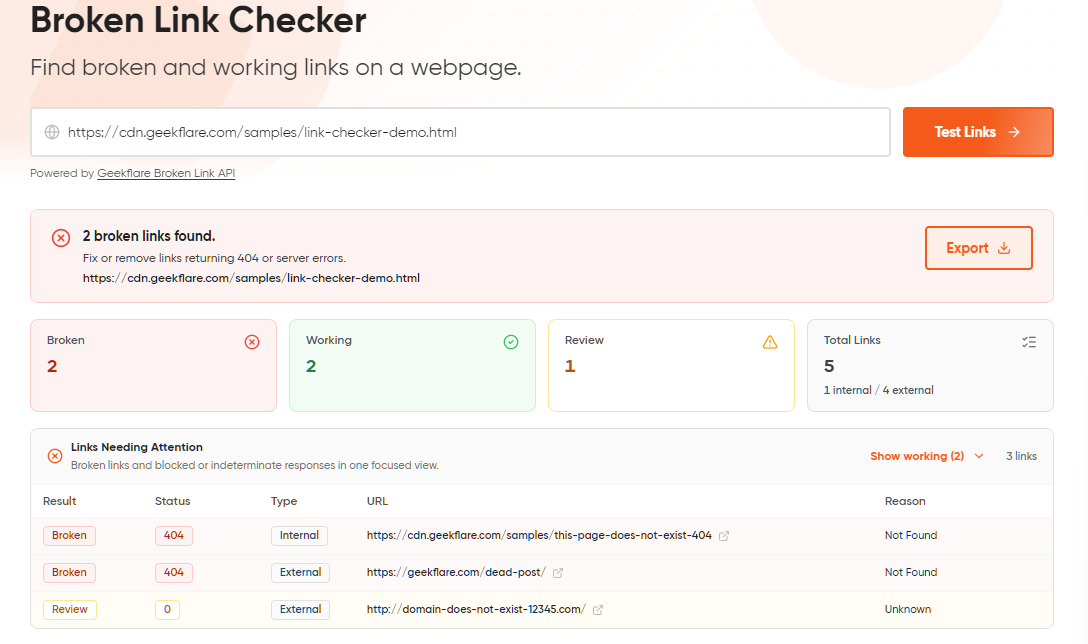
I went ahead and checked the demo site, which showed the following result.
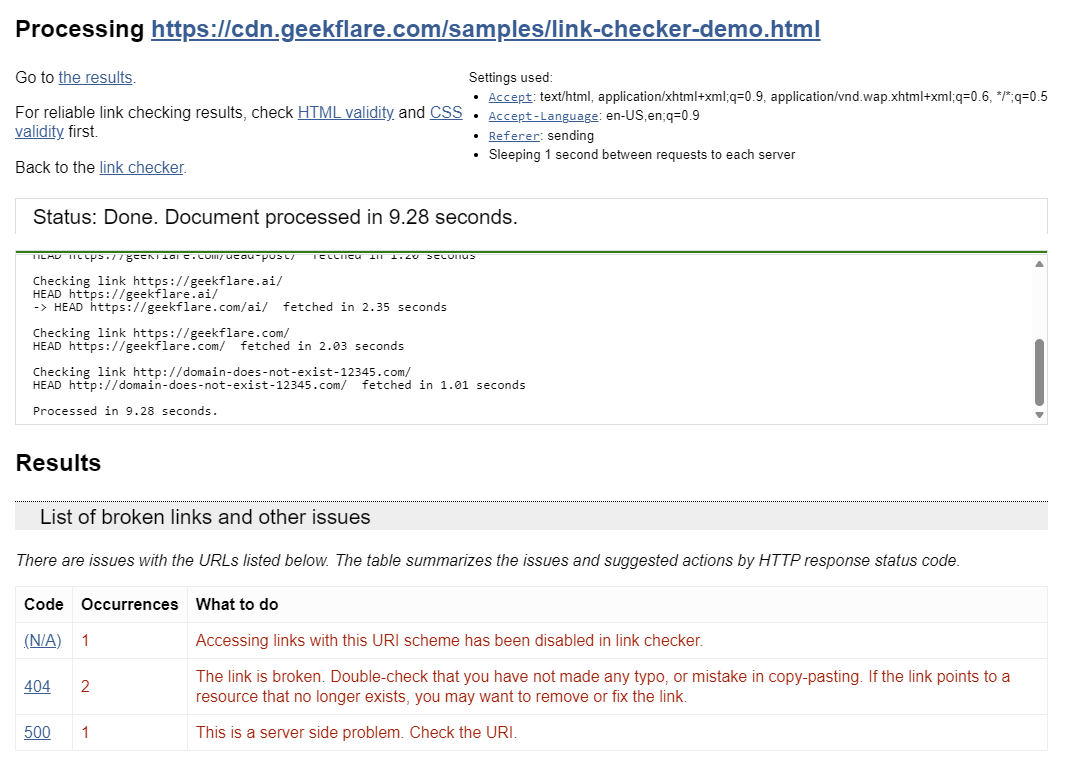
You can also opt to use the W3C Link Checker. It crawls the page and checks for broken links. However, it is not as fast compared to Geekflare Broken Link Checker, which is expected considering it is a 28-year-old tool (though updated).
Pros & Cons of using standalone tools
PROS
CONS
Method 2: SEO Platforms
SEO platforms are another viable alternative to find broken links. For example, you can use any of the industry-standard site crawlers like Screaming Frog, Ahrefs, and Semrush.
These are dedicated SEO platforms that give you way more in terms of features, including SEO keyword research, competitor research, and so on.
As they are full-fledged platforms, these products are not only good at finding broken links but also at getting a full site audit. However, this also means that they are overkill and expensive if your only purpose is to find the broken links.
Checking broken links via these tools is easy; you just need to log in and enter the URL.
I have access to Ubersuggest (a complete SEO tool), which gives a full site audit with a complete list of broken links.
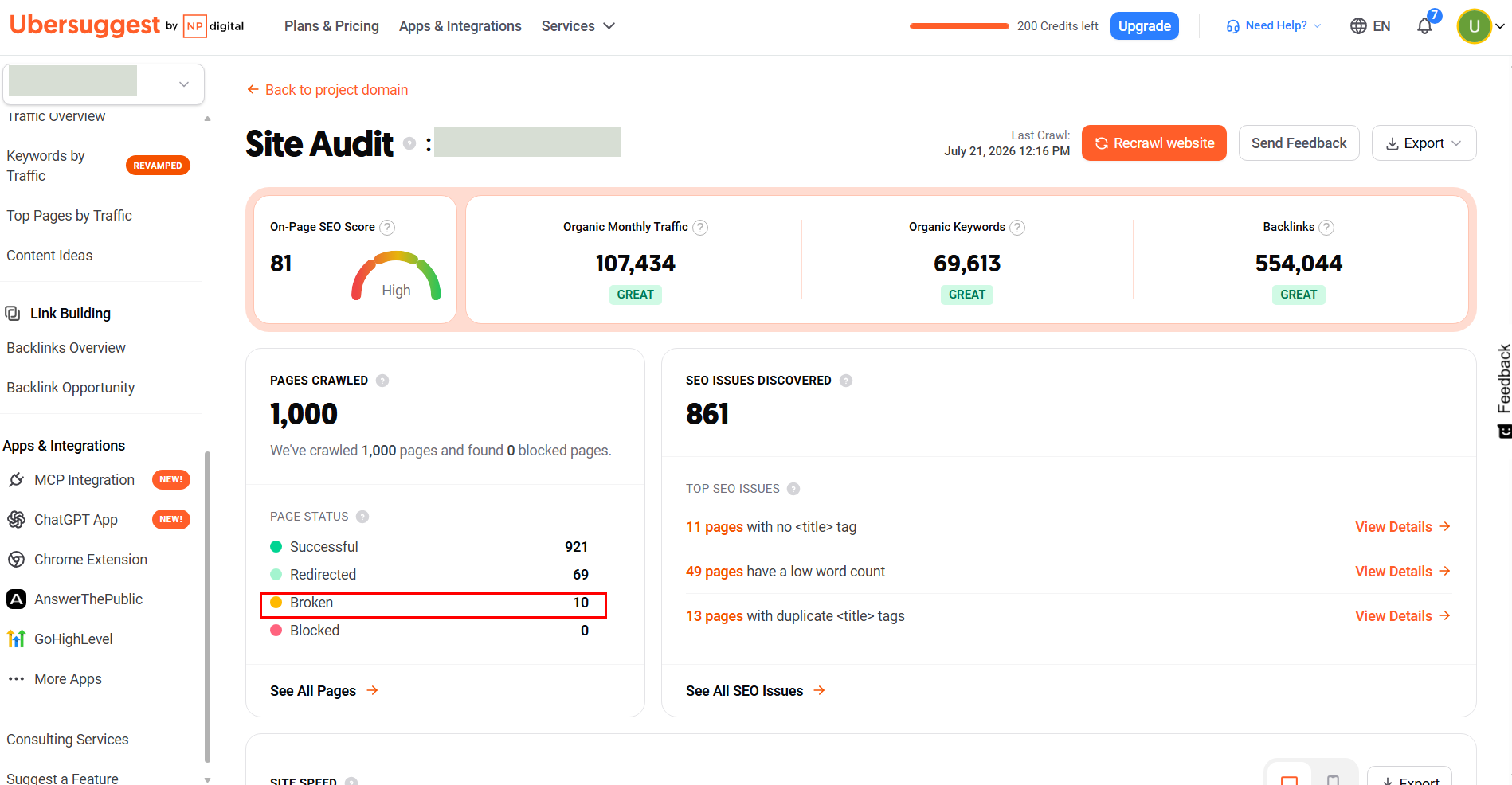
Overall, I will only suggest using SEO platforms if you already have access to one. There is no point in buying the whole package if you’re only looking to fix the broken links.
Method 3: Using APIs for Automated Monitoring
Using APIs is another great way of ensuring that no broken links stay on the site for long.
For this purpose, I use the Broken Link Checker API, which can help you set up an automated dead internal and external links checker.
Here’s how I have tested it on the playground.
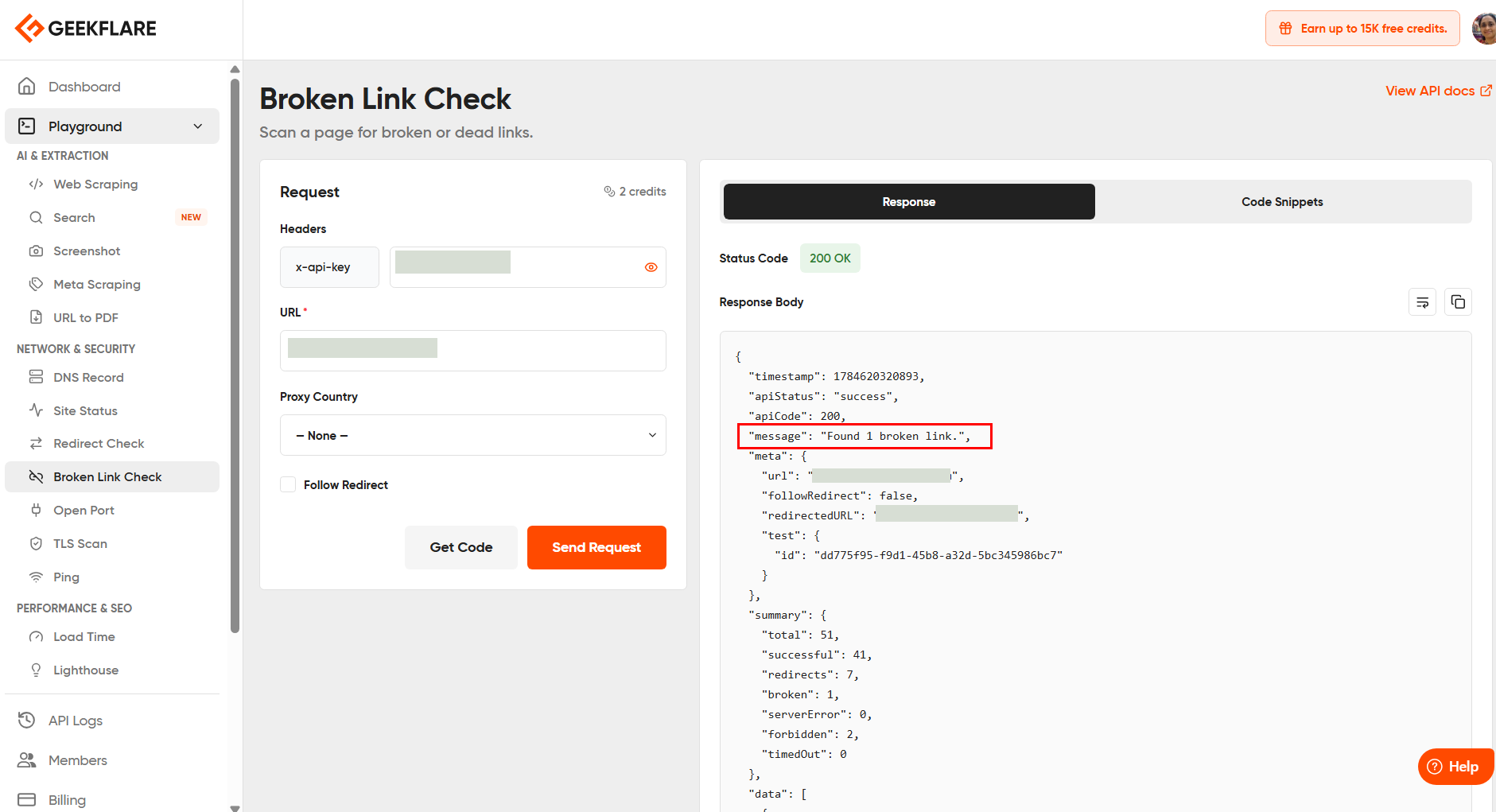
If you’re running a small site, then you can use it at no cost, as it costs 5 credits per request. With 500 credits/mo, you can do 100 checks/month. It also has official support for Python, Node, Go, PHP, and others for easy integration.
When configured correctly, you can feed the API data directly into Google Looker Studio or a custom dashboard. It gives you real-time visual monitoring capabilities, but you might need a paid subscription to make the most of it.
Tip: If you’re a freelancer or solo developer, you can use Google Sheets to set up and get real-time insights.
Pros & Cons of using APIs for automated monitoring
PROS
CONS
Method 4: DIY Python Script
For more technically advanced users, a DIY Python script is recommended. It helps you extract all href links and check for broken ones.
Before you use the code below, you need to install the prerequisite.
pip install requests beautifulsoup4Now, create a broken_link_checker.py file and put the code mentioned below.
import requests
from bs4 import BeautifulSoup
from urllib.parse import urljoin

def check_broken_links(url):
    try:
        response = requests.get(
            url,
            headers={"User-Agent": "Mozilla/5.0 (Windows NT 10.0; Win64; x64) AppleWebKit/537.36 (KHTML, like Gecko) Chrome/148.0.0.0 Safari/537.36"},
            timeout=10
        )
        response.raise_for_status()
    except Exception as e:
        print(f"Failed to fetch page: {e}")
        return

    soup = BeautifulSoup(response.text, "html.parser")

    links = set()

    for tag in soup.find_all("a", href=True):
        href = tag["href"].strip()

        if href.startswith(("mailto:", "tel:", "javascript:", "#")):
            continue

        full_url = urljoin(url, href)
        links.add(full_url)

    print(f"Found {len(links)} links\n")

    broken = []

    for link in sorted(links):
        try:
            r = requests.head(
                link,
                allow_redirects=True,
                headers={"User-Agent": "Mozilla/5.0 (Windows NT 10.0; Win64; x64) AppleWebKit/537.36 (KHTML, like Gecko) Chrome/148.0.0.0 Safari/537.36"},
                timeout=10
            )

            if r.status_code >= 400:
                broken.append((link, r.status_code))
                print(f"❌ {r.status_code} - {link}")
            else:
                print(f"✅ {r.status_code} - {link}")

        except Exception as e:
            broken.append((link, str(e)))
            print(f"❌ ERROR - {link} - {e}")

    print("\n--- Broken Links ---")
    for link, error in broken:
        print(f"{error} - {link}")

if __name__ == "__main__":
    check_broken_links("https://docs.stripe.com/")
Note: It is recommended to use a recent user agent to avoid getting blocked.
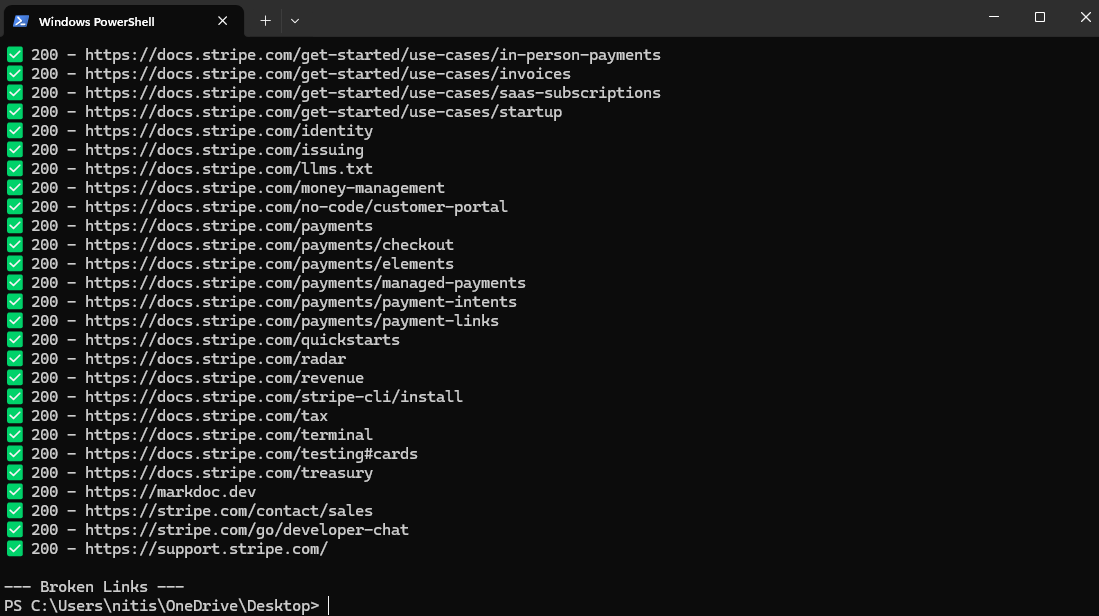
Output
% python3 broken-link-checker.py
Found 47 links

✅ 200 - https://dashboard.stripe.com/login?redirect=https%3A%2F%2Fdocs.stripe.com%2F
✅ 200 - https://dashboard.stripe.com/register
✅ 200 - https://docs.stripe.com/
✅ 200 - https://docs.stripe.com/atlas
✅ 200 - https://docs.stripe.com/billing
✅ 200 - https://docs.stripe.com/billing/how-metronome-works-with-stripe
✅ 200 - https://docs.stripe.com/billing/revenue-recognition
✅ 200 - https://docs.stripe.com/building-with-ai
✅ 200 - https://docs.stripe.com/capital/how-stripe-capital-works
✅ 200 - https://docs.stripe.com/changelog
✅ 200 - https://docs.stripe.com/climate
✅ 200 - https://docs.stripe.com/connect
✅ 200 - https://docs.stripe.com/crypto
❌ 404 - https://docs.stripe.com/data/access-data-in-dashboard
✅ 200 - https://docs.stripe.com/data/access-data-in-warehouse
✅ 200 - https://docs.stripe.com/development
✅ 200 - https://docs.stripe.com/financial-connections
✅ 200 - https://docs.stripe.com/get-started
✅ 200 - https://docs.stripe.com/get-started/development-environment
✅ 200 - https://docs.stripe.com/get-started/use-cases
✅ 200 - https://docs.stripe.com/get-started/use-cases/in-person-payments
✅ 200 - https://docs.stripe.com/get-started/use-cases/invoices
✅ 200 - https://docs.stripe.com/get-started/use-cases/saas-subscriptions
✅ 200 - https://docs.stripe.com/get-started/use-cases/startup
✅ 200 - https://docs.stripe.com/identity
✅ 200 - https://docs.stripe.com/issuing
✅ 200 - https://docs.stripe.com/llms.txt
✅ 200 - https://docs.stripe.com/money-management
✅ 200 - https://docs.stripe.com/no-code/customer-portal
✅ 200 - https://docs.stripe.com/payments
✅ 200 - https://docs.stripe.com/payments/checkout
✅ 200 - https://docs.stripe.com/payments/elements
✅ 200 - https://docs.stripe.com/payments/managed-payments
✅ 200 - https://docs.stripe.com/payments/payment-intents
✅ 200 - https://docs.stripe.com/payments/payment-links
✅ 200 - https://docs.stripe.com/quickstarts
✅ 200 - https://docs.stripe.com/radar
✅ 200 - https://docs.stripe.com/revenue
✅ 200 - https://docs.stripe.com/stripe-cli/install
✅ 200 - https://docs.stripe.com/tax
✅ 200 - https://docs.stripe.com/terminal
✅ 200 - https://docs.stripe.com/testing#cards
✅ 200 - https://docs.stripe.com/treasury
✅ 200 - https://markdoc.dev
✅ 200 - https://stripe.com/contact/sales
✅ 200 - https://stripe.com/go/developer-chat
✅ 200 - https://support.stripe.com/

--- Broken Links ---
404 - https://docs.stripe.com/data/access-data-in-dashboard
% 
But why use a script? Well, it gives you full control over your crawl, including:
- Crawl speed
- User-agent spoofing
- Export formats without the need to pay any subscription fees
However, the script is basic and doesn’t let you bypass CAPTCHA or anti-bot. It also doesn’t have any code for managing a proxy.
That’s why I recommend this to technical people who want to try things out.
Alternatively, also check out the Geekflare API Python SDK, which allows checking links using Python.
# pip install geekflare-api
from geekflare_api.client import GeekflareClient
from geekflare_api.models import BrokenLinkDto

with GeekflareClient(api_key="<api-key>") as client:
    result = client.broken_link(
        BrokenLinkDto(
            url="https://example.com"
        )
    )
    print(result)
Conclusion
Fixing broken links is relatively easy if you know what you’re doing. You can choose between a standalone tool or automate via API. Both are feasible, but require different levels of expertise. If you’re non-technical, go with a standalone tool, but it has a big limitation of checking a single page at a time.
An alternative but costly option is to use an SEO platform, which gives you a comprehensive site audit, giving you more insight into your site’s overall health, including identifying duplicate content, canonicals, Core Web Vitals, and broken backlinks. You also need to look into your site’s size and frequency of checking before picking one of the above 4 mentioned methods.
If you think you can use scripts and have knowledge on how to modify them based on your requirements, then go for it!
In the end, all these methods help you fix and find broken links. For larger sites, it is always a good idea to use an SEO platform or use an API. Doing so will keep your site healthy and help it get traffic.






