


Monitoring a website involves more than checking if it is online. A website may return a successful response but still take longer to resolve the domain, establish a connection, respond to a request, or download content.
A Load Time API can measure these parts of a request and provide data such as response times, status codes, redirects, and results from different locations. This information can help you identify performance or availability issues.
In this guide I will show how to monitor website performance and availability using the Website Load Time API.
Why Monitor Website Performance and Availability?
A website being online does not always mean that it is working well. Visitors may face slow response times, connection delays, failed requests, or redirect issues even when the website eventually loads.
Performance can also vary across locations. A website may respond quickly in one country but take longer to load or fail to respond in another. Regular monitoring helps you identify such issues and understand if they affect specific regions or users.
Checking individual parts of a request can also help you identify the possible source of a delay. For instance, a slow server response differs from a delay during DNS lookup or the TLS handshake.
Monitoring availability is equally important. HTTP status codes and reachability checks can reveal failed pages, server errors, or other issues that prevent visitors from accessing the website. A Load Time API brings these checks together and provides data you can use to monitor website performance and availability.
What Can You Monitor With a Load Time API?
Geekflare’s Load Time API lets you check website performance and availability by measuring different parts of a website request.
You can use the API to monitor:
- Website availability: Check if the website is reachable from the selected location.
- HTTP status codes: See responses such as
200,301,404, or503. - Timing metrics: Measure DNS lookup, TCP connection, TLS handshake, TTFB, download time, and total load time.
- Redirects: Follow the redirect chain and check the final destination and redirect time.
- Performance from different locations: Test how the website responds from selected countries.
- Response details: Review HTTP headers, remote IP, response size, and supported HTTP protocols.
These metrics provide a clearer view of how a website handles requests and can help identify performance or availability issues.
Geekflare also offers an MCP server that lets you use its various APIs with LLMs and AI agents. AI agents can use the Load Time API to check website performance and availability as part of a task.
Method 1: Monitor Website Performance With Geekflare’s Load Time API
Geekflare’s Load Time API lets you check website performance and availability through an API request. You can test a URL from different countries and review the response data for each location.
Prerequisites
Before running the example, make sure you have the following:
- Geekflare API key: Create a Geekflare account if you do not have one. Open the Geekflare dashboard and copy your API key.
- Python: Install Python on your system.
- Geekflare Python SDK: Install the SDK with the following command:
pip install geekflare-apiAfter completing the setup, use the following code to test a website:
from geekflare_api.client import GeekflareClient
from geekflare_api.models import LoadTimeDto

with GeekflareClient(api_key="YOUR_API_KEY") as client:
    result = client.load_time(
        LoadTimeDto(
            target_countries=["af", "io", "au"],
            url="https://www.bbc.com"
        )
    )
    print(result)
Replace YOUR_API_KEY with your Geekflare API key. The url parameter specifies the website you want to test. This example uses https://www.bbc.com, but you can enter any publicly accessible website URL.
The target_countries parameter lets you choose up to three additional countries for testing. Geekflare also runs a default test from a US server, so the response includes results from the selected countries and the US. In this example, the API tests the website from Afghanistan (af), British Indian Ocean Territory (io), Australia (au), and the default US location.
The API returns the performance and availability data for each selected location.
Understanding the Response of the Load Time API
The API returns the results for each location selected through the target_countries parameter. The response shows whether the website is reachable and provides details about how the request performed.
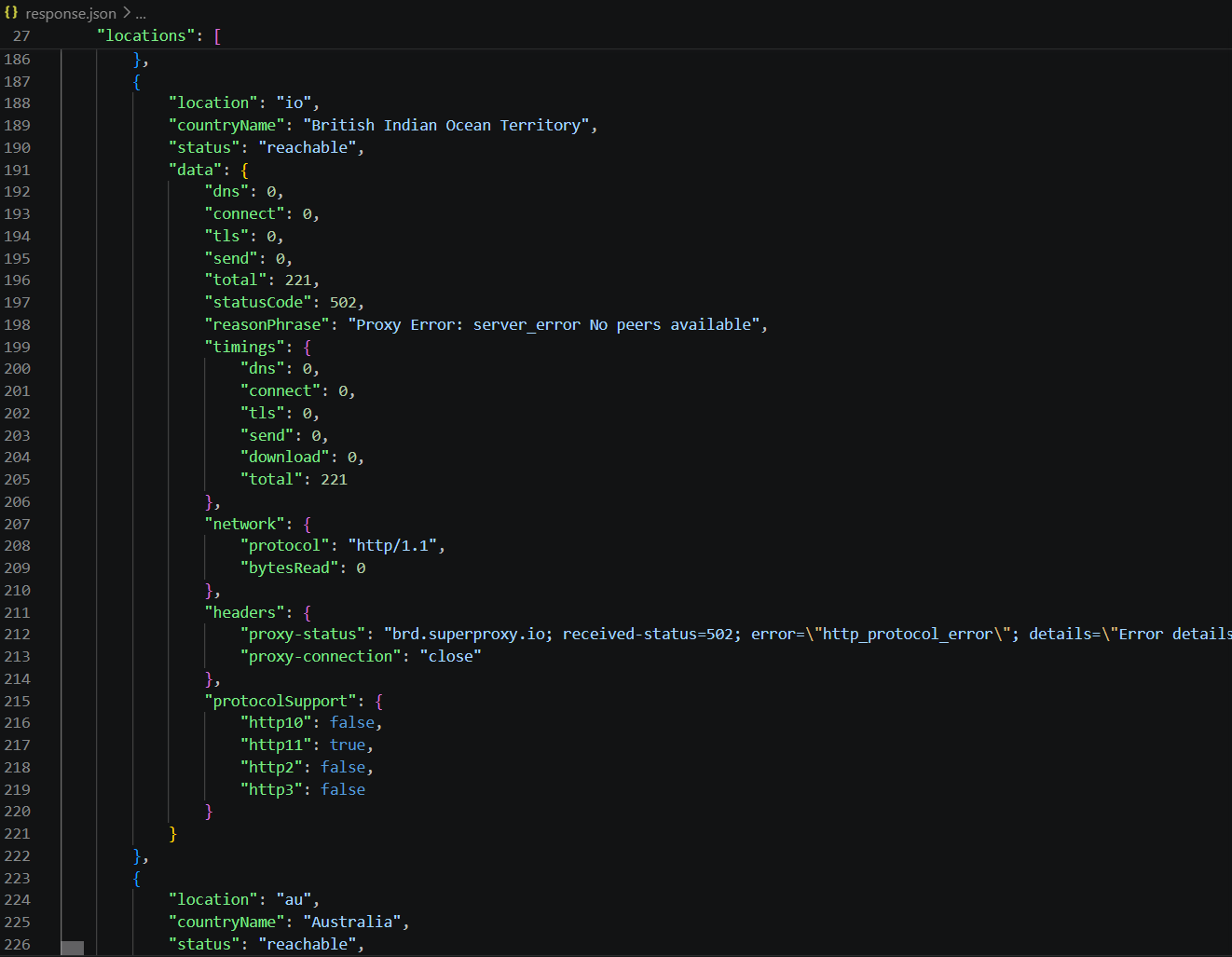
In the response above, the request from the British Indian Ocean Territory (io) returned a 502 status code with the reason phrase “Proxy Error: server_error No peers available.”
The timing values are 0 because the request did not successfully reach and receive a response from the target website. The response also shows the HTTP protocol and headers returned during the failed request.
This data can help you identify issues that affect only specific locations. For instance, your website may work correctly from Australia but fail from another selected country. You can also use the timing data to identify slow DNS resolution, connection setup, TLS negotiation, server response, or content download.
The response can also help you monitor:
- Availability: Check the
statusfield to see if the website is reachable. - HTTP errors: Review
statusCodeandreasonPhraseto identify failed requests. - Load time: Check individual timing values and the total request time.
- Regional issues: Compare results from up to three selected countries.
- Server response: Review the returned headers, protocol, and bytes received.
- Protocol support: Check support for HTTP/1.0, HTTP/1.1, HTTP/2, and HTTP/3.
Together, these details give you a clearer picture of how your website performs and whether visitors from different locations can access it successfully.
Method 2: Using the Geekflare Playground
Geekflare also provides a no-code Playground for the Load Time API. You can use it to test a website directly from your browser without writing Python code.
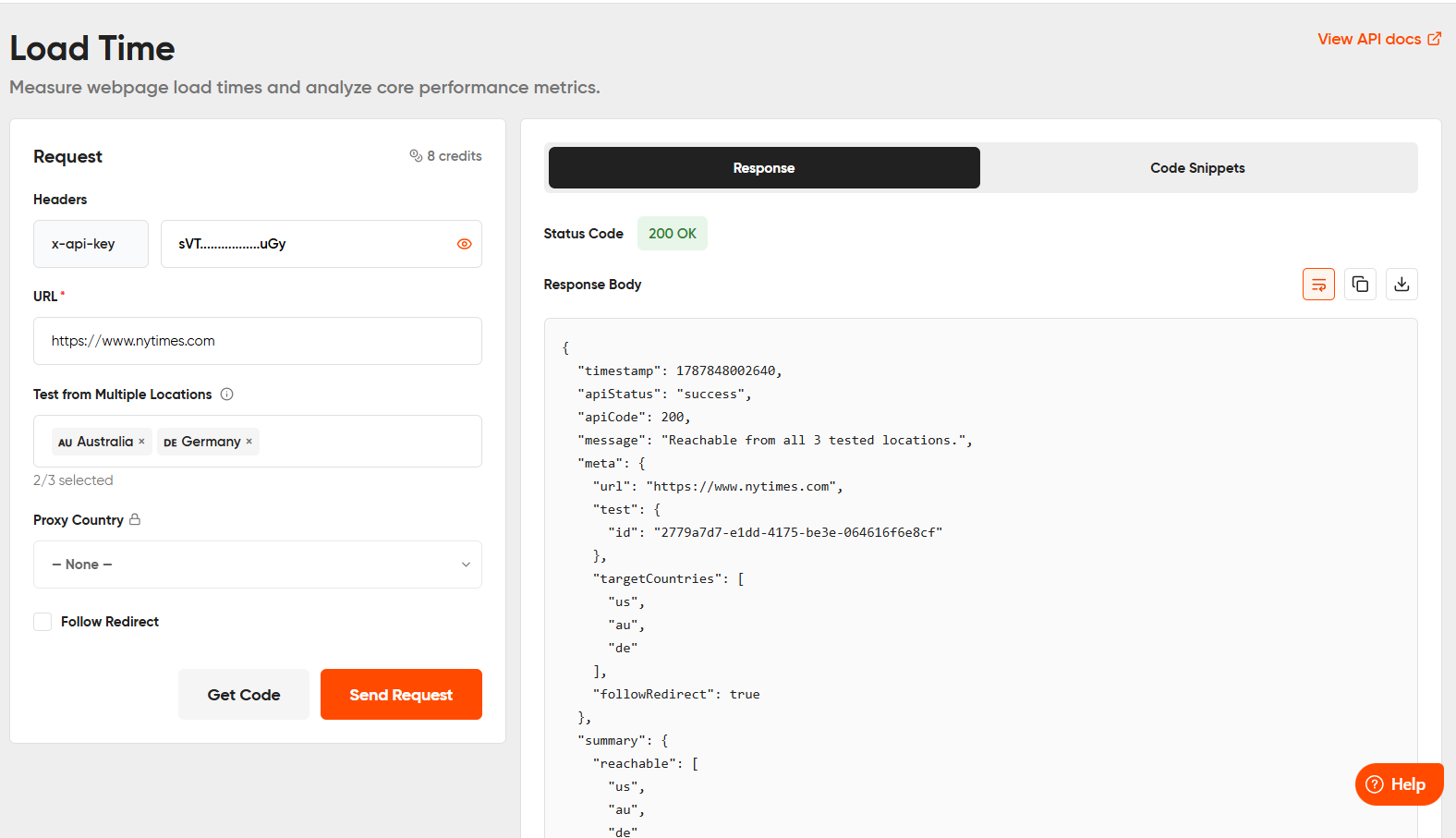
For this example, enter https://www.nytimes.com as the website URL and select Australia and Germany as the two target countries. Then, send the request.
The Playground returns performance and availability data for both locations, such as reachability, status codes, timing metrics, response headers, and protocol details. You can use these results to check how the website responds from each selected location.
Conclusion
Monitoring website performance and availability can help you identify slow responses, failed requests, redirect issues, and regional access problems. Checking these metrics regularly also helps you understand how your website responds from different locations.
Geekflare’s Load Time API provides timing data, HTTP status codes, redirect details, response headers, and location-based test results through an API or its no-code Playground. You can use either method based on how you want to test and monitor your website.
Frequently Asked Questions
What is a Load Time API?
A Load Time API checks how a website responds to a request and returns data such as timing metrics, HTTP status codes, redirects, response headers, and availability.
How many countries can I select with Geekflare’s Load Time API?
You can select up to three countries through the target_countries parameter. Geekflare also runs a default test from a US server.
What timing metrics does the Load Time API return?
The Geekflare Load Time API can return metrics for DNS lookup, TCP connection, TLS handshake, time to first byte (TTFB), download time, and total load time.
Can I use the Load Time API with AI agents?
Yes. Geekflare offers an MCP server that lets LLMs and AI agents access its APIs, which can be used to check website performance and availability as part of a task.





