



We’re always working behind the scenes to make Geekflare APIs faster and more reliable for production workloads. Today, we’re sharing a meaningful performance milestone for our Screenshot API.
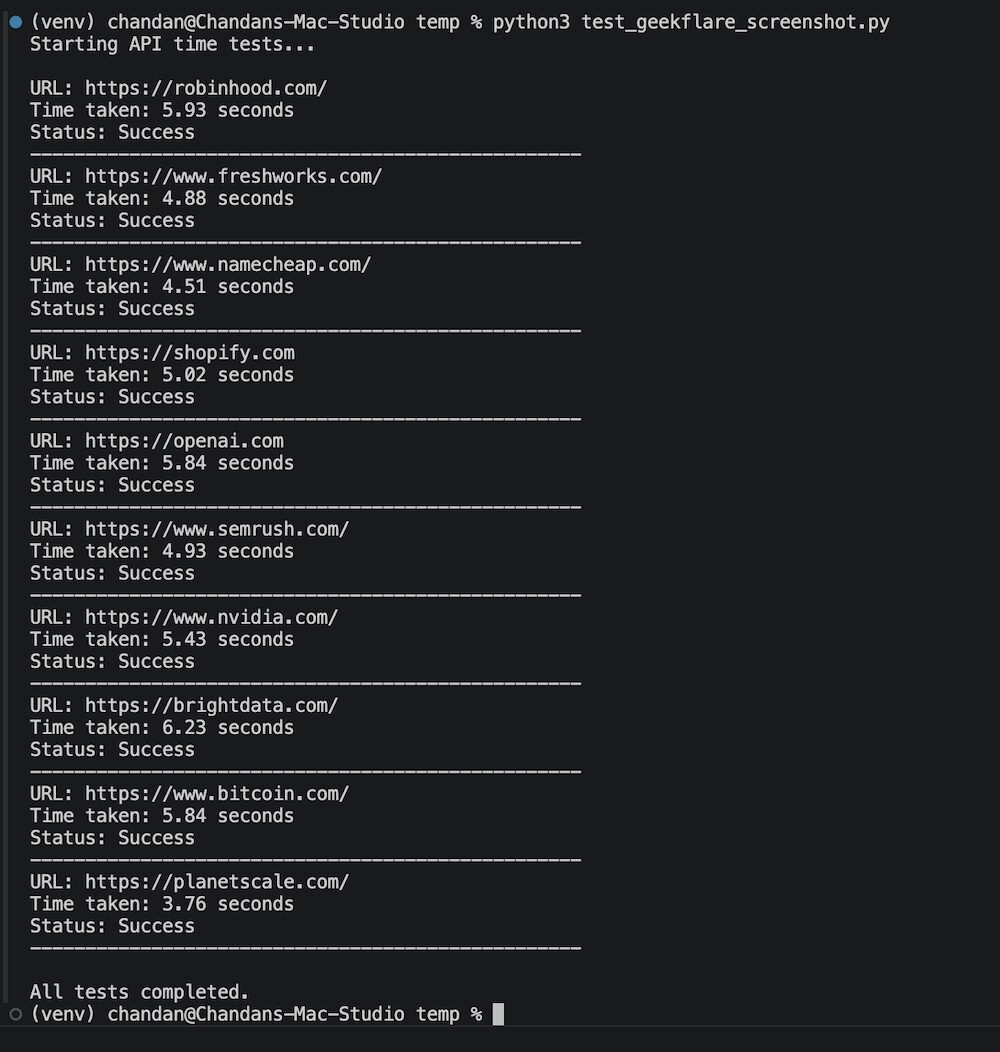
After an upgrade to our underlying infrastructure, the Screenshot API now generates screenshots in around 4 to 6 seconds on average. That’s roughly 40% faster than before, with no compromise on image quality.
What changed
We improved the rendering pipeline that powers the Screenshot API. By optimizing how pages are loaded, rendered, and processed, we’ve cut down the time it takes to deliver a high-quality full-page screenshot. Best of all, these improvements are already live, and you don’t need to change any code in your existing integration to benefit from the speed boost.
Testing results
To validate the improvement, we ran a series of tests capturing full-page screenshots across many real-world websites. The results consistently landed in the 4–6 second range.
How we tested it
I used the below Python script to benchmark the performance. You can reproduce the results on your end as well.
import requests
import time
API_KEY = "XXX"  # Get it from https://dash.geekflare.com/
urls = [
    "https://robinhood.com/",
    "https://www.freshworks.com/",
    "https://www.namecheap.com/",
    "https://shopify.com",
    "https://openai.com",
    "https://www.semrush.com/",
    "https://www.nvidia.com/",
    "https://brightdata.com/",
    "https://www.bitcoin.com/",
    "https://planetscale.com/",
]

endpoint = "https://api.geekflare.com/screenshot"
headers = {
    "x-api-key": API_KEY,
    "Content-Type": "application/json"
}
payload_template = {
    "fullPage": False,
    "responseType": "json"
}
print("Starting API time tests...\n")
for url in urls:
    payload = payload_template.copy()
    payload["url"] = url

    start_time = time.time()
    try:
        response = requests.post(
            endpoint,
            headers=headers,
            json=payload,
            timeout=60
        )
        elapsed = time.time() - start_time

        if response.status_code == 201:
            print(f"URL: {url}")
            print(f"Time taken: {elapsed:.2f} seconds")
            print(f"Status: Success")
        else:
            print(f"URL: {url}")
            print(f"Time taken: {elapsed:.2f} seconds")
            print(f"Status: Error {response.status_code}")
            print(f"Response: {response.text[:200]}")

    except Exception as e:
        elapsed = time.time() - start_time
        print(f"URL: {url}")
        print(f"Time taken: {elapsed:.2f} seconds")
        print(f"Exception: {str(e)}")

    print("-" * 50)

print("\nAll tests completed.")
What’s next
Our goal is to push average full-page screenshot generation down to less than 4 seconds while maintaining the quality and accuracy. Expect more performance updates in the coming releases.
If you’re already using the Screenshot API, you’ll see the speed improvements right away. If you’re new here, get a free API key to test it out.






