



API design is a craft, not just a technical checklist. While it involves writing code, it also involves empathy and communication. It is the process of deciding how your software will interact with the rest of the world.
A well-designed API is like a clearly drafted contract. You know what to send and what you’ll get back, and you don’t have to worry about what’s happening underneath. It tells you exactly how to interact with a system, and you can rely on it not to break unexpectedly.
When we discuss good API design, we are focusing on Developer Experience (DX). Just as a UI designer worries about where a human clicks, an API designer worries about the names of endpoints and the structure of JSON responses. If the API consumer has to email you every five minutes to ask what a specific field means, the design has failed.
This guide is for:
- Developers moving beyond internal scripts to public-facing API services.
- Architects planning complex system integrations.
- Technical product managers shaping the capabilities and usability of a digital product.
Mastering how to design an API requires shifting your perspective from the server side to the user side. In this article, I will discuss fundamental API design principles to help you create a professional-grade interface.
If you are new to APIs, read our beginner guide about APIs.
What is API Design?
API design is the process of deciding how an API should behave, how it should communicate, and how it should feel to the people using it.
You need to think of the below questions.
- What can a developer request from the API?
- What URL or endpoint should they use?
- What data should they send?
- What response should they get back?
- What should happen when the request fails?
For example, if an app needs customer details, the API should make that request simple and predictable. A developer should not have to guess whether the endpoint is /getCustomer, /customerDetails, or /customers/{id}. The API design should make the right path clear.
A badly designed API can cause broken integrations, inconsistent responses, and security gaps. Developers waste time reading unclear documentation or fixing avoidable errors.
Good API design prevents a lot of this. It gives developers a stable way to connect with your system. It also makes the API easier to test, maintain, and improve over time.
API Design Principles
API design principles are the basic rules that make an API usable. They make the API easier to understand, test, and maintain. Here are the most important design principles.
1. Consistency
Your API should follow the same pattern everywhere.
Stick to a single naming convention. If you use nouns and slashes for one resource (like /users/123), don’t switch to action verbs for another (like /getProducts). If one response uses created_at, don’t use createdDate somewhere else for the same meaning.
Developers learn your API by noticing patterns. When the patterns stay the same, the API becomes easier to use. When every endpoint behaves differently, developers have to keep checking the docs.
2. Simplicity
A good API should do one thing clearly. Don’t make one endpoint handle too many jobs. For example, an endpoint that creates a customer should not also update billing details, assign a sales owner, and send a welcome email unless that behavior is clearly expected.
Simple APIs are easier to use and debug. When something goes wrong, the developer can quickly understand where the problem is. Therefore, keep each endpoint focused.
3. Discoverability
A developer should ideally be able to understand your API just by looking at it.
For example, /orders/{id} is easier to understand than /fetchData. A 404 Not Found error is clearer than returning a generic failure message. A response field called total_amount is more useful than a vague field called value.
Your API should not force developers to guess. Good names, clear structures, and useful error messages make the API feel self-explanatory.
Documentation matters. But the API itself should be self-explanatory.
4. Stability
Once people start using your API, they build around it. Their apps, workflows, and customer experiences may depend on your endpoints and responses. That is why you should avoid breaking changes.
For example, don’t rename a response field from email to user_email or change an endpoint suddenly. Don’t change the format of a date if developers are already relying on the old format.
If a change is necessary, use versioning and give people time to move. Stability is a major part of good API design because trust is difficult to rebuild once an integration breaks.
5. Principle of least surprise
Your API should behave the way a developer expects it to behave.
If a developer sends a GET request, they expect to read data, not change it. If they send a DELETE request, they expect something to be removed. If a request fails because the user is not allowed to access something, the API should return a proper authorization error, not a random server error.
A predictable API feels safe to use. An unpredictable API forces developers to start writing extra checks, workarounds, and fallback logic because they don’t fully trust it.
REST API Design
REST stands for Representational State Transfer. It is one of the most common ways to design APIs. You will see it in web apps, mobile apps, SaaS platforms, payment systems, CRMs, and internal tools.
REST works by treating the main things in your system as resources. A resource can be a user, order, product, invoice, ticket, file, or anything else your API manages.
- The URL points to the resource.
- The HTTP method tells the API what action to perform.
- The response tells the client what happened.
The goal of API design is simple: make your API easy to understand from the URL, the method, and the response. Below are some guidelines to follow.
1. Use nouns for resource names.
In REST API design, you usually work with resources. A resource is a thing your API manages, such as a user, order, product, invoice, or ticket.
A common REST rule is to use nouns, not verbs.
Use this:
/users
/orders
/products
Avoid this:
/getUsers
/createOrder
/deleteProduct
Because the HTTP method already tells the API what action to perform.
For example:
GET /users
POST /users
DELETE /users/123
Here, /users is the resource. GET, POST, and DELETE describe the action.
This keeps your API cleaner and easier to predict.
2. Use HTTP methods correctly.
Each HTTP method has a clear purpose.
GET is used to read data. For example, the below code should return the user with ID 123.
GET /users/123POST is used to create something new.
POST /usersPUT is usually used to replace a full resource. This updates the complete user record.
PUT /users/123PATCH is used to update part of a resource. If you want to update only the email address or phone number, you can use this method.
PATCH /users/123DELETE is used to remove a resource. To delete the user with ID 123, you can say:
DELETE /users/123Using these methods properly is one of the basic API design best practices. It helps developers understand your API without reading long documentation each time they use it.
3. Use status codes properly.
Status codes tell the developer what happened after the request. Some common ones are:
| Status Code | Meaning |
|---|---|
200 OK | The request worked. |
201 Created | A new resource was created. |
400 Bad Request | The request is invalid. |
401 Unauthorized | The user is not logged in, or the token is missing. |
403 Forbidden | The user is logged in but not allowed to do this. |
404 Not Found | The resource does not exist. |
422 Unprocessable Entity | The request is valid, but the data has a problem. |
500 Internal Server Error | Something broke on the server. |
Do not return 200 OK for everything. That makes errors harder to handle. The status code should match the result. The response body can then explain the details.
4. Plan API versioning early.
APIs change over time. You may add fields, change behavior, or improve the response format. Versioning helps you make changes without breaking existing users. A simple example is:
/v1/users
/v2/users
This tells developers which version of the API they are using. We will cover versioning in detail in a later section.
5. Add pagination for large lists.
Do not return thousands of records in one response. It slows down the API and creates a load on the server. The solution is to use pagination.
Offset-based pagination is simple:
GET /orders?limit=20&offset=40This means return 20 orders, starting after the first 40.
It works well for small or medium datasets. It is easy to understand. But it can become slow or inaccurate when the dataset changes often.
Cursor-based pagination uses a pointer to the next set of results:
GET /orders?limit=20&cursor=eyJpZCI6MTIzfQThis works better for large datasets or fast-changing data, such as feeds, logs, transactions, or messages.
Use offset pagination when the data is small and simple. Use cursor pagination when performance and accuracy matter more.
6. Common REST mistakes to avoid
Many REST APIs become hard to use because of a few repeated mistakes.
One common mistake is mixing verbs into URLs:
/getAllUsers
/createNewOrder
Use resources and HTTP methods instead:
GET /users
POST /orders
Another mistake is using the wrong method. A GET request should not create, update, or delete data. Keep GET safe for reading only.
A third mistake is returning unclear errors. This is not helpful:
{
  "message": "Something went wrong"
}
A better error response gives the developer something useful:
{
  "error": "invalid_email",
  "message": "Email address is not valid"
}
Also avoid inconsistent response formats. If one endpoint returns user_id, another should not return userId for the same concept.
Endpoint Design Best Practices
Endpoint design is where API design becomes visible.
The diagram below breaks a REST endpoint into its main parts, so you can see how the method, URL, resource, ID, sub-resource, and query parameters work together in one request.
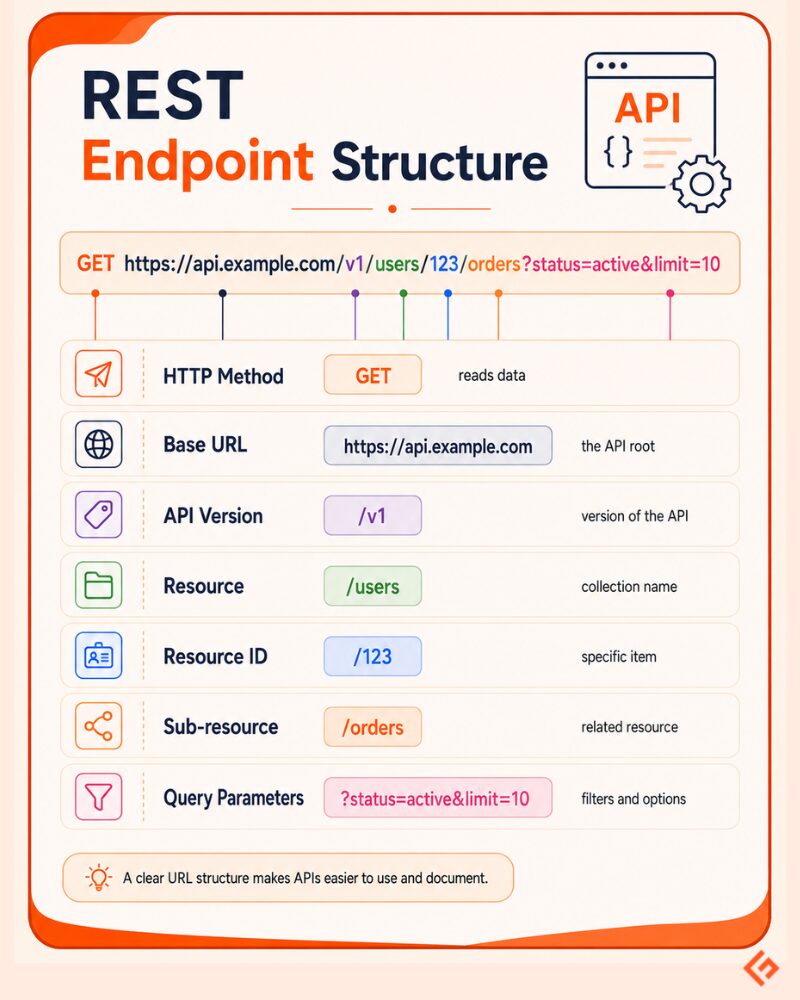
A developer may not know your backend logic, database structure, or internal services. But they will see your endpoints. If the endpoints are clean, the API feels easier to use. Below are some guidelines for designing endpoints.
1. Keep URLs clean and intuitive.
A good endpoint should be easy to understand at a glance.
Use this format.
GET /orders/123This clearly means: get order no. 123.
Avoid something like this:
GET /getOrderDetailsByOrderId?id=123This is longer, harder to read, and repeats information that the HTTP method and URL can already express.
2. Use plural nouns for collections
Use plural nouns when the endpoint represents a collection.
/users
/orders
/products
For single items, add the ID:
/users/123
/orders/987
For related resources, keep the hierarchy simple:
/users/123/ordersThis means: get the orders that belong to user no. 123.
This is easier to understand than:
/getOrdersForUser?userId=1233. Avoid deep nesting.
Nesting is useful, but too much nesting makes URLs difficult to read and maintain.
This is fine:
/users/123/ordersThis is just acceptable:
/users/123/orders/987/itemsBut this is too deep and confusing:
/users/123/orders/987/items/456/shipments/789/trackingLimit nesting to 2–3 levels. If the relationship is getting too deep, consider using a direct endpoint with query parameters instead. For example:
/tracking?order_id=9874. Use query parameters for filtering, sorting, and searching.
Query parameters are useful when the client wants to refine a list for the following purposes.
Filtering:
GET /orders?status=paidSorting:
GET /orders?sort=created_atSearching:
GET /products?search=laptopPagination:
GET /orders?limit=20&cursor=abc1235. Good vs. bad endpoint design
Below are some examples to help you decide if your design is good.
| Good Endpoint | Bad Endpoint | Reason |
|---|---|---|
GET /users | GET /getUsers | The method already says it is a read action. Adding a verb to the resource makes it redundant. |
POST /orders | POST /createOrder | The endpoint should be focused on the resource. |
GET /users/123/orders | GET /getOrdersByUserId?id=123 | The relationship should be clear from the URL. |
GET /orders?status=paid | GET /paidOrders | Filtering should be given as query parameters. |
GET /products?search=phone | GET /searchProductsByName?name=phone | Searching is cleaner when given as a query parameter. |
Request & Response Design
The request and response are the actual conversation between the client and the API. The request tells the API what the client wants. The response tells the client what happened.
Good API design makes both sides clear.
1. Keep request bodies consistent.
Most modern APIs use JSON for request bodies. It is easy to read, widely supported, and works well across languages.
For example, a request to create a user may look like this:
{
 "name": "Adam Smith",
 "email": "[email protected]",
 "role": "admin"
}
Keep the structure predictable. If you use snake_case, use it everywhere:
{
 "first_name": "Adam",
 "last_name": "Smith"
}
Don’t switch between first_name, firstName, and fname across different endpoints. Small inconsistencies create extra work for developers.
2. Decide how responses should look.
There are two common ways to return data.
A flat response returns the object directly:
{
 "id": 123,
 "name": "Adam Smith",
 "email": "[email protected]"
}
This is simple and works well for small APIs.
A response envelope wraps the data inside a standard structure:
{
 "data": {
   "id": 123,
   "name": "Adam Smith",
   "email": "[email protected]"
 },
 "meta": {
   "request_id": "req_789"
 }
}
This is useful when you want to include extra information, such as pagination, request IDs, warnings, or metadata.
Choose one pattern and use it consistently.
3. Return helpful error messages.
A status code alone is not enough.
This is not helpful:
{
 "error": "Bad request"
}
A better error response explains what failed and why:
{
 "error": "invalid_email",
 "message": "Email address is not valid",
 "field": "email"
}
Now the developer knows the exact problem. They can fix it without guessing.
Good error responses usually include:
| Field | Purpose |
|---|---|
error | A short error code the app can read. |
message | A clear explanation for the developer. |
field | The specific field that caused the issue, when relevant. |
request_id | Useful for support and debugging. |
4. Treat error design as user experience.
Error messages are part of the API experience. A vague error can waste hours.
For example, this slows people down:
{
 "message": "Validation failed"
}
This is better:
{
 "error": "missing_required_field",
 "message": "Phone number is required",
 "field": "phone_number"
}
The second response tells the developer exactly what to fix. Don’t make developers dig through logs or guess what went wrong. Tell them clearly, in the response itself.
API Versioning
API versioning exists to ensure backward compatibility.
Once developers start using your API, they build their apps around its behavior. If you suddenly rename fields, remove endpoints, or change response formats, their integrations can break.
Versioning gives you a safer way to improve the API while keeping older integrations working.
Common API versioning strategies
There are three common ways to version an API.
URI versioning puts the version in the URL.
/v1/users
/v2/users
This is the easiest to understand. It is visible, simple to test, and beginner-friendly. The downside is that it puts version details directly into the URL, which some teams prefer to avoid.
Header versioning keeps the URL clean and sends the version in the request header.
Accept: application/vnd.company.v1+jsonThis is cleaner from an API structure point of view. But it is less obvious when testing in a browser or sharing a simple API example.
Query parameter versioning passes the version as a parameter.
/users?version=1This is simple, but it can become messy. Query parameters are usually better for filters, sorting, and pagination, not core API behavior.
For most beginner APIs, URI versioning is the easiest place to start. It is clear and widely understood.
When to version and when to extend
Not every change needs a new version.
You can usually extend the same version when the change does not break existing users.
{
  "id": 123,
  "name": "Adam Smith",
  "email": "[email protected]",
  "created_at": "2026-05-01"
}
If created_at is a new field, existing clients can usually ignore it. No new version is needed.
But you should consider a new version when you make breaking changes, such as:
- renaming a field
- removing a field
- changing a field’s data type
- changing how an endpoint behaves
- changing the response structure
- removing an endpoint
For example, changing this:
{
  "user_id": 123
}
to this
{
  "id": 123
}
may look small, but it can break apps that expect user_id.
That is when versioning matters.
Deprecate old versions carefully.
Versioning is not only about creating new versions. You also need a plan to retire old ones.
Do not remove an old API version suddenly. Give developers enough time to move.
A simple deprecation plan can look like this:
- Announce that the old version will be retired.
- Share the retirement date clearly.
- Provide migration docs with examples.
- Add deprecation warnings in responses or headers.
- Monitor usage of the old version.
- Remove it only after the agreed timeline.
For example, an API response header can warn users:
Deprecation: true
Sunset: Wed, 31 Dec 2026 23:59:59 GMT
This gives developers a clear signal that the version is going away.
API Security in Design
Security should be part of API design from the first draft. It affects how users authenticate, what data they can access, how much traffic they can send, and what inputs your API will accept.
Authentication by design
Your API should know who is making the request. Some APIs are public, but most are not. They may expose customer data, payment details, internal records, or actions that change something in the system. So before the API accepts a request, it should check whether the caller is allowed to make that request.
There are a few common ways to do this.
An API key is a unique access code given to an app or developer. The client sends this key with each request, and the API checks whether the key is valid. This is simple and works well for many server-to-server APIs.
A JWT, or JSON Web Token, is a signed token that carries information about a user or session. After a user logs in, the system can issue a JWT. The client sends this token with future API requests, and the API uses it to confirm who the user is and what they are allowed to do.
OAuth 2.0 is used when one app needs limited access to another app on behalf of a user. For example, a reporting tool may ask permission to read data from your account without asking for your password.
The right choice depends on who is calling the API, how sensitive the data is, and whether the access is for an app, a user, or a third-party service.
Rate limiting and throttling
Rate limiting controls how many requests a client can make in a fixed time. For example, you may allow 1,000 requests per hour for each API key.
Throttling is what happens when a client crosses that limit. The API may slow requests down or reject them with a 429 Too Many Requests response.
This protects your API from abuse, bugs, and sudden traffic spikes.
Input validation and sanitization
Never trust input just because it came through your API. Check required fields, data types, formats, length, and allowed values.
For example, an email field should look like an email. A page size should not accept 999999. A user ID should not accept random script content.
Sanitization helps clean or block unsafe input before it reaches your database or backend logic.
Principle of least privilege
Each endpoint should expose only what the caller is allowed to use.
A regular user should not get access to admin-only fields. A read-only token should not be able to delete records. A billing API should not expose unrelated customer data.
Use scopes, roles, and permissions to keep access narrow. This is one of the most important API design principles for security.
Security as a design constraint
Security is not a final checklist item. It should shape the API from the beginning: authentication, permissions, request limits, validation, error messages, and data exposure.
A secure API is easier to trust, easier to operate, and harder to misuse.
API Design Styles Compared
REST
REST is the most common API style for web applications.
It works well when you are dealing with resources such as users, orders, products, invoices, or tickets. You use URLs to identify resources and HTTP methods to act on them.
REST is a good default choice for most public APIs and many internal APIs.
GraphQL
GraphQL lets the client ask for exactly the data it needs. In REST, an endpoint decides the shape of the response. In GraphQL, the client can request specific fields.
For example, a mobile app may ask only for a user’s name and profile image, while a dashboard may ask for the user’s name, orders, billing status, and activity history.
This avoids two common REST problems: getting too much data or making too many API calls.
GraphQL works well when different clients need different views of the same data. But it also adds complexity. You need to consider performance, permissions, and query limits.
Use GraphQL when clients need flexible data fetching.
gRPC
gRPC (Open-source Remote Procedure Call, initially developed by Google) is built for fast communication between services.
It is commonly used in microservices, backend systems, and internal platform communication. Instead of sending plain JSON like most REST APIs, gRPC uses a compact format called Protocol Buffers.
Use gRPC for high-performance service-to-service communication.
WebSocket
WebSocket is used when the connection needs to stay open. In REST, the client sends a request and gets a response. Then the connection is done.
With WebSocket, the client and server can keep talking to each other in real time.
This is useful for chat apps, live dashboards, multiplayer games, trading apps, notifications, and collaboration tools.
Use WebSocket when the server needs to push updates instantly instead of waiting for the client to keep asking.
Webhooks
Webhooks are used when one system needs to notify another system when something happens.
For example, a payment gateway can send a webhook to your app when a payment succeeds. Your app does not need to keep checking the payment status again and again.
Webhooks are useful for automation, integrations, payment updates, order updates, alerts, and background workflows.
Use webhooks when your system needs to react to events from another system.
The above design styles are summarized in the below table.
| Style | Best For | Tradeoff |
|---|---|---|
| REST | General-purpose web APIs | Can over/under-fetch |
| GraphQL | Flexible, client-driven queries | Complex to implement |
| gRPC | High-performance, internal services | Less human-readable |
| WebSocket | Real-time, bidirectional | Stateful, harder to scale |
| Webhooks | Event-driven notifications | The client must expose the endpoint. |
Most teams do not choose only one style forever. A product may use REST for public APIs, gRPC between backend services, WebSocket for live updates, and webhooks for external notifications. Good API design is about choosing the style that fits the job.
API Documentation as Part of Design
Even a well-designed API needs docs. Developers should be able to understand how to authenticate, which endpoints are available, what each request needs, what the response looks like, and what to do when something fails.
OpenAPI and Swagger
Many teams use the OpenAPI Specification to describe their APIs in a standard format. This specification can define endpoints, request parameters, response schemas, authentication methods, and error responses.
Swagger helps generate interactive API documentation where developers can explore endpoints and test requests from the browser.
This is useful because your documentation stays closer to the actual API structure. It also reduces the chance of your docs and code drifting apart.
What good API docs include
Good API docs should answer the developer’s first questions quickly. Below are some items you should include in your API docs.
| Documentation item | What it explains |
|---|---|
| Authentication guide | How to get access and pass credentials |
| Endpoint reference | Available endpoints, methods, parameters, and responses |
| Code examples | Working examples in common languages |
| Error glossary | Common errors, status codes, and how to fix them |
| Rate limits | The max number of requests allowed per hour etc. |
| Changelog | What has changed across versions |
Check out the best API documentation tools to help teams create and maintain API docs.
Design the API so the docs have less work to do. Documentation should explain your API. It should not rescue a confusing design.
Before you publish or hand over an API, run through this checklist to catch the design issues that usually cause confusion, broken integrations, or extra rework later.
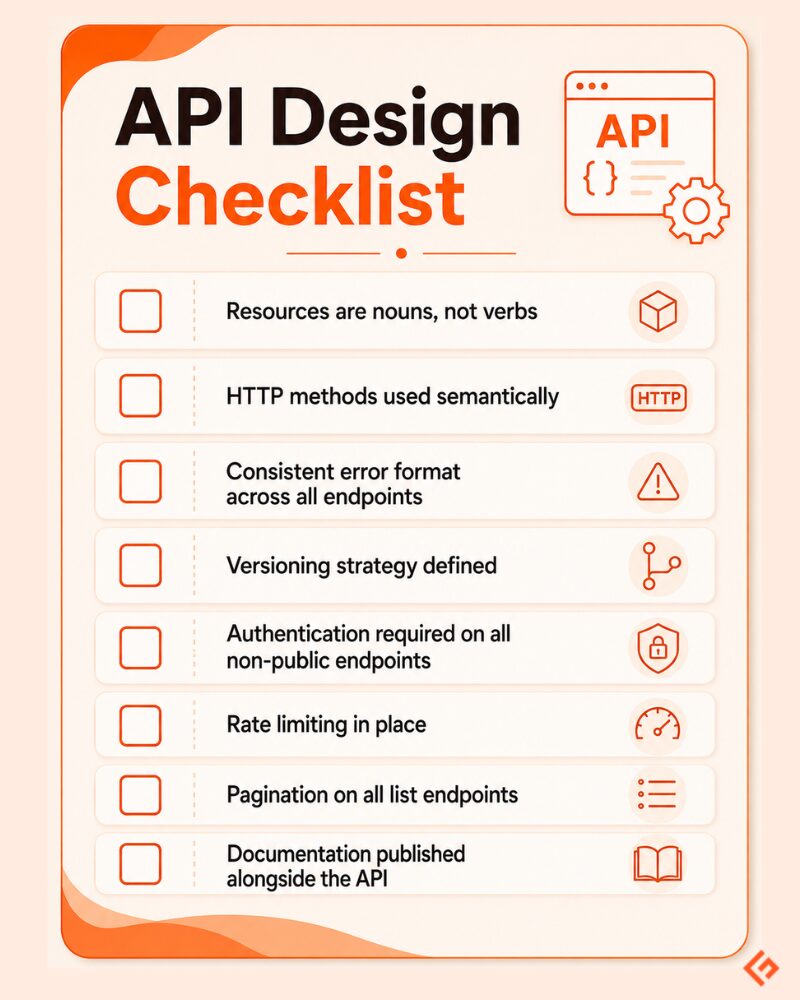
API-First Design
API-first design means you define the API contract before writing the backend code.The contract describes how the API will work. It includes the endpoints, request format, response format, status codes, authentication method, and error structure.
For example, before building the user service, the team agrees on something like:
GET /users/{id}and the expected response:
{
  "id": 123,
  "name": "Adam Smith",
  "email": "[email protected]"
}
Once this contract is clear, different teams can work in parallel. Backend developers can build the API. Frontend developers can build against mock responses. QA teams can prepare test cases. Documentation can start early.
Tools like OpenAPI, Stoplight, and Postman are commonly used for API-first workflows. They help teams design, document, mock, test, and share APIs before the full implementation is ready.
API-first matters even more in an AI-agent world. LLMs and agents often consume APIs to search data, trigger workflows, update records, or call external tools. If the API is unclear, inconsistent, or poorly documented, the agent may call the wrong endpoint, pass the wrong input, or fail silently.
A clean API contract gives both humans and AI systems a better chance of using the API correctly.
Real-World Examples of Great API Design
A good way to learn API design is to study APIs that developers use heavily in real products. The examples below are useful because their design choices are visible in their public documentation.
Stripe
Stripe is often used as a reference for developer-friendly API design.
One strong design choice is idempotency. Stripe lets developers safely retry create or update requests by sending an idempotency key. This helps avoid duplicate actions, such as accidentally creating two payments when a network retry happens. Stripe also uses cursor-based pagination with starting_after and ending_before, which works well for large lists of objects.
What to learn from Stripe: Design for real failure cases. Payments can fail, networks can time out, and users can retry. The API should handle that safely.
Twilio
Twilio is a good example of API design where errors are treated seriously.
Its documentation includes a full Error and Warning Dictionary with REST API error codes. This makes debugging easier because developers can look up what went wrong instead of guessing from a vague message.
Twilio also documents common HTTP response codes, including 405, 429, and 500, with plain explanations of what each means.
What to learn from Twilio: Error messages are part of the developer experience. A clear error can save hours.
GitHub API
GitHub’s REST API is a strong example of versioning and pagination.
GitHub documents that its REST API is versioned and that breaking changes are released in a new API version with advance notice. It also explains pagination clearly, including how developers can use the Link header and per_page query parameter to move through large result sets.
What to learn from GitHub: Stable APIs need clear versioning rules and predictable pagination.
Slack
Slack’s Web API is a good example of designing around app behavior and platform safety.
Slack assigns Web API methods to different rate-limit tiers. Requests are evaluated per method and per workspace, with rate-limit windows measured per minute. This is useful because not every API method has the same load or risk.
What to learn from Slack: Rate limits should not be random. They should reflect how developers actually use each endpoint.
Shopify
Shopify is useful because it supports different API styles for different needs.
Its GraphQL Admin API uses a cost-based rate limit, where each field in a query has a cost. This is a practical design choice because GraphQL requests can vary a lot in complexity. Shopify also documents pagination limits because very large result sets can affect performance.
What to learn from Shopify: API limits should match the API style. REST and GraphQL do not always need the same rate-limit model.






