



Enshrouded crossed one million players in its first four days on Steam Early Access. That’s an extraordinary number for any survival RPG, but it also exposed a consistent frustration: peer-to-peer hosting breaks.
When the host closes their game, the server dies. When everyone’s pinging across continents, lag creeps in. Terraforming a mountain is hard enough without a 300 ms delay between your pickaxe swing and the block breaking.
A dedicated server fixes all of that. Your world stays online 24/7 regardless of whether you’re logged in. Every player connects to the same hardware, so ping stabilizes. Automated backups protect your progress between Early Access patches. And you’re not asking your friend with the best PC to keep it running all night.
To put this list together, we evaluated each provider across the criteria that actually matter for Enshrouded: pricing, datacenter locations relative to where most players are, RAM allocation and hardware transparency, uptime guarantees, and backup policies. The nine providers below represent the strongest options across different use cases.
The TL;DR
| Provider | Starting Price | Player Slots | Best For |
|---|---|---|---|
| Host Havoc | $10.00/mo | 4–16 | Premium performance |
| Pine Hosting | $19.99/mo | 8–16 | High performance + dedicated |
| DatHost | €6.90/mo (annual) | 16 | Intuitive UI |
| G-Portal | $23/30 days | 4–16 | Official Keen Games partner |
| Survival Servers | $19.00/mo | 8–16 | Custom panel + mod support |
| Indifferent Broccoli | $5.99/mo | 1–16 | Free trial + best support |
| Nitrado | €6.99/30 days | 6–16 | Console/Xbox crossplay |
| Apex Hosting | $16.87 first mo | 6 GB RAM+ | Large communities |
| Shockbyte | ~$24.99/mo | 16 | Budget 16-player |
Note: All pricing verified against provider order pages as of June 2026. Prices in EUR or GBP are subject to exchange rate fluctuation for USD buyers.
Top Enshrouded Server Hosting Providers
Host Havoc
Premium performance hosting
Host Havoc owns and operates its own hardware, unlike most hosts that rent rack space and resell it. Their Enshrouded plans run on Xeon and Ryzen CPUs with DDR4 and DDR5 memory and NVMe SSDs as standard across all tiers.
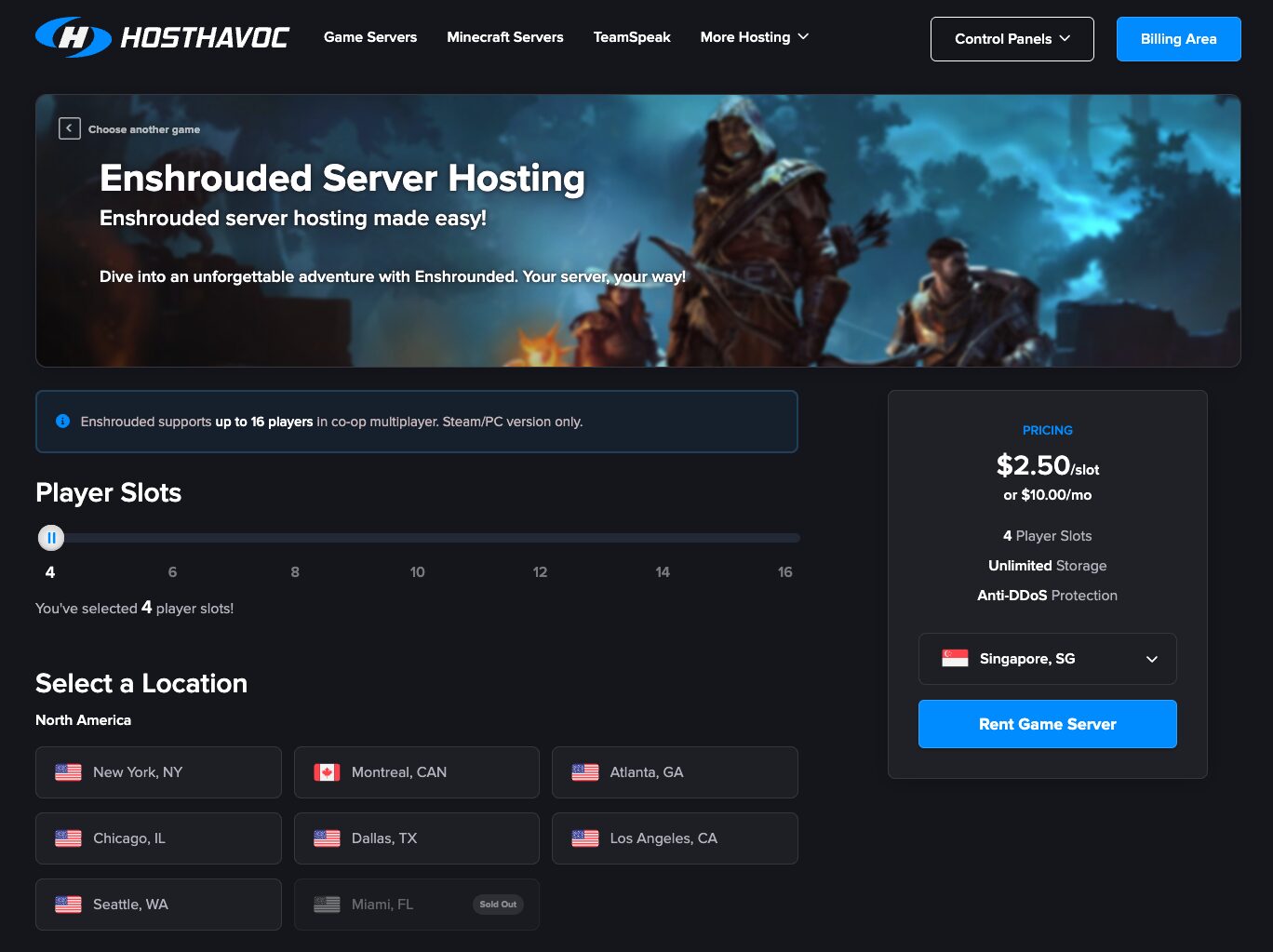
Uplink speeds reach 10 Gbps. The control panel is a modified TCAdmin v2 build with a web console, file manager, workshop installer, log viewer, offsite backups, and one-click data restores.
Locations span 13 datacenters: New York, Montreal, Atlanta, Chicago, Dallas, Los Angeles, Seattle, Miami (US), London, Amsterdam, Nuremberg, Frankfurt (EU), Singapore, and Sydney (APAC). That’s solid global distribution for a mid-sized provider.
Key features
- Owned hardware (not resold rack space)
- NVMe storage and up to 10 Gbps uplinks on all plans
- Multi-tiered DDoS mitigation built in-house
- Modified TCAdmin panel with FTP access and workshop installer
Pros & Cons
PROS
CONS
Pricing
$2.50/slot/month. Starts at $10/mo for a 4-slot server, scaling to $40/mo for a full 16-slot server. Longer billing cycles unlock discounts: 5% quarterly, 8% semi-annually, 12% annually.
Best for: Players who want consistent hardware performance and fast support without relying on a reseller infrastructure.
Pine Hosting
High-Performance and Dedicated Options
Pine Hosting markets itself as a high-performance provider and backs that up with custom-built hardware running the latest-generation processors and NVMe SSDs across all plans.
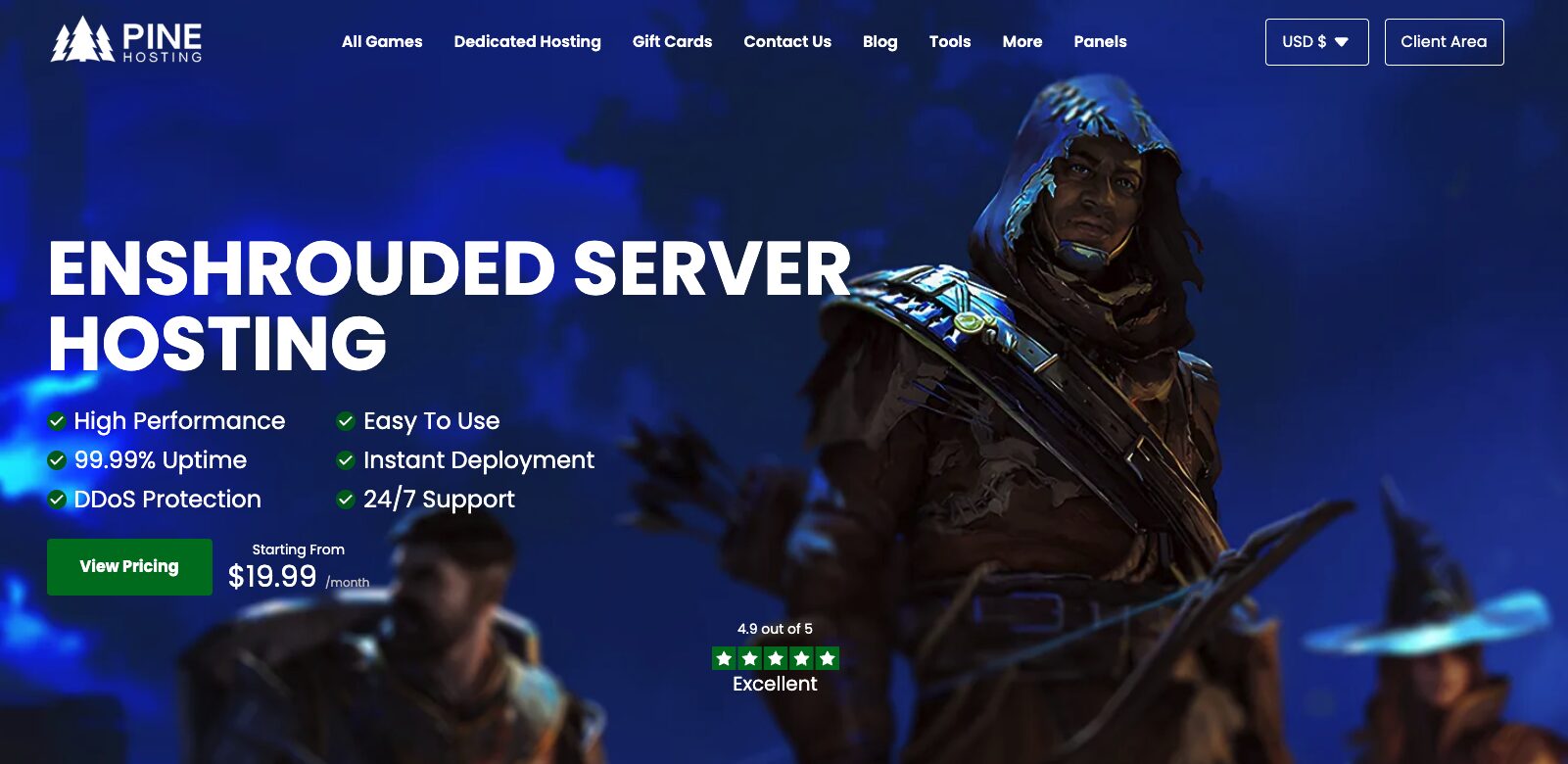
Their bespoke control panel (Pterodactyl-based) offers a console, backup manager, file manager, and task scheduling. For groups that outgrow shared game server plans, Pine also offers dedicated hosting with full hardware allocation.
The company earns a 4.9/5 on Trustpilot, the highest score of any provider on this list. Their support team responds to tickets, but the more notable feedback from customers is the speed of response and willingness to get into the specifics of server configuration.
Key features
- Custom in-house panel with backup manager and task scheduling
- Dedicated hosting tier available (not just game server plans)
- 99.99% uptime guarantee
- DDoS protection is included on all plans
- Instant deployment after purchase
Pros & Cons
PROS
CONS
Pricing
Three pre-configured plans: Essential (8 slots, 6GB RAM, 400% CPU) at $19.99/mo; Performance (16 slots, 8GB RAM, 500% CPU) at $32.99/mo; Extreme (16 slots, 12GB RAM, 600% CPU) at $43.99/mo. Quarterly, semi-annual, and annual billing offer 10%, 20%, and 30% discounts, respectively.
Best for: Groups who want verified performance specs and are comfortable paying a slight premium for hardware transparency and demonstrated support quality.
DatHost
Intuitive UI and No Resource Caps
DatHost stands out for one reason most providers don’t advertise clearly; they don’t cap RAM or CPU. Your Enshrouded server uses what it needs. That matters for a voxel game where a base with 50,000 blocks accumulates differently over time than on launch day.
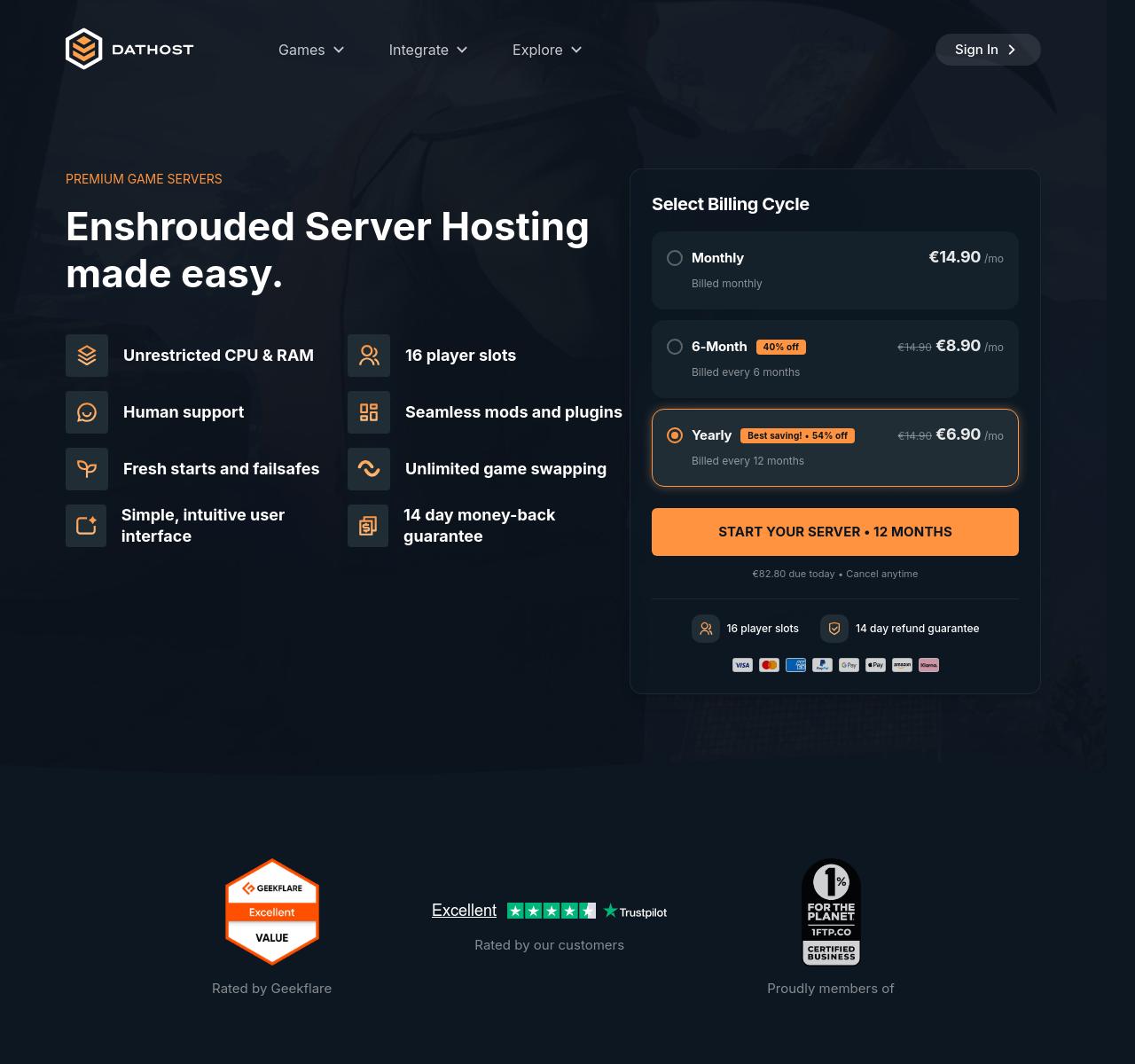
The plan includes 30 GB of storage, unlimited uplink bandwidth, and runs on AMD Ryzen 9 7950X3D (or equivalent) hardware with DDR5 RAM.
Their control panel is beginner-friendly. No config file editing is required to change core server settings, and automatic updates fire within 15 minutes of a new Steam build.
The game-switching feature (called unlimited game swapping) lets you reassign the same subscription to a different game without losing saves, which is useful for groups who cycle between titles.
DatHost covers 49 locations across 38 countries, which is the widest datacenter footprint on this list by a significant margin. North America, Europe, Asia-Pacific, Latin America, the Middle East, and Africa are all represented.
Key features
- Unrestricted CPU and RAM usage
- 49 global datacenter locations
- AMD Ryzen 9 7950X3D hardware with DDR5 RAM
- Automatic updates within 15 minutes of Steam patches
- Daily backups are built in
- Unlimited game switching across their catalog
Pros & Cons
PROS
CONS
Pricing
Single all-inclusive plan at €14.90/mo (billed monthly). Discounts apply on longer cycles: €8.90/mo on a 6-month plan (40% off), €6.90/mo annually (54% off). Priced in EUR; approximately $16–18 USD at monthly billing.
Best for: International groups needing a nearby datacenter and anyone who wants unrestricted resource access without configuring RAM allocations manually.
G-Portal
Official Keen Games Partner with Global Coverage
G-Portal is the official hosting partner for Keen Games, the developer behind Enshrouded. That relationship means G-Portal tends to get access to beta builds and patch notes before other providers, translating into faster update deployments.
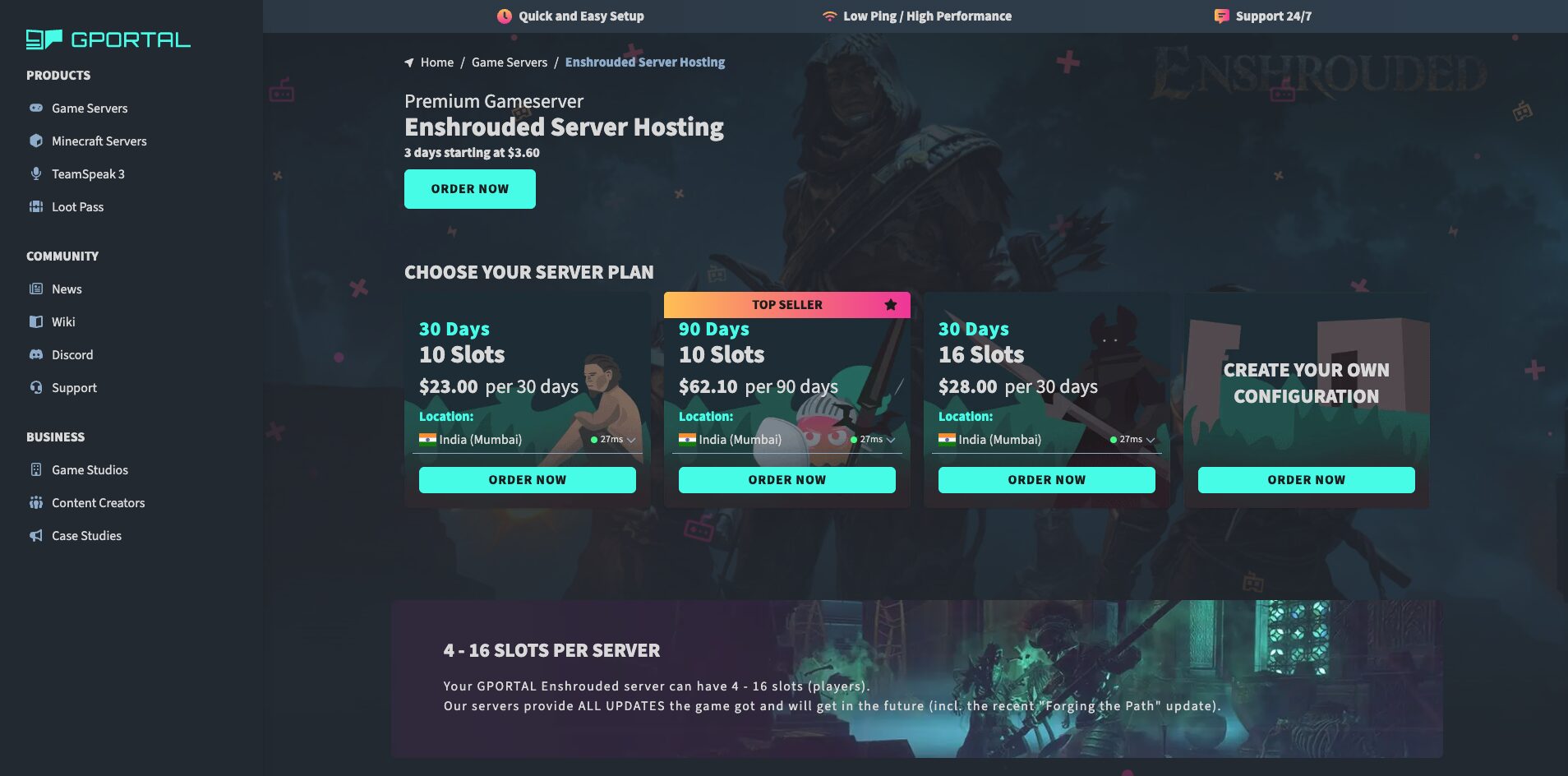
Their servers run the latest NVMe SSD hardware and carry both Bulwark and Corero DDoS protection layers, a dual-provider setup that goes beyond what most competitors offer.
Their web interface handles most server configurations without requiring config file edits. The Gamecloud feature lets you reassign slots to a different game when Embervale fatigue sets in.
G-Portal also provides 50 GB of backup storage per server, the most storage-for-backups of any provider on this list.
Datacenter locations cover Central Europe, North America, South America, Asia, and Australia.
Key features
- Official Keen Games hosting partner
- Dual-layer DDoS protection (Bulwark + Corero)
- 50 GB backup storage included
- NVMe SSD hardware across all plans
- Gamecloud for switching between game titles
- Server live in under 3 minutes after purchase
- Built-in mod loader in server settings
Pros & Cons
PROS
CONS
Pricing
Flexible day-based billing. 30-day plan for 10 slots runs $23; 90-day plan for 10 slots is $62.10; 30-day plan for 16 slots is $28. Starting point is $3.60 for a 3-day trial server.
Best for: Groups who want the official Keen Games provider and don’t mind G-Portal’s day-based billing model.
Survival Servers
Custom Panel and Deep Mod Integration
Survival Servers launched in 2012 and built their reputation on early DayZ hosting. That heritage shows in their control panel, which is an in-house build rather than a licensed product.
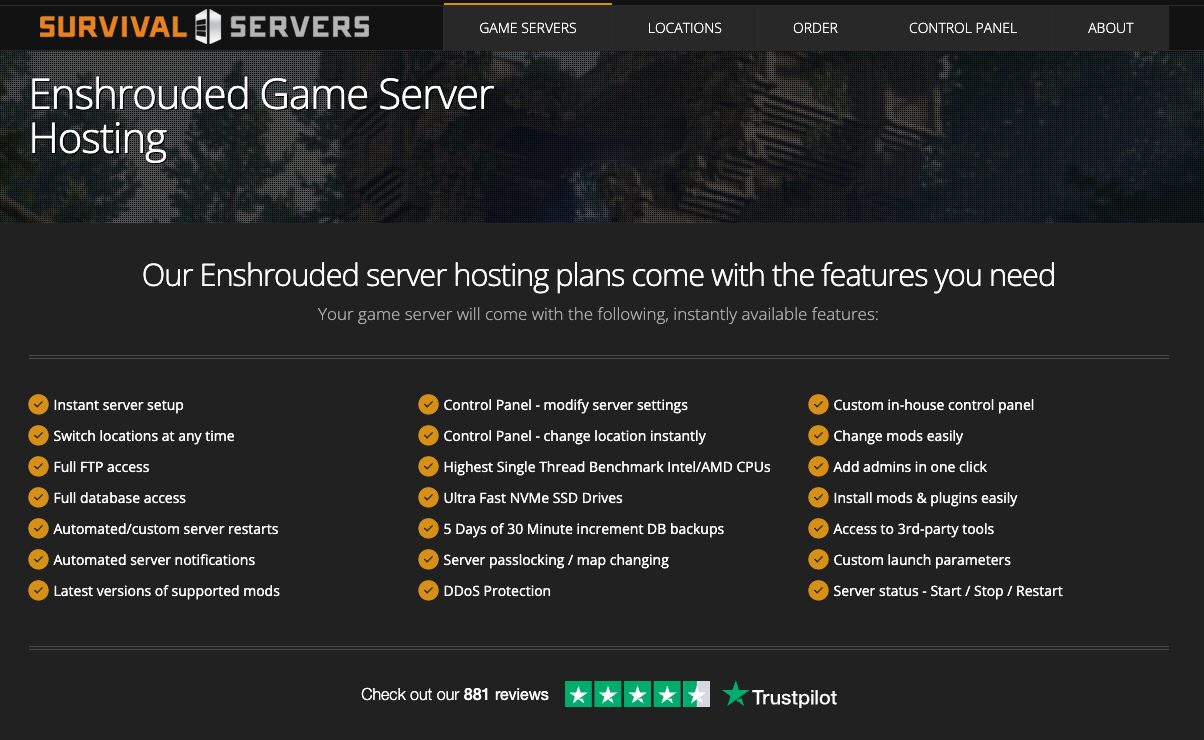
For Enshrouded specifically, the panel supports one-click mod installation, instant location switching, custom launch parameters, and direct database access: capabilities that matter when you’re running a modded server with 16 players.
They offer two hardware tiers: Standard (SSD, DDR4, high-performance CPU) and Premium (NVMe SSD, DDR5, overclocked CPU). The premium tier costs more but provides the hardware edge that a heavy voxel world with lots of build data will appreciate.
Eight locations cover the US (5 cities), Germany, France, and Singapore.
The site also lists PC, Windows, and Xbox Series X|S crossplay compatibility, though Enshrouded’s Xbox version is described as “coming soon” as of mid-2026.
Key features
- In-house custom control panel
- Standard and Premium hardware tiers
- One-click mod and plugin installation
- Custom launch parameters and 3rd-party tool access
- 5-day rolling backups at 30-minute increments
- Location switching at any time
- DDoS protection on all 8 locations
Pros & Cons
PROS
CONS
Pricing
8 slots (Standard) from $19.00/mo; 16 slots from $28.00/mo. A 3-day trial for 8 slots is available at $4.28 (with available coupon codes bringing standard monthly pricing down further). Premium hardware adds a per-slot surcharge.
Best for: Modded Enshrouded servers and players who want a control panel built by people who’ve been running survival game servers since 2012.
Indifferent Broccoli
Best Free Trial and Standout Support
Indifferent Broccoli is a small hosting provider that runs a deliberately different model.
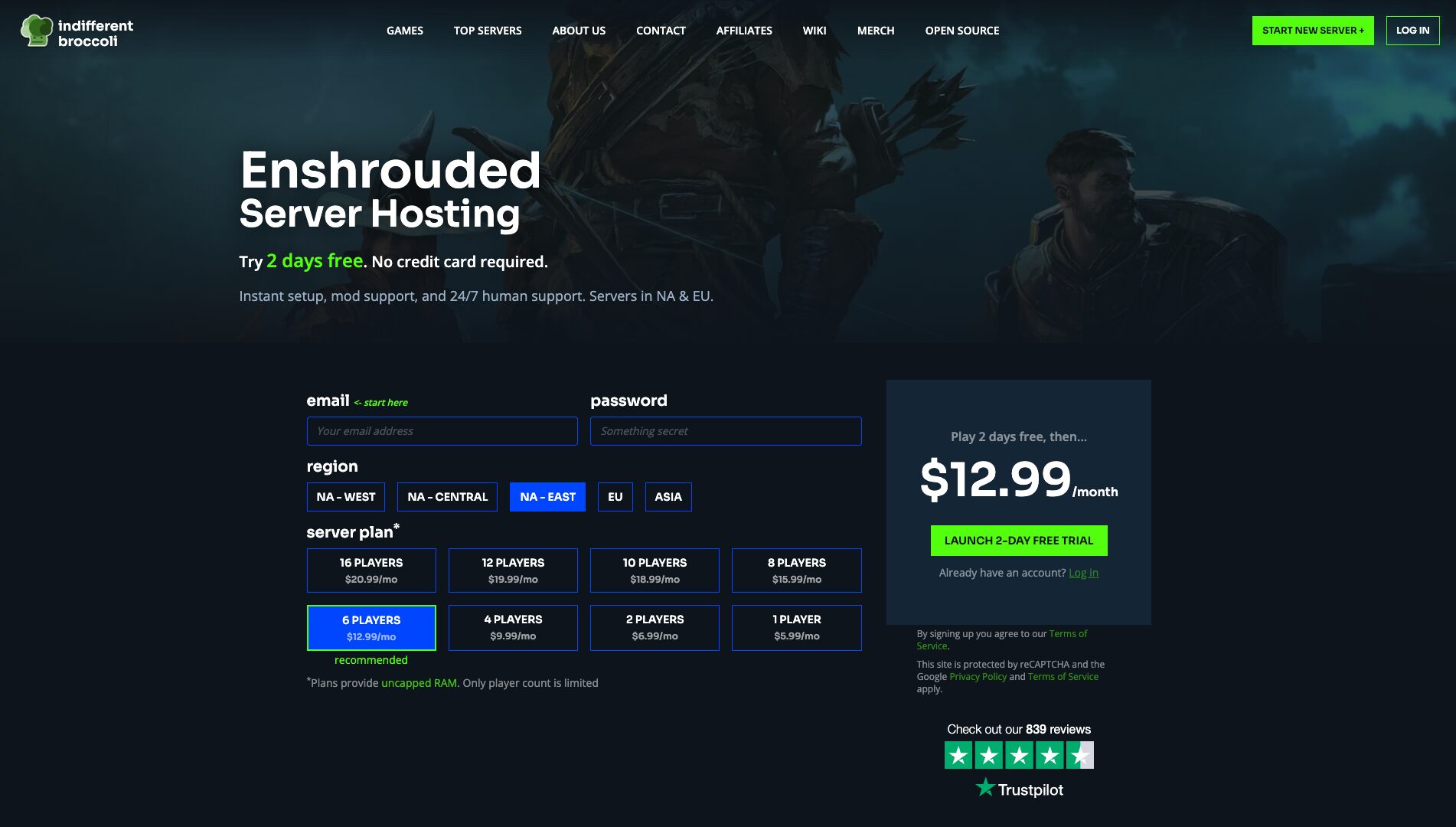
They offer a 2-day free trial with no credit card required (the only provider on this list that does so), and their pricing is based on player count rather than RAM. Plans provide uncapped RAM; you pay for slots, not resources.
Their control panel is custom-built and Discord-integrated: you can check server status, restart the server, and get crash notifications without opening a browser. The Discord community has over 17,000 members and functions as a hybrid support channel and player community.
Their support team, which they call “Broccolini,” has built a reputation across Trustpilot reviews for personal, fast responses that go beyond scripted replies.
Datacenter locations: San Jose, Dallas, Salt Lake City, Washington DC, and Montreal in North America; Frankfurt, Roubaix, and Amsterdam in Europe. No Asia-Pacific option, which matters if your group is Australia- or Southeast Asia-based.
Key features
- Uncapped RAM on all plans
- Discord bot for server management
- At least 128 GB RAM on server nodes
- Custom panel with simple configuration
- Support team consistently praised for personal responses
- Open-source control panel (BOSS project)
Pros & Cons
PROS
CONS
Pricing
1 player at $5.99/mo; 2 players at $6.99/mo; 4 players at $9.99/mo; 6 players at $12.99/mo; 8 players at $15.99/mo; 10 players at $18.99/mo; 12 players at $19.99/mo; 16 players at $20.99/mo. No long-term billing discounts.
Best for: New server owners who want to test before committing and anyone who prioritizes responsive, human support over automated ticketing systems.
Nitrado
Seamless Xbox and PC Crossplay Readiness
Nitrado has operated since 2001 and holds official console server hosting partnerships for a significant portion of the major survival games.
Their Enshrouded support is worth noting specifically because Enshrouded’s Xbox Series X|S version is in active development, and Nitrado has positioned itself as the crossplay-ready host for console players who want a server that works across PC and console when that feature ships.
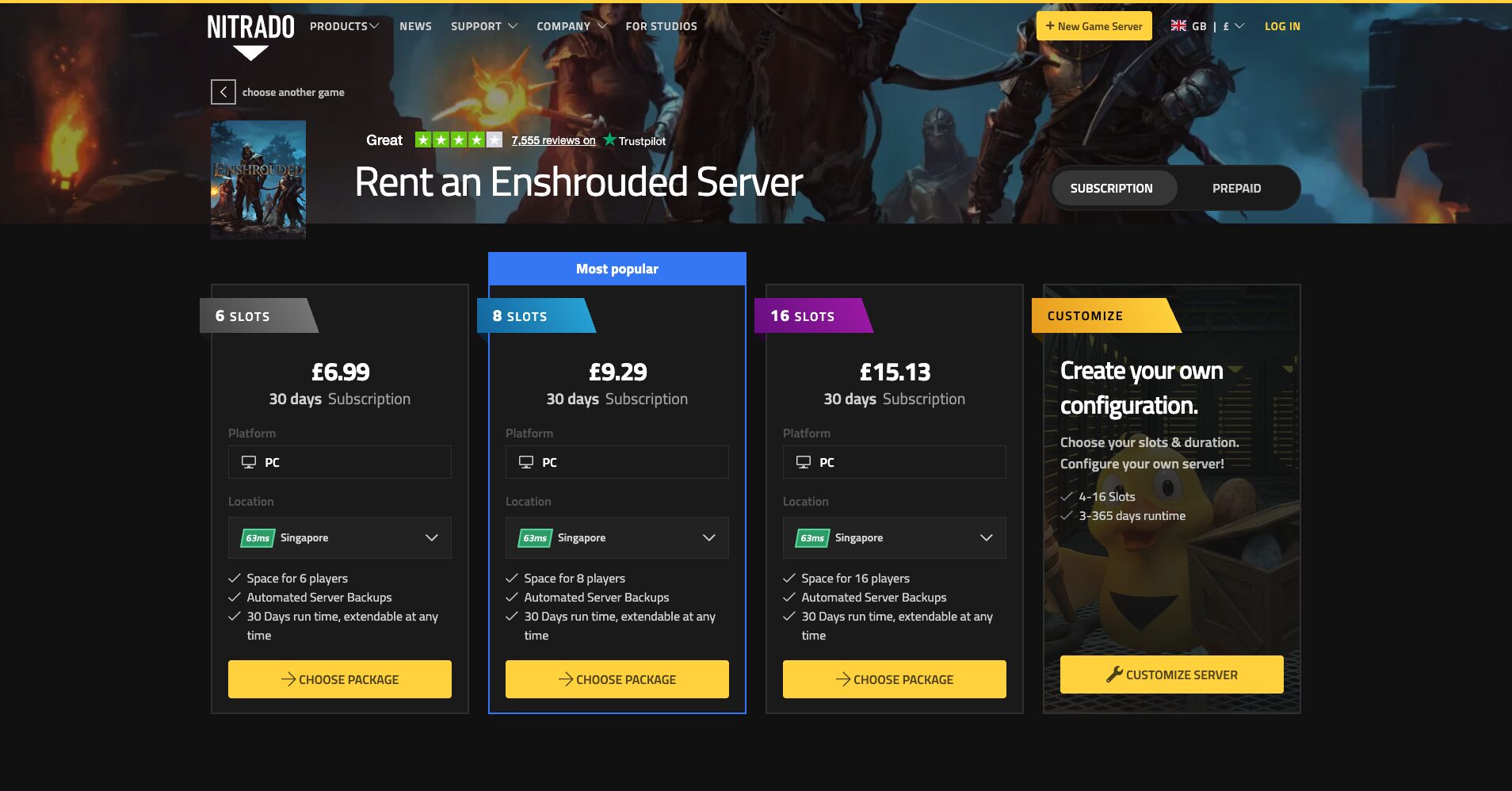
Their billing model differs from every other provider: you purchase credits in advance, and the server draws from that balance over time. This gives flexibility to pause, switch games, or extend without committing to a monthly charge. The trade-off is that tracking spend requires more active attention than a standard subscription.
Coverage spans 18+ datacenter locations worldwide. Their web interface has improved, but it remains one of the more complex panels to configure on first use.
Key features
- Official hosting partner for most major console survival games
- Prepaid credit billing model for flexible usage
- 100+ supported game titles
- 18+ global datacenter locations
- Crossplay infrastructure for console releases
- Mobile app for server management
Pros & Cons
PROS
CONS
Pricing
Starting from approximately €6.99/30 days equivalent for minimal configs. Enshrouded server pricing varies by slot count and region. Checking the Nitrado configurator is required to get an exact quote.
Best for: Groups who plan to include Xbox players when Enshrouded’s console version launches, and players who want flexibility in their billing model.
8. Apex Hosting
Strong Option for Larger Communities
Apex Hosting has been running since 2013 and has built its reputation in Minecraft before expanding to 50+ game titles. Their Enshrouded plans use Ryzen CPUs with NVMe storage and sit in Tier 3 datacenters.
Their standout offering is the EX Series: dedicated vCores (4 exclusive cores from a Ryzen 9 7950X), which separates your server’s CPU access from other tenants on the same machine.
Their control panel is accessible from mobile or desktop, and 24/7 live chat support is available alongside ticket submission. Server locations span North America, Europe, and Asia-Pacific.
Key features
- EX Series with 4 dedicated vCores up to 4.8 GHz
- NVMe storage on all plans
- 300 Gbps DDoS protection
- Free subdomain included
- Automatic backups and updates
- Game switching across 50+ titles
Pros & Cons
PROS
CONS
Pricing
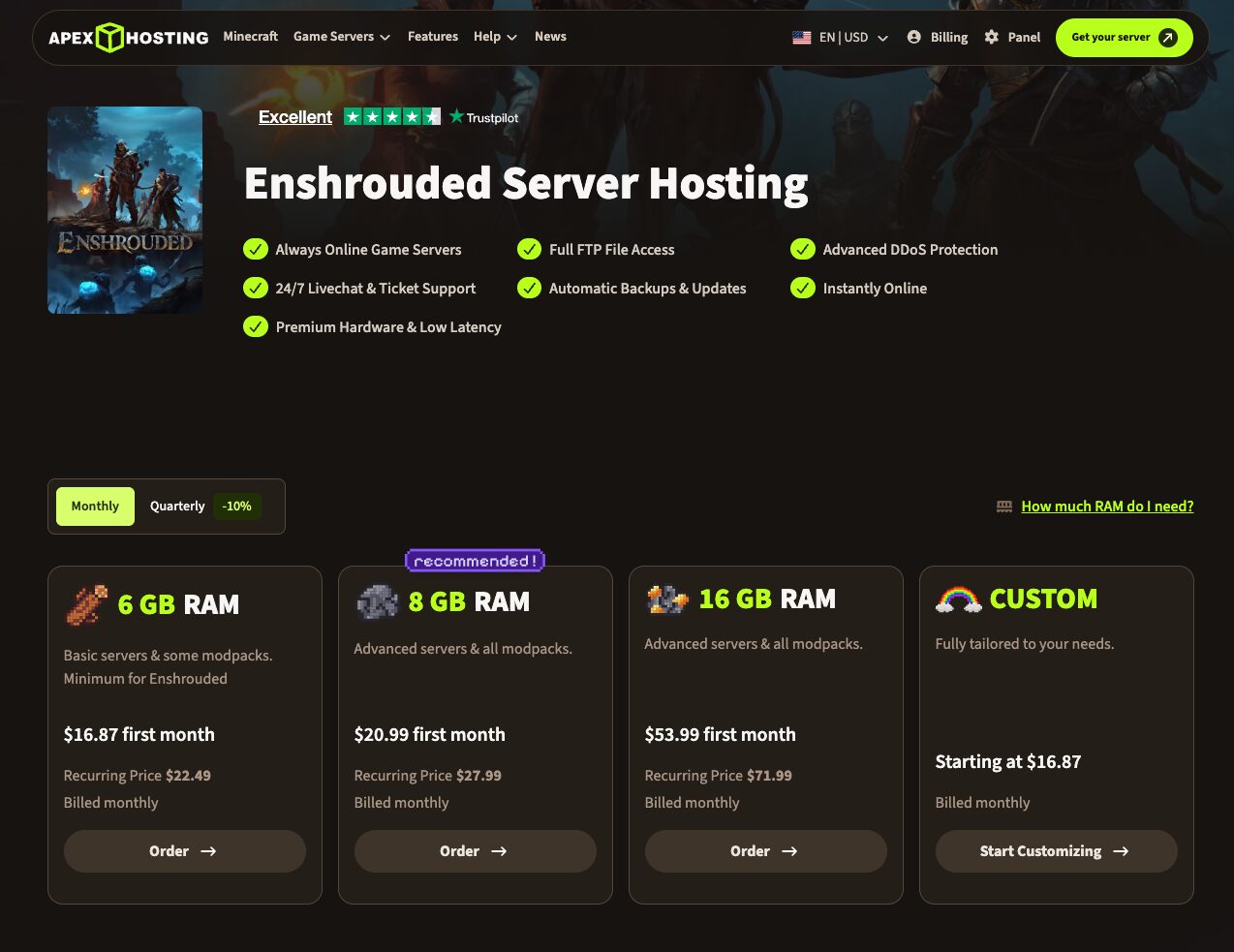
Plans are RAM-based. 6 GB plan starts at $16.87/mo first month ($22.49 recurring); 8 GB at $20.99/mo first month ($27.99 recurring); 16 GB EX Series at $53.99 first month ($71.99 recurring). Quarterly billing saves 10%.
Best for: Large communities (10–16 players) who run modded configurations and need dedicated CPU resources to handle the load.
Shockbyte
Accessible 16-Player Hosting
Shockbyte launched in 2013 as a Minecraft host and expanded to 60+ games. Their Enshrouded hosting runs on AMD EPYC hardware with NVMe storage across locations in the US (East and West), UK, Germany, Singapore, Australia, and Brazil.
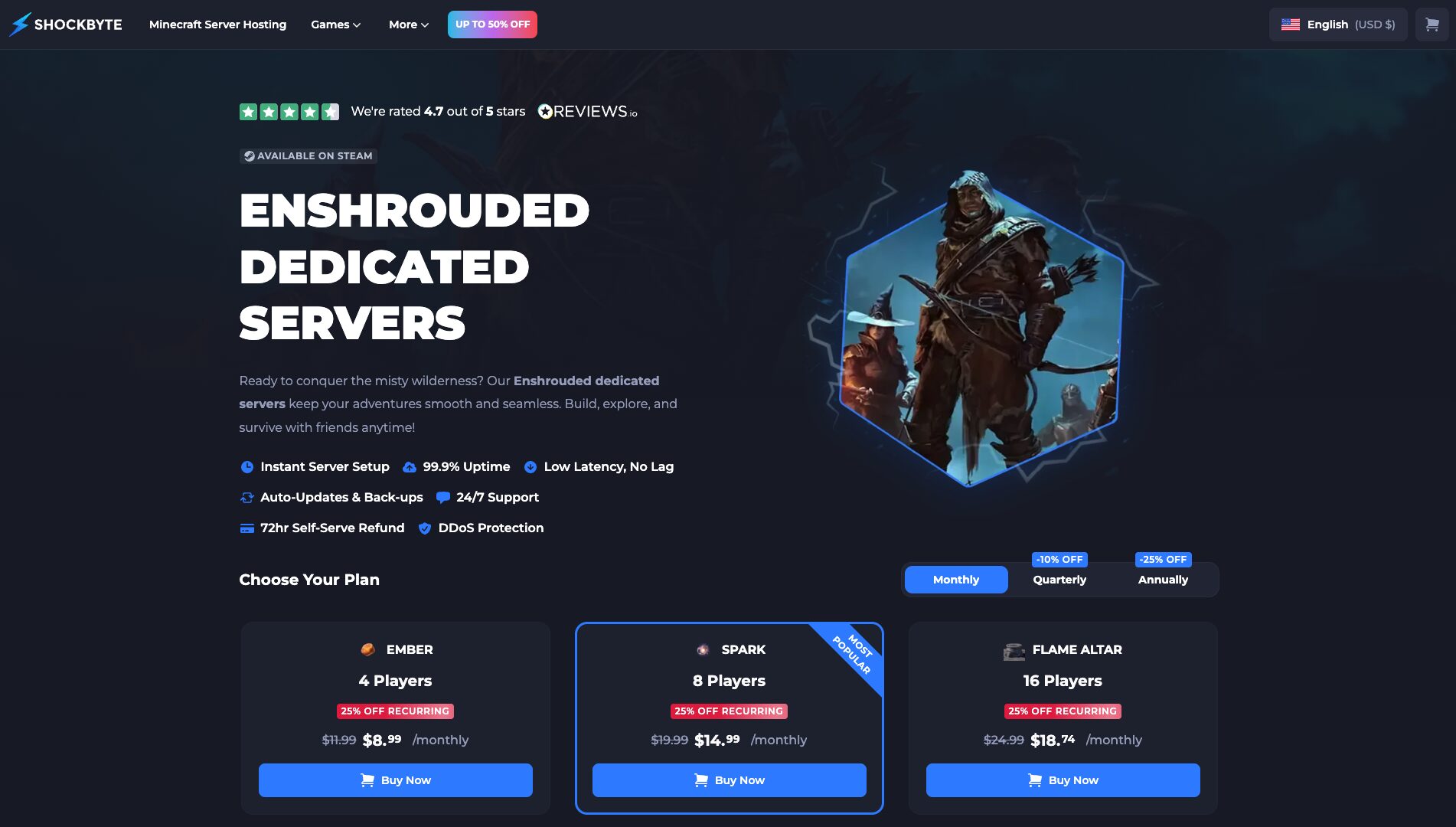
Their custom control panel (launched in 2024) includes a real-time console, mod browsing by category, and an FTP migration service, which is useful if you’re moving from another provider.
They offer a 72-hour money-back guarantee and a free FTP file migration service for transfers from other hosts, which reduces the friction of switching.
Key features
- AMD EPYC hardware optimized for high single-thread performance
- NVMe storage on all plans
- 100% uptime guarantee
- Free FTP migration from other hosts
- Global locations including Australia, Brazil, and Singapore
- Automatic backups and updates
Pros & Cons
PROS
CONS
Pricing
16-slot Enshrouded server at approximately $24.99/mo (monthly billing). Discounts apply on longer terms: 10% quarterly, 20% semi-annual, 25% annual. Discount codes (e.g., TWITTER25) are reported as active for 25% off the first payment.
Best for: Players in Australia, Brazil, or Singapore, and groups migrating from another host who want a free FTP-assisted transfer.
How Enshrouded’s Voxel Engine Impacts Server Choice
Enshrouded doesn’t run on a traditional game engine. Keen Games built a custom voxel system that lets players reshape terrain at a per-block level: digging tunnels, flattening ground, and constructing multi-story bases from scratch.
In a standard survival game, the world is largely static. The server tracks player positions, inventory, and mob states. In Enshrouded, every block a player places or removes is a persistent change to a voxel grid that the server has to store and simulate.
A late-game base with a large footprint can carry tens of thousands of modified voxels. Terraforming a mountainside to build a fortress extends that further.
The practical result: Enshrouded servers use significantly more RAM as bases grow. A fresh server with four players in early-game exploration uses noticeably less memory than the same server after 200 hours of building. Providers that cap RAM or throttle it to encourage plan upgrades will create problems in exactly the phase of the game when you’re most invested.
RAM guidance by use case:
A 4–6 player server doing moderate building and exploration runs stably on 8 GB of dedicated server RAM. Once your group hits the late game (large builds, terraforming, and full 16 players active simultaneously), 16 GB becomes the practical minimum to avoid late-game lag and save-load hitches.
For ambitious building projects or modded servers at full capacity, 32 GB provides headroom. Several providers on this list (Indifferent Broccoli, DatHost) offer uncapped RAM, which effectively solves this problem automatically.
The other hardware variable that matters specifically for Enshrouded is single-core CPU clock speed. The game’s simulation is largely single-threaded, so a server running at 4.5 GHz on a single core outperforms one with more cores at lower clock speeds.
NVMe storage matters at server startup and on saves. A world save to a slow SSD blocks the server during the write, which players experience as a brief freeze.
How to Choose the Best Enshrouded Server
Server Location
Every 10 ms of ping adds a perceptible delay to the connection between a player’s input and the server’s response. For a survival game with melee combat and building, the difference between 20 ms and 120 ms is the difference between tight and sluggish.
Choose a datacenter in the same region as the majority of your players. If you’re split across regions, pick the location closest to the players who’ll be most active at peak hours.
Hardware Specs
NVMe SSDs matter for two reasons: they load world chunks faster on player login, and they write server saves without blocking the game thread.
Mechanical HDDs or basic SSDs create the brief freezes that look like server lag but are actually storage I/O. High single-core CPU clock speed (4.0 GHz or above on a modern architecture like Ryzen 5000 or 7000 series) directly translates to smoother server-side frame timing.
Automated Backups
Enshrouded is still in Early Access. Keen Games ships patches frequently, and patches occasionally break world saves or corrupt server configs.
A provider that runs daily automated backups with at least 3–5 days of history lets you roll back to before a bad patch without losing your entire build. This is basic protection for an Early Access game.
DDoS Protection
Public-facing servers are periodic targets for denial-of-service attacks, particularly once a player community grows. A provider without DDoS mitigation will see your server go offline when this happens.
Every provider on this list includes some form of DDoS protection; the differences lie in mitigation capacity (measured in Gbps) and whether protection is always-on or reactive. Always-on mitigation at the network edge is preferable.
Dedicated Hosting vs. Self-Hosting
Self-hosting is free and gives you complete control, but the requirements are substantial. The Enshrouded dedicated server tool (Steam App ID 2278520) runs on Windows only. Linux hosting requires Wine or Proton.
Your server machine needs at least 16 GB of RAM (32 GB for 16 players with active building), a quad-core CPU, and a stable internet connection with sufficient upload bandwidth to serve 16 simultaneous players.
Port forwarding (UDP 15636 and UDP 15637) requires router access. The server goes offline when your PC does, patches require manual application, and you absorb any DDoS attacks without mitigation infrastructure.
Paid hosting starts at $5–10/mo for small groups and removes every one of those constraints: 24/7 uptime independent of your hardware, automated patching, offsite backups, DDoS protection, and a control panel that handles configuration through a web interface.
The operational trade-off is a monthly cost and the minor inconvenience of a control panel login instead of direct file access, though every provider on this list includes FTP or SFTP access for direct file management anyway.
Self-hosting makes sense for technical users who want complete control and don’t mind the management overhead. Paid hosting makes sense for everyone else and for any group where 24/7 availability is part of the value, which it is for most Enshrouded sessions, where players log in at different times across different time zones.
Frequently Asked Questions
How much RAM do I need for an Enshrouded server?
For a 4–6 player server in the early-to-mid game, 8 GB of dedicated server RAM is sufficient. Once you add more players, late-game building, or mods, 16 GB is the practical minimum. The game’s voxel engine accumulates memory usage as players terraform and build, so late-game servers with large bases will use noticeably more RAM than on launch day.
Can Xbox and PC players play on the same Enshrouded server?
Enshrouded launched on PC via Steam Early Access in January 2024. The Xbox Series X|S version is in active development as of mid-2026 but has not shipped yet. When it does, crossplay between Xbox and PC on a dedicated server will require a provider that supports console crossplay configurations. Nitrado is the most established option for console server crossplay based on their existing partnerships with other game titles.
How do I transfer my local Enshrouded world to a dedicated server?
Your local Enshrouded world is stored as a save file on your PC (typically in %AppData%\Enshrouded\saves\). To migrate it to a hosted server: locate the save file on your PC, connect to your server’s file manager or FTP, navigate to the server’s save directory, upload the local save file, and restart the server. Most providers on this list include a file manager in the control panel.
Are there free Enshrouded server hosts?
No free managed Enshrouded hosting exists for permanent servers. Running a game server requires real hardware and bandwidth that providers charge for. Indifferent Broccoli offers the closest option: a 2-day free trial with no credit card required, which is enough time to test performance and configuration before committing.






