


Python has the richest set of web scraping libraries of any language, but they solve different problems. Some download pages, some parse HTML, some drive a real browser, and one, Scrapy, does all of it as a framework. Picking the wrong one usually means rewriting your scraper later.
I tested nine of the most popular Python web scraping libraries on the same pages, measured how they did, and noted where each one fits. Every result below comes from code I ran, and every snippet works as written.
How we tested
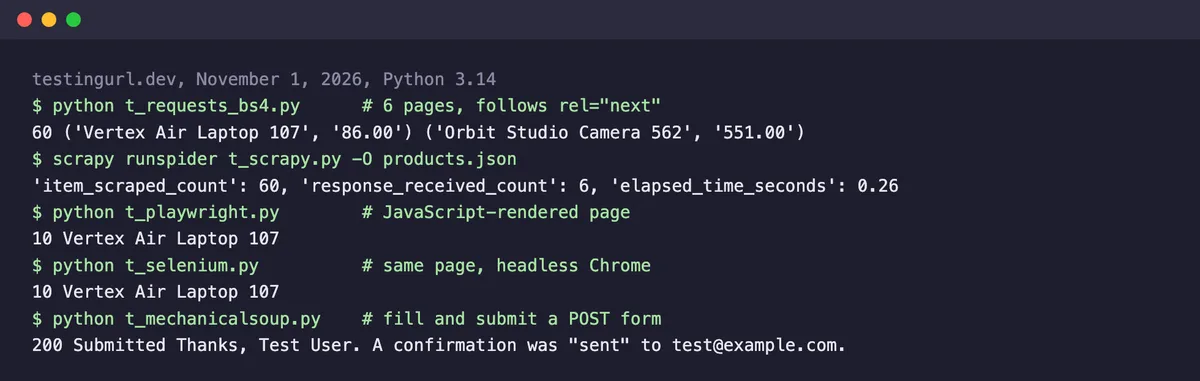
We ran each library with Python 3.14 against TestingURL.dev, a free scraping sandbox.
Quick Comparison
| Library | Type | Runs JavaScript? | Our test result | Best for |
|---|---|---|---|---|
| Requests | HTTP client | No | 60/60 products across 6 pages (with BeautifulSoup) | Downloading pages in simple scripts |
| BeautifulSoup | HTML parser | No | 60/60 rows, 4.5 to 6.9 ms per parse | Beginner-friendly parsing |
| HTTPX | HTTP client (sync and async) | No | 60/60 products, 6 pages fetched at once | Many requests in parallel |
| lxml | HTML/XML parser | No | 60/60 rows, 0.3 ms per parse | Raw parsing speed |
| Scrapy | Crawling framework | No (plugins add it) | 60/60 products in 0.26 s | Large crawls with pipelines |
| Playwright | Browser automation | Yes | 10/10 JS-loaded products, about 1.1 s | Modern JavaScript sites |
| Selenium | Browser automation | Yes | 10/10 JS-loaded products, about 2.9 s | Teams with existing Selenium tests |
| Scrapling | Fetcher + adaptive parser | Yes (browser fetchers) | 10/10 products, about 0.35 s | Scrapers that survive layout changes |
| MechanicalSoup | Form-filling browser | No | POST form submitted, 200 OK | Forms and simple logins |
Best Python Web Scraping Libraries
Requests
Requests is the standard way to download a web page in Python. It sends HTTP requests, handles cookies, redirects, and sessions, and gives you the response body to parse with another library.
Our test
Paired with BeautifulSoup, it followed the rel="next" links through all 6 pagination pages and collected 60 of 60 products in under a second.
import requests
from bs4 import BeautifulSoup

url = "https://testingurl.dev/scraping/pagination/page/1"
products = []
while url:
    soup = BeautifulSoup(requests.get(url, timeout=10).content, "html.parser")
    for card in soup.select("div.card"):
        products.append((card.h3.text, card.p.text.split("$")[1]))
    nxt = soup.select_one('link[rel="next"]')
    url = nxt["href"] if nxt else None
print(len(products), products[0], products[-1])
Pros & Cons
PROS
CONS
License: Apache-2.0. Version tested: 2.34.
BeautifulSoup
BeautifulSoup is the most beginner-friendly HTML parser. It turns messy HTML into a tree you can search with CSS selectors or simple methods like find(), and it tolerates broken markup well.
BeautifulSoup only parses. Pair it with Requests or HTTPX to download pages, as in the snippet above. If you’re new to this, our Python web scraping tutorial walks through a full project.
Our test
It parsed all 60 rows of a 55 KB table page in 6.9 ms with Python’s built-in parser, and in 4.5 ms when we switched it to the lxml parser with BeautifulSoup(html, "lxml"). That one-word change is a free speed-up.
Pros & Cons
PROS
CONS
License: MIT. Version tested: 4.15.

HTTPX
HTTPX is a modern HTTP client with an API close to Requests, plus async support and HTTP/2. Async lets you fetch many pages at the same time instead of one after another.
Our test
It fetched all 6 pages concurrently and returned 60 of 60 products. On this small, fast site, the gain over plain Requests was modest: 0.14 to 0.31 seconds for async against 0.28 to 0.34 seconds sequential across three runs. The difference grows with the number of pages and the server’s response time.
import asyncio
import httpx
from lxml import html

URLS = [f"https://testingurl.dev/scraping/pagination/page/{n}" for n in range(1, 7)]

async def main():
    async with httpx.AsyncClient(timeout=10) as client:
        pages = await asyncio.gather(*(client.get(u) for u in URLS))
    names = []
    for page in pages:
        tree = html.fromstring(page.content)
        names += tree.xpath('//div[@class="card"]/h3/text()')
    print(len(names), names[0], names[-1])

asyncio.run(main())
Pros & Cons
PROS
CONS
License: BSD-3-Clause. Version tested: 0.28.
lxml
lxml is a fast parser for HTML and XML built on C libraries. It supports XPath and CSS selectors, and many other tools, including BeautifulSoup and Scrapy’s selectors, can use it underneath.
For a few pages, the difference doesn’t matter. For millions of pages, it decides how many servers you need.
Our test
Querying the 60 table rows with XPath took 0.3 ms per parse, about 15 times faster than BeautifulSoup with the lxml backend and more than 20 times faster than BeautifulSoup with Python’s built-in parser.
Pros & Cons
PROS
CONS
License: BSD-3-Clause. Version tested: 6.1.
Scrapy
Scrapy is a complete crawling framework. It schedules requests, follows links, retries failures, throttles itself, and exports results to JSON, CSV, or a database through item pipelines.
Scrapy doesn’t run JavaScript by itself, but plugins such as scrapy-playwright add it. If you outgrow single scripts, this is usually where Python scrapers end up.
Our test
A spider of about 10 lines crawled the 6 pages and exported 60 of 60 products to JSON in 0.26 seconds of crawl time, because Scrapy fetches pages concurrently by default.
import scrapy

class ProductsSpider(scrapy.Spider):
    name = "products"
    start_urls = ["https://testingurl.dev/scraping/pagination/page/1"]

    def parse(self, response):
        for card in response.css("div.card"):
            yield {"name": card.css("h3::text").get(), "info": card.css("p::text").get()}
        yield from response.follow_all(css='link[rel="next"]', callback=self.parse)

# Run: scrapy runspider t_scrapy.py -O products.json
Pros & Cons
PROS
CONS
License: BSD-3-Clause. Version tested: 2.19.
Playwright
Playwright drives a real browser (Chromium, Firefox, or WebKit) from Python, so it sees pages exactly as a visitor does after JavaScript runs. It also clicks, scrolls, fills forms, and waits for elements automatically.
Install it with pip install playwright and playwright install chromium. We passed channel="chrome" to reuse an installed Chrome instead.
Our test
On a page whose HTML contains no product data until JavaScript loads it, Requests found 0 products. Playwright waited for the content and read all 10 in about 1.1 seconds, including browser startup.
from playwright.sync_api import sync_playwright

with sync_playwright() as p:
    browser = p.chromium.launch(channel="chrome")
    page = browser.new_page()
    page.goto("https://testingurl.dev/scraping/js-rendered")
    page.wait_for_selector('#app[data-loaded="true"]')
    print(page.locator("#app").inner_text()[:300])
    browser.close()
Pros & Cons
PROS
CONS
License: Apache-2.0. Version tested: 1.64.
Selenium
Selenium is the original browser automation library and still the standard for automated testing. For scraping, it does the same job as Playwright: load the page in a real browser and read the result.
Our test
It loaded the same JavaScript page in headless Chrome and returned 10 of 10 products in about 2.9 seconds, almost three times slower than Playwright on our run. Selenium Manager downloaded the matching ChromeDriver automatically on the first run, so there was no manual driver setup.
from selenium import webdriver
from selenium.webdriver.common.by import By
from selenium.webdriver.support.ui import WebDriverWait
from selenium.webdriver.support import expected_conditions as EC

options = webdriver.ChromeOptions()
options.add_argument("--headless=new")
driver = webdriver.Chrome(options=options)
driver.get("https://testingurl.dev/scraping/js-rendered")
WebDriverWait(driver, 10).until(
    EC.presence_of_element_located((By.CSS_SELECTOR, '#app[data-loaded="true"]'))
)
cards = driver.find_elements(By.CSS_SELECTOR, "#app h3")
print(len(cards), cards[0].text)
driver.quit()
Pros & Cons
PROS
CONS
License: Apache-2.0. Version tested: 4.52.
Scrapling
Scrapling is a newer library that combines fetching and parsing. Its parser can find elements again after a site changes its layout, and it offers HTTP, browser, and stealth fetchers behind one API.
Scrapling also ships an MCP server, so AI assistants like Claude can call it as a tool.
Our test
Its HTTP fetcher read 10 of 10 products from the first pagination page in about 0.35 seconds. A plain pip install scrapling wasn’t enough for the fetchers; we needed pip install "scrapling[fetchers]".
from scrapling.fetchers import Fetcher

page = Fetcher.get("https://testingurl.dev/scraping/pagination/page/1")
names = page.css("div.card h3::text").getall()
print(len(names), names[0])
Pros & Cons
PROS
CONS
License: BSD-3-Clause. Version tested: 0.5.
MechanicalSoup
MechanicalSoup combines Requests and BeautifulSoup into a stateful browser for pages that need form submissions, without running a real browser.
It keeps cookies between pages, which makes it a light option for simple login flows on sites that don’t rely on JavaScript.
Our test
It opened a POST form, filled the name and email fields, submitted it, and read the confirmation page, all in about 0.4 seconds.
import mechanicalsoup

browser = mechanicalsoup.StatefulBrowser()
browser.open("https://testingurl.dev/scraping/forms/post")
browser.select_form("form.test-form")
browser["name"] = "Test User"
browser["email"] = "[email protected]"
response = browser.submit_selected()
print(response.status_code, response.soup.select_one("main").get_text(" ", strip=True)[:200])
Pros & Cons
PROS
CONS
License: MIT. Version tested: 1.4.
Check for a JSON API before you reach for a browser
The JavaScript page in our test loaded its products from a JSON endpoint. Calling that endpoint directly with Requests returned all 10 products in about 0.2 seconds, faster than any browser.
Open your browser’s developer tools, check the Network tab for XHR or Fetch requests, and you may not need Playwright or Selenium at all.
How to Choose a Python Scraping Library
- If the data is in the page’s HTML, start with Requests and BeautifulSoup. Switch BeautifulSoup to the lxml parser, or use lxml directly, when parsing speed matters.
- If you need hundreds of pages at once, use HTTPX with async, or move to Scrapy when you also want retries, throttling, and exports.
- If content appears only after JavaScript runs, check for a JSON API first, then use Playwright. Choose Selenium if your team already knows it.
- If you submit forms on simple sites, MechanicalSoup is lighter than a browser.
- If you maintain scrapers on sites that change often, try Scrapling’s adaptive parsing.
Library or Full Scraping Tool?
Libraries give you full control, but you also own the proxies, browsers, retries, and blocking. If you’d rather start from a complete self-hosted tool, such as Crawl4AI, Firecrawl, or Crawlee, see our tested list of open source web scraping tools.
If sites block your scripts or you don’t want to run browsers at all, a managed service such as the Geekflare Web Scraping API, our own product, handles proxies and JavaScript rendering and returns HTML, Markdown, or JSON. It has a Python SDK and a free plan with 500 credits a month.
FAQ
What is the best Python library for web scraping?
For most projects, Requests with BeautifulSoup is the best start: it’s simple and handled our 6-page test without issues. Use Scrapy for large crawls, Playwright for JavaScript-heavy sites, and lxml when parsing speed matters.
Is BeautifulSoup or Scrapy better for web scraping?
They do different jobs. BeautifulSoup only parses HTML, so it suits small scripts where you control the requests. Scrapy is a full framework with concurrency, retries, and exports, so it suits larger crawls. In our test, Scrapy crawled 6 pages in 0.26 seconds because it fetches pages concurrently.
Should I use Selenium or Playwright for scraping?
Playwright is usually the better choice for new scraping projects. It auto-waits for elements, has sync and async APIs, and was almost three times faster than Selenium on our JavaScript page. Selenium makes sense if your team already uses it for testing.
Can Python scrape JavaScript websites?
Yes. Requests and BeautifulSoup can’t run JavaScript, but Playwright, Selenium, and Scrapling’s browser fetchers can. Before using a browser, check whether the page loads its data from a JSON API you can call directly, which is much faster.
Which Python scraping library is fastest?
For parsing, lxml was the fastest in our test at 0.3 ms for a 55 KB page, about 20 times faster than BeautifulSoup with Python’s built-in parser. For fetching many pages, async HTTPX or Scrapy’s concurrency make the biggest difference.