



9Proxy has been one of the more trusted names in residential proxy services for several years running. A 20-million-IP pool and flexible billing options made it a go-to choice for web scrapers, security researchers, and OSINT professionals who needed residential routing without enterprise pricing.
Recently, 9Proxy made its first-ever price adjustment, a notable moment for a provider that had kept its rates flat since launch.
That’s why I’ve picked this review. If you’re evaluating 9Proxy for the first time or reconsidering it after hearing about the pricing change, this breakdown covers everything that matters: how the network actually performs against real-world targets, and whether the new pricing still makes sense against the competition.
Exclusive 40% OFF 9Proxy | Limited-Time Deal for Geekflare Users
Geekflare users can now unlock an exclusive 40% OFF partnership deal on the 50+5 GB 9Proxy plan.
Simply use code GEEKFLARE40 at checkout to activate the discount. This is a limited-time offer and may end anytime, so if you see the code, now is the best time to lock in the deal before it’s gone.
What Is 9Proxy and How Does It Work?
9Proxy is a residential proxy network built on a pool of 20 million+ IPs spread across 90+ countries. The IPs are sourced from real Internet Service Providers and assigned to real end-user devices, homes, mobile connections, and real consumer hardware. That’s the defining characteristic of a residential proxy, and it’s what separates this category from datacenter proxies.
Datacenter proxies are fast and cheap, but they carry a server-origin fingerprint that detection systems pick up immediately. Cloudflare, Akamai, Imperva, and any popular WAF know what a datacenter subnet looks like. A residential proxy IP carries none of that baggage. To a web server’s detection layer, it looks like a regular person on a regular home connection in whatever city you’ve selected.
9Proxy supports both HTTP/HTTPS and SOCKS5 protocols, with targeting available down to city and state level. You can rotate IPs on every request, hold a session across multiple requests, or mix both approaches depending on what your task actually needs.
Who Actually Needs a Service Like This?
The use cases are broader than most people assume. Residential proxies aren’t just for scrapers.
Web scraping and data collection is the obvious one. If you’re pulling product data, monitoring prices, or aggregating publicly available information at scale, a residential proxy is what keeps your pipeline running without constant block evasion patching. A residential proxy IP from the target market’s own country and city doesn’t just pass IP reputation checks; it also gets you accurate geo-targeted content that a foreign datacenter IP would never see.
Security research and penetration testing is where residential proxies earn their keep on professional engagements. Testing how a client’s WAF responds to traffic from different IP reputation tiers requires access to clean residential IPs as your baseline. You can’t accurately simulate what a real attacker looks like if your own test traffic gets flagged at the IP layer before reaching the application layer.
OSINT and reconnaissance benefit enormously from residential routing. When you’re gathering open-source intelligence, your IP is part of your operational profile. Rotating through residential IPs from the target’s own region means your traffic pattern blends into normal user activity rather than appearing as a systematic sweep from a known proxy range.
Market research and ad verification are growing use cases that enterprise teams often overlook until they’ve been burned by geo-locked content or ad fraud. A residential proxy routed through the right city shows you exactly what local users see, the correct ad placements, the accurate pricing, the real search results.
How to Download and Set Up 9Proxy
Getting started is a direct three-step process: sign up for an account on the official site, purchase a package that fits your workflow (IP-based or GB-based), and choose your access method. You can either download the desktop app for advanced control or use Proxy2Web for an instant, browser-based setup.
Depending on your workflow and infrastructure, you can access the network via these core features:
- Proxy Program: A Windows client that routes traffic at the OS layer. It requires zero application-level config, hides proxy detection, and works seamlessly with software lacking native proxy support.
- Proxy2Web: A lightweight, zero-install option using standard credential authentication (user:pass). Perfect for quick browser-based checks and manual geo-verification.
- ProxyHub: A mobile device management tool. ProxyHub Lite runs on individual devices, while ProxyHub Pro provides centralized desktop control to switch and assign multiple mobile proxies remotely.
- Public API: Built for automated pipelines, offering complete programmatic access to session control and usage stats directly from your code.
- Third-Party Integration: Native SOCKS5 support ensures seamless compatibility with anti-detect browsers, proxychains, and custom Python scripts without clunky protocol conversions.
9Proxy Pricing
Choosing the right one matters because the better option depends heavily on how your workload uses proxies.
IP-Based Packages
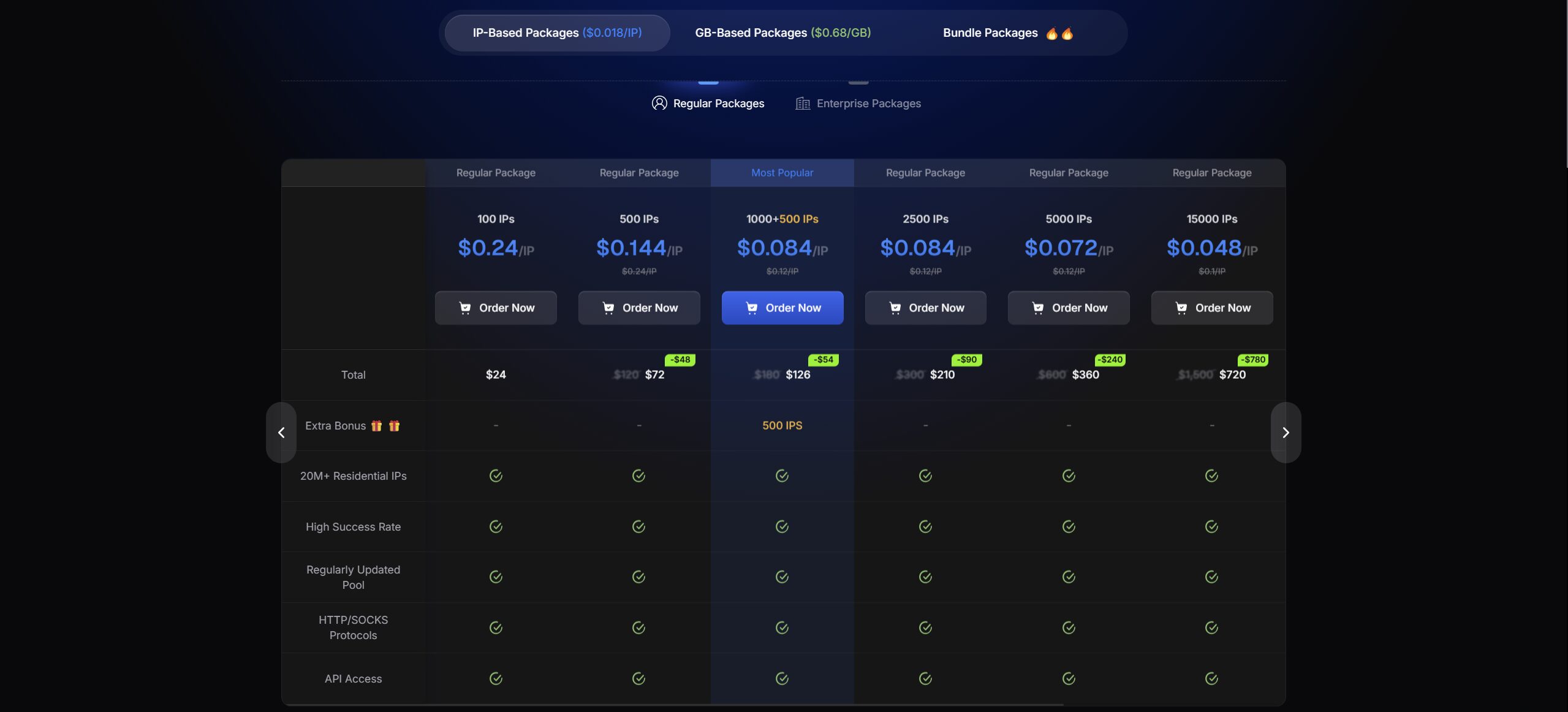
The IP-based model gives you a fixed number of residential IPs with unlimited bandwidth. It is best for sustained sessions, heavy data transfer, long-running scraping jobs, and workflows where bandwidth usage is difficult to predict.
After the latest price adjustment, 100 IPs now cost $24, 500 IPs cost $72, and the 1,000 IP package includes 500 bonus IPs for $126. Larger tiers reduce the effective per-IP cost significantly, with 100,000 IPs priced at $2,300 and 500,000 IPs priced at $8,625.
This model is most attractive when predictable access matters more than minimizing the cost of each small request.
GB-Based Packages
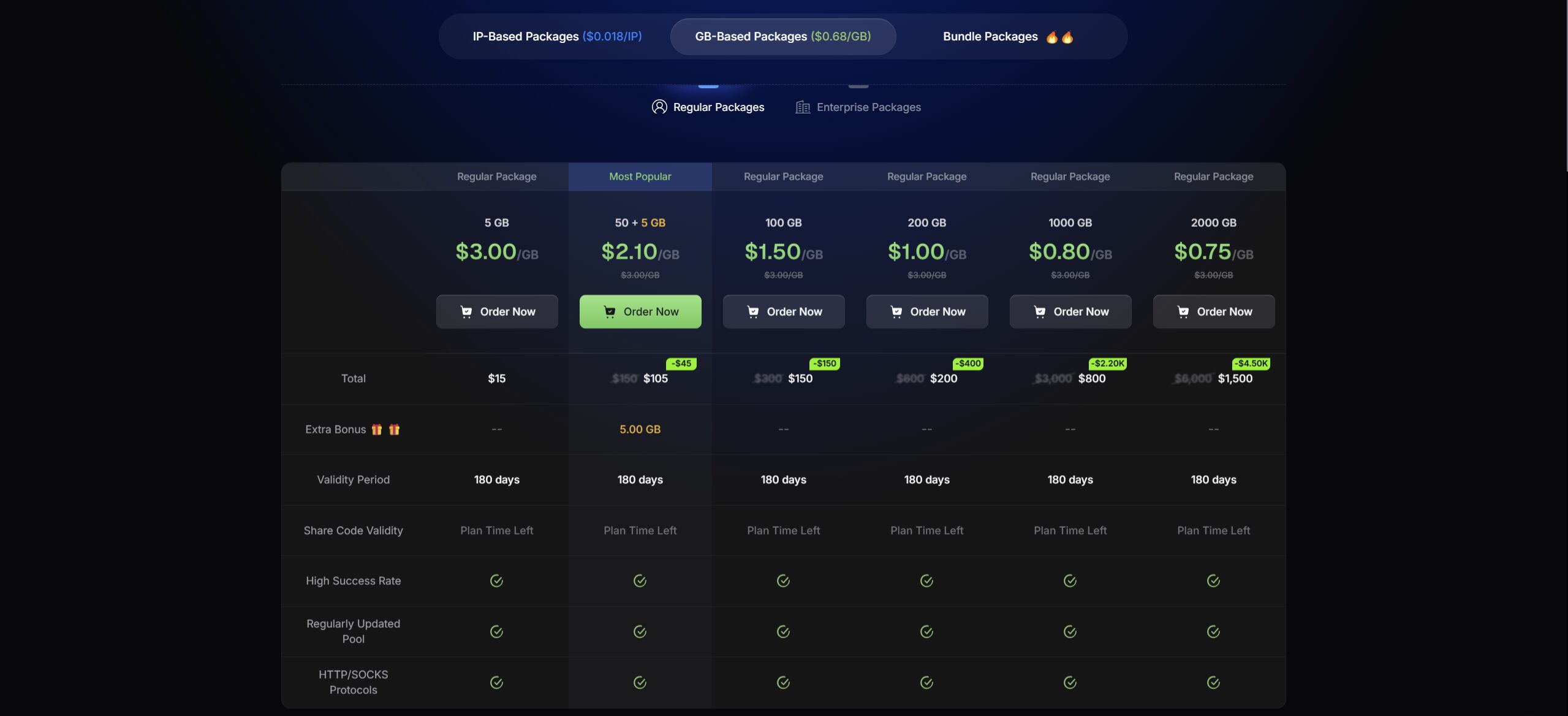
The GB-based model charges by traffic volume rather than fixed IP quantity. It is better for high-rotation workflows where each request uses relatively little data, such as lightweight scraping, ad verification, geo-checking, API polling, and authorized testing.
GB-based pricing starts at $3.00 per GB for smaller packages and scales down to $0.68 per GB at the 10,000 GB tier. For tasks that need frequent IP rotation but do not consume much bandwidth per request, this is usually the more cost-efficient structure.
Bundle Packages
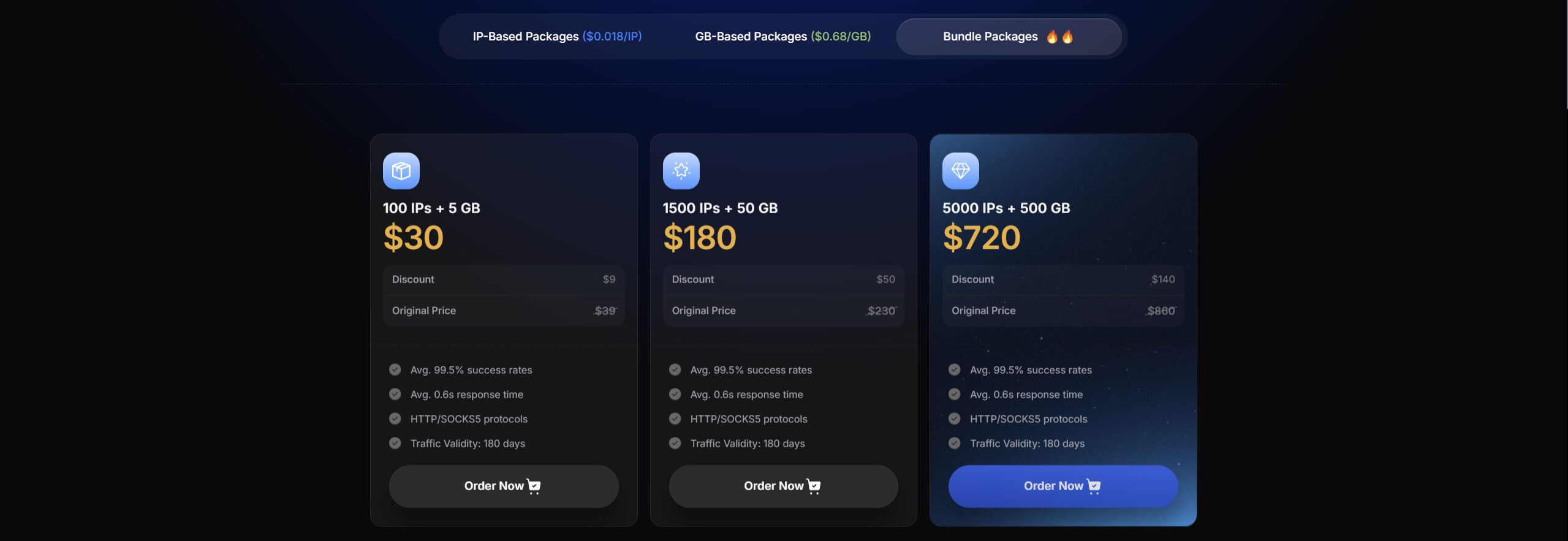
Bundle packages combine IP access with GB traffic for users who need both. After the adjustment, the Starter bundle costs $30 for 100 IPs + 5 GB, the Popular bundle costs $180 for 1,500 IPs + 50 GB, and the Pro bundle costs $720 for 5,000 IPs + 500 GB.
These bundles are useful for mixed workloads where some tasks require stable IP access while others require flexible traffic-based rotation. The 180-day traffic validity also makes them more practical for uneven project-based usage, since unused balance is not forced into a short monthly expiration window.
9Proxy Performance
Published benchmarks are marketing. What matters is how a proxy server performs against hardened real-world targets.
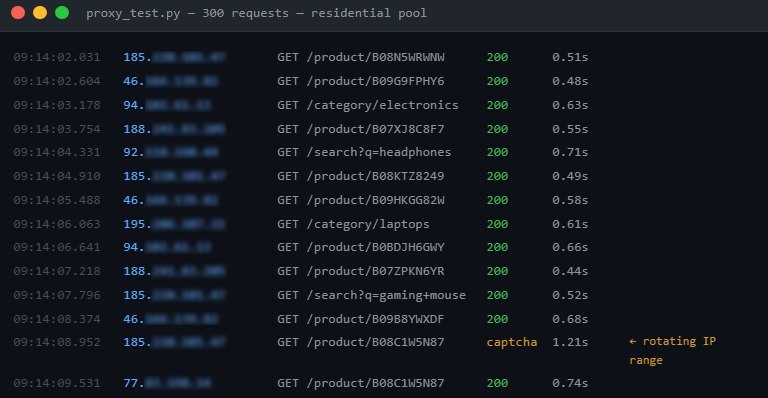
The test I ran involved 300 sequential requests through rotating residential IPs against a major e-commerce platform operating behind Cloudflare’s bot protection layer, the same class of detection that stops most datacenter proxies within the first few requests.
Results across 300 requests:
- Successful passes: 293 (97.7%)
- CAPTCHA challenges: 5 (1.7%)
- Hard blocks: 2 (0.6%)
- Average response time: 0.63 seconds
The 5 CAPTCHA challenges all came from the same IP range, rotating away from it resolved them immediately. This is expected behavior with any residential pool and isn’t a meaningful problem in practice. The 2 hard blocks were likely IPs with prior abuse history that hadn’t been cycled out yet. Neither disrupted the overall test flow.
For comparison: the same test pattern through a datacenter proxy pool produced a 34% block rate on the first pass. The residential IP trust profile delivered a measurable, practical difference.
The 0.63-second average response time is honest. Residential routing adds hops compared to datacenter connections, so it’s inherently slower. For most serious use cases, scraping, research, WAF testing, the success rate and IP cleanliness matter far more than raw speed. A fast datacenter proxy that gets blocked on request 3 isn’t useful. A slightly slower residential proxy that completes 293 out of 300 requests is.
What 9Proxy Does Well and Where It Falls Short
What works:
Unlike competitors who hide behind unhelpful, repetitive AI chatbots, you get real human support around the clock. When a pipeline stalls or a configuration breaks, you deal with actual technical specialists who can fix the problem instantly, eliminating the frustration of looped automated replies.
The IP pool is genuinely clean in a way that cheaper residential services often aren’t. Dirty pools, IPs previously associated with spam, credential stuffing, or other abuse get flagged by reputation services and blocklisted across detection layers. The low hard block rate in testing suggests 9Proxy’s pool management is reasonably active about cycling out burned IPs.
The billing flexibility is real. Having both a residential proxy IP model and a residential proxy GB model means you’re not forced into a pricing structure that doesn’t match your actual workflow. The IP-based unlimited bandwidth option is particularly useful for longer engagements.
City and state-level targeting works reliably, which is important for geo-specific tasks where country-level targeting isn’t precise enough.
SOCKS5 support simplifies integration across most serious tooling.
Where it falls short:
There’s no self-serve free trial on the website. Testing options exist through the Black Hat World community forum, where the 9Proxy team maintains an active presence, but it requires an extra step that more established providers don’t impose.
Coverage spans 90+ countries, not 195. For most common use cases, US, UK, Europe, and Southeast Asia coverage is solid. For niche geographies, verify before committing.
The Trustpilot score reflects friction with the refund policy more than problems with the actual proxy server infrastructure. Users who purchased a plan found it didn’t suit their specific use case and couldn’t recover their spend, leaving negative reviews. The lesson is practical: use whatever test access you can get before purchasing. The IP quality is legitimate; a bad plan choice because of mismatched expectations is avoidable.
How 9Proxy Compares to the Main Alternatives
Against Bright Data, 9Proxy’s main disadvantage is infrastructure depth; Bright Data has dedicated tools for enterprise security research use cases. The practical tradeoff is mandatory KYC verification and enterprise-tier pricing. For independent consultants or smaller teams, 9Proxy delivers the core residential capability at a meaningfully lower cost.
Against Decodo, the pool size gap is real; Decodo claims 115M+ residential IPs versus 9Proxy’s 20M+. Decodo also offers scraping APIs. But 9Proxy undercuts Decodo on price substantially, especially at the IP-based unlimited bandwidth tiers. For budget-conscious operations that don’t need the largest possible pool, the price difference is hard to ignore.
Against datacenter proxies generally: faster, cheaper, flagged immediately by any competent detection layer. For tasks where the IP trust profile doesn’t matter, the datacenter proxy is fine. For tasks where it does, like WAF testing, OSINT, phishing simulation, and serious scraping, a residential proxy is the right tool; datacenter proxies aren’t actually a real alternative.
Final Verdict
9Proxy is an affordable residential proxy service that covers the practical requirements for most scraping, research, and testing use cases. The IP pool is good enough to deliver a 97.7% success rate against Cloudflare-protected targets. The dual billing model, IP-based and GB-based, gives you a sensible way to match pricing to your actual workflow. And at the mid-tier bundle and IP package pricing, it’s cheaper than the major enterprise alternatives without sacrificing the core thing that makes residential proxies worth using: IP trust profile.
It’s not the largest pool on the market, and it doesn’t have the enterprise tooling of a Bright Data. But for individual practitioners and small teams who need reliable residential IP access without enterprise overhead, it does the job well.
Before you spend, you can request a test balance, run it against your actual target environment, and verify the IP quality. Whether the fit is right depends on your specific use case, and that’s something a few minutes of testing will tell you far more accurately than any review.






