



Getting blocked from a website, seeing repeated CAPTCHAs, or finding different prices in different locations can make normal web research frustrating. For businesses collecting public data or checking how websites appear across regions, those small blocks can quickly turn into a workflow problem.
A residential proxy helps solve this by routing traffic through a real ISP-issued residential IP address rather than a data center IP. This guide explains what a residential proxy is, how it works, how it compares with other proxy types, and when it makes sense to use one.
What Is a Residential Proxy?
A residential proxy is a proxy server that routes internet traffic through an IP address assigned by an internet service provider to a real consumer network. In simple terms, “residential” refers to the type of IP address, while a proxy is the middleman that forwards requests between you and the website you want to access.
The key difference is what the target website sees. Instead of seeing your original IP address, the website sees the residential proxy IP.
These IPs may be associated with real user devices such as laptops, desktops, phones, routers, or smart devices, depending on how the proxy provider builds its network. Because the request appears to come from a consumer internet connection rather than a data center, it can look closer to normal browsing activity.
That said, a residential IP does not point to someone’s exact home address. Websites and IP databases may estimate a country, city, region, ISP, or network type, but IP geolocation is not precise enough to identify a specific household.
How Do Residential Proxies Work?
When you send a request through a residential proxy, it first reaches the provider’s proxy gateway instead of going directly to the target website.
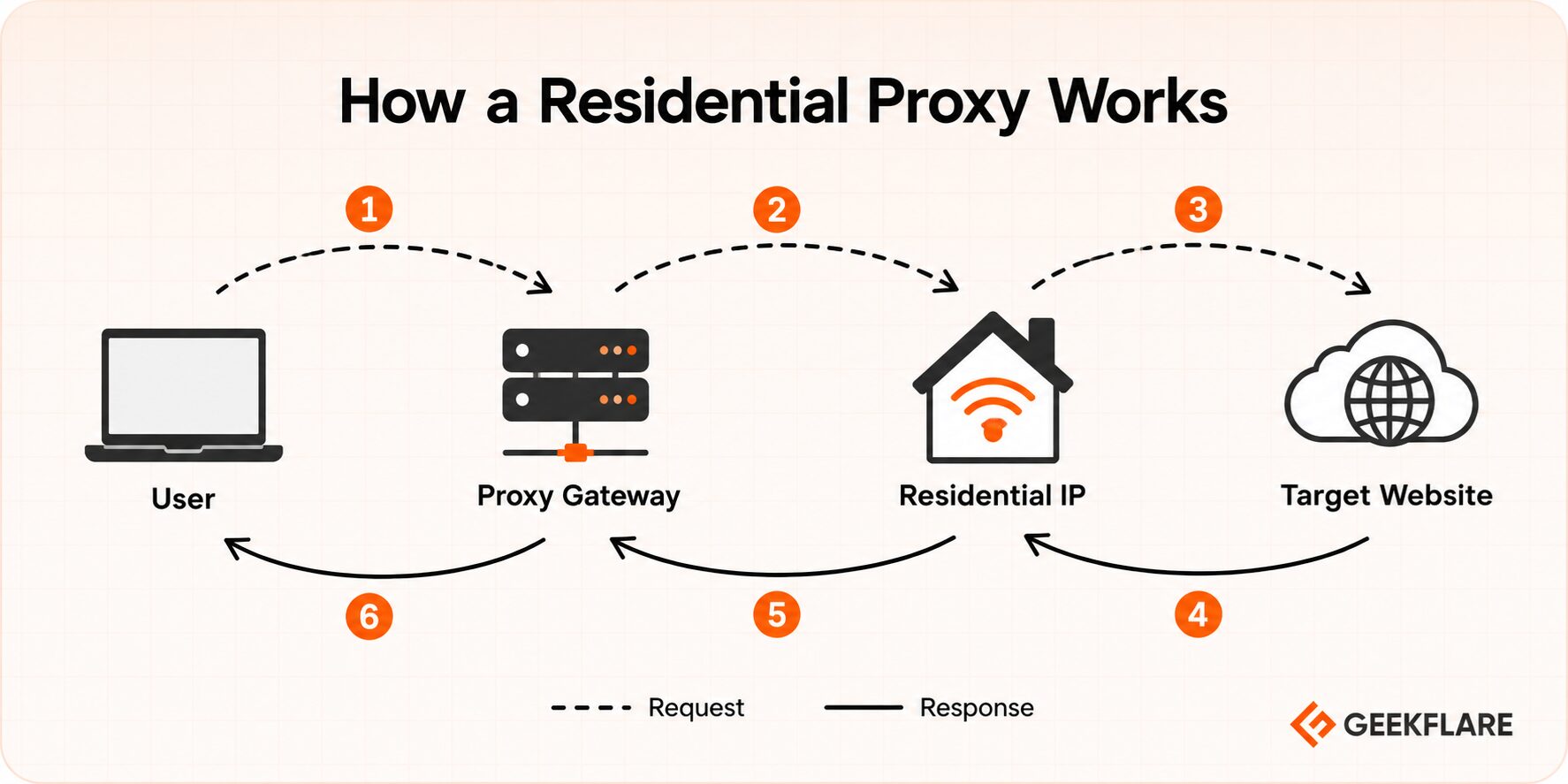
The gateway then forwards that request through an available residential IP in its network.
The website receives the request from that residential IP, so it does not see your original IP address. Once the website responds, the data travels back through the same route and reaches you.
The proxy gateway handles most of the technical work in the background. Depending on your settings, it may rotate IPs after each request, keep the same IP for a session, or route traffic through a specific country, state, or city.
This setup is useful when websites tailor content, pricing, search results, or access rules based on where a request originates. The user does not manually connect to individual residential devices; the provider manages that routing through its gateway.
Where Do Residential IPs Come From?
Residential IPs usually come from peer-to-peer networks built by proxy providers. In this model, real users allow part of their internet connection to be used as a proxy endpoint, often through an app, SDK, browser extension, free VPN, or bandwidth-sharing program.
In an ethical setup, the user should know what they are opting into. That means clear consent, plain-language disclosure, and some form of value exchange, such as app access, payment, credits, or another service benefit. The provider should also explain what kind of traffic is allowed and how it prevents abuse.
This part matters because residential IP sourcing has a messy side. Security researchers and law enforcement have documented cases where devices were added to proxy networks through deceptive apps, hidden SDKs, compromised devices, and browser extensions. Google has also disrupted a large residential proxy network that it said enrolled millions of Android, Windows, and smart home devices and was used by hundreds of threat groups.
That does not make every residential proxy network unsafe. But it does mean sourcing should be treated as a serious trust signal. If a provider cannot clearly explain how peers join the network, how consent is collected, and how abuse is controlled, that is a red flag.
Warning
Before using a residential proxy provider, check whether it explains how users opt in, whether peers are compensated, what traffic is allowed, and how abuse is prevented. Vague sourcing is a red flag.
Key Features of Residential Proxies
Residential proxies are mainly useful because they allow traffic to originate from consumer ISP networks rather than data center infrastructure. That makes them look closer to regular browsing activity than requests coming from server-based IP ranges.
- Consumer IP reputation: Residential IPs come from consumer ISP networks, so websites are less likely to flag them based on IP type alone.
- Rotating IP pools: Providers maintain groups of residential IPs across different locations and ISPs, allowing traffic to rotate between addresses.
- Geo-targeting: Users can route traffic through specific countries, cities, regions, or ISPs, depending on provider support.
- Sticky sessions: The same residential IP can be kept for a set period instead of changing with every request.
Together, these features make residential proxies useful when IP reputation, location, and session consistency matter. They still do not make traffic fully anonymous or impossible to detect, but they reduce some of the obvious signals associated with datacenter traffic.
Residential Proxies vs. Other Proxy Types
Residential proxies are only one type of proxy. The right choice depends on whether you need IP trust, speed, stable sessions, location coverage, or lower cost.
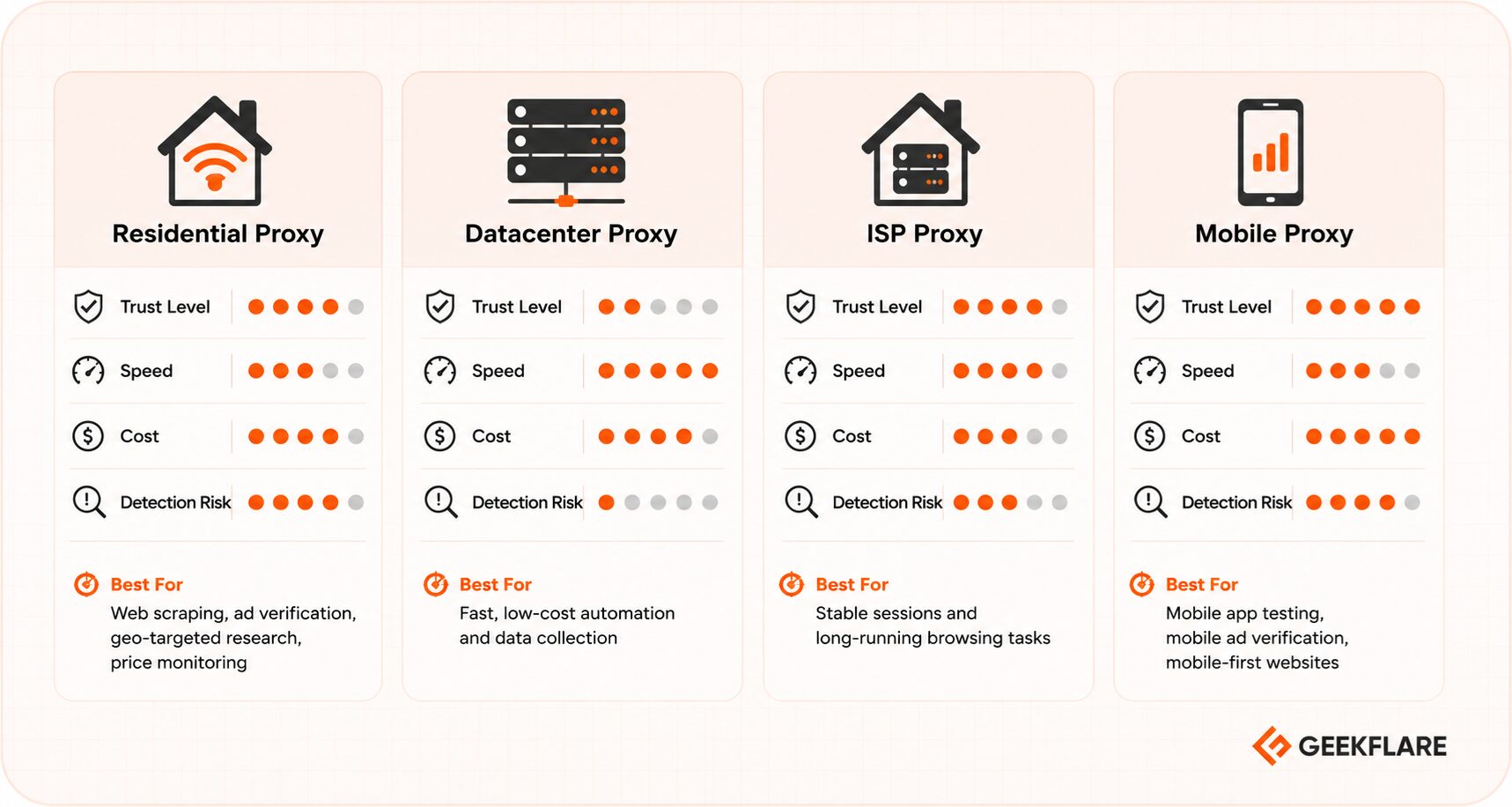
Datacenter proxies are usually the fastest and most affordable option, but they are easier to identify because they come from server infrastructure. Residential proxies offer broader geographic coverage and are less likely to be identified solely by IP type, but speed and stability can vary.
ISP proxies, sometimes called static residential proxies, sit between the two. They use ISP-registered IPs and usually offer better stability than rotating residential proxies. Mobile proxies have a strong trust profile because they use mobile carrier networks, but they are expensive and unnecessary unless the task specifically needs mobile traffic.
Top Use Cases for Residential Proxies
Residential proxies are most useful when a website’s response depends on the visitor’s IP address, location, or network type. Here are the common use cases at a high level:
- Web scraping and data collection: Collecting publicly available data at scale while reducing blocks caused by repeated requests from the same IP.
- Price aggregation and competitor monitoring: Checking how product prices, availability, and offers appear across regions or marketplaces.
- Ad verification and brand protection: Confirming whether ads display correctly in different locations and detecting misleading placements, fraud, or unauthorized brand use.
- SEO rank tracking: Viewing search results from different cities or countries to understand how rankings change by location.
- Geo-restricted content and market research: Seeing how websites, products, or content libraries appear to users in specific regions.
- Cybersecurity and threat intelligence: Investigating phishing pages, suspicious domains, fraud campaigns, or region-specific threats from different network locations.
These use cases still need to follow website terms, data protection rules, and local laws. A residential proxy can help with access and accuracy, but it does not make restricted or non-compliant activity acceptable.
Benefits of Using Residential Proxies
- Lower block rates: Residential IPs come from consumer ISP networks, so websites are less likely to flag them as datacenter or server-based traffic.
- Accurate localized data: Residential proxies help you view prices, search results, ads, and website content as they appear to users in specific locations.
- Better results on stricter websites: Residential proxies can reduce blocks on websites that treat datacenter traffic cautiously, but they do not guarantee access or make automated traffic undetectable.
Limitations and Drawbacks
- Higher cost: Residential proxies usually cost more than datacenter proxies and are often billed by bandwidth usage.
- Slower speeds: Requests may pass through a proxy gateway and a residential peer, which can make them slower than datacenter proxies.
- Variable stability: Residential proxy networks depend on peer availability, so connections may change or drop when peer devices go offline.
Residential proxies address the IP side of access, but they do not automatically solve browser fingerprinting, JavaScript-based checks, session consistency, or abusive request patterns.
Tip
Avoid random free proxy lists for business tasks. They are often unstable, poorly documented, and may expose users to security or privacy risks.
How to Choose an Ethical Residential Proxy Provider
Not all residential proxy networks are built the same. Before choosing a provider, look for clear answers to the following questions:
- Is there a transparent opt-in process? Users should know their device or connection may be part of a proxy network.
- How are residential IPs sourced? Providers should clearly explain whether users join through apps, SDKs, VPNs, browser extensions, or bandwidth-sharing programs.
- Do users receive compensation or a clear benefit? Ethical networks usually provide payment, credits, app access, or another form of value exchange.
- What safeguards exist against abuse? Look for acceptable-use policies, abuse monitoring, and restrictions on malicious activity.
- Are the service terms easy to understand? Session duration, IP rotation, geo-targeting options, bandwidth limits, and traffic restrictions should be clearly documented.
If a provider is vague about sourcing, consent, or acceptable use, consider it a warning sign.
Do You Need a Residential Proxy?
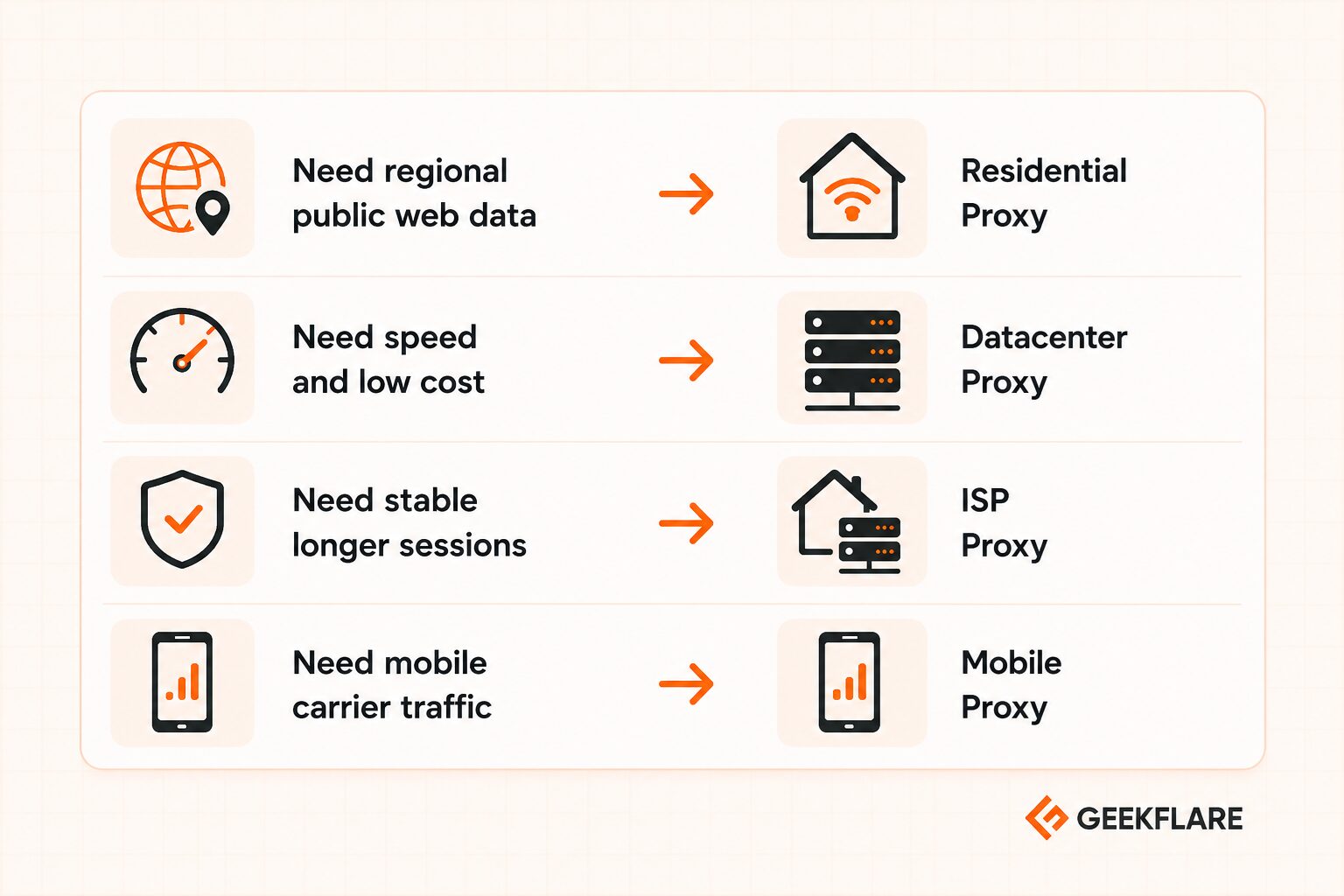
You probably need a residential proxy if the task depends on how a website responds to a real consumer IP address. This is common when collecting localized public web data, monitoring prices across regions, verifying ads, tracking search results, or conducting market research.
A residential proxy may not be the best choice if speed and cost are your top priorities. In those cases, a datacenter proxy is often the more practical option.
If you need a stable IP address for longer sessions, an ISP proxy may be a better fit. Mobile proxies are usually only worth considering when you specifically need traffic to originate from a mobile carrier network.
In short, residential proxies make the most sense when IP reputation and location accuracy matter more than raw performance or price.
FAQs About Residential Proxies
Are Residential Proxies Legal?
Residential proxies can be legal when they are ethically sourced and used for legitimate purposes, such as public data collection, ad verification, or market research. Misuse can still violate website terms, platform rules, or laws, so check the rules for your use case.
Are Residential Proxies Better Than Datacenter Proxies?
Residential proxies are better for IP trust and geo-targeting. Datacenter proxies are better for speed, stability, and lower cost. The right choice depends on whether legitimacy or performance matters more for the task.
What Is a Rotating Residential Proxy?
A rotating residential proxy automatically changes the residential IP address after a request, session, or predefined interval. This helps distribute traffic across multiple IPs, while sticky sessions keep the same residential IP for a longer period when continuity is needed.
Can Residential Proxies Be Detected?
Yes. Residential proxies are harder to flag by IP type alone, but they are not invisible. Websites can still detect suspicious activity through browser fingerprints, request patterns, session behavior, and other signals.
Are Free Residential Proxies Safe?
Free residential proxies are not ideal for business use because sourcing, security, and reliability are often unclear. A 2024 study of over 640,600 free proxies found that only 34.5% were active at least once during testing, and also reported vulnerabilities and content manipulation risks.
What Is the Difference Between Residential and ISP Proxies?
Residential proxies usually rotate through peer-based consumer IPs. ISP proxies use ISP-registered IPs but are usually more stable and better suited for longer sessions that need the same IP.
Conclusion
A residential proxy routes traffic through a real ISP-issued consumer IP, which makes requests look closer to normal user activity than traffic from a data center. This makes it useful for tasks where location, IP reputation, and public web visibility matter.
It can help with localized data collection, ad verification, price monitoring, SEO checks, and threat intelligence. However, residential proxies are usually pricier than datacenter proxies, can be slower, and require careful sourcing checks.
Choose a residential proxy when seeing the web from a specific region matters more than achieving the fastest speeds or the lowest cost. For simpler, faster, or lower-budget tasks, another proxy type may be a better fit.






